1
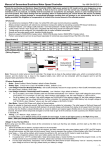
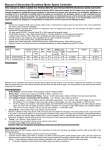
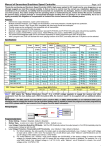
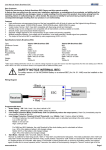
Manual of Sensorless Brushless Speed Controller Ver HW-04-110503 Thanks for purchasing our Electronic Speed Controller (ESC). High power system for RC model can be very dangerous, so we strongly suggest you read this manual carefully. In that we have no control over the correct use, installation, application, or maintenance of our products, no liability shall be assumed nor accepted for any damages, losses or costs resulting from the use of the product. Any claims arising from the operating, failure or malfunctioning etc. will be denied. We assume no liability for personal injury, property damage or consequential damages resulting from our product or our workmanship. As far as is legally permitted, the obligation to compensation is limited to the invoice amount of the affected product. 【Features】 1. Use extreme low resistance PCB to make the whole ESC with super current endurance capability. 2. Military quality capacitors with extreme low resistance increase the ability for preventing unwanted RF noise or interference. 3. Protection features: Low-voltage cutoff protection / over-heat protection / throttle signal lost protection. 4. 3 start modes: Normal / Soft / Super-Soft, compatible with fixed-wing aircraft and helicopter. 5. Throttle range can be configured, fully compatible with all transmitters. 6. Smooth and accurate speed control, excellent throttle linearity. 7. Maximum speed: 210000 RPM (2 poles motor), 70000 RPM (6 poles motor), 35000 RPM (12 poles motor). 8. Pocket- sized program card can be purchased separately for extremely easy programming of the ESC at flying field. 【Specification】 Class Model Cont. Current Burst Current (>10s) BEC Output Battery Cell Lipo 80A Fentium-80-HV 80A 100A N/A 5-10 100A Fentium-100-HV 100A 120A N/A 5-12 Weight Size NiMH User Programmable 15-30 Yes 125g 78*55*18 15-36 Yes 112g 78*55*15 L*W*H 【Wiring Diagram】 Note: There are 2 control wires on the HV controller. The longer one is close to the positive battery wire, which is connected with the receiver, and the shorter one is close to the negative battery wire, which is used to connect the program card to set the programmable parameters of the controller. There is a pair of bullet connectors and a thin red wire attached with the positive input wire (red color, thick) of the ESC. They are used to eliminate sparks when the battery pack is connecting with the ESC. Please use it in the following sequence: 1. Disconnect the bullet connectors on the positive input wire (red color, thick) of the ESC. 2. Connect battery wires to the ESC. 3. Connect the bullet connectors on the positive input wire (red color, thick) of the ESC as soon as you hear the special tone “♪123”. 【Feature Explanation】 1. Brake:Brake Enabled / Brake Disabled, default is Brake Disabled 2. Battery Type:Li-xx(Li-ion or Li-po) / Ni-xx(NiMh or Nicd),default is Li-xx. 3. Low Voltage Protection Mode(Cutoff Mode):Soft Cutoff (Gradually reduces the output power) or Hard Cutoff (Immediately stops the output power), default is Soft Cutoff. 4. Low Voltage Protection Threshold(Cutoff Threshold):Low / Medium / High, default is Medium. For Li-xx battery,the cells quantity of a battery pack is calculated automatically or set manually. Low / Medium / High cutoff voltage for each cell is: 2.6V/2.85V/3.1V. For example: 10 cells Lipo, when “Medium” cutoff voltage is set, the cutoff voltage is: 2.85*10=28.5V. For Ni-xx battery, low / medium / high cutoff voltages are 0%/45%/60% of the startup voltage (i.e. the initial voltage of the charged battery pack), 0% means the low voltage protection function is disabled. For example:20 cells NiMH battery, fully charged voltage is 1.44*20=28.8V, when “Medium” value is set, the cutoff voltage is: 28.8*45%=12.96V。 5. Start Mode:Normal /Soft /Super-soft, default is Normal startup. Normal is suitable for fixed-wing aircraft. Soft and Super-soft are suitable for helicopter. The initial speed of Soft and Super-soft mode is very slow so it will take 3 seconds (Soft startup) or 6 seconds (Super-soft startup) from zero speed to full speed. But if the startup process is completed (i.e. The motor is running), then the throttle is closed (that means the throttle stick is moved to bottom position at 0% throttle) and opened again (throttle stick is moved upwards) within 3 seconds, the restart will be temporarily changed to normal mode to get rid of the chances of crash caused by slow throttle response in aerobatic fly. 6. Timing:Low / Medium / High, default is Low. In normal cases, Low or Medium timing is suitable for most motors. In order to get higher speed, please try the High timing value. Note: After you changing the timing setting, please test your RC model on ground before taking off. -1- Manual of Sensorless Brushless Speed Controller Ver HW-04-110503 【Begin To Use The New ESC】 Note: In the following instructions, we use the words of “Top position” and “Bottom position” to represent the location of the throttle stick. Top Position: The throttle value is 100% at this position. Bottom Position: The throttle value is 0% at this position. Before using your new ESC, please check all the connections to make sure that they are reliable, and then start up the ESC in the following sequence: 1. Move the throttle stick to bottom, and then switch on the transmitter. 2. Connect the receiver battery pack (4-6V) to the receiver, and then connect the main power battery pack to ESC, the ESC begins the self-test process, and the motor will emit several “beep” tones to represent the cells quantity of the lithium battery pack. After 2 seconds a long “beep------”tone emits, which means the self-test is OK, and now the RC model is ready to take off. If nothing is happened, please check your battery packs and all the connections; If a special tone “ ” emits after 2 beep tones (beep-beep-), means the ESC has entered the program mode, i.e. the throttle channel of your transmitter is reversed, please set the direction of throttle channel correctly. If a very rapid “beep-beep-, beep-beep-” tone emits (The time interval of each “beep-beep-” tone is 1 second), means the input voltage is too low or too high, please check the battery voltage. 3. VERY IMPORTANT! Because different transmitter has different throttle range, you need to use the “Throttle Range Setting Function” to calibrate the throttle range. Please read the instructions on page 2------“Throttle Range Setting”. 【Alert Tone】 1. Input voltage abnormal alert tone: The ESC begins to check the voltage of battery pack when it is power on, if the voltage is not in the acceptable range, such an alert tone emits: “beep-beep-, beep-beep-, beep-beep-” (Every “beep-beep-” has a time interval about 1 second) 2. Throttle signal abnormal alert tone: When the ESC can’t detect the normal throttle signal, such an alert tone emits: “beep-, beep-, beep-”. (Every “beep-” has a time interval about 2 seconds) 3. Throttle stick is not at its bottom position alert tone: When the throttle stick is not in the bottom (lowest) position, a very rapid alert tone emits: “beep-, beep-, beep-”. (Every “beep-” has a time interval about 0.25 second.) 【Protection Function】 1. Start up protection: If the motor failed to start up in 2 seconds, the ESC will cut off the output power. In this case, the throttle stick MUST be moved to bottom again and then to restart the motor. (Such a situation happens in the following cases: The connection between ESC and motor is not reliable, propeller is blocked, gearbox is damaged, etc.) 2. Over-heat protection: When the temperature of ESC is higher than a factory-preset value, the ESC will gradually reduce the output power. 3. Throttle signal lost protection: The ESC will reduce the output power if the throttle signal is lost for 1 second, further lost for totally 2 seconds will cause its output to be completely cut off. 【Normal Startup Procedure】 Switch on the transmitter, and then move the throttle stick to bottom position Connect the battery pack to ESC, a special tone “ 123” will emits, means the power supply is OK Several “beep-” tones emit to represent the cells quantity of the lithium battery pack When self-test is finished, a long “beep — ” tone emits Ready to go flying now Please note that we use a special way to represent the cells quantity of a lithium battery pack: 1 long “beep—” = 5 short “beep-”. For example, 2 long “beep—” plus 2 short “beep-” (Beep—Beep—BB) means a 12 cells lithium battery pack, 1 long “beep—” plus 1 short “beep-” (Beep—B) means a 6 cells lithium battery pack, and so on. 【Throttle Range Setting】 Throttle range should be reset when a new transmitter is being used Switch on the transmitter, and move the throttle stick to top position Connect the battery pack to the ESC, and then wait for about 2 seconds 【Trouble Shooting】 Trouble After power on, motor can’t work, no sound is emitted After power on, motor can’t work, such an alert tone emits: “beep-beep-, beep-beep-,beep-beep-” (Every “beep-beep-” has a time interval about 1 second) After power on, motor can’t work, such an alert tone emits: “beep-, beep-, beep- ”(Every “beep-” has a time interval about 2 seconds) After power on, motor can’t work, such a alert tone emits: “beep-, beep-, beep-” (Every “beep-” has “Beep-beep-” tone emits, which means the highest point of the throttle range has been correctly confirmed Move the throttle stick to the bottom position, and then several “beep-” tones emits to represent the number of Lipo battery cells A long “Beep-” tone emits, means the lowest point of the throttle range has been correctly confirmed. Possible Reason The connection between battery pack and ESC is not OK Input voltage is abnormal, too high or too low Action Check the power connection. Replace the connector. Check the voltage of battery pack Throttle signal is abnormal Check the receiver and transmitter Check the cable of throttle channel Throttle stick is not in its bottom position (Lowest position). Move the throttle stick to bottom -2- Manual of Sensorless Brushless Speed Controller a time interval about 0.25 second) After power on, motor can’t work, a special tone “ ” emits after 2 beep tones (beep-beep-) The motor runs in opposite direction The motor stop running while in working state Ver HW-04-110503 The direction of throttle channel is reversed, so the ESC has entered the program mode The connection between ESC and the motor need to be changed. Throttle signal is lost ESC has entered Low Voltage Protection mode Some Connections are not reliable 【 Program The ESC With Transmitter (4 Steps)】 1. Enter program mode 2. Select programmable items 3. Set item value (Programmable value) Set the direction of throttle channel correctly Swap any two wire connections between ESC and motor Check the receiver and transmitter Check the cable of throttle channel Land RC model as soon as possible, and then replace the battery pack Check all the connections: battery pack connection, throttle signal cable, motor connections, etc. 2. Select programmable items After entering program mode, you can hear 9 tones in a loop in the following sequence. If you move the throttle stick to bottom within 3 seconds after one kind of tones, then this item will be selected. 1. “beep” Brake (1 short tone) 2. “beep-beep-” Battery type (2 short tone) 3. “beep-beep-beep-” Cutoff mode (3 short tone) 4. “beep-beep-beep-beep-” Cutoff threshold (4 short tone) 4. Exit program mode 1. Enter program mode 5. “beep—” Startup mode (1 long tone) 1) 6. “beep—beep-” Timing (1 long 1 short) 7. “beep—beep-beep-” Lipo battery cells (1 long 2 short) 8. “beep—beep-beep-beep-” Set all to default (1 long 3 short) 9. “beep—beep—” (2 long tones) 2) 3) Switch on transmitter, move throttle stick to top position, and then connect the battery pack to ESC Wait for 2 seconds, the motor will emit special tone like “beep-beep-” Wait for another 5 seconds, special tone like Exit Remark: 1 long “beep—” = 5 short “beep-” “ ” emits, which means program mode is entered 3. Set item value 4. Exit program mode You will hear tones in loop. Set the value matching to a tone by moving the throttle stick to top when you hear the tone , then a special tone “ ” emits which means the value is set and saved. (Keeping the stick at top, you will go back to step 2 and you can select other items; Moving the stick to bottom within 2 seconds, you will exit the programming mode directly) There are 2 ways to exit program mode. 1. In the step 3, after special tone “ ”, move throttle stick to the bottom within 2 seconds. 2. In step 2, after the Items beep1 short tone Brake Off On Battery type Li-ion / Li-Po NiMH / NiCd Cutoff mode Soft Cutoff Hard Cutoff Low Medium High Tones Cutoff threshold Startup mode beep-beep- beep-beep-beep beep-beep-beep... 2 short tones 3 short tones N short tones tone “beep—beep—” Normal Soft Super soft Timing Low Medium High Lipo cells quantity N beep tones represent N cells (N ≤ 4 means “Auto Detect”) (Item #9), move throttle stick to the bottom within 3 seconds. Note: 1. It very important to set the Lipo battery cells quantity correctly, otherwise the ESC will mistakenly calculate the cut off voltage. 2. In “Lipo cells quantity” setting process, 1 long “beep—” = 5 short “beep-”. For example, 2 long “beep—” plus 2 short “beep-” means a 12 cells lithium battery pack, 1 long “beep—” plus 1 short “beep-” means a 6 cells lithium battery pack. 3. If you are using lithium battery pack, you’d better set the “Lipo cells quantity” manually. The voltage of a full charged lithium battery pack is different from that of a discharged battery pack, the more cells a battery pack has, the more difficult for the ESC to automatically detect the cells quantity accurately. -3- Manual of Sensorless Brushless Speed Controller Ver HW-04-110503 【How To Use The Program Card】 When you are using a program card to set the programmable values of Fentium-80A-HV or Fentium-100A-HV ESC, please check the version of the program card. If there isn’t a 3 pin port marked with “BATT” on the right conner, it means it is an old version program card, so a “Y” cable is necessary for powering the program card. If there is a 3 pin port marked with “BATT”, it means it is a new version program card, so the “Y” cable is unnecessary. For detail information, please refer to the user manual of the program card. The following picture shows the connections of a new version program card and the HV controller. When using a program card to program the Fentium series HV ESC, the “Music/Lipo cell” item now means the cells quantity of the lithium battery pack. (● = LED is lighting) LED Lipo Cells Quantity D C B A ○ ○ ○ ○ ○ ○ ○ ○ ○ ○ LED Lipo Cells Quantity D C B A Auto detect ● ○ ○ ○ 9 CELLS (33.3V) ● Auto detect ● ○ ○ ● 10 CELLS (37.0V) ● ○ Auto detect ● ○ ● ○ 11 CELLS (40.7V) ○ ● ● Auto detect ● ○ ● ● 12 CELLS (44.4V) ○ ● ○ ○ 5 CELLS (18.5V) ● ● ○ ○ Auto detect ○ ● ○ ● 6 CELLS (22.2V) ● ● ○ ● Auto detect ○ ● ● ○ 7 CELLS (25.9V) ● ● ● ○ Auto detect ○ ● ● ● 8 CELLS (29.6V) ● ● ● ● Auto detect 【Program Example】 In the following example, we set the Startup Mode to “Super-soft”, i.e. value #3 of the programmable item #5 1. Enter Program Mode Switch on transmitter, move throttle stick to top, connect battery packs to receiver and ESC, wait for 2 seconds, “beep-beep” tone emits. Then wait another 5 seconds, a special tone “ ” emits, that means the ESC is in the program mode. 2. Select Programmable Items Now you’ll hear 9 tones in loop. When a long “beep—” tone emits, please move the throttle stick to bottom position to enter the “Startup Mode” item. 3. Set Item Value (Programmable Value) “Beep-”, wait for 3 seconds; “Beep-beep-”, wait for another 3 seconds; then you’ll hear “beep-beep-beep”, move the throttle stick to top position, then a special tone “ ” emits, now you have successfully set the “Startup Mode” item to the value of “Super-soft Startup” 4. Exit Program Mode After the special tone “ ”, move the throttle stick to bottom position within 2 seconds. -4-