1
Manual of Sensorless Brushless Speed Controller
Ver HW-04-110503
【How To Use The Program Card】
When you are using a program card to set the programmable values of Fentium-80A-HV or Fentium-100A-HV ESC, please check the
version of the program card. If there isn’t a 3 pin port marked with “BATT” on the right conner, it means it is an old version program card,
so a “Y” cable is necessary for powering the program card. If there is a 3 pin port marked with “BATT”, it means it is a new version
program card, so the “Y” cable is unnecessary. For detail information, please refer to the user manual of the program card.
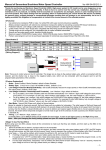
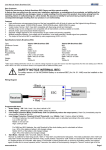
The following picture shows the connections of a new version program card and the HV controller.
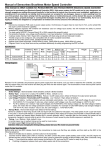
When using a program card to program the Fentium series HV ESC, the “Music/Lipo cell” item now means the cells quantity of the
lithium battery pack. (● = LED is lighting)
LED
Lipo Cells Quantity
D
C
B
A
○
○
○
○
○
○
○
○
○
○
LED
Lipo Cells Quantity
D
C
B
A
Auto detect
●
○
○
○
9 CELLS (33.3V)
●
Auto detect
●
○
○
●
10 CELLS (37.0V)
●
○
Auto detect
●
○
●
○
11 CELLS (40.7V)
○
●
●
Auto detect
●
○
●
●
12 CELLS (44.4V)
○
●
○
○
5 CELLS (18.5V)
●
●
○
○
Auto detect
○
●
○
●
6 CELLS (22.2V)
●
●
○
●
Auto detect
○
●
●
○
7 CELLS (25.9V)
●
●
●
○
Auto detect
○
●
●
●
8 CELLS (29.6V)
●
●
●
●
Auto detect
【Program Example】
In the following example, we set the Startup Mode to “Super-soft”, i.e. value #3 of the programmable item #5
1. Enter Program Mode
Switch on transmitter, move throttle stick to top, connect battery packs to receiver and ESC, wait for 2 seconds, “beep-beep” tone
emits. Then wait another 5 seconds, a special tone “
” emits, that means the ESC is in the program mode.
2. Select Programmable Items
Now you’ll hear 9 tones in loop. When a long “beep—” tone emits, please move the throttle stick to bottom position to enter the
“Startup Mode” item.
3. Set Item Value (Programmable Value)
“Beep-”, wait for 3 seconds; “Beep-beep-”, wait for another 3 seconds; then you’ll hear “beep-beep-beep”, move the throttle stick to
top position, then a special tone “
” emits, now you have successfully set the “Startup Mode” item to the value of “Super-soft
Startup”
4. Exit Program Mode
After the special tone “
”, move the throttle stick to bottom position within 2 seconds.
-4-