1
Manual of Sensorless Brushless Speed Controller
a time interval about 0.25 second)
After power on, motor can’t work, a
special tone “
” emits after 2 beep
tones (beep-beep-)
The motor runs in opposite direction
The motor stop running while in working
state
Ver HW-04-110503
The direction of throttle channel is
reversed, so the ESC has entered
the program mode
The connection between ESC and
the motor need to be changed.
Throttle signal is lost
ESC has entered Low Voltage
Protection mode
Some Connections are not reliable
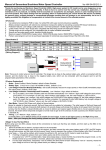
【 Program The ESC With Transmitter (4 Steps)】
1.
Enter program mode
2.
Select programmable items
3.
Set item value (Programmable value)
Set the direction of throttle channel correctly
Swap any two wire connections between ESC and
motor
Check the receiver and transmitter
Check the cable of throttle channel
Land RC model as soon as possible, and then
replace the battery pack
Check all the connections: battery pack connection,
throttle signal cable, motor connections, etc.
2. Select programmable items
After entering program mode, you can hear 9 tones in a loop in the
following sequence. If you move the throttle stick to bottom within 3
seconds after one kind of tones, then this item will be selected.
1. “beep”
Brake
(1 short tone)
2. “beep-beep-”
Battery type
(2 short tone)
3. “beep-beep-beep-”
Cutoff mode
(3 short tone)
4. “beep-beep-beep-beep-” Cutoff threshold (4 short tone)
4. Exit program mode
1. Enter program mode
5.
“beep—”
Startup mode
(1 long tone)
1)
6.
“beep—beep-”
Timing
(1 long 1 short)
7.
“beep—beep-beep-”
Lipo battery cells (1 long 2 short)
8.
“beep—beep-beep-beep-” Set all to default
(1 long 3 short)
9.
“beep—beep—”
(2 long tones)
2)
3)
Switch on transmitter, move throttle stick to top
position, and then connect the battery pack to
ESC
Wait for 2 seconds, the motor will emit special
tone like “beep-beep-”
Wait for another 5 seconds, special tone like
Exit
Remark: 1 long “beep—” = 5 short “beep-”
“
” emits, which means program mode
is entered
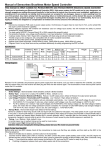
3. Set item value
4. Exit program mode
You will hear tones in loop. Set the value matching to a tone by moving the throttle stick to top
when you hear the tone , then a special tone “
” emits which means the value is set and
saved. (Keeping the stick at top, you will go back to step 2 and you can select other items;
Moving the stick to bottom within 2 seconds, you will exit the programming mode directly)
There are 2 ways to exit
program mode.
1. In the step 3, after
special tone “
”,
move throttle stick to
the bottom within 2
seconds.
2. In step 2, after the
Items
beep1 short tone
Brake
Off
On
Battery type
Li-ion / Li-Po
NiMH / NiCd
Cutoff mode
Soft Cutoff
Hard Cutoff
Low
Medium
High
Tones
Cutoff threshold
Startup mode
beep-beep- beep-beep-beep beep-beep-beep...
2 short tones 3 short tones
N short tones
tone “beep—beep—”
Normal
Soft
Super soft
Timing
Low
Medium
High
Lipo cells quantity
N beep tones represent N cells (N ≤ 4 means “Auto Detect”)
(Item #9), move
throttle stick to the
bottom
within 3
seconds.
Note:
1.
It very important to set the Lipo battery cells quantity correctly, otherwise the ESC will mistakenly calculate the cut off voltage.
2.
In “Lipo cells quantity” setting process, 1 long “beep—” = 5 short “beep-”. For example, 2 long “beep—” plus 2 short “beep-” means
a 12 cells lithium battery pack, 1 long “beep—” plus 1 short “beep-” means a 6 cells lithium battery pack.
3.
If you are using lithium battery pack, you’d better set the “Lipo cells quantity” manually. The voltage of a full charged lithium battery
pack is different from that of a discharged battery pack, the more cells a battery pack has, the more difficult for the ESC to
automatically detect the cells quantity accurately.
-3-