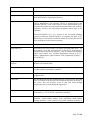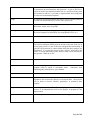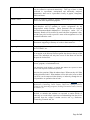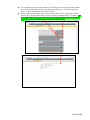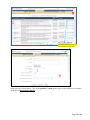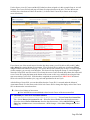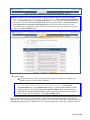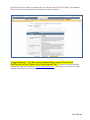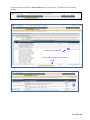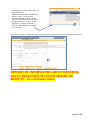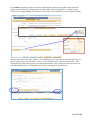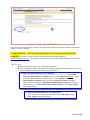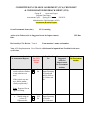
1
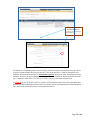
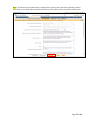
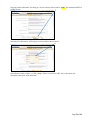
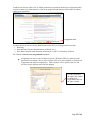
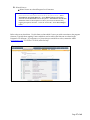
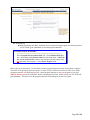
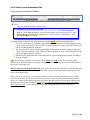
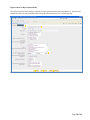
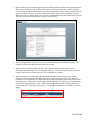
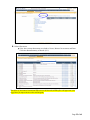
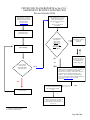
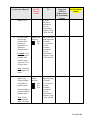
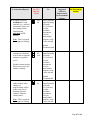
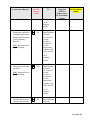
ASSESSMENT @ GCC TRACDAT Version 4.4.2.1 User’s Guide for Documenting Outcomes (SLOs/AUOs/SSUOs) at Guam Community College Updated: June 2012 http://tracdat.guamcc.edu:8081/tracdat/ "The mission of Guam Community College is to be a leader in career and technical workforce development by providing the highest quality education and job training in Micronesia." Page 1 of 69 Welcome to TracDat @ GCC The Office of Assessment, Institutional Effectiveness & Research (AIER) prepared this TracDat User’s Guide to help users navigate through TracDat more efficiently and effectively. Once users become familiar with its varied features and functions, they can use TracDat for a wide range of administrative reporting, management and planning tasks. Additionally, TracDat serves as a repository for assessment data (i.e., survey results, student artifacts, focus group transcripts). TracDat provides a structured framework for continuous monitoring of assessment results. It allows users to store and manage assessment data crucial to the systematic process of evidence-based assessment of student learning outcomes, both at the program and course-level. TracDat also permits instructional programs, student services and administrative units to store their assessment plan and report in one easily accessible database. The ability to link Student Learning Outcomes (SLOs), Administrative Unit Outcomes (AUOs) and Student Service Unit Outcomes (SSUOs) to program goals, school goals, division-level goals, institutionlevel goals, and ACCJC/WASC standards is an important feature of TracDat. Additionally, TracDat allows users to conduct queries and to quickly produce reports that can guide planning and decision-making. TracDat training is essential. We strongly encourage users to participate in our continuous TracDat training program offered every semester. Contact the AIER office ([email protected], 735-5620 or 735-5641) for individual or group training arrangements, if needed. We trust that you—as a TracDat user—will contribute significantly to assessment at GCC. This is only possible through a good understanding of TracDat’s functionality, and most important of all, through careful input of assessment data. We live in an age of evidence. TracDat allows us to confront the challenge of assessment and transform it into a continuous improvement effort that translates results into decisions and eventually into action. Thank you for your valuable contribution to our campus-wide assessment initiative. Dr. Gina Tudela, Assistant Director Marlena Montague, Institutional Researcher Priscilla C. Johns, Program Specialist Joseph Benavente, Planner IV Evangeline Aguon, Administrative Asst. Front L-R: Vangie, Priscilla, Joe & Marlena Office of Assessment, Institutional Effectiveness & Research (AIER) http://www.guamcc.edu/aier June 2012 Page 2 of 69 Table of Contents Introduction 4 Uses of TracDat 5 Glossary 6 User Permissions and Their Role 12 TracDat Login 13 TracDat Logout 14 Home Screen Tab 1: Home 15 Tab 2: Assessment Unit (Academic/Instructional Programs) 16 Tab 2: Assessment Unit (Non-Academic Units) 17 Tab 3: Program/Unit Assessment Plan for Instructional and Non-Instructional Units 17 Tab 4: Course (Level) Assessment Plan 30 Tab 5: Data Collection Status/Summary of Results (n=?) 38 Tab 6: Data Tools 44 Tab 7: Reports 47 Tab 8: Documents 52 Assessment Review Flow Process 54 Consolidated Feedback Sheet (CFS) for Assessment Plans 55 Consolidated Feedback Sheet (CFS) for Assessment Reports 61 Page 3 of 69 Introduction GCC's Comprehensive Institutional Assessment Plan for Programs, Services, Administrative Units, and the Board of Trustees document is the institutional mandate that drives all campus-wide assessment activities. "Assessment is a means for focusing our collective attention, examining our assumptions, and creating a shared culture dedicated to continuously improving the quality of higher learning. Assessment requires making expectations and standards for quality explicit and public; systematically gathering evidence on how well performance matches those expectations and standards; analyzing and interpreting the evidence; and using the resulting information to document, explain, and improve performance." (Angelo, AAHE Bulletin, April 1995, p. 11). TracDat is an assessment data management software package from Nuventive. It is designed to organize assessment data at the course, program, department, school, division and college levels. TracDat allows for institution-wide viewing of assessment plans and uniform reporting across departments. Each Unit is responsible for entering/maintaining their action plans (assessment plans) and results (assessment reports) in TracDat. The Committee on College Assessment (CCA) is an institution-level committee created under the terms of the 2000-2005 Board of Trustees-Faculty Union Agreement and is responsible for reviewing and rating assessment plans and reports. CCA developed a flow chart (Appendix A) and Consolidated Feedback Sheets (CFS) as tools used to systematically review and deliberate on the merits of assessment plans and reports inputted into TracDat. The CFS often undergoes review and revision as the assessment data management software (TracDat) upgrades occur. This manual provides step-by-step instruction on all functions and provides a wide assortment of information to ease the learning process. It shows how to log in, enter plans and data, run reports, etc. Page 4 of 69 Uses of TracDat TracDat can be used to manage and document (not limited to) the following institutional effectiveness activities: Manage assessment plans Manage action plans/tasks Show strengths and weaknesses Document student learning outcomes and results Link to the College mission, vision, and goals Page 5 of 69 GLOSSARY Asterisk to the left of each Refers to a required field. Whenever an asterisk (*) appear to the left of a field/box within a page, data is required. Users would not be able to field/box proceed within the application if the required field is blank. ? Question mark to the right of Provides guidance as to what type of data is required/ each field/box Academic Units Refers to all instructional programs (associate degrees, certificate programs and secondary programs). * Activities Refers to performing a function or mission. Measurable amount of work performed to convert inputs into outputs. For an academic department, this would be a Course. Activity Schedule When and how often each measure will be taken AUOs Acronym for Administrative Unit Outcomes = The knowledge, skills, abilities or attitudes that students are expected to attain directly or indirectly as a result of support for instructional programs, quality of service, interaction with other departments/units and planning/budgeting processes. An administrative unit outcome (AUO) is a statement about what a client will experience, receive, or understand as a result of a given service. Admin Role An individual with the role of Admin for a Unit will have that Unit as an option in the Selected Unit navigation drop-down at the top of the screen. When this Unit is selected, the individual will have full access to all functionality and reports that are available to that Unit. Anticipated Use of Assessment Results How the results of assessment efforts will be used to impact the program or unit. Assessments Formal evaluations of institutional plans, academic programs, or student learning. Assessment Method Type (Artifacts/Instrument/Rubrics re: Tools Used) Allows users to categorize program/unit assessment means. Ex: exit exam, survey, focus group, certification exam, etc. Assessment Tools Known as Assessment Methods; used to document how attainment of the program/unit outcomes will be measured. Assessment Cycle Refers to the college’s Two-Year Assessment Schedule on what is due from each assessment group. Assessment Group A Refers to all Associate Degree programs Page 6 of 69 Assessment Group B Refers to all Certificate programs Assessment Group C Refers to all administrative and student service units Assessment Group D Refers to general education, developmental courses, secondary programs, and related technical requirements/electives Program/Unit Assessment Plan Used at the program/unit level to record student learning outcomes (SLOs) administrative unit outcomes (AUOs) or student services unit outcomes (SSUOs), relate to the Goals at various organizational levels, document assessment tools and related department courses (for academic programs), activities (for non-academic programs) and/or /tasks to the outcomes. SLOs/AUOs/SSUOs are a key element in the assessment planning process as defined in TracDat Enterprise. It is against each SLO, AUO, SSUO that you will be able to define the means of assessing the outcome and recording the results of that assessment. Assessment Process Refers to schedule of assessment tasks and activities. Assessment Unit Assessment Unit is the primary Unit where assessment takes place. An Assessment Unit is that Unit which has a plan and is being asked to document the result/status of that plan. Units are broken into Reporting (BOT, AAD, School, etc.); Academic Departments (Groups A, B, D – SLOs); Administrative (Non-Academic Units) Departments (Group C – AUOs/SSUOs) Budget Related Proposed Outcome Refers to proposed outcome identified in the Department’s Budget Request (on an annual basis) Criterion Standard of achievement for a measure; expressed in percentage, number or other qualitative/quantitative yardstick Document Repository A place to store ALL documents that can be shared with other programs/units. Email Only An individual with the role of Email Only for a Unit will NOT have that Unit as an option in the Selected Unit navigation drop-down at the top of the screen. This role provides access to that Unit solely through assignments sent by email through the application. External Unit Organizations outside of the institution to which assessment data needs to be related (e.g., ACCJC/WASC), particularly standards. Goal A component of the organization’s or division’s/program’s/unit’s mission statement, which broadly outlines clear expectations about student learning outcomes. Goals comprise of a general statement of themes or Page 7 of 69 directions, either measurable or not measurable as stated. They represent a commitment to broad intentions and aspirations. A goal or objective is a desired result of the department and/or unit or a system envisions, plans and commits to achieve—a personal or organizational desired end-point in some sort of assumed development. Group A collection of individual students that can be used to organize portfolios or other assessment measures by course, major, project, etc. Group Data Used to record statistical aggregates (Means, Medians, Standard Deviations, sample sizes) for groups Goal Type Allows institutions to classify goals into categories (e.g., Institutional, Division, Program/Unit, Individual, Governing Board Levels, etc.). Means of Assessment Means/methods you will use to assess or evaluate the selected Outcome. Mission Statement A clear statement of an organizational unit’s intended accomplishments. The mission statement should guide the actions of the unit, spell out its overall goal, provide a sense of direction, and guide decision-making. It provides "the framework or context within which the unit's strategies are formulated." It is sometimes used to set out a "picture" of the unit in the future. A mission statement provides details of what is done and answers the question: "What do we do?" Non-Academic Units Refers to administrative units and student services units Objective/Outcome An intended program outcome stated in measurable terms. An intended program result as stated in measurable terms. Sometimes used interchangeably with objective, goal, standard. Objective/Outcome Name Brief name given to an objective/outcome. Observations The TracDat term for Summary of Results. It refers to a conclusion or hypothesis derived from the analysis of assessment data. Observations can be based on formal, informal, quantitative, or qualitative data samples. Program Review An in-depth assessment of an educational program, a student support service, or an administrative unit for the purpose of program or unit improvement. Qualitative Data The term qualitative data is used to describe certain types of information. Page 8 of 69 Quantitative Data The term quantitative data is used to describe a type of information that can be counted or expressed numerically. This type of data is often collected in experiments, manipulated and statistically analyzed. Quantitative data can be represented visually in graphs, histograms, tables and charts. Owned Courses Refers to course(s) owned by specific department/program and can be shared with other departments/programs. Personnel Person who have any type of permission to the selected Program/Unit, and therefore will be available to receive assignments for the Program/Unit within TracDat. Those Personnel who are assigned Artifact/Instrument/Rubric/Method/Tool Description, and/or Use of Summary Results will be notified by email when the assignment is due, and they may also be able to provide a status of the assignment via a link contained within the email. Related Documents Documents relating to a specific area of an assessment plan or report. Documents supporting a summary of results or short narratives. Reporting Unit Reporting units are categorized as Division, School, Institution, BOT, ACCJC/WASC, etc. Reports Only An individual with the role of Reports Only for a Unit will have that Unit as an option in the Selected Unit navigation drop-down at the top of the screen. The individual will only have access to the Home tab and the Reports tab for that Unit. SLOs Acronym for Student Learning Outcomes, which can be written at the course, program, or institutional levels. The knowledge, skills, abilities, or attitudes that students are expected to attain as the result of specific educational experiences. Answers the questions, What do students know? What can they do? What do they think and value? What students will be able to do, know or think (as SLOs) can be answered either directly or indirectly, through the use of quantitative or qualitative data or both. Student Services Services provided by a College that are not explicitly "academic". e.g. Bookstores, Counseling, Career Centers, Child Care, Dining Facilities, Financial Aid, Internship programs, Parking, Placement Centers, Security Assistance, etc SSUOs Acronym for Student Services Unit Outcomes = The knowledge, skills, abilities or attitudes that students are expected to attain directly or indirectly as a result of their experience or understanding from the service provided from the college’s student services unit e.g. Bookstore, Counseling, Financial Aid, etc. Page 9 of 69 Student Success Commonly used to refer to measurable student achievement outcomes, including degree and certificate completion, transfer to four-year institutions, completion of preparatory course sequences, etc. Summative Assessment The final determination of student knowledge, skills, or abilities, or the final determination of the effectiveness of a plan or strategy. Task A piece of work assigned or done as part of one's duties. A function to be performed; an objective. Task Description Full description of the Assessment Process or Schedule Task. Task Name Brief name given to a Task (e.g. survey administration, data collection, focus group facilitation, etc). User Role Has the ability to add, delete, modify, print, query and export any of the program/unit’s data. Does not have the ability to create user or assign user permission. Does not have the ability to create custom fields. The individual will have full access to all tabs for the Unit with the exception of the Assessment Unit or Reporting Unit tab (the second main tab), restricting the individual from changing general Unit information, Goals, Personnel, Courses or Activities for that Unit. Vision Statement Description of what a unit would look in the future (major distinctive characteristics). Vision is a long-term view, sometimes describing how the unit would like the world to be in which it operates. A unit’s vision expresses a compelling image of the desired future for the unit. It provides an inspiration and challenge to all members to reach toward an ideal of what the entity can become. It should be brief enough to be memorable and complete enough to direct effort. Page 10 of 69 TracDat Version 4.4.2.1 User Reference Guide Assessment Unit Complete Tabs This reference guide is intended for TracDat users with permissions at the Assessment Unit level. The Assessment Unit level varies by group, but normally includes any academic or administrative departments within an Institution that measure student learning outcomes, administrative unit outcomes, student services units’ outcomes, or strategic goals. This guide will present all of the major heading tabs and their basic functions as well as the functionality and typical usage of some of the more common tabs and sub-tabs that you will encounter within TracDat. Here you will also find some suggested tips to remember and use while in the multiple editing modes. At the Assessment Unit level there are a maximum of eight heading tabs, each representing a different functional area of the software. These main heading tabs include: Home, Group Assessment Unit (Group A, B, C, or D), Program/Unit-Level Assmt Plan, Course-Level Assmt Plan, Data Collection Status/Summary of Results (N=?), Data Tools, Reports, and Documents. The sub-tabs that appear under each main heading tab may vary by Assessment Unit. The information in this reference guide is organized according to the stock main heading tabs and sub-tabs that originally come with TracDat. Please be aware that your experience with TracDat may look slightly different than the screenshots below due to the software’s dynamic labeling feature and your specific unit’s configuration of different tabs and features. Also take note that some features are limited to the type of user role you are assigned. Page 11 of 69 User Permissions and Their Role User – A user is a person who may enter information. The level at which they may enter will vary according to their approved access level. All users may also run reports for their approved “levels.” Reports Only – Some individuals may have report-only capabilities and not be able to enter or change data in the TracDat system. This level of approval is anticipated for some clerical or support personnel in the College who may be asked to produce reports for faculty, administrators, or committees, such as the CCA. Administrator (Department Level) – One individual will be provided with “administrator” level access to everything within their department. This individual will be charged with keeping Assessment Unit information up to date. At this time, Department Level Administrator has not been utilized. System Administrator – The Office of Assessment, Institutional Effectiveness and Research is responsible for adding all users to the system. The AIER office will be responsible for assuring that the system is kept up-to-date with program changes and will link the required programs to various reports. Email only – users would be those who need to supply data to the TracDat system but will be invited to go to a link to enter the required information and not be regular users of the system. New Custom (User) Roles The Assessment Unit level Plan tab and sub-tabs may be marked as “Read Only” for a Custom Role, whereby the user will be able to see/view those features and areas of TracDat. Although Custom Role users may add, edit, or delete contents of the program/unit, saving the changes is not available. CCA Review Team and ACCJC/WASC Visitors as shown on the screen shot below are the newly created Custom Role. Page 12 of 69 TracDat Login TracDat Login page can be found following these steps: 1. Go to Guam Community College website. 2. Click on About GCC as shown on the screen shot below 3. From the Offices sub-menu, click on Assessment AIER 4. To the right of the new window, under AIER links, click on TracDat Log In Page 13 of 69 Login window like the one below will appear. In the appropriate fields, key in your user name and password (lower case). Acceptable password (minimum of 5characters) in alpha, numeric or symbols and may include a combination of all. All users must be approved by the dean or his/her designee such as department chair/program manager, etc. to use the TracDat system. Contact AIER via email [email protected]) for a user name, password, role type and the program/unit name(s) to access. In general, faculty, department chairs/program managers will have access to the data in only their program areas. Department heads, department chairs, coordinators, etc. will have access to both produce reports and enter data for any programs within their areas. Page 14 of 69 TracDat Logout Users must click on the logout link in the upper right hand corner of the toolbar (as shown on the screen shot sample below) to insure the integrity of the data inputted is secured. Page 15 of 69 Tab 1: Home Home Features: Summary View your personal Assignments View Overdue Unit Assignments Brief description of Assessment Unit Goals, Outcomes, and Summary of Results At the unit level, users will notice some changes to the summary page. You will see all courses that have been assigned to the unit including the course assessment summary information for each. This includes both owned and non-owned (only assigned) courses. If a course has an asterisk in front of it, it means that another unit owns the course. You can see which unit owns the course if you hold your cursor over the course name. Page 16 of 69 Calendar Monthly view of Unit Assignments Create/view Reminder Entries for assessment purposes Profile Add/change your Email Address To Add/Change Your Email Address: Select Home Tab > Select Profile Sub-tab > Add/Change Email Address > Select Save Changes button Change your Password To Change Your Password: Select Home Tab > Select Profile Sub-tab > Select Change Password button > Enter Current and New Passwords > Select Save Changes button Tab 2: Assessment Unit (Academic/Instructional Programs) The Assessment Unit is the primary Unit where assessment takes place. An Assessment Unit is that Unit which has a plan and is being asked to document the results/status of that plan. This form allows you to collect general information about the Assessment Unit. Academic Assessment Unit Features: General Overview/Description of Assessment Unit such as group category (Group A, B, C, or D) View/Add Assessment Unit’s Mission and the Assessment Unit’s Vision statements. Goals View/Add Assessment Unit level goals Link Assessment Unit goals to selected Reporting Unit goals and Institution goals Page 17 of 69 Personnel with User’s Role View personnel who have access to the Assessment Unit Add/Remove personnel access to Assessment Unit Courses View courses listed within the Assessment Unit (Courses must be uploaded in TracDat by the System Administrator – contact [email protected] for assistance) Editing a listed course allows you to relate a document (e.g. syllabus, course or program curriculum guide) to that specific course Tab 2: Assessment Unit (Non-Academic Units) Non-Academic Assessment Unit Features: General Overview/Description of Assessment Unit View/Add Assessment Unit’s Mission and the Assessment Unit’s Vision statements Goals View/Add Assessment Unit level goals Link Assessment Unit goals to selected Reporting Unit goals and Institution goals Personnel View personnel who have access to the Assessment Unit with their viewing rights/role Add/Remove personnel access to Assessment Unit Activities View activities listed within the Assessment Unit Editing a listed activity allows you to relate an activity (e.g. workshop/conference, focus group) to that specific AUO/SSUO Tab 3: Program/Unit Assessment Plan for Instructional and Non-Instructional Units Assessment Plan Features: Program/Unit Assessment Plan View/Add/Edit Outcomes for Assessment Unit To Add/Modify an Outcome: [Select the desired Assessment Unit from the top drop down menu >] Select Program/Unit Assessment Plan Tab > Select SLO, AUO, SSUO (Outcome) Sub-tab > Select Add New Outcome or Select Edit, Copy, or Delete next to a current Outcome > Make changes > Select Save Changes button after editing Page 18 of 69 It would be helpful to have the following documents available before inputting assessment plans: 1. Two-Year Assessment Cycle Schedule (found under the Documents form/tab; Document Repository sub-tab; drop-down menu/list; Show Folder For Guam Community College). Open and minimize the current year Budget Request document 2. The most current CCA-CFS Template (found under the Documents form/tab; Document Repository sub-tab; drop-down menu/list; Show Folder For Guam Community College). Open and minimize the current year Budget Request document 3. Budget Request (found under the Documents form/tab. Open and minimize the current year Budget Request document Note: Assessment or evaluation of program-level SLOs must be the same as those published in the College catalog and/or most current and approved curriculum for the assessment cycle. Refer to the screen shot below. Use this form to add new Outcomes (SLOs, AUOs, SSUOs) and/or view the existing Outcomes of your Assessment Unit. Outcomes are a key element in the assessment planning process. It is against each Outcome that you will be able to define the means of assessing the Outcome and recording the results of that assessment. Use the arrows to the left of each Outcome to change the display order of the Outcomes. Click on the filter icon to the right of the screen to filter SLOs/AUOs/SSUOs. Page 19 of 69 When an instructional program-level assessment plan is due, users are to complete all the fields/boxes for the following sub-tabs: Student Learning Outcomes (SLOs), Means of Assessment, Related Courses, Tasks and Related Goals. Selecting edit or Add New SLO will bring up a screen similar to the one below It is useful to have the Two-Year Assessment Cycle Schedule (found under the Documents form/tab; Document Repository sub-tab; drop-down menu/list; Show Folder For Guam Community College) and the most current CCA-CFS Template (found under the Documents form/tab; Document Repository sub-tab; dropdown menu/list; Show Folder For Guam Community College) immediately available for this process. (Refer to the screen shot below). Click on the question (?) mark (to the right of each field/box) for assistance on the type of information required. Page 20 of 69 A new feature was added when copying an outcome for a new assessment cycle. When copying a programlevel, course-level and/or unit outcome (SLO/AUO/SSUO) there is no default unit that is checked to receive the copied outcome for the new outcome name. Place a check mark in the box to include Means of Assessment, Related Course, Tasks, and Related Goals. Select the unit by checking the appropriate box, then click save changes at the bottom of the window. Refer to the screen shot below, an error message will appear when a unit is not selected. Place a check mark to the right of each box when copying the SLO/AUO/SSUO. Means of Assessment View/Add/Edit Assessment Methods related to each Outcome of the Assessment Unit To Add/Modify an Assessment Method: [Select the desired Assessment Unit from the top drop down menu >] Select Program/Unit Assessment Plan Tab > Select Means of Assessment Subheading > Select Add New Artifact/Instrument/Rubric/Method/Tool Description or Select Edit, Copy, or Delete next to a current Outcome > Make changes > Select Save Changes button after editing Page 21 of 69 Selecting edit or Add New Assessment Method will bring up a screen similar to the one below The Means of Assessment sub-tab is the form used to define the means/resources/processes you will use to assess/evaluate/measure the selected outcome. Click on the question (?) mark (to the right of each field/box) for assistance on the type of information required. In this same form, data collection can be assigned. However, the person assigned to collect data must be listed in the Home and Profile form/subtab. Contact the AIER office (735-5520 or 735-5641) to set up a user name and password. As required by ACCJC/WASC and CCA, evidence of the instrument that will be used to document how attainment of the program/unit outcomes will be measured must be uploaded under the Relate Document link. Refer to the screen shots below to accomplish this process. Page 22 of 69 Note: The Means of Assessment must be completed to its entirety and saved before uploading evidence. After doing so, the Relate Document link at the bottom of the window will be activated as shown below. Page 23 of 69 Selecting “Relate Document” will bring up a screen similar to the one below. Note: The document MUST be in PDF format! Selecting “New Document” will bring up a screen similar to the one below. Select Browse (if the evidence is a URL, change “Source” from File to URL. Key a short name, the description, then click “relate document”. Page 24 of 69 TracDat users who have either User or Admin permissions to a unit have the ability to assign tasks and/or activities to other users within that unit. Click on the assign link at the bottom of the window (as shown on the screen shot below). Assignment link As shown below, the unit user and/or administrator has the ability to assign personnel to provide: 1. Data Only 2. Data and Data Collection Status/Summary of Results (N=?) 3. Data, Data Collection Status/Summary of Results (N=?) and Use of Summary of Result For either the course-level or program/unit level plans. Assignments can now be sent to multiple recipients. (Hold the CTRL key and click on the personnel to be assigned). One or more recipients will receive the assignment in TracDat and (if applicable) the email accompanying it. Their responses will be separate, however, and will result in two different entries into the database. Use the scroll bar to the right of the window to complete the required data and view the entire window. Page 25 of 69 The assignment pop-ups can now be moved. Note the gray bar near the top of the window (refer to the previous page for the screen shot sample) that says: “Click here to drag this panel”. Follow the directions to move the window. When sending an assignment email, the user who assigns it will be copied on the email to ensure both its delivery and to have a reference for the assignment outside of TracDat. Note, the assignment will also appear on the Home and Calendar sub tab as shown on the screen shots below. Click on the assignment within the calendar for details. Page 26 of 69 Related Courses Relate Courses to selected Program Level Outcomes To Relate Courses to a Program Level SLO (Outcome): [Select the desired Assessment Unit from the top drop down menu >] Select Program/Unit Assessment Plan Tab > Select Related Courses Subheading > Select the desired SLO Name from the drop down > Check the box next to each Course that relates to the Program Level SLO (you can select/deselect all by toggling the topmost check box – below the Course ID) > Select Save Changes button Refer to the screen shot below. Use this form to relate which Courses you wish to associate to the program Outcome. Typically those ongoing Courses which are used to achieve the Outcome are related to the Program-Level Outcome. If you do not see a Course that you would like to select, contact the AIER ([email protected], 735-5520 or 735-5641) office for help. Page 27 of 69 Note: Curriculum Mapping is also available electronically in TracDat. Click on Curriculum Mapping link and place a check mark by clicking in the boxes for any applicable emphasis mapping course-level SLOs to program-level SLOs. Refer to the screen shot below to view the window/page for this process. Tasks View/Add/Edit Tasks for Assessment Unit Use this form (screen shot above) to identify those Tasks that must be accomplished in order to achieve the Outcome. When you enter a Task, you can then assign that Task to a person. That person will receive an email notifying them they have been assigned the Task. Below is a good example of a program-level task. Page 28 of 69 Related Goals Relate Reporting Unit (BOT, President, Division, School, Program) goals, Institution goals and ACCJC/WASC goals (Standards) to selected program Outcomes To Relate Goals to an Outcome: [Select the desired Assessment Unit from the top drop down menu >] Select Program/Unit Assessment Plan Tab > Select Related Goals Subtab > Select the desired Outcome Name from the drop down > Check the box next to each Goal that relates to the Outcome (you may choose only one goal from each category) > Select Save Changes button Refer to the screen shot below. Use this form to relate a program Outcome to those Goals which it supports. The Goals of all appropriate Units are shown. To select a Goal, click the box to the left of the Goal. Relate program outcome to one ISMP and one ILO. Relate program Outcome to only one program review goal (PRG) & division goal from AAD, BOT, School, and program unit Goal. Relate to only one ACCJC/WASC goal (Standard). This process ties the program Outcomes relationships to all other level goals. Page 29 of 69 Congratulations! You have just completed the required forms and field/boxes for the program/unit-level Assessment Plan. Transmit via email a completed TracDat Data Input memo template to [email protected]. The template can be found in TracDat under the Documents tab, show folder for Guam Community College. Page 30 of 69 Tab 4: Course (Level) Assessment Plan Course (Level) Assessment Plan Features: SLOs View/Add/Edit SLO for specific Courses To Add/Modify a Course-level SLO Outcome: [Select the desired Assessment Unit from the top drop down menu >] Select Course Assessment Plan Tab > Select SLOs Subheading > Select the desired Course from the drop-down menu > Select Add New SLO or Select Edit, Copy, or Delete next to a current Outcome > Make changes > Select Save Changes button after editing It would be helpful to have the following documents available before inputting assessment plans: 1. Two-Year Assessment Cycle Schedule (found under the Documents form/tab; Document Repository sub-tab; drop-down menu/list; Show Folder For Guam Community College). Open and minimize the current year Budget Request document 2. The most current CCA-CFS Template (found under the Documents form/tab; Document Repository sub-tab; drop-down menu/list; Show Folder For Guam Community College). Open and minimize the current year Budget Request document 3. Budget Request (found under the Documents form/tab. Open and minimize the current year Budget Request document Note: Assessment or evaluation of course-level SLOs must be the same as the course syllabus given to students, those published in the current College catalog, and most current approved curriculum document for the semester assessment cycle. When a course-level assessment plan is due, users are to complete all the fields/boxes for the following subtabs: Course SLO, Means of Assessment, Related Group (A, B or D) Program Student Learning Outcomes (SLOs), and Related Goals. Refer to the screen shot below. Use this form to add new course-level Outcomes and/or view the existing course-level Outcomes of your Assessment Unit. Outcomes are a key element in the assessment planning process. It is against each Outcome that you will be able to define the means of assessing the Outcome and recording the results of that assessment. Use the arrows to the left of each Outcome to change the display order of the Outcomes. Click on the filter icon to the right of the screen to filter course SLOs. Page 31 of 69 Selecting edit or Add New Assessment Method will bring up a screen similar to the one below Refer to the screen shots above. Click on the question (?) mark (to the right of each field/box) for assistance on the type of information required. Page 32 of 69 Use the form to view all Courses and their SLO that have been assigned as in this example Group A: AA/AS Program. The Course SLO sub-tab page will show all assigned courses to the unit. The ones that are not owned by the selected unit will have an asterisk (*) in front of their Course ID (as shown on the sample screen shot below). If you choose one of the owned courses from the drop-down menu, you will be able to fully modify [edit | copy | delete] the existing Means of Assessment. You will also be able to add a new Assessment Method using the button at the bottom of the page. For Courses that are not owned by the Group A: AA/AS Program (in this example), you can only view them here. This form will also display the Group A: AA/AS Program where the Course SLO was first created. First choose the correct Course from the drop-down, then either add a new Course SLO using the button at the bottom of the screen or edit, copy, and delete one using the links next to an existing Course SLO. SLOs that have completed an assessment cycle MUST NOT be deleted. SLOs to be assessed for another cycle, copy such and input data for the new cycle. After defining a Course SLO, you can then define how the Course SLO is assessed under the Means of Assessment sub-tab. Use the arrows to the left of each Course SLO to change the display order of the Course SLO as shown on the screen shot above. (Course-level) Means of Assessment View/Add/Edit Assessment Methods related to each Course of the Assessment Unit To Add/Modify a Course-level Assessment Method: [Select the desired Assessment Unit from the top drop down menu >] Select Course-Level Assmt Plan Tab > Select Means of Assessment Sub-tab > Select the desired Course from the drop-down menu > Select the desired Course SLO Outcome from the drop-down menu > Select Add New SLO or Select Edit, Copy, or Delete next to a current Outcome > Make changes > Select Save Changes button after editing Page 33 of 69 Page 34 of 69 Selecting edit or Add New Assessment Method will bring up a screen similar to the one below Page 35 of 69 Like the Program/Unit-Level “Means of Assessment” sub-tab, fill in all the field/boxes with the required data. It is essential to upload an example of evidence supporting the conclusion or hypothesis derived from the analysis of assessment data. Samples can be based on formal, informal, quantitative, or qualitative data. Upload of such samples must be in PDF format. To Upload Evidence (PDF format) to a Course-level SLO: [Select the desired Assessment Unit from the top drop down menu >] Select Course-Level Assmt Plan Tab > Select Means of Assessment Sub-tab > Select the desired Course from the drop-down menu > Select the desired Course SLO Name from the drop-down menu >. Refer to the screen shots below. Selecting Relate Document will bring up a screen similar to the one below. Selecting New Document will bring up a screen similar to the one below. Select Browse (if the evidence is a URL, change “Source” from File to URL. Key a short name, the description, then click “relate document”. Related Group A: AA/AS Program Student Learning Outcomes (SLOs)- as in the example below Relate Program-Level Outcomes to selected Course Outcomes Page 36 of 69 To Relate Groups A: AA/AS Program Student Learning Outcomes (SLOs) to a Course-level SLO: [Select the desired Assessment Unit from the top drop down menu >] Select Course-Level Assmt Plan Tab > Select Related Group A: AA/AS Program SLO Sub-tab > Select the desired Course from the dropdown menu > Select the desired Course SLO Name from the drop-down menu > Check the box next to each Program Level Assessment Unit SLO Outcome that relates to the Course Outcome (you can select/deselect all by toggling the topmost check box of each section – next to the name of the respective Unit) > Select Save Changes button Related Goals Like the program-level SLO, relate Assessment Unit goals, Reporting Unit goals, and Institution goals to selected Course Outcomes To Relate Goals to a Course Outcome: [Select the desired Assessment Unit from the top drop down menu >] Select Course Assessment Plan Tab > Select Related Goals Sub-tab > Select the desired Course from the drop-down menu > Select the desired Course Outcome Name from the drop-down menu > Check the box next to each Unit Goal that relates to the Course Outcome (you may choose only one goal from each category) > Select Save Changes button Refer to the screen shot below. Use this form to relate a course-level Outcome to those Goals which it supports. The Goals of all appropriate Units are shown. To select a Goal, click the box to the left of the Goal. Relate program outcome to one ISMP and one ILO. Relate program Outcome to only one PRG & division Page 37 of 69 goal from AAD, BOT, School, and program unit Goal. Relate to only one ACCJC/WASC goal (Standard). This process ties the course Outcomes relationships to all other level goals. Congratulations! You have just completed the required forms and field/boxes for the Course-level Assessment Plan. Transmit via email a completed TracDat Data Input memo template to [email protected]. The template can be found in TracDat under the Documents tab, show folder for Guam Community College. Page 38 of 69 The following are guides to help users navigate and input Data Collection Status, Assessment Report and Implementation Status for academic and non-academic units. Tab 5: Data Collection Status/Summary of Results (N=?) Summary of Results Features: By Instructional Program and By Non-Academic Unit Displays Data Collection Status/Summary of Results by Assessment Unit Outcome View/Add/Edit these Data Collection Status/Summary of Results as well as any Actions and Related Documents linked to the Observation To Add a new Summary of Results to an Assessment Unit Outcome: [Select the desired Assessment Unit from the top drop down menu >] Select Data Collection Status/Summary of Results Tab > Select By Instructional Program Sub-tab > Select Add Data Collection Status/Summary of Results (N=?) at bottom > Select the Outcome to which the Observation ties > Select Artifact/Instrument/Rubric/Method/Tool Description to which the Observation ties > Add Data Collection Status/Summary of Results data and required fields > Select Save Changes button after editing Refer to the screen shots below to add new Data Collection Status/Summary of Results (N=?) and/or view and edit the existing Data Collection Status/Summary of Results (N=?) related to the Instructional Program level Student Learning Outcomes (SLOs). Click on the ‘Show Data Collection Status/Summary of Results (N=?)’ link to display any existing Data Collection Status/Summary of Results (N=?). You can also use the Filter button next to the help icon to reduce any unwanted Data Collection Status/Summary of Results (N=?) displayed on the page. Use of Summary Results can be added to each Data Collection Status/Summary of Result (N=?) without having to edit the Data Collection Status/Summary of Result (N=?) first. This process allows the user to input data for the same SLO that may have multiple assessment methods to evaluate the SLO. Click on the question (?) mark to the right of each field/box for assistance on the type of information required. Page 39 of 69 The process and screen shots for non-academic units are very similar. The difference is the sub-tab headings. To edit an Outcome, click here To add an Action to an Observation, click here Page 40 of 69 Selecting an outcome (previous page) will bring up the Select Artifact/Instrument/Rubric/Method/Tool window. Note, to view the entire assessment method window, slide the scroll bar at the bottom of the window to the right in order to see select. Screen shot below is a sample of the Data Collection Status/Summary of Results (N=?) window. Click on the question (?) mark to the right of each field/box for assistance on the type of information required. IMPORTANT INFORMATION ABOUT DELETING DATA COLLECTION STATUS/SUMMARY OF RESULTS – see screen shots below. Page 41 of 69 If you want to delete an entire Data Collection Status/Summary of Result (N=?), then you would click the DELETE DATA COLLECTION STATUS/SUMMARY OF RESULT (N=?) button in RED. To delete a only Use of Summary Result, first click the EDIT link highlighted in BLUE. To then delete the Use of Summary Result, click the USE OF SUMMARY OF RESULT button in GREEN. Page 42 of 69 It is essential to upload an example of evidence supporting the conclusion or hypothesis derived from the analysis of assessment data. Samples can be based on formal, informal, quantitative, or qualitative data. Upload of such samples must be in PDF format. Refer to the screen shots below on how to upload evidence. When an assessment report is due, data for “Use of Summary Result” must also be completed and saved. To the left of the sample screen shot above, click on “Use of Summary Result” link for a new window. After clicking the link, another link appears to the right as shown below. After clicking on such to access the Use of Summary Result form, a second window (screen shot) will appear, also shown below. Page 43 of 69 Once again, click on the question (?) mark to the right of the field/box for guidance on the key information needed. Click save changes. Congratulations! An Assessment Report for the program/unit level is complete. Transmit via email a completed TracDat Data Input memo template to [email protected]. The template can be found in TracDat under the Documents tab, show folder for Guam Community College. By Course Displays Observations by Courses and Course Outcomes View/Add/Edit these Data Collection Status/Summary of Results (Observations) as well as any Actions and Related Documents linked to the Observation To Add a new Observation to a Course Outcome: [Select the desired Assessment Unit from the top drop down menu >] Select Data Collection Status/Summary of Results (N?) Tab > Select By Course Sub-tab > Select the desired Course from the drop-down menu > Select Add Data Collection Status/Summary of Results (N=?) > Select the Course SLO Name to which the Observation ties> Select the Artifact/Rubric/Method/Tool Description to which the Observation ties > Add Observation data and required fields > Select Save Changes button after editing To Add a Related Document to a New Observation: After you have saved your new Observation, select add Action > Select Save Changes button after editing Page 44 of 69 It is essential to upload an example of evidence supporting the conclusion or hypothesis derived from the analysis of assessment data. Samples can be based on formal, informal, quantitative, or qualitative data. Upload of such samples must be in PDF format. When a Course-level Assessment Report or Data Collection Status is due, the process is similar to the program/unit level. The only difference is selecting By Course sub-tab instead of By Instructional Program. The Course Data Collection Status/Summary of Results (N=?) results page will show all assigned courses to the unit. The ones that are not owned by the selected unit will have an asterisk in front of their Course ID. If you choose one of the owned courses from the drop-down menu, you will be able to fully modify [edit] existing data. You will also be able to add a new Result using the button at the bottom of the page. OWNED COURSE If you choose one of the assigned (but not owned) courses from the drop-down menu, you will only be able to view the existing Results. The Add Data Collection Status/Summary of Result (N=?) is de-activated for all courses not owned by the selected unit. To modify or add new results for courses not owned, you will need to go to the owning unit to make any necessary changes. Page 45 of 69 COURSE NOT OWNED (only ASSIGED) Tab 6: Data Tools Data Tools Features: Although Data Tools Features have not been introduced during the TracDat workshop/training, users have the option to use this tool by following the steps below. Measures Create basic data collection checklists for standardized and user-friendly purposes Note: A Measure can be used to identify and collect data that supports one or more objectives. Create a measure to outline the data to be collected. Groups can then be created that use the measure. Below is a screen shot sample of data collection checklist from the Accounting AS program. Page 46 of 69 How To 1. Provide a name for the measure. 2. Optionally provide instructions for the measure. These instructions will display during data collection. Any instruction that will assist the user entering the data in providing the correct information should be provided here. 3. Click the "Save Changes" button to save the measure. To add new fields to the measure, click the "Add New Field" button. To edit an existing field, click the "edit" link for that field. Sample Report: Certified Public Accountant (CPA)-list of students reported taking and passing the CPA test Groups Create groups to send the data collection checklists Note: A Group is a set of individuals for which data can be collected against a specified measure. The measure must be created before a group can exist that includes that measure. Each group can be assigned to another user for data collection. Page 47 of 69 How To 1. Provide a name for the group. 2. Select the measure to be used for data collection for the group. 3. Click the "Save Changes" button to save the group. To add new individuals to the measure, click the "Add New Individual" button. To edit an existing individual, click the "edit" link for that individual. To assign the group to another user for data collection, click the "Assign" button. The popup to assign data collection will appear, with fields to select the assigned user, the due date, the frequency, and the instructions to be sent to that user. To view the data that has been entered by an assignee, click the ‘view’ link next to his/her name. Questionnaires Create basic questionnaires for standardized and user-friendly purposes (Allows users to create surveys and publish on-line) Page 48 of 69 Tab 7: Reports Reports Features: Reports List Reports at the program/unit level and course level can be executed in either HTML, PDF or Microsoft Word For best results, use HTML for viewing and PDF for Printing reports Report data is related to the Assessment Unit that is selected from the top drop-down menu (Selected Instructional Program or Selected Non-Academic Assessment Unit) From the Selected Instructional Program or Selected Non-Instructional Program drop-down list select the program/unit. As in this example sub-tab, click Group A: AA/AS Program, to view from the list of program-level reports available. For instructional programs, to run a course-level report, click on the Course sub-tab. To the right of the report type you wish to view or print, click "run" to set criteria and create the report. Set the parameters on what you want shown on the report by clicking in the boxes/fields of your choice(s). Page 49 of 69 Improvements to Report Functionality One of the most observable changes is that the overall reporting interface has been enhanced. Please see the numbered sections on the screenshot and that describe the newest features of TracDat reporting. 1 5 6 2 3 4 Page 50 of 69 To view or print course-level reports, you must select the Course sub-tab. Highlight the courses you want printed as in the example screen shot below. For this example, the Unit Course Assessment Report Four Column is the type of report to print or preview. To the right, click run as shown on the screen shot above. A new window will pop up as shown on the screen shot below. In the Preview Report sub-tab a set of parameters is provided for your choice. Highlight by holding down the Ctrl key and click each of specific course numbers you want printed/shown. To the right of the Course Outcome Statuses, click on “Currently being assessed” to run only those courses that are currently being assessed. Page 51 of 69 An example of the Unit Course Assessment Report - Four Column report with only those courses highlighted as “Currently being assessed” will appear on the final report. Page 52 of 69 1. Reports can be previewed while toggling between different parameters before final report generation. The preview will display only one page of the report at a time, giving the user a chance to quickly review both the format and some content before deciding whether or not to choose a further action for this report (Group A, below). For more information on these actions, please see bullets 2-4 below. While in the Preview Report mode, users can also page through the report using the Paging Tools (B), and also resize the view on the screen using the View Tools (C). 2. The Open Report button will open your report in the format chosen on the Parameters page. This replaces the old Execute Report button of previous versions. 3. Reports can now be downloaded a Zip files. All required resources (report images, related documents, and linked reports) are also included in the Zip. The Zip can then be extracted and the complete report can be viewed from a PC, CD, or published to a website. 4. Reports can also be saved directly to the Document Repository and viewed just like any other document. When saved to the Document Repository, reports are saved as a Zip file to ensure all related data is included and saved. When viewed, the report will display in the format chosen on the Parameters page. If desired, this saved report can be downloaded as a Zip file to your computer later from the Document Repository. Note: AIER created two folders under the Document Repository sub-tab for specific report types filing/saving 1) TracDat-Assessment Plans 2) TracDat-Assessment Report Page 53 of 69 5. The Microsoft Word (.rtf) report format has been added, giving users the flexibility of viewing TracDat reports using most word processing software. This allows for greater customization of headings, display of data, and overall formatting options. 6. When choosing filter parameters for any report that displays Data Collection Status/Summary of Results, users have the ability to order such by Ascending or Descending date. 7. The Outcome Status and Outcome Type fields have been added to the Report Parameters page for the Outcome Relationships Report. 8. Many reports now have been given the option to be viewed in either Portrait or Landscape layout. Ad Hoc Reporting Tool Enhancements While the Ad Hoc Reporting Tool is not new to TracDat, many of its features are new or updated, and have improved the scope and power of this tool exponentially. Contact AIER for the specific type of Ad Hoc Report needed as this would require users to know where within TracDat Data Base data is store. Tab 8: Documents Documents Features: Use this page to upload documents into the Document library within TracDat. You can create new folders, manage existing folders, upload new documents, and manage existing documents. From this page you can also see folders that have been shared to the Selected Program/Unit. Document Repository View/Add/Edit/Share folders within the Assessment Unit View shared folders from other units by selecting the unit from the drop-down list below Show Folders For Upload files to be related to Assessment Plans and Observations Ability to share documents across Assessment Units, Reporting Units, and the Institution General depository for any assessment documents Page 54 of 69 Related Documents View where current documents are related to Course, Means of Assessment, and Data Collection Status/Summary of Results (N=?) The Office of Assessment, Institutional Effectiveness & Research (AIER) office will appreciate your suggestions for improvements to this manual/guide. Page 55 of 69 CRITIQUING PLANS/REPORTS by the CCA1: ASSESSMENT REVIEW FLOW PROCESS Revised October 2010 Authors submit TracDat Data Input Memo to Assessment, Institutional Effectiveness & Research (AIER) [email protected] AIER staff advises CCA Review Teams via email to review plans/reports & then files plan/report in program/unit’s folder. Add to CCA agenda for deliberation AIER prints the plan/report from TracDat and files in program/unit’s folder. CCA deliberates on plans first then reports & rates Approve (A) sometimes with revisions or Resubmit (RS) both with deadlines. Pre-screening CCA Review Teams prepares the CFS prior to rating and report to the committee as a whole; rating given. (A) or Proper format? Data entered in appropriate fields? Prior documents? YES (RS) TracDat plan/report projected on screen for critique and discussion. CCA Review Team finalizes CFS2, submit a copy to AIER and meets with authors to convey (electronic or face-to-face) CCA feedback NO LATER than Monday after CCA rating. Author makes changes in TracDat based on CFS and personal/electronic feedback. Author re-submits TracDat Data Input Memo no later than the deadline indicated on the CFS to CCA via [email protected] for another deliberation. NO Go back to author with prescreening results. Author updates TracDat based on CFS & re-submits TracDat Data Input Memo to AIER staff. (A) AIER staff receive, note down and files memo document. Notify CCA Review Teams of receipt date. Revised TracDat plan/report will be the basis of next review. 1 Committee on College Assessment 2 Consolidated Feedback Sheet Page 56 of 69 COMMITTEE ON COLLEGE ASSESSMENT (CCA) CHECKLIST & CONSOLIDATED FEEDBACK SHEET (CFS) Group B Associate Degree Program/Unit Name: Assessment Cycle: Fall 2010 to Spring 2011 Student Services Unit Outcome (SSUO) Administrative-Level Assessment Plan Overall comments from (date) CCA’s meeting: Action to be Taken (refer to Suggested Areas for Improvement): Date: Reviewed by CCA Review: Team 2 CFS Due Team members’ name and contact number: Your AUO Assessment Report, which must be inputted into TracDat for the next cycle is due, . Critical Areas to Look for in Assessment Plans 1. Are the outcomes similar to the ones published in the current catalog or TracDat from the previous cycle? Checklist for CCA Review Team Only Yes No In TracDat Go To: Comments and Suggested Areas for Improvement for Assessment Authors Response from the Assessment Author Program/Unit Assmt Plan or Course Assessment Plan tab and AUOs, SLOs or SSUOs sub-tab For instructional program & course SLOs, this must be the same as the college catalog. Note: This is required for an Page 57 of 69 Critical Areas to Look for in Assessment Plans approved rating. 2. Are the outcomes linked to: Note: These (2.a to 2.e.) are required for an approved rating. Checklist for CCA Review Team Only Division Goals Yes No In TracDat Go To: Comments and Suggested Areas for Improvement for Assessment Authors Response from the Assessment Author Program/Unit or Course Assessment Plan tab and Related Goals sub-tab a. Division goals? b. Institutional/I Institutional/I Program/Unit SMP goals? SMP Goals Assmt Plan or Yes Course No Assessment Plan tab and Related Goals sub-tab c. Institutional ILOs Program/Unit Learning Yes Assmt Plan or Outcome No Course (ILOs)? Assessment Plan tab and Related Goals sub-tab d. Program Level SLO Industry National Certification or Capstone Course/CTE Related Course identified? CTE Standards Yes No N/A Program/Unit Assmt Plan or Course Assessment Plan tab and Student Learning Outcome (SLO) or Course Outcome sub-tab PRG Program/Unit Assmt or Course Assessment Plan Note: This applies to course-level and instructional programlevel only. e. Program Review Goals (PRG) Yes No Page 58 of 69 Critical Areas to Look for in Assessment Plans Checklist for CCA Review Team Only In TracDat Go To: Comments and Suggested Areas for Improvement for Assessment Authors Response from the Assessment Author tab and Related Goals sub-tab 3. Are proposed outcome from the department’s budget request clearly identified? Proposed Outcome Yes No N/A Does not apply to course-level plans. Note: This is required for an approved rating. 4. Are data collection methods (e.g., artifacts, instruments, rubric, on-line testing) selected and clearly described and uploaded in TracDat? Yes No Go to the Documents Tab and select Budget Request folder. Open the applicable Department Budget Request, save to Desktop. Then go to Program/Unit Assmt Plan tab and Means of Assessment subtab Program/Unit Assmt or Course Assessment Plan tab and Means of Assessment subtab EVIDENCE must be in PDF format and uploaded to each specific AUO/SLO/SSU O. Note: This is required for an approved rating. Page 59 of 69 Critical Areas to Look for in Assessment Plans Checklist for CCA Review Team Only In TracDat Go To: 5. Are Program /Unit Assmt Plan related courses selected? Or Course Assessment Plan Related Group SLOs selected? Or Program/Unit Assmt Plan Related Activities selected? Yes No Program/Unit Assmt Plan tab and Related Courses, Related Activities, or Related Group, sub-tabs 6. Are the program/unit AUO/SSUO tasks identified and described? Yes No N/A Program/Unit Assmt Plan tab and Tasks sub tab. Yes No Program/Unit Assmt Plan tab and Means of Assessment subtab and Assign link. Yes No Course Assessment Plan tab and Means of Assessment subtab and Assign link. Program/Unit Assmt Plan tab and SLO/SSUO/AUO Note: Does not apply to courselevel assessment plans. 7. Is the program/unit SLOs means of assessment assigned? Note: Does not apply to courselevel assessment plans. 8. Are course assessment SLOs means of assessment assigned? 9. Does the plan reflect information from the GCC Fact Yes No Comments and Suggested Areas for Improvement for Assessment Authors Response from the Assessment Author Page 60 of 69 Critical Areas to Look for in Assessment Plans Checklist for CCA Review Team Only Book, ISMP, Self Study Report, ACCJC Standards or other relevant information to develop or enhance the plan? 10. Does the new course level and/or program/unit plan incorporate the information from the use of summary results and implementation status from the previous cycle? Does not apply if this is the initial assessment plan. Note: This is required for an approved rating. In TracDat Go To: Comments and Suggested Areas for Improvement for Assessment Authors Response from the Assessment Author sub-tab. Course-Level Assmt Plan tab and Course SLO sub-tab. Yes No Program/Unit Assmt Plan tab and SLO/SSUO/AUO sub-tab. To review information from the last cycle, Go to Reports tab any of the sub-tab: 1. Group A: AA/AS Program 2. Group B: Certificate Program 3. Group C: Administrative Unit 4. Group C: Student Services Unit 5. Group D: Secondary Program 6. Course A list of reports will appear on the screen, pick “ Unit Assessment Report – Four Column” then click run shown on the right of the report list. Page 61 of 69 Critical Areas to Look for in Assessment Plans 11. Does the new plan reflect the department’s mission and vision? Note: This (vision and mission statements) is required for an approved rating. Checklist for CCA Review Team Only Yes No In TracDat Go To: Comments and Suggested Areas for Improvement for Assessment Authors Response from the Assessment Author A new screen will pop up. 1. On the right of SLO, AUO or SSUO Status field, highlight all that is listed by holding down the CTRL key and click all that apply. 2. On the right of Data Collection Summary of Results field/box highlight Open. 3. At the bottom of the window, select Open Report. To view the department’s mission and vision statements, go to Group A: AA/AS Program, Group B: Certificate Program, Group C: Student Services Unit, or Group D: Secondary Program tab and General sub-tab. Data Input Guidelines: a. Outcome prefix must begin with FAXX – SPXX, e.g., FA09-SP11, SP10-FA11 b. Start and End dates should reflect a two year cycle when the plan begins and when the implementation status is due. Page 62 of 69 c. d. e. f. Criterion must be indicated in percentage format, e.g., 80%. Artifacts/instrument/rubric/on-line tools must be uploaded in PDF format. Include related activities/related courses/tasks information. For non academic units, the outcomes must reflect assessment of services rather than processes, i.e., office functions. Page 63 of 69 COMMITTEE ON COLLEGE ASSESSMENT (CCA) CHECKLIST & CONSOLIDATED FEEDBACK SHEET (CFS) Group B Associate Degree Program/Unit Name: Assessment Cycle: Spring 2011 to Fall 2011 Administrative Unit Outcome (AUO) Assessment (Results) Report Overall comments from (date) CCA’s meeting: Action to be Taken (refer to Suggested Areas for Improvement): Date: CFS Due Team member’s name and number: Reviewed by CCA Review: Team 4 Your AUO Implementation Use of Results, which must be inputted into TracDat for the next cycle is due, . Critical Areas to Look for in Assessment Reports Checklist for CCA Review Team In TracDat Go To: 11. Does the summary of results indicate whether or not criterion was met? Yes No Data Collection Status/Summary of Results tab and By SLO or By Course sub tab If the criteria was not met, did the author clearly explain why? Note: Required for an approved rating. 12. Are the results: a. Stated using (n= __) where N represents the Use of n=__ Yes No Data Collection Status/Summary of Results (N=?) tab and Comments and Suggested Areas for Improvement for Assessment Authors Response from the Assessment Author Critical Areas to Look for in Assessment Reports Checklist for CCA Review Team sample size? b. Are the results stated using numbers and percents in quantitative or qualitative measurements? In TracDat Go To: Comments and Suggested Areas for Improvement for Assessment Authors Response from the Assessment Author By NonAcademic Assessment Unit, By Instructional Program, or By Course sub tab Numbers & Percents Yes No Data Collection Status/Summary of Results (N=?) tab and By NonAcademic Assessment Unit, By Instructional Program, or By Course sub tab Address failing students Yes No N/A Data Collection Status/Summary of Results (N=?) tab and By NonAcademic Assessment Unit, By Instructional Program, or By Course sub tab Example: 30% N=? (30/100) of students who took the exam achieved a 70% or better score. Note: Required for an approved rating. c. Does the result address any failing students with plans for improvement? Does not apply to non-instructional program/units. Note: If yes, required for an approved rating. Page 65 of 69 Critical Areas to Look for in Assessment Reports d. Are the results detailed enough to indicate when/where/what /who administered and completed the activity or task? 13. Does the narrative of collection of data on the industry or national standard identify and report on the specific CTE or national standards? Note: If yes, is there a report on the students who took the test and either passed or failed? Required for an approved rating. Checklist for CCA Review Team In TracDat Go To: Yes No Data Collection Status/Summary of Results (N=?) tab and By NonAcademic Assessment Unit, By Instructional Program, or By Course sub tab CTE Standards Yes No N/A Data Collection Status/Summary of Results (N=?) tab and By NonAcademic Assessment Unit, By Instructional Program, or By Course sub tab Comments and Suggested Areas for Improvement for Assessment Authors Response from the Assessment Author If no, how will you include industry or national standards in your upcoming Plan? Applies only to instructional programs and is a requirement for the SLO Annual Report to ACCJC. Page 66 of 69 Critical Areas to Look for in Assessment Reports Checklist for CCA Review Team In TracDat Go To: 14. Are data collection evidence for each outcome (e.g., artifacts, instruments, rubric, online testing) clearly identified and uploaded in PDF format? Yes No Data Collection Status/Summary of Results (N=?) tab and By NonAcademic Assessment Unit, By Instructional Program, or By Course sub tab Note: This is required for an approved rating. Comments and Suggested Areas for Improvement for Assessment Authors Response from the Assessment Author Related Documents link 15. Is there at least one example of a student’s work at the exceptional and non-exceptional level? Yes No N/A Student’s name must be block-out to secure the student’s identity. 16. Did the assessment author indicate what changes or improvements will be made in the Use of Summary Results column? Must be clearly stated. Note: This is required for an approved rating. Yes No Data Collection Status/Summary of Results (N=?) tab and By NonAcademic Assessment Unit, By Instructional Program, or By Course sub tab Related Document link Data Collection Status/Summary of Results (N=?) tab and By NonAcademic Assessment Unit, By Instructional Program, or By Course sub tab Page 67 of 69 Critical Areas to Look for in Assessment Reports Checklist for CCA Review Team In TracDat Go To: Comments and Suggested Areas for Improvement for Assessment Authors Response from the Assessment Author Use of Summary Results 17. Are there any stated performance indicators or budget implications based on the Results or Use of Summary Results? Yes No Note: Required for an approved rating Data Collection Status/Summary of Results (N=?) tab and By NonAcademic Assessment Unit, By Instructional Program, or By Course sub tab Use of Summary Results 18. Were funds & resources acquired and specified? Yes No Note: Required for an approved rating. Data Collection Status/Summary of Results (N=?) tab and By NonAcademic Assessment Unit, By Instructional Program, or By Course sub tab Use of Summary Results 19. Are there any institutional/systemic activities that must be Yes No Data Collection Status/Summary of Results Page 68 of 69 Critical Areas to Look for in Assessment Reports taken for program/unit/course improvement? Note: Required for an approved rating. Checklist for CCA Review Team In TracDat Go To: Comments and Suggested Areas for Improvement for Assessment Authors Response from the Assessment Author (N=?) tab and By NonAcademic Assessment Unit, By Instructional Program, or By Course sub tab Use of Summary Results Data Input Guidelines: g. Outcome prefix must begin with FAXX – SPXX, e.g., FA09-SP11, SP10-FA11 h. Start and End dates should reflect a two year cycle when the plan begins and when the implementation status is due. i. Criterion must be indicated in percentage format, e.g., 80%. j. Artifacts/instrument/rubric/on-line tools must be uploaded in PDF format. k. Include related activities/related courses/tasks information. l. For non academic units, the outcomes must reflect assessment of services rather than processes, i.e., office functions. m. Data Collection Status/Summary of Results format, when reporting percentage it must include % of n=___ ex. 90% of 150 students where n=sample size (150 students). Page 69 of 69