1
Installing the Multiport Card
Tools
You’ll need the following tools to install your Apollo Multiport hardware:
• Any tools listed in your SPARC’s documentation.
• A small flat-head screwdriver to make cable connections and secure mounting
screws.
Installing the Multiport Card
Detailed installation procedures for PCI cards can be found in your system installation or hardware documentation. The system documentation explains how the slots
are numbered and any special considerations you should note.
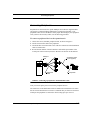
Electrostatic discharge and static electricity can damage integrated
circuits on the PCI card and in the box.
Be sure to follow the precautions listed in your SPARC documentation.
To install the multiport card
1.
Make sure the computer system is powered off.
2.
Install the multiport card in the selected slot, following the instructions in your
system documentation. Be sure that you secure the board in its slot with the
mounting screw. (If the board isn’t secured, the weight of the cable will dislodge
it.)
3.
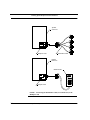
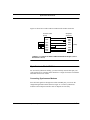
Connect the distribution cable or breakout box to the multiport card.
4.
Turn on and boot the SPARC.
Now you are ready to connect your peripherals.
Apollo Multiport Controller User’s Guide
3-5