1
User Manual ES-Mega / MegaBeans
______________________________________________________________________________________________________
5.
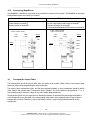
Operating the Access Control System Using Key Transponders
1.
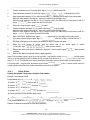
Hold transponder in front of ES-Mega Æ “short low pitch - short high pitch” signal
The buttons enabled for this transponder start flashing.
2.
Press a flashing button within 10 seconds Æ “trill” signal
Button actuation is transferred to the control unit. The system returns to idle, and the ES-Mega waits for the
next input.
ES-Mega will output a buzzer tone whenever a button is pressed without having read-in a transponder before. The
button actuation will not be transferred to the control unit.
In the idle state, an acknowledgement will be transferred to the buttons.
Notes:
A transponder not stored in the ES-Mega so far will be rejected immediately, sounding a “long high pitch - long low
pitch” signal
.
If no button is pressed within 10 seconds after step 1, the system will sound a “long high pitch - long low pitch” signal
and return to the idle status.
The system will not react when a non-flashing button is pressed in step 2, while the enabled buttons keep on
flashing.
5.1
Permanent Enabling Using Key Transponders
Permanent enabling can be used to “unlock” any number of floors for an indefinite period of time, allowing visitors to
use the lift without a transponder.
DIP switch 4 of ES-Mega must be ON to enable this function.
Identical procedures are applied for enabling or disabling a button:
1.
Hold transponder in front of ES-Mega Æ “short low pitch - short high pitch” signal
The buttons enabled for this transponder start flashing.
2.
Keep holding transponder in front of ES-Mega and press a flashing button within 10 seconds
Æ “trill” signal
; keep the button pressed, keep holding transponder in front of ES-Mega.
3.
A “double long low pitch” signal sounds after pressing for 3 seconds
remove transponder.
; release the button,
- A button disabled so far, is enabled now.
- A button enabled so far, is disabled now.
An actuation of an enabled button will be transferred directly to the control unit. ES-Mega will not sound any audible
acknowledgement.
Notes:
The button will flash as before after detecting a transponder assigned to a floor which is enabled permanently.
The floors not enabled so far remain blocked.
A user can only enable or disable a floor when his or her transponder has been authorized for that floor.
A floor cannot be blocked any longer when DIP switch 4 is set to OFF while permanent enabling is active for that
floor.
5
______________________________________________________________________________________________________
SCHAEFER GmbH | Winterlinger Str. 4 | 72488 Sigmaringen | Germany
Phone +49 7571 722-0 | Fax +49 7571 722-98 | [email protected] | www.ws-schaefer.de