1
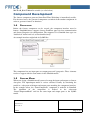
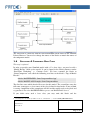
MATLAB_ROOT Makefile variable (see also below). Component Development The Orocos component generated from RealTime Workshop is immediately usable. For advanced users, the generated component can inherit from another component in order to get more features or functions. 1.4 PREPARATION Before the Orocos component can be created, the component interface must be known. Simulink4Orocos supports Orocos DataFlow ports for data communication and Orocos Properties for configuration. The supported C++/Simulink data types are 'double/real' 'int/int' and 'std::vector<double>/array'. An example interface might look in SysML like: This component has one input port, two output ports and 2 properties. These elements need to reappear with the same names in the Simulink model. 1.5 SIMULINK MODEL When you design a Simulink model you need to map the inputs and outputs to Orocos data ports. The input/output model is easiest validated visually by containing the model in a subsystem with input and output ports matching the component interface. In the example below, the “SomeComponent” component is modeled in Simulink. The algorithm of the component is defined in the subsystem “SomeComponentModel” and has the same input and output ports as the SysML model. Document: Status/Version: File Location: Page 4 of 9 FMTC