1
Thompson Scale Company Sonic 350 In-Motion Checkweigher Manual Ver. 7.2 Page 27
3.2.9.5 Detecting Packages Too Close Together
As described above, it is possible to configure the weigh station conveyor so that maximum production rates
and minimal product spacing can be realized. However, one of the events that may occur in this type of
production environment is that packages can sometimes become too closely spaced.
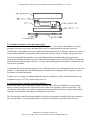
Using the two photo-eye arrangement detailed above, the Checkweigher can determine if product is too
closely spaced. If the “B” photo-eye becomes blocked and then cleared as a product crosses in front of this
eye, and then becomes blocked again before photo-eye “A” has terminated weight on the1st package, and
error is created.
Since two packages on the weigh station conveyor could be as close as touching, or as far as just barely too
close, they cannot be rejected or handled normally. The checkweigher generates a separate alarm output
specifically for this fault condition. Output #5 on I/O card number 2 (a purchased option not included in the
standard system) is actuated the instant the fault is detected, and remains on for one (1) second. An error
message of “product too close” is also displayed on the main checkweigh screen.
3.2.9.6 Using photo-eyes for pacing control
Using the two photo-eye arrangement described above, it is also possible to use a third photo-eye mounted to
the out-feed end of a pacing conveyor. The pacing conveyor (differs from a standard conveyor by using a
brake motor and a photo-eye) must be located directly up-stream of the weigh station conveyor.
The pacing conveyor photo-eye should be placed approximately 3" from the out-feed end of the pacing
conveyor, with the output of the photo-eye’s Normally Closed contact tied to the checkweigher controller’s
#2 I/O card input #3. When this photo-eye is blocked by a package ready to exit from the pacing conveyor,
the input will be driven high. If the weigh station conveyor is ready to accept the next package, the
checkweigher controller will turn on output #3 on I/O card #2. This output should be interfaced back to
either the motor starter for the pacing conveyor, or through the user’s PLC, and programmed to start the
motor starter for the pacing conveyor.
If the #3 output is turned off, the motor starter or system PLC should stop the pacing conveyor motor until
the output is energized again.
Thompson Scale Company, Houston, TX
Phone 713/932-9071, Fax 713/932-9379, Web Site www.thompsonscale.com