1
C H A P T E R
3
–
U S I N G
T H E
D A T A H A N D L E R
C O M P O N E N T
DataSet buffer. Typically, if you are working with a table that have a large number of rows, you will
want to first count how many rows there are matching the search criteria, and decide whether you
want to allow the user to retrieve that many rows or not (impose a “governor”). There is a special
function called GetQueryRowCount() that should be used for this purpose. This method will take
your standard SQL Query, and instead of fetching the actual row data, it will perform a SELECT
COUNT(*) operation against the SQL Query to see how many rows there will be if the query is run.
Using this information, you can decide whether you want to allow the user to run the query or not.
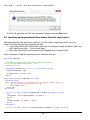
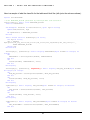
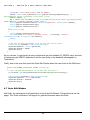
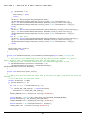
Here is a typical example showing the use of the GetQueryRowCount() routine and the
GetAllRows() routine. Let’s suppose that this particular window enforces that they always type in a
last name to search for (and that’s the only search field):
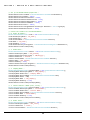
mEmployees = New EMPLOYEES(gSQLConn, "")
Dim SQL As String
SQL = "SELECT EmployeeID,FirstName,LastName,Address1,Address2,City,State,Zip " & _
"FROM EMPLOYEES WHERE "
SQL &= "LastName LIKE @LastName"
mEmployees.Parameters.Add(New CmdParameter("@LastName", SqlDbType.varchar, _
txtLastName.Text & "%"))
' Add the ORDER BY clause...
SQL &= " ORDER BY LastName, FirstName"
mEmployees.SQLQuery = SQL
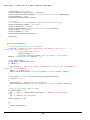
' First perform a count of the matching Employees in the database...
Dim intCount As Integer
Try
IntCount = mEmployees.GetQueryRowCount()
Catch ex As Exception
MsgBox("Error performing Count of matching Employees: " & ex.Message)
Exit Sub
End Try
If (intCount > 500) Then
MsgBox("There were too many employees (" & CStr(intCount) & _
") matching your search conditions.")
Exit Sub
End If
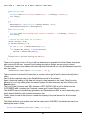
' Now go ahead and retrieve the Employees...
Try
mEmployees.GetAllRows()
Catch ex As Exception
MsgBox("Error Retrieving list of Employees: " & ex.Message)
Exit Sub
End Try
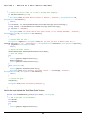
3.9 Retrieving Data into the DataSet buffer using the Paging routines
Sometimes you need to support being able to retrieve a very large result set, but you don’t
necessarily want to read all the records into memory (the DataSet buffer) all at once.
25