1
02/02 Rev. 2.14-01
USER MANUAL
Maintenance, Page 12
TTX x50/67x – Wildcats/Wildcats plus – S 45/65/95/105 – TDI/STDI/XXtreme
Cleaning the feed roller
The feed roller and plastic rollers should also be cleaned from time to time.
1. Disassemble the print head.
Refer to section Print head on page 9.
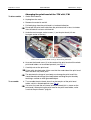
2. Rotate the feed roller by increments and wipe off with roller cleaner (see
Fig. 7:) until the whole roller is free of deposits.
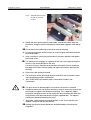
Push the front material guide (1) and pinch rollers (2) to the side to give
better access to the roller.
Fig. 7: To clean the feed roller,
disassemble the print head and
push the material guide (1) and
pinch rollers (2) to the side.
2
1
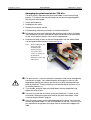
6. After cleaning, return the print head holder to the old position and tighten
the wing screws (TTX x67) or the thumb screw (TTX x50) again.
TTX 67x:
Press the wing screws onto the beveled edge of the square axle to ensure
that the print head holder is in the exact position on the axle.
TTX x50:
The thumb screw engages in a groove on the axle, ensuring that the print
head is in the exact position on the axle.
For both printer types, you must also pay attention to the position of the
print head in relation to the edge of the label. Default setting: up against the
internal black plastic bushing.
7. Before switching the device on, make sure that the print head cable is
properly connected.