1
Description
Front panel
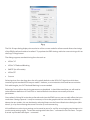
Fig.1
Operation Indicators
The front panel has three LEDs to indicate the operational status of the x4:
• Power
• Input
• Status
Power
• When illuminated, the Power LED indicates the x4 is connected to a mains supply using the
supplied PSU.
Input
• When illuminated, the Input LED indicates a valid DVI source is connected.
Status
• Continuous illumination – Indicates the x4 is operating normally.
• Flashing – Unit is operating over the normal operating temperature. Ensure the input fan vent is not
blocked.
• If the Status LED goes off and remains off this indicates that the settings configured in the x4
application no longer match the input, this is normally the result of a change of input. The x4 will
compensate for the settings and reconfigure itself to display as near to the settings as possible. The
output will still be displayed but not necessarily as expected.
When the x4 device is connected to a PC by a USB cable and the x4 Control application is active, then all
three lights flash in turn to help to identify which unit is being controlled.
10