1
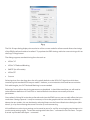
The source of mode selection controls whether the x4 output should take its timing values and
resolution from the preferred mode of the monitor that is connected, or use its internally programmed
‘default’ mode. Please note that only the internal default timings can be edited in this dialog.
If Use the Monitors Preferred Mode is selected, but no valid EDID can be read from the attached
monitor, then the x4 firmware will program the output using the default mode timings.
The rest of the dialog is identical to that for setting the Input timings, with the exception that for the
output monitors it is possible to select Analog RGB (“VGA”) output as well as DVI.
All modifications to the Output… settings can be save as part of a .vqs file, removing the requirement
to input the same settings again. To save the settings select the Save… command in the File menu. To
open a saved .vqs file select the Open… command.
Finally there is a Test button which should be used when defining a default mode that you are not sure
the attached monitor can support. In test mode, the output timings are programmed, but they are not
saved to non-volatile memory on the x4 until the OK button is pressed to accept the mode.
24