1
AN-524
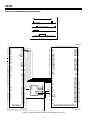
42 RECIPROCAL BIN
WIDTH REGISTERS
RAW VIDEO IN
RUN LENGTH &
HUFFMAN ENCODER
WAVELET TRANSFORM
COMPRESSED
VIDEO OUT
ADAPTIVE QUANTIZER
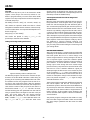
Figure 3. Block Diagram Encoding
RAW VIDEO
OUT
RUN LENGTH &
HUFFMAN ENCODER
WAVELET TRANSFORM
COMPRESSED
VIDEO IN
ADAPTIVE QUANTIZER
42 BIN WIDTH
REGISTERS
Figure 4. Block Diagram Decoding
length encoder will efficiently convert the long runs of
zeros into a single short code group, and the image will
compress tremendously. Other video (e.g., an actor
wearing a plaid shirt) has significant high frequency detail. When the TV broadcaster cuts from simple video to
complex video, or even from one scene to another, or to
a commercial, the bit rate will change substantially unless something is done. That "something" is handled by
the Bin Width Calculator, which must respond to the
video change by altering the bin-width register settings
to achieve the desired bit rate.
To reverse the Wavelet transform and recover the original signal, simply add all the sub-bands back together. If
all the bits in all the sub-bands are preserved, there is a
loss less transformation and the original signal is recovered intact. This gives about 3:1 loss less compression,
which is not really enough for many applications. The
signal in the highest frequency sub-band will contain
small amplitude wiggles that are mostly high frequency
noise and a few high amplitude spikes that represent
sharp edges in the picture.
To obtain more compression we discard low order bits
in the high frequency sub-bands. This gives longer runs
of zeros that the run length encoder converts into a very
short code. Multiplying every data point in each subband by a fraction, called the reciprocal bin width, discards the low order bits. This is the adaptive quantizer
located in between the Wavelet filter bank and the run
length/Huffman encoder. There are 42 different subbands and each one has a reciprocal bin width register,
permitting independent quantization of each sub-band.
On decode, we restore the quantized signal to its proper
amplitude by multiplying each data point by a factor
called the bin width. Again there are 42 bin width registers. The duty of the “Bin Width Calculator” program is
to set all 42 bin width and 42 reciprocal bin width register with the proper fraction to achieve the desired compression ratio.
Constant Bit Rate
A constant bit rate Bin Width Calculator is needed when
video must go through a fixed bit rate communications
link. If the video bit rate from the ADV601 exceeds the
communication link bit rate, video will be lost. If the bit
rate from the ADV601 is less than the communications
link can handle, the viewer at the far end of the link is not
receiving the best possible picture. A better picture
would be obtained if more bits were sent. The constant
bit rate Bin Width Calculator adjusts the bin width registers on every frame to achieve the programmed target
bit rate as closely as possible.
Constant Quality
It is also possible to create a constant quality Bin Width
Calculator. If the objective is to maximize the amount of
video stored on a hard disk, the problem is a bit less demanding. Plain and simple video that compresses well
can be allowed to do so and only the busy and complex
video needs be trimmed down to size. The savings in
disk space are worthwhile, and might permit a longer
video capture before the hard drive is filled.
DESIRABLE FEATURES IN A BIN WIDTH CALCULATOR
Bit Rate Depends On Video Signal
Simple video (e.g., a shot of a cloudless blue sky) has
very little high frequency detail. Every pixel is the same
(blue). The high pass sub-bands will all be zero. The run
–2–