1
All remaining features will flash the player 4 LED when activating
or deactivating. (1 flash = Activated) (2 flashes = Deactivated)
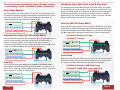
Mimic (Auto Akimbo)
When using Mimic, “R1” controls both “L1” and “R1” at the same time. If “L1”
is Enabled for Rapid fire (see page 2) and rapid fire is turned ON than “L1” will
also rapid fire, otherwise “L1” works as normal allowing you to scope. To
activate HOLD Left on D-Pad and tap the “Mod” button.
1. Hold Left on D-pad
2. Tap the Mod Button
3. Player 4 LED will Flash
Sub-Modes (Jitter Mod, Quick Scope & Drop Shot)
The Jitter Mod, Drop Shot and Quick Scope all have sub modes. Sub modes
are modifications to the main function. To change a sub mode hold UP on the
D-Pad + the “Mod” button, while holding both, tap the corresponding button
to change the Sub-Mode. For example, to change the Jitter sub mode you
would Hold UP + the “Mod” button then tap ”Triangle”, the Player 4 LED will
flash to indicate which sub mode you are currently in.
Jitter Fire (All COD Except MW3)
Jitter takes advantage of a glitch in most COD games allowing for faster firing
of just about all weapons including shotguns and 3-Round burst weapons. To
activate the Jitter Mod make sure the “Rapid Fire” is turned “On” then HOLD
the ▲ (Triangle) button and tap the “Mod” button. Jitter has 2 sub modes.
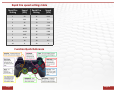
Adjustable Fast Reload (All COD Except MW3)
Sub Mode 1 (Default) = XYY Jitter
Shave precious Milliseconds off your reload time. Adjust by holding ■ until you
see your ammo indicator at the bottom of the screen go from grayed out
bullets to white, then release. At this moment your clip is full and the
remaining reload animation can be cancelled. Once adjusted just tap ■ to fast
reload. To activate HOLD ■ (square) and tap the “Mod” Button.
Sub Mode 2 = YY Jitter
1. Hold the
■ Button
2. Tap the Mod Button
3. Player 4 LED will Flash
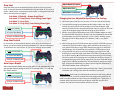
Auto Aim
The Auto Aim Feature ONLY WORKS WITH ZOMBIES & CAMPAIGN GAMES
AND DOES NOT WORK WITH ONLINE MATCHING GAMES. The Auto Aim is a
feature for L1, Auto Aim will work with both rapid fire on and off. To activate
Auto Aim HOLD “X” and tap the “Mod” button.
1. Hold the ▲ Button
2. Tap the Mod Button
3. Player 4 LED will Flash
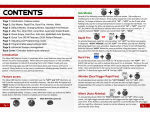
Quick Scope
With Quick Scope Active just hold L1 and You will scope and automatically fire
at the exact moment the accuracy of being scoped kicks in. To activate hold
“L1” and tap the “Mod” button. Quick scope also has 2 sub modes.
Sub Mode 1 (Default) = MW3 Quick Scope
Sub Mode 2 = MW3 Quick Scope + Rapid Fire
1. Hold the L1 Button
1. Hold the X Button
2. Tap the Mod Button
2. Tap the Mod Button
3. Player 4 LED will Flash
3. Player 4 LED will Flash
Page 3
Page 4