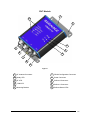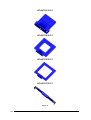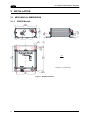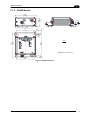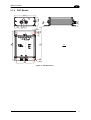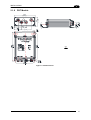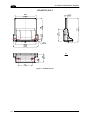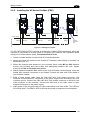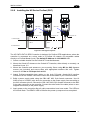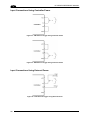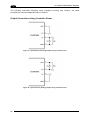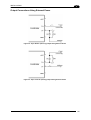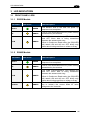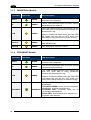
1
HF-SERIES CONTROLLER Reference Manual Datalogic Automation S.r.l. Via Lavino, 265 40050 - Monte S. Pietro Bologna - Italy HF-Series Reference Manual Ed.: 03/2012 © 2011 - 2012 Datalogic Automation S.r.l. ALL RIGHTS RESERVED. Protected to the fullest extent under U.S. and international laws. Copying, or altering of this document is prohibited without express written consent from Datalogic Automation S.r.l. Datalogic and the Datalogic logo are registered trademarks of Datalogic S.p.A. in many countries, including the U.S.A. and the E.U. Subnet16, Cobalt Dashboard and Cobalt C-Macro Builder are trademarks of Datalogic Automation S.r.l. All other brand and product names mentioned herein are for identification purposes only and may be trademarks or registered trademarks of their respective owners. Datalogic shall not be liable for technical or editorial errors or omissions contained herein, nor for incidental or consequential damages resulting from the use of this material. 12/03/12 CONTENTS REFERENCES ...........................................................................................................vii Conventions.................................................................................................................vii Reference Documentation ...........................................................................................vii Services and Support ..................................................................................................vii REGULATORY AND COMPLIANCE NOTICES....................................................... viii Radio Compliance ......................................................................................................viii FCC Compliance ......................................................................................................... ix Power Supply............................................................................................................... ix GENERAL VIEW ..........................................................................................................x 1 1.1 1.2 1.3 1.3.1 1.3.2 1.4 1.5 OVERVIEW ..................................................................................................................1 Introduction ...................................................................................................................1 HF-Series Features ......................................................................................................1 About this Manual .........................................................................................................1 Who Should Read This Manual? ..................................................................................2 HEX Notation ................................................................................................................2 Models and Accessories...............................................................................................2 Datalogic Automation RFID Tags ................................................................................. 3 2 2.1 2.1.1 2.1.2 2.1.3 2.1.4 2.1.5 2.1.6 2.2 2.2.1 2.2.2 2.2.3 2.2.4 2.3 2.3.1 2.3.2 2.3.3 2.3.4 2.3.5 2.3.6 2.3.7 2.4 2.4.1 2.4.2 2.4.3 2.4.4 2.5 2.5.1 2.5.2 INSTALLATION ...........................................................................................................4 Mechanical Dimensions................................................................................................ 4 RS232 Models ..............................................................................................................4 RS485 Models ..............................................................................................................5 IND Models ...................................................................................................................6 DNT Models..................................................................................................................7 PBS Models ..................................................................................................................8 PNT Models ..................................................................................................................9 HF-ANT-01 Antenna Mounting ................................................................................... 14 Direct Antenna Mounting ............................................................................................14 Remote Antenna Mounting .........................................................................................15 Minimum Mounting Distance Between Adjacent Antennas ........................................ 16 Antenna to Tag Range................................................................................................17 Electrical Connectors..................................................................................................18 RS232.........................................................................................................................18 RS485.........................................................................................................................19 Industrial Ethernet IP ..................................................................................................20 DeviceNet ...................................................................................................................21 Profibus.......................................................................................................................23 Profinet .......................................................................................................................25 Digital I/O (-12 models)...............................................................................................27 Power & Wiring ...........................................................................................................28 Power Requirements .................................................................................................. 28 Total System Current Consumption............................................................................28 Cable Voltage Drop ....................................................................................................29 Current Rating for Cables ...........................................................................................29 Installation Guidelines.................................................................................................30 Hardware Requirements.............................................................................................30 Installation Precautions............................................................................................... 30 iii 2.6 2.6.1 2.6.2 2.6.3 2.6.4 2.6.5 2.6.6 2.7 2.7.1 2.7.2 2.7.3 Typical Layouts and Installation Procedures .............................................................. 31 Installing the HF-Series RS232 ..................................................................................31 Installing the HF-Series RS485 ..................................................................................32 Installing the HF-Series Industrial Ethernet (IND)....................................................... 33 Installing the HF-Series DeviceNet (DNT) ..................................................................34 Installing the HF-Series Profibus (PBS)...................................................................... 35 Installing the HF-Series Profinet (PNT) ...................................................................... 37 Digital I/O (-12 models)...............................................................................................39 Input............................................................................................................................ 39 Outputs .......................................................................................................................41 Digital I/O Command Control......................................................................................44 3 3.1 3.1.1 3.1.2 3.1.3 3.1.4 3.1.5 3.1.6 LED INDICATORS .....................................................................................................45 Front Panel LEDs .......................................................................................................45 RS232 Models ............................................................................................................45 RS485 Models ............................................................................................................45 INDUSTRIAL Models..................................................................................................46 DEVICENET Models...................................................................................................46 PROFIBUS Models.....................................................................................................47 PROFINET Models .....................................................................................................48 4 4.1 4.1.1 4.2 4.2.1 4.2.2 4.2.3 4.3 CONFIGURATION METHODS ..................................................................................49 Configuration Tag .......................................................................................................49 Node ID Configuration Using Configuration Tags....................................................... 49 Configuration Tools.....................................................................................................50 Configuration Using Cobalt Dashboard™...................................................................51 Software Upgrades Using Cobalt Dashboard™ ......................................................... 52 Creating and Using RFID Macros with C-Macro Builder™......................................... 52 Command Protocols ...................................................................................................56 5 5.1 5.2 5.3 5.4 5.5 5.6 5.7 5.8 5.8.1 5.8.2 5.9 5.9.1 5.9.2 5.9.3 ETHERNET/IP INTERFACE ...................................................................................... 57 Ethernet/IP Configuration Overview ...........................................................................58 HTTP Server & OnDemand PLC Support .................................................................. 58 HTTP Server and OnDemand Utilities........................................................................ 59 IP Configuration via HTTP Server .............................................................................. 60 OnDemand Configuration for Ethernet/IP................................................................... 62 Configuring PLC Controller Tags................................................................................65 Checking OnDemand Status ......................................................................................66 Verifying Data Exchange with RSLogix 5000 ............................................................. 67 Ethernet/IP Handshaking............................................................................................67 Ethernet/IP Handshaking Example.............................................................................68 Ethernet/IP: Object Model...........................................................................................69 Ethernet/IP Required Objects .....................................................................................70 EtherNet/IP: Vendor Specific Objects.........................................................................74 Cobalt Consume Data Object (0x64 - 32 Instances) .................................................. 74 Application Object (0x67 – 10 Instances).....................................................................77 6 6.1 6.2 6.2.1 6.2.2 6.2.3 6.3 6.3.1 MODBUS TCP INTERFACE ...................................................................................... 79 Modbus TCP Overview...............................................................................................79 Modbus TCP Configuration via HTTP Server............................................................. 79 Modbus TCP - Command Packet Structure ............................................................... 82 Modbus TCP - Response Packet Structure................................................................ 82 Modbus TCP - Mapping for Node 33 .......................................................................... 83 Modbus TCP - Handshaking....................................................................................... 84 Modbus TCP - Host/Cobalt Handshaking................................................................... 85 iv 6.3.2 Modbus TCP - Handshaking Example........................................................................ 85 7 7.1 7.2 7.3 7.3.1 7.3.2 STANDARD TCP/IP INTERFACE .............................................................................87 Standard TCP/IP Overview......................................................................................... 87 Standard TCP/IP - IP Configuration via HTTP Server ................................................ 87 Standard TCP/IP - Command & Response Examples ............................................... 90 Standard TCP/IP - Command Structure Example ...................................................... 91 Standard TCP/IP - Response Structure Example....................................................... 91 8 8.1 8.2 8.2.1 8.2.2 8.2.3 8.2.4 8.2.5 DEVICENET INTERFACE..........................................................................................92 DeviceNet Overview ...................................................................................................92 DeviceNet Configuration.............................................................................................92 Importing the Controller.EDS File ...............................................................................92 Configuring Controller and PLC DeviceNet Communications .................................... 93 Configuring Data Rate and Node Address ................................................................. 98 DeviceNet - Exchanging Data and Handshaking........................................................ 99 DeviceNet - Handshaking Example ..........................................................................100 9 9.1 9.2 9.3 9.4 9.4.1 9.4.2 9.4.3 9.4.4 9.4.5 9.5 9.5.1 9.5.2 9.5.3 9.5.4 9.5.5 PROFIBUS INTERFACE..........................................................................................102 Profibus Overview.....................................................................................................102 Profibus-DP ..............................................................................................................102 Data Exchange .........................................................................................................103 Protocol Implementation ...........................................................................................104 Definitions .................................................................................................................104 Control Field .............................................................................................................105 SAP Field..................................................................................................................108 Length Field ..............................................................................................................108 Application Data Buffer ............................................................................................. 109 Examples of Profibus Command/Response Mechanism.......................................... 109 Example 1: Normal Command/Response Sequence ............................................... 111 Example 2: Unsolicited Responses (Continuous Read Mode) ................................. 121 Example 3: Fragmentation of Responses................................................................. 125 Example 4: Fragmentation of Commands ................................................................134 Example 5: Resynchronization ................................................................................. 145 10 10.1 10.2 10.3 10.4 10.4.1 10.4.2 10.4.3 10.4.4 10.4.5 10.5 PROFINET INTERFACE ..........................................................................................150 Profinet Overview .....................................................................................................150 Profinet IO.................................................................................................................150 Data Exchange .........................................................................................................151 Protocol Implementation ...........................................................................................152 Definitions .................................................................................................................152 Control Field .............................................................................................................153 SAP Field..................................................................................................................156 Length Field ..............................................................................................................156 Application Data Buffer ............................................................................................. 157 Examples of Profnet Command/Response Mechanism ........................................... 157 11 11.1 11.2 TECHNICAL FEATURES......................................................................................... 160 HF-Series Controller .................................................................................................160 HF-Series Antennas .................................................................................................161 A RFID OPERATING PRINCIPLES ............................................................................ 162 RFID Overview .........................................................................................................162 Subnet16™ Multidrop Protocol................................................................................. 163 Datalogic RFID Tags ................................................................................................163 v RFID Tag Standards.................................................................................................164 RFID Tag Embodiments ...........................................................................................166 RFID Tag Memory ....................................................................................................167 vi REFERENCES CONVENTIONS This manual uses the following conventions: “User” or “Operator” refers to anyone using a Cobalt HF-Series Controller. “Device” refers to the Cobalt HF-Series Controller. “You” refers to the System Administrator or Technical Support person using this manual to install, mount, operate, maintain or troubleshoot a Cobalt HF-Series Controller. Cobalt C-Series, HF-Series and UHF-Series RFID Controllers are referred to as Cobalt Controllers, or just “the Controller”. In addition, the terms “Subnet Node Number”, “Node ID” and “Controller ID” are used interchangeably. REFERENCE DOCUMENTATION The documentation related to the HF-Series Controller management is available on the specific product page at the website: www.automation.datalogic.com SERVICES AND SUPPORT Datalogic provides several services as well as technical support through its website. Log on to www.automation.datalogic.com and click on the links indicated for further information including: PRODUCTS Search through the links to arrive at your product page which describes specific Info, Features, Applications, Models, Accessories, and Downloads including: - Cobalt Dashboard™: a Windows-based utility program, which allows system testing, monitoring, and configuration using a PC. It provides Serial (RS232 or USB) and Ethernet interface configuration. - C-Macro Builder™: an easy to use GUI-driven utility for Windows. This software tool allows users with minimal programming experience to “build” their own macro programs (which are stored internally on and executed directly by Cobalt RFID Controllers). SERVICE - Overview - Warranty Extensions and Maintenance Agreements - Sales Network - Listing of Subsidiaries, Repair Centers, Partners - Helpdesk - Material Return Authorization vii REGULATORY AND COMPLIANCE NOTICES This product is intended to be installed by Qualified Personnel only. This product must not be used in explosive environments. Only connect Ethernet and dataport connections to a network which has routing only within the plant or building and no routing outside the plant or building. RADIO COMPLIANCE ENGLISH Contact the competent authority responsible for the management of radio frequency devices of your country to verify any possible restrictions or licenses required. For further information, refer to the web site: http://ec.europa.eu/enterprise/sectors/rtte/ ITALIANO Prendi contatto con l'autorità competente per la gestione degli apparati a radio frequenza del tuo paese, per verificare eventuali restrizioni o licenze. Ulteriori informazioni sono disponibili sul sito: http://ec.europa.eu/enterprise/sectors/rtte/ FRANÇAIS Contactez l'autorité compétente en la gestion des appareils à radio fréquence de votre pays pour vérifier d'éventuelles restrictions ou licences. Pour tout renseignement vous pouvez vous adresser au site web: http://ec.europa.eu/enterprise/sectors/rtte/ DEUTSCH Wenden Sie sich an die für Radiofrequenzgeräte zuständige Behörde Ihres Landes, um zu prüfen ob es Einschränkungen gibt, oder eine Lizenz erforderlich ist. Weitere Informationen finden Sie auf der Web Seite: http://ec.europa.eu/enterprise/sectors/rtte/ ESPAÑOL Contacta la autoridad competente para la gestión de los dispositivos de radio frecuencia de tu país, para verificar cualesquiera restricciones o licencias posibles requerida. Además se puede encontrar mas información en el sitio: Web: http://ec.europa.eu/enterprise/sectors/rtte/ viii FCC COMPLIANCE Modifications or changes to this equipment without the expressed written approval of Datalogic could void the authority to use the equipment. This device complies with PART 15 of the FCC Rules. Operation is subject to the following two conditions: (1) This device may not cause harmful interference, and (2) this device must accept any interference received, including interference which may cause undesired operation. FCC ID E36-0001: for HF-CNTL-232, HF-CNTL-485, HF-CNTL-IND models FCC ID E36-0002: for HF-CNTL-PBS, HF-CNTL-DNT, HF-CNTL-PNT models This equipment has been tested and found to comply with the limits for a Class B digital device, pursuant to part 15 of the FCC Rules. These limits are designed to provide reasonable protection against harmful interference in a residential installation. This equipment generates, uses and can radiate radio frequency energy and, if not installed and used in accordance with the instructions, may cause harmful interference to radio communications. However, there is no guarantee that interference will not occur in a particular installation. If this equipment does cause harmful interference to radio or television reception, which can be determined by turning the equipment off and on, the user is encouraged to try to correct the interference by one or more of the following measures: Reorient or relocate the receiving antenna. Increase the separation between the equipment and receiver. Connect the equipment into an outlet on a circuit different from that to which the receiver is connected. Consult the dealer or an experienced radio/TV technician for help. POWER SUPPLY This product is intended to be installed by Qualified Personnel only. This device is intended to be supplied by a UL Listed or CSA Certified Power Unit with «Class 2» or LPS power source. ix GENERAL VIEW RS232 Models 1 5 2 3 4 6 5 Figure A x 1 HF A ntenna Connector 4 COM LED 2 Read y LE D 5 Mo unting B racket 3 RF LE D 6 Host (RS 232) and P ower Connector RS485 Models 1 7 5 2 3 4 6 5 Figure B 1 HF A ntenna Connector 4 COM LED 2 Read y LE D 5 Mo unting B racket 3 RF LE D 6 Host (RS 485) and P ower Connector 7 Node ID LEDs xi IND Models 1 8 5 2 3 7 4 6 5 Figure C 1 HF A ntenna Connector 5 Mounting Bracket 2 Read y LE D 6 Power Connector 3 RF LE D 7 Host (Ethernet) Connector 8 IP Address Status LEDs 4 xii COM LED DNT Models 1 8 5 2 3 7 4 6 5 Figure D 1 HF A ntenna Connector 5 Mounting Bracket 2 Read y LE D 6 RS232 Config uration Connector 3 RF LE D 7 Host (DeviceNet) and Power Connector 8 DeviceNet S tatus LE D 4 COM LED xiii PBS Models 1 10 5 2 9 3 8 4 7 6 5 Figure E xiv 1 HF Antenna Connector 6 RS232 Configuration Connector 2 Ready LED 7 Power Connector 3 RF LED 8 Host (Profibus Out) Connector Host (Profibus In) Connector 4 COM LED 9 5 Mounting Bracket 10 Profibus Status LEDs PNT Models 1 10 5 2 9 3 8 4 7 6 5 Figure F 1 HF Antenna Connector 6 RS232 Configuration Connector 2 Ready LED 7 Power Connector 3 RF LED 8 Profinet 2 Connector Profinet 1 Connector 4 COM LED 9 5 Mounting Bracket 10 Profinet Status LEDs xv HF-ANT-1010-01 HF-ANT-2020-01 HF-ANT-3030-01 HF-ANT-0750-01 Figure G xvi OVERVIEW 1 1 OVERVIEW 1.1 INTRODUCTION Welcome to the Cobalt HF-Series RFID Controllers Reference Manual. This manual will assist you in the installation, configuration and operation of the Cobalt HF-Series family of RFID controllers. The Cobalt HF-Series is a complete line of feature-rich, passive, high frequency, read/write Radio-Frequency Identification devices that provide RFID data collection and control solutions to shop floor, item-level tracking and material handling applications. Cobalt HF controllers are designed to be compact, rugged and reliable, in order to meet and exceed the requirements of the industrial automation industry. For an overview of RFID operating principles and tags see Appendix A. 1.2 HF-SERIES FEATURES High performance, industrial, multi-protocol RFID controller Available support for multiple communication protocols: Subnet16™, standard TCP/IP, Ethernet/IP, MODBUS TCP, Profibus-DP-V1 and Profinet IO Supports multiple interface connections: RS232, RS485, Ethernet, DeviceNet, Profibus; Profinet Reads/Writes ISO 14443A and ISO 15693 compliant RFID tags Compatible with HMS, LRP and T-Series RFID tags from Datalogic Supports Datalogic's ABx Fast & CBx RFID command protocols Operates at the internationally recognized ISM frequency of 13.56 MHz Housed in rugged IP65 rated enclosure LED status indicators display READY status, COM activity, RF activity, and depending on the model, Subnet16 Node ID, DeviceNet, Profibus or Profinet network status Auto configurable and software programmable, contains flash memory for firmware upgrades and internal configuration storage. 1.3 ABOUT THIS MANUAL This manual provides guidelines and instructions for installing, configuring and operating HFSeries Controllers. This document does NOT include explicit details regarding the HF-Series Controller commands. Specific RFID command related information such as: the process of issuing commands from a host PC or Programmable Logic Controller (PLC) to the HF-Series Controller is available in the CBx Command Protocol – Reference Manual, which is available at www.automation.datalogic.com. 1 HF-SERIES REFERENCE MANUAL 1 1.3.1 Who Should Read This Manual? This manual should be read by those who will be installing, configuring and operating the Controller. This may include the following people: Hardware Installers System Integrators Project Managers IT Personnel System and Database Administrators Software Application Engineers Service and Maintenance Engineers 1.3.2 HEX Notation Throughout this manual, numbers expressed in Hexadecimal notation are prefaced with “0x”. For example, the number "10" in decimal is expressed as "0x0A" in hexadecimal. 1.4 MODELS AND ACCESSORIES Datalogic Automation designs, manufactures and distributes a wide range of RFID equipment including RFID controllers, network interface modules (Gateways and Hubs), RFID tags and the cables needed to make it all work. Listed here are the products and accessories relative to the HF-Series controllers. For a complete list of products and accessories relative to the Subnet16™ Gateway see the Gateway Reference Manual. To purchase any of the Datalogic Automation products listed below contact your Datalogic Automation distributor or visit our Web site: http://www.automation.datalogic.com. Name Description Part Number HF-Series Controllers HF-CNTL-232-02 HF-CNTL-232-12 HF-CNTL-485-02 HF-CNTL-485-12 HF-CNTL-IND-02 HF-CNTL-IND-12 HF-CNTL-DNT-02 HF-CNTL-PBS-02 HF-CNTL-PNT-02 Cobalt HF RFID Controller - RS232 Cobalt HF RFID Controller - RS232 w I/O Cobalt HF RFID Controller - RS485 Subnet16™ Cobalt HF RFID Controller - RS485 Subnet16™ w I/O Cobalt HF RFID Controller - Industrial Ethernet Cobalt HF RFID Controller - Industrial Ethernet w I/O Cobalt HF RFID Controller - DeviceNet Cobalt HF RFID Controller - Profibus Cobalt HF RFID Controller - Profinet 970327002 970327014 970327006 970327015 970327010 970327016 970327008 970327011 970327017 HF-Series Antennas HF-ANT-0750-01 HF-ANT-1010-01 Cobalt HF Antenna 7 x 50 cm Cobalt HF Antenna 10 x 10 cm 970325001 970325002 2 OVERVIEW 1 Name Description Part Number HF-ANT-2020-01 HF-ANT-3030-01 HF-ANT-CBL-07-12 Cobalt HF Antenna 20 x 20 cm Cobalt HF Antenna 30 x 30 cm Cobalt HF Remote Antenna kit 7 m 970325003 970325004 970101127 RS232 Cable: M12, DB9-pin, PS wires Cable: M12, 5-pin, Male/Female, ThinNet, 0.3 m Cable: M12, 5-pin, Male/Female, ThinNet, 1 m Cable: M12, 5-pin, Male/Female, ThinNet, 2 m Cable: M12, 5-pin, Male/Female, ThinNet, 5 m Cable: M12, 5-pin, Male/Male, ThinNet, 0.2 m (Gateway to Drop-T) Cable: M12, 5-pin, Male/Male, ThinNet, 1 m (Gateway to Drop-T) Cable: M12, 5-pin, Male/Male, ThinNet 2 m (Gateway to Drop-T) Cable: 7/8–16, 5-pin, Male/Female, ThickNet, 2 m Cable: 7/8–16, 5-pin, Male/Female, ThickNet, 5 m Cable: M12, 5-pin, Female / Bare Wires, ThinNet, 2 m Cable: M12, 5-pin, Female / Bare Wires, ThinNet, 5 m Cable: 7/8-16, 5-pin, Female / Bare Wires, 5M Cable: M12, 5-pin, Male / Bare Wires, ThinNet, 2M Industrial Ethernet Cable: M12, RJ45 5 m 970101018 970101020 970101021 970101022 970101023 Cables & Connectors CBL-1478 CBL-1480-0.3 CBL-1480-01 CBL-1480-02 CBL-1480-05 CBL-1481-0.2 CBL-1481-01 CBL-1481-02 CBL-1483-02 CBL-1483-05 CBL-1494-02 CBL-1494-05 CBL-1495-05 CBL-1498-02 CBL-1515-05 970101027 970101028 970101029 970101037 970101038 970101077 970101078 970101080 970101084 970101087 Subnet16™ Ts, Terminators, Connectors CBL-1485 CBL-1486 CBL-1487 CBL-1489 CBL-1490 CBL-1493 CBL-1496 CBL-1497 CBL-1521 CBL-1526 Drop-T Connector: 5-pin, 7/8-16 F / M12 F / 7/8-16 M (ThickNet to ThinNet) Drop-T Connector: M12, 5-pin, F/F/M (ThinNet to ThinNet) Field Mountable Connector: M12, 5-pin, Female, Straight Termination Resistor Plug: 7/8-16, 5-pin, Male, (ThickNet) Termination Resistor Plug: M12, 5-pin, Male, (ThinNet) RS232 Connector: M12, 8-pin, Female Plug: Termination Resistor, M12, 5-pin, Female (ThinNet) Plug: Termination Resistor, 7/8-16, 5-pin, Female (ThickNet) Field Mountable Connector: 7/8-16, 5-pin, Female, Straight T Connector: 7/8-16/5P M/F/F (ThickNet to ThickNet) 970101061 970101062 970101063 970101068 970101069 970101075 970101082 970101083 970101115 970101118 1.5 DATALOGIC AUTOMATION RFID TAGS Datalogic Automation designs and manufactures several lines of RFID tags. LRP, HMS and T-Series passive read/write RFID tags are specially suited for Datalogic Automation HF RFID Controllers. Tag Mounting Kits are also available. 3 HF-SERIES REFERENCE MANUAL 2 2 INSTALLATION 2.1 MECHANICAL DIMENSIONS 2.1.1 RS232 Models 122.7 [4.83] 137 [5.40] 4 [0.16] 5.3 [0.21] mm in * Digital I/O (-12 models only) * 98 [3.86] Ø5.3 [Ø0.21] Figure 1 - RS232 Dimensions 4 32 [1.26] 19.7 [0.77] 54 * [2.13] 8 [0.31] 38 [1.50] * 22.6 [0.89] 48 [1.88] 112 [4.41] INSTALLATION 2.1.2 2 RS485 Models 48 [1.88] 112 [4.41] 8 [0.31] 54 * [2.13] 98 [3.86] 5.3 [0.21] 4 [0.16] 38 [1.50] * 122.7 [4.83] 137 [5.40] mm in * Digital I/O (-12 models only) 98 [3.86] Ø5.3 [Ø0.21] Figure 2 - RS485 Dimensions 5 HF-SERIES REFERENCE MANUAL 2 2.1.3 IND Models 48 [1.88] 112 [4.41] 54 * [2.13] 63 [2.48] 122.7 [4.83] 137 [5.40] 4 [0.16] 5.3 [0.21] 8 [0.31] 38 [1.50] mm in * Digital I/O (-12 models only) 98 [3.86] Ø5.3 [Ø0.21] Figure 3 - IND Dimensions 6 INSTALLATION 2.1.4 2 DNT Models 5.3 [0.21] 19.6 [0.77] 8 [0.31] 25 [0.98] 150 [5.90] 164 [6.48] 4 [0.16] 38 [1.50] 22.6 [0.89] 48 [1.88] 112 [4.41] 98 [3.86] mm in Ø5.3 [Ø0.21] Figure 4 - DNT Dimensions 7 HF-SERIES REFERENCE MANUAL 2 2.1.5 PBS Models 48 [1.88] 112 [4.41] 43 [1.69] 38 [1.50] 54 [2.13] 19.5 [0.77] 20 [0.79] 5.3 [0.21] mm in Ø5.3 [Ø0.21] Figure 5 - PBS Dimensions 8 INSTALLATION PNT Models 112 [4.41] 48 [1.88] 2.1.6 2 43.0 [1.69] 54.0 [2.13] mm in Figure 6 - PNT Dimensions 9 HF-SERIES REFERENCE MANUAL 2 HF-ANT-1010-01 6.2 [0.24] 16.9 [0.67] 42 [1.67] 117.1 [4.61] Ø5.1 [Ø0.20] 98 [3.86] 113.4 [4.47] 65 [2.56] Figure 7 - HF-ANT-1010-01 10 61.3 [2.41] 12.8 [0.50] 100 [3.94] 100 [3.94] mm in INSTALLATION 2 HF-ANT-2020-01 6.2 [0.24] 47.4 [1.87] 61.4 [2.42] 200 [7.87] 47.4 [1.87] 200 [7.87] 16.4 [0.64] 20.5 [0.81] 42 [1.67] 113.4 [4.47] Ø5.1 [Ø0.20] 25.5 [1.00] 14.9 [0.59] 30 [1.18] 98 [3.86] mm in 65 [2.56] 89.3 [3.52] Ø3 [Ø0.12] Figure 8 - HF-ANT-2020-01 11 HF-SERIES REFERENCE MANUAL 2 HF-ANT-3030-01 300 [11.81] 47.4 [1.87] 6.2 [0.24] 101 [3.98] 98 [3.86] 30 [1.18] 16.4 [0.64] Ø5.1 [Ø0.20] 20.6 [0.81] Ø5.1 [Ø0.20] 14.9 [0.59] 42 [1.67] 113.4 [4.47] 65 [2.56] 89.3 [3.51] Figure 9 - HF-ANT-1010-01 12 61.4 [2.42] 60.9 [2.40] 13 [0.52] 300 [11.81] 47.4 [1.87] mm in INSTALLATION 2 HF-ANT-0750-01 3.5 [0.14] 76 [2.98] 13.1 [0.52] 70 [2.76] 38 [1.50] MINIMUM BRACKET DIMENSION MAXIMUM BRACKET DIMENSION 38 [1.50] 40 [1.59] 26 [1.02] 137.5 [5.41] 65 [2.56] 500 [19.68] 373 [14.68] 541 [21.29] Ø5.4 [Ø0.21] mm in Figure 10 - HF-ANT-1010-01 13 HF-SERIES REFERENCE MANUAL 2 2.2 HF-ANT-01 ANTENNA MOUNTING 2.2.1 Direct Antenna Mounting Only -1010, -2020, and -3030 Antenna models Antenna Mounting Screws (M5 x 20 mm) and Washers (M5) included in HF-CNTL package. Figure 11 - Direct Antenna Mounting The HF-ANT-01 RFID antennas (except HF-ANT-0750-01) are designed to be connected directly to the HF-CNTL-xxx-x2 Controllers using the hardware included in the Controller package. 1. Connect the Cobalt HF Antenna to the Cobalt HF Controller by inserting the RCA antenna plug into the RF port (RCA jack) on the controller, as shown above. 2. Secure the antenna to the controller using the two 20 mm M5 screws and washers provided with each Cobalt HF Series Controller. You can use the 4 mm hex key wrench supplied with each Cobalt Controller to tighten the screws to 1.7 Nm or 15 lbs per inch ± 10%. 3. Fasten the combined controller and antenna to your mounting fixture using M5 (or #10) diameter screws (not included). Pass the screws through the antenna’s mounting holes and the controller bracket, and secure them with appropriate washers and nuts. Tighten screws to 1.7 Nm or 15 lbs per inch ± 10%. To complete the installation, refer to the specific procedure for your controller under par. 2.6. 14 INSTALLATION 2.2.2 2 Remote Antenna Mounting Controller Adapter Mounting Screws (M5 x 20 mm) and Washers (M5) included in (Antenna Adapter Mounting Screws (M5 x 25 mm) are include in the Extension Cable Antenna Adapter Mounting Washers and Nuts (M5) included in Extension Cable package. Antenna Adapter Mounting Screws (M5 x 35 mm) included in HF-ANT-0750 package. Using HF-ANT-CNTL-CBL-07-12 Extension Cable Figure 12 - Remote Antenna Mounting All HF-ANT-01 RFID antennas can be connected remotely to the HF-CNTL-xxx-x2 Controllers through the HF-ANT-CNTL-CBL-07-12 Extension Cable. You can use the 4 mm hex key wrench supplied with each Cobalt Controller to tighten all screws to 1.7 Nm or 15 lbs per inch ± 10%. NOTE 15 HF-SERIES REFERENCE MANUAL 2 1. Mount the the Controller Adapter to the top of the controller using the two 20 mm M5 screws and washers provided with each Cobalt HF Series Controller. 2. Mount the the Antenna Adapter to the bottom of the antenna as follows: 3. for Antenna models -1010, -2020, and -3030, use the two 25 mm M5 screws, washers and nuts provided with the Cobalt HF-ANT-CNTL-CBL-07-12 Extension Cable kit. 4. for Antenna models -0750, use the two 35 mm M5 screws provided with the Cobalt HF-ANT-0750-01 antenna. The M5 washers and nuts are in the Extension Cable kit. 5. Connect one end of the antenna extension cable to the RF port on the top of the Cobalt Controller-Side Adapter, attach the other end to the RF port on the bottom of the Cobalt Antenna-Side Adapter. Tighten both ends of the extension cable firmly by hand. 6. Fasten the controller and the antenna to your mounting fixtures using M5 (or #10) diameter screws (not included) and secure them with appropriate washers and nuts. To complete the installation, refer to the specific procedure for your controller under par. 2.6. 2.2.3 ANT -1010 -2020 -3030 -0750 16 Minimum Mounting Distance Between Adjacent Antennas -1010 60 cm 75 cm 90 cm 50 cm -2020 75 cm 90 cm 1.2 m 65 cm -3030 90 cm 1.2 m 2m 90 cm -0750 50 cm 65 cm 90 cm 50 cm INSTALLATION 2.2.4 2 Antenna to Tag Range RF read/write range can be adversely affected by many environmental factors, including electrical noise, metallic objects and liquids. The tag ranges below are provided for design purposes only. Testing should be performed in the actual environment for more precise range results. Typical Antenna-to-Tag Ranges for some of Datalogic Tags Tag range values are listed in mm / inches. Datalogic Tag Model Cobalt HF-Series RFID Antenna [HF-ANT] -1010-01 -2020-01 -3030-01 -0750-01 Testing Environment LRP125(HT)S 152 / 6.0 216 / 8.5 228 / 9.0 57 / 2.25 Free Air LRP250(HT)S 267 / 10.5 381 / 15.0 406 / 16.0 120 / 4.8 Free Air LRP525HTS 254 / 10.0 381 / 15.0 432 / 17.0 127 / 5.0 Attached to Metal with spacers LRP-P3858S 216 / 8.5 292 / 11.5 343 / 13.5 82 / 3.25 Free Air HMS125(HT) 64 / 2.5 64 / 2.5 Not Advised Not Advised Free Air HMS150(HT) 115 / 4.5 155 / 6.1 162 / 6.4 44 / 1.8 Free Air LRP-P1212I 85 / 3.4 95 / 3.7 Not Advised Not Advised Free Air For further information regarding the Antenna–to–Tag Ranges, please refer to the specific Tag’s Datasheet. NOTE 17 HF-SERIES REFERENCE MANUAL 2 2.3 ELECTRICAL CONNECTORS 2.3.1 RS232 The RS232 Connector (M12 8-pin, Male) is used for a point-to-point serial connection between a host computer and the HF-Series RFID controller. Figure 13 - RS232 Interface M12 8-pin Male Connector Pin 1 2 3 4 5 6 7 8 18 Name Vdc GND nc RX TX SGND Function Input Power Power Ground Reserved Reserved RS232 Receive Data RS232 Transmit Data Signal Ground INSTALLATION 2.3.2 2 RS485 The Subnet16™ RS485 Connector (M12 5-pin, Male) is used for connecting the HF-Series RFID controllers to a Subnet16™ network. These models are powered from the Subnet16™ network power. PIN 5: TX/RX- PIN 4: TX/RX+ PIN 3: GND PIN 1: SIGNAL GND PIN 2: VDC Figure 14 - RS485 Subnet16™ Interface M12 5-pin Male Connector Pin 1 2 3 4 5 Name SGND Vdc GND TX/RX+ TX/RX- Function Signal Ground Subnet16™ Bus Power Subnet16™ Bus Ground Receive/Transmit Data positive Receive/Transmit Data negative 19 HF-SERIES REFERENCE MANUAL 2 2.3.3 Industrial Ethernet IP The Ethernet Connector (M12 4-pin D-coded, Female) is used for connecting the controller to an Ethernet network. PIN 4: RX- PIN 1: TX+ PIN 3: TXPIN 2: RX+ Figure 15 - M12 4-pin D-Coded Female Connector (for Ethernet) Pin 1 2 3 4 Name TX+ RX+ TXRX- Function Transmit Data positive Receive Data positive Transmit Data negative Receive Data negative The Industrial Ethernet models are powered through their VDC power connector (M12 5-pin, Male). PIN 5: N/C PIN 4: N/C PIN 3: GND PIN 1: N/C PIN 2: VDC Figure 16 - M12 5-pin Male Connector (for Power Supply) Pin 1 2 3 4 5 20 Name nc VDC GND nc nc Function Input Power Power Ground INSTALLATION 2.3.4 2 DeviceNet The DeviceNet Connector (M12 5-pin, Male) is used for connecting the controller to a DeviceNet network. These models are powered from the DeviceNet network power supply PIN 5: CAN_L PIN 4: CAN_H PIN 3: V- PIN 1: SHIELD PIN 2: V+ Figure 17 - M12 5-pin Male Connector (DeviceNet and Power Supply) Pin 1 2 3 4 5 Name Shield V+ VCan_H Can_L Function DeviceNet Bus Shield DeviceNet Bus Power DeviceNet Bus Ground Data positive Data negative 21 HF-SERIES REFERENCE MANUAL 2 The RS232 Connector (M12 8-pin, Male) on the DeviceNet models is used for connecting the controller to a portable PC for configuration. Figure 18 - M12 8-pin Male Connector (RS232) Pin 1 2 3 4 5 6 7 8 22 Name nc nc nc nc nc RX TX SGND Function Receive Data Transmit Data Signal Ground INSTALLATION 2.3.5 2 Profibus The Profibus IN Connector (M12 5-pin B-coded, Male) is used for connecting the controller to a Profibus network. PIN 5: SHIELD PIN 4: B Line (+) PIN 3: GND PIN 1: +5 Vdc PIN 2: A Line (-) Figure 19 - M12 5-pin B-Coded Male Connector (Profibus-IN) Pin 1 2 3 4 5 Name +5 Vdc A Line (-) GND B Line (+) Shield Function Bus Power for termination Data negative Bus Ground for termination Data positive Profibus Shield The Profibus OUT Connector (M12 5-pin B-coded, Female) is used for connecting the controller to a Profibus network. PIN 4: B Line (+) PIN 5: SHIELD PIN 1: +5 Vdc PIN 3: GND PIN 2: A Line (-) Figure 20 - M12 5-pin B-Coded Female Connector (Profibus-OUT) Pin 1 2 3 4 5 Name +5 Vdc A Line (-) GND B Line (+) Shield Function Bus Power for termination Data negative Bus Ground for termination Data positive Profibus Shield 23 HF-SERIES REFERENCE MANUAL 2 The Profibus models are ONLY powered through their VDC power connector (M12 5-pin, Male). PIN 5: N/C PIN 4: N/C PIN 3: GND PIN 1: N/C PIN 2: VDC Figure 21 - M12 5-pin Male Connector (Power Supply) Pin 1 2 3 4 5 Name Nc Vdc GND Nc Nc Function Input Power Power Ground The RS232 Connector (M12 8-pin, Male) on the Profibus models is used for connecting the controller to a portable PC for configuration. Figure 22 - M12 8-pin Male Connector (RS232) Pin 1 2 3 4 5 6 7 8 24 Name nc nc nc nc nc RX TX SGND Function Receive Data Transmit Data Signal Ground INSTALLATION 2.3.6 2 Profinet The PNT1 and PNT2 Profinet Connectors (M12 4-pin D-coded, Female) are used for connecting the controller to a Profinet network. PIN 4: RX- PIN 1: TX+ PIN 3: TXPIN 2: RX+ Figure 23 - M12 4-pin D-Coded Female Connector (for Profinet) Pin 1 2 3 4 Name TX+ RX+ TXRX- Function Transmit Data positive Receive Data positive Transmit Data negative Receive Data negative The Profinet models are powered through their VDC power connector (M12 5-pin, Male). PIN 5: N/C PIN 4: N/C PIN 3: GND PIN 1: N/C PIN 2: VDC Figure 24 - M12 5-pin Male Connector (for Power Supply) Pin 1 2 3 4 5 Name nc VDC GND nc nc Function Input Power Power Ground 25 HF-SERIES REFERENCE MANUAL 2 The RS232 Connector (M12 8-pin, Male) on the Profinet models is used for connecting the controller to a portable PC for configuration. Figure 25 - M12 8-pin Male Connector (RS232) Pin 1 2 3 4 5 6 7 8 26 Name nc nc nc nc nc RX TX SGND Function Receive Data Transmit Data Signal Ground INSTALLATION 2.3.7 2 Digital I/O (-12 models) The Digital I/O Connector (M12 8-pin Female Connector) is used for connecting the controller to optional external digital input/output devices. See par. 2.7 for further details. Figure 26 - M12 8-pin Female Connector (Digital I/O) Pin 1 2 3 4 5 6 7 8 Name Vdc GND O1+ O1-c O2+ O2I1A I1B CAUTION Function Power from the controller to the I/O device Power Ground Output 1 positive Output 1 negative Output 2 positive Output 2 negative Input 1A (optocoupled polarity insensitive) Input 1B (optocoupled polarity insensitive) The Vdc and Ground pins on this connector must not be used to power the controller. They can only be used to optionally supply the I/O device within the limits specified in par. 2.7 and in the Technical Features. 27 HF-SERIES REFERENCE MANUAL 2 2.4 POWER & WIRING The information presented below is provided to assist the installer in determining the amount of power that will be required by the HF-Controller depending on the application. 2.4.1 Power Requirements The HF-Series controller requires an electrical supply voltage of 12 to 30 Vdc. Use a regulated power supply that is capable of delivering the requirements listed in the Technical Features. For point-to-point or individually powered slave nodes, the calculation is straight forward. The calculation becomes more complex for network power sources. The following information is provided to assist you in determining the power requirements of an RFID network application, in particular a Subnet16™ network. NOTE 2.4.2 Power is applied directly to the Subnet16™ Network trunk and distributed through drop cables to the Gateway and RFID controllers. By positioning the power supply near the middle of the network, you can limit voltage drop at the ends, (see par. 2.6.2 for network layout diagrams). Total System Current Consumption NOTE The current consumption values of each product are given in the Technical Features paragraph of the relative Installation manual and refer to the min and max input voltage range. These values already include an adequate safety margin. The consumption values given in the following examples have been interpolated for an input voltage of 24 Vdc. Max Gateway Current: 200 mA @ 12 Vdc (133 mA @ 24 Vdc). Max Controller Current: 366 mA @ 24 Vdc for Cobalt HF-Series Calculating Total System Current Consumption: Total System Current Consumption = [Max Gateway Current + (Max Controller Current x Number of Controllers)] Example A Subnet16™ network powered at 24 Vdc is composed of a GWY-01-xxx-01 connecting eight HF-CNTL-485 RFID Controllers. Total System Current Consumption = [0.133 A + (0.366 A X 8)] = 3.061 A 28 INSTALLATION 2.4.3 2 Cable Voltage Drop In addition, each RFID controller on the Subnet will experience a certain amount of voltage drop depending on the length of the cable. Cable Resistance per Meter ThinNet = 0.058 ohms per meter per wire ThickNet = 0.0105 ohms per meter per wire Calculating Voltage Drop Voltage Drop = (Max Controller Current x Number of Controllers) x (Cable Resistance per Meter per Wire1 x Cable length in Meters) Example A Subnet16™ network is composed of a GWY-01-xxx-01 connecting eight HF-CNTL-485 RFID Controllers (366 mA each @ 24 Vdc). A total of 20 meters of ThinNet cables are used to connect the devices, which have Cable Resistance = 0.058 Ohms per meter per wire. The network power is 24 Vdc. The voltage drop calculation must be conducted on the RFID controller that is farthest from the Power Supply, as it will experience the greatest voltage drop. NOTE It is always recommended to power the network from the middle (Tconfiguration), to reduce total voltage drop at the ends. In the example below this allows the fourth controller and not the eighth to be the furthest from the power supply. Voltage Drop = [0.133 A GWY + (0.366 A x 8 controllers)] x [(0.058 x 2) x 20 meters] = 7.10 Vdc total voltage drop for 8 controllers 24 Vdc - 7.10/2 = 20.45 Vdc at controller number 4 of each branch 2.4.4 Current Rating for Cables The maximum current rating for the Subnet16™ network using Datalogic Automation's cables and accessories (CBL-xxxx), is 4.0 A. 1 The resistance calculation must include both wires (Vdc and GND). 29 HF-SERIES REFERENCE MANUAL 2 2.5 INSTALLATION GUIDELINES 2.5.1 Hardware Requirements The following is a list of minimum components required to create an RFID reading system. Other components may be required depending on the controller model, see the specific installation procedure for your model. Host computer with specific interface Programmable Logic Controller (PLC) or PC RFID controller(s) (Cobalt C-Series, HF-Series or UHF-Series Controllers) Adequate length cabling, connectors and terminators Sufficient power capable of powering all the RFID components Datalogic Automation RFID series tags: HMS, LRP, T/Gamma, I, or UHF-G2-525 2.5.2 30 (Serial, Subnet16™ or Fieldbus); Installation Precautions RF performance and read/write range can be negatively impacted by the proximity of metallic objects and liquids. Avoid mounting the Cobalt antenna within 15 cm (6 inches) of any metallic object or wet surface. Do not route cables near other unshielded cables or near wiring carrying high voltage or high current. Cross cables at perpendicular intersections and avoid routing cables near motors and solenoids. Avoid mounting the controller near sources of EMI (electro-magnetic interference) or near devices that generate high ESD (electro-static discharge) levels. Always use adequate ESD prevention measures to dissipate potentially high voltages. If electrical interference is encountered (as indicated by a significant reduction in read/write performance), relocate the controller to an area free from potential sources of interference. INSTALLATION 2 2.6 TYPICAL LAYOUTS AND INSTALLATION PROCEDURES 2.6.1 Installing the HF-Series RS232 HF-CNTL-232-02 w antenna CBL-1478 Host VDC (red) Power Supply GND (black) Figure 27 - RS232 Typical Layouts The HF-CNTL-232-x2 RFID Controller is designed for point-to-point RFID applications, where the distance from host to controller is less than 15 meters (50 feet). The controller connects directly to a serial communications port on a host computer via an RS232compatible serial interface cable. 1. Select a suitable location for the Cobalt HF Controller/Antenna. 2. Mount the Cobalt HF Antenna to the Cobalt HF Controller, either directly or remotely, as described in par. 2.2. 3. Mount the controller and antenna to your mounting fixture using M5 (or #10) diameter screws (not included) and secure them with appropriate washers and nuts. Tighten screws to 1.7 Nm or 15 lbs per inch ± 10%. 4. Connect the CBL-1478 M12 8-pin female connector to the M12 8-pin male interface connector on the Cobalt HF-CNTL-232-x2. Connect the CBL-1478 9-pin female D-sub connector to an RS232 COM port on the host computer. Tighten the cable’s two locking thumbscrews. 5. Connect the power supply to the VDC (red) and GND (black) wires on the CBL-1478 cable. 6. Apply power to the controller after all cable connections have been made. The LEDs on the unit will flash. The READY LED is ON after the power up sequence has completed. 7. On the host computer, set the COM port parameters to: 9600 baud, 8 data bits, 1 stop bit, no parity and no handshaking. To verify operations, download the Cobalt Dashboard™ Utility from www.automation.datalogic.com. The Cobalt Dashboard™ Utility allows users to configure and control their HF-CNTL-232-x2 controllers and send RFID commands for testing purposes. See the Cobalt Dashboard™ Reference Manual for details. 31 HF-SERIES REFERENCE MANUAL 2 Installing the HF-Series RS485 CBL-1486 CBL-1486 CBL-1480 CBL-1480 CBL-1486 CBL-1486 CBL-1480 CBL-1480 CBL-1490 CBL-1486 CBL-1481 CBL-1486 CBL-1480 CBL-1480 CBL-1480 CBL-1490 CBL-1487 CBL-1480 2.6.2 Gateway HF-CNTL-485-02 w antenna to Host to Configuration PC Vdc GND to Power Supply HF-CNTL-485-02 w antenna Figure 28 - RS485 Typical Layouts See Gateway or Hub Reference Manual for further connection details. The HF-CNTL-485-x2 RFID Controller is designed for Subnet16™ RFID applications, where the controller is connected in an RS485 network via Subnet16™-compatible cables to the host through a Gateway or Hub. 1. Select a suitable location for the Cobalt HF Controller/Antenna. 2. Mount the Cobalt HF Antenna to the Cobalt HF Controller, either directly or remotely, as described in par. 2.2. 3. Mount the controller and antenna to your mounting fixture using M5 (or #10) diameter screws (not included) and secure them with appropriate washers and nuts. Tighten screws to 1.7 Nm or 15 lbs per inch ± 10%. 4. Attach a Subnet16™ compatible cable (i.e. CBL-1480-xx) to the M12 5-pin male Subnet16™ connector on the controller. Connect the other end of this cable to your Subnet16™ network. 5. To complete the Subnet16™ network installation, including power supply wiring, trunk wiring, network termination, Gateway/Hub wiring, and for a complete list of compatible accessory cables and Subnet16™ network layout examples, see the Subnet16™ Gateway or Subnet16™ Hub Reference Manuals. After installation, the Subnet16™ network can be configured through the Subnet16™ Gateway/Hub using the Cobalt Dashboard™ Utility. See the Cobalt Dashboard™ Reference Manual for details. 32 INSTALLATION Installing the HF-Series Industrial Ethernet (IND) HF-CNTL-IND-02 w antenna 2.6.3 2 CBL-1487 Vdc to Power Supply GND Ethernet Router CBL-1515 PLC Figure 29 - IND Typical Layouts The HF-CNTL-IND-x2 RFID Controller is designed for Industrial Ethernet IP RFID applications, where the controller is connected in an Ethernet IP TCP/IP network via compatible cables through a hub or directly to an Ethernet IP host. 1. Select a suitable location for the Cobalt HF Controller/Antenna. 2. Mount the Cobalt HF Antenna to the Cobalt HF Controller, either directly or remotely, as described in par. 2.2. 3. Mount the controller and antenna to your mounting fixture using M5 (or #10) diameter screws (not included) and secure them with appropriate washers and nuts. Tighten screws to 1.7 Nm or 15 lbs per inch ± 10%. 4. Connect the CBL-1515 M12 4-pin male connector to the M12 4-pin female interface connector on the Cobalt HF-CNTL-IND-x2. Connect the CBL-1515 RJ45 male connector to the LAN hub/switch. If connecting directly to the host computer you will need to use an additional crossover cable. 5. Build a power supply cable using the CBL-1487 M12 5-pin female connector. Use minimum 24 AWG wires for connection to the power supply lines according to the Vdc connector pinout. Connect the CBL-1487 M12 5-pin female connector to the M12 5-pin male connector on the controller. Connect the other end of the cable (wires or usersupplied connectors) to the power supply. 6. Apply power to the controller after all cable connections have been made. The LEDs on the unit will flash. The READY LED is ON after the power up sequence has completed. Then one of the Ethernet IP Address LEDs will remain on, either Default or Custom. To verify operations, download the Cobalt Dashboard™ Utility from www.automation.datalogic.com. The Cobalt Dashboard™ Utility allows users to configure and control their HF-CNTL-IND-x2 controllers and send RFID commands for testing purposes. See the Cobalt Dashboard™ Reference Manual for details. 33 HF-SERIES REFERENCE MANUAL 2 CBL-1487 CBL-1480 to Configuration PC CBL-1480 CBL-1486 CBL-1486 CBL-1490 HF-CNTL-DNT-02 w antenna CBL-1480 CBL-1486 to Configuration PC CBL-1480 to Configuration PC Vdc GND to Power Supply CBL-1480 CBL-1480 HF-CNTL-DNT-02 w antenna Installing the HF-Series DeviceNet (DNT) HF-CNTL-DNT-02 w antenna to DeviceNet Master and Power Supply 2.6.4 CBL-1486 Figure 30 - DNT Typical Layouts The HF-CNTL-DNT-02 RFID Controller is designed for DeviceNet RFID applications, where the controller is connected as a slave node in a DeviceNet network via compatible cables directly to a DeviceNet Master/Scanner (host). The default Node ID is 63. 1. Select a suitable location for the Cobalt HF Controller/Antenna. 2. Mount the Cobalt HF Antenna to the Cobalt HF Controller, either directly or remotely, as described in par. 2.2. 3. Mount the controller and antenna to your mounting fixture using M5 (or #10) diameter screws (not included) and secure them with appropriate washers and nuts. Tighten screws to 1.7 Nm or 15 lbs per inch ± 10%. 4. Attach a DeviceNet-compatible cable to the 5-pin, male M12 interface connector on the Cobalt. Connect the other end of this cable to your DeviceNet network. 5. Turn your DeviceNet power supply ON. After a while the Devicenet LED will briefly flash alternatively Red and Green. The READY LED will be ON when the controller’s startup procedure has completed. To configure and control the HF-CNTL-DNT-02 controller and send RFID commands for testing purposes, download and install the Cobalt Dashboard™ Utility from www.automation.datalogic.com. The Dashboard utility uses the PC RS232 serial port to communicate to the controller’s RS232 serial port. To enable communication: 1. To connect the controller’s RS232 serial port to the PC you have two choices; the first one is the quickest: a) Connect the CBL-1478 M12 8-pin female connector to the M12 8pin male interface connector on the Cobalt HF-CNTL-DNT-02. Connect the CBL-1478 9pin female D-sub connector to an RS232 COM port on the host computer, or, b) Build your own communication cable using the CBL-1493 connector M12 8-pin female connector and follow the schematic shown in par. 2.3.4. 2. On the host computer, set COM port parameters to: 9600 baud, 8 data bits, 1 stop bit, no parity and no handshaking. 3. Run the Cobalt Dashboard™ Utility. 34 INSTALLATION Installing the HF-Series Profibus (PBS) CBL-1487 CBL-1487 to Configuration PC to Configuration PC to Configuration PC to Configuration PC HF-CNTL-PBS-02 w antenna 2.6.5 2 to Profibus Master to Power Supply PBS IN PBS OUT PBS IN PBS OUT PBS IN PBS OUT PBS IN Profibus Terminator Cap Figure 31 - PBS Typical Layouts The HF-CNTL-PBS-02 RFID Controller is designed for Profibus RFID applications, where the controller is connected as a slave node in a Profibus (DP) network via compatible cables directly to a Profibus Master (host). The default Node ID is 63. 1. Select a suitable location for the Cobalt HF Controller/Antenna. 2. Mount the Cobalt HF Antenna to the Cobalt HF Controller, either directly or remotely, as described in par. 2.2. 3. Mount the controller and antenna to your mounting fixture using M5 (or #10) diameter screws (not included) and secure them with appropriate washers and nuts. Tighten screws to 1.7 Nm or 15 lbs per inch ± 10%. 4. Attach Profibus-compatible data cables to the 5-pin B-Coded (reverse-keyed), male and female M12 interface connectors on the Cobalt. Connect the other end of the cables to your Profibus network. 5. Build a power supply cable using the CBL-1487 M12 5-pin female connector. Use minimum 24 AWG wires for connection to the power supply lines according to the Vdc connector pinout. Connect the CBL-1487 M12 5-pin female connector to the M12 5-pin male connector on the controller. Connect the other end of the cable (wires or usersupplied connectors) to the power supply. 6. Apply power to the controller after all cable connections have been made. The LEDs on the unit will flash. The READY LED is ON after the power up sequence has completed. 35 2 HF-SERIES REFERENCE MANUAL To configure and control the HF-CNTL-PBS-02 controller and send RFID commands for testing purposes, download and install the Cobalt Dashboard™ Utility from www.automation.datalogic.com. The Dashboard utility uses the PC RS232 serial port to communicate to the controller’s RS232 serial port. To enable communication: 1. To connect the controller’s RS232 serial port to the PC you have two choices; the first one is the quickest: a) Connect the CBL-1478 M12 8-pin female connector to the M12 8pin male interface connector on the Cobalt HF-CNTL-PBS-02. Connect the CBL-1478 9pin female D-sub connector to an RS232 COM port on the host computer, or, b) Build your own communication cable using the CBL-1493 connector M12 8-pin female connector and follow the schematic shown in par. 2.3.5. 2. On the host computer, set COM port parameters to: 9600 baud, 8 data bits, 1 stop bit, no parity and no handshaking. 3. Run the Cobalt Dashboard™ Utility. 36 INSTALLATION Installing the HF-Series Profinet (PNT) HF-CNTL-PNT-02 w antenna 2.6.6 2 CBL-1487 PNT 1 CBL-1487 PNT 1 to Configuration PC PNT 1 to Configuration PC to Configuration PC to Power Supply PNT 2 PNT 2 to Profinet Master Figure 32 - PNT Typical Layouts The HF-CNTL-PNT-02 RFID Controller is designed for Profinet RFID applications, where the controller is connected as a slave node in a Profinet IO network via compatible cables directly to a Profinet Master (host). The default IP Address is 192.168.253.110. 1. Select a suitable location for the Cobalt HF Controller/Antenna. 2. Mount the Cobalt HF Antenna to the Cobalt HF Controller, either directly or remotely, as described in par. 2.2. 3. Mount the controller and antenna to your mounting fixture using M5 (or #10) diameter screws (not included) and secure them with appropriate washers and nuts. Tighten screws to 1.7 Nm or 15 lbs per inch ± 10%. 4. Attach Profinet-compatible data cables to the 4-pin D-Coded, female M12 interface connectors on the Cobalt. Connect the other end of the cables to your Profinet network. 5. Build a power supply cable using the CBL-1487 M12 5-pin female connector. Use 18 AWG (max) to 24 AWG (min) wires for connection to the power supply lines according to the Vdc connector pinout. Connect the CBL-1487 M12 5-pin female connector to the M12 5-pin male connector on the controller. Connect the other end of the cable (wires or usersupplied connectors) to the power supply. 6. Apply power to the controller after all cable connections have been made. The LEDs on the unit will flash. The READY LED is ON after the power up sequence has completed. 37 2 HF-SERIES REFERENCE MANUAL To configure and control the HF-CNTL-PNT-02 controller and send RFID commands for testing purposes, download and install the Cobalt Dashboard™ Utility from www.automation.datalogic.com. The Dashboard utility uses the PC RS232 serial port to communicate to the controller’s RS232 serial port. To enable communication: 1. To connect the controller’s RS232 serial port to the PC you have two choices; the first one is the quickest: a) Connect the CBL-1478 M12 8-pin female connector to the M12 8pin male interface connector on the Cobalt HF-CNTL-PNT-02. Connect the CBL-1478 9pin female D-sub connector to an RS232 COM port on the host computer, or, b) Build your own communication cable using the CBL-1493 connector M12 8-pin female connector and follow the schematic shown in par. 2.3.6. 2. On the host computer, set COM port parameters to: 9600 baud, 8 data bits, 1 stop bit, no parity and no handshaking. 3. Run the Cobalt Dashboard™ Utility. 38 INSTALLATION 2 2.7 DIGITAL I/O (-12 MODELS) 2.7.1 Input There is one optocoupled polarity insensitive input available on the Controllers with the I/O option. See par. 2.3.7 for pinout. “Polarity Insensitive” means that, in the applications examples shown below, the user can exchange I1A with I1B without affecting the system behaviour. The user can handle the input through specific commands (see par. 2.7.3 for the specific Cobalt Command Protocol Reference Manual according to your controller model). The electrical features of the input are: Maximum voltage: 30 Vdc Minimum voltage: 6 Vdc Maximum current: 28 mA The input is optocoupled and can be driven by both an NPN and PNP type command. 39 HF-SERIES REFERENCE MANUAL 2 Input Connections Using Controller Power Figure 33 - PNP External Trigger Using Controller Power Figure 34 - NPN External Trigger Using Controller Power Input Connections Using External Power Figure 35 - PNP External Trigger Using External Power 40 INSTALLATION 2 Figure 36 - NPN External Trigger Using External Power 2.7.2 Outputs Two general purpose optocoupled outputs are available on the Controllers with the I/O option. See par. 2.3.7 for pinout. The user can activate/deactivate the two outpus through specific commands (see par. 2.7.3 for the specific Cobalt Command Protocol Reference Manual according to your controller model). When connected to an external circuit, the current must enter in O1+/O2+ and exit from O1/O2-. The electrical features of the outputs are: Voltage Range: 6 ~ 30 Vdc Maximum Current: - If externally powered (by the user): 500 mA - If powered by the controller (pins 1 and 2 of the I/O connector): max. 300 mA (*) (*) This is the maximum value of current computed as the sum of both the Outputs! In fact the output current supplied by the controller is limited. In other words if only one output is active the maximum current value is 300 mA, but if both the outputs are active then each Output current must decrease (for example max. 150 mA for each Output). Notes - It should be noted that if the power supply for the I/O is supplied by the Controller (pins 1 and 2), the opto-isolation feature for the Input and Output sections will be lost, because the ground reference of the I/O and the Controller power supply is the same. - A device that operates at 200 mA may damage the Digital Output due to inrush current if a current limiting device is not used and the current exceeds 500 mA (e.g. an incandescent light). - The inductive "kick" that occurs when a relay is released (back EMF from a collapsing magnetic field) can impose a voltage higher than 30 Vdc that may damage the output transistor. To avoid this potential issue, employ a diode (D1) to clamp the back EMF. D1 should be a 1N4001 or equivalent. 41 HF-SERIES REFERENCE MANUAL 2 The following connection diagrams show examples involving only Output1; the same principles are valid and applicable also to Output2. Output Connections Using Controller Power Figure 37 - Open Emitter (Sourcing) Output Using Controller Power Figure 38 - Open Collector (Sinking) Output Using Controller Power 42 INSTALLATION 2 Output Connections Using External Power Figure 39 - Open Emitter (Sourcing) Output Using External Power Figure 40 - Open Collector (Sinking) Output Using External Power 43 HF-SERIES REFERENCE MANUAL 2 Figure 41 - Open Collector (Sinking) Output for a LED Using External Power Note - 2.7.3 The resistor R1 in series with the LED LD1 sets the forward current; a value of 1.2 kΩ will provide about 20 mA LED current, when run from 24 Vdc. Digital I/O Command Control To handle the Input and Outputs, a set of CBx and ABx commands are available for the user. These commands include getting the status and setting/clearing the Input/Outputs. For more details, refer to the Cobalt CBx Command Protocol Reference Manual, and the Cobalt ABx Fast Command Protocol Reference Manual, both available on the Datalogic Automation web site in the download section of the product page. To determine which command protocol to utilize, please refer to the list below for the different Cobalt RFID devices. CBx Protocol HF-CNTL-Series Fieldbus and Non Fieldbus models: Industrial Ethernet (IND), ABx Protocol (Fast and Standard) HF-CNTL-Series Serial models: RS232 NOTE 44 All RS485-based RFID controllers are used in conjunction with Subnet16™ Gateway and Subnet16™ Hub interface modules, which all use the CBx Command Protocol. LED INDICATORS 3 3 LED INDICATORS 3.1 FRONT PANEL LEDS 3.1.1 RS232 Models LED Name LED Color LED Description READY GREEN The READY LED is ON after the power up sequence has completed. RF AMBER The RF LED illuminates when RF power is being transmitted by the antenna. COM 3.1.2 AMBER The COM (communications) LED flashes ON and OFF when data is being transmitted between the antenna and a tag. When in Continuous Read mode, the COM LED will remain ON and will turn OFF briefly only while data is being read from or written to a tag. RS485 Models LED Name LED Color LED Description READY GREEN The READY LED is ON after the power up sequence has completed. RF AMBER The RF LED illuminates when RF power is being transmitted by the antenna. COM NODE ID AMBER AMBER The COM (communications) LED flashes ON and OFF when data is being transmitted between the antenna and a tag. When in Continuous Read mode, the COM LED will remain ON and will turn OFF briefly only while data is being read from or written to a tag. The five Node ID LEDs indicate (in Binary, from top to bottom) the current Node ID value assigned to the controller. 45 HF-SERIES REFERENCE MANUAL 3 3.1.3 INDUSTRIAL Models LED Name LED Color LED Description READY GREEN The READY LED is ON after the power up sequence has completed. RF AMBER The RF LED illuminates when RF power is being transmitted by the antenna. COM AMBER DEFAULT AMBER CUSTOM AMBER 3.1.4 The COM (communications) LED flashes ON and OFF when data is being transmitted between the antenna and a tag. When in Continuous Read mode, the COM LED will remain ON and will turn OFF briefly only while data is being read from or written to a tag. Default IP Address enabled (192.168.253.110) User assigned IP Address enabled DEVICENET Models LED Name LED Color LED Description READY GREEN The READY LED is ON after the power up sequence has completed. RF AMBER The RF LED illuminates when RF power is being transmitted by the antenna. COM DEVICENET 46 AMBER GREEN/RED The COM (communications) LED flashes ON and OFF when data is being transmitted between the antenna and a tag. When in Continuous Read mode, the COM LED will remain ON and will turn OFF briefly only while data is being read from or written to a tag. SOLID GREEN: on-line and connection established. FLASHING GREEN: on-line, but no connections established, or needs commissioning. FLASHING RED: connection timed out, or recoverable fault detected. SOLID RED: unrecoverable fault detected (i.e., duplicate node address). LED INDICATORS 3.1.5 3 PROFIBUS Models LED Name LED Color LED Description READY GREEN The READY LED is ON after the power up sequence has completed. RF AMBER The RF LED illuminates when RF power is being transmitted by the antenna. COM STATUS OP MODE AMBER The COM (communications) LED flashes ON and OFF when data is being transmitted between the antenna and a tag. When in Continuous Read mode, the COM LED will remain ON and will turn OFF briefly only while data is being read from or written to a tag. GREEN/RED SOLID GREEN: initialized. FLASHING GREEN: initialized, diagnostic event(s) present. SOLID RED: exception error GREEN/RED SOLID GREEN: on-line, data exchange FLASHING GREEN: on-line, but idle. FLASHING RED (1 FLASH): parametrization error FLASHING RED (2 FLASHES): Profibus configuration error 47 HF-SERIES REFERENCE MANUAL 3 3.1.6 PROFINET Models LED Name LED Color LED Description READY GREEN The READY LED is ON after the power up sequence has completed. RF AMBER The RF LED illuminates when RF power is being transmitted by the antenna. COM MOD STATUS AMBER The COM (communications) LED flashes ON and OFF when data is being transmitted between the antenna and a tag. When in Continuous Read mode, the COM LED will remain ON and will turn OFF briefly only while data is being read from or written to a tag. SOLID GREEN: initialized, Normal Operation FLASHING GREEN (1 FLASH): diagnostic event(s) present. FLASHING GREEN (2 FLASHES): blink used for node identification SOLID RED: exception error GREEN/RED FLASHING RED (1 FLASH): configuration error FLASHING RED (2 FLASHES): IP address error FLASHING RED (3 FLASH): Station Name error FLASHING RED (4 FLASHES): Internal error NET STATUS GREEN SOLID GREEN: IO Controller connected in RUN FLASHING GREEN: IO Controller connected in STOP LINK 1 LINK 2 AMBER SOLID AMBER: Profinet link established 48 CONFIGURATION METHODS 4 4 CONFIGURATION METHODS There are several configuration methods available for your controller depending on the interface type and application: Configuration Tag Configuration Tools: Cobalt Dashboard™ and C-Macro Builder™ Command Protocol 4.1 CONFIGURATION TAG A configuration tag is included with your HF-Series controller. This can be used to reset all HF-series controllers to their factory default configuration settings. For Subnet16™ models (HF-CNTL-485-x2), this tag can also be used to set the Node ID of each controller in the network. Figure 42 - HF-Series Configuration Tag 4.1.1 Node ID Configuration Using Configuration Tags Only RS485-based RFID controllers can be connected to a Gateway’s Subnet network and each must be assigned a unique Node ID value between 1 and 16. When an RFID controller is connected to the Gateway’s Subnet network, the Gateway will query the new controller to obtain certain configuration values (specifically the Node ID number). If the Gateway does not detect a Node ID conflict, it will “allow” the RFID controller onto the Subnet network. By using the Cobalt HF Configuration Tag that is included with each RS485-based Cobalt HF-Series RFID Controller, the Node ID value can be dynamically assigned by the Gateway or can be manually assigned by the user. For the Gateway to dynamically assign a Node ID value to a controller, the controller must first be initialized with the Node ID value of zero. This is the equivalent of having no Node ID assigned. 49 HF-SERIES REFERENCE MANUAL 4 All Datalogic Automation RS485-based controllers ship with their Node ID value set to 0. NOTE When a powered controller (that is set to Node ID 0) is connected to the Subnet, it will not initially be recognized by the Gateway until the Configuration Tag is placed in the antenna’s RF field. After a few seconds the controller will display its new assigned Node ID value in binary code from right to left or (top to bottom) using the five amber Node LEDs on the controller, see Figure B, 7. When dynamically assigning a Node ID value for a new controller, the Gateway will either assign the next available Node ID value or the value that the Gateway recognizes as offline or “missing” – that is, a Node ID value that previously existed, but has since disappeared from the network. Because the Gateway stores a backup of each Subnet Node’s configuration, should an RFID controller ever fail, a replacement controller can be installed quickly and easily. The new controller will be automatically assigned the same Node ID value and configuration as the replaced controller, provided the Configuration Tag is introduced to the antenna field after startup and then removed. Avoid that the configuration tag is simultaneously read by more than one controller. NOTE 4.2 CONFIGURATION TOOLS Datalogic Automation offers the following powerful RFID configuration utilities for Microsoft Windows 2000, XP, Vista and 7 systems: Cobalt Dashboard™ C-Macro Builder™ These configuration tools can be downloaded from the Datalogic Automation website: www.automation.datalogic.com 50 CONFIGURATION METHODS 4.2.1 4 Configuration Using Cobalt Dashboard™ The Cobalt Dashboard™ Utility is a software application that allows users to view, modify, save and update the configuration settings of their Cobalt controllers. Follow the instructions below to operate the Cobalt Dashboard Utility and to set the Cobalt device’s configuration. 1. Install the Controller as described in the relevant sub-paragraph in 2.6. 2. Connect the Controller to your PC, power up and wait for the boot procedure to finish. 3. Run the Cobalt Dashboard™. 4. From the Connection screen, choose your controller from the list. Figure 43 - Cobalt Dashboard™ HF RS232 Controller Selection 5. Choose the appropriate COM port and Baudrate, (or IP Address for Ethernet models); then click “Connect”. Figure 44 - Cobalt Dashboard™ COM Port and Baudrate Selection 51 HF-SERIES REFERENCE MANUAL 4 The Dashboard should send some commands to retrieve device and configuration information from the device. If communications are set up correctly, the device configuration area within the Cobalt Dashboard should now look something like this: Figure 45 - Cobalt Dashboard™ HF RS232 Controller Configuration See the Cobalt Dashboard™ User's Manual for more configuration details. 4.2.2 Software Upgrades Using Cobalt Dashboard™ The Cobalt Dashboard™ utility also allows for controller software upgrades. NOTE For the HF-Series Controllers, software upgrades/downgrades can only be made within the same major release family (i.e. 2.xx <> 2.xy). Do not attempt software upgrades/downgrades between major releases (i.e. 2.xx <> 3.xx). See the Cobalt Dashboard™ User's Manual for more details on software upgrades. 4.2.3 Creating and Using RFID Macros with C-Macro Builder™ What are RFID Command Macros? RFID Command Macros are a powerful feature of Datalogic Automation Cobalt Controllers. Macros are simple programs that direct a controller to execute multiple pre-programmed instructions. 52 CONFIGURATION METHODS 4 Because macros reside within the controller’s internal memory, they can be programmed to instruct the controller to automatically read and/or write a specified set of data to an RFID tag without the controller ever having to receive a command from the host. In fact, the controllers do not even require a connection to a host in order to execute macros. Each macro can contain up to 255 bytes of data and each supported controller can store up to eight macros at a time. Though they are stored locally on the controller, macros are also backed up in the Gateway’s flash memory as well. Why use macros? The power of macros is in distributed intelligence, the reduction in network bus traffic and the ability to accelerate routine decision making at the point of data collection. What can macros do? In addition to the automated reading and writing of data, macro capabilities include: The ability to write time stamps to RFID tags The ability to filter command responses to only those of interest to the host (such as when an error occurs or when a tag has arrived in the RF field) The ability to harness powerful logic and triggering capabilities such as; read, write, start/stop continuous read, data compare, branch, transmit custom string, and set outputs. What is a macro trigger? Macros are initiated by “triggers.” Triggers can be configured in numerous ways. A simple command from the host, such as “execute macro number three” can be considered a trigger. Triggers can be configured, for example, to activate a macro when a tag enters or leaves a controller’s RF field. Datalogic Automation RFID controllers can store up to eight separate triggers in addition to the eight macros they can also house. Any trigger can activate any of the eight stored macros. How are macros created? Macros are created using the powerful, yet simple, C-Macro Builder™ utility from Datalogic Automation. The easy to use GUI allows the user to create powerful RFID macro programs quickly and easily. When used with Datalogic Automation Cobalt Dashboard™ utility, users can effortlessly download, erase, and manage their macros and triggers, as well as set the operational configurations of their RFID controllers and Subnet16™ Gateways. 53 4 HF-SERIES REFERENCE MANUAL Which communication interfaces support the use of macros? Macros are supported on the following Cobalt Controllers: Ethernet, Profibus, Profinet, DeviceNet, RS232 and USB interfaces. What happens to existing Macros if a controller must be replaced? When using a Subnet16™ Gateway, users do not need to worry. Macros and triggers normally residing in an RFID controller’s flash memory are always backed up in the Gateway’s flash memory as well. Therefore, if a controller should ever require replacement, all existing macro and trigger settings are automatically exported from the Gateway to the new RFID controller. In short, when an RFID controller is initially connected to the Gateway, macro and trigger data from the controller’s flash memory is compared to the macro and trigger data backed up in the Gateway from the previous RFID controller. If the data does not match that which is stored on the Gateway, the controller’s flash memory will be overwritten with the backed up data stored in the Gateway’s flash memory. How can I learn more about the Dashboard and C-Macro Builder? More information regarding macros, triggers, uploading, downloading, configuring and monitoring Datalogic Automation RFID equipment is available in the respective User’s Manuals for these products, which are available on the Datalogic Automation website at: www.automation.datalogic.com 54 CONFIGURATION METHODS 4 C-Macro Builder™ is an easy to use GUI-driven utility for Windows that allows users to create powerful RFID command macro programs. Figure 46 - C-Macro Builder™ NOTE For specific information regarding the configuration and use of either of these utilities, please see the accompanying documentation included when downloading each software application. 55 HF-SERIES REFERENCE MANUAL 4 4.3 COMMAND PROTOCOLS HF-Series controllers can be directly programmed using a proprietary command protocol over the specific host interface. This is useful for controllers connected to a PLC over a Fieldbus network (i.e. DeviceNet, Profibus, Ethernet/IP, Profinet, etc.). To determine which command protocol to utilize, please refer to the list below for the different Cobalt RFID devices. CBx Protocol HF-CNTL-Series (Fieldbus and Non-Fieldbus) models: Industrial Ethernet (IND), DeviceNet (DNT), Profibus (PBS), Profinet (PNT) ABx Protocol (Fast and Standard) HF-CNTL-Series Serial models: RS232 NOTE All RS485-based RFID controllers are used in conjunction with Subnet16™ Gateway and Subnet16™ Hub interface modules, which all use the CBx Command Protocol. Refer to the specific Command Protocol Reference Manual for details. 56 ETHERNET/IP INTERFACE 5 5 ETHERNET/IP INTERFACE For Cobalt HF-CNTL-IND-x2 models. NOTE Users of the Cobalt Dashboard utility should exit the application before attempting communications between the Industrial Cobalt and an EtherNet/IP host Programmable Logic Controller (PLC). When installing the Controller for communication over EtherNet/IP, the ODVA Guidelines for EtherNet/IP Media System installation should be followed (refer to www.odva.org, ODVA PUB00148R0 (Pub 148), EtherNet/IP Media Planning and Installation Manual, 2006 ODVA). Follow ODVA recommendations for switching and wiring Ethernet/IP. If the Ethernet/IP network enables I/O Messaging for remote I/O, etc., or if other UDP traffic is present, then the Controller must be protected by a switch that incorporates IGMP Snooping or a VLAN. The Cobalt HF-CNTL-IND-x2 model is designed to support many common Industrial Ethernet protocols and can be implemented in a wide variety of existing host / PLC applications. One such popular Ethernet protocol is Ethernet/IP (EIP). This chapter focuses on the process of setting up the Cobalt Industrial RFID Controller to communicate (via Ethernet/IP) with a ControlLogix Programmable Logic Controller (PLC). Also in this chapter are descriptions of the Datalogic HTTP Server and OnDemand Utilities, as well as systematic instructions to help configure the Cobalt Industrial RFID Controller for Ethernet/IP environments. NOTE This manual assumes that users are already familiar with Ethernet/IP, industrial Ethernet communications protocols and programmable logic controller technologies. For specific information regarding the protocol used by your particular RFID application, please refer to the appropriate documentation from your host / PLC program provider. 57 HF-SERIES REFERENCE MANUAL 5 5.1 ETHERNET/IP CONFIGURATION OVERVIEW Based upon on the standard TCP/IP protocol suite, EtherNet/IP is a high-level application layer protocol for industrial automation applications that uses traditional Ethernet hardware and software to define an application layer protocol that structures the task of configuring, accessing and controlling industrial automation devices. Ethernet/IP classifies Ethernet nodes as predefined device types with specific behaviors. The set of device types and the EIP application layer protocol is based on the Common Industrial Protocol (CIP) layer used in ControlNet. Building on these two widely used protocol suites, Ethernet/IP provides a seamlessly integrated system from the RFID Subnet network to the Host and enterprise networks. The Cobalt is designed to communicate as an EtherNet/IP client device, which will receive and execute RFID commands issued by the host / PLC (acting as EtherNet/IP Server). Paragraphs 5.3 through 5.7 contain instructions that will help you accomplish the following: Assign the Cobalt an IP address via HTTP Server Configure the Cobalt’s Subnet Node via OnDemand Utilities Create “Controller Tags” in the PLC Verify PLC and Cobalt Subnet Node connectivity 5.2 HTTP SERVER & ONDEMAND PLC SUPPORT Below is a partial list of the programmable logic controllers that are supported by the Datalogic HTTP Server and OnDemand Utilities: 58 ControlLogix – OnDemand supports all current versions RA’s PLC5E releases: Series C, Revision N.1 Series D, Revision E.1 Series E, Revision D.1 PLC5 "Sidecar" Module Series B, Revision A with EIP support SLC5/05 releases: Series A with firmware revision OS501, FRN5 All Series B and Series C PLC Controllers ETHERNET/IP INTERFACE 5 5.3 HTTP SERVER AND ONDEMAND UTILITIES Embedded in the Cobalt HF-CNTL-IND-02 is an HTTP Server, which provides a Website-like interface and a suite of configuration tools. Through the use of the Cobalt’s HTTP Server, users can access, modify and save changes to the unit’s Industrial Ethernet configuration, IP address, and OnDemand mode settings. The OnDemand Utilities will be used later in this chapter to link the Cobalt to specific Controller Tags as defined in Rockwell Automation’s (RA) ControlLogix PLC. CAUTION NOTE Disable any firewall services affecting or running locally on the host computer. Firewalls can potentially block communications between the Cobalt and the host and/or PLC. In ControlLogix, a “Controller Tag” is a small block of internal memory that is used to hold outgoing (command) and incoming (response) data. Within each controller tag, information is stored in two-byte segments, known as registers or “words.” OnDemand is the Datalogic approach to adding Change of State messaging to ControlLogix and legacy support for RA PLC5E and RA SCL5/05 programmable logic controllers. 59 HF-SERIES REFERENCE MANUAL 5 5.4 IP CONFIGURATION VIA HTTP SERVER To configure the Cobalt for Ethernet communications, begin by assigning the controller a locally compatible IP address. Through a standard Web browser, you can utilize the Cobalt’s HTTP Server to access an embedded suite of controller configuration tools, called the “OnDemand Utilities.” Among its features is the ability to modify and save changes to the controller’s IP address, which is stored internally on the Cobalt. Cobalt Industrial Ethernet RFID Controller - Default IP Address: 192.168.253.110 Setting the Cobalt IP Address To set the Cobalt’s IP address using the HTTP Server, follow the steps below: 1. Open a Web browser on the PC. 2. In the URL address field, enter the Cobalt’s IP address (192.168.253.110 = factory default). 3. Press ENTER. The HTTP Server - Main Page will be displayed. HTTP Server – Main Page Figure 47 - The HTTP Server - Main Page The HTTP Server - Main Page lists the IP address and network settings currently stored on the Cobalt. 60 ETHERNET/IP INTERFACE 5 4. Click the button labeled “EDIT”, located below “Network Settings.” The IP Configuration Page will be displayed. IP Configuration Page The IP Configuration Page is used to modify and save changes to the IP Address, Subnet Mask and (Network) Gateway IP Address. Figure 48 - The IP Configuration Page 5. In the fields provided, enter your new IP configuration values for the Cobalt. 6. Click the “Save Settings” button to store your new IP configuration, then cycle power to the controller to store the changes in the main memory. The Ethernet module will reset and your IP changes will be implemented. 7. After the Cobalt has restarted, verify the new IP configuration by opening a Web browser and manually entering the Cobalt’s new IP address in the URL field. If successful, you should arrive back at the HTTP Server – Main Page. 61 5 HF-SERIES REFERENCE MANUAL 5.5 ONDEMAND CONFIGURATION FOR ETHERNET/IP Now that you have configured the Cobalt’s IP address, you will need to use the embedded HTTP Server to access the Cobalt’s OnDemand Configuration Page. Through the use of the OnDemand Configuration Page, the Cobalt can be configured to communicate with a ControlLogix PLC. To configure the Cobalt’s OnDemand Configuration settings, follow the steps below: 1. Open a Web browser on the host and enter the Cobalt’s new IP address in the URL field. The HTTP Server – Main Page will be displayed. 2. At the HTTP Server – Main Page, click the button labeled “OnDemand Config.” The OnDemand Configuration Page will be displayed. 62 ETHERNET/IP INTERFACE 5 OnDemand Configuration Page The OnDemand Configuration Page allows you to modify the settings of the Cobalt’s Node. Figure 49 - The OnDemand Configuration Page 3. In the upper portion of the OnDemand Configuration Page, select a PLC Type from the drop-down menu. Figure 50 - The OnDemand Configuration Page 4. Enter the PLC’s IP address. 5. For the PLC Slot Number, enter a value between 0 and 255. The PLC Slot Number indicates the location in your PLC rack where the controller module is installed (normally slot 0 for ControlLogix). 63 HF-SERIES REFERENCE MANUAL 5 6. In the Read Delay field, enter a value between 0 and 6000. This number specifies (in 10ms “ticks”) how frequently the Cobalt will poll the PLC for the presence of new data. (Note: a value of 6000 = 60 seconds; zero = disable). 7. In the column labeled “Enable Node,” place a check in the box for Node 01. Other Nodes listed on this page are not supported by the Cobalt –IND. 8. Write Size: Enter a value between 1 and 100 (or 0 to disable) for the Write Size. The Write Size represents the maximum number of 2-byte “words” that the Cobalt will attempt to write to PLC memory during a single write cycle. (Note: to accommodate message handshaking overhead, the actual data size required by the PLC is three words larger than the value specified in this field). 9. Write Tag Name: For ControlLogix systems, specify a Write Tag Name that is 40 characters or less (for example EMS_WRITE1, for Node 01). The Write Tag Name is a user defined description or title for the area of memory in the PLC where hostbound data will be written for the Cobalt. (Note: the Write Tag Name is not to be confused with writing to an RFID transponder, which is often referred to as “writing to a tag”). OR Write Tag Name: For PLC5E, SLC5/05 and MicroLogix systems, enter the PCCC File Number and Offset (for example N7:0) in the Write Tag Name field. Together these values identify the location in the PLC’s Status File where host-bound data will be written for the Cobalt. 10. Read Size: Enter a value between 1 and 100 (or 0 to disable) for the Read Size. The Read Size represents the maximum number of 2-byte “words” that the Cobalt will attempt to retrieve from PLC memory during a single read cycle. (Note: to accommodate message handshaking overhead, the actual data size required by the PLC is three words larger than the value specified in this field). 11. Read Tag Name: For ControlLogix systems, specify a Read Tag Name that is 40 characters or less (for example EMS_READ1, for Node 01). The Read Tag Name is a user defined description or title for the area of memory in the PLC from which the Cobalt will retrieve data. OR Read Tag Name: For PLC5E, SLC5/05 and MicroLogix systems enter the PCCC File Number and Offset in the Read Tag Name field. Together these values indicate the location in the PLC’s Status File from which the Cobalt will retrieve data. 12. After entering the proper information for Node 01, click the Save Settings button located at the bottom of the page. The OnDemand Status Page will be displayed. 64 ETHERNET/IP INTERFACE 5 13. At the OnDemand Status Page, click the link labeled “Main Page” to return to the HTTP Server – Main Page. 5.6 CONFIGURING PLC CONTROLLER TAGS After you have configured the Cobalt’s Node via the OnDemand Configuration Page, open your PLC program (i.e. RSLogix 5000) and, if you have not already done so, define two Controller Tags (a Write Tag and a Read Tag). Controller Tag Naming Controller Tags need to be assigned a name and size. Be sure to use the same Write Tag Name and Read Tag Name that you specified in the OnDemand Node Configuration (i.e., EMS_WRITE1 and EMS_READ1). Controller Tag Size Due to handshaking overhead, Controller Tags must have the size capacity to store an integer array equal to your previously specified Write/Read Size + three words. So for example, if the Read Size you specified earlier was 100 words, the corresponding Read Tag in the PLC must be able to store an array of 103 integers. The Write Tag holds messages and response data generated by the Cobalt that is bound for the host or PLC. The Read Tag holds RFID commands and instructions intended for the Cobalt. The Cobalt should already be linked to the proper Write Tag and Read Tag via the OnDemand Utilities - OnDemand Configuration Page). NOTE After creating and defining a Write Tag and a Read Tag for the Cobalt, return to the Cobalt’s HTTP Server – Main Page to continue. 65 HF-SERIES REFERENCE MANUAL 5 5.7 CHECKING ONDEMAND STATUS Now that you have configured the Cobalt’s Node and defined corresponding Write and Read Tags in the PLC, the last step is to check the communication status between the Cobalt and the PLC. Return to the Cobalt’s HTTP Server - Main Page and click the link labeled “OnDemand Status.” The OnDemand Status Page will be displayed. Figure 51 - The OnDemand Status Page The OnDemand Status Page provides statistical information regarding the connection status of the Cobalt. This information can be used to verify that read and write connections between the Cobalt and the PLC have been established successfully. Read Counts: this value indicates the number of times the Cobalt has checked the PLC for new data. Write Counts: this value indicates the number of times the Cobalt has provided data to the PLC. NOTE That under Ethernet/IP, the host (and/or PLC) acts as the server. However, additional messaging instructions are not required on the part of the host because the Cobalt will automatically poll the Read Tag in the PLC at the interval specified by the Read Delay value set via the OnDemand Configuration Utility. There is no delay parameter when writing data to the PLC, as the Cobalt delivers all PLCbound data immediately after it is generated. If you configured a low Read Delay value, the Read Counts on the OnDemand Status Page will accumulate rapidly. This occurs because a low Read Delay value instructs the Cobalt to poll the PLC for new data more frequently. If the Cobalt and PLC do not successfully establish a connection, cycle power to the Cobalt and verify that Ethernet/IP services are running properly on the PLC. If that does not resolve the issue, restart Ethernet/IP services on the CAUTION PLC and the 1756-ENBT module. 66 ETHERNET/IP INTERFACE 5 5.8 VERIFYING DATA EXCHANGE WITH RSLOGIX 5000 At this point, communication between the Cobalt and the PLC should be properly configured and a connection established. You can verify the exchange of information between devices using RSLogix 5000. Figure 52 - RSLogix 5000 5.8.1 Ethernet/IP Handshaking To ensure that messages to and from the Cobalt are properly delivered and received, a handshaking mechanism has been implemented that uses a pair of dedicated words in the exchange. The first two words in each Controller Tag are dedicated to handshaking. When new information is generated, the producing device (Data Producer) will increment a counter in one of the Controller Tags. After identifying the new data, the consuming device (Data Consumer) will copy that same counter value to a different Controller Tag location, which lets the Data Producer know that the information has been processed by the Data Consumer. WRITE TAG (where responses are written by the Cobalt) EMS_Write1 [0] = (2) the Cobalt copies counter here to ACK EMS_Write1 [1] = (3) the Cobalt increments this counter to signal response available EMS_Write1 [2] = Data Size EMS_Write1 [3-102] = Data READ TAG (where commands are retrieved by the Cobalt) EMS_Read1 [0] = (4) PLC copies the counter here to ACK the response EMS_Read1 [1] = (1) PLC increments this counter after writing a command EMS_Read1 [2] = Data Size EMS_Read1 [3-102] = Data 67 HF-SERIES REFERENCE MANUAL 5 5.8.2 Ethernet/IP Handshaking Example In the example below, EMS_READ1 is the name of the Read Tag and EMS_WRITE1 is the name of the Write Tag. [0] indicates the first word, [1] indicates the second word in a controller tag. NOTE 1. The PLC writes the command to the Read Tag (EMS_READ1) and then increments the counter in EMS_READ1 [1] 2. The counter in EMS_READ1 [1] is copied by the Cobalt to EMS_WRITE1 [0] which acknowledges that the command has been received. 3. Following execution of the command, the Cobalt copies the response to EMS_WRITE1 (the Write Tag) and increments the counter in EMS_WRITE1 [1]. This signals that there is new data for the PLC (the Cobalt generated response, in this case). 4. After the PLC has processed the response information, it copies the counter from EMS_WRITE1 [1] to EMS_READ1 [0] which signals to the Cobalt that the PLC has retrieved the response data. 68 ETHERNET/IP INTERFACE 5 5. The data will then be cleared from EMS_WRITE1. After which the Cobalt will be ready to receive another command. 5.9 ETHERNET/IP: OBJECT MODEL The Object Model is the logical organization of attributes (parameters) within classes (objects) and services supported by each device. Objects are broken down into three categories: Required Objects, Vendor Specific Objects and Application Objects. Required Objects are classes that must be supported by all devices on EtherNet/IP. The Cobalt has six Required Objects. Vendor Specific Objects are classes that add attributes and services that do not fit into the Required Objects or Application Objects categories. The Cobalt has two Vendor Specific Objects. Application Objects are classes that must be supported by all devices using the same profile. An example of a profile is a Discrete I/O device or an AC Drive. This ensures that all devices with the same profile have a common look on the network. Data Type Definition Table EtherNet/IP was designed by the Open Device Vendors Association (ODVA) as an open protocol. The following table contains a description of the data types used by ODVA that are also found in this chapter. Data Type USINT UINT UDINT STRING BYTE WORD DWORD Description Unsigned Short Integer (8-bit) Unsigned Integer (16-bit) Unsigned Double Integer (32-bit) Character String (1 byte per character) Bit String (8-bits) Bit String (16-bits) Bit String (32-bits) 69 HF-SERIES REFERENCE MANUAL 5 5.9.1 Ethernet/IP Required Objects Under Ethernet/IP, there are six Required Objects: Identity Object (0x01) Message Router Object (0x02) Assembly Object (0x04) Connection Manager Object (0x06) TCP Object (0xF5) Ethernet Link Object (0xF6) Identity Object (0x01 - 1 Instance) Class Attributes Attribute ID 1 Name / Description Data Type Revision UINT Default Data Value 1 Access Rule Get Access Rule Get Get Get Get Instance Attributes Attribute ID 1 2 3 Name / Description Data Type Vendor Number Device Type Product Code Number Product Major Revision Product Minor Revision Status Word (see below for definition) UINT UINT UINT USINT USINT Default Data Value 50 DEC 0x0C 6102 DEC 01 25 WORD See Below 6 Serial Number UDINT 7 Product Name: Product Name Size Product Name String USINT USINT[26] 4 5 Unique 32 Bit Value HF-CNTL-IND-x2 06 “Cobalt” Get Get Get Status Word Bit 0 1 – 15 Bit = 0 No I/O Connection Unused Bit = 1 I/O Connection Allocated Unused Common Services Service Code 0x0E 0x05 70 Implementation Class Level Yes No Instance Level Yes Yes Service Name Get Attribute Single Reset ETHERNET/IP INTERFACE 5 Message Router Object (0x02) This object has no supported attributes. Assembly Object (0x04 - 3 Instances) Class Attributes Attribute ID Name / Description Data Type 1 2 Revision Max Instance UINT UINT Default Data Value 1 81 Access Rule Get Get Instance 0x64 Attributes (Input Instance) Attribute ID Name / Description 3 Status Information: Bitmap of Consume Instances with Data Bitmap of Produce Instances with Data Data Type Default Data Value DINT DINT 0 0 Access Rule Get User Datagram Protocol (UDP) I/O Sequence Number Handshaking The data producing device increments the data sequence number by one with the transmission of each new serial data packet. Valid sequence numbers are 1-65535. After the consuming device has processed the data, it must echo the sequence number in the handshake to allow the producing device to remove the data from the queue. This is required for I/O communications because UDP is not guaranteed to arrive in order. If the Node ID number is passed as part of the I/O message, the message is stored to the appropriate location in the Modbus RTU table. Because communications are asynchronous, the Node ID number is also stored as part of the output data. It is the responsibility of the PLC programmer to make sure the proper request lines up with the proper response if the Cobalt is used as a request/response device. Instance 0x65 Attributes (Input Instance 2) Attribute ID Name / Description 3 Serial Produce Data: Consume Data Seq. Number Handshake Produce Data Sequence Number Node 1 Serial Produce Data Size Node 1 Serial Produce Data Data Type Default Data Value UINT 0 UINT 0 UINT 0 Access Rule Get WORD[100] All 0’s 71 HF-SERIES REFERENCE MANUAL 5 Instance 0x66 Attributes (Input Instance 3) Attribute ID Name / Description 3 Serial Produce Data: Consume Data Seq. Number Handshake Produce Data Sequence Number Node ID (1-32) Node Serial Produce Data Size Node Serial Produce Data Data Type Default Data Value UINT 0 UINT UINT UINT WORD[100] 0 1 0 All 0’s Data Type Default Data Value UINT 0 UINT UINT WORD[100] 0 0 All 0’s Data Type Default Data Value UINT 0 UINT UINT UINT WORD[100] 0 1 0 All 0’s Access Rule Get Instance 0x70 Attributes (Output Instance 1) Attribute ID Name / Description 3 Serial Consume Data: Produce Data Seq. Number Handshake Consume Data Sequence Number Node 1 Serial Consume Data Size Node 1 Serial Consume Data Access Rule Get / Set Instance 0x71 Attributes (Output Instance 2) Attribute ID Name / Description 3 Serial Consume Data: Produce Data Seq. Number Handshake Consume Data Sequence Number Node ID (1-32) Node Serial Consume Data Size Node Serial Consume Data Access Rule Get / Set Instance 0x80 Attributes (Configuration Instance) Most I/O clients include a configuration path when opening an I/O connection to a server. There is no configuration data needed. Instance 0x81 Attributes (Heartbeat Instance – Input Only) This instance allows clients to monitor input data without providing output data. Common Services Service Code 0x0E 0x10 72 Implementation Class Level Yes No Instance Level Yes Yes Service Name Get Attribute Single Set Attribute Single ETHERNET/IP INTERFACE 5 Connection Manager Object (0x06) This object has no attributes. TCP Object (0xF5 - 1 Instance) Class Attributes Attribute ID Name / Description Data Type 1 Revision UINT Default Data Value 1 Access Rule Get Instance Attributes Attribute ID Name / Description Data Type 1 2 3 Status* Configuration Capability* Configuration Control* DWORD DWORD DWORD Default Data Value 1 0 0 4 Physical Link Object* Structure of: Path Size Path UINT Array Of WORD 2 0x20F6 0x2401 UDINT UDINT UDINT UDINT UDINT UINT STRING 0 0 0 0 0 0 0 UINT STRING 0 0 5 6 Interface Configuration* Structure of: IP Address Network Mask Gateway Address Name Server Name Server 2 Domain Name Size Domain Name Host Name* Structure of: Host Name Size Host Name Access Rule Get Get Get Get Get Get *See section 5-3.2.2.1 – 5-3.2.2.6 of “Volume 2: EtherNet/IP Adaptation of CIP” from ODVA for more information regarding these attributes. Common Services Service Code 0x0E Implementation Class Level Yes Instance Level Yes Service Name Get Attribute Single 73 HF-SERIES REFERENCE MANUAL 5 Ethernet Link Object (0xF6 - 1 Instance) Class Attributes Attribute ID Name / Description Data Type 1 Revision UINT Default Data Value 1 Access Rule Get Instance Attributes Attribute ID Name / Description Data Type 1 2 Interface Speed* Interface Flags* 3 Physical Address* UDINT DWORD USINT Array[6] Default Data Value 100 3 Get Get 0 Get Access Rule *See section 5-4.2.2.1 – 5-4.2.2.3 of “Volume 2: EtherNet/IP Adaptation of CIP” from ODVA for more details on this attribute. Common Services Service Code 0x0E 5.9.2 Implementation Class Level Yes Instance Level Yes Service Name Get Attribute Single EtherNet/IP: Vendor Specific Objects The Cobalt has two Vendor Specific Objects: Vendor Specific Objects: Cobalt Consume Data Object (0x64) Cobalt Produce Data Object (0x65) COBALT CONSUME DATA OBJECT (0X64 - 32 INSTANCES) Class Attributes (Instance 0) Attribute ID 1 2 3 74 Name / Description Data Type Revision Maximum Consume Data Buffer Size (in words) Bitmap of Consume Instances with Data Bit 0: Instance 1 … Bit 31: Instance 32 UINT Default Data Value 1 UINT 32768 Get DINT 0 Get Access Rule Get ETHERNET/IP INTERFACE 5 Instance Attributes (Instances 1-32) Attribute ID Name / Description Data Type 1 2 3 4 5 6 … 10 … 34 … 38 … 42 … 82 … 122 … 126 … 130 131 132 133 Consume Data Size (in words) Consume Data [0-249] Consume Data [250-499] Consume Data [500-749] Consume Data [750-999] Consume Data [1,000-1,249] … Consume Data [2,000-2,249] … Consume Data [8,000-8,249] … Consume Data [9,000-9,249] … Consume Data [10,000-10,249] … Consume Data [20,000-20,249] … Consume Data [30,000-30,249] … Consume Data [31,000-31,249] … Consume Data [32,000-32,249] Consume Data [32,250-32,249] Consume Data [32,500-32,249] Consume Data [32,750-32,767] UINT UINT UINT UINT UINT UINT … UINT … UINT … UINT … UINT … UINT … UINT … UINT … UINT UINT UINT UINT Default Data Value 0 0 0 0 0 0 … 0 … 0 … 0 … 0 … 0 … 0 … 0 … 0 0 0 0 Access Rule Get / Set Get / Set Get / Set Get / Set Get / Set Get / Set … Get / Set … Get / Set … Get / Set … Get / Set … Get / Set … Get / Set … Get / Set … Get / Set Get / Set Get / Set Get / Set Common Services Service Code 0x05 0x0E 0x10 Implementation Class Level No Yes No Instance Level Yes Yes Yes Service Name Reset* Get Attribute Single Set Attribute Single *This Service Code is used to flush all attributes to zero. 75 HF-SERIES REFERENCE MANUAL 5 Cobalt Produce Data Object (0x65 - 32 Instances) Class Attributes (Instance 0) Attribute ID 1 2 3 Name / Description Data Type Revision Maximum Produce Data Buffer Size (in words) UINT Default Data Value 1 UINT 32768 Get DINT 0 Get Data Type Default Data Value Access Rule Bitmap of Produce Instances with Data Bit 0: Instance 1 … Bit 31: Instance 32 Access Rule Get Instance Attributes (Instances 1-32) Attribute Name / Description ID 1 Produce Data Size (in words) UINT 0 2 3 4 5 6 … 10 … 34 … 38 … 42 … 82 … 122 … 126 … 130 131 132 133 Produce Data [0-249] Produce Data [250-499] Produce Data [500-749] Produce Data [750-999] Produce Data [1,000-1,249] … Produce Data [2,000-2,249] … Produce Data [8,000-8,249] … Produce Data [9,000-9,249] … Produce Data [10,000-10,249] … Produce Data [20,000-20,249] … Produce Data [30,000-30,249] … Produce Data [31,000-31,249] … Produce Data [32,000-32,249] Produce Data [32,250-32,249] Produce Data [32,500-32,249] Produce Data [32,750-32,767] UINT UINT UINT UINT UINT … UINT … UINT … UINT … UINT … UINT … UINT … UINT … UINT UINT UINT UINT 0 0 0 0 0 … 0 … 0 … 0 … 0 … 0 … 0 … 0 … 0 0 0 0 76 Get / Set Get Get Get Get Get … Get … Get … Get … Get … Get … Get … Get … Get Get Get Get ETHERNET/IP INTERFACE 5 Common Services Service Code 0x05 0x0E 0x10 Implementation Class Level No Yes No Service Name Instance Level Yes Yes Yes Reset* Get Attribute Single Set Attribute Single *This Service Code is used to flush all attributes to zero. 5.9.3 Application Object (0x67 – 10 Instances) Class Attributes (Instance 0) Attribute ID 1 Name / Description Data Type Revision UINT Default Data Value 1 Access Rule Get Instance Attributes (Instances 1-32) Attribute ID 1 2 3 11 12 13 14 15 21 22 Name / Description Instance Type (0-3): 0 - Disable 1 – ControlLogix 2 – SLC 5/05 3 – PLC5E PLC IP Address PLC Slot Location (0255) Max Write Size in Words: 0 – Disabled 1 – 100 Words Write Tag Name (ControlLogix Only) Write File Number (SLC/PLC Only) NX:0 - where “X” is the File Number Write File Offset (SLC/PLC Only) N7:Y - where “Y” is the File Offset Write “Heartbeat” Timeout Measured in 10ms “ticks” 0 = disabled Max value: 6000 ticks Max Read Size in Words 0 – Disable Max Value: 100 Read Tag Name (ControlLogix Only) Data Type Default Data Value Access Rule USINT 0 Get UDINT 0 Get USINT 0 Get UINT 0 Get SHORT STRING 0 Get UINT 7 Get UINT 0 Get UINT 100 Get UINT 0 Get SHORT STRING 0 Get 77 HF-SERIES REFERENCE MANUAL 5 Attribute ID 23 24 25 Name / Description Read File Number (SLC/PLC Only) NX:0 - Where “X” is the File Number Read File Offset (SLC/PLC Only) N7:Y - Where “Y” is the File Offset Read Poll Rate Measured in 10ms “ticks” 0 = disabled 6000 ticks max Data Type Default Data Value Access Rule UINT 7 Get UINT 0 Get UINT 100 Get Common Services Service Code 0x0E 78 Implementation Class Level Yes Instance Level Yes Service Name Get Attribute Single MODBUS TCP INTERFACE 6 6 MODBUS TCP INTERFACE For Cobalt HF-CNTL-IND-x2 models. NOTE One of the most popular and well-proven industrial automation protocols in use today is Modbus. Modbus is an open client/server application protocol. Modbus TCP allows the Modbus protocol to be carried over standard Ethernet networks. Modbus TCP is managed by the Modbus-IDA User Organization. 6.1 MODBUS TCP OVERVIEW Under the Modbus TCP protocol, the Cobalt acts as a Modbus Server and the PLC acts as a Modbus Client. By utilizing Produce and Consume registers for mapping commands and responses, data produced by the Cobalt is consumed by the Modbus Client and data produced by the Modbus Client is consumed by the Cobalt. Modbus Client (Host or PLC) must connect to the Modbus Server (Cobalt) on port 502 Maximum number of words transferred to/from an RFID tag per read/write cycle: 100 Words / 200 Bytes Disable any firewall services running on the PC. Firewalls can potentially block communications between the Cobalt and the host and/or PLC 6.2 MODBUS TCP CONFIGURATION VIA HTTP SERVER To configure the Cobalt for Modbus TCP communications, begin by assigning the controller a locally compatible IP address. Through a standard Web browser, you can utilize the Cobalt’s HTTP Server to access an embedded suite of controller configuration tools, called the “OnDemand Utilities.” Among its features is the ability to modify and save changes to the controller’s IP address, which is stored internally on the Cobalt. Cobalt Industrial Ethernet RFID Controller - Default IP Address: 192.168.253.110 Setting the Cobalt IP Address To set the Cobalt’s IP address using the HTTP Server, follow the steps below: 1. Open a Web browser on the host. 2. In the URL address field, enter the Cobalt’s IP address (192.168.253.110 = factory default). 3. Press ENTER. The HTTP Server - Main Page will be displayed. 79 HF-SERIES REFERENCE MANUAL 6 HTTP Server – Main Page Figure 53 - The HTTP Server - Main Page The HTTP Server - Main Page lists the network settings (including the IP address) currently stored on the Cobalt. 4. Click the button labeled “EDIT”, located below “Network Settings.” The IP Configuration Page will be displayed. 80 MODBUS TCP INTERFACE 6 IP Configuration Page The IP Configuration Page is used to modify and save changes to the IP Address, Subnet Mask and (Network) Gateway IP Address. Figure 54 - The IP Configuration Page 5. In the fields provided, enter your new IP configuration values for the Cobalt. 6. Click the “Save Settings” button to store your new IP configuration, then cycle power to the controller to store the changes in the main memory. The Ethernet module will reset and your IP changes will be implemented. 7. After the Cobalt has restarted, verify the new IP configuration by opening a Web browser and manually entering the Cobalt’s new IP address in the URL field. If successful, you should arrive back at the HTTP Server – Main Page. 81 HF-SERIES REFERENCE MANUAL 6 6.2.1 Modbus TCP - Command Packet Structure Consume Registers hold data that is destined for the Cobalt. Modbus TCP commands must be placed in the holding registers, starting at address 40001, of Device ID 01 (Node Input Page 01). Commands utilize at least six registers (double-byte values or words). Modbus Address (4xxxx / 3xxxx) Read / Write Privilege (40001) 1 R/W 2 R/W 3 R/W 4 R/W 5 R/W 6 R/W 7 – 32774 32775 – 65536 R/W R/W 6.2.2 Register Description 2-byte Consume Data Overall Length (> 0 indicates data is available; Cobalt clears to 0 after data is processed) MSB = Reader Type LSB = Command ID MSB = 0x00 LSB = Node ID (0x01 for the Cobalt) 2-byte Timeout Value (0-65535) measured in milliseconds 2-byte Start Address (0-65535) 2-byte Read/Block Size (0-65535 bytes) Cobalt Consume Data (when applicable) Reserved Modbus TCP - Response Packet Structure Produce Registers hold data that is destined for the host or PLC. Modbus Address (4xxxx / 3xxxx) Read / Write Privilege (40001) 1 R/W 2 RO 3 4 5 6 7 – 32774 32775 – 65536 RO RO RO RO RO RO 82 Register Description 2-byte Produce Data Overall Length (> 0 indicates data is available; Modbus Client clears to 0 after data is processed) MSB = Reader Type LSB = Command Echo Node ID Number (33 for the Cobalt) Timeout Value (0-65535) Read/Write Start Address (0-65535) Read/Block Size (0-65535 bytes) Cobalt Produce Data (when applicable) Reserved MODBUS TCP INTERFACE 6.2.3 6 Modbus TCP - Mapping for Node 33 Modbus Address (4xxxx) 1 2 3 4 5 6 7 8 9 10 11 12 13 14 15 16 17 18 Read / Write Privilege R/W R/W R/W R/W R/W R/W R/W R/W R/W R/W R/W R/W RO RO RO RO RO RO 19 RO 20 RO 21 RO 22 23 – 1000 1001 1002 1003 1004 1005-10099 10100 – 10199 10200 – 10299 … 13100 – 13199 13200 – 13299 13300 – 65536 RO R/W RO RO RO RO R/W R/W R/W … R/W R/W R/W Register Description IP Address 1 (MSB) Example: 192 IP Address 2 Example: 168 IP Address 3 Example: 000 IP Address 4 (LSB) Example: 100 Subnet Mask 1 (MSB) Example: 255 Subnet Mask 2 Example: 255 Subnet Mask 3 Example: 255 Subnet Mask 4 (LSB) Example: 000 Gateway Address 1 (MSB) Example: 192 Gateway Address 2 Example: 168 Gateway Address 3 Example: 000 Gateway Address 4 (LSB) Example: 001 MAC Address 1 (MSB) Example: 0x00 MAC Address 2 Example: 0x40 MAC Address 3 Example: 0x9D MAC Address 4 Example: 0x12 MAC Address 5 Example: 0x34 MAC Address 6 (LSB) Example: 0x56 Link Status: 0 = No Link 1 = Link is OK Ethernet Speed (10M or 100M bits) Link Duplex: 0 = Half Duplex 1 = Full Duplex Revision (Major/Minor) Reserved (Input) Data Ready Mask - Nodes 1 - 16 (Input) Data Ready Mask - Nodes 17 - 32 (Output) Data Ready Mask - Nodes 33 - 48 (Output) Data Ready Mask - Nodes 49 - 64 Reserved Reserved Reserved … Reserved Reserved Reserved 83 6 HF-SERIES REFERENCE MANUAL 6.3 MODBUS TCP - HANDSHAKING Due to the process with which commands and responses are passed between the Cobalt and the host, a handshaking procedure is used to notify the host that returning data is available for retrieval. Overall Length The handshaking process is governed by the changing of the “Overall Length” value within a data packet. The Overall Length value is typically the first word (2-bytes) of a command or response and indicates the total number of data words in the packet. Node Input and Node Output Pages Under the Modbus TCP protocol, host-generated data is written to a pre-defined region of the Cobalt’s own memory known as the Node Input Page. Host-bound data generated by the Cobalt, is written to a separate region of the Cobalt’s memory known as the Node Output Page (in Modbus TCP these regions of memory are called Device IDs). Node Input and Node Output Pages are used to temporarily hold incoming (controller-bound) and outgoing (host-bound) data. Output Data Ready Mask To notify the host that new data is waiting to be retrieved from the Node Output Page, the Cobalt utilizes a separate 32-bit block of internal memory, called the Output Data Ready Mask. The first bit of the 32-bit Output Data Ready Mask represents the status of the Node Output Page. For example, the first or lowest bit (bit 01) represents Node Output Page 33 - which holds output data from Node 01. The Cobalt, itself, is assigned Node 01 and thus, its corresponding Node Output Page is 33. As noted, Node Output Page 33 is represented by the first bit (bit 01) in the Output Data Ready Mask. Holding Registers When writing host-bound data to Node Output Page 33, the Cobalt actually places each byte of the data packet into pre-defined “holding registers” within the Node Output Page. Note that a single holding register stores 2-bytes or one word of data. The 2-byte Overall Length value, for example, is written to the first holding register (which is location 40001) of the Node Output Page. Then, as the Cobalt finishes writing host-bound data to the Node Output Page, the Overall Length value (stored at holding register 40001) will change from its default value of 0x00 to reflect the number of data words within the newly written host-bound data packet. This change to the Overall Length value (i.e. register 40001) within the Node Output Page, triggers the Cobalt to enable (change from zero to one) bit one in the Output Data Ready Mask. It is when bit one in the Output Data Ready Mask has become enabled, that the host will recognize the pending data. Finally, after the host has retrieved its pending data, the enabled bit in the Output Data Ready Mask and the Overall Length value at holding register 40001 of the Node Output 84 MODBUS TCP INTERFACE 6 Page will be reset to zero (0x00), indicating that the host has received and processed its pending data. 6.3.1 Modbus TCP - Host/Cobalt Handshaking When the host issues a command, it must first write the entire command to the Node Input Page, leaving the Overall Length value to be written last. For example, for the host to issue the 6-word command “Read Data,” it must first write the last five words of the command to Node Input Page 01, beginning at register 40002. After which, the host will fill in the first word (at holding register 40001) with the Overall Length of the command packet. Last Five Words of a Read Data Command Word 02 03 04 05 06 MSB 0xAA 0x00 0x03 0x00 0x00 LSB 0x05 0x01 0xE8 0x20 0x04 Description Command ID: Read Data Node ID: 0x01 Timeout Value: 1 second Read Start Address: 0x0020 Block Size: 4 Bytes After writing the last five words of the command, the host will write the Overall Length value to holding register 40001 of Node Input Page 01. First Word of a Read Data Command Word MSB LSB Description 01 0x00 0x06 Overall Length (in words) The moment the Overall Length value (at holding register 40001) of Node Input Page 01 changes from 0x0000 to a “non-zero” value, the Cobalt will recognize the waiting data and will execute the command. 6.3.2 Modbus TCP - Handshaking Example 1. The host or PLC issues an RFID command to the Cobalt, writing the command string to the holding registers for Device ID 01 (Node Input Page 01). An Overall Length value of 0x0006 is written last to holding register 40001. 2. The Cobalt recognizes that the Overall Length value at holding register 40001 has changed for Device ID 01 (Node Input Page 01), indicating that a command is waiting to be executed. 3. The Cobalt executes the command and then clears the Overall Length holding register of Device ID 01 (Node Input Page 01), setting it back the default value of zero (0x0000). 85 HF-SERIES REFERENCE MANUAL 6 NOTE NOTE: when the Node Input Page’s value at register 40001 is returned to 0x0000, the host can assume that the command was at least received and execution was attempted. The host can also assume that it is OK to clear the remaining holding registers and write another command to the Device ID (Node Input Page). 4. After the Cobalt executes its given command instructions, it will write the command response to the holding registers for Device ID 33 (Node Output Page 33). Again, the Overall Length value is written last to holding register 40001. Host-bound data is always written to Device ID 33 (Node Output Page 33). NOTE 5. With holding register 40001 of Device ID 33 (Node Output Page 33) now containing a non-zero length value, the Cobalt will enable (change from zero to 1) the first bit in the Output Data Ready Mask. (The first bit is allocated to Node Output Page 33). 6. Once bit 01 in the Output Data Ready Mask becomes enabled, the host retrieves the data string stored in the holding register area for Device ID 33 (Node Output Page 33). 7. After importing the data from Device ID 33 (Node Output Page 33), the host clears (sets back to 0x0000) the Overall Length value at holding register 40001 of Device ID 33 (Node Output Page 33). In doing so, bit 01 in the Output Data Ready Mask is also cleared. NOTE The clearing of bit 01 in the Output Data Ready Mask indicates to the Cobalt that the host has received the response and that it is now OK to write another response to Node Output Page 33. This completes the Modbus TCP handshaking cycle. 86 STANDARD TCP/IP INTERFACE 7 7 STANDARD TCP/IP INTERFACE For Cobalt HF-CNTL-IND-x2 models. NOTE 7.1 STANDARD TCP/IP OVERVIEW Another means of communicating with the Cobalt is through the standard TCP/IP protocol. For this manual, the protocol is referred to as Standard TCP/IP to distinguish it from other industrial protocols. In this environment, the Cobalt acts as the server and the host or PLC acts as client. Standard TCP/IP sessions are established between the host computer and the Cobalt via TCP/IP client software. A TCP/IP session generally consists of three stages: connection setup, data transactions and connection termination. All connections to the Cobalt are initiated by client side software only. If, for example, an existing connection terminates unexpectedly, the Cobalt will not attempt to contact the client software or re-establish a connection. The client is responsible for opening, maintaining, and closing all TCP/IP sessions. After establishing a successful connection, communications between the host and the Cobalt can proceed. When communication is no longer necessary, it is the responsibility of the client side application to terminate the connection. The TCP/IP client software (running on the host or PLC) must connect to the TCP/IP server (Cobalt) on port 2101 Maximum number of words transferred to/from an RFID tag per read/write cycle: 100 Words / 200 Bytes Disable any firewall services running on the PC. Firewalls can potentially block communications between the Cobalt and the host and/or PLC 7.2 STANDARD TCP/IP - IP CONFIGURATION VIA HTTP SERVER To configure the Cobalt for standard TCP/IP communications, begin by assigning the controller a locally compatible IP address. Through a standard Web browser, you can utilize the Cobalt’s HTTP Server to access an embedded suite of controller configuration tools, called the “OnDemand Utilities.” Among its features is the ability to modify and save changes to the controller’s IP address, which is stored internally on the Cobalt. Cobalt Industrial Ethernet RFID Controller Default IP Address: 192.168.253.110 87 HF-SERIES REFERENCE MANUAL 7 Setting the Cobalt IP Address To set the Cobalt’s IP address using the HTTP Server, follow the steps below: 1. Open a Web browser on the PC. 2. In the URL address field, enter the Cobalt’s IP address (192.168.253.110 = factory default). 3. Press ENTER. The HTTP Server - Main Page will be displayed. Figure 55 - The HTTP Server - Main Page The HTTP Server - Main Page lists the network settings (including the IP address) currently stored on the Cobalt. 4. Click the button labeled “EDIT”, located below “Network Settings.” The IP Configuration Page will be displayed. 88 STANDARD TCP/IP INTERFACE 7 IP Configuration Page The IP Configuration Page is used to modify and save changes to the IP Address, Subnet Mask and (Network) Gateway IP Address. Figure 56 - The IP Configuration Page 5. In the fields provided, enter your new IP configuration values for the Cobalt. 6. Click the “Save Settings” button to store your new IP configuration. The Cobalt will completely reset and your IP changes will be implemented. 7. After the Cobalt has restarted, verify the new IP configuration by opening a Web browser and manually entering the Cobalt’s new IP address in the URL field. If successful, you should arrive back at the HTTP Server – Main Page. 89 HF-SERIES REFERENCE MANUAL 7 7.3 STANDARD TCP/IP - COMMAND & RESPONSE EXAMPLES In standard TCP/IP, RFID commands issued by the host resemble Modbus TCP commands. The Cobalt handles all handshaking tasks. Moreover, the command & response packets need an additional word at the beginning of the string: Protocol Header 0xFF in MSB, <Node ID> in LSB. Please notice that these two bytes are not considered part of the CBx command packet and should not be counted in the Overall Length. Below is the structure of the additional word required, named as Word # 00: Word # 00 Command Packet Element Protocol Header in MSB: 0xFF Node ID in LSB MSB LSB 0xFF <Node ID> And similarly for the response: Word # 00 Response PACKET ELEMENT Protocol Header in MSB: 0xFF Node ID Echo in LSB MSB LSB 0xFF <Node ID Echo> These first two bytes will not be returned in the response packet for commands executed by Node 01. NOTE Therefore, the command packet structure for Standard TCP/IP applications is: Figure 57 - Standard TCP/IP Protocol Command Packet Structure 90 STANDARD TCP/IP INTERFACE 7.3.1 7 Standard TCP/IP - Command Structure Example In the following example, a 12-byte command has been issued to the Cobalt, instructing the controller to read six bytes from a tag within RF range. A Timeout Value of five seconds has been set for the completion of the command. Word 00 01 02 03 04 05 06 7.3.2 Description Protocol Header in MSB = 0xFF Node ID in LSB = default value for Cobalt -IND is one (0x01) Overall Length: 2-byte integer indicating number of “words” in the command packet MSB = 0xAA LSB = Command ID: (example: 0x05 – Read Data) MSB = 0x00 LSB = Node ID: default value for Cobalt -IND is one (0x01) Timeout Value: 2-byte integer measured in .10 (1/10th) second increments. (0x0032 = 50 x .10 or 5 seconds) Start Address: 2-byte integer identifies tag address where read will begin Block Size: 2-byte integer indicates number of bytes to retrieve MSB LSB 0xFF 0x01 0x00 0x06 0xAA 0x05 0x00 0x01 0x00 0x32 0x00 0x01 0x00 0x06 Standard TCP/IP - Response Structure Example The following resembles a typical response to the command issued in the previous example: Word 00 01 02 03 04 05 06 07 08 09 Description Protocol Header in MSB = 0xFF Node ID in LSB = default value for Cobalt -IND is one (0x01) Overall Length: 2-byte integer indicating number of “words” in the response packet MSB = 0xAA LSB = Command Echo: (0x05 - Read Data) MSB = Instance Counter LSB = Node ID: 0x01 Time Stamp: Month / Day (March 19th) Time Stamp: Hour / Minute (8:15 a.m.) MSB = Time Stamp: Seconds LSB = Number of Additional Bytes Retrieved: 6 Retrieved Bytes 1 & 2 Retrieved Bytes 3 & 4 Retrieved Bytes 5 & 6 MSB LSB 0xFF 0x01 0x00 0x09 0xAA 0x05 <IC> 0x01 0x03 0x08 0x13 0x0E 0x00 0x06 0x61 0x63 0x65 0x62 0x64 0x66 91 HF-SERIES REFERENCE MANUAL 8 8 DEVICENET INTERFACE For Cobalt HF-CNTL-DNT-02 models. NOTE 8.1 DEVICENET OVERVIEW DeviceNet is a digital, multi-drop network based on the CAN (Controller Area Network) specification, which permits easy connectivity between industrial controllers and I/O devices. When the Controller is connected to a DeviceNet network, it is considered an individual node for which a unique Node Address number between 1 and 63 is assigned. The DeviceNet Controller conforms to the standards set by the Open DeviceNet Vendor Association (ODVA). 8.2 DEVICENET CONFIGURATION 8.2.1 Importing the Controller.EDS File After making all necessary hardware connections, the next step in configuring the HF-CNTLDNT-02 for DeviceNet is to import the .EDS file. NOTE Electronic Data Sheets (*.EDS) are basic text files that are utilized by network configuration tools to identify and configure hardware devices for DeviceNet networks. A typical .EDS file contains a description of the product, its device type, hardware version and configurable parameters. The .EDS file (filename: “DeviceNet EDS.zip”) for the HF-CNTL-DNT-02 is available from the technical support area of the Datalogic Automation website. 1. Download the .EDS file to the computer running your network’s Rockwell Automation software (i.e. the host computer). 2. Using the EDS Hardware Installation Tool, located in the RSLinx™ Tools program group, import the .EDS file into your RSNetWorx/DeviceNet system. Refer to Rockwell Automation’s documentation for specific instructions. 3. After you have imported the .EDS file, close and restart all Rockwell Automation programs. If you are uncertain which programs to close, cycle power to the host computer after importing the .EDS file. 92 DEVICENET INTERFACE 8.2.2 8 Configuring Controller and PLC DeviceNet Communications After importing the .EDS file and rebooting the host computer (or after restarting your Rockwell Automation software), follow the steps below to continue configuring DeviceNet network communications between the Controller and a ControlLogix PLC. 1. On the host computer, start RSNetWorx for DeviceNet. 2. Go online (click NETWORK and select ONLINE). Figure 58 - Configuring Controller for DeviceNet - Going Online 3. Select the appropriate DeviceNet network and then click “OK.” 93 8 HF-SERIES REFERENCE MANUAL The Scanner Configuration Applet in RSNetWorx will begin scanning the specified network. This procedure may take some time depending on the speed of the bus and the number of devices connected. Node addresses are scanned from zero to 63. The default node address for the Controller is 63. Figure 59 - Scanning Node Addresses on a DeviceNet Network 4. When the scan operation has completed, click “UPLOAD”, in the Scanner Configuration Applet dialog box, to update the configuration of the RSNetWorx software. Figure 60 - Updating Configuration in RSNetWorx 94 DEVICENET INTERFACE NOTE 8 The 1756-DNB/A is a Series A DeviceNet Bridge / Scanner Module. After updating the software, the Controller should be recognized on the network and the device name, “63, Cobalt DN Controller”, should be displayed under “Available Devices.” 4. Highlight the Controller in the Available Devices list, and add it to the Scanlist field on the right hand side of the dialogue box. Click “Apply” and then “OK.” The Controller will be added to the list of DeviceNet hardware in RSNetWorx. 5. Next, select the Controller from the list of DeviceNet hardware and edit its I/O Parameters. Set the Input Size and Output Size parameters according to your application requirements, then click “OK.” In the example below, 30 input bytes and 30 output bytes will be scanned per polling cycle. Strobed mode is not supported by the HF-CNTL-DNT-02. NOTE 95 8 HF-SERIES REFERENCE MANUAL Figure 61 - Editing the Controller’s DeviceNet I/O Parameters The following images display the Input and Output properties tabs (in RSNetWorx for DeviceNet) for the 1756-DNB/A DeviceNet Bridge / Scanner Module after running the Scanner Configuration Applet for a second time. The scanner module, in this case, only identified one node, the Controller, at node address 63. The tabs are used to identify where input and output data is mapped for each identified node. In the image below, input data is mapped to start at 1:I.Data(0).0 on the PLC. 6. Run the Scanner Configuration Applet and verify the mapping of the address where the PLC will write input data for the Controller. Figure 62 - 1756-DNB/A Input Properties Tab 96 DEVICENET INTERFACE 8 7. Next, verify the mapping of the address where the PLC will retrieve output data from the Controller. In the image below, output data is mapped to start at 1:O.Data(0).0 on the PLC. Figure 63 - 1756-DNB/A Output Properties Tab 8. Lastly, click “Apply” and select “YES” to download the configuration and mapping settings from RSNetWorx to the PLC. Figure 64 - 1756-DNB/A Output Properties Tab 97 HF-SERIES REFERENCE MANUAL 8 8.2.3 Configuring Data Rate and Node Address As noted, each device, computer and controller on a DeviceNet network is considered an individual node for which a unique Node Address number (between 0 and 63) is assigned. The node address provides a means of numerically identifying each device on a DeviceNet network. Prior to operating the HF-CNTL-DNT-02, you must verify that it has been configured for the same Data Rate as your network and that it has been assigned a suitable node address value. The Controller supports data rates of 125Kb (default), 250Kb and 500Kb and supports node addresses 1 – 63 (default: 63). To change the data rate or node address, use either the "Node Commissioning" tool in RSNetWorx for DeviceNet or the Datalogic “Cobalt Dashboard™” utility running on a host computer that is connected to the RS232 port on the Controller. The Cobalt Dashboard™ utility is available on the Datalogic Web site (www.automation.datalogic.com). NOTE When using node commissioning in RSNetWorx for DeviceNet, modify only one parameter at a time (either data rate or node address). After changing the data rate, you must manually cycle power to your DeviceNet network for the change to take effect. Factory Default Configuration: Data Rate = 125Kb Node Address = 63 98 DEVICENET INTERFACE 8.2.4 8 DeviceNet - Exchanging Data and Handshaking After the Controller has been properly configured for your DeviceNet network, it will be possible to send the Controller commands using the Datalogic CBx Command Protocol. For reference, the CBx Command Protocol Reference Manual is available on the Datalogic Web site (www.automation.datalogic.com). However, to ensure that messages to and from the Controller are properly delivered and received, a handshaking mechanism has been implemented that uses a pair of dedicated words in the exchange. The first two words in the Input Controller Tag and Output Controller Tag are dedicated to handshaking. When new information is generated, the data-producing device increments the counter value stored in the second word of a controller tag (either Input or Output, depending on the device). The data-consuming device, copies that same value to the counter in the first word of the reciprocal (or opposite) controller tag. This handshaking scheme signals to the data producer that the information has been received. The image below displays an example of the data contained in the two I/O Controller Tags for the Controller. Figure 65 - Controller I/O Controller Tags (in RSLogix 5000) 99 HF-SERIES REFERENCE MANUAL 8 8.2.5 DeviceNet - Handshaking Example This example describes the sequence of events for a simple command and response. All data is written in 2-byte WORD format and stored in 2-byte “registers.” The Output Controller Tag holds command data written by the PLC. The Input Controller Tag holds response data generated by the Controller. Handshaking is implemented using the first two words (Words 0 and 1) in both Input Controller Tag and Output Controller Tags. The PLC writes a command to the Output Controller Tag, starting with the 2-byte Consume Data Size value at Local:2:O.Data [2] (which is the third register of the Output Controller Tag). The remainder of the command packet is then written, 2-byte per register, to the Output Controller Tag, starting at the fourth register, Local:2:O.Data [3]. After writing the command packet data to the appropriate registers, the PLC increments the counter value stored at Local:2:O.Data [1] (the second register in the Output Controller Tag). The counter at Local:2:O.Data [1] is copied by the Controller to Local:2:I.Data [0] (the first register of the Input Controller Tag) which signals the PLC that the command has been received by the Controller. Following execution of the command, the Controller writes its response to the Input Controller Tag, starting with the 2-byte Produce Data Size, at Local:2:I.Data [2] and the actual data beginning at Local:2:I.Data [3]. It then increments the counter value at Local:2:I.Data [1]. This alerts the PLC to the new data available (the Controller generated response, in this case). After processing the response information, the PLC copies the counter from Local:2:I.Data [1] to Local:2:O.Data [0], which signals to the Controller that the PLC has retrieved the response data. OUTPUT CONTROLLER TAG Controller Tag Location and Data Description Local:2:O.Data [0] (4) The PLC copies the value at 2:I:Data[1] here to acknowledge receipt of the response Local:2:O.Data [1] (1) The PLC increments this counter value after copying a command in Consume Data Local:2:O.Data [2] Consume Data Size Local:2:O.Data [3] First WORD of Consume Data (Command from PLC) Local:2:O.Data [xxx] xxx WORD of Consume Data 100 DEVICENET INTERFACE 8 INPUT CONTROLLER TAG Controller Tag Location and Data Description Local:2:I.Data [0] (2) The value at 2:O:Data[1] is copied here by the Controller to acknowledge receipt of a command Local:2:I.Data [1] (3) The Controller increments this counter to signal that a response is available Local:2:I.Data [2] Produce Data Size Local:2:I.Data [3] First WORD of Produce Data (Response from Controller) Local:2:I.Data [xxx] xxx WORD of Produce Data NOTE: A ladder logic example illustrating the implementation of this handshaking strategy can be downloaded from the technical support area of the Datalogic Automation website. 101 HF-SERIES REFERENCE MANUAL 9 9 PROFIBUS INTERFACE For Cobalt HF-CNTL-PBS-02 models. NOTE 9.1 PROFIBUS OVERVIEW Profibus was created under German Government leadership in co-operation with automation manufacturers (Siemens) in 1989. Today it is commonly found in Process Control, large assembly and material handling machines. Just a single-cable which is able to wire multiinput sensor blocks, pneumatic valves, complex intelligent devices, smaller sub-networks, operator interfaces and many other devices. 9.2 PROFIBUS-DP Basically Profibus is available in three different versions: Profibus-DP (Decentralized Periphery) Multiple masters are possible with Profibus-DP, in which case each slave device is assigned to one master. This means that multiple masters can read inputs from the device but only one master can write outputs to that device. Profibus-FMS It is a peer to peer messaging format, which allows masters to communicate with one another. Just as in Profibus-DP, up to 126 nodes are available and all can be masters if desired. FMS messages consume more overhead than DP messages. Profibus-PA PA protocol is the same as the latest Profibus-DP except that voltage and current levels are reduced to meet the requirements of intrinsic safety (Class I div. II) for the process industry. The Profibus Controller supports Profibus-DP only, since this version has been specifically designed for factory automation. MAIN FEATURES: Maximum Number of Nodes: 126 Distance: 100 m to 24 Km (with repeaters and fibre optic transmission) Baud rate: 9600 to 12M bps 102 PROFIBUS INTERFACE 9 9.3 DATA EXCHANGE The Master Profibus is usually a PLC (Siemens S7 or others) but it could be a PC based device as well. The Profibus Controller is always Slave in the Profibus network. Profibus Master Profibus Network PLC Profibus Slaves Profibus Slaves RFID Controller RFID Controller RFID Controller RFID Controller RFID Controller Figure 66 - Profibus-DP Network Diagram Basically two shared memory areas (Exchange Areas) are used to exchange information between the SLAVE and the MASTER, both devices provide information to each other. Read Write Master INPUT AREA Slave PLC OUTPUT AREA HF-CNTL-PBS-02 Write Read Exchange Areas Figure 67 - Profibus Communication – Data Exchange Areas Diagram Input and Output areas always refer to the Master: this means that the Controller writes to the Input buffer and the PLC writes to the Output buffer. The dimension of the exchange areas can be set to different values by the PLC through the GSD file: the Profibus Controller allows up to 152 bytes as a combined total of the Input and Output Areas. NOTE For further information regarding Fieldbus interfacing including downloadable support files, go to the HMS website at http://www.anybus.com, choose the link to the support page, select the Anybus-CompactCom product type and then your network type. 103 HF-SERIES REFERENCE MANUAL 9 9.4 PROTOCOL IMPLEMENTATION 9.4.1 Definitions In the protocol description we'll use the following definitions: Input field: is the set of master inputs that can be modified by the specific slave Output field: is the set of master outputs that can be read by the specific slave MaxInBytes: is the number of input bytes shared by the master and the specific slave MaxOutBytes: is the number of output bytes shared by the master and the specific slave IN[ Nin ] represent the input byte number Nin, where numbering starts from 0 to MaxInBytes-1 OUT[ Nout ] represent the output byte number Nout, where numbering starts from 0 to MaxOutBytes-1 Obviously, MaxInBytes and MaxOutBytes are respectively the configured INPUT and OUTPUT AREA sizes. The I/O Exchange Areas are actually updated and read every 30 ms at the Profibus Controller side. So after an RFID tag is read the worst delivery time from the Profibus Controller to the Master station is about 30 ms plus the intrinsic PROFIBUS DP delay and the Master delay. This product implements the Datalogic AnyBus Driver (DAD) which is a layer that is built upon the intrinsic fieldbus data exchange mechanism. The Driver is needed to add features such as flow control and fragmentation. In order to implement the flow controlled version of the driver, I/O Exchange Areas must be congruently compiled in both directions. INPUT Area is the Exchange buffer from Profibus Controller to the Master while OUTPUT Area is the exchange buffer from the Master to the Profibus Controller. Only the first three bytes are used by the Datalogic AnyBus Driver layer in both buffers for the extended protocol. These are: byte 0: Control Field, used to issue and control the Datalogic AnyBus Driver primitives such as flowcontrol, fragmentation and resynchronization; byte 1: Service Access Point Field, used to distinguish among different services but also to provide future expandability. Since this SAP definition is introduced by the Datalogic AnyBus Driver, it must not be confused with the AnyBus SAP that is defined by the international standard. byte 2: Length Field, that contains the number of bytes used by the application layer. This number must always be less than or equal to MaxInBytes-3 for the IN[ ] buffer and less than or equal to MaxOutBytes-3 for the OUT[ ] buffer. 104 PROFIBUS INTERFACE 9 Figure 68 - Exchange Area Buffer Structure 9.4.2 Control Field The Input field structure reserves IN[0] for handshake purposes: bit 0 and bit 1 are used for this. Bit 6 is set to 1 in order to specify the messaging protocol number 1 is in use. The Output field structure is symmetrical, and reserves bit 0 and 1 for handshake purposes. Bit 6 is set to 1 in order to specify the messaging protocol number 1 is in use. Bit 2 of the Output buffer is used to request a clear of the synchronization numbers (bit 0 and bit 1 of both Input and Output buffers). This is called a resynchronization request and it is always initiated by the Master Station. The Slave must acknowledge the request, using bit 2 of the Input buffer. Bit 3 is used to control a fragmentation sequence in both directions. More precisely, function of the IN[0] byte: IN[0].bit0 = TxBufferFull, toggles when new data is available on IN[1] .. IN[Nin] input area IN[0].bit1 = RxBufferEmpty, toggles when rx block has been read on OUT[1] .. OUT[ Nout] IN[0].bit2 = Resync Acknowledge, set to 1 as an acknowledge to a resync request. IN[0].bit3 = More Bit, it must be set to 1 when this is not the last piece of a fragmentation sequence. It must be set to 0 when this is the last piece of a fragmentation sequence. IN[0].bit4,5,7 = set to 0,0,0 when this messaging protocol is used. IN[0].bit6 = set to 1 when this messaging protocol is used. 105 HF-SERIES REFERENCE MANUAL 9 function of the OUT[0] byte: OUT[0].bit0 = TxBufferEmpty, toggles when transmitted data block has been read from master. OUT[0].bit1 = RxBufferFull, toggles when new data block is available from master. OUT[0].bit2 = Resync Request, set to 1 for 1 second to resynchronize a slave. After resynchronization, all 4 handshake bits are set to 0 and next toggle brings them to 1. OUT[0].bit3 = More Bit, it must be set to 1 when this is not the last piece of a fragmentation sequence. It must be set to 0 when this is the last piece of a fragmentation sequence. OUT[0].bit4,5,7 = set to 0,0,0 when this messaging protocol is used. OUT[0].bit6 = set to 1 when this messaging protocol is used. The following figure shows how it is possible to exchange messages with flow control using bit 0 and bit 1 in the IN/OUT buffers. Figure 69 - Message Exchange with Flow Control 106 PROFIBUS INTERFACE 9 Data Transmission Slave → Master The transmission state machine is shown to understand how a single block is transmitted and received. This protocol guarantees a basic flow control mechanism from slave to master. Figure 70 - Slave to Master Transmission State Machine Data Transmission Master → Slave The receive state machine is shown to understand how a single block is transmitted by the master and received by a slave. This protocol guarantees a basic flow control mechanism from master to slave. Figure 71 - Master to Slave Reception State Machine 107 HF-SERIES REFERENCE MANUAL 9 Resynchronization Protocol Resynchronization may be used at the master startup, both to detect if a slave is on line or not, or to restart the messaging protocol from a predefined state. It is also used during normal operations in case of errors requiring a protocol reset procedure to be started. Figure 72 - Resynchronization State Machine 9.4.3 SAP Field SAP (Service Access Point) is an identifier that is used to share the same communication channel between processes of two remote stations. This allows splitting the single service into different services. SAP = 0 is actually used by the slave to transfer acquisition information; it should also be used to transfer application data from Master to Slave. SAP = 2 is currently reserved. SAP = 255 is currently reserved. Only SAP 255 and 2 are reserved. All other SAPs are free and may be used by new application programs. 9.4.4 Length Field The Application layer uses all or a part of the remaining bytes of the Exchange Area buffers that are not used by the Datalogic AnyBus Driver. The Length Field is introduced to keep the information of how many bytes are really used by the Application Layer. A fragment that is not the last one of a fragmentation sequence must fill this field with Max(In/Out)Bytes-3, depending on whether it is an INPUT/OUTPUT fragment. Otherwise this field is filled with a number that is less than or equal to Max(In/Out)Bytes-3. 108 PROFIBUS INTERFACE 9.4.5 9 Application Data Buffer The Application data buffer holds the CBx commands described in the CBx Command Protocol Reference Manual. 9.5 EXAMPLES OF PROFIBUS COMMAND/RESPONSE MECHANISM As seen in par. 9.3, there are two buffers – an OUTPUT Buffer that is controlled by the MASTER, and an INPUT Buffer that is controlled by the slave (the Controller). The OUTPUT Buffer is mapped the following way: Output Buffer Byte # 00: 01: 02: 03: 04: 05: 06: 07: 08: 09: 10: N-2: N-1: OUTPUT BUFFER CONTROL BYTE (OBCB) (Always 0) Packet Length in Bytes Packet Bytes (Command) “ “ “ “ “ “ “ “ “ “ “ “ “ “ “ “ “ “ “ “ Data Consistency Byte (OBDCB) Byte 0 is the Output Buffer Control Byte. The Master uses the lowest two bits of this byte for handshaking: to signal that a command is ready for the slave (Bit 1), and to acknowledge receiving a response from the slave (Bit 0). OUTPUT BUFFER CONTROL BYTE 7 6 5 4 3 2 1 0 [1] [0] [0] [0] [0] [0] [0] [0] Bit 0 is toggled by the Master to acknowledge a packet (response) from the RFID Controller. Bit 1 is toggled by the Master when it has a packet (command) ready for the RFID Controller. Bit 2 is set when the Master wishes to initiate a “Resynchronization” with the Slave, and then cleared when it sees the corresponding handshake from the Slave, (indicating that the resynchronization is complete). Bit 3 is set by the Slave when the total CBx response being returned to the Master is larger than the space available in the Input Buffer (or that the packet being returned is a fragment, and that there are more fragments to follow). This bit is cleared for the final fragment of a fragmented response – and so the Master can know when all the fragments of a response have been returned from the Slave. 109 HF-SERIES REFERENCE MANUAL 9 Bit 7 is always 1, to conform to Datalogic’s proprietary “DAD” Protocol. Byte 1: is always 0. Byte 2: contains the length of the packet in bytes (CBx Command or Command Fragment) to be sent to the RFID Controller. This can be the length of an entire CBx command, or the length of a fragment of a command, if the CBx command is larger than the space allowed to send it in a single fragment. Byte 3 through Byte N-2 are used for the actual CBx Command or Command Fragment to be sent. Byte N-1: the final byte of the Output Buffer is the Data Consistency Byte. It is a copy of the Ouptut Buffer Control Byte. When changes to the Control Byte are made, the same changes must also be made in the Data Consistency Byte, before the changes “take effect”. This is to guarantee the validity of the data between the two bytes. The INPUT Buffer is controlled by the Slave (Cobalt RFID Controller) and is mapped the same way, except for the packet bytes containing a response (or response fragment) from the controller. Input Buffer Byte # 00: 01: 02: 03: 04: 05: 06: 07: 08: 09: 10: N-2: N-1: INPUT BUFFER CONTROL BYTE (IBCB) (Always 0) Packet Length in Bytes Packet Bytes (Response) “ “ “ “ “ “ “ “ “ “ “ “ “ “ “ “ “ “ “ “ Data Consistency Byte (IBDCB) Byte 0 is the Input Buffer Control Byte. The Slave uses the lowest four bits of this byte for handshaking: to acknowledge receiving a command from the master (Bit 1), and to signal that a response is ready for the master (Bit 0). INPUT BUFFER CONTROL BYTE 7 6 5 4 3 2 1 0 [1] [0] [0] [0] [0] [0] [0] [0] Bit 0 is toggled by the Slave when it has a new packet (response or response fragment) ready for the Master. Bit 1 is toggled by the Slave to acknowledge a packet (command or command fragment) from the Master. 110 PROFIBUS INTERFACE 9 Bit 2 is set by the Slave after it completes resynchronization, and then cleared once the Master has acknowledged that resynchronization is complete. Bit 3 is set by the Slave when the total CBx response being returned to the Master is larger than the space available in the Input Buffer (or that the packet being returned is a fragment, and that there are more fragments to follow). This bit is cleared for the final fragment of a fragmented response – and so the Master can know when all the fragments of a response have been returned from the Slave. Bit 7 is set to 1 as soon as the Slave has been successfully initialized at power-up, and remains at 1, to conform to Datalogic’s proprietary “DAD” Protocol. Byte 1: is always 0. Byte 2: contains the length of the packet in bytes (CBx response or response fragment) to be sent back to the Master. Byte 3 through Byte N-2 are used for the actual CBx response or response fragment to be sent. Byte N-1: The final byte of the Input Buffer is the Data Consistency Byte for the Input Buffer. It is a copy of the Input Buffer Control Byte. The Master should check that these two bytes are the same, before considering the Input Buffer’s data to be valid. The input and output buffers can exceed 64 bytes. The combined total of the input and output buffers cannot exceed 152 bytes. NOTE 9.5.1 Example 1: Normal Command/Response Sequence For this example, the Master will send a CBx “Read Tag ID” command to the Slave (the RFID Controller) to read an 8-byte tag ID from an RFID Tag. First we will see a “Tag Not Found” error (assuming that the tag is not read) and then we will see a successful read of the Tag ID. We will assume for this example that both the Input and Output Buffers have been configured to 32 bytes each. This means that the controllers response (for this command) can fit entirely in the input buffer, and no fragmentation is required. Sending the command: In Byte 2 of the output buffer the Master places the length (in bytes) of the data packet (CBx Command) we are sending. In this case the CBx command we are sending is 12 bytes. This length is the length of the command bytes we are interested in sending, not the full size of the buffer. The length also does not include the “Data Consistency Byte” at the end of the buffer. That is just a mirror of the Control Byte. In Byte 3 through Byte 14 the Master places the 12 bytes of this particular CBx command. Some CBx commands are larger, but all will be at least 12 bytes, even if some of those 12 bytes are not actually used. 111 HF-SERIES REFERENCE MANUAL 9 (See the Green changes below) Output Buffer Input Buffer Byte # Byte # Value 00: 80 01: 02: 03: 04: 00 0C 00 06 05: 06: AA 07 07: 08: 09: 10: 00 01 03 E8 11: 12: 13: 14: 15: 16: 17: 18: 19: 20: .. 30: 31: 00 00 00 00 00 00 00 00 00 00 .. 00 80 Output Buffer Control Byte (OBCB) 7 6 5 4 3 2 1 0 [1] [0] [0] [0] [0] [0] [0] [0] (Always 0) (Packet length in bytes) (CBx Command word length MSB) (CBx Command word length LSB) Minimum of 6 words (CBx Command Type) Always AA (CBx Command Opcode) 0x07 = Read Tag ID (CBx Command, byte not used) (CBx Command “Node ID”) (CBx Command Timeout MSB) (CBx Command Timeout LSB) 0xE8 = 1000 ms timeout (CBx Command Not Used) (CBx Command Not Used) (CBx Command Not Used) (CBx Command Not Used) Data Consistency Byte (OBDCB) Value 00 80 01: 02: 03: 04: 05: 06: 07: 08: 09: 10: 11: 12: 13: 14: 15: 16: 17: 18: 19: 20: .. 30: 00 00 00 00 00 00 00 00 00 00 00 00 00 00 00 00 00 00 00 00 .. 00 31: 80 Input Buffer Control Byte (IBCB) 7 6 5 4 3 2 1 0 [1] [0] [0] [0] [0] [0] [0] [0] Data Consistency Byte (IBDCB) Now that the command is in the Output Buffer, The Master alerts the Slave that the command is ready. It does this by toggling Bit 1 of the Output Buffer Control Byte (the OBCB) and then also toggling the same bit in the Output Buffer Data Consistence Byte (the OBDCB). NOTE 112 This bit is a toggle. So if it is 0, it is toggled to 1 to indicate a new command. If it is 1, it is toggled to 0 to indicate a new command. If the bit is 1, setting it to 0, and then back to 1 will cause the command to be issued twice. PROFIBUS INTERFACE 9 (See the Green changes below) Output Buffer Input Buffer Byte # Byte # Value 00: 82 01: 02: 03: 04: 05: 06: 07: 08: 09: 10: 11: 12: 13: 14: 15: 16: 17: 18: 19: 20: .. 30: 31: 00 0C 00 06 AA 07 00 01 03 E8 00 00 00 00 00 00 00 00 00 00 .. 00 82 Output Buffer Control Byte (OBCB) 7 6 5 4 3 2 1 0 [1] [0] [0] [0] [0] [0] [1] [0] (Always 0) (Packet length in bytes) (CBx Command word length MSB) (CBx Command word length LSB) (CBx Command Type) (CBx Command Opcode) (CBx Command, byte not used) (CBx Command “Node ID”) (CBx Command Timeout MSB) (CBx Command Timeout LSB) (CBx Command Not Used) (CBx Command Not Used) (CBx Command Not Used) (CBx Command Not Used) Data Consistency Byte (OBDCB) Value 00 80 01: 02: 03: 04: 05: 06: 07: 08: 09: 10: 11: 12: 13: 14: 15: 16: 17: 18: 19: 20: .. 30: 31: 00 00 00 00 00 00 00 00 00 00 00 00 00 00 00 00 00 00 00 00 .. 00 80 Input Buffer Control Byte (IBCB) 7 6 5 4 3 2 1 0 [1] [0] [0] [0] [0] [0] [0] [0] Data Consistency Byte (IBDCB) When the Slave sees Bit 1 of the OBCB & OBDBC toggle, it grabs the command from the Output Buffer. The Slave then acknowledges the command by toggling Bit 1 of the Input Buffer Control Byte (the IBCB) and also the same bit of the Input Buffer Data Consistency Byte (the IBDCB). 113 HF-SERIES REFERENCE MANUAL 9 (See the Green changes below) Output Buffer Input Buffer Byte # Byte # Value 00: 82 01: 02: 03: 04: 05: 06: 07: 08: 09: 10: 11: 12: 13: 14: 15: 16: 17: 18: 19: 20: .. 30: 31: 00 0C 00 06 AA 07 00 01 03 E8 00 00 00 00 00 00 00 00 00 00 .. 00 82 Output Buffer Control Byte (OBCB) 7 6 5 4 3 2 1 0 [1] [0] [0] [0] [0] [0] [1] [0] (Always 0) (Packet length in bytes) (CBx Command word length MSB) (CBx Command word length LSB) (CBx Command Type) (CBx Command Opcode) (CBx Command, byte not used) (CBx Command “Node ID”) (CBx Command Timeout MSB) (CBx Command Timeout LSB) (CBx Command Not Used) (CBx Command Not Used) (CBx Command Not Used) (CBx Command Not Used) Data Consistency Byte (OBDCB) Value 00 82 01: 02: 03: 04: 05: 06: 07: 08: 09: 10: 11: 12: 13: 14: 15: 16: 17: 18: 19: 20: .. 30: 31: 00 00 00 00 00 00 00 00 00 00 00 00 00 00 00 00 00 00 00 00 .. 00 82 Input Buffer Control Byte (IBCB) 7 6 5 4 3 2 1 0 [1] [0] [0] [0] [0] [0] [1] [0] Data Consistency Byte (IBDCB) The Slave writes the response into the Input Buffer, and toggles Bit 0 of the IBCB to indicate that there is a response fragment ready for the master. Since the entire response fits in the buffer, it does not need to use fragmentation. The Slave also simultaneously makes the same changes to the IBDCB. 114 PROFIBUS INTERFACE 9 (See the Green changes below) Output Buffer Input Buffer Byte # Byte # Value 00: 82 01: 02: 03: 04: 05: 06: 07: 08: 09: 10: 11: 12: 13: 14: 15: 16: 17: 18: 19: 20: .. 30: 00 0C 00 06 AA 07 00 01 03 E8 00 00 00 00 00 00 00 00 00 00 .. 00 31: 82 Output Buffer Control Byte (OBCB) 7 6 5 4 3 2 1 0 [1] [0] [0] [0] [0] [0] [1] [0] (Always 0) (Packet length in bytes) (CBx Command word length MSB) (CBx Command word length LSB) (CBx Command Type) (CBx Command Opcode) (CBx Command, byte not used) (CBx Command “Node ID”) (CBx Command Timeout MSB) (CBx Command Timeout LSB) (CBx Command Not Used) (CBx Command Not Used) (CBx Command Not Used) (CBx Command Not Used) Data Consistency Byte (OBDCB) Value 00 83 01: 02: 03: 04: 00 0E 00 07 05: 06: 07: 08: 09: 10: 11: 12: 13: 14: FF FF 00 01 01 01 00 13 22 01 15: 07 16: 17: 18: 19: 20: .. 30: 31: 00 00 00 00 00 .. 00 83 Input Buffer Control Byte (IBCB) 7 6 5 4 3 2 1 0 [1] [0] [0] [0] [0] [0] [1] [1] (Always 0) (Packet length in bytes) (CBx Response word length MSB) (CBx Response word length LSB) Minimum of 6 words (CBx Response Type) FF=Error (CBx Response Opcode) FF=Error (CBx Response Instance Counter) (CBx Response “Node ID”) (CBx Response Timestamp Month) (CBx Response Timestamp Day) (CBx Response Timestamp Hour) (CBx Response Timestamp Minute) (CBx Response Timestamp Second) (CBx Response “Data length”) 1 byte (the Error Code) (CBx Response Data Byte 1) Error Code 7 = Tag Not Found (CBx Response byte not used) Data Consistency Byte (IBDCB) In this case, the response is a "Tag Not Found" error. The Master can see that Bit 0 of the IBCB & IBDCB has been toggled, so it knows that the response in the Input Buffer is ready. Since Bit 2 of the IBCB & IBDCB is not set to 1, it knows that the response is complete (not a fragment). 115 HF-SERIES REFERENCE MANUAL 9 The Master now toggles Bit 0 of the OBCB & OBDCB to acknowledge that it has received the response. (See the Green changes below) Output Buffer Input Buffer Byte # Byte # Value 00: 83 01: 02: 03: 04: 05: 06: 07: 08: 09: 10: 11: 12: 13: 14: 15: 16: 17: 18: 19: 20: .. 30: 00 0C 00 06 AA 07 00 01 03 E8 00 00 00 00 00 00 00 00 00 00 .. 00 31: 83 Output Buffer Control Byte (OBCB) 7 6 5 4 3 2 1 0 [1] [0] [0] [0] [0] [0] [1] [1] (Always 0) (Packet length in bytes) (CBx Command word length MSB) (CBx Command word length LSB) (CBx Command Type) (CBx Command Opcode) (CBx Command, byte not used) (CBx Command “Node ID”) (CBx Command Timeout MSB) (CBx Command Timeout LSB) (CBx Command Not Used) (CBx Command Not Used) (CBx Command Not Used) (CBx Command Not Used) Data Consistency Byte (OBDCB) Value 00 83 01: 02: 03: 04: 00 0E 00 07 05: 06: 07: 08: 09: 10: 11: 12: 13: 14: FF FF 00 01 01 01 00 13 22 01 15: 07 16: 17: 18: 19: 20: .. 30: 31: 00 00 00 00 00 .. 00 83 Input Buffer Control Byte (IBCB) 7 6 5 4 3 2 1 0 [1] [0] [0] [0] [0] [0] [1] [1] (Always 0) (Packet length in bytes) (CBx Response word length MSB) (CBx Response word length LSB) Minimum of 6 words (CBx Response Type) FF=Error (CBx Response Opcode) FF=Error (CBx Response Instance Counter) (CBx Response “Node ID”) (CBx Response Timestamp Month) (CBx Response Timestamp Day) (CBx Response Timestamp Hour) (CBx Response Timestamp Minute) (CBx Response Timestamp Second) (CBx Response “Data length”) 1 byte (the Error Code) (CBx Response Data Byte 1) Error Code 7 = Tag Not Found (CBx Response byte not used) Data Consistency Byte (IBDCB) The command/response sequence has completed. A command has been issued and the response received (in this case, a “Tag Not Found” error) and the response has been acknowledged. 116 PROFIBUS INTERFACE 9 If we now place a tag on the controller’s antenna, we can reissue the same command by toggling Bit 1 of the OBCB & OBDCB again. (See the Green changes below) Output Buffer Input Buffer Byte # Byte # Value 00: 81 01: 02: 03: 04: 05: 06: 07: 08: 09: 10: 11: 12: 13: 14: 15: 16: 17: 18: 19: 20: .. 30: 00 0C 00 06 AA 07 00 01 03 E8 00 00 00 00 00 00 00 00 00 00 .. 00 31: 81 Output Buffer Control Byte (OBCB) 7 6 5 4 3 2 1 0 [1] [0] [0] [0] [0] [0] [0] [1] (Always 0) (Packet length in bytes) (CBx Command word length MSB) (CBx Command word length LSB) (CBx Command Type) (CBx Command Opcode) (CBx Command, byte not used) (CBx Command “Node ID”) (CBx Command Timeout MSB) (CBx Command Timeout LSB) (CBx Command Not Used) (CBx Command Not Used) (CBx Command Not Used) (CBx Command Not Used) Data Consistency Byte (OBDCB) Value 00 83 01: 02: 03: 04: 00 0E 00 07 05: 06: 07: 08: 09: 10: 11: 12: 13: 14: FF FF 00 01 01 01 00 13 22 01 15: 07 16: 17: 18: 19: 20: .. 30: 31: 00 00 00 00 00 .. 00 83 Input Buffer Control Byte (IBCB) 7 6 5 4 3 2 1 0 [1] [0] [0] [0] [0] [0] [1] [1] (Always 0) (Packet length in bytes) (CBx Response word length MSB) (CBx Response word length LSB) Minimum of 6 words (CBx Response Type) FF=Error (CBx Response Opcode) FF=Error (CBx Response Instance Counter) (CBx Response “Node ID”) (CBx Response Timestamp Month) (CBx Response Timestamp Day) (CBx Response Timestamp Hour) (CBx Response Timestamp Minute) (CBx Response Timestamp Second) (CBx Response “Data length”) 1 byte (the Error Code) (CBx Response Data Byte 1) Error Code 7 = Tag Not Found (CBx Response byte not used) Data Consistency Byte (IBDCB) The controller will toggle Bit 1 of the IBCB & IBDCB to indicate it has received the command. 117 HF-SERIES REFERENCE MANUAL 9 (See the Green changes below) Output Buffer Input Buffer Byte # Byte # Value 00: 81 01: 02: 03: 04: 05: 06: 07: 08: 09: 10: 11: 12: 13: 14: 15: 16: 17: 18: 19: 20: .. 30: 00 0C 00 06 AA 07 00 01 03 E8 00 00 00 00 00 00 00 00 00 00 .. 00 31: 81 Output Buffer Control Byte (OBCB) 7 6 5 4 3 2 1 0 [1] [0] [0] [0] [0] [0] [0] [1] (Always 0) (Packet length in bytes) (CBx Command word length MSB) (CBx Command word length LSB) (CBx Command Type) (CBx Command Opcode) (CBx Command, byte not used) (CBx Command “Node ID”) (CBx Command Timeout MSB) (CBx Command Timeout LSB) (CBx Command Not Used) (CBx Command Not Used) (CBx Command Not Used) (CBx Command Not Used) Data Consistency Byte (OBDCB) Value 00 81 01: 02: 03: 04: 00 0E 00 07 05: 06: 07: 08: 09: 10: 11: 12: 13: 14: FF FF 00 01 01 01 00 13 22 01 15: 07 16: 17: 18: 19: 20: .. 30: 31: 00 00 00 00 00 .. 00 81 Input Buffer Control Byte (IBCB) 7 6 5 4 3 2 1 0 [1] [0] [0] [0] [0] [0] [0] [1] (Always 0) (Packet length in bytes) (CBx Response word length MSB) (CBx Response word length LSB) Minimum of 6 words (CBx Response Type) FF=Error (CBx Response Opcode) FF=Error (CBx Response Instance Counter) (CBx Response “Node ID”) (CBx Response Timestamp Month) (CBx Response Timestamp Day) (CBx Response Timestamp Hour) (CBx Response Timestamp Minute) (CBx Response Timestamp Second) (CBx Response “Data length”) 1 byte (the Error Code) (CBx Response Data Byte 1) Error Code 7 = (Tag Not Found) (CBx Response byte not used) Data Consistency Byte (IBDCB) We will assume that the Slave successfully reads the RFID tag. The Slave writes the response into the Input Buffer, and toggles Bit 0 of the IBCB & IBDCB to indicate that the response is ready. If the master has not acknowledged receiving the previous response, the controller will not be able to place the response in the Input Buffer. NOTE 118 PROFIBUS INTERFACE 9 (See the Green changes below) Output Buffer Input Buffer Byte # Byte # Value 00: 81 01: 02: 03: 04: 05: 06: 07: 08: 09: 10: 11: 12: 13: 14: 15: 16: 17: 18: 19: 20: .. 30: 00 0C 00 06 AA 07 00 01 03 E8 00 00 00 00 00 00 00 00 00 00 .. 00 31: 81 Output Buffer Control Byte (OBCB) 7 6 5 4 3 2 1 0 [1] [0] [0] [0] [0] [0] [0] [1] (Always 0) (Packet length in bytes) (CBx Command word length MSB) (CBx Command word length LSB) (CBx Command Type) (CBx Command Opcode) (CBx Command, byte not used) (CBx Command “Node ID”) (CBx Command Timeout MSB) (CBx Command Timeout LSB) (CBx Command Not Used) (CBx Command Not Used) (CBx Command Not Used) (CBx Command Not Used) Data Consistency Byte (OBDCB) Value 00 80 01: 02: 03: 04: 00 14 00 0A 05: AA 06: 07 07: 08: 09: 10: 11: 12: 13: 14: 01 01 01 01 01 17 58 08 15: E0 16: 04 17: 01 18: 00 19: 0E 20: 20 21: DD 22: AF .. 30: 31: .. 00 80 Input Buffer Control Byte (IBCB) 7 6 5 4 3 2 1 0 [1] [0] [0] [0] [0] [0] [0] [0] (Always 0) (Packet length in bytes) (CBx Response word length MSB) (CBx Response word length LSB) Minimum of 6 words (CBx Response Type) AA=Normal Response (CBx Response Opcode) 07=Command Echo of Tag Read ID (CBx Response Instance Counter) (CBx Response “Node ID”) (CBx Response Timestamp Month) (CBx Response Timestamp Day) (CBx Response Timestamp Hour) (CBx Response Timestamp Minute) (CBx Response Timestamp Second) (CBx Response “Data length”) 8 bytes (the Tag ID) (CBx Response Data Byte 1) Tag ID Byte 1 (CBx Response Data Byte 2) Tag ID Byte 2 (CBx Response Data Byte 3) Tag ID Byte 3 (CBx Response Data Byte 4) Tag ID Byte 4 (CBx Response Data Byte 5) Tag ID Byte 5 (CBx Response Data Byte 6) Tag ID Byte 6 (CBx Response Data Byte 7) Tag ID Byte 7 (CBx Response Data Byte 8) Tag ID Byte 8 Data Consistency Byte (IBDCB) You can see the Tag ID in the data portion of the CBx response, Tag ID E00401000E20DDAF. The Master can see that Bit 0 of the IBCB & IBDCB has been toggled, so it knows that the response in the Input Buffer is ready. Since Bit 2 is not set to 1, it knows that the response is complete (not a fragment). 119 HF-SERIES REFERENCE MANUAL 9 The Master now toggles Bit 0 of the OBCB & OBDCB to acknowledge that it has received the response. (See the Green changes below) Output Buffer Input Buffer Byte # Byte # Value 00: 80 01: 02: 03: 04: 05: 06: 07: 08: 09: 10: 11: 12: 13: 14: 15: 16: 17: 18: 19: 20: .. 30: 00 0C 00 06 AA 07 00 01 03 E8 00 00 00 00 00 00 00 00 00 00 .. 00 31: 80 Output Buffer Control Byte (OBCB) 7 6 5 4 3 2 1 0 [1] [0] [0] [0] [0] [0] [0] [0] (Always 0) (Packet length in bytes) (CBx Command word length MSB) (CBx Command word length LSB) (CBx Command Type) (CBx Command Opcode) (CBx Command, byte not used) (CBx Command “Node ID”) (CBx Command Timeout MSB) (CBx Command Timeout LSB) (CBx Command Not Used) (CBx Command Not Used) (CBx Command Not Used) (CBx Command Not Used) Data Consistency Byte (OBDCB) Value 00 80 01: 02: 03: 04: 00 14 00 0A 05: AA 06: 07 07: 08: 09: 10: 11: 12: 13: 14: 01 01 01 01 01 17 58 08 15: E0 16: 04 17: 01 18: 00 19: 0E 20: 20 21: DD 22: AF .. 30: 31: .. 00 80 Input Buffer Control Byte (IBCB) 7 6 5 4 3 2 1 0 [1] [0] [0] [0] [0] [0] [0] [0] (Always 0) (Packet length in bytes) (CBx Response word length MSB) (CBx Response word length LSB) Minimum of 6 words (CBx Response Type) AA=Normal Response (CBx Response Opcode) 07=Command Echo of Tag Read ID (CBx Response Instance Counter) (CBx Response “Node ID”) (CBx Response Timestamp Month) (CBx Response Timestamp Day) (CBx Response Timestamp Hour) (CBx Response Timestamp Minute) (CBx Response Timestamp Second) (CBx Response “Data length”) 8 bytes (the Tag ID) (CBx Response Data Byte 1) Tag ID Byte 1 (CBx Response Data Byte 2) Tag ID Byte 2 (CBx Response Data Byte 3) Tag ID Byte 3 (CBx Response Data Byte 4) Tag ID Byte 4 (CBx Response Data Byte 5) Tag ID Byte 5 (CBx Response Data Byte 6) Tag ID Byte 6 (CBx Response Data Byte 7) Tag ID Byte 7 (CBx Response Data Byte 8) Tag ID Byte 8 Data Consistency Byte (IBDCB) The command/response sequence has completed. A command has been issued and the response received (in this case, a successful read of the RFID Tag ID) and the response has been acknowledged. 120 PROFIBUS INTERFACE 9.5.2 9 Example 2: Unsolicited Responses (Continuous Read Mode) In some modes (such as Continuous Read Mode) the slave can generate unsolicited responses. If the Slave generates an unsolicited response, it will place the response in the Input Buffer, as long as the Master has acknowledged receiving the previous response. If the Master does not perform the handshake to acknowledge the previous response, the responses will accumulate in the internal memory buffer of the Slave (The RFID controller has an internal 2K buffer for responses) and the responses will remain until the handshakes are performed for each response. For this example, the controller automatically reads a tag (6 bytes of data), and places the “response” in the Input Buffer, and toggles Bit 0 to indicate that a response is waiting. Although no command was issued by the Master, we will still call this a “response”. (See the Green changes below) Output Buffer Input Buffer Byte # Byte # Value 00: 80 01: 02: 03: 04: 05: 06: 07: 08: 09: 10: 11: 12: 13: 14: 15: 16: 17: 18: 19: 20: .. 30: 00 00 00 00 00 00 00 00 00 00 00 00 00 00 00 00 00 00 00 00 .. 00 31: 80 Output Buffer Control Byte (OBCB) 7 6 5 4 3 2 1 0 [1] [0] [0] [0] [0] [0] [0] [0] (Always 0) (Packet length in bytes) Data Consistency Byte (OBDCB) Value 00 81 01: 02: 03: 04: 00 12 00 09 05: AA 06: 0D 07: 08: 09: 10: 11: 12: 13: 14: 01 01 01 01 02 12 34 06 15: 11 16: 22 17: 33 18: 44 19: 55 20: 66 .. 30: 31: .. 00 81 Input Buffer Control Byte (IBCB) 7 6 5 4 3 2 1 0 [1] [0] [0] [0] [0] [0] [0] [1] (Always 0) (Packet length in bytes) (CBx Response word length MSB) (CBx Response word length LSB) Minimum of 6 words (CBx Response Type) AA=Normal Response (CBx Response Opcode) 0D=Continuous Read Response (CBx Response Instance Counter) (CBx Response “Node ID”) (CBx Response Timestamp Month) (CBx Response Timestamp Day) (CBx Response Timestamp Hour) (CBx Response Timestamp Minute) (CBx Response Timestamp Second) (CBx Response “Data length”) 6 bytes (the Tag ID) (CBx Response Data Byte 1) Tag ID Byte 1 (CBx Response Data Byte 2) Tag ID Byte 2 (CBx Response Data Byte 3) Tag ID Byte 3 (CBx Response Data Byte 4) Tag ID Byte 4 (CBx Response Data Byte 5) Tag ID Byte 5 (CBx Response Data Byte 6) Tag ID Byte 6 Data Consistency Byte (IBDCB) 121 HF-SERIES REFERENCE MANUAL 9 The Master can see that Bit 0 of the IBCB & IBDCB has been toggled, so it knows that a new response in the Input Buffer is ready (even though it hasn’t issued a command). Since Bit 2 is not set to 1, it knows that the response is complete (not a fragment). The Master now toggles Bit 0 of the OBCB & OBDCB to acknowledge that it has received the response. (See the Green changes below) Output Buffer Input Buffer Byte # Byte # Value 00: 81 01: 02: 03: 04: 05: 06: 07: 08: 09: 10: 11: 12: 13: 14: 15: 16: 17: 18: 19: 20: .. 30: 00 00 00 00 00 00 00 00 00 00 00 00 00 00 00 00 00 00 00 00 .. 00 31: 81 Output Buffer Control Byte (OBCB) 7 6 5 4 3 2 1 0 [1] [0] [0] [0] [0] [0] [0] [1] (Always 0) (Packet length in bytes) Data Consistency Byte (OBDCB) Value 00 81 01: 02: 03: 04: 00 12 00 09 05: AA 06: 0D 07: 08: 09: 10: 11: 12: 13: 14: 01 01 01 01 02 12 34 06 15: 11 16: 22 17: 33 18: 44 19: 55 20: 66 .. 30: 31: .. 00 81 Input Buffer Control Byte (IBCB) 7 6 5 4 3 2 1 0 [1] [0] [0] [0] [0] [0] [0] [1] (Always 0) (Packet length in bytes) (CBx Response word length MSB) (CBx Response word length LSB) Minimum of 6 words (CBx Response Type) AA=Normal Response (CBx Response Opcode) 0D=Continuous Read Response (CBx Response Instance Counter) (CBx Response “Node ID”) (CBx Response Timestamp Month) (CBx Response Timestamp Day) (CBx Response Timestamp Hour) (CBx Response Timestamp Minute) (CBx Response Timestamp Second) (CBx Response “Data length”) 6 bytes (the Tag ID) (CBx Response Data Byte 1) Tag ID Byte 1 (CBx Response Data Byte 2) Tag ID Byte 2 (CBx Response Data Byte 3) Tag ID Byte 3 (CBx Response Data Byte 4) Tag ID Byte 4 (CBx Response Data Byte 5) Tag ID Byte 5 (CBx Response Data Byte 6) Tag ID Byte 6 Data Consistency Byte (IBDCB) The response has been acknowledged (a read of 6 bytes: 11 22 33 44 55 66). The reader then reads another tag, puts another response in the Input Buffer, and toggles Bit 0 again in the IBCB & IBDCB. 122 PROFIBUS INTERFACE 9 (See the Green changes below) Output Buffer Input Buffer Byte # Byte # Value 00: 81 01: 02: 03: 04: 05: 06: 07: 08: 09: 10: 11: 12: 13: 14: 15: 16: 17: 18: 19: 20: .. 30: 00 00 00 00 00 00 00 00 00 00 00 00 00 00 00 00 00 00 00 00 .. 00 31: 81 Output Buffer Control Byte (OBCB) 7 6 5 4 3 2 1 0 [1] [0] [0] [0] [0] [0] [0] [1] (Always 0) (Packet length in bytes) Data Consistency Byte (OBDCB) Value 00 80 01: 02: 03: 04: 00 12 00 09 05: AA 06: 0D 07: 08: 09: 10: 11: 12: 13: 14: 02 01 01 01 02 13 34 06 15: 77 16: 88 17: 99 18: AA 19: BB 20: CC .. 30: 31: .. 00 80 Input Buffer Control Byte (IBCB) 7 6 5 4 3 2 1 0 [1] [0] [0] [0] [0] [0] [0] [0] (Always 0) (Packet length in bytes) (CBx Response word length MSB) (CBx Response word length LSB) Minimum of 6 words (CBx Response Type) AA=Normal Response (CBx Response Opcode) 0D=Continuous Read Response (CBx Response Instance Counter) (CBx Response “Node ID”) (CBx Response Timestamp Month) (CBx Response Timestamp Day) (CBx Response Timestamp Hour) (CBx Response Timestamp Minute) (CBx Response Timestamp Second) (CBx Response “Data length”) 6 bytes (the Tag ID) (CBx Response Data Byte 1) Tag ID Byte 1 (CBx Response Data Byte 2) Tag ID Byte 2 (CBx Response Data Byte 3) Tag ID Byte 3 (CBx Response Data Byte 4) Tag ID Byte 4 (CBx Response Data Byte 5) Tag ID Byte 5 (CBx Response Data Byte 6) Tag ID Byte 6 Data Consistency Byte (IBDCB) This response contains a timestamp that is 60 seconds after the previous response, and tag has different data. Note that the “Instance Counter” in the CBx response increments for each response. The Master can see that Bit 0 of the IBCB & IBDCB has been toggled, so it knows that a new response in the Input Buffer is ready. 123 HF-SERIES REFERENCE MANUAL 9 The Master now toggles Bit 0 of the OBCB & OBDCB to acknowledge that it has received the response. (See the Green changes below) Output Buffer Input Buffer Byte # Byte # Value 00: 80 01: 02: 03: 04: 05: 06: 07: 08: 09: 10: 11: 12: 13: 14: 15: 16: 17: 18: 19: 20: .. 30: 00 00 00 00 00 00 00 00 00 00 00 00 00 00 00 00 00 00 00 00 .. 00 31: 80 Output Buffer Control Byte (OBCB) 7 6 5 4 3 2 1 0 [1] [0] [0] [0] [0] [0] [0] [0] (Always 0) (Packet length in bytes) Data Consistency Byte (OBDCB) Value 00 80 01: 02: 03: 04: 00 12 00 09 05: AA 06: 0D 07: 08: 09: 10: 11: 12: 13: 14: 02 01 01 01 02 13 34 06 15: 77 16: 88 17: 99 18: AA 19: BB 20: CC .. 30: 31: .. 00 80 Input Buffer Control Byte (IBCB) 7 6 5 4 3 2 1 0 [1] [0] [0] [0] [0] [0] [0] [0] (Always 0) (Packet length in bytes) (CBx Response word length MSB) (CBx Response word length LSB) Minimum of 6 words (CBx Response Type) AA=Normal Response (CBx Response Opcode) 0D=Continuous Read Response (CBx Response Instance Counter) (CBx Response “Node ID”) (CBx Response Timestamp Month) (CBx Response Timestamp Day) (CBx Response Timestamp Hour) (CBx Response Timestamp Minute) (CBx Response Timestamp Second) (CBx Response “Data length”) 6 bytes (the Tag ID) (CBx Response Data Byte 1) Tag ID Byte 1 (CBx Response Data Byte 2) Tag ID Byte 2 (CBx Response Data Byte 3) Tag ID Byte 3 (CBx Response Data Byte 4) Tag ID Byte 4 (CBx Response Data Byte 5) Tag ID Byte 5 (CBx Response Data Byte 6) Tag ID Byte 6 Data Consistency Byte (IBDCB) No new responses will come from the reader until the Master has acknowledged the previous response by toggling Bit 0 of the OBCB & OBDCB. 124 PROFIBUS INTERFACE 9.5.3 9 Example 3: Fragmentation of Responses For this example, the Master will send a CBx “Read Tag Data” command to the Slave (the RFID Controller) to read 50 bytes from a tag. We will assume for this example that the both the input and output buffers have been configured to 32 bytes each. This means that the controllers response to the tag read command cannot completely fit in the input buffer, and the response will be “fragmented” or sent in multiple fragments. Sending the command: In Byte 2 of the output buffer, the Master places the length (in bytes) of the data packet (CBx Command) we are sending. In this case the CBx command we are sending is 12 bytes. This length is the length of the command bytes we are interested in sending, not the full size of the buffer. The length also does not include the “Data Consistency Byte” at the end of the buffer. That is just a mirror of the Control Byte. In Byte 3 through Byte 14 the Master places the 12 bytes of this particular CBx command. Some CBx commands are larger, but all will be at least 12 bytes, even if some of those 12 bytes are not actually used. (See the Green changes below) Output Buffer Input Buffer Byte # Byte # Value 00: 80 01: 02: 03: 04: 00 0C 00 06 05: 06: AA 05 07: 08: 09: 10: 00 01 03 E8 11: 12: 00 00 13: 14: 00 32 15: 16: 17: 18: 19: 20: .. 30: 31: 00 00 00 00 00 00 .. 00 80 Output Buffer Control Byte (OBCB) 7 6 5 4 3 2 1 0 [1] [0] [0] [0] [0] [0] [0] [0] (Always 0) (Packet length in bytes) (CBx Command word length MSB) (CBx Command word length LSB) Minimum of 6 words (CBx Command Type) Always AA (CBx Command Opcode) 0x05 = Read Tag Data (CBx Command, byte not used) (CBx Command “Node ID”) (CBx Command Timeout MSB) (CBx Command Timeout LSB) 0xE8 = 1000 ms timeout (CBx Command Start Address MSB) (CBx Command Start Address LSB) address 0 (CBx Command Length MSB) (CBx Command Length LSB) 50 bytes Data Consistency Byte (OBDCB) Value 00 80 01: 02: 03: 04: 05: 06: 07: 08: 09: 10: 11: 12: 13: 14: 15: 16: 17: 18: 19: 20: .. 30: 00 00 00 00 00 00 00 00 00 00 00 00 00 00 00 00 00 00 00 00 .. 00 31: 80 Input Buffer Control Byte (IBCB) 7 6 5 4 3 2 1 0 [1] [0] [0] [0] [0] [0] [0] [0] Data Consistency Byte (IBDCB) 125 HF-SERIES REFERENCE MANUAL 9 Now that the command is in the Output Buffer, The Master alerts the Slave that the command is ready. It does this by toggling Bit 1 of the Output Buffer Control Byte (the OBCB) and then also toggling the same bit in the Output Buffer Data Consistence Byte (the OBDCB) NOTE This bit is a toggle. So if it is 0, it is toggled to 1 to indicate a new command. If it is 1, it is toggled to 0 to indicate a new command. If the bit is 1, setting it to 0, and then back to 1 will cause the command to be issued twice. (See the Green changes below) Output Buffer Input Buffer Byte # Byte # Value 00: 82 01: 02: 03: 04: 00 0C 00 06 05: 06: AA 05 07: 08: 09: 10: 00 01 03 E8 11: 12: 00 00 13: 14: 00 32 15: 16: 17: 18: 19: 20: .. 30: 31: 00 00 00 00 00 00 .. 00 82 126 Output Buffer Control Byte (OBCB) 7 6 5 4 3 2 1 0 [1] [0] [0] [0] [0] [0] [1] [0] (Always 0) (Packet length in bytes) (CBx Command word length MSB) (CBx Command word length LSB) Minimum of 6 words (CBx Command Type) Always AA (CBx Command Opcode) 0x05 = Read Tag Data (CBx Command, byte not used) (CBx Command “Node ID”) (CBx Command Timeout MSB) (CBx Command Timeout LSB) 0xE8 = 1000 ms timeout (CBx Command Start Address MSB) (CBx Command Start Address LSB) address 0 (CBx Command Length MSB) (CBx Command Length LSB) 50 bytes Data Consistency Byte (OBDCB) Value 00 80 01: 02: 03: 04: 05: 06: 07: 08: 09: 10: 11: 12: 13: 14: 15: 16: 17: 18: 19: 20: .. 30: 00 00 00 00 00 00 00 00 00 00 00 00 00 00 00 00 00 00 00 00 .. 00 31: 80 Input Buffer Control Byte (IBCB) 7 6 5 4 3 2 1 0 [1] [0] [0] [0] [0] [0] [0] [0] Data Consistency Byte (IBDCB) PROFIBUS INTERFACE 9 When the Slave sees Bit 1 of the OBCB & OBDBC toggle, it grabs the command from the Output Buffer. The Slave then acknowledges the command by toggling Bit 1 of the Input Buffer Control Byte (the IBCB) and also the same bit of the Input Buffer Data Consistency Byte (the IBDCB). (See the Green changes below) Output Buffer Input Buffer Byte # Byte # Value 00: 82 01: 02: 03: 04: 00 0C 00 06 05: 06: AA 05 07: 08: 09: 10: 00 01 03 E8 11: 12: 00 00 13: 14: 00 32 15: 16: 17: 18: 19: 20: .. 30: 31: 00 00 00 00 00 00 .. 00 82 Output Buffer Control Byte (OBCB) 7 6 5 4 3 2 1 0 [1] [0] [0] [0] [0] [0] [1] [0] (Always 0) (Packet length in bytes) (CBx Command word length MSB) (CBx Command word length LSB) Minimum of 6 words (CBx Command Type) Always AA (CBx Command Opcode) 0x05 = Read Tag Data (CBx Command, byte not used) (CBx Command “Node ID”) (CBx Command Timeout MSB) (CBx Command Timeout LSB) 0xE8 = 1000 ms timeout (CBx Command Start Address MSB) (CBx Command Start Address LSB) address 0 (CBx Command Length MSB) (CBx Command Length LSB) 50 bytes Data Consistency Byte (OBDCB) Value 00 82 01: 02: 03: 04: 05: 06: 07: 08: 09: 10: 11: 12: 13: 14: 15: 16: 17: 18: 19: 20: .. 30: 00 00 00 00 00 00 00 00 00 00 00 00 00 00 00 00 00 00 00 00 .. 00 31: 82 Input Buffer Control Byte (IBCB) 7 6 5 4 3 2 1 0 [1] [0] [0] [0] [0] [0] [1] [0] Data Consistency Byte (IBDCB) 127 HF-SERIES REFERENCE MANUAL 9 The Slave writes the first fragment of the response into the Input Buffer, and toggles Bit 0 of the IBCB to indicate that there is a response fragment ready for the master, and sets Bit 3 of the IBCB to 1 to indicate that this is a fragment of a longer response (i.e. there is more data remaining) The Slave also simultaneously makes the same changes to the IBDCB. Bit 3 is not a toggle – If it is 1, then there are more fragments to follow. If it is 0, it is either a complete response, or the final fragment of a response. NOTE (See the Green changes below) Output Buffer Input Buffer Byte # Byte # Value 00: 82 01: 02: 03: 04: 00 0C 00 06 05: 06: AA 05 07: 08: 09: 10: 00 01 03 E8 11: 12: 00 00 13: 14: 00 32 15: 16: 17: 18: 19: 20: .. 30: 00 00 00 00 00 00 .. 00 31: 82 Output Buffer Control Byte (OBCB) 7 6 5 4 3 2 1 0 [1] [0] [0] [0] [0] [0] [1] [0] (Always 0) (Packet length in bytes) (CBx Command word length MSB) (CBx Command word length LSB) Minimum of 6 words (CBx Command Type) Always AA (CBx Command Opcode) 0x05 = Read Tag Data (CBx Command, byte not used) (CBx Command “Node ID”) (CBx Command Timeout MSB) (CBx Command Timeout LSB) 0xE8 = 1000 ms timeout (CBx Command Start Address MSB) (CBx Command Start Address LSB) address 0 (CBx Command Length MSB) (CBx Command Length LSB) 50 bytes Data Consistency Byte (OBDCB) Value 00 8B 01: 02: 03: 04: 00 1C 00 1F 05: AA 06: 05 07: 08: 09: 10: 11: 12: 13: 14: 00 01 01 01 00 01 1D 32 15: 16: 17: 18: 19: 20: 21: 22: 23: 24: 25: 26: 27: 28: 29: 30: 31: 2F 13 19 45 94 D1 B5 FA C7 42 33 58 A3 55 88 49 8B Input Buffer Control Byte (IBCB) 7 6 5 4 3 2 1 0 [1] [0] [0] [0] [1] [0] [1] [1] (Always 0) (Packet length in bytes) (CBx Response word length MSB) (CBx Response word length LSB) Minimum of 6 words (CBx Response Type) AA=Normal Response (CBx Response Opcode) 05=Continuous Read Response (CBx Response Instance Counter) (CBx Response “Node ID”) (CBx Response Timestamp Month) (CBx Response Timestamp Day) (CBx Response Timestamp Hour) (CBx Response Timestamp Minute) (CBx Response Timestamp Second) (CBx Response “Data length”) 50 bytes (total Tag Data) (CBx Response Data Byte 1) (CBx Response Data Byte 2) (CBx Response Data Byte 3) (CBx Response Data Byte 4) (CBx Response Data Byte 5) (CBx Response Data Byte 6) (CBx Response Data Byte 7) (CBx Response Data Byte 8) (CBx Response Data Byte 9) (CBx Response Data Byte 10) (CBx Response Data Byte 11) (CBx Response Data Byte 12) (CBx Response Data Byte 13) (CBx Response Data Byte 14) (CBx Response Data Byte 15) (CBx Response Data Byte 16) Data Consistency Byte (IBDCB) The Master can see that Bit 3 of the IBCB & IBDCB has been set to 1, so it knows that the response in the Input Buffer is just a fragment of a longer response, and not a complete response, and that there are more fragments to follow. 128 PROFIBUS INTERFACE 9 The Master now toggles Bit 0 of the OBCB & OBDCB to acknowledge that it has received the response fragment. (See the Green changes below) Output Buffer Input Buffer Byte # Byte # Value 00: 83 01: 02: 03: 04: 00 0C 00 06 05: 06: AA 05 07: 08: 09: 10: 00 01 03 E8 11: 12: 00 00 13: 14: 00 32 15: 16: 17: 18: 19: 20: .. 30: 00 00 00 00 00 00 .. 00 31: 83 Output Buffer Control Byte (OBCB) 7 6 5 4 3 2 1 0 [1] [0] [0] [0] [0] [0] [1] [1] (Always 0) (Packet length in bytes) (CBx Command word length MSB) (CBx Command word length LSB) Minimum of 6 words (CBx Command Type) Always AA (CBx Command Opcode) 0x05 = Read Tag Data (CBx Command, byte not used) (CBx Command “Node ID”) (CBx Command Timeout MSB) (CBx Command Timeout LSB) 0xE8 = 1000 ms timeout (CBx Command Start Address MSB) (CBx Command Start Address LSB) address 0 (CBx Command Length MSB) (CBx Command Length LSB) 50 bytes Data Consistency Byte (OBDCB) Value 00 8B 01: 02: 03: 04: 00 1C 00 1F 05: AA 06: 05 07: 08: 09: 10: 11: 12: 13: 14: 00 01 01 01 00 01 1D 32 15: 16: 17: 18: 19: 20: 21: 22: 23: 24: 25: 26: 27: 28: 29: 30: 31: 2F 13 19 45 94 D1 B5 FA C7 42 33 58 A3 55 88 49 8B Input Buffer Control Byte (IBCB) 7 6 5 4 3 2 1 0 [1] [0] [0] [0] [1] [0] [1] [1] (Always 0) (Packet length in bytes) (CBx Response word length MSB) (CBx Response word length LSB) Minimum of 6 words (CBx Response Type) AA=Normal Response (CBx Response Opcode) 05=Continuous Read Response (CBx Response Instance Counter) (CBx Response “Node ID”) (CBx Response Timestamp Month) (CBx Response Timestamp Day) (CBx Response Timestamp Hour) (CBx Response Timestamp Minute) (CBx Response Timestamp Second) (CBx Response “Data length”) 50 bytes (total Tag Data) (CBx Response Data Byte 1) (CBx Response Data Byte 2) (CBx Response Data Byte 3) (CBx Response Data Byte 4) (CBx Response Data Byte 5) (CBx Response Data Byte 6) (CBx Response Data Byte 7) (CBx Response Data Byte 8) (CBx Response Data Byte 9) (CBx Response Data Byte 10) (CBx Response Data Byte 11) (CBx Response Data Byte 12) (CBx Response Data Byte 13) (CBx Response Data Byte 14) (CBx Response Data Byte 15) (CBx Response Data Byte 16) Data Consistency Byte (IBDCB) 129 HF-SERIES REFERENCE MANUAL 9 After the Master acknowledges that it has received the fragment, the Slave places the next fragment in the Input Buffer and toggles Bit 0 of the IBCB & IBDCB. Since this is still not the last fragment, the Save leaves Bit 3 set to 1 in the IBCB & IBDCB (See the Green changes below) Output Buffer Input Buffer Byte # Byte # Value 00: 83 01: 02: 03: 04: 00 0C 00 06 05: 06: AA 05 07: 08: 09: 10: 00 01 03 E8 11: 12: 00 00 13: 14: 00 32 15: 16: 17: 18: 19: 20: .. 30: 00 00 00 00 00 00 .. 00 31: 83 130 Output Buffer Control Byte (OBCB) 7 6 5 4 3 2 1 0 [1] [0] [0] [0] [0] [0] [1] [1] (Always 0) (Packet length in bytes) (CBx Command word length MSB) (CBx Command word length LSB) Minimum of 6 words (CBx Command Type) Always AA (CBx Command Opcode) 0x05 = Read Tag Data (CBx Command, byte not used) (CBx Command “Node ID”) (CBx Command Timeout MSB) (CBx Command Timeout LSB) 0xE8 = 1000 ms timeout (CBx Command Start Address MSB) (CBx Command Start Address LSB) address 0 (CBx Command Length MSB) (CBx Command Length LSB) 50 bytes Data Consistency Byte (OBDCB) Value 00 8A 01: 02: 03: 04: 05: 06: 07: 08: 09: 10: 11: 12: 13: 14: 15: 16: 17: 18: 19: 20: 21: 22: 23: 24: 25: 26: 27: 28: 29: 30: 31: 00 1C 02 02 02 02 02 02 02 02 02 02 02 02 02 02 02 02 02 02 02 02 02 02 02 02 02 02 02 02 8A Input Buffer Control Byte (IBCB) 7 6 5 4 3 2 1 0 [1] [0] [0] [0] [1] [0] [1] [0] (Always 0) (Packet length in bytes) (CBx Response Data Byte 17) (CBx Response Data Byte 18) (CBx Response Data Byte 19) (CBx Response Data Byte 20) (CBx Response Data Byte 21) (CBx Response Data Byte 22) (CBx Response Data Byte 23) (CBx Response Data Byte 24) (CBx Response Data Byte 25) (CBx Response Data Byte 26) (CBx Response Data Byte 27) (CBx Response Data Byte 28) (CBx Response Data Byte 29) (CBx Response Data Byte 30) (CBx Response Data Byte 31) (CBx Response Data Byte 32) (CBx Response Data Byte 33) (CBx Response Data Byte 34) (CBx Response Data Byte 35) (CBx Response Data Byte 36) (CBx Response Data Byte 37) (CBx Response Data Byte 38) (CBx Response Data Byte 39) (CBx Response Data Byte 40) (CBx Response Data Byte 41) (CBx Response Data Byte 42) (CBx Response Data Byte 43) (CBx Response Data Byte 44) Data Consistency Byte (IBDCB) PROFIBUS INTERFACE 9 Now the Master acknowledges this fragment by toggling Bit 0 of the OBCB & OBDCB. It knows that this is still not the last fragment of the response, since Bit 3 of the IBCB & IBDCB is still set to 1. (See the Green changes below) Output Buffer Input Buffer Byte # Byte # Value 00: 82 01: 02: 03: 04: 00 0C 00 06 05: 06: AA 05 07: 08: 09: 10: 00 01 03 E8 11: 12: 00 00 13: 14: 00 32 15: 16: 17: 18: 19: 20: .. 30: 00 00 00 00 00 00 .. 00 31: 82 Output Buffer Control Byte (OBCB) 7 6 5 4 3 2 1 0 [1] [0] [0] [0] [0] [0] [1] [0] (Always 0) (Packet length in bytes) (CBx Command word length MSB) (CBx Command word length LSB) Minimum of 6 words (CBx Command Type) Always AA (CBx Command Opcode) 0x05 = Read Tag Data (CBx Command, byte not used) (CBx Command “Node ID”) (CBx Command Timeout MSB) (CBx Command Timeout LSB) 0xE8 = 1000 ms timeout (CBx Command Start Address MSB) (CBx Command Start Address LSB) address 0 (CBx Command Length MSB) (CBx Command Length LSB) 50 bytes Data Consistency Byte (OBDCB) Value 00 8A 01: 02: 03: 04: 05: 06: 07: 08: 09: 10: 11: 12: 13: 14: 15: 16: 17: 18: 19: 20: 21: 22: 23: 24: 25: 26: 27: 28: 29: 30: 31: 00 1C 02 02 02 02 02 02 02 02 02 02 02 02 02 02 02 02 02 02 02 02 02 02 02 02 02 02 02 02 8A Input Buffer Control Byte (IBCB) 7 6 5 4 3 2 1 0 [1] [0] [0] [0] [1] [0] [1] [0] (Always 0) (Packet length in bytes) (CBx Response Data Byte 17) (CBx Response Data Byte 18) (CBx Response Data Byte 19) (CBx Response Data Byte 20) (CBx Response Data Byte 21) (CBx Response Data Byte 22) (CBx Response Data Byte 23) (CBx Response Data Byte 24) (CBx Response Data Byte 25) (CBx Response Data Byte 26) (CBx Response Data Byte 27) (CBx Response Data Byte 28) (CBx Response Data Byte 29) (CBx Response Data Byte 30) (CBx Response Data Byte 31) (CBx Response Data Byte 32) (CBx Response Data Byte 33) (CBx Response Data Byte 34) (CBx Response Data Byte 35) (CBx Response Data Byte 36) (CBx Response Data Byte 37) (CBx Response Data Byte 38) (CBx Response Data Byte 39) (CBx Response Data Byte 40) (CBx Response Data Byte 41) (CBx Response Data Byte 42) (CBx Response Data Byte 43) (CBx Response Data Byte 44) Data Consistency Byte (IBDCB) 131 HF-SERIES REFERENCE MANUAL 9 Now the Slave places the final fragment into the Input Buffer and toggles Bit 0 of the IBCB & IBDCB to indicate the new fragment is ready. Since it is the final fragment, the Slave also now clears Bit 3 of the IBCB & IBDCB: (See the Green changes below) Output Buffer Input Buffer Byte # Byte # Value 00: 82 01: 02: 03: 04: 00 0C 00 06 05: 06: AA 05 07: 08: 09: 10: 00 01 03 E8 11: 12: 00 00 13: 14: 00 32 15: 16: 17: 18: 19: 20: .. 30: 00 00 00 00 00 00 .. 00 31: 82 132 Output Buffer Control Byte (OBCB) 7 6 5 4 3 2 1 0 [1] [0] [0] [0] [0] [0] [1] [0] (Always 0) (Packet length in bytes) (CBx Command word length MSB) (CBx Command word length LSB) Minimum of 6 words (CBx Command Type) Always AA (CBx Command Opcode) 0x05 = Read Tag Data (CBx Command, byte not used) (CBx Command “Node ID”) (CBx Command Timeout MSB) (CBx Command Timeout LSB) 0xE8 = 1000 ms timeout (CBx Command Start Address MSB) (CBx Command Start Address LSB) address 0 (CBx Command Length MSB) (CBx Command Length LSB) 50 bytes Data Consistency Byte (OBDCB) Value 00 83 01: 02: 03: 04: 05: 06: 07: 08: 09: 10: 11: 12: 13: 14: 15: 16: 17: 18: 19: 20: 21: 22: 23: 24: 25: 26: 27: 28: 29: 30: 31: 00 06 02 02 02 02 02 02 00 00 00 00 00 00 00 00 00 00 00 00 00 00 00 00 00 00 00 00 00 00 83 Input Buffer Control Byte (IBCB) 7 6 5 4 3 2 1 0 [1] [0] [0] [0] [0] [0] [1] [1] (Always 0) (Packet length in bytes) (CBx Response Data Byte 45) (CBx Response Data Byte 46) (CBx Response Data Byte 47) (CBx Response Data Byte 48) (CBx Response Data Byte 49) (CBx Response Data Byte 50) Data Consistency Byte (IBDCB) PROFIBUS INTERFACE 9 And lastly, the Master acknowledges receipt of the final fragment by toggling Bit 0 of its OBCB & OBDCB: (See the Green changes below) Output Buffer Input Buffer Byte # Byte # Value 00: 83 01: 02: 03: 04: 00 0C 00 06 05: 06: AA 05 07: 08: 09: 10: 00 01 03 E8 11: 12: 00 00 13: 14: 00 32 15: 16: 17: 18: 19: 20: .. 30: 00 00 00 00 00 00 .. 00 31: 83 Output Buffer Control Byte (OBCB) 7 6 5 4 3 2 1 0 [1] [0] [0] [0] [0] [0] [1] [1] (Always 0) (Packet length in bytes) (CBx Command word length MSB) (CBx Command word length LSB) Minimum of 6 words (CBx Command Type) Always AA (CBx Command Opcode) 0x05 = Read Tag Data (CBx Command, byte not used) (CBx Command “Node ID”) (CBx Command Timeout MSB) (CBx Command Timeout LSB) 0xE8 = 1000 ms timeout (CBx Command Start Address MSB) (CBx Command Start Address LSB) address 0 (CBx Command Length MSB) (CBx Command Length LSB) 50 bytes Data Consistency Byte (OBDCB) Value 00 83 01: 02: 03: 04: 05: 06: 07: 08: 09: 10: 11: 12: 13: 14: 15: 16: 17: 18: 19: 20: 21: 22: 23: 24: 25: 26: 27: 28: 29: 30: 31: 00 06 02 02 02 02 02 02 00 00 00 00 00 00 00 00 00 00 00 00 00 00 00 00 00 00 00 00 00 00 83 Input Buffer Control Byte (IBCB) 7 6 5 4 3 2 1 0 [1] [0] [0] [0] [0] [0] [1] [1] (Always 0) (Packet length in bytes) (CBx Response Data Byte 45) (CBx Response Data Byte 46) (CBx Response Data Byte 47) (CBx Response Data Byte 48) (CBx Response Data Byte 49) (CBx Response Data Byte 50) Data Consistency Byte (IBDCB) The command/response sequence has completed. A command has been issued and the response received and all fragments of a response have been retrieved and acknowledged. 133 HF-SERIES REFERENCE MANUAL 9 9.5.4 Example 4: Fragmentation of Commands For this example, the Master will send a CBx “Write Tag Data” command to the Slave (the RFID Controller) to write 50 bytes to a tag. We will assume for this example that the both the input and output buffers have been configured to 32 bytes each. This means that the command itself cannot completely fit in the output buffer, and therefore needs to be sent in fragments. Long Tag writes that exceed the buffer size can be separated into multiple writes, with each write addressed to a different location of the tag, but if it is desirable to send one long CBx command, it can be accomplished using this method of fragmentation: Sending the command: In Byte 2 of the output buffer the Master places the length (in bytes) of the data packet (first Fragment of the CBx Command) we are sending – in this case the first fragment will be 28 bytes – the maximum size of a packet when the output buffer is 32 bytes. (The entire CBx command we are planning to send, over 3 fragments, is 62 bytes). In Byte 3 through Byte 30 the Master places the first 28 bytes of this CBx command. (See the Green changes below) Output Buffer Input Buffer Byte # Byte # Value 00: 80 01: 02: 03: 04: 05: 06: 00 1C 00 1F AA 06 07: 08: 09: 10: 00 01 03 E8 11: 12: 00 00 13: 14: 00 32 15: 16: 17: 18: 19: 20: 21: 22: 23: 24: 25: 26: 27: 28: 29: 30: 31: 41 42 43 44 45 46 47 48 49 50 51 52 53 54 55 56 80 134 Output Buffer Control Byte (OBCB) 7 6 5 4 3 2 1 0 [1] [0] [0] [0] [0] [0] [0] [0] (Always 0) (Packet length in bytes) (CBx Command word length MSB) (CBx Command word length LSB) (CBx Command Type) Always AA (CBx Command Opcode) 0x06 = Write Tag Data (CBx Command, byte not used) (CBx Command “Node ID”) (CBx Command Timeout MSB) (CBx Command Timeout LSB) 0xE8 = 1000 ms timeout (CBx Command Start Address MSB) (CBx Command Start Address LSB) address 0 (CBx Command Length MSB) (CBx Command Length LSB) 50 bytes (CBx Command Data Byte 1) (CBx Command Data Byte 2) (CBx Command Data Byte 3) (CBx Command Data Byte 4) (CBx Command Data Byte 5) (CBx Command Data Byte 6) (CBx Command Data Byte 7) (CBx Command Data Byte 8) (CBx Command Data Byte 9) (CBx Command Data Byte 10) (CBx Command Data Byte 11) (CBx Command Data Byte 12) (CBx Command Data Byte 13) (CBx Command Data Byte 14) (CBx Command Data Byte 15) (CBx Command Data Byte 16) Data Consistency Byte (OBDCB) Value 00 80 01: 02: 03: 04: 05: 06: 07: 08: 09: 10: 11: 12: 13: 14: 15: 16: 17: 18: 19: 20: .. 30: 00 00 00 00 00 00 00 00 00 00 00 00 00 00 00 00 00 00 00 00 .. 00 31: 80 Input Buffer Control Byte (IBCB) 7 6 5 4 3 2 1 0 [1] [0] [0] [0] [0] [0] [0] [0] Data Consistency Byte (IBDCB) PROFIBUS INTERFACE 9 Now that the first command fragment is in the Output Buffer, the Master alerts the Slave that the command fragment is ready. It does this by toggling Bit 1 of the OBCB & OBDCB. Since there are more command fragments to follow to complete the command, the Master also sets Bit 3 of the OBCB & OBDCB to 1. This bit is what tells the Slave to wait for further fragments before processing the command. (See the Green changes below) Output Buffer Input Buffer Byte # Byte # Value 00: 8A 01: 02: 03: 04: 05: 06: 00 1C 00 1F AA 06 07: 08: 09: 10: 00 01 03 E8 11: 12: 00 00 13: 14: 00 32 15: 16: 17: 18: 19: 20: 21: 22: 23: 24: 25: 26: 27: 28: 29: 30: 31: 41 42 43 44 45 46 47 48 49 50 51 52 53 54 55 56 8A Output Buffer Control Byte (OBCB) 7 6 5 4 3 2 1 0 [1] [0] [0] [0] [1] [0] [1] [0] (Always 0) (Packet length in bytes) (CBx Command word length MSB) (CBx Command word length LSB) (CBx Command Type) Always AA (CBx Command Opcode) 0x06 = Write Tag Data (CBx Command, byte not used) (CBx Command “Node ID”) (CBx Command Timeout MSB) (CBx Command Timeout LSB) 0xE8 = 1000 ms timeout (CBx Command Start Address MSB) (CBx Command Start Address LSB) address 0 (CBx Command Length MSB) (CBx Command Length LSB) 50 bytes (CBx Command Data Byte 1) (CBx Command Data Byte 2) (CBx Command Data Byte 3) (CBx Command Data Byte 4) (CBx Command Data Byte 5) (CBx Command Data Byte 6) (CBx Command Data Byte 7) (CBx Command Data Byte 8) (CBx Command Data Byte 9) (CBx Command Data Byte 10) (CBx Command Data Byte 11) (CBx Command Data Byte 12) (CBx Command Data Byte 13) (CBx Command Data Byte 14) (CBx Command Data Byte 15) (CBx Command Data Byte 16) Data Consistency Byte (OBDCB) Value 00 80 01: 02: 03: 04: 05: 06: 07: 08: 09: 10: 11: 12: 13: 14: 15: 16: 17: 18: 19: 20: .. 30: 00 00 00 00 00 00 00 00 00 00 00 00 00 00 00 00 00 00 00 00 .. 00 31: 80 Input Buffer Control Byte (IBCB) 7 6 5 4 3 2 1 0 [1] [0] [0] [0] [0] [0] [0] [0] Data Consistency Byte (IBDCB) 135 HF-SERIES REFERENCE MANUAL 9 When the Slave sees Bit 1 of the OBCB & OBDBC toggle, it grabs the command fragment from the Output Buffer. The Slave then acknowledges the command fragment by toggling Bit 1 of the IBCB & IBDCB. (See the Green changes below) Output Buffer Input Buffer Byte # Byte # Value 00: 8A 01: 02: 03: 04: 05: 06: 00 1C 00 1F AA 06 07: 08: 09: 10: 00 01 03 E8 11: 12: 00 00 13: 14: 00 32 15: 16: 17: 18: 19: 20: 21: 22: 23: 24: 25: 26: 27: 28: 29: 30: 31: 41 42 43 44 45 46 47 48 49 50 51 52 53 54 55 56 8A 136 Output Buffer Control Byte (OBCB) 7 6 5 4 3 2 1 0 [1] [0] [0] [0] [1] [0] [1] [0] (Always 0) (Packet length in bytes) (CBx Command word length MSB) (CBx Command word length LSB) (CBx Command Type) Always AA (CBx Command Opcode) 0x06 = Write Tag Data (CBx Command, byte not used) (CBx Command “Node ID”) (CBx Command Timeout MSB) (CBx Command Timeout LSB) 0xE8 = 1000 ms timeout (CBx Command Start Address MSB) (CBx Command Start Address LSB) address 0 (CBx Command Length MSB) (CBx Command Length LSB) 50 bytes (CBx Command Data Byte 1) (CBx Command Data Byte 2) (CBx Command Data Byte 3) (CBx Command Data Byte 4) (CBx Command Data Byte 5) (CBx Command Data Byte 6) (CBx Command Data Byte 7) (CBx Command Data Byte 8) (CBx Command Data Byte 9) (CBx Command Data Byte 10) (CBx Command Data Byte 11) (CBx Command Data Byte 12) (CBx Command Data Byte 13) (CBx Command Data Byte 14) (CBx Command Data Byte 15) (CBx Command Data Byte 16) Data Consistency Byte (OBDCB) Value 00 82 01: 02: 03: 04: 05: 06: 07: 08: 09: 10: 11: 12: 13: 14: 15: 16: 17: 18: 19: 20: .. 30: 00 00 00 00 00 00 00 00 00 00 00 00 00 00 00 00 00 00 00 00 .. 00 31: 82 Input Buffer Control Byte (IBCB) 7 6 5 4 3 2 1 0 [1] [0] [0] [0] [0] [0] [1] [0] Data Consistency Byte (IBDCB) PROFIBUS INTERFACE 9 Now that the Slave has acknowledged receiving the command fragment, the Master writes the next command fragment into the Output Buffer: (See the Green changes below) Output Buffer Input Buffer Byte # Byte # Value 00: 8A 01: 02: 03: 04: 05: 06: 07: 08: 09: 10: 11: 12: 13: 14: 15: 16: 17: 18: 19: 20: 21: 22: 23: 24: 25: 26: 27: 28: 29: 30: 31: 00 1C 57 58 59 60 61 62 63 64 65 66 67 68 69 70 71 72 73 74 75 76 77 78 79 80 81 82 83 84 8A Output Buffer Control Byte (OBCB) 7 6 5 4 3 2 1 0 [1] [0] [0] [0] [1] [0] [1] [0] (Always 0) (Packet length in bytes) (CBx Command Data Byte 17) (CBx Command Data Byte 18) (CBx Command Data Byte 19) (CBx Command Data Byte 20) (CBx Command Data Byte 21) (CBx Command Data Byte 22) (CBx Command Data Byte 23) (CBx Command Data Byte 24) (CBx Command Data Byte 25) (CBx Command Data Byte 26) (CBx Command Data Byte 27) (CBx Command Data Byte 28) (CBx Command Data Byte 29) (CBx Command Data Byte 30) (CBx Command Data Byte 31) (CBx Command Data Byte 32) (CBx Command Data Byte 33) (CBx Command Data Byte 34) (CBx Command Data Byte 35) (CBx Command Data Byte 36) (CBx Command Data Byte 37) (CBx Command Data Byte 38) (CBx Command Data Byte 39) (CBx Command Data Byte 40) (CBx Command Data Byte 41) (CBx Command Data Byte 42) (CBx Command Data Byte 43) (CBx Command Data Byte 44) Data Consistency Byte (OBDCB) Value 00 82 01: 02: 03: 04: 05: 06: 07: 08: 09: 10: 11: 12: 13: 14: 15: 16: 17: 18: 19: 20: .. 30: 00 00 00 00 00 00 00 00 00 00 00 00 00 00 00 00 00 00 00 00 .. 00 31: 82 Input Buffer Control Byte (IBCB) 7 6 5 4 3 2 1 0 [1] [0] [0] [0] [0] [0] [1] [0] Data Consistency Byte (IBDCB) 137 HF-SERIES REFERENCE MANUAL 9 Next, the Master signals that this fragment is ready, by toggling Bit 1 of the OBCB & OBDCB. Since this is still not the final fragment, the Master leaves Bit 3 set to 1. (See the Green changes below) Output Buffer Input Buffer Byte # Byte # Value 00: 88 01: 02: 03: 04: 05: 06: 07: 08: 09: 10: 11: 12: 13: 14: 15: 16: 17: 18: 19: 20: 21: 22: 23: 24: 25: 26: 27: 28: 29: 30: 31: 00 1C 57 58 59 60 61 62 63 64 65 66 67 68 69 70 71 72 73 74 75 76 77 78 79 80 81 82 83 84 88 138 Output Buffer Control Byte (OBCB) 7 6 5 4 3 2 1 0 [1] [0] [0] [0] [1] [0] [0] [0] (Always 0) (Packet length in bytes) (CBx Command Data Byte 17) (CBx Command Data Byte 18) (CBx Command Data Byte 19) (CBx Command Data Byte 20) (CBx Command Data Byte 21) (CBx Command Data Byte 22) (CBx Command Data Byte 23) (CBx Command Data Byte 24) (CBx Command Data Byte 25) (CBx Command Data Byte 26) (CBx Command Data Byte 27) (CBx Command Data Byte 28) (CBx Command Data Byte 29) (CBx Command Data Byte 30) (CBx Command Data Byte 31) (CBx Command Data Byte 32) (CBx Command Data Byte 33) (CBx Command Data Byte 34) (CBx Command Data Byte 35) (CBx Command Data Byte 36) (CBx Command Data Byte 37) (CBx Command Data Byte 38) (CBx Command Data Byte 39) (CBx Command Data Byte 40) (CBx Command Data Byte 41) (CBx Command Data Byte 42) (CBx Command Data Byte 43) (CBx Command Data Byte 44) Data Consistency Byte (OBDCB) Value 00 82 01: 02: 03: 04: 05: 06: 07: 08: 09: 10: 11: 12: 13: 14: 15: 16: 17: 18: 19: 20: .. 30: 00 00 00 00 00 00 00 00 00 00 00 00 00 00 00 00 00 00 00 00 .. 00 31: 82 Input Buffer Control Byte (IBCB) 7 6 5 4 3 2 1 0 [1] [0] [0] [0] [0] [0] [1] [0] Data Consistency Byte (IBDCB) PROFIBUS INTERFACE 9 When the Slave sees Bit 1 of the OBCB & OBDBC toggle, it grabs this command fragment from the Output Buffer. The Slave then acknowledges the command fragment by toggling Bit 1 of the IBCB & IBDCB. (See the Green changes below) Output Buffer Input Buffer Byte # Byte # Value 00: 88 01: 02: 03: 04: 05: 06: 07: 08: 09: 10: 11: 12: 13: 14: 15: 16: 17: 18: 19: 20: 21: 22: 23: 24: 25: 26: 27: 28: 29: 30: 31: 00 1C 57 58 59 60 61 62 63 64 65 66 67 68 69 70 71 72 73 74 75 76 77 78 79 80 81 82 83 84 88 Output Buffer Control Byte (OBCB) 7 6 5 4 3 2 1 0 [1] [0] [0] [0] [1] [0] [0] [0] (Always 0) (Packet length in bytes) (CBx Command Data Byte 17) (CBx Command Data Byte 18) (CBx Command Data Byte 19) (CBx Command Data Byte 20) (CBx Command Data Byte 21) (CBx Command Data Byte 22) (CBx Command Data Byte 23) (CBx Command Data Byte 24) (CBx Command Data Byte 25) (CBx Command Data Byte 26) (CBx Command Data Byte 27) (CBx Command Data Byte 28) (CBx Command Data Byte 29) (CBx Command Data Byte 30) (CBx Command Data Byte 31) (CBx Command Data Byte 32) (CBx Command Data Byte 33) (CBx Command Data Byte 34) (CBx Command Data Byte 35) (CBx Command Data Byte 36) (CBx Command Data Byte 37) (CBx Command Data Byte 38) (CBx Command Data Byte 39) (CBx Command Data Byte 40) (CBx Command Data Byte 41) (CBx Command Data Byte 42) (CBx Command Data Byte 43) (CBx Command Data Byte 44) Data Consistency Byte (OBDCB) Value 00 80 01: 02: 03: 04: 05: 06: 07: 08: 09: 10: 11: 12: 13: 14: 15: 16: 17: 18: 19: 20: .. 30: 00 00 00 00 00 00 00 00 00 00 00 00 00 00 00 00 00 00 00 00 .. 00 31: 80 Input Buffer Control Byte (IBCB) 7 6 5 4 3 2 1 0 [1] [0] [0] [0] [0] [0] [0] [0] Data Consistency Byte (IBDCB) 139 HF-SERIES REFERENCE MANUAL 9 Now that the Slave has acknowledged receiving the command fragment, the Master writes the next (and final) command fragment into the Output Buffer: (See the Green changes below) Output Buffer Input Buffer Byte # Byte # Value 00: 88 01: 02: 03: 04: 05: 06: 07: 08: 09: 10: 11: 12: 13: 14: 15: 16: 17: 18: 19: 20: 21: 22: 23: 24: 25: 26: 27: 28: 29: 30: 31: 00 06 85 86 87 88 89 90 00 00 00 00 00 00 00 00 00 00 00 00 00 00 00 00 00 00 00 00 00 00 88 140 Output Buffer Control Byte (OBCB) 7 6 5 4 3 2 1 0 [1] [0] [0] [0] [1] [0] [0] [0] (Always 0) (Packet length in bytes) (CBx Command Data Byte 45) (CBx Command Data Byte 46) (CBx Command Data Byte 47) (CBx Command Data Byte 48) (CBx Command Data Byte 49) (CBx Command Data Byte 50) Data Consistency Byte (OBDCB) Value 00 80 01: 02: 03: 04: 05: 06: 07: 08: 09: 10: 11: 12: 13: 14: 15: 16: 17: 18: 19: 20: .. 30: 00 00 00 00 00 00 00 00 00 00 00 00 00 00 00 00 00 00 00 00 .. 00 31: 80 Input Buffer Control Byte (IBCB) 7 6 5 4 3 2 1 0 [1] [0] [0] [0] [0] [0] [0] [0] Data Consistency Byte (IBDCB) PROFIBUS INTERFACE 9 Next, the Master signals that this fragment is ready, by toggling Bit 1 of the OBCB & OBDCB. Since this is the final fragment, the Master clears Bit 3 to 0. (See the Green changes below) Output Buffer Input Buffer Byte # Byte # Value 00: 82 01: 02: 03: 04: 05: 06: 07: 08: 09: 10: 11: 12: 13: 14: 15: 16: 17: 18: 19: 20: 21: 22: 23: 24: 25: 26: 27: 28: 29: 30: 31: 00 06 85 86 87 88 89 90 00 00 00 00 00 00 00 00 00 00 00 00 00 00 00 00 00 00 00 00 00 00 82 Output Buffer Control Byte (OBCB) 7 6 5 4 3 2 1 0 [1] [0] [0] [0] [0] [0] [1] [0] (Always 0) (Packet length in bytes) (CBx Command Data Byte 45) (CBx Command Data Byte 46) (CBx Command Data Byte 47) (CBx Command Data Byte 48) (CBx Command Data Byte 49) (CBx Command Data Byte 50) Data Consistency Byte (OBDCB) Value 00 80 01: 02: 03: 04: 05: 06: 07: 08: 09: 10: 11: 12: 13: 14: 15: 16: 17: 18: 19: 20: .. 30: 00 00 00 00 00 00 00 00 00 00 00 00 00 00 00 00 00 00 00 00 .. 00 31: 80 Input Buffer Control Byte (IBCB) 7 6 5 4 3 2 1 0 [1] [0] [0] [0] [0] [0] [0] [0] Data Consistency Byte (IBDCB) 141 HF-SERIES REFERENCE MANUAL 9 When the Slave sees Bit 1 of the OBCB & OBDBC toggle, it grabs this command fragment from the Output Buffer. The Slave then acknowledges the command fragment by toggling Bit 1 of the IBCB & IBDCB. (See the Green changes below) Output Buffer Input Buffer Byte # Byte # Value 00: 82 01: 02: 03: 04: 05: 06: 07: 08: 09: 10: 11: 12: 13: 14: 15: 16: 17: 18: 19: 20: 21: 22: 23: 24: 25: 26: 27: 28: 29: 30: 31: 00 06 85 86 87 88 89 90 00 00 00 00 00 00 00 00 00 00 00 00 00 00 00 00 00 00 00 00 00 00 82 142 Output Buffer Control Byte (OBCB) 7 6 5 4 3 2 1 0 [1] [0] [0] [0] [0] [0] [1] [0] (Always 0) (Packet length in bytes) (CBx Command Data Byte 45) (CBx Command Data Byte 46) (CBx Command Data Byte 47) (CBx Command Data Byte 48) (CBx Command Data Byte 49) (CBx Command Data Byte 50) Data Consistency Byte (OBDCB) Value 00 82 01: 02: 03: 04: 05: 06: 07: 08: 09: 10: 11: 12: 13: 14: 15: 16: 17: 18: 19: 20: .. 30: 00 00 00 00 00 00 00 00 00 00 00 00 00 00 00 00 00 00 00 00 .. 00 31: 82 Input Buffer Control Byte (IBCB) 7 6 5 4 3 2 1 0 [1] [0] [0] [0] [0] [0] [1] [0] Data Consistency Byte (IBDCB) PROFIBUS INTERFACE 9 The Slave, at this point, after acknowledging the final fragment, knows it has the complete CBx command, so it processes the command. Assuming the command is successful, the Slave will write the response (in this case a “Tag Write Successful” response) into the Input buffer, and then toggle Bit 0 of the IBCB & IBDCB. (See the Green changes below) Output Buffer Input Buffer Byte # Byte # Value 00: 82 01: 02: 03: 04: 05: 06: 07: 08: 09: 10: 11: 12: 13: 14: 15: 16: 17: 18: 19: 20: 21: 22: 23: 24: 25: 26: 27: 28: 29: 30: 31: 00 06 85 86 87 88 89 90 00 00 00 00 00 00 00 00 00 00 00 00 00 00 00 00 00 00 00 00 00 00 82 Output Buffer Control Byte (OBCB) 7 6 5 4 3 2 1 0 [1] [0] [0] [0] [0] [0] [1] [0] (Always 0) (Packet length in bytes) (CBx Command Data Byte 45) (CBx Command Data Byte 46) (CBx Command Data Byte 47) (CBx Command Data Byte 48) (CBx Command Data Byte 49) (CBx Command Data Byte 50) Data Consistency Byte (OBDCB) Value 00 83 01: 02: 03: 04: 00 0C 00 06 05: AA 06: 06 07: 08: 09: 10: 11: 12: 13: 14: 15: 16: 17: 18: 19: 20: .. 30: 01 01 01 01 00 01 20 00 00 00 00 00 00 00 .. 00 31: 83 Input Buffer Control Byte (IBCB) 7 6 5 4 3 2 1 0 [1] [0] [0] [0] [0] [0] [1] [1] (Packet length in bytes) (CBx Response word length MSB) (CBx Response word length LSB) Minimum of 6 words (CBx Response Type) AA=Normal Response (CBx Response Opcode) 06=echo of "Tag Write" (CBx Response Instance Counter) (CBx Response “Node ID”) (CBx Response Timestamp Month) (CBx Response Timestamp Day) (CBx Response Timestamp Hour) (CBx Response Timestamp Minute) (CBx Response Timestamp Second) (CBx Response Not Used) Data Consistency Byte (IBDCB) 143 HF-SERIES REFERENCE MANUAL 9 The Master now toggles Bit 0 of the OBCB & OBDCB to acknowledge that it has received the response. (See the Green changes below) Output Buffer Input Buffer Byte # Byte # Value 00: 83 01: 02: 03: 04: 05: 06: 07: 08: 09: 10: 11: 12: 13: 14: 15: 16: 17: 18: 19: 20: 21: 22: 23: 24: 25: 26: 27: 28: 29: 30: 31: 00 06 85 86 87 88 89 90 00 00 00 00 00 00 00 00 00 00 00 00 00 00 00 00 00 00 00 00 00 00 83 Output Buffer Control Byte (OBCB) 7 6 5 4 3 2 1 0 [1] [0] [0] [0] [0] [0] [1] [1] (Always 0) (Packet length in bytes) (CBx Command Data Byte 45) (CBx Command Data Byte 46) (CBx Command Data Byte 47) (CBx Command Data Byte 48) (CBx Command Data Byte 49) (CBx Command Data Byte 50) Data Consistency Byte (OBDCB) Value 00 83 01: 02: 03: 04: 00 0C 00 06 05: AA 06: 06 07: 08: 09: 10: 11: 12: 13: 14: 15: 16: 17: 18: 19: 20: .. 30: 01 01 01 01 00 01 20 00 00 00 00 00 00 00 .. 00 31: 83 Input Buffer Control Byte (IBCB) 7 6 5 4 3 2 1 0 [1] [0] [0] [0] [0] [0] [1] [1] (Packet length in bytes) (CBx Response word length MSB) (CBx Response word length LSB) Minimum of 6 words (CBx Response Type) AA=Normal Response (CBx Response Opcode) 06=echo of "Tag Write" (CBx Response Instance Counter) (CBx Response “Node ID”) (CBx Response Timestamp Month) (CBx Response Timestamp Day) (CBx Response Timestamp Hour) (CBx Response Timestamp Minute) (CBx Response Timestamp Second) (CBx Response Not Used) Data Consistency Byte (IBDCB) The command/response sequence has completed. A command has been issued over 3 fragments and processed, and the response received and the response has been acknowledged. 144 PROFIBUS INTERFACE 9.5.5 9 Example 5: Resynchronization For this example we will assume the same conditions as the previous example, that the input buffer and output buffer are 32 bytes each. It does not matter what data is currently in the two buffers, other than the control bytes and data consistency bytes – resynchronization only resets the handshaking to a known state. For this example we will assume a starting state as follows: Output Buffer Input Buffer Byte # Byte # Value 00: 80 01: 02: 03: 04: 05: 06: 07: 08: 09: 10: 11: 12: 13: 14: 15: 16: 17: 18: 19: 20: .. 30: 31: 00 06 00 00 00 00 00 00 00 00 00 00 00 00 00 00 00 00 00 00 80 Output Buffer Control Byte (OBCB) 7 6 5 4 3 2 1 0 [1] [0] [0] [0] [0] [0] [0] [0] (Always 0) (Packet length in bytes) Data Consistency Byte (OBDCB) Value 00 82 01: 02: 03: 04: 05: 06: 07: 08: 09: 10: 11: 12: 13: 14: 15: 16: 17: 18: 19: 20: .. 30: 31: 00 00 00 00 00 00 00 00 00 00 00 00 00 00 00 00 00 00 00 00 .. 00 82 Input Buffer Control Byte (IBCB) 7 6 5 4 3 2 1 0 [1] [0] [0] [0] [0] [0] [1] [0] Data Consistency Byte (IBDCB) 145 HF-SERIES REFERENCE MANUAL 9 If the Master believes that the handshaking has gotten out of synch, it can request a resynchronization, by setting Bit 2 of the Output Buffer Control Byte (the OBCB) and then also setting the same bit in the Output Buffer Data Consistency Byte (the OBDCB). Bit 2 is not a toggle – It is always set to 1 to begin a resynchronization process, and cleared later to acknowledge that the process is complete. NOTE (See the Green changes below) Output Buffer Input Buffer Byte # Byte # Value 00: 84 01: 02: 03: 04: 05: 06: 07: 08: 09: 10: 11: 12: 13: 14: 15: 16: 17: 18: 19: 20: .. 30: 31: 00 06 00 00 00 00 00 00 00 00 00 00 00 00 00 00 00 00 00 00 146 84 Output Buffer Control Byte (OBCB) 7 6 5 4 3 2 1 0 [1] [0] [0] [0] [0] [1] [0] [0] (Always 0) (Packet length in bytes) Data Consistency Byte (OBDCB) Value 00 82 01: 02: 03: 04: 05: 06: 07: 08: 09: 10: 11: 12: 13: 14: 15: 16: 17: 18: 19: 20: .. 30: 31: 00 00 00 00 00 00 00 00 00 00 00 00 00 00 00 00 00 00 00 00 .. 00 82 Input Buffer Control Byte (IBCB) 7 6 5 4 3 2 1 0 [1] [0] [0] [0] [0] [0] [1] [0] Data Consistency Byte (IBDCB) PROFIBUS INTERFACE 9 When the slave sees Bit 2 In the OBCB & OBDCB set, it knows it needs to resynchronize its handshaking bits in the IBCB & IBDCB. So the Slave will acknowledge the resynchronization request by setting Bit 2, and will clear Bit 1 and Bit 0 in the IBCB & IBDCB. Note that whatever values Bit 1 or Bit 0 had, they will be set to 0. This process forces the handshaking into a known state. (See the Green changes below) Output Buffer Input Buffer Byte # Byte # Value 00: 84 01: 02: 03: 04: 05: 06: 07: 08: 09: 10: 11: 12: 13: 14: 15: 16: 17: 18: 19: 20: .. 30: 31: 00 06 00 00 00 00 00 00 00 00 00 00 00 00 00 00 00 00 00 00 84 Output Buffer Control Byte (OBCB) 7 6 5 4 3 2 1 0 [1] [0] [0] [0] [0] [1] [0] [0] (Always 0) (Packet length in bytes) Data Consistency Byte (OBDCB) Value 00 84 01: 02: 03: 04: 05: 06: 07: 08: 09: 10: 11: 12: 13: 14: 15: 16: 17: 18: 19: 20: .. 30: 31: 00 00 00 00 00 00 00 00 00 00 00 00 00 00 00 00 00 00 00 00 .. 00 84 Input Buffer Control Byte (IBCB) 7 6 5 4 3 2 1 0 [1] [0] [0] [0] [0] [1] [0] [0] Data Consistency Byte (IBDCB) 147 HF-SERIES REFERENCE MANUAL 9 When the Master sees Bit 2 of the IBCB & IBDCB set, it clears Bit 2 of the OBCB & OBDCB to acknowledge that the Slave has resynchronized. (See the Green changes below) Output Buffer Input Buffer Byte # Byte # Value 00: 80 01: 02: 03: 04: 05: 06: 07: 08: 09: 10: 11: 12: 13: 14: 15: 16: 17: 18: 19: 20: .. 30: 31: 00 06 00 00 00 00 00 00 00 00 00 00 00 00 00 00 00 00 00 00 148 80 Output Buffer Control Byte (OBCB) 7 6 5 4 3 2 1 0 [1] [0] [0] [0] [0] [0] [0] [0] (Always 0) (Packet length in bytes) Data Consistency Byte (OBDCB) Value 00 84 01: 02: 03: 04: 05: 06: 07: 08: 09: 10: 11: 12: 13: 14: 15: 16: 17: 18: 19: 20: .. 30: 31: 00 00 00 00 00 00 00 00 00 00 00 00 00 00 00 00 00 00 00 00 .. 00 84 Input Buffer Control Byte (IBCB) 7 6 5 4 3 2 1 0 [1] [0] [0] [0] [0] [1] [0] [0] Data Consistency Byte (IBDCB) PROFIBUS INTERFACE 9 And lastly, when the Slave sees the Master clear Bit 2 of the OBCD & OBCDB, it clears Bit 2 of the IBCB & IBDCB to complete the resynchronization process. (See the Green changes below) Output Buffer Input Buffer Byte # Byte # Value 00: 80 01: 02: 03: 04: 05: 06: 07: 08: 09: 10: 11: 12: 13: 14: 15: 16: 17: 18: 19: 20: .. 30: 31: 00 06 00 00 00 00 00 00 00 00 00 00 00 00 00 00 00 00 00 00 80 Output Buffer Control Byte (OBCB) 7 6 5 4 3 2 1 0 [1] [0] [0] [0] [0] [0] [0] [0] (Always 0) (Packet length in bytes) Data Consistency Byte (OBDCB) Value 00 80 01: 02: 03: 04: 05: 06: 07: 08: 09: 10: 11: 12: 13: 14: 15: 16: 17: 18: 19: 20: .. 30: 31: 00 00 00 00 00 00 00 00 00 00 00 00 00 00 00 00 00 00 00 00 .. 00 80 Input Buffer Control Byte (IBCB) 7 6 5 4 3 2 1 0 [1] [0] [0] [0] [0] [0] [0] [0] Data Consistency Byte (IBDCB) The Resynchronization process is complete. The Slave is now in a known state, with the handshake bits set to zero, and internally in a state of “waiting for a new command”. 149 HF-SERIES REFERENCE MANUAL 10 10 PROFINET INTERFACE For Cobalt HF-CNTL-PNT-02 models. NOTE 10.1 PROFINET OVERVIEW Profinet is the open industrial Ethernet standard of PROFIBUS & PROFINET International (PI) for automation. Profinet uses TCP/IP and IT standards, and is, in effect, real-time Ethernet. The Profinet concept features a modular structure so that users can select the cascading functions themselves. They differ essentially because of the type of data exchange to fulfill the partly very high requirements of speed. Profinet is defined by PROFIBUS & PROFINET International (PI) and backed by the INTERBUS Club and, since 2003, is part of the IEC 61158 and IEC 61784 standards. 10.2 PROFINET IO In conjunction with PROFINET, the two perspectives PROFINET CBA and PROFINET IO exist. PROFINET CBA Suitable for component-based communication via TCP/IP and communication for real-time requirements in modular systems engineering. real-time PROFINET IO Developed for real time (RT) and isochronous real time (IRT) communication with decentral periphery. The designations RT and IRT merely describe the real-time properties for the communication within PROFINET IO. The Profinet Controller supports Profinet IO: MAIN FEATURES: 150 Complies to conformance class B Device characteristics stored in a .GSD file, used by PROFINET engineering tools when setting up the network configuration. 100Mbps, full duplex with auto-negotiation enabled as default Up to 248 bytes of IO Data PROFINET INTERFACE 10 10.3 DATA EXCHANGE The Master Profinet is usually a PLC (Siemens S7 or others) but it could be a PC based device as well. The Profinet Controller is always Slave in the Profinet network. Profinet Master Profinet Network PLC Profinet Slaves Profinet Slaves RFID Controller RFID Controller RFID Controller RFID Controller RFID Controller Figure 73 - Profinet IO Network Diagram Basically two shared memory areas (Exchange Areas) are used to exchange information between the SLAVE and the MASTER, both devices provide information to each other. Read Write Master INPUT AREA Slave PLC OUTPUT AREA HF-CNTL-PNT-02 Write Read Exchange Areas Figure 74 - Profinet Communication – Data Exchange Areas Diagram Input and Output areas always refer to the Master: this means that the Controller writes to the Input buffer and the PLC writes to the Output buffer. The dimension of the exchange areas can be set to different values by the PLC through the GSD file: the Profinet Controller allows up to 248 bytes as a combined total of the Input and Output Areas. NOTE For further information regarding Fieldbus interfacing including downloadable support files, go to the HMS website at http://www.anybus.com, choose the link to the support page, select the Anybus-CompactCom product type and then your network type. 151 HF-SERIES REFERENCE MANUAL 10 10.4 PROTOCOL IMPLEMENTATION 10.4.1 Definitions In the protocol description we'll use the following definitions: Input field: is the set of master inputs that can be modified by the specific slave Output field: is the set of master outputs that can be read by the specific slave MaxInBytes: is the number of input bytes shared by the master and the specific slave MaxOutBytes: is the number of output bytes shared by the master and the specific slave IN[ Nin ] represent the input byte number Nin, where numbering starts from 0 to MaxInBytes-1 OUT[ Nout ] represent the output byte number Nout, where numbering starts from 0 to MaxOutBytes-1 Obviously, MaxInBytes and MaxOutBytes are respectively the configured INPUT and OUTPUT AREA sizes. The I/O Exchange Areas are actually updated and read every 30 ms at the Profinet Controller side. So after an RFID tag is read the worst delivery time from the Profinet Controller to the Master station is about 30 ms plus the intrinsic PROFINET IO delay and the Master delay. This product implements the Datalogic AnyBus Driver (DAD) which is a layer that is built upon the intrinsic fieldbus data exchange mechanism. The Driver is needed to add features such as flow control and fragmentation. In order to implement the flow controlled version of the driver, I/O Exchange Areas must be congruently compiled in both directions. INPUT Area is the Exchange buffer from Profinet Controller to the Master while OUTPUT Area is the exchange buffer from the Master to the Profinet Controller. Only the first three bytes are used by the Datalogic AnyBus Driver layer in both buffers for the extended protocol. These are: byte 0: Control Field, used to issue and control the Datalogic AnyBus Driver primitives such as flowcontrol, fragmentation and resynchronization; byte 1: Service Access Point Field, used to distinguish among different services but also to provide future expandability. Since this SAP definition is introduced by the Datalogic AnyBus Driver, it must not be confused with the AnyBus SAP that is defined by the international standard. byte 2: Length Field, that contains the number of bytes used by the application layer. This number must always be less than or equal to MaxInBytes-3 for the IN[ ] buffer and less than or equal to MaxOutBytes-3 for the OUT[ ] buffer. 152 PROFINET INTERFACE 10 Figure 75 - Exchange Area Buffer Structure 10.4.2 Control Field The Input field structure reserves IN[0] for handshake purposes: bit 0 and bit 1 are used for this. Bit 6 is set to 1 in order to specify the messaging protocol number 1 is in use. The Output field structure is symmetrical, and reserves bit 0 and 1 for handshake purposes. Bit 6 is set to 1 in order to specify the messaging protocol number 1 is in use. Bit 2 of the Output buffer is used to request a clear of the synchronization numbers (bit 0 and bit 1 of both Input and Output buffers). This is called a resynchronization request and it is always initiated by the Master Station. The Slave must acknowledge the request, using bit 2 of the Input buffer. Bit 3 is used to control a fragmentation sequence in both directions. More precisely, function of the IN[0] byte: IN[0].bit0 = TxBufferFull, toggles when new data is available on IN[1] .. IN[Nin] input area IN[0].bit1 = RxBufferEmpty, toggles when rx block has been read on OUT[1] .. OUT[ Nout] IN[0].bit2 = Resync Acknowledge, set to 1 as an acknowledge to a resync request. IN[0].bit3 = More Bit, it must be set to 1 when this is not the last piece of a fragmentation sequence. It must be set to 0 when this is the last piece of a fragmentation sequence. IN[0].bit4,5,7 = set to 0,0,0 when this messaging protocol is used. IN[0].bit6 = set to 1 when this messaging protocol is used. 153 HF-SERIES REFERENCE MANUAL 10 function of the OUT[0] byte: OUT[0].bit0 = TxBufferEmpty, toggles when transmitted data block has been read from master. OUT[0].bit1 = RxBufferFull, toggles when new data block is available from master. OUT[0].bit2 = Resync Request, set to 1 for 1 second to resynchronize a slave. After resynchronization, all 4 handshake bits are set to 0 and next toggle brings them to 1. OUT[0].bit3 = More Bit, it must be set to 1 when this is not the last piece of a fragmentation sequence. It must be set to 0 when this is the last piece of a fragmentation sequence. OUT[0].bit4,5,7 = set to 0,0,0 when this messaging protocol is used. OUT[0].bit6 = set to 1 when this messaging protocol is used. The following figure shows how it is possible to exchange messages with flow control using bit 0 and bit 1 in the IN/OUT buffers. Figure 76 - Message Exchange with Flow Control 154 PROFINET INTERFACE 10 Data Transmission Slave → Master The transmission state machine is shown to understand how a single block is transmitted and received. This protocol guarantees a basic flow control mechanism from slave to master. Figure 77 - Slave to Master Transmission State Machine Data Transmission Master → Slave The receive state machine is shown to understand how a single block is transmitted by the master and received by a slave. This protocol guarantees a basic flow control mechanism from master to slave. Figure 78 - Master to Slave Reception State Machine 155 HF-SERIES REFERENCE MANUAL 10 Resynchronization Protocol Resynchronization may be used at the master startup, both to detect if a slave is on line or not, or to restart the messaging protocol from a predefined state. It is also used during normal operations in case of errors requiring a protocol reset procedure to be started. Figure 79 - Resynchronization State Machine 10.4.3 SAP Field SAP (Service Access Point) is an identifier that is used to share the same communication channel between processes of two remote stations. This allows splitting the single service into different services. SAP = 0 is actually used by the slave to transfer acquisition information; it should also be used to transfer application data from Master to Slave. SAP = 2 is currently reserved. SAP = 255 is currently reserved. Only SAP 255 and 2 are reserved. All other SAPs are free and may be used by new application programs. 10.4.4 Length Field The Application layer uses all or a part of the remaining bytes of the Exchange Area buffers that are not used by the Datalogic AnyBus Driver. The Length Field is introduced to keep the information of how many bytes are really used by the Application Layer. A fragment that is not the last one of a fragmentation sequence must fill this field with Max(In/Out)Bytes-3, depending on whether it is an INPUT/OUTPUT fragment. Otherwise this field is filled with a number that is less than or equal to Max(In/Out)Bytes-3. 156 PROFINET INTERFACE 10 10.4.5 Application Data Buffer The Application data buffer holds the CBx commands described in the CBx Command Protocol Reference Manual. 10.5 EXAMPLES OF PROFNET COMMAND/RESPONSE MECHANISM As seen in par. 10.3, there are two buffers – an OUTPUT Buffer that is controlled by the MASTER, and an INPUT Buffer that is controlled by the slave (the Controller). The OUTPUT Buffer is mapped the following way: Output Buffer Byte # 00: 01: 02: 03: 04: 05: 06: 07: 08: 09: 10: N-2: N-1: OUTPUT BUFFER CONTROL BYTE (OBCB) (Always 0) Packet Length in Bytes Packet Bytes (Command) “ “ “ “ “ “ “ “ “ “ “ “ “ “ “ “ “ “ “ “ Data Consistency Byte (OBDCB) Byte 0 is the Output Buffer Control Byte. The Master uses the lowest two bits of this byte for handshaking: to signal that a command is ready for the slave (Bit 1), and to acknowledge receiving a response from the slave (Bit 0). OUTPUT BUFFER CONTROL BYTE 7 6 5 4 3 2 1 0 [1] [0] [0] [0] [0] [0] [0] [0] Bit 0 is toggled by the Master to acknowledge a packet (response) from the RFID Controller. Bit 1 is toggled by the Master when it has a packet (command) ready for the RFID Controller. Bit 2 is set when the Master wishes to initiate a “Resynchronization” with the Slave, and then cleared when it sees the corresponding handshake from the Slave, (indicating that the resynchronization is complete). Bit 3 is set by the Slave when the total CBx response being returned to the Master is larger than the space available in the Input Buffer (or that the packet being returned is a fragment, and that there are more fragments to follow). This bit is cleared for the final fragment of a fragmented response – and so the Master can know when all the fragments of a response have been returned from the Slave. 157 HF-SERIES REFERENCE MANUAL 10 Bit 7 is always 1, to conform to Datalogic’s proprietary “DAD” Protocol. Byte 1: is always 0. Byte 2: contains the length of the packet in bytes (CBx Command or Command Fragment) to be sent to the RFID Controller. This can be the length of an entire CBx command, or the length of a fragment of a command, if the CBx command is larger than the space allowed to send it in a single fragment. Byte 3 through Byte N-2 are used for the actual CBx Command or Command Fragment to be sent. Byte N-1: the final byte of the Output Buffer is the Data Consistency Byte. It is a copy of the Ouptut Buffer Control Byte. When changes to the Control Byte are made, the same changes must also be made in the Data Consistency Byte, before the changes “take effect”. This is to guarantee the validity of the data between the two bytes. The INPUT Buffer is controlled by the Slave (Cobalt RFID Controller) and is mapped the same way, except for the packet bytes containing a response (or response fragment) from the controller. Input Buffer Byte # 00: 01: 02: 03: 04: 05: 06: 07: 08: 09: 10: N-2: N-1: INPUT BUFFER CONTROL BYTE (IBCB) (Always 0) Packet Length in Bytes Packet Bytes (Response) “ “ “ “ “ “ “ “ “ “ “ “ “ “ “ “ “ “ “ “ Data Consistency Byte (IBDCB) Byte 0 is the Input Buffer Control Byte. The Slave uses the lowest four bits of this byte for handshaking: to acknowledge receiving a command from the master (Bit 1), and to signal that a response is ready for the master (Bit 0). INPUT BUFFER CONTROL BYTE 7 6 5 4 3 2 1 0 [1] [0] [0] [0] [0] [0] [0] [0] Bit 0 is toggled by the Slave when it has a new packet (response or response fragment) ready for the Master. Bit 1 is toggled by the Slave to acknowledge a packet (command or command fragment) from the Master. 158 PROFINET INTERFACE 10 Bit 2 is set by the Slave after it completes resynchronization, and then cleared once the Master has acknowledged that resynchronization is complete. Bit 3 is set by the Slave when the total CBx response being returned to the Master is larger than the space available in the Input Buffer (or that the packet being returned is a fragment, and that there are more fragments to follow). This bit is cleared for the final fragment of a fragmented response – and so the Master can know when all the fragments of a response have been returned from the Slave. Bit 7 is set to 1 as soon as the Slave has been successfully initialized at power-up, and remains at 1, to conform to Datalogic’s proprietary “DAD” Protocol. Byte 1: is always 0. Byte 2: contains the length of the packet in bytes (CBx response or response fragment) to be sent back to the Master. Byte 3 through Byte N-2 are used for the actual CBx response or response fragment to be sent. Byte N-1: The final byte of the Input Buffer is the Data Consistency Byte for the Input Buffer. It is a copy of the Input Buffer Control Byte. The Master should check that these two bytes are the same, before considering the Input Buffer’s data to be valid. The combined total of the input and output buffers cannot exceed 248 bytes. NOTE For specific exchange data examples, refer to the examples in par. 9.5, Profibus Interface. 159 HF-SERIES REFERENCE MANUAL 11 11 TECHNICAL FEATURES 11.1 HF-SERIES CONTROLLER ELECTRICAL FEATURES Supply Voltage DC Input Current max. Host Communication Interface: RS232 RS485 IND DNT PBS PNT Digital Input (-12 models) Voltage Range DC Input Current max. Digital Outputs (-12 models) Voltage Range DC Output Current max. 12 to 30 Vdc 500 to 300 mA RS232 Subnet16™ (RS485) Ethernet IP, TCP/IP, MODBUS TCP DeviceNet 125 Profibus –DP Profinet IO One optocoupled polarity insensitive digital input 6 to 30 Vdc 28 mA Two optocoupled digital outputs 6 to 30 Vdc external power: 500 mA per output; controller power: 300 mA total for both outputs RADIO FEATURES Frequency Air Protocols Conducted Output Power 13.56 MHz ISO 14443A, ISO 15693 1W ENVIRONMENTAL FEATURES Operating Temperature Storage Temperature Humidity max. Protection Class EN 60529 -20° to +50 °C (-4° to +122 °F) -20° to +70 °C (-4° to +158 °F) 90% non condensing IP65 PHYSICAL FEATURES Dimensions: RS232, RS485, IND DNT, PBS, PNT Weight: RS232, RS485, IND DNT, PBS, PNT 137 x 112 x 48 mm (5.40 x 4.41 x 1.88 in) 164 x 112 x 48 mm (6.48 x 4.41 x 1.88 in) 440 g (15.5 oz) 560 g (19.8 oz) USER INTERFACE LED Indicators: RS232 RS485 IND DNT PBS PNT READY, RF, COM READY, RF, COM, NODE ID READY, RF, COM, DEFAULT IP, CUSTOM IP READY, RF, COM, DEVICENET READY, RF, COM, STATUS, OP MODE READY, RF, COM, NET STATUS, MODE STATUS, LINK 1; LINK 2 The features given are typical at a 25 C ambient temperature (if not otherwise indicated). 160 TECHNICAL FEATURES 11 11.2 HF-SERIES ANTENNAS RADIO FEATURES Frequency Input Impedance Gain: HF-ANT-0750-1 HF-ANT-1010-1 HF-ANT-2020-1 HF-ANT-3030-1 Conducted Input Power 13.56 MHz 50 ohms -37.8 dBi -36.6 dBi -26.3 dBi -22.9 dBi 1W ENVIRONMENTAL FEATURES Operating Temperature Storage Temperature Humidity max. Protection Class EN 60529 -20° to +50 °C (-4° to +122 °F) -20° to +70 °C (-4° to +158 °F) 90% non condensing IP65 (when correctly mounted) PHYSICAL FEATURES HF-ANT-0750-1 Dimensions Weight HF-ANT-1010-1 Dimensions Weight HF-ANT-2020-1 Dimensions Weight HF-ANT-3030-1 Dimensions Weight 70 x 500 x 40 mm (2.76 x 19.69 x 1.57 in) 635 g (22.4 oz) 100 x 100 x 42 mm (3.94 x 3.94 x 1.67 in) 280 g (9.88 oz) 200 x 200 x 42 mm (7.87 x 7.87 x 1.67 in) 500 g (17.64 oz) 300 x 300 x 42 mm (11.81 x 11.81 x 1.67 in) 740 g (26.10 oz) The HF-CNTL-xxx-x2 Controller and its antenna are intended for indoor use only. 161 HF-SERIES REFERENCE MANUAL A A RFID OPERATING PRINCIPLES RFID OVERVIEW Cobalt HF-Series products are designed for use with passive RFID tags, which do not require batteries or contain an internal power supply. Through a process called inductive coupling, passive RFID tags obtain power from the RFID antenna. When a passive tag comes in contact with the RF field from an RFID antenna, the incoming radio frequency signal generates a small, but sufficient, electrical current that powers the passive tag’s integrated circuit (IC) and antenna. Similar to a transformer, the efficiency of the energy transferred is directly related to the size and number of turns of the transmitting antenna (primary winding) and the size and number of turns of the RFID tag’s antenna (secondary winding). The resonant frequency and Q-factor (quality factor) of each antenna coil are the primary concerns when producing efficient antenna coil and tag coil designs. The Q-factor defines how broad the energy bandwidth is spread. Antenna and tag coils that are optimally tuned will achieve the most efficient energy transfer. Although, RF output power is fixed within legal limits, the higher the peak energy at the resonant frequency, the higher the Q-factor value and the narrower the bandwidth. Inversely, the lower the peak energy at the resonant frequency, the lower the Q-factor value (resulting in a wider bandwidth). In general, raising the Q-factor value of the two antenna coils produces better overall range results. However, when the Q-factor value becomes too high, the system may become less tolerant to shifts in resonant frequency. When the Q-factor is low, bandwidth becomes wider which increases system tolerance to a shift in resonant frequency. Tuned antenna circuits can be affected by many materials. Metal, liquid, plastic, cement and even organic substances can cause an upward shift in the resonant frequency, which can negatively affect an antenna’s tuning (certain other materials can cause a downward shift in resonant frequency as well). However, the lower the operating frequency, the less pronounced the influence would be to the antenna’s performance. Cobalt HF-Series products are manufactured using optimal antenna designs that exhibit Q-factor values within the required range of most applications. Cobalt Controllers operate at the internationally accepted ISM (Industrial, Scientific and Medical) frequency of 13.56 MHz. Residing in the High Frequency RF spectrum, 13.56 MHz provides an excellent compromise between range, speed and immunity to environmental materials, as opposed to 864 MHz or 915 MHz, which fall under the Ultra-High Frequency (UHF) spectrum or 2.4GHz, which resides in the microwave range spectrum. For reference, 13.56 MHz falls between the AM and FM radio bands. When mounting RFID antennas and tags, it is important to understanding certain principals. If your RFID application requires that the tag be attached directly to a metal surface, always use a non-metallic tag spacer to avoid a possible reduction in read/write range. In addition, motors, conveyors and other automation equipment can produce excessive electrical noise that may also negatively affect RF performance. Cobalt HF-Series products should only be used with well-grounded systems. Conveyor equipment should be tied directly to an earth ground by an electrician. All cables used on or around Cobalt HF RFID devices must be shielded. Cable shields typically should be grounded at only one end. 162 RFID OPERATING PRINCIPLES A The majority of the Antenna-to-Tag range results specified in this publication were calculated in a free air environment – where no metallic objects were within the antenna’s RF field. Yet because proximity to metals and other environmental conditions can adversely affect read and write range, it is not possible to state absolute range results achieved under all conditions. System integrators should validate the RF performance of the RFID products used and should not rely solely on Datalogic published range specifications. The Cobalt HF RFID Controller is compatible with Datalogic HMS-Series and LRP-Series RFID tags. HMS-Series tags utilize integrated circuits (ICs) compliant with ISO 14443A standards. LRP-Series tags, which provide a greater potential read/write range, employ integrated circuits compliant with ISO 15693 specifications, and include NXP’s I-CODE SLI (SL2) and tag ICs manufactured by Fujitsu and Infineon. SUBNET16™ MULTIDROP PROTOCOL The HF-CNTL-485-02 model includes support for Datalogic Subnet16™ Multidrop RFID networking protocol. Under the Subnet16 protocol, up to 16 HF-CNTL-485-x2 controllers can be connected via a trunk and tap network to a Subnet16™ Industrial Gateway (GWY-01-xxx01) for connections to a variety of Fielbus or TCP/IP networks. HF-CNTL-485-x2 models can also be connected directly to a Subnet16™ Industrial Hub (HUB-04-IND-01) or Subnet16 TCP/IP Hub (HUB-04-TCP-01). Subnet16 Hubs possess four independent controller ports, four digital inputs and four digital outputs. DATALOGIC RFID TAGS As of this publication, Datalogic tags containing the RFID integrated circuits (ICs) listed below are compatible with Cobalt HF Controllers. HMS-Series RFID Tags Datalogic HMS-Series RFID tags use the following integrated circuits: NXP Mifare Classic - 1 kilobyte (kB) + 32-bit Tag ID (ISO 14443A): One KB is the total memory in the IC. Of this memory, 736 bytes are available for user data. Figure 80 - HMS125HT and HMS150HT RFID Tags 163 HF-SERIES REFERENCE MANUAL A LRP- and T-Series RFID Tags Datalogic LRP- and T-Series RFID tags use the following integrated circuits: NXP I-CODE SLI, 112-byte + 64-bit Tag ID (LRP-S Series; ISO 15693) Infineon My-D Vicinity, 1 kb + 64-bit Tag ID (LRP-I Series; ISO 15693) Fujitsu, 2 kB + 64-bit Tag ID (T Series; ISO 15693) Figure 81 - LRP125 and LRP250 RFID Tags RFID TAG STANDARDS RFID tags, which are also referred to as RFID transponders, smart labels, or inlays, are produced in a variety of sizes, memory capacities, read ranges, frequencies, temperature survivability ranges and physical embodiments. Datalogic offers many different RFID tag models. Cobalt Controllers are capable of reading all Datalogic HMS and LRP-Series RFID tags as well as most of those produced by other manufacturers. Our patented tags can be read through obstructions such as water, wood, plastic and more. Our specialty high-temperature (HT) models are capable of surviving temperatures of 415° F. It is important to note that not all 13.56MHz RFID tags are compatible with Cobalt Controllers and even tags that are said to be compliant with ISO standards may not actually be compatible with RFID controllers adhering to the same standards. This is partially due to ISO standards so new that they leave many features open to the discretion and interpretation of the RFID equipment manufacturer to implement or define. When using another manufacturer’s tags, ensure compatibility of those tags with your RFID system provider. ISO 14443A RFID integrated circuits (ICs) designed to meet ISO 14443A standards were originally intended for use in smart cards used in secure transactions such as credit cards, passports, bus passes, ski lift tickets, etc. For this reason there are many security authentication measures taken within the air protocol between the RFID device and the tag. Datalogic was the first company to adopt ISO 14443 RFID ICs with this technology for industrial automation 164 RFID OPERATING PRINCIPLES A applications. Because these applications do not require the level of security monetary or passport applications require, many of these features have not been implemented in HFSeries products. It is important to understand the requirements of an ISO 14443 application before assuming an HF-Series reader/writer is suitable. ISO 14443A compliant tags and controllers incorporate security authentication through the exchanging of software “keys.” The RFID controller and the tag must use the same security keys to authenticate communication before the transfer of data will begin. The Cobalt Controller’s operating system manages these security features, making their existence transparent to the user. However, it is important to understand the implications associated with ISO 14443 when using another manufacturer’s RFID tags. Because of these security “features,” an ISO 14443 tag made by one manufacturer may not necessarily be readable by a Cobalt Controller and, likewise, an Datalogic ISO 14443 compliant tag might not be readable by another manufacturer’s RFID controller. The Cobalt Controllers support Datalogic security keys for use on NXP Mifare ISO 14443A tags. Datalogic was one of the first companies to adopt ISO 14443 standards and has incorporated much of the technology into our products designed for industrial automation applications. But because most industrial environments do not require the same level of security monetary or passport applications necessitate, some features have not been implemented in the Cobalt HF product line. ISO 15693 ISO 15693 was established at a time when the RFID industry identified that the lack of standards was preventing the market from growing. NXP Semiconductor and Texas Instruments were, at that time, the major manufacturers producing RFID ICs for the Industrial, Scientific, and Medical (ISM) frequency of 13.56MHz. However, each had their own unique protocol and modulation algorithm. NXP Semiconductor’s I-CODE® and Texas Instruments Tag-it® product lines were eventually standardized on the mutually compatible ISO 15693 standards. After the decision was made to standardize, the door was opened for other silicon manufacturers to enter the RFID business, many of which have since contributed to other RFID ISO definitions. This healthy competition has led to rapid growth in the RFID industry and has pushed the development of new standards, such as ISO 180x000 for Electronic Product Code (EPC) applications. NOTE Many factors can affect the read/write performance between an RFID controller’s antenna and a tag’s antenna. These include, but are not limited to, the tag’s integrated circuit (IC), the tag’s antenna coil design, the tag’s antenna conductor material and coil substrate, the bonding method between tag IC and antenna coil, and the material used to embody the tag. Additionally, the mounting environment of the tag and the controller can hinder performance due to the presence of other materials (particularly metals) that affect the tuning of either antenna. Datalogic has performed extensive testing in order to produce tags that obtain optimum performance with our RFID products. In most cases, optimal range will be obtained when mounting the tag and the controller/antenna in locations free of metals and the influence of ESD and EMI emitting devices. 165 HF-SERIES REFERENCE MANUAL A RFID TAG EMBODIMENTS RFID tags are designed, produced and distributed in a variety of sizes and packages. Printed Circuit Board RFID Tags RFID tags that incorporate Printed Circuit Board (PCB) technology are designed for encasement inside totes, pallets, or products that can provide the protection normally associated with injection-molded enclosures. These tags are made primarily from etched copper PCB materials (FR-4, for example) and are die-bonded by means of high quality wire bonding. This procedure ensures reliable electrical connections that are superior to flip-chip assembly methods. The RFID tag’s integrated circuit is then encapsulated in epoxy to protect it and the electrical connections. Figure 82 -Printed Circuit Board RFID Tags Molded RFID Tags Molded tags, which are PCB tags that have been protected with a durable resin overmolding, are the most rugged and reliable type of tag offered by Datalogic. These tags are designed for closed loop applications where the tag is reused; thereby the cost of the tag can be amortized over the life of the production line. Typically, molded tags will be mounted to a pallet or carrier, which transports the product throughout the production process. Some of the applications for these tags include, but are not limited to, embedding the tag into concrete floors for location identification by forklifts and automatically guided vehicles (AGVs), shelf identification for storage and retrieval systems, and tool identification. Figure 83 -Molded RFID Tags 166 RFID OPERATING PRINCIPLES A High temperature (HT) tags, using patented processes and specialized materials, allow tags to survive elevated temperatures, such as those found in automotive paint and plating applications. Datalogic offers a wide variety of molded tags that have been developed over the years for real world applications. RFID TAG MEMORY RFID Tag memory addressing typically begins at tag address zero (0x00), with the highest addressable memory location equal to one less than the total number of bytes in the tag. Each address location is equal to one byte (8-bits), where the byte is the smallest addressable unit of data. So for example, writing 8-bytes to a tag beginning at address 0x00 will actually fill addresses 0x00 through 0x07 with 64-bits of data in all. Depending on the manufacturer, RFID labels, molded tags and embedded PCBs can have differing memory storage capacities and organization. Tag memory is grouped into blocks of bytes that can vary in structure from manufacturer to manufacturer. Even when compliant to ISO standards, byte memory addressing can differ from one manufacturer to another. For example, tag memory can be organized in blocks of 4 or 8 bytes, depending on the RFID IC. Additionally, all bytes may not be available for data storage as some bytes may be used for security and access conditions. Datalogic has taken great care to simplify tag memory addressing. The mapping from logical address to physical address is handled by the Cobalt Controller’s operating system. Users only need to indicate the starting address location on the tag and the number of bytes to be read or written. Mapping Tag Memory Creating a Tag Memory Map is much like designing a spreadsheet that outlines the actual data you plan to capture as well as the specific tag memory locations in which you wish to store said data. Tag Memory maps should be carefully planned, simple and straightforward. It is advisable to allow additional memory space than is initially required, as inevitably a need will arise to store more data. In the example below, 90-bytes of a 112-byte tag have been allocated to areas of the Memory Map (leaving roughly 20% free for future uses). Because a short paragraph of alphanumeric characters could quickly use all 90 bytes, creating an efficient mapping scheme that utilizes all 720-bits (out of the 90-bytes allocated) will provide a better use of tag space. Tag Memory Map Example Tag Address 00 – 15 16 - 47 48 - 63 64 - 71 72 - 89 90 - 111 Usage Serial Number Model Number Manufacturing Date Lot Number Factory ID Reserved for future use 167 HF-SERIES REFERENCE MANUAL A Optimizing Tag Memory Data is stored in tag memory in binary format (1’s and 0’s). Binary numbers are notated using the hexadecimal numbering system (otherwise, users would be forced to interpret long strings of 1’s and 0’s). Below is an example of how hexadecimal notation simplifies the expressing of byte values for the decimal number 52,882. Instead of using 5-bytes of data to store the ASCII bytes representing characters 5, 2, 8, 8, and 2 (ASCII bytes: 0x35, 0x32, 0x38, 0x38, 0x32) by simply writing two “hex” bytes (0xCE and 0x92), 60% less tag memory is used to store the same information. Decimal 52,882 Binary 1100111010010010 Hexadecimal CE92 When an alphabetical character is to be written to a tag, the Hex equivalent of the ASCII value is written to the tag. So for example, to write a capital “D” (ASCII value 0x44), the Hex value 0x44 is written to the tag. In addition, when a database with look up values is used in the RFID application, the logic level of the individual bits within the tag can be used to maximize tag memory even further. The graphic below illustrates how a single byte (8-bits) can be efficiently used to track an automobile’s inspection history at eight inspection stations. The number one (1) represents a required operation and the number zero (0) represents an operation that is not required for that particular vehicle. Figure 84 - RFID Tag Memory Optimization 168 DECLARATION OF CONFORMITY EC-113 Rev.: 4 Pag.: 1 di 1 Datalogic Automation S.r.l. Via Lavino 265 40050 Monte San Pietro Bologna - Italy www.automation.datalogic.com declares that the HF-CNTL-232; RF-ID Controller HF-CNTL-485; RF-ID Controller HF-CNTL-IND; RF-ID Controller HF-CNTL-PBS; RF-ID Controller HF-CNTL-DNT; RF-ID Controller HF-CNTL-PNT; RF-ID Controller and all its models are in conformity with the requirements of the European Council Directives listed below: 1999 / 5 / EEC R&TTE ______________________________________________ This Declaration is based upon compliance of the products to the following standards: ETSI EN 301 489-3 V1.4.1, AUGUST 2002 : ETSI EN 300 330-2 V1.3.1, APRIL 2006 : EN 60950-1, APRIL 2006 : EN 60950-1/A11, MARCH 2009 : ELECTROMAGNETIC COMPATIBILITY AND RADIO SPECTRUM MATTERS (ERM); ELECTROMAGNETIC COMPATIBILITY (EMC) STANDARD FOR RADIO EQUIPMENT AND SERVICES; PART 3: SPECIFIC CONDITIONS FOR SHORT-RANGE DEVICES (SRD) OPERATING ON FREQUENCIES BETWEEN 9KHZ AND 40GHZ ELECTROMAGNETIC COMPATIBILITY AND RADIO SPECTRUM MATTERS (ERM);SHORT RANGE DEVICES (SRD);RADIO EQUIPMENT IN THE FREQUENCY RANGE 9 KHZ TO 25 MHZ AND INDUCTIVE LOOP SYSTEMS IN THE FREQUENCY RANGE 9 KHZ TO 30 MHZ; PART 2: HARMONIZED EN UNDER ARTICLE 3.2 OF THE R&TTE DIRECTIVE INFORMATION TECHNOLOGY EQUIPMENT - SAFETY PART 1 : GENERAL REQUIREMENTS Monte San Pietro, June 29th, 2011 Lorenzo Girotti Product & Process Quality Manager UNI EN ISO 14001 www.automation.datalogic.com