1
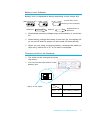
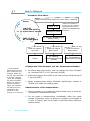
§3 How to Measure - Procedure Flow Chart Push and hold the switch for more than 1 second Pause Power is on ON/OFF Press and hold for more than 1 second FAST/SLOW/ Air Temperature Display all items *When the power is turned on, air velocity measurement mode (FAST) is automatically selected. Air Velocity Measurement Mode (FAST) Slide the switch up once Slide the switch down once Slide the switch down twice Pause Air Velocity Measurement Mode (SLOW) Air Temperature Measurement Mode <Change the Time Constant (Air Vel. Measurement Mode)> *Time Constant determines the time span of the moving average. When you set the Time Constant to a larger (longer) value, the readings will become stable. When you select a smaller (shorter) value, the readings will become more responsive and sensitive to the change in air velocity. 10 By sliding down the switch, you can change the Time Constant to 1 second (FAST) or to 5 seconds (SLOW). When the power is turned off, it will return to the initial setting of 1 second (FAST). When measurement values fluctuate significantly, setting to “SLOW” will make the reading easy. <Measurement of Air temperature> Turn the power on and slide the switch down twice to enter Air Temperature Measurement Mode. Do not make a measurement immediately after the mode change. Especially, when no airflow is present (wind-speed of 0.1m/s or lower), wait for at least 30 seconds before taking a measurement. How to Measure