1
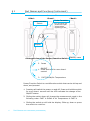
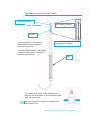
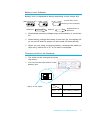
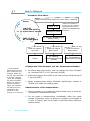
§1 Part Names and Functions (Instrument) Part Names and Functions (Main Body) <Side> <Front> Power/Function Switch <Back> Probe Connector *Do not leave the probe inlet open except when replacing probe. Display <Enlarged view of the Power/Function Switch> Battery Case 3. Pause ON/OFF 1. Press and hold for more than 1 second. 2. FAST/SLOW/Air Temperature Power/Function Switch is a multifunction switch that can be slid up and down, and pressed. 1. Pressing will switch the power on and off. Press and hold the switch for more than 1 second until the LED indicates the change of the ON/OFF status. 2. Sliding the switch down will change the measurement mode in the following order: FAST SLOW Air Temperature FAST 3. Sliding the switch up will hold the display. Slide up, down or press the switch to continue. 6 Part Names and Functions (Instrument)