1
§5
Troubleshooting
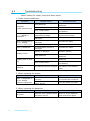
Before asking for repair, check the items below.
1. Under normal conditions:
Problems
No power.
(LCD remains unlit)
Possible Cause
Dead batteries.
Replace them with new
batteries.
Wrong battery polarity.
Insert them correctly.
Dirty contact point.
“----” (OVER) is
displayed.
“E01” is displayed or
“0.00” display
remains unchanged.
“E02” is displayed.
Used beyond the
measurement range.
Air velocity sensor is
damaged.
Air velocity sensor is
damaged.
Contact the dealer.
Contact the dealer.
Contact the dealer.
Air temperature sensor is
damaged.
Contact the dealer.
Display is “paused”.
Release “pause”.
Weak batteries.
Unit of the readings is
different.
Clean the contact point of
the battery.
Use it within the
measurement range.
Probe cable is damaged.
Display frozen.
Display goes on and
off.
Corrective Action
Weak batteries.
Dirty contact point.
Unit setting has been changed.
Replace them with new
batteries.
Replace them with new
batteries.
Clean the contact point of
the battery.
Change the unit using the
dip switch in the battery
case.
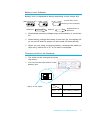
2. When replacing the probe:
Problem
“E01” is displayed or
“0.00” display
remains unchanged.
Possible Cause
Connector is not connected
correctly.
Probe was replaced while the
power was on.
Corrective Action
Turn the power off and
re-connect the connector.
Turn the power on again.
3. When replacing the batteries:
Problem
No power.
12
Troubleshooting
Possible Cause
Batteries were replaced while
the power was on.
Corrective Action
Remove all the batteries
and insert them again.