1
3
GETTING TO KNOW YOUR SECURITY SYSTEM
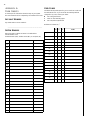
The dealer or installer may have already discussed the details of
your system with you. Record your system details in the User
Sheets located in Appendix A.
Overview
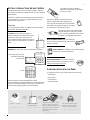
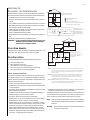
Your security system is made up of different parts. Each plays a
special role in the system’s operation:
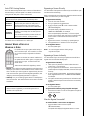
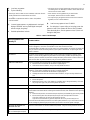
The panel is at the heart of your system. It
stores the intelligence to monitor all the sensors
and devices in the system. The panel is the
piece of equipment that activates sirens and initiates a call to the central station in an alarm situation.
S y s t e m
2
A rm
T u rn C H IM E O n / O ff
1
2
3
A rm
1
2
3
1
to S T A Y
A r m s y s t e m t o d e s ir e d le v e l.
P re ss B Y P A S S + C O D E + S e n so r N o .
1
C lo s e a ll p r o te c t e d d o o r s a n d w in d o w s .
P re ss 2 + C O D E .
P r e s s 4 t o a r m d e la y d o o r s in s t a n t ly ,
if d e s ir e d .
A
M a k e s u r e s y s t e m is d is a r m e d .
P re ss 7 + 1 to tu rn C H IM E o n o r o ff.
2
P ro g ra m
1
2
to A W A Y
C lo s e a ll p r o te c t e d d o o r s a n d w in d o w s .
P re ss 3 + C O D E .
E x it p r e m is e s th r o u g h d e la y d o o r .
Z o n e /S e n so r N u m b e r
0 1
0 2
0 3
0 4
0 5
0 6
0 7
Or this:
Test System Weekly
Q u ic k G u id e
D is a r m S y s te m / C a n c e l A la r m
B y p a ss S e n so rs
P re ss 1 + C O D E .
B
C
Off
Stay
D
Stay
A Y
A W
3
6
S T
A Y
B Y
B Y
P A
S S
9
2
5
O F
F
0
C O
M M
A N
D
8
1
D E
L A
Y
4
N O
E
C H
IM
S T
7
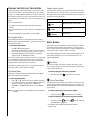
Motion detectors in hallways or rooms detect a person
moving across the field of detection.
Away
1
2
3
No Delay
Silent
Pager
4
5
6
Features
System
Menu
7
8
9
Status
Lights
Bypass
*
0
#
press both
1 0
1 1
1 2
1 3
1 4
Off
Wireless panic button touchpads are dedicated to sending one signal only—usually a
Police or Auxiliary panic alarm. Panic button
touchpads are usually kept near the user.
is O K
press both
0 8
A
The installer can program the keychain touchpad
to send a Police or Auxiliary panic alarm.
press both
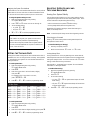
U s e r S e ttin g s
M a k e s u r e s y s t e m is d is a r m e d .
P r e s s A o r B t o s c r o ll th r o u g h m e n u s .
P r e s s # t o s e le c t o p tio n o r a c c e p t e n t r y .
P re ss
t o d e s e le c t o p t io n o r c a n c e l e n t r y .
P re ss 1 fo r O F F ; p re ss 2 fo r O N ;
p r e s s 0 - 9 f o r o t h e r e n t r ie s .
0 9
Test System Weekly
Keychain touchpads are also wireless and are
handy for simple arming and disarming functions. Keychain touchpads can be carried off-site.
Door and window sensors protect the perimeter
of your home by alerting the panel when a door or
window is opened.
Touchpads are used to arm, disarm, and program your system.
Your system may use a wallmounted touchpad that
looks like this:
S T
A T
U S
This manual describes how to operate your system. It describes
basic arming and disarming commands as well as how to program
system features.
Your system may also use wireless,
handheld touchpads that can be carried
from room to room.
COMMUNICATING WITH THE PANEL
Away
1
2
3
No Delay
Silent
Pager
4
5
6
Features
System
Environmental sensors such as smoke and heat
detectors remain alert for the presence of fire or
carbon monoxide 24 hours a day.
press both
B
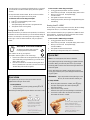
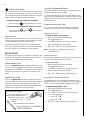
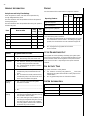
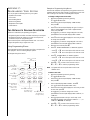
Your system can be set up to communicate with you through:
press both
C
Menu
7
8
9
Status
Lights
Bypass
*
0
#
press both
D
• Status beeps
• Alarm sirens
The first touchpad is called a fixed English touchpad.
It communicates by using lighted text and an 11-character display.
The second touchpad is called an alphanumeric touchpad and
communicates by displaying text on a two-line display.
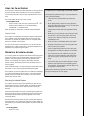
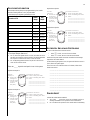
A s e n s o r is a c tiv a te d .
T h e s e n s o r a le r t s t h e
p a n e l im m e d ia t e ly .
• Touchpad text
• Pager information
T h e p a n e l a c tiv a te s s ir e n s . If t h e
s y s te m is m o n ito r e d , th e p a n e l
c a lls t h e c e n t r a l m o n it o r in g s t a t io n .
T h is d e c is io n is b a s e d o n s y s t e m
p r o g r a m m in g a n d th e c u r r e n t
a r m in g le v e l.
T h e c e n tr a l m o n ito r in g s ta t io n
o p e r a t o r r e p o r t s t h e a la r m t o
t h e p o lic e o r fir e d e p a r t m e n t .