1
Laboratory Exercise #2
3
the system build process. You may use the ‘mkdir’ command in an open terminal to create a
directory.
(b) Next, type the following commands in the terminal window:
>source /homes/faculty/shared/ECEN449/settings.csh
>xps
The former will setup the environment for XPS and kermit, a serial console required for lab this
week.
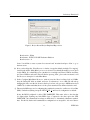
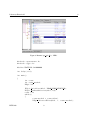
(c) Once XPS comes up, select ‘Base System Builder wizard’ in first prompt (Figure 2). Hit ‘OK’
to continue.
Figure 2: Begin Base System Builder
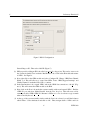
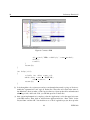
(d) In the next window (Figure 3), define the ‘Project file’ as “system.xmp” within your project
directory created in step 1(a).
(e) In the same window, check ‘Set Project Peripheral Repositories’ and hit ‘Browse’ to set
/homes/faculty/shared/ECEN449/EDK-XUPV5-LX110T-Pack/lib
as the project peripheral repositories for this lab. Hit ‘OK’ to proceed.
(f) At this point, the BSB welcome window appears. Select ‘I would like to create a new design’
and hit ‘Next’ to start BSB with a blank design.
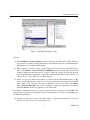
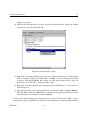
(g) The ‘Select Board’ window (Figure 4) will now come up. Set the following fields before continuing:
ECEN 449
3