1
Rotating screen when sampling
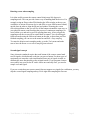
It is often useful to rotate the remote control skin/screen 180 degrees in
sampling mode. This can provide a better way of handling both the devices. For
example, using an iPaq or other PDA that has the IrDA window at the top you
would have to orient at least one device (the PDA or your OEM remote control)
upside down in order to align the IR port and window. Rotating the screen
solves this problem so that you will see all the buttons oriented the same way as
your physical remote control making the process of continuous sampling a lot
easier on the eyes and neck as well as speeding data entry. After you quit the
sampling mode the screen will be rotated back to normal. You can still toggle
fullscreen mode using the fullscreen button on the skin, so that when you have
finished sampling you can access the menu bar and Edit->Stop sampling.
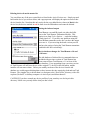
To rotate the skin/screen in sampling mode, go to the Tools menu and make
sure to have the Rotate screen when sampling item selected.
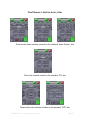
Second signal concept
Some electronic standards require that each button of the remote control send
two IR signals, which alternate each time you press a button. For these types of
equipment you can make each virtual button learn a pair of signals in order to
maintain the same functionality as the original remote. If you program a button
successfully into your Pocket PC and it works once and only once, you need to
sample a second signal.
If you are certain that your remote control does not support two signals for each button, you may
skip the second signal sampling and tap Finish right after sampling the first one.
Total Remote v1.1x desktop user manual
Page 9