1
Operations
Methods to Charge Battery:
1. Connect DVR to car charger through Mini-USB port, DVR powers
on automatically to enter standby mode and start charging with red
indicator light ON.
Once DVR been fully charged, red indicator light goes out.
2. Connect DVR to computer via USB cable, DVR power on automatically to enter mode choice between ‘Mass Storage (MSDC)’ and ‘PCCam’, press ‘UP’/’DOWN’ to choose the desired mode and ‘REC/OK’
button to enter your choice and start charging.
Once DVR been fully charged, red indicator light goes out.
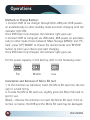
For the power capacity in the battery, refer to the following icons:
Full
Middle
Low
Installation and Removal of Micro SD card
1. In the direction as indicated, insert the Micro SD card into the slot
until it is held firmly.
2. To take the Micro SD card out, slightly press the Micro SD card to
eject it out.
[Note] - Observe the direction to insert the Micro SD card; if the direction is reverse, the DVR and the Micro SD card may be damaged.
6
RVS SYSTEMS