1
1.2
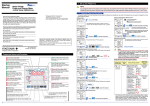
2. Setting the VT and CT Ratios
Setting the Voltage Range
This section explains how to set the voltage range by taking as an example the case when the voltage range is changed from 300 V to 600 V.
Voltage Range Setting screen
Startup screen
Pressing
once causes all digits of the setpoint
to start blinking. Pressing
once again confirms
the setpoint and returns to the Voltage Range
screen.
The voltage range thus set is shown as the current
value.
Turn on the PR300.
1
Measured Value screen
The PR300 shows the station number for about 5
seconds, then the Measured Value screen * appears.
2
Hold down
When proceeding to set the phase and wire system,
press
or
to show the Phase and Wire
System screen, with this screen (figure on the left)
shown as is. After showing the Phase and Wire
System screen, start from step 6 in Section 1.1,
“Setting the Phase and Wire System.”
The parameter
10
(VT ratio) appears.
Hold down
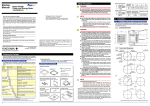
Setting the VT Ratio
This section explains how to set the VT ratio by taking as an example the
case when the VT ratio is changed from the initial value (1) to 4.
Prior to proceeding to the following steps, ensure that the PR300 is turned
on, and the Measured Value screen is displayed.
3
and
Using
or
the lower display.
, show
The parameter
1
The parameter
NOTE
3
2
Press
once.
VT Ratio Setting screen
The screen changes to the one for setting the
parameter
and the alterable digit blinks.
Range of Voltage Range Options
5
Press
once.
Setting
Type
Selection
Phase and Wire System screen
The Phase and Wire System screen appears.
Setting Range (Details)
150V
Initial Value
(Factory-set
Value)
3
6
, show the Voltage
4
Voltage Range screen
The Voltage Range screen appears.
Voltage range
Parameter symbol for voltage range
Current value
7
Press
* The initial value of the Measured Value screen (display pattern) is Upper
display: Current (phase switch indication), Middle display: Voltage (phase
switch indication), and Lower display: Active power. For the display
pattern setting procedures, refer to the PR300 Power and Energy Meter
User's Manual (IM 77C01E01-01E) provided on the accompanying CD.
or
, change the setpoint.
Press
To move the decimal point, use the following keys:
To the left
To the right
Press
5
Using
4
Press
VT Ratio Setting screen
Pressing
once causes all digits of the setpoint to
start blinking. Pressing
once again confirms the
setpoint and returns to the VT Ratio screen.
To re-set the parameter:
Press any key other than
6
Press
, change the voltage
Voltage Range Setting screen
2
Press
twice to confirm the setpoint.
CT Ratio Setting screen
Pressing
once causes all digits of the setpoint to
start blinking. Pressing
once again confirms the
setpoint and returns to the CT Ratio screen.
To re-set the parameter:
.
If you do not operate any key for more than 5
minutes on the Parameter screen, the PR300
automatically returns to the Measured Value screen.
Press any key other than
while all digits of the setpoint are
blinking. The PR300 returns to the initial setting screen.
CT Ratio screen
To return to the Measured Value screen, hold down
Setting completed.
9
, change the setpoint.
To move to the digit to be changed, use the following
keys:
To the left
To the right
twice to confirm the setpoint.
To return to the Measured Value screen, hold down
Setpoint
8
or
VT Ratio screen
once.
or
once to fix the position of the decimal point.
CT Ratio Setting screen
while all digits of the setpoint are blinking.
The PR300 returns to the initial setting screen.
Voltage Range Setting screen
The Voltage Range Setting screen appears.
Using
range.
once.
CT Ratio Setting screen
The alterable digit blinks.
To move to the digit to be changed, use the following
keys:
To the left
To the right
300V
600V
Using
(CT ratio) appears.
VT Ratio Setting screen
300V
Using
or
Range screen.
once.
CT Ratio Setting screen
The screen changes to the one for setting the parameter
. The lower display shows the current value and the
decimal point blinks.
Setpoint
Parameter Symbol
Parameter Name
(VT ratio) appears.
Current value
(VT ratio) appears.
Current value
•The voltage range of single-phase three-wire system is fixed at
300V (between P0 and P1, P0 and P2). The voltage range
cannot be selected.
•For the voltage range of three-phase four-wire system, set the
voltage between P0 and P1, P0 and P2, P0 and P3.
Press
The parameter
for at least 3 seconds.
Setting completed.
Specification Change Confirmation screen
for at least 3 seconds.
CT Ratio screen
Hold down
VT Ratio screen
on
Hold down
VT Ratio screen
2
,
for at least 3 seconds.
Specification Change Confirmation screen
The Specification Change Confirmation screen
appears.
4
1
for at least 3 seconds.
Measured Value screen
The PR300 shows the Startup screen for about 5
seconds, then the Measured Value screen appears.
Simultaneously hold down
Setting the CT Ratio
This section explains how to set the CT ratio by taking as an example the
case when the CT ratio is changed from the initial value (1.00) to 10.00.
Prior to proceeding to the following steps, ensure that the PR300 is turned
on, and the Measured Value screen is displayed.
Measured Value screen
Measured Value screen
Current value
VT Ratio screen
Set the VT and CT ratios so that the value of “secondary rated
power ⴛ VT ratio ⴛ CT ratio” is smaller than 10 GW. If this value
exceeds 10 GW, the updated VT or CT ratio will not be
incorporated but revert to the current value before change.
2.1
Voltage Range screen
for at least 3 seconds.
NOTE
2.2
.
If you do not operate any key for more than 5
minutes on the Parameter screen, the PR300
automatically returns to the Measured Value screen.
When proceeding to set the CT ratio, press
once
and start from step 3 in Section 2.2, “Setting the CT Ratio.”
Parameter Setting Types and Ranges
twice to confirm the setpoint.
Initial Value
Parameter Symbol
Setting Type Setting Range (Details) (Factory-set
Parameter Name
Value)
Integral
numeric
1
1 to 6000
VT ratio
value
Setting completed.
Parameter Setting Types and Ranges
Parameter Symbol
Parameter Name
Setting
Type
CT ratio
Floating-point
numeric
value
Initial Value
Setting Range (Details) (Factory-set
Value)
0.05 to 32000
IM 77C01E01-03E
1.00
1st Edition Feb. 13, 2006-00