1
Troubleshoot
1. FP will not start up.
307
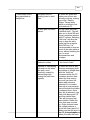
Previous version was not
uninstalled before this
installation.
Uninstall by going to
Add/Remove Programs in
the control panel,
selecting Proplanner
AutoCAD Programs and
selecting remove. When
done, install from the disk.
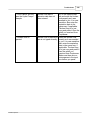
If using the stand-alone
version that comes with
AutoCAD included,
“Supplemental” Install was
not performed.
This setup file can be
found on the install disk in
a folder titled
“Supplemental”
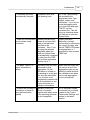
Microsoft .NET version
1.1 may not be installed
on your computer.
There is a folder titled
“Microsoft .NET Install” on
the install disk. The setup
file is called “dotnetfx.exe”
If using an older version of
our software, this folder
may not be there. In that
case, this file can be
downloaded and
automatically installed by
going to Windows Update
which can most commonly
be reached by clicking a
link in the Control Panel or
by going to Microsoft.com.
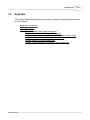
The menu bar was not
installed.
For the 2002 to 2005
versions of AutoCAD, Go
to Tools\VBA Manager
and load
MENULOAD.dvb. Go to
Tools\Macros and run the
addtoolbar macro.
For the 2006 or higher
versions of AutoCAD or
AutoCAD Engine, type
"cuiload" in the command
line, then load "PP.cui"
from proplanner install
fold.
© 2006 Proplanner
More detailed steps can
be found in the Install
guide on the Proplanner
AutoCAD Programs disk.