1
TABLE OF CONTENTS
The Installation and User's Guide of this Swiid® Cord Switch Set has a separate section for
each of the three devices it contains namely :
1. The Swiid® cord switch,
2. The wall controller switch (a Z-Wave>Me™ product), and
3. The Swiid® adapter plug
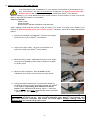
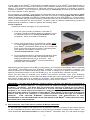
NOTE : If you intend to use your Swiid® Cord Switch Set without changing its setup, all you
need to know is contained in the Chapters 3 and 4 of Sections I-III.
SECTION I – SWiiD® CORD SWITCH
1.
Specifications ............................................................................................................. 4
2.
Key features .............................................................................................................. 4
3.
Installation of the cord switch ..................................................................................... 5
4.
Operating the cord switch .......................................................................................... 6
5.
Inclusion of the cord switch into a Z-Wave® network .................................................. 6
6.
Exclusion of the cord switch from a Z-Wave® network ................................................ 7
7.
Cord switch associations ........................................................................................... 8
8.
Resetting the cord switch ........................................................................................... 9
9.
Advanced settings ..................................................................................................... 9
SECTION II – WALL CONTROLLER SWITCH (a Z-Wave>Me™ product)
1.
Specifications .............................................................................................................10
2.
Key features ..............................................................................................................10
3.
Installation of the wall controller switch ......................................................................10
4.
Operating the wall controller switch ............................................................................11
5.
Primary or secondary Z-Wave® controller ? ................................................................11
6.
The wall controller switch as a primary Z-Wave® controller ........................................12
7.
8.
The wall controller switch as a secondary Z-Wave® controller ....................................14
Wall controller switch associations .............................................................................15
9.
Resetting the wall controller switch ............................................................................16
10. Advanced settings .....................................................................................................16
SECTION III – SWiiD® ADAPTER PLUG
1.
Specifications .............................................................................................................18
2.
Key features ..............................................................................................................18
3.
Installation of the adapter plug ...................................................................................18
4.
Operating the adapter plug ........................................................................................18
5.
6.
Inclusion of the adapter plug into a Z-Wave® network ................................................19
Exclusion of the adapter plug from a Z-Wave® network ..............................................20
7.
Adapter plug associations ..........................................................................................20
8.
Resetting the adapter plug .........................................................................................20
SECTION IV – GENERAL
1.
What is Z-Wave® ? .....................................................................................................21
2.
Warranty ....................................................................................................................21
3.
Swiid® / CBCC Domotique SAS .................................................................................22
-3-