1
by the traffic signal control equipment. Simultaneously, the
traffic signal control equipment uses the detector signals
generated by the simulation to update its control logic (see
Figure 2(a)) [5]. HILS has been used in the past to interface
with traffic signal control equipment for testing purposes;
however, previous systems focused on testing intersection
control software. The simulation time step used in these
systems is on the order of seconds, and equipment is used
primarily to simulate loop detector signals used by traffic
controllers to determine car presence and a rough estimate
of occupancy [6], [7]. The tool presented in this paper is
primarily designed to generate, through simulation, traffic
detector signals for an on-ramp/freeway system (see Figure
3(b)) with sufficient resolution to allow the 2070 controller
to accurately calculate volume, occupancy, and speed.
The HILS system presented in this paper has three basic
components: 1) a controller interface device (CID), 2) a
software interface module, and 3) a microscopic simulation
engine. A description of each component is presented below.
a)
Computer
2070 Controller
Controller Interface Device (CID)
The custom made circuit was designed to interface the 5Volt TTL logic from the digital I/O board to the 2070 controller. This circuit was built using a modular IC breadboard
socket, SN706 TTL hex inverter buffers/drivers with opencollector high-voltage outputs, one 7805A voltage regulator,
and a 12-Volt power supply.
Two main goals of the CID design stage were portability
and low cost. The portability was ensured with the use of a
small USB DIO board that can be used in most personal
computers. The low cost was achieved by using one of
the cheapest data acquisition boards on the market. The
components to build the CID presented in this paper cost
less than 200 U.S. dollars.
B. Software Interface Module
The software interface model provides the linkage between
the CID and the traffic simulation program. The NI USB6501 board used to build the CID comes with drivers that
can be used to develop customized applications using NI
LabVIEW. These drivers serve as the software interface
module, and do not require any modification when used in
the HILS tool.
Detector
States
Detector
States
C. Microscopic Simulation Engine
Phase
States
Phase
States
b)
2070 Controller
running the URMS
CID
Computer running Simulation Tool
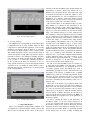
Fig. 2. (a) On-ramp simulation tool architecture (b) On-ramp simulation
tool setup
The simulation engine was developed using the NI LabVIEW development environment. Before deciding to create a
custom traffic microscopic simulator, commercial simulator
packages were considered. However, the time steps used in
these simulators were not low enough for the resolution desired for this application, e.g. CORSIM uses a 1 second time
step while VISSIM can not go lower than 100 milliseconds.
This limitation was one reason for developing a microscopic
simulation specifically for an on-ramp/freeway system with a
time step between 1 and 10 milliseconds. Another reason was
to have the flexibility to customize the simulation engine to
complement some features of the URMS, e.g. configuration
and testing menus.
A. Computer Interface Device (CID)
This device provides the interface from the 2070 traffic
controller to the personal computer running the traffic simulation. The CID has two main elements: 1) the NI USB-6501
device and 2) a custom electronic circuit.
The NI USB-6501 is a portable digital Input/Output device, which provides data acquisition and control capabilities.
With plug-and-play USB connectivity, the NI USB-6501 is
very versatile and can be used in most personal computers.
The NI USB-6501 has 24 single-ended digital lines, which
comprise three DIO ports. In this tool, two ports are configured to generate detector signals and one port is used to
read the phase states output from the controller. This device
was chosen because of its low price, portability, and because
when used with LabVIEW, it provides a straightforward
procedure to interface with the simulation engine. Signals
can be sent and received using LabVIEW standard functions
that can easily be accessed from the simulation.
a)
b)
Traffic Light State
(available from 2070 Controller)
LO
TO
Q
On-ramp Demand
(data available from D4)
P D
Legend:
T1
L1
T2
L2
T3
L3
T4
L4
Detection Station
(data available from PeMS)
L = Leading Detector
T = Trailing Detector
P = Passage Detector
D = Demand Detector
LO = On-ramp Leading Detector
TO = On-ramp Trailing Detector
Q = Queue Detector
Fig. 3.
(a) Hegenberger Rd. loop on-ramp to 880 southbound (b)
Hegenberger on-ramp/mainline layout used for the simulation tool