1
Chapter 6: Maintenance
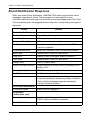
Replace SEP
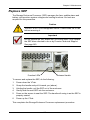
The Storage Enclosure Processor (SEP) manages the fans, audible alarm and
battery, and monitors system voltages and cooling functions. No tools are
required for this procedure.
Caution
The SEP is NOT a hot-swappable device. Power-down the VTrak
before removing it.
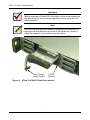
Important
Do not replace the SEP based on LED colors alone. Only replace
the SEP when directed to do so by Promise Technical Support.
See page 243.
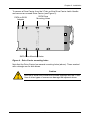
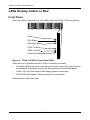
Function LEDs
Release Handle
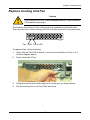
To remove and replace the SEP, do the following:
1.
Power down the VTrak.
2.
Grasp the handle and pull it toward you (above).
3.
Holding the handle, pull the SEP out of the enclosure.
4.
Gently slide the new SEP into the enclosure.
5.
Press on the screen to seat the SEP. The handle will swing in as the SEP is
properly seated.
6.
Power up the VTrak.
This completes the Storage Enclosure Processor replacement procedure.
203