1
Bright Cluster Manager 7.1
User Manual
Revision: 6743
Date: Thu, 19 Nov 2015
©2015 Bright Computing, Inc. All Rights Reserved. This manual or parts thereof may not be reproduced
in any form unless permitted by contract or by written permission of Bright Computing, Inc.
Trademarks
Linux is a registered trademark of Linus Torvalds. PathScale is a registered trademark of Cray, Inc. Red
Hat and all Red Hat-based trademarks are trademarks or registered trademarks of Red Hat, Inc. SUSE
is a registered trademark of Novell, Inc. PGI is a registered trademark of NVIDIA Corporation. FLEXlm
is a registered trademark of Flexera Software, Inc. ScaleMP is a registered trademark of ScaleMP, Inc.
All other trademarks are the property of their respective owners.
Rights and Restrictions
All statements, specifications, recommendations, and technical information contained herein are current
or planned as of the date of publication of this document. They are reliable as of the time of this writing
and are presented without warranty of any kind, expressed or implied. Bright Computing, Inc. shall
not be liable for technical or editorial errors or omissions which may occur in this document. Bright
Computing, Inc. shall not be liable for any damages resulting from the use of this document.
Limitation of Liability and Damages Pertaining to Bright Computing, Inc.
The Bright Cluster Manager product principally consists of free software that is licensed by the Linux
authors free of charge. Bright Computing, Inc. shall have no liability nor will Bright Computing, Inc.
provide any warranty for the Bright Cluster Manager to the extent that is permitted by law. Unless
confirmed in writing, the Linux authors and/or third parties provide the program as is without any
warranty, either expressed or implied, including, but not limited to, marketability or suitability for a
specific purpose. The user of the Bright Cluster Manager product shall accept the full risk for the quality or performance of the product. Should the product malfunction, the costs for repair, service, or
correction will be borne by the user of the Bright Cluster Manager product. No copyright owner or
third party who has modified or distributed the program as permitted in this license shall be held liable
for damages, including general or specific damages, damages caused by side effects or consequential
damages, resulting from the use of the program or the un-usability of the program (including, but not
limited to, loss of data, incorrect processing of data, losses that must be borne by you or others, or the
inability of the program to work together with any other program), even if a copyright owner or third
party had been advised about the possibility of such damages unless such copyright owner or third
party has signed a writing to the contrary.
Table of Contents
1
2
3
4
Table of Contents . . . . . . . . . . . . . . . . . . . . . . . . . . . . . . . . . . . . . . . . . . . . .
0.1 About This Manual . . . . . . . . . . . . . . . . . . . . . . . . . . . . . . . . . . . . . . . . .
0.2 Getting User-Level Support . . . . . . . . . . . . . . . . . . . . . . . . . . . . . . . . . . . .
i
v
v
Introduction
1.1 What Is A Beowulf Cluster? . . . . . . . . . . . . .
1.1.1 Background And History . . . . . . . . . .
1.1.2 Brief Hardware And Software Description
1.2 Brief Network Description . . . . . . . . . . . . . .
.
.
.
.
.
.
.
.
.
.
.
.
.
.
.
.
.
.
.
.
.
.
.
.
.
.
.
.
.
.
.
.
.
.
.
.
.
.
.
.
.
.
.
.
.
.
.
.
.
.
.
.
.
.
.
.
.
.
.
.
.
.
.
.
.
.
.
.
.
.
.
.
.
.
.
.
.
.
.
.
.
.
.
.
.
.
.
.
.
.
.
.
1
1
1
1
2
Cluster Usage
2.1 Login To The Cluster Environment . . . . .
2.2 Setting Up The User Environment . . . . .
2.3 Environment Modules . . . . . . . . . . . .
2.3.1 Available commands . . . . . . . . .
2.3.2 Changing The Current Environment
2.3.3 Changing The Default Environment
2.4 Compiling Applications . . . . . . . . . . .
2.4.1 Open MPI And Mixing Compilers .
.
.
.
.
.
.
.
.
.
.
.
.
.
.
.
.
.
.
.
.
.
.
.
.
.
.
.
.
.
.
.
.
.
.
.
.
.
.
.
.
.
.
.
.
.
.
.
.
.
.
.
.
.
.
.
.
.
.
.
.
.
.
.
.
.
.
.
.
.
.
.
.
.
.
.
.
.
.
.
.
.
.
.
.
.
.
.
.
.
.
.
.
.
.
.
.
.
.
.
.
.
.
.
.
.
.
.
.
.
.
.
.
.
.
.
.
.
.
.
.
.
.
.
.
.
.
.
.
.
.
.
.
.
.
.
.
.
.
.
.
.
.
.
.
.
.
.
.
.
.
.
.
.
.
.
.
.
.
.
.
.
.
.
.
.
.
.
.
.
.
.
.
.
.
.
.
.
.
.
.
.
.
.
.
.
.
.
.
.
.
.
.
3
3
4
4
4
5
6
7
8
Using MPI
3.1 Interconnects . . . . . . . . . . . . . . . . . . . . . .
3.1.1 Gigabit Ethernet . . . . . . . . . . . . . . .
3.1.2 InfiniBand . . . . . . . . . . . . . . . . . . .
3.2 Selecting An MPI implementation . . . . . . . . .
3.3 Example MPI Run . . . . . . . . . . . . . . . . . . .
3.3.1 Compiling And Preparing The Application
3.3.2 Creating A Machine File . . . . . . . . . . .
3.3.3 Running The Application . . . . . . . . . .
3.3.4 Hybridization . . . . . . . . . . . . . . . . .
3.3.5 Support Thread Levels . . . . . . . . . . . .
3.3.6 Further Recommendations . . . . . . . . .
.
.
.
.
.
.
.
.
.
.
.
.
.
.
.
.
.
.
.
.
.
.
.
.
.
.
.
.
.
.
.
.
.
.
.
.
.
.
.
.
.
.
.
.
.
.
.
.
.
.
.
.
.
.
.
.
.
.
.
.
.
.
.
.
.
.
.
.
.
.
.
.
.
.
.
.
.
.
.
.
.
.
.
.
.
.
.
.
.
.
.
.
.
.
.
.
.
.
.
.
.
.
.
.
.
.
.
.
.
.
.
.
.
.
.
.
.
.
.
.
.
.
.
.
.
.
.
.
.
.
.
.
.
.
.
.
.
.
.
.
.
.
.
.
.
.
.
.
.
.
.
.
.
.
.
.
.
.
.
.
.
.
.
.
.
.
.
.
.
.
.
.
.
.
.
.
.
.
.
.
.
.
.
.
.
.
.
.
.
.
.
.
.
.
.
.
.
.
.
.
.
.
.
.
.
.
.
.
.
.
.
.
.
.
.
.
.
.
.
.
.
.
.
.
.
.
.
.
.
.
.
.
.
.
.
.
.
.
.
.
.
.
.
.
.
.
.
.
.
.
.
.
.
9
9
10
10
10
10
10
11
11
13
15
15
.
.
.
.
.
.
.
.
17
17
17
17
18
18
18
19
19
.
.
.
.
.
.
.
.
.
.
.
.
.
.
.
.
.
.
.
.
.
.
.
.
Workload Management
4.1 What Is A Workload Manager? . . . . . . . . . . . . . . . . . .
4.2 Why Use A Workload Manager? . . . . . . . . . . . . . . . . .
4.3 How Does A Workload Manager Function? . . . . . . . . . . .
4.4 Job Submission Process . . . . . . . . . . . . . . . . . . . . . . .
4.5 What Do Job Scripts Look Like? . . . . . . . . . . . . . . . . . .
4.6 Running Jobs On A Workload Manager . . . . . . . . . . . . .
4.7 Running Jobs In Cluster Extension Cloud Nodes Using cmsub
4.8 Configuring Passwordless Login To Cloud Nodes . . . . . . .
.
.
.
.
.
.
.
.
.
.
.
.
.
.
.
.
.
.
.
.
.
.
.
.
.
.
.
.
.
.
.
.
.
.
.
.
.
.
.
.
.
.
.
.
.
.
.
.
.
.
.
.
.
.
.
.
.
.
.
.
.
.
.
.
.
.
.
.
.
.
.
.
.
.
.
.
.
.
.
.
.
.
.
.
.
.
.
.
.
.
.
.
.
.
.
.
.
.
.
.
.
.
.
.
.
.
.
.
.
.
.
.
.
.
.
.
.
.
.
.
ii
5
6
7
8
Table of Contents
Slurm
5.1 Loading Slurm Modules And Compiling The Executable
5.2 Running The Executable With salloc . . . . . . . . . . .
5.2.1 Node Allocation Examples . . . . . . . . . . . . .
5.3 Running The Executable As A Slurm Job Script . . . . . .
5.3.1 Slurm Job Script Structure . . . . . . . . . . . . . .
5.3.2 Slurm Job Script Options . . . . . . . . . . . . . .
5.3.3 Slurm Environment Variables . . . . . . . . . . . .
5.3.4 Submitting The Slurm Job Script . . . . . . . . . .
5.3.5 Checking And Changing Queued Job Status . . .
SGE
6.1 Writing A Job Script . . . . . . . . . . . .
6.1.1 Directives . . . . . . . . . . . . .
6.1.2 SGE Environment Variables . . .
6.1.3 Job Script Options . . . . . . . .
6.1.4 The Executable Line . . . . . . .
6.1.5 Job Script Examples . . . . . . .
6.2 Submitting A Job . . . . . . . . . . . . .
6.2.1 Submitting To A Specific Queue
6.3 Monitoring A Job . . . . . . . . . . . . .
6.4 Deleting A Job . . . . . . . . . . . . . . .
.
.
.
.
.
.
.
.
.
.
.
.
.
.
.
.
.
.
.
.
.
.
.
.
.
.
.
.
.
.
.
.
.
.
.
.
.
.
.
.
.
.
.
.
.
.
.
.
.
.
.
.
.
.
.
.
.
.
.
.
.
.
.
.
.
.
.
.
.
.
.
.
.
.
.
.
.
.
.
.
.
.
.
.
.
.
.
.
.
.
.
.
.
.
.
.
.
.
.
.
.
.
.
.
.
.
.
.
.
.
.
.
.
.
.
.
.
.
.
.
.
.
.
.
.
.
.
.
.
.
.
.
.
.
.
.
.
.
.
.
.
.
.
.
.
.
.
.
.
.
.
.
.
.
.
.
.
.
.
.
.
.
.
.
.
.
.
.
.
.
.
.
.
.
.
.
.
.
.
.
.
.
.
.
.
.
.
.
.
.
.
.
.
.
.
.
.
.
.
.
.
.
.
.
.
.
.
.
.
.
.
.
.
.
.
.
.
.
.
.
.
.
.
.
.
.
.
.
.
.
.
.
.
.
.
.
.
.
.
.
.
.
.
.
.
.
.
.
.
.
.
.
.
.
.
.
.
.
.
.
.
.
.
.
.
.
.
.
.
.
.
.
.
.
.
.
.
.
.
.
.
.
.
.
.
.
.
.
.
.
.
.
.
.
.
.
.
.
.
.
.
.
.
.
.
.
.
.
.
.
.
.
.
.
.
.
.
.
.
.
.
.
.
.
.
.
.
.
.
.
.
.
.
.
.
.
.
.
.
.
.
.
.
.
.
.
.
.
.
.
.
.
.
.
.
.
.
.
.
.
.
.
.
.
.
.
.
.
.
.
.
.
.
.
.
.
.
.
.
.
.
.
.
.
.
.
.
.
.
.
.
.
.
.
.
.
.
.
.
.
.
.
.
.
.
.
.
.
.
.
.
.
.
.
.
.
.
.
.
.
.
.
.
.
.
.
.
.
.
.
.
.
.
.
.
.
.
.
.
.
.
.
.
.
.
.
.
.
.
.
.
23
23
24
24
26
26
26
27
27
28
.
.
.
.
.
.
.
.
.
.
29
29
29
29
30
31
32
33
33
34
35
PBS Variants: Torque And PBS Pro
7.1 Components Of A Job Script . . . . . . . . . . . . . . . . . . . . . . . . . . . .
7.1.1 Sample Script Structure . . . . . . . . . . . . . . . . . . . . . . . . . .
7.1.2 Directives . . . . . . . . . . . . . . . . . . . . . . . . . . . . . . . . . .
7.1.3 The Executable Line . . . . . . . . . . . . . . . . . . . . . . . . . . . .
7.1.4 Example Batch Submission Scripts . . . . . . . . . . . . . . . . . . . .
7.1.5 Links To Other Resources About Job Scripts In Torque And PBS Pro
7.2 Submitting A Job . . . . . . . . . . . . . . . . . . . . . . . . . . . . . . . . . .
7.2.1 Preliminaries: Loading The Modules Environment . . . . . . . . . .
7.2.2 Using qsub . . . . . . . . . . . . . . . . . . . . . . . . . . . . . . . . .
7.2.3 Job Output . . . . . . . . . . . . . . . . . . . . . . . . . . . . . . . . . .
7.2.4 Monitoring A Job . . . . . . . . . . . . . . . . . . . . . . . . . . . . . .
7.2.5 Deleting A Job . . . . . . . . . . . . . . . . . . . . . . . . . . . . . . . .
7.2.6 Monitoring Nodes In Torque And PBS Pro . . . . . . . . . . . . . . .
.
.
.
.
.
.
.
.
.
.
.
.
.
.
.
.
.
.
.
.
.
.
.
.
.
.
.
.
.
.
.
.
.
.
.
.
.
.
.
.
.
.
.
.
.
.
.
.
.
.
.
.
.
.
.
.
.
.
.
.
.
.
.
.
.
.
.
.
.
.
.
.
.
.
.
.
.
.
.
.
.
.
.
.
.
.
.
.
.
.
.
.
.
.
.
.
.
.
.
.
.
.
.
.
37
37
38
38
41
41
43
43
43
44
44
44
47
47
Using GPUs
8.1 Packages . . . . . . . . . . . .
8.2 Using CUDA . . . . . . . . . .
8.3 Using OpenCL . . . . . . . . .
8.4 Compiling Code . . . . . . . .
8.5 Available Tools . . . . . . . .
8.5.1 CUDA gdb . . . . . .
8.5.2 nvidia-smi . . . . . . .
8.5.3 CUDA Utility Library
.
.
.
.
.
.
.
.
.
.
.
.
.
.
.
.
.
.
.
.
.
.
.
.
.
.
.
.
.
.
.
.
.
.
.
.
.
.
.
.
.
.
.
.
.
.
.
.
.
.
.
.
.
.
.
.
.
.
.
.
.
.
.
.
49
49
50
50
50
51
51
51
52
.
.
.
.
.
.
.
.
.
.
.
.
.
.
.
.
.
.
.
.
.
.
.
.
.
.
.
.
.
.
.
.
.
.
.
.
.
.
.
.
.
.
.
.
.
.
.
.
.
.
.
.
.
.
.
.
.
.
.
.
.
.
.
.
.
.
.
.
.
.
.
.
.
.
.
.
.
.
.
.
.
.
.
.
.
.
.
.
.
.
.
.
.
.
.
.
.
.
.
.
.
.
.
.
.
.
.
.
.
.
.
.
.
.
.
.
.
.
.
.
.
.
.
.
.
.
.
.
.
.
.
.
.
.
.
.
.
.
.
.
.
.
.
.
.
.
.
.
.
.
.
.
.
.
.
.
.
.
.
.
.
.
.
.
.
.
.
.
.
.
.
.
.
.
.
.
.
.
.
.
.
.
.
.
.
.
.
.
.
.
.
.
.
.
.
.
.
.
.
.
.
.
.
.
.
.
.
.
.
.
.
.
.
.
.
.
Table of Contents
8.5.4
8.5.5
9
iii
CUDA “Hello world” Example . . . . . . . . . . . . . . . . . . . . . . . . . . . .
OpenACC . . . . . . . . . . . . . . . . . . . . . . . . . . . . . . . . . . . . . . . . . .
Using MICs
9.1 Compiling Code In Native Mode . . . . .
9.1.1 Using The GNU Compiler . . . . .
9.1.2 Using Intel Compilers . . . . . . .
9.2 Compiling Code In Offload Mode . . . .
9.3 Using MIC With Workload Managers . .
9.3.1 Using MIC Cards With Slurm . . .
9.3.2 Using MIC Cards With PBS Pro . .
9.3.3 Using MIC Cards With TORQUE .
9.3.4 Using MIC Cards With SGE . . . .
9.3.5 Using MIC Cards With openlava
10 User Portal
10.1 Overview Page
10.2 Workload Page
10.3 Nodes Page . .
10.4 Hadoop Page .
10.5 OpenStack Page
10.6 Charts Page . .
.
.
.
.
.
.
.
.
.
.
.
.
.
.
.
.
.
.
.
.
.
.
.
.
.
.
.
.
.
.
.
.
.
.
.
.
.
.
.
.
.
.
.
.
.
.
.
.
.
.
.
.
.
.
.
.
.
.
.
.
.
.
.
.
.
.
.
.
.
.
.
.
.
.
.
.
.
.
.
.
.
.
.
.
.
.
.
.
.
.
.
.
.
.
.
.
.
.
.
.
.
.
.
.
.
.
.
.
.
.
.
.
.
.
.
.
.
.
.
.
.
.
11 Running Hadoop Jobs
11.1 What Is Hadoop About? . . . . . . . . . . . .
11.2 Preliminaries . . . . . . . . . . . . . . . . . . .
11.3 Managing Data On HDFS . . . . . . . . . . .
11.4 Managing Jobs Using YARN . . . . . . . . . .
11.5 Managing Jobs Using MapReduce . . . . . .
11.6 Running The Hadoop wordcount Example
11.7 Access To Hadoop Documentation . . . . . .
.
.
.
.
.
.
.
.
.
.
.
.
.
.
.
.
.
.
.
.
.
.
.
.
.
.
.
.
.
.
.
.
.
.
.
.
.
.
.
.
.
.
.
.
.
.
.
.
.
.
.
.
.
.
.
.
.
.
.
.
.
.
.
.
.
.
.
.
.
.
.
.
.
.
.
.
.
.
.
.
.
.
.
.
.
.
.
.
.
.
.
.
12 Running Spark Jobs
12.1 What Is Spark? . . . . . . . . . . . . . . . . . . . . . .
12.2 Spark Usage . . . . . . . . . . . . . . . . . . . . . . .
12.2.1 Spark And Hadoop Modules . . . . . . . . .
12.2.2 Spark Job Submission With spark-submit
.
.
.
.
.
.
.
.
.
.
.
.
.
.
.
.
.
.
.
.
.
.
.
.
.
.
.
.
.
.
.
.
.
.
.
.
.
.
.
.
.
.
.
.
.
.
.
.
.
.
.
.
.
.
.
.
.
.
.
.
.
.
.
.
.
.
.
.
.
.
.
.
.
.
.
.
.
.
.
.
.
.
.
.
.
.
.
.
.
.
.
.
.
.
.
.
.
.
.
.
.
.
.
.
.
.
.
.
.
.
.
.
.
.
.
.
.
.
.
.
.
.
.
.
.
.
.
.
.
.
.
.
.
.
.
.
.
.
.
.
.
.
.
.
.
.
.
.
.
.
.
.
.
.
.
.
.
.
.
.
.
.
.
.
.
.
.
.
.
.
.
.
.
.
.
.
.
.
.
.
.
.
.
.
.
.
.
.
.
.
.
.
.
.
.
.
.
.
.
.
.
.
.
.
.
.
.
.
.
.
.
.
.
.
.
.
.
.
.
.
.
.
.
.
.
.
.
.
.
.
.
.
.
.
.
.
.
.
.
.
.
.
.
.
.
.
.
.
.
.
.
.
.
.
.
.
.
.
.
.
.
.
.
.
.
.
.
.
.
.
.
.
.
.
.
.
.
.
.
.
.
.
.
.
.
.
.
.
.
.
.
.
.
.
.
.
.
.
.
.
.
.
.
.
.
.
.
.
.
.
.
.
.
.
.
.
.
.
.
.
.
.
.
.
.
.
.
.
.
.
.
.
.
.
.
.
.
.
.
.
.
.
.
.
.
.
.
.
.
.
.
.
.
.
.
.
.
.
.
.
.
.
.
.
.
.
.
.
.
.
.
.
.
.
.
.
.
.
.
.
.
.
.
.
.
.
.
.
.
.
.
.
.
.
.
.
.
.
.
.
.
.
.
.
.
.
.
.
.
.
.
.
.
.
.
.
.
.
.
.
.
.
.
.
.
.
.
.
.
.
.
.
.
.
.
.
.
.
.
.
.
.
.
.
.
.
.
.
.
.
.
.
.
.
.
.
.
.
.
.
.
.
.
.
.
.
.
.
.
.
.
.
.
.
.
.
.
.
.
.
.
.
.
53
54
.
.
.
.
.
.
.
.
.
.
55
55
55
56
56
57
58
59
59
59
59
.
.
.
.
.
.
61
61
62
63
64
65
66
.
.
.
.
.
.
.
69
69
70
70
70
71
71
72
.
.
.
.
.
.
.
.
.
.
.
.
.
.
.
.
.
.
.
.
.
.
.
.
.
.
.
.
.
.
.
.
.
.
.
.
.
.
.
.
.
.
.
.
.
.
.
.
.
.
.
.
.
.
.
.
.
.
.
.
.
.
.
.
75
75
75
75
75
A MPI Examples
A.1 “Hello world” . . . . . . . . . . . . . . . . . . . . . . . . . . .
A.2 MPI Skeleton . . . . . . . . . . . . . . . . . . . . . . . . . . . . . .
A.3 MPI Initialization And Finalization . . . . . . . . . . . . . . . . .
A.4 What Is The Current Process? How Many Processes Are There?
A.5 Sending Messages . . . . . . . . . . . . . . . . . . . . . . . . . . .
A.6 Receiving Messages . . . . . . . . . . . . . . . . . . . . . . . . . .
A.7 Blocking, Non-Blocking, And Persistent Messages . . . . . . . .
A.7.1 Blocking Messages . . . . . . . . . . . . . . . . . . . . . .
A.7.2 Non-Blocking Messages . . . . . . . . . . . . . . . . . . .
.
.
.
.
.
.
.
.
.
.
.
.
.
.
.
.
.
.
.
.
.
.
.
.
.
.
.
.
.
.
.
.
.
.
.
.
.
.
.
.
.
.
.
.
.
.
.
.
.
.
.
.
.
.
.
.
.
.
.
.
.
.
.
.
.
.
.
.
.
.
.
.
.
.
.
.
.
.
.
.
.
.
.
.
.
.
.
.
.
.
.
.
.
.
.
.
.
.
.
.
.
.
.
.
.
.
.
.
.
.
.
.
.
.
.
.
.
.
.
.
.
.
.
.
.
.
.
.
.
.
.
.
.
.
.
79
79
80
82
82
82
82
83
83
83
.
.
.
.
.
.
.
.
.
.
.
.
.
.
.
.
.
.
.
.
.
.
.
.
iv
Table of Contents
A.7.3 Persistent, Non-Blocking Messages . . . . . . . . . . . . . . . . . . . . . . . . . . . .
B Compiler Flag Equivalence
84
85
Preface
Welcome to the User Manual for the Bright Cluster Manager 7.1.
0.1
About This Manual
This manual is intended for the end users of a cluster running Bright Cluster Manager, and tends to see
things from a user perspective. It covers the basics of using the Bright Cluster Manager user environment to run compute jobs on the cluster. Although it does cover some aspects of general Linux usage,
it is by no means comprehensive in this area. Readers are expected to have some familiarity with the
basics of a Linux environment from the regular user point of view.
Regularly updated production versions of the 7.1 manuals are available on updated clusters by
default at /cm/shared/docs/cm. The latest updates are always online at http://support.
brightcomputing.com/manuals.
The manuals constantly evolve to keep up with the development of the Bright Cluster Manager environment and the addition of new hardware and/or applications. The manuals also regularly incorporate
customer feedback. Administrator and user input is greatly valued at Bright Computing. So any comments, suggestions or corrections will be very gratefully accepted at manuals@brightcomputing.
com.
0.2
Getting User-Level Support
A user is first expected to refer to this manual or other supplementary site documentation when dealing with an issue. If that is not enough to resolve the issue, then support for an end-user is typically
provided by the cluster administrator, who is often a unix or Linux system administrator with some
cluster experience. Commonly, the administrator has configured and tested the cluster beforehand, and
therefore has a good idea of its behavior and quirks. The initial step when calling in outside help is thus
often to call in the cluster administrator.
1
Introduction
This manual is intended for cluster users who need a quick introduction to the Bright Cluster Manager,
which manages a Beowulf cluster configuration. It explains how to use the MPI and batch environments,
how to submit jobs to the queueing system, and how to check job progress. The specific combination of
hardware and software installed may differ depending on the specification of the cluster, which means
that parts of this manual may not be relevant to the user’s particular cluster.
1.1
What Is A Beowulf Cluster?
1.1.1 Background And History
In the history of the English language, Beowulf is the earliest surviving epic poem written in English. It
is a story about a hero with the strength of many men who defeated a fearsome monster called Grendel.
In computing, a Beowulf class cluster computer is a multiprocessor architecture used for parallel
computations, i.e., it uses many processors together so that it has the brute force to defeat certain “fearsome” number-crunching problems.
The architecture was first popularized in the Linux community when the source code used for the
original Beowulf cluster built at NASA was made widely available. The Beowulf class cluster computer
design usually consists of one head node and one or more regular nodes connected together via Ethernet
or some other type of network. While the original Beowulf software and hardware has long been superseded, the name given to this basic design remains “Beowulf class cluster computer”, or less formally
“Beowulf cluster”.
1.1.2 Brief Hardware And Software Description
On the hardware side, commodity hardware is generally used in Beowulf clusters to keep costs
down. These components are usually x86-compatible processors produced at the Intel and AMD chip
foundries, standard Ethernet adapters, InfiniBand interconnects, and switches.
On the software side, free and open-source software is generally used in Beowulf clusters to keep
costs down. For example: the Linux operating system, the GNU C compiler collection and open-source
implementations of the Message Passing Interface (MPI) standard.
The head node controls the whole cluster and serves files and information to the nodes. It is also the
cluster’s console and gateway to the outside world. Large Beowulf clusters might have more than one
head node, and possibly other nodes dedicated to particular tasks, for example consoles or monitoring
stations. In most cases compute nodes in a Beowulf system are dumb—in general, the dumber the
better—with the focus on the processing capability of the node within the cluster, rather than other
abilities a computer might generally have. A node may therefore have
• one or more processing elements. The processors may be standard CPUs, as well as GPUs, FPGAs,
MICs, and so on.
• enough local memory—memory contained in a single node—to deal with the processes passed on
to the node
© Bright Computing, Inc.
2
Introduction
• a connection to the rest of the cluster
Nodes are configured and controlled by the head node, and do only what they are told to do. One
of the main differences between Beowulf and a Cluster of Workstations (COW) is the fact that Beowulf
behaves more like a single machine rather than many workstations. In most cases, the nodes do not
have keyboards or monitors, and are accessed only via remote login or possibly serial terminal. Beowulf
nodes can be thought of as a CPU + memory package which can be plugged into the cluster, just like
a CPU or memory module can be plugged into a motherboard to form a larger and more powerful
machine. A significant difference is that the nodes of a cluster have a relatively slower interconnect.
1.2
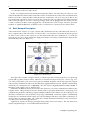
Brief Network Description
A Beowulf Cluster consists of a login, compile and job submission node, called the head, and one or
more compute nodes, often referred to as worker nodes. A second (fail-over) head node may be present
in order to take control of the cluster in case the main head node fails. Furthermore, a second fast
network may also have been installed for high-performance low-latency communication between the
(head and the) nodes (see figure 1.1).
Figure 1.1: Cluster layout
The login node is used to compile software, to submit a parallel or batch program to a job queueing
system and to gather/analyze results. Therefore, it should rarely be necessary for a user to log on to
one of the nodes and in some cases node logins are disabled altogether. The head, login and compute
nodes usually communicate with each other through a gigabit Ethernet network, capable of transmitting
information at a maximum rate of 1000 Mbps. In some clusters 10 gigabit Ethernet (10GE, 10GBE, or
10GigE) is used, capable of up to 10 Gbps rates.
Sometimes an additional network is used by the cluster for even faster communication between the
compute nodes. This particular network is mainly used for programs dedicated to solving large scale
computational problems, which may require multiple machines and could involve the exchange of vast
amounts of information. One such network topology is InfiniBand, commonly capable of transmitting
information at a maximum effective data rate of about 124Gbps and about 1.2µs end-to-end latency on
small packets, for clusters in 2013. The commonly available maximum transmission rates will increase
over the years as the technology advances.
Applications relying on message passing benefit greatly from lower latency. The fast network is
usually complementary to a slower Ethernet-based network.
© Bright Computing, Inc.
2
Cluster Usage
2.1
Login To The Cluster Environment
The login node is the node where the user logs in and works from. Simple clusters have a single login
node, but large clusters sometimes have multiple login nodes to improve the reliability of the cluster. In
most clusters, the login node is also the head node from where the cluster is monitored and installed.
On the login node:
• applications can be developed
• code can be compiled and debugged
• applications can be submitted to the cluster for execution
• running applications can be monitored
To carry out an ssh login to the cluster, a terminal session can be started from Unix-like operating
systems:
Example
$ ssh [email protected]
On a Windows operating system, an SSH client such as for PuTTY (http://www.putty.org) can be
downloaded. Another standard possibility is to run a Unix-like environment such as Cygwin (http:
//www.cywin.com) within the Windows operating system, and then run the SSH client from within it.
A Mac OS X user can use the Terminal application from the Finder, or under
Application/Utilities/Terminal.app. X11 must be installed from the Mac OS X medium, or
alternatively, XQuartz can be used instead. XQuartz is an alternative to the official X11 package, and is
usually more up-to-date and less buggy.
When using the SSH connection, the cluster’s address must be added. When the connection is made,
a username and password must be entered at the prompt.
If the administrator has changed the default SSH port from 22 to something else, the port can be
specified with the -p <port> option:
$ ssh -X -p <port> <user>@<cluster>
The -X option can be dropped if no X11-forwarding is required. X11-forwarding allows a GUI application from the cluster to be displayed locally.
Optionally, after logging in, the password used can be changed using the passwd command:
$ passwd
© Bright Computing, Inc.
4
Cluster Usage
2.2
Setting Up The User Environment
By default, each user uses the bash shell interpreter. In that case, each time a user login takes place, a file
named .bashrc is executed to set up the shell environment for the user. The shell and its environment
can be customized to suit user preferences. For example,
• the prompt can be changed to indicate the current username, host, and directory, for example: by
setting the prompt string variable:
PS1="[\u@\h:\w ] $"
• the size of the command history file can be increased, for example: export HISTSIZE=100
• aliases can be added for frequently used command sequences, for example: alias lart=’ls
-alrt’
• environment variables can be created or modified, for example: EXPORT $MYVAR = "MY STRING"
• the location of software packages and versions that are to be used by a user (the path to a package)
can be set.
Because there is a huge choice of software packages and versions, it can be hard to set up the right
environment variables and paths for software that is to be used. Collisions between different versions
of the same package and non-matching dependencies on other packages must also be avoided. To
make setting up the environment easier, Bright Cluster Manager provides preconfigured environment
modules (section 2.3).
2.3
Environment Modules
It can be quite hard to set up the correct environment to use a particular software package and version.
For instance, managing several MPI software packages on the same system or even different versions
of the same MPI software package is quite difficult for most users on a standard SUSE or Red Hat system
because many software packages use the same names for executables and libraries.
A user could end up with the problem of never being quite sure which libraries have been used for
the compilation of a program as multiple libraries with the same name may be installed. Very often a
user would like to test new versions of a software package before permanently installing the package.
Within a Red Hat or SuSE setup without special utilities, this would be quite a complex task to achieve.
Environment modules, using the module command, are a special utility to make this task much easier.
2.3.1
Available commands
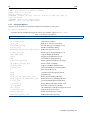
$ module --help
Modules Release 3.2.10 2012-12-21 (Copyright GNU GPL v2 1991):
Usage: module [ switches ] [ subcommand ] [subcommand-args ]
Switches:
-H|--help
-V|--version
-f|--force
-t|--terse
-l|--long
-h|--human
-v|--verbose
-s|--silent
-c|--create
this usage info
modules version & configuration options
force active dependency resolution
terse
format avail and list format
long
format avail and list format
readable format avail and list format
enable verbose messages
disable verbose messages
create caches for avail and apropos
© Bright Computing, Inc.
2.3 Environment Modules
5
-i|--icase
case insensitive
-u|--userlvl <lvl>
set user level to (nov[ice],exp[ert],adv[anced])
Available SubCommands and Args:
+ add|load
modulefile [modulefile ...]
+ rm|unload
modulefile [modulefile ...]
+ switch|swap
[modulefile1] modulefile2
+ display|show
modulefile [modulefile ...]
+ avail
[modulefile [modulefile ...]]
+ use [-a|--append]
dir [dir ...]
+ unuse
dir [dir ...]
+ update
+ refresh
+ purge
+ list
+ clear
+ help
[modulefile [modulefile ...]]
+ whatis
[modulefile [modulefile ...]]
+ apropos|keyword
string
+ initadd
modulefile [modulefile ...]
+ initprepend
modulefile [modulefile ...]
+ initrm
modulefile [modulefile ...]
+ initswitch
modulefile1 modulefile2
+ initlist
+ initclear
2.3.2 Changing The Current Environment
The modules loaded into the user’s environment can be seen with:
$ module list
Modules can be loaded using the add or load options. A list of modules can be added by spacing
them:
$ module add shared open64 openmpi/open64
The shared module is special. If it is to be loaded, it is usually placed first in a list before the
other modules, because the other modules often depend on it. The shared module is described further
shortly.
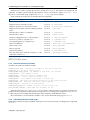
The “module avail” command lists all modules that are available for loading (some output elided):
Example
[fred@bright71 ~]$ module avail
-------------------------- /cm/local/modulefiles --------------------cluster-tools/7.1dot
module-info
use.own
cmd
freeipmi/1.2.6
null
version
cmsh
ipmitool/1.8.12
openldap
cmsub/7.1
module-git
shared
-------------------------- /cm/shared/modulefiles -------------------acml/gcc/64/5.3.1
hwloc/1.7
acml/gcc/fma4/5.3.1
intel-cluster-checker/2.0
acml/gcc/mp/64/5.3.1
intel-cluster-runtime/ia32/3.5
acml/gcc/mp/fma4/5.3.1
intel-cluster-runtime/intel64/3.5
acml/gcc-int64/64/5.3.1
intel-cluster-runtime/mic/3.5
acml/gcc-int64/fma4/5.3.1
intel-tbb-oss/ia32/41_20130314oss
...
© Bright Computing, Inc.
6
Cluster Usage
In the list there are two kinds of modules:
• local modules, which are specific to the node, or head node only
• shared modules, which are made available from a shared storage, and which only become available for loading after the shared module is loaded.
The shared module is obviously a useful local module, and is therefore usually configured to be
loaded for the user by default.
Although version numbers are shown in the “module avail” output, it is not necessary to specify
version numbers, unless multiple versions are available for a module1 .
To remove one or more modules, the “module unload” or “module rm” command is used.
To remove all modules from the user’s environment, the “module purge” command is used.
The user should be aware that some loaded modules can conflict with others loaded at the same time.
For example, loading openmpi/gcc/64/ without removing an already loaded openmpi/gcc/64/
can result in confusion about what compiler opencc is meant to use.
2.3.3 Changing The Default Environment
The initial state of modules in the user environment can be set as a default using the “module init*”
subcommands. The more useful ones of these are:
• module initadd: add a module to the initial state
• module initrm: remove a module from the initial state
• module initlist: list all modules loaded initially
• module initclear: clear all modules from the list of modules loaded initially
Example
$ module initclear
$ module initlist
bash initialization file $HOME/.bashrc loads modules:
null
$ module initadd shared gcc/4.8.1 openmpi/gcc sge
$ module initlist
bash initialization file $HOME/.bashrc loads modules:
null shared gcc/4.8.1 openmpi/gcc/64/1.6.5 sge/2011.11p1
In the preceding example, the newly defined initial state module environment for the user is loaded
from the next login onwards.
If the user is unsure about what the module does, it can be checked using “module whatis”:
$ module whatis sge
sge
: Adds sge to your environment
The man pages for module gives further details on usage.
1 For multiple versions, when no version is specified, the alphabetically-last version is chosen. This usually is the latest, but can
be an issue when versions move from, say, 9, to 10. For example, the following is sorted in alphabetical order: v1 v10 v11 v12 v13
v2 v3 v4 v5 v6 v7 v8 v9.
© Bright Computing, Inc.
2.4 Compiling Applications
2.4
7
Compiling Applications
Compiling an application is usually done on the head node or login node. Typically, there are several
compilers available on the head node, which provide different levels of optimization, standards conformance, and support for accelerators. For example: GNU compiler collection, Open64 compiler, Intel
compilers, Portland Group compilers. The following table summarizes the available compiler commands on the cluster:
Language
GNU
Open64
Portland
Intel
C
gcc
opencc
pgcc
icc
C++
g++
openCC
pgCC
icc
Fortran77
gfortran
openf90 -ff77
pgf77
ifort
Fortran90
gfortran
openf90
pgf90
ifort
Fortran95
gfortran
openf95
pgf95
ifort
GNU compilers are the de facto standard on Linux and are installed by default. They are provided
under the terms of the GNU General Public License. AMD’s Open64 is also installed by default on Bright
Cluster Manager. Commercial compilers by Portland and Intel are available as packages via the Bright
Cluster Manager YUM repository, and require the purchase of a license to use them. To make a compiler
available to be used in a user’s shell commands, the appropriate environment module (section 2.3) must
be loaded first. On most clusters two versions of GCC are available:
1. The version of GCC that comes along with the Linux distribution. For example, for CentOS 6.x:
Example
[fred@bright71 ~]$ which gcc; gcc --version | head -1
/usr/bin/gcc
gcc (GCC) 4.4.7 20120313 (Red Hat 4.4.7-3)
2. The latest version suitable for general use that is packaged as a module by Bright Computing:
Example
[fred@bright71 ~]$ module load gcc
[fred@bright71 ~]$ which gcc; gcc --version | head -1
/cm/shared/apps/gcc/4.8.1/bin/gcc
gcc (GCC) 4.8.1
To use the latest version of GCC, the gcc module must be loaded. To revert to the version of GCC
that comes natively with the Linux distribution, the gcc module must be unloaded.
The compilers in the preceding table are ordinarily used for applications that run on a single node.
However, the applications used may fork, thread, and run across as many nodes and processors as they
can access if the application is designed that way.
The standard, structured way of running applications in parallel is to use the MPI-based libraries,
which link to the underlying compilers in the preceding table. The underlying compilers are automatically made available after choosing the parallel environment (MPICH, MVAPICH, Open MPI, etc.) via
the following compiler commands:
Language
C
C++
Fortran77
Fortran90
Fortran95
Command
mpicc
mpiCC
mpif77
mpif90
mpif95
© Bright Computing, Inc.
8
Cluster Usage
2.4.1 Open MPI And Mixing Compilers
Bright Cluster Manager comes with multiple Open MPI packages corresponding to the different available compilers. However, sometimes mixing compilers is desirable. For example, C-compilation may
be preferred using icc from Intel, while Fortran90-compilation may be preferred using openf90 from
Open64. In such cases it is possible to override the default compiler path environment variable, for
example:
[fred@bright71 ~]$ module list
Currently Loaded Modulefiles:
1) null
3) gcc/4.4.7
5) sge/2011.11
2) shared
4) openmpi/gcc/64/1.4.5
[fred@bright71 ~]$ mpicc --version --showme; mpif90 --version --showme
gcc --version
gfortran --version
[fred@bright71 ~]$ export OMPI_CC=icc; export OMPI_FC=openf90
[fred@bright71 ~]$ mpicc --version --showme; mpif90 --version --showme
icc --version
openf90 --version
Variables that may be set are OMPI_CC, OMPI_FC, OMPI_F77, and OMPI_CXX. More on overriding
the Open MPI wrapper settings is documented in the man pages of mpicc in the environment section.
© Bright Computing, Inc.
3
Using MPI
The Message Passing Interface (MPI) is a standardized and portable message passing system designed
by a group of researchers from academia and industry to function on a wide variety of parallel computers. The standard defines the syntax and semantics of a core of library routines useful to a wide range
of users writing portable message-passing programs in Fortran or the C programming language. MPI
libraries allow the compilation of code so that it can be used over a variety of multi-processor systems
from SMP nodes to NUMA (non-Uniform Memory Access) systems and interconnected cluster nodes .
The available MPI implementation for the variant MPI-3 is MPICH (version 3). Open MPI supports
both variants. These MPI libaries can be compiled with GCC, Open64, Intel, or PGI.
Depending on the cluster hardware, the interconnect available may be: Ethernet (GE), InfiniBand
(IB), or Myrinet (MX).
Depending on the cluster configuration, MPI implementations for different compilers can be loaded.
By default MPI implementations that are installed are compiled and made available using both GCC
and Open64.
The interconnect and compiler implementation can be worked out from looking at the module and
package name. The modules available can be searched through for the compiler variant, and then the
package providing it can be found:
Example
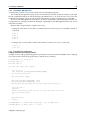
[fred@bright71 ~]$ # search for modules starting with the name openmpi
[fred@bright71 ~]$ module -l avail 2>&1 | grep ^openmpi
openmpi/gcc/64/1.6.5
2013/09/05 22:01:44
openmpi/intel/64/1.6.5
2013/09/05 21:23:57
openmpi/open64/64/1.6.5
2013/09/05 22:28:37
[fred@bright71 ~]$ rpm -qa | grep ^openmpi
openmpi-geib-open64-64-1.6.5-165_cm7.1.x86_64
openmpi-geib-gcc-64-1.6.5-165_cm7.1.x86_64
openmpi-ge-intel-64-1.6.5-165_cm7.1.x86_64
Here, for example,
openmpi-geib-open64-64-1.6.5-165_cm7.1.x86_64
implies: Open MPI version 1.6.5 compiled for both Gigabit Ethernet (ge) and InfiniBand (ib), with
the Open64 (open64) compiler for a 64-bit architecture, packaged as a cluster manager (cm) package for
version 7.1 of Bright Cluster Manager, for the x86_64 architecture.
3.1
Interconnects
Jobs can use particular networks for intra-node communication.
© Bright Computing, Inc.
10
Using MPI
3.1.1 Gigabit Ethernet
Gigabit Ethernet is the interconnect that is most commonly available. For Gigabit Ethernet, no additional modules or libraries are needed. The Open MPI, MPICH implementations will work over Gigabit
Ethernet.
3.1.2 InfiniBand
InfiniBand is a high-performance switched fabric which is characterized by its high throughput and low
latency. Open MPI, MVAPICH and MVAPICH2 are suitable MPI implementations for InfiniBand.
3.2
Selecting An MPI implementation
Once the appropriate compiler module has been loaded, the MPI implementation is selected along with
the appropriate library modules. The following list, <compiler> indicates a choice of gcc, intel,
open64, or pgi:
• mpich/ge/<compiler>
• mvapich/<compiler>
• mvapich2/<compiler>
• openmpi/<compiler>
After the appropriate MPI module has been added to the user environment, the user can start compiling applications. The mpich and openmpi implementations may be used on Ethernet. On InfiniBand, mvapich, mvapich2 and openmpi may be used. Open MPI’s openmpi implementation will
first attempt to use InfiniBand, but will revert to Ethernet if InfiniBand is not available.
3.3
Example MPI Run
This example covers an MPI run, which can be run inside and outside of a queuing system.
To use mpirun, the relevant environment modules must be loaded. For example, to use the mpich
over Gigabit Ethernet (ge) GCC implementation:
$ module add mpich/ge/gcc
or to use the openmpi Open MPI GCC implementation:
$ module add openmpi/gcc
Similarly, to use the mvapich InfiniBand Open64 implementation:
$ module add mvapich/open64
Depending on the libraries and compilers installed on the system, the availability of these packages
might differ. To see a full list on the system the command “module avail” can be typed.
3.3.1 Compiling And Preparing The Application
The code must be compiled with MPI libraries and an underlying compiler. The correct library command can be found in the following table:
Language
C
C++
Fortran77
Fortran90
Fortran95
Command
mpicc
mpiCC
mpif77
mpif90
mpif95
An MPI application myapp.c, built in C, could then be compiled as:
$ mpicc myapp.c
The a.out binary that is created can then be executed using the mpirun command (section 3.3.3).
© Bright Computing, Inc.
3.3 Example MPI Run
11
3.3.2 Creating A Machine File
A machine file contains a list of nodes which can be used by MPI programs.
The workload management system creates a machine file based on the nodes allocated for a job when
the job is submitted with the workload manager job submission tool. So if the user chooses to have the
workload management system allocate nodes for the job then creating a machine file is not needed.
However, if an MPI application is being run “by hand” outside the workload manager, then the user
is responsible for creating a machine file manually. Depending on the MPI implementation, the layout
of this file may differ.
Machine files can generally be created in two ways:
• Listing the same node several times to indicate that more than one process should be started on
each node:
node001
node001
node002
node002
• Listing nodes once, but with a suffix for the number of CPU cores to use on each node:
node001:2
node002:2
3.3.3
Running The Application
A Simple Parallel Processing Executable
A simple “hello world” program designed for parallel processing can be built with MPI. After compiling
it, it can be used to send a message about how and where it is running:
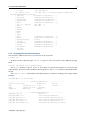
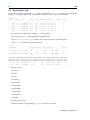
[fred@bright71 ~]$ cat hello.c
#include <stdio.h>
#include <mpi.h>
int main (int argc, char *argv[])
{
int id, np, i;
char processor_name[MPI_MAX_PROCESSOR_NAME];
int processor_name_len;
MPI_Init(&argc, &argv);
MPI_Comm_size(MPI_COMM_WORLD, &np);
MPI_Comm_rank(MPI_COMM_WORLD, &id);
MPI_Get_processor_name(processor_name, &processor_name_len);
for(i=1;i<2;i++)
{printf(
"Hello world from process %03d out of %03d, processor name %s\n",
id, np, processor_name
);}
MPI_Finalize();
return 0;
}
[fred@bright71 ~]$ module add openmpi/gcc
[fred@bright71 ~]$ mpicc hello.c -o hello
© Bright Computing, Inc.
#or as appropriate
12
Using MPI
[fred@bright71 ~]$ ./hello
Hello world from process 000 out of 001, processor name bright71.cm.cluster
However, it still runs on a single processor unless it is submitted to the system in a special way.
Running An MPI Executable In Parallel Without A Workload Manager
Compute node environment provided by user’s .bashrc: After the relevant module files are chosen
(section 3.3) for MPI, an executable compiled with MPI libraries runs on nodes in parallel when submitted with mpirun. The executable running on other nodes loads environmental modules on those other
nodes by sourcing the .bashrc file of the user (section 2.3.3). It is therefore important to ensure that
the environmental module stack used on the compute node is clean and consistent.
Example
Supposing the .bashrc loads two MPI stacks—the mpich stack, followed by the Open MPI stack—
then that can cause errors because the compute node may use parts of the wrong MPI implementation.
The environment of the user from the interactive shell prompt is not normally carried over automatically to the compute nodes during an mpirun submission. That is, compiling and running the
executable will normally work only on the local node without a special treatment. To have the executable run on the compute nodes, the right environment modules for the job must be made available
on the compute nodes too, as part of the user login process to the compute nodes for that job. Usually the system administrator takes care of such matters in the default user configuration by setting up
the default user environment (section 2.3.3), with reasonable initrm and initadd options. Users are
then typically allowed to set up their personal default overrides to the default administrator settings, by
placing their own initrm and initadd options to the module command according to their needs.
Running mpirun outside a workload manager: When using mpirun manually, outside a workload
manager environment, the number of processes (-np) as well as the number of hosts (-machinefile)
should be specified. For example, on a cluster with 2 compute-nodes and a machine file as specified in
section 3.3.2:
Example
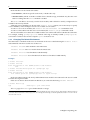
[fred@bright71 ~]$ module initclear; module initadd openmpi/gcc
[fred@bright71 ~]$ module add openmpi/gcc
#or as appropriate
[fred@bright71 ~]$ mpirun -np 4 -machinefile mpirun.hosts hello
Hello world from process 002 out of 004, processor name node002.cm.cluster
Hello world from process 003 out of 004, processor name node001.cm.cluster
Hello world from process 000 out of 004, processor name node002.cm.cluster
Hello world from process 001 out of 004, processor name node001.cm.cluster
The output of the preceding program is actually printed in random order. This can be modified as
follows, so that only process 0 prints to the standard output, and other processes communicate their
output to process 0:
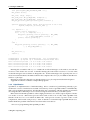
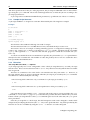
#include "mpi.h"
#include "string.h"
#include <stdio.h>
int main( int argc, char *argv[] )
{
int numprocs, myrank, namelen, i;
char processor_name[MPI_MAX_PROCESSOR_NAME];
© Bright Computing, Inc.
3.3 Example MPI Run
13
char greeting[MPI_MAX_PROCESSOR_NAME + 80];
MPI_Status status;
MPI_Init( &argc, &argv );
MPI_Comm_size( MPI_COMM_WORLD, &numprocs );
MPI_Comm_rank( MPI_COMM_WORLD, &myrank );
MPI_Get_processor_name( processor_name, &namelen );
sprintf( greeting, "Hello world, from process %d of %d on %s",
myrank, numprocs, processor_name );
if ( myrank == 0 ) {
printf( "%s\n", greeting );
for ( i = 1; i < numprocs; i++ ) {
MPI_Recv( greeting, sizeof( greeting ), MPI_CHAR,
i, 1, MPI_COMM_WORLD, &status );
printf( "%s\n", greeting );
}
}
else {
MPI_Send( greeting, strlen( greeting ) + 1, MPI_CHAR,
0, 1, MPI_COMM_WORLD );
}
MPI_Finalize( );
return 0;
}
fred@bright71 ~]$ module
fred@bright71 ~]$ mpirun
Hello world from process
Hello world from process
Hello world from process
Hello world from process
add mvapich/gcc
#or as appropriate
-np 4 -machinefile mpirun.hosts hello
0 of 4 on node001.cm.cluster
1 of 4 on node002.cm.cluster
2 of 4 on node001.cm.cluster
3 of 4 on node002.cm.cluster
Running the executable with mpirun outside the workload manager as shown does not take the
resources of the cluster into account. To handle running jobs with cluster resources is of course what
workload managers such as Slurm are designed to do. Workload managers also typically take care of
what environment modules should be loaded on the compute nodes for a job, via additions that the user
makes to a job script.
Running an application through a workload manager via a job script is introduced in Chapter 4.
Appendix A contains a number of simple MPI programs.
3.3.4 Hybridization
OpenMP is an implementation of multi-threading. This is a method of parallelizing whereby a parent thread—a series of instructions executed consecutively—forks a specified number of child threads,
and a task is divided among them. The threads then run concurrently, with the runtime environment
allocating threads to different processors and accessing the shared memory of an SMP system.
MPI can be mixed with OpenMP to achieve high performance on a cluster/supercomputer of multicore nodes or servers. MPI creates processes that reside on the level of node, while OpenMP forks
threads on the level of a core within an SMP node. Each process executes a portion of the overall
computation, while inside each process, a team of threads is created through OpenMP directives to
further divide the problem. This kind of execution makes sense due to:
• the ease of programming that OpenMP provides
© Bright Computing, Inc.
14
Using MPI
• OpenMP might not require copies of data structure, which allows for designs that overlap computation and communication
• overcoming the limits of parallelism within the SMP node is of course still possible by using the
power of other nodes via MPI.
Example
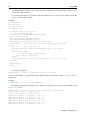
#include<mpi.h>
#include <omp.h>
#include <stdio.h>
#include<stdlib.h>
int main(int argc , char** argv) {
int size, myrank,namelength;
char processor_name[MPI_MAX_PROCESSOR_NAME];
MPI_Init(&argc,&argv);
MPI_Comm_rank(MPI_COMM_WORLD,&myrank);
MPI_Comm_size(MPI_COMM_WORLD,&size);
MPI_Get_processor_name(processor_name,&namelength);
printf("Hello I am Processor %d on %s of %d\n",myrank,processor_name,\
size);
int tid = 0; int n_of_threads = 1;
#pragma omp parallel default(shared) private(tid, n_of_threads)
{
#if defined (_OPENMP)
n_of_threads= omp_get_num_threads();
tid = omp_get_thread_num();
#endif
printf("Hybrid Hello World: I am thread # %d out of %d\n", tid, n_o\
f_threads);
}
MPI_Finalize();
return 0;
}
To compile the program:
fred@bright71 ~]$ mpicc -o hybridhello omphello.c -fopenmp
To specify the number of OpenMP threads per MPI task the environment variable OMP_NUM_THREADS
must be set.
Example
fred@bright71 ~]$ export OMP_NUM_THREADS=3
The number of threads specified by the variable can then be run over the hosts specified by the
mpirun.hosts file:
fred@bright71 ~]$ mpirun -np 2 -hostfile mpirun.hosts ./hybridhello
Hello I am Processor 0 on node001 of 2
Hello I am Processor 1 on node002 of 2
Hybrid Hello World: I am thread # 0 out of 3
Hybrid Hello World: I am thread # 2 out of 3
Hybrid Hello World: I am thread # 1 out of 3
Hybrid Hello World: I am thread # 0 out of 3
Hybrid Hello World: I am thread # 2 out of 3
Hybrid Hello World: I am thread # 1 out of 3
© Bright Computing, Inc.
3.3 Example MPI Run
15
Benefits And Drawbacks Of Using OpenMP
The main benefit to using OpenMP is that it can decrease memory requirements, with usually no reduction in performance. Other benefits include:
• Potential additional parallelization opportunities besides those exploited by MPI.
• Less domain decomposition, which can help with load balancing as well as allowing for larger
messages and fewer tasks participating in MPI collective operations.
• OpenMP is a standard, so any modifications introduced into an application are portable and appear as comments on systems not using OpenMP.
• By adding annotations to existing code and using a compiler option, it is possible to add OpenMP
to a code somewhat incrementally, almost on a loop-by-loop basis. The vector loops in a code that
vectorize well are good candidates for OpenMP.
There are also some potential drawbacks:
• OpenMP can be hard to program and/or debug in some cases.
• Effective usage can be complicated on NUMA systems due to locality considerations
• If an application is network- or memory- bandwidth-bound, then threading it is not going to help.
In this case it will be OK to leave some cores idle.
• In some cases a serial portion may be essential, which can inhibit performance.
• In most MPI codes, synchronization is implicit and happens when messages are sent and received.
However, with OpenMP, much synchronization must be added to the code explicitly. The programmer must also explicitly determine which variables can be shared among threads and which
ones cannot (parallel scoping). OpenMP codes that have errors introduced by incomplete or misplaced synchronization or improper scoping can be difficult to debug because the error can introduce race conditions which cause the error to happen only intermittently.
3.3.5 Support Thread Levels
MPI defines four “levels” of thread safety. The maximum thread support level is returned by the
MPI_Init_thread call in the “provided” argument.
An environment variable MPICH_MAX_THREAD_SAFETY can be set to different values to increase
the thread safety:
MPICH_MAX_THREAD_SAFETY
Supported Thread Level
not set
MPI_THREAD_SINGLE
single
MPI_THREAD_SINGLE
funneled
MPI_THREAD_FUNNELED
serialized
MPI_THREAD_SERIALIZED
multiple
MPI_THREAD_MULTIPLE
3.3.6 Further Recommendations
Users face various challenges with running and scaling large scale jobs on peta-scale production systems. For example: certain applications may not have enough memory per core, the default environment variables may need to be adjusted, or I/O may dominate run time.
Possible ways to deal with these are:
• Trying out various compilers and compiler flags, and finding out which options are best for particular applications.
© Bright Computing, Inc.
16
Using MPI
• Changing the default MPI rank ordering. This is a simple, yet sometimes effective, runtime tuning
option that requires no source code modification, recompilation or re-linking. The default MPI
rank placement on the compute nodes is SMP style. However, other choices are round-robin,
folded rank, and custom ranking.
• Using fewer cores per node is helpful when more memory per process than the default is needed.
Having fewer processes to share the memory and interconnect bandwidth is also helpful in this
case. For NUMA nodes, extra care must be taken.
• Hybrid MPI/OpenMP reduces the memory footprint. Overlapping communication with computation in hybrid MPI/OpenMP can be considered.
• Some applications may perform better when large memory pages are used.
© Bright Computing, Inc.
4
Workload Management
4.1
What Is A Workload Manager?
A workload management system (also known as a queueing system, job scheduler or batch submission
system) manages the available resources such as CPUs, GPUs, and memory for jobs submitted to the
system by users.
Jobs are submitted by the users using job scripts. Job scripts are constructed by users and include
requests for resources. How resources are allocated depends upon policies that the system administrator
sets up for the workload manager.
4.2
Why Use A Workload Manager?
Workload managers are used so that users do not manually have to keep track of node usage in a cluster
in order to plan efficient and fair use of cluster resources.
Users may still perhaps run jobs on the compute nodes outside of the workload manager, if that is
administratively permitted. However, running jobs outside a workload manager tends to eventually
lead to an abuse of the cluster resources as more people use the cluster, and thus inefficient use of available resources. It is therefore usually forbidden as a policy by the system administrator on production
clusters.
4.3
How Does A Workload Manager Function?
A workload manager uses policies to ensure that the resources of a cluster are used efficiently, and must
therefore track cluster resources and jobs. A workload manager is therefore generally able to:
• Monitor:
– the node status (up, down, load average)
– all available resources (available cores, memory on the nodes)
– the jobs state (queued, on hold, deleted, done)
• Modify:
– the status of jobs (freeze/hold the job, resume the job, delete the job)
– the priority and execution order for jobs
– the run status of a job. For example, by adding checkpoints to freeze a job.
– (optional) how related tasks in a job are handled according to their resource requirements.
For example, a job with two tasks may have a greater need for disk I/O resources for the first
task, and a greater need for CPU resources during the second task.
Some workload managers can adapt to external triggers such as hardware failure, and send alerts or
attempt automatic recovery.
© Bright Computing, Inc.
18
Workload Management
4.4
Job Submission Process
Whenever a job is submitted, the workload management system checks on the resources requested by
the job script. It assigns cores, accelerators, local disk space, and memory to the job, and sends the job to
the nodes for computation. If the required number of cores or memory are not yet available, it queues
the job until these resources become available. If the job requests resources that are always going to
exceed those that can become available, then the job accordingly remains queued indefinitely.
The workload management system keeps track of the status of the job and returns the resources to
the available pool when a job has finished (that is, been deleted, has crashed or successfully completed).
4.5
What Do Job Scripts Look Like?
A job script looks very much like an ordinary shell script, and certain commands and variables can be
put in there that are needed for the job. The exact composition of a job script depends on the workload
manager used, but normally includes:
• commands to load relevant modules or set environment variables
• directives for the workload manager to request resources, control the output, set email addresses
for messages to go to
• an execution (job submission) line
When running a job script, the workload manager is normally responsible for generating a machine
file based on the requested number of processor cores (np), as well as being responsible for the allocation
any other requested resources.
The executable submission line in a job script is the line where the job is submitted to the workload
manager. This can take various forms.
Example
For the Slurm workload manager, the line might look like:
srun --mpi=mpich1_p4 ./a.out
Example
For Torque or PBS Pro it may simply be:
mpirun ./a.out
Example
For SGE it may look like:
mpirun -np 4 -machinefile $TMP/machines ./a.out
4.6
Running Jobs On A Workload Manager
The details of running jobs through the following workload managers is discussed later on, for:
• Slurm (Chapter 5)
• SGE (Chapter 6)
• Torque (with Maui or Moab) and PBS Pro (Chapter 7)
© Bright Computing, Inc.
4.7 Running Jobs In Cluster Extension Cloud Nodes Using cmsub
4.7
19
Running Jobs In Cluster Extension Cloud Nodes Using cmsub
Extra computational power from cloud service providers such as the Amazon Elastic Compute Cloud
(EC2) can be used by an appropriately configured cluster managed by Bright Cluster Manager.
If the head node is running outside a cloud services provider, and at least some of the compute nodes
are in the cloud, then this “hybrid” cluster configuration is called a Cluster Extension cluster, with the
compute nodes in the cloud being the cloud extension of the cluster.
For a Cluster Extension cluster, job scripts to a workload manager should be submitted using Bright
Cluster Manager’s cmsub utility. This allows the job to be considered for running on the extension (the
cloud nodes). Jobs that are to run on the local regular nodes (not in a cloud) are not dealt with by cmsub.
The environment module (section 2.3) cmsub is typically configured by the system administrator to
load by default on the head node. It must be loaded for the cmsub utility to work.
The basic usage for cmsub is:
cmsub [options] script
Options details are given by the -h|--help option for cmsub.
Users that are used to running jobs as root should note that the root user cannot usefully run a job
with cmsub.
The user can submit some cloud-related values as options to cmsub on the command line, followed
by the job script.
Example
$ cat myscript1
#!/bin/sh
hostname
$ cmsub myscript1
Submitting job: myscript1(slurm-2) [slurm:2] ... OK
All cmsub command line options can also be specified in a job-directive style format in the job script
itself, using the “#CMSUB” tag to indicate an option.
Example
$ cat myscript2
#!/bin/sh
#CMSUB --input-list=/home/user/myjob.in
#CMSUB --output-list=/home/user/myjob.out
#CMSUB --remote-output-list=/home/user/file-which-will-be-created
#CMSUB --input=/home/user/onemoreinput.dat
#CMSUB --input=/home/user/myexec
myexec
$ cmsub myscript2
Submitting job: myscript2(slurm-2) [slurm:2] ... OK
4.8
Configuring Passwordless Login To Cloud Nodes
Logging in to a cloud node is possible, in a similar way to regular nodes. There is however a minor
initial complication—passwordless ssh login to the cloud node or cloud director is not configured by
default. This is because passwordless ssh uses certificate-based authentication, and the cloud director
thus needs to have the ssh public key certificate of the user in the home directory of that user, in the
cloud director. Since the home directory of the user in the cloud director is only created after the first
© Bright Computing, Inc.
20
Workload Management
login of the user to the cloud director, there can be no ssh public key certificate in that location to begin
with.
This existential issue can be dealt with with the following one-time actions:
• The user, after logging in, generates an ssh key pair on the head node with an empty passphrase.
• The user runs the ssh-copy-id command to copy the public key over to the cloud director instance using the usual password for authentication.
After this, the user can carry out a passwordless login from the head node to the cloud director or
the cloud node.
For example, after logging into the head node using the standard login with a password, a user galt
can generate an ssh private and public certificate with ssh-keygen as follows:
Example
[galt@bright71 ~]$ #user galt already exists and has password
[galt@bright71 ~]$ ssh-keygen
Generating public/private rsa key pair.
Enter file in which to save the key (/home/galt/.ssh/id_rsa):
Enter passphrase (empty for no passphrase):
Enter same passphrase again:
Your identification has been saved in /home/galt/.ssh/id_rsa.
Your public key has been saved in /home/galt/.ssh/id_rsa.pub.
The key fingerprint is:
7a:31:d1:f7:93:d5:96:bd:5a:6f:a1:11:b3:c2:d1:14 galt@bright71
The key’s randomart image is:
+--[ RSA 2048]----+
|
E. |
|
. o
+|
|
. ...+ .=|
|
.....++.|
|
S o o++ |
|
. o . =.o|
|
. .
o o|
|
.
. |
|
|
+-----------------+
The user can then copy the public key over to the cloud director, eu-west-1-director in the
following example, using ssh-copy-id:
Example
[galt@bright71 ~]$ ssh-copy-id eu-west-1-director
galt@eu-west-1-director’s password:
Now try logging into the machine, with "ssh ’eu-west-1-director’",
and check in:
.ssh/authorized_keys
to make sure we haven’t added extra keys that you weren’t expecting.
[galt@bright71 ~]$ ssh cnode001
Last login: Tue May 27 08:24:07 2014 from master.cm.cluster
[galt@cnode001 ~]$
© Bright Computing, Inc.
4.8 Configuring Passwordless Login To Cloud Nodes
21
If the user is able to login to a cloud node, cnode001 in the preceding example, then it implies that
the user can login to the cloud director anyway, so the user should now be correctly configured with
passwordless authentication to the cloud nodes.
© Bright Computing, Inc.
5
Slurm
Slurm is a workload management system developed originally at the Lawrence Livermore National
Laboratory. Slurm used to stand for Simple Linux Utility for Resource Management. However Slurm
has evolved since then, and its advanced state nowadays means that the acronym is obsolete.
Slurm has both a graphical interface and command line tools for submitting, monitoring, modifying
and deleting jobs. It is normally used with job scripts to submit and execute jobs. Various settings can be
put in the job script, such as number of processors, resource usage
and application specific variables.
The steps for running a job through Slurm are to:
• Create the script or executable that will be handled as a job
• Create a job script that sets the resources for the script/executable
• Submit the job script to the workload management system
The details of Slurm usage depends upon the MPI implementation used. The description in this
chapter will cover using Slurm’s Open MPI implementation, which is quite standard. Slurm documentation can be consulted (http://slurm.schedmd.com/mpi_guide.html) if the implementation the
user is using is very different.
5.1
Loading Slurm Modules And Compiling The Executable
In section 3.3.3 an MPI “Hello, world!” executable that can run in parallel is created and run in parallel
outside a workload manager.
The executable can be run in parallel using the Slurm workload manager. For this, the Slurm module
should first be loaded by the user on top of the chosen MPI implementation, in this case Open MPI:
Example
[fred@bright52 ~]$ module list
Currently Loaded Modulefiles:
1) gcc/4.4.6
3) shared
2) openmpi/gcc/64/1.4.2
4) cuda40/toolkit/4.0.17
[fred@bright52 ~]$ module add slurm; module list
Currently Loaded Modulefiles:
1) gcc/4.4.6
3) shared
2) openmpi/gcc/64/1.4.2
4) cuda40/toolkit/4.0.17
5) slurm/2.2.4
The “hello world” executable from section 3.3.3 can then be compiled and run for one task outside
the workload manager, on the local host, as:
mpicc hello.c -o hello
mpirun -np 1 hello
© Bright Computing, Inc.
24
5.2
Slurm
Running The Executable With salloc
Running it as a job managed by Slurm can be done interactively with the Slurm allocation command,
salloc, as follows
[fred@bright52 ~]$ salloc mpirun hello
Slurm is more typically run as a batch job (section 5.3). However execution via salloc uses the
same options, and it is more convenient as an introduction because of its interactive behavior.
In a default Bright Cluster Manager configuration, Slurm auto-detects the cores available and by
default spreads the tasks across the cores that are part of the allocation request.
To change how Slurm spreads the executable across nodes is typically determined by the options in
the following table:
Short
Option
Long
Option
Description
-N
--nodes=
Request this many nodes on the cluster.
Use all cores on each node by default
-n
--ntasks=
-c
--cpus-per-task=
Request this many tasks on the cluster.
Defaults to 1 task per node.
request this many CPUs per task.
(not implemented by Open MPI yet)
(none)
--ntasks-per-node=
request this number of tasks per node.
The full options list and syntax for salloc can be viewed with “man salloc”.
The requirement of specified options to salloc must be met before the executable is allowed to run.
So, for example, if --nodes=4 and the cluster only has 3 nodes, then the executable does not run.
5.2.1 Node Allocation Examples
The following session illustrates and explains some node allocation options and issues for Slurm using
a cluster with just 1 compute node and 4 CPU cores:
Default settings: The hello MPI executable with default settings of Slurm runs successfully over the
first (and in this case, the only) node that it finds:
[fred@bright52 ~]$ salloc mpirun hello
salloc: Granted job allocation 572
Hello world from process 0 out of 4, host
Hello world from process 1 out of 4, host
Hello world from process 2 out of 4, host
Hello world from process 3 out of 4, host
salloc: Relinquishing job allocation 572
name
name
name
name
node001
node001
node001
node001
The preceding output also displays if -N1 (indicating 1 node) is specified, or if -n4 (indicating 4 tasks)
is specified.
The node and task allocation is almost certainly not going to be done by relying on defaults. Instead,
node specifications are supplied to Slurm along with the executable.
To understand Slurm node specifications, the following cases consider and explain where the node
specification is valid and invalid.
© Bright Computing, Inc.
5.2 Running The Executable With salloc
25
Number of nodes requested: The value assigned to the -N|--nodes= option is the number of nodes
from the cluster that is requested for allocation for the executable. In the current cluster example it can
only be 1. For a cluster with, for example, 1000 nodes, it could be a number up to 1000.
A resource allocation request for 2 nodes with the --nodes option causes an error on the current
1-node cluster example:
[fred@bright52 ~]$ salloc -N2 mpirun hello
salloc: error: Failed to allocate resources: Node count specification invalid
salloc: Relinquishing job allocation 573
Number of tasks requested per cluster: The value assigned to the -n|--ntasks option is the number of tasks that are requested for allocation from the cluster for the executable. In the current cluster
example, it can be 1 to 4 tasks. The default resources available on a cluster are the number of available
processor cores.
A resource allocation request for 5 tasks with the --ntasks option causes an error because it exceeds
the default resources available on the 4-core cluster:
[fred@bright52 ~]$ salloc -n5 mpirun hello
salloc: error: Failed to allocate resources: More processors requested than permitted
Adding and configuring just one more node to the current cluster would allows the resource allocation to succeed, since an added node would provide at least one more processor to the cluster.
Number of tasks requested per node: The value assigned to the --ntasks-per-node option is
the number of tasks that are requested for allocation from each node on the cluster. In the current cluster example, it can be 1 to 4 tasks. A resource allocation request for 5 tasks per node with
--ntasks-per-node fails on this 4-core cluster, giving an output like:
[fred@bright52 ~]$ salloc --ntasks-per-node=5 mpirun hello
salloc: error: Failed to allocate resources: More processors requested than permitted
Adding and configuring another 4-core node to the current cluster would still not allow resource
allocation to succeed, because the request is for at least 5 cores per node, rather than per cluster.
Restricting the number of tasks that can run per node: A resource allocation request for 2 tasks per
node with the --ntasks-per-node option, and simultaneously an allocation request for 1 task to run
on the cluster using the --ntasks option, runs successfully, although it uselessly ties up resources for
1 task per node:
[fre@bright52 ~]$ salloc --ntasks-per-node=2 --ntasks=1 mpirun hello
salloc: Granted job allocation 574
Hello world from process 0 out of 1, host name node005
salloc: Relinquishing job allocation 574
The other way round, that is, a resource allocation request for 1 task per node with the
--ntasks-per-node option, and simultaneously an allocation request for 2 tasks to run on the cluster
using the --ntasks option, fails because on the 1-cluster node, only 1 task can be allocated resources
on the single node, while resources for 2 tasks are being asked for on the cluster:
[fred@bright52 ~]$ salloc --ntasks-per-node=1 --ntasks=3 mpirun hello
salloc: error: Failed to allocate resources: Requested node configuration is not available
salloc: Job allocation 575 has been revoked.
© Bright Computing, Inc.
26
5.3
Slurm
Running The Executable As A Slurm Job Script
Instead of using options appended to the salloc command line as in section 5.2, it is usually more
convenient to send jobs to Slurm with the sbatch command acting on a job script.
A job script is also sometimes called a batch file. In a job script, the user can add and adjust the Slurm
options, which are the same as the salloc options of section 5.2. The various settings and variables
that go with the application can also be adjusted.
5.3.1 Slurm Job Script Structure
A job script submission for the Slurm batch job script format is illustrated by the following:
[fred@bright52 ~]$ cat slurmhello.sh
#!/bin/sh
#SBATCH -o my.stdout
#SBATCH --time=30
#time limit to batch job
#SBATCH --ntasks=1
#SBATCH --ntasks-per-node=4
module add shared openmpi/gcc/64/1.4.2 slurm
mpirun hello
The structure is:
shebang line: shell definition line.
SBATCH lines: optional job script directives (section 5.3.2).
shell commands:
optional shell commands, such as loading necessary modules.
application execution line:
wrapper.
execution of the MPI application using sbatch, the Slurm submission
In SBATCH lines, “#SBATCH” is used to submit options. The various meanings of lines starting with
“#” are:
Line Starts With
Treated As
#
Comment in shell and Slurm
#SBATCH
Comment in shell, option in Slurm
# SBATCH
Comment in shell and Slurm
After the Slurm job script is run with the sbatch command (Section 5.3.4), the output goes into file
my.stdout, as specified by the “-o” command.
If the output file is not specified, then the file takes a name of the form ”slurm-<jobnumber>.out”,
where <jobnumber> is a number starting from 1.
The command “sbatch --usage” lists possible options that can be used on the command line or
in the job script. Command line values override script-provided values.
5.3.2 Slurm Job Script Options
Options, sometimes called “directives”, can be set in the job script file using this line format for each
option:
#SBATCH {option} {parameter}
© Bright Computing, Inc.
5.3 Running The Executable As A Slurm Job Script
27
Directives are used to specify the resource allocation for a job so that Slurm can manage the job
optimally. Available options and their descriptions can be seen with the output of sbatch --help.
The more overviewable usage output from sbatch --usage may also be helpful.
Some of the more useful ones are listed in the following table:
Directive Description
Specified As
Name the job <jobname>
#SBATCH -J <jobname>
Request at least <minnodes> nodes
#SBATCH -N <minnodes>
Request <minnodes> to <maxnodes> nodes
#SBATCH -N <minnodes>-<maxnodes>
Request at least <MB> amount of temporary disk
space
#SBATCH --tmp <MB>
Run the job for a time of <walltime>
#SBATCH -t <walltime>
Run the job at <time>
#SBATCH --begin <time>
Set the working directory to <directorypath>
#SBATCH -D <directorypath>
Set error log name to <jobname.err>*
#SBATCH -e <jobname.err>
Set output log name to <jobname.log>*
#SBATCH -o <jobname.log>
Mail <user@address>
#SBATCH --mail-user <user@address>
Mail on any event
#SBATCH --mail-type=ALL
Mail on job end
#SBATCH --mail-type=END
Run job in partition
#SBATCH -p <destination>
Run job using GPU with ID <number>, as described in section 8.5.2
#SBATCH --gres=gpu:<number>
*By default, both standard output and standard error go to a file:
slurm-<%j>.out
where <%j> is the job number.
5.3.3 Slurm Environment Variables
Available environment variables include:
SLURM_CPUS_ON_NODE - processors available to the job on
SLURM_JOB_ID - job ID of executing job
SLURM_LAUNCH_NODE_IPADDR - IP address of node where job
SLURM_NNODES - total number of nodes
SLURM_NODEID - relative node ID of current node
SLURM_NODELIST - list of nodes allocated to job
SLURM_NTASKS - total number of processes in current job
SLURM_PROCID - MPI rank (or relative process ID) of the
SLURM_SUBMIT_DIR - directory from with job was launched
SLURM_TASK_PID - process ID of task started
SLURM_TASKS_PER_NODE - number of task to be run on each
CUDA_VISIBLE_DEVICES - which GPUs are available for use
this node
launched
current process
node.
Typically, end users use SLURM_PROCID in a program so that an input of a parallel calculation depends on it. The calculation is thus spread across processors according to the assigned SLURM_PROCID,
so that each processor handles the parallel part of the calculation with different values.
More information on environment variables is also to be found in the man page for sbatch.
5.3.4 Submitting The Slurm Job Script
Submitting a Slurm job script created like in the previous section is done by executing the job script with
sbatch:
© Bright Computing, Inc.
28
Slurm
[fred@bright52 ~]$ sbatch slurmhello.sh
Submitted batch job 703
[fred@bright52 ~]$ cat slurm-703.out
Hello world from process 001 out of 004, processor name node001
...
Queues in Slurm terminology are called “partitions”. Slurm has a default queue called defq. The
administrator may have removed this or created others.
If a particular queue is to be used, this is typically set in the job script using the -p or --partition
option:
#SBATCH --partition=bitcoinsq
It can also be specified as an option to the sbatch command during submission to Slurm.
5.3.5 Checking And Changing Queued Job Status
After a job has gone into a queue, the queue status can be checked using the squeue command. The
job number can be specified with the -j option to avoid seeing other jobs. The man page for squeue
covers other options.
Jobs can be canceled with “scancel <job number>”.
The scontrol command allows users to see and change the job directives while the job is still
queued. For example, a user may have specified a job, using the --begin directive, to start at 10am the
next day by mistake. To change the job to start at 10pm tonight, something like the following session
may take place:
[fred@bright52 ~]$ scontrol show jobid=254 | grep Time
RunTime=00:00:04 TimeLimit=UNLIMITED TimeMin=N/A
SubmitTime=2011-10-18T17:41:34 EligibleTime=2011-10-19T10:00:00
StartTime=2011-10-18T17:44:15 EndTime=Unknown
SuspendTime=None SecsPreSuspend=0
The parameter that should be changed is “EligibleTime”, which can be done as follows:
[fred@bright52 ~]$ scontrol update jobid=254 EligibleTime=2011-10-18T22:00:00
An approximate GUI Slurm equivalent to scontrol is the sview tool. This allows the job to be
viewed under its jobs tab, and the job to be edited with a right click menu item. It can also carry out
many other functions, including canceling a job.
Webbrowser-accessible job viewing is possible from the workload tab of the User Portal (section 10.2).
© Bright Computing, Inc.
6
SGE
Sun Grid Engine (SGE) is a workload management and job scheduling system first developed to manage
computing resources by Sun Microsystems. SGE has both a graphical interface and command line tools
for submitting, monitoring, modifying and deleting jobs.
SGE uses job scripts to submit and execute jobs. Various settings can be put in the job script, such as
number of processors, resource usage and application specific variables.
The steps for running a job through SGE are to:
• Create a job script
• Select the directives to use
• Add the scripts and applications and runtime parameters
• Submit it to the workload management system
6.1
Writing A Job Script
A binary cannot be submitted directly to SGE—a job script is needed for that. A job script can contain
various settings and variables to go with the application. A job script format looks like:
#!/bin/bash
#$ Script options
shell commands
application
# Optional script directives
# Optional shell commands
# Application itself
6.1.1 Directives
It is possible to specify options (’directives’) to SGE by using “#$” in the script. The difference in the
meaning of lines that start with the “#” character in the job script file should be noted:
Line Starts With
Treated As
#
Comment in shell and SGE
#$
Comment in shell, directive in SGE
# $
Comment in shell and SGE
6.1.2 SGE Environment Variables
Available environment variables:
© Bright Computing, Inc.
30
SGE
$HOME - Home directory on execution machine
$USER - User ID of job owner
$JOB_ID - Current job ID
$JOB_NAME - Current job name; (like the -N option in qsub, qsh, qrsh, q\
login and qalter)
$HOSTNAME - Name of the execution host
$TASK_ID - Array job task index number
6.1.3 Job Script Options
Options can be set in the job script file using this line format for each option:
#$ {option} {parameter}
Available options and their descriptions can be seen with the output of qsub -help:
Table 6.1.3: SGE Job Script Options
Option and parameter
Description
-a date_time
request a start time
-ac context_list
add context variables
-ar ar_id
bind job to advance reservation
-A account_string
account string in accounting record
-b y[es]|n[o]
handle command as binary
-binding [env|pe|set] exp|lin|str
binds job to processor cores
-c ckpt_selector
define type of checkpointing for job
-ckpt ckpt-name
request checkpoint method
-clear
skip previous definitions for job
-cwd
use current working directory
-C directive_prefix
define command prefix for job script
-dc simple_context_list
delete context variable(s)
-dl date_time
request a deadline initiation time
-e path_list
specify standard error stream path(s)
-h
place user hold on job
-hard
consider following requests "hard"
-help
print this help
-hold_jid job_identifier_list
define jobnet interdependencies
-hold_jid_ad job_identifier_list
define jobnet array interdependencies
-i file_list
specify standard input stream file(s)
-j y[es]|n[o]
merge stdout and stderr stream of job
-js job_share
share tree or functional job share
-jsv jsv_url
job submission verification script to be used
-l resource_list
request the given resources
-m mail_options
define mail notification events
-masterq wc_queue_list
bind master task to queue(s)
...continued
© Bright Computing, Inc.
6.1 Writing A Job Script
31
Table 6.1.3: SGE Job Script Options...continued
Option and parameter
Description
-notify
notify job before killing/suspending it
-now y[es]|n[o]
start job immediately or not at all
-M mail_list
notify these e-mail addresses
-N name
specify job name
-o path_list
specify standard output stream path(s)
-P project_name
set job’s project
-p priority
define job’s relative priority
-pe pe-name slot_range
request slot range for parallel jobs
-q wc_queue_list
bind job to queue(s)
-R y[es]|n[o]
reservation desired
-r y[es]|n[o]
define job as (not) restartable
-sc context_list
set job context (replaces old context)
-shell y[es]|n[o]
start command with or without wrapping <loginshell> -c
-soft
consider following requests as soft
-sync y[es]|n[o]
wait for job to end and return exit code
-S path_list
command interpreter to be used
-t task_id_range
create a job-array with these tasks
-tc max_running_tasks
throttle the number of concurrent tasks (experimental)
-terse
tersed output, print only the job-id
-v variable_list
export these environment variables
-verify
do not submit just verify
-V
export all environment variables
-w e|w|n|v|p
verify mode (error|warning|none|just verify|poke) for jobs
-wd working_directory
use working_directory
-@ file
read commandline input from file
More detail on these options and their use is found in the man page for qsub.
6.1.4 The Executable Line
In a job script, the executable line is launched with the job launcher command after the directives lines
have been dealt with, and after any other shell commands have been carried out to set up the execution
environment.
Using mpirun In The Executable Line
The mpirun job-launcher command is used for executables compiled with MPI libraries. Executables
that have not been compiled with MPI libraries, or which are launched without any specified number
of nodes, run on a single free node chosen by the workload manager.
The executable line to run a program myprog that has been compiled with MPI libraries is run by
placing the job-launcher command mpirun before it as follows:
mpirun myprog
Using cm-launcher With mpirun In The Executable Line
For SGE, for some MPI implementations, jobs sometimes leave processes behind after they have ended.
A default Bright Cluster Manager installation provides a cleanup utility that removes such processes.
© Bright Computing, Inc.
32
SGE
To use it, the user simply runs the executable line using the cm-launcher wrapper before the mpirun
job-launcher command:
cm-launcher mpirun myprog
The wrapper tracks processes that the workload manager launches. When it sees processes that the
workload manager is unable to clean up after a job is over, it carries out the cleanup instead. Using
cm-launcher is recommended if jobs that do not get cleaned up correctly are an issue for the user or
administrator.
6.1.5 Job Script Examples
Some job script examples are given in this section. Each job script can use a number of variables and
directives.
Single Node Example Script
An example script for SGE:
noob@sgecluster:~$ cat application
#!/bin/sh
#$ -N sleep
#$ -S /bin/sh
# Make sure that the .e and .o file arrive in the
# working directory
#$ -cwd
#Merge the standard out and standard error to one file
#$ -j y
sleep 60
echo Now it is: ‘date‘
Parallel Example Script
For parallel jobs the -pe (parallel environment) option must be assigned to the script. Depending on
the interconnect, there may be a choice between a number of parallel environments such as MPICH
(Ethernet) or MVAPICH (InfiniBand).
#!/bin/sh
#
# Your job name
#$ -N My_Job
#
# Use current working directory
#$ -cwd
#
# Join stdout and stderr
#$ -j y
#
# pe (Parallel environment) request. Set your number of requested slots here.
#$ -pe mpich 2
#
# Run job through bash shell
#$ -S /bin/bash
# If modules are needed, source modules environment:
. /etc/profile.d/modules.sh
# Add any modules you might require:
© Bright Computing, Inc.
6.2 Submitting A Job
33
module add shared mpich/ge/gcc/64/3.1
# The following output will show in the output file. Used for debugging.
echo "Got $NSLOTS processors."
echo "Machines:"
cat machines
# Use MPIRUN to run the application
mpirun -machinefile machines ./application
The number of available slots can be set by the administrator to an arbitrary value. However, it is
typically set so that it matches the number of cores in the cluster, for efficiency reasons. More slots can
be set than cores, but most administrators prefer not to do that.
In a job script, the user can request slots from the available slots. Requesting multiple slots therefore
typically means requesting multiple cores. In the case of an environment that is not set up as a parallel
environment, the request for slots is done with the -np option. For jobs that run in a parallel environment, the -pe option is used. Mixed jobs, running in both non-MPI and parallel environments are also
possible if the administrator has allowed it in the complex attribute slots settings.
Whether the request is granted is decided by the workload manager policy set by the administrator.
If the request exceeds the number of available slots, then the request is not granted.
If the administrator has configured the cluster to use cloud computing with cm-scale-cluster
(section 7.9.2 of the Administrator Manual), then the total number of slots available to a cluster changes
over time automatically, as nodes are started up and stopped dynamically.
6.2
Submitting A Job
The SGE module must be loaded first so that SGE commands can be accessed:
$ module add shared sge
With SGE a job can be submitted with qsub. The qsub command has the following syntax:
qsub [ options ] [ jobscript | -- [ jobscript args ]]
After completion (either successful or not), output is put in the user’s current directory, appended
with the job number which is assigned by SGE. By default, there is an error and an output file.
myapp.e#{JOBID}
myapp.o#{JOBID}
6.2.1 Submitting To A Specific Queue
Some clusters have specific queues for jobs which run are configured to house a certain type of job: long
and short duration jobs, high resource jobs, or a queue for a specific type of node.
To see which queues are available on the cluster the qstat command can be used:
qstat -g c
CLUSTER QUEUE
CQLOAD
USED
RES AVAIL TOTAL aoACDS cdsuE
----------------------------------------------------------------long.q
0.01
0
0
144
288
0
144
default.q
0.01
0
0
144
288
0
144
The job is then submitted, for example to the long.q queue:
qsub -q long.q sleeper.sh
© Bright Computing, Inc.
34
SGE
6.3
Monitoring A Job
The job status can be viewed with qstat. In this example the sleeper.sh script has been submitted.
Using qstat without options will only display a list of jobs, with no queue status options:
$ qstat
job-ID prior
name
user
state submit/start at
queue slots
----------------------------------------------------------------------249 0.00000 Sleeper1 root
qw
12/03/2008 07:29:00
1
250 0.00000 Sleeper1 root
qw
12/03/2008 07:29:01
1
251 0.00000 Sleeper1 root
qw
12/03/2008 07:29:02
1
252 0.00000 Sleeper1 root
qw
12/03/2008 07:29:02
1
253 0.00000 Sleeper1 root
qw
12/03/2008 07:29:03
1
More details are visible when using the -f (for full) option:
• The Queuetype qtype can be Batch (B) or Interactive (I).
• The used/tot or used/free column is the count of used/free slots in the queue.
• The states column is the state of the queue.
$ qstat -f
queuename
qtype used/tot. load_avg arch
states
----------------------------------------------------------------------all.q@node001.cm.cluster
BI
0/16
-NAlx26-amd64
au
----------------------------------------------------------------------all.q@node002.cm.cluster
BI
0/16
-NAlx26-amd64
au
########################################################################
PENDING JOBS - PENDING JOBS - PENDING JOBS - PENDING JOBS - PENDING JOBS
########################################################################
249 0.55500 Sleeper1
root
qw
12/03/2008 07:29:00
1
250 0.55500 Sleeper1
root
qw
12/03/2008 07:29:01
1
Job state can be:
• d(eletion)
• E(rror)
• h(old)
• r(unning)
• R(estarted)
• s(uspended)
• S(uspended)
• t(ransfering)
• T(hreshold)
• w(aiting)
The queue state can be:
• u(nknown) if the corresponding sge_execd cannot be contacted
© Bright Computing, Inc.
6.4 Deleting A Job
35
• a(larm) - the load threshold is currently exceeded
• A(larm) - the suspend threshold is currently exceeded
• C(alendar suspended) - see calendar_conf
• s(uspended) - see qmod
• S(ubordinate)
• d(isabled) - see qmod
• D(isabled) - see calendar_conf
• E(rror) - sge_execd was unable to locate the sge_shepherd - use qmod to fix it.
• o(rphaned) - for queue instances
By default the qstat command shows only jobs belonging to the current user, i.e. the command is
executed with the option -u $user. To see jobs from other users too, the following format is used:
$ qstat -u ‘‘*’’
6.4
Deleting A Job
A job can be deleted in SGE with the following command
$ qdel <jobid>
The job-id is the number assigned by SGE when the job is submitted using qsub. Only jobs belonging
to the logged-in user can be deleted. Using qdel will delete a user’s job regardless of whether the job is
running or in the queue.
© Bright Computing, Inc.
7
PBS Variants: Torque And PBS
Pro
Bright Cluster Manager works with Torque and PBS Pro, which are two forks of Portable Batch System
(PBS). PBS was a workload management and job scheduling system first developed to manage computing resources at NASA in the 1990s.
Torque and PBS Pro can differ significantly in the output they present when using their GUI visual
tools. However because of their historical legacy, their basic design structure and job submission methods from the command line remain very similar for the user. Both Torque and PBS Pro are therefore
covered in this chapter. The possible Torque schedulers (Torque’s built-in scheduler, Maui, or Moab) are
also covered when discussing Torque.
Torque and PBS Pro both offer a graphical interface and command line tools for submitting, monitoring, modifying and deleting jobs.
For submission and execution of jobs, both workload managers use PBS “job scripts”. The user puts
values into a job script for the resources being requested, such as the number of processors, memory.
Other values are also set for the runtime parameters and application-specific variables.
The steps for running a job through a PBS job script are:
• Creating an application to be run via the job script
• Creating the job script, adding directives, applications, runtime parameters, and application-specific
variables to the script
• Submitting the script to the workload management system
This chapter covers the using the workload managers and job scripts with the PBS variants so that
users can get a basic understanding of how they are used, and can get started with typical cluster usage.
In this chapter:
• section 7.1 covers the components of a job script and job script examples
• section 7.2.1 covers submitting, monitoring, and deleting a job with a job script
More depth on using these workload managers is to be found in the PBS Professional User Guide
and in the online Torque documentation at http://www.adaptivecomputing.com/resources/
docs/.
7.1
Components Of A Job Script
To use Torque or PBS Pro, a batch job script is created by the user. The job script is a shell script containing the set of commands that the user wants to run. It also contains the resource requirement directives
© Bright Computing, Inc.
38
PBS Variants: Torque And PBS Pro
and other specifications for the job. After preparation, the job script is submitted to the workload manager using the qsub command. The workload manager then tries to make the job run according to the
job script specifications.
A job script can be resubmitted with different parameters (e.g. different sets of data or variables).
7.1.1 Sample Script Structure
A job script in PBS Pro or Torque has a structure illustrated by the following basic example:
Example
#!/bin/bash
#
#PBS -l walltime=1:00:00
#PBS -l nodes=4
#PBS -l mem=500mb
#PBS -j oe
cd ${HOME}/myprogs
mpirun myprog a b c
The first line is the standard “shebang” line used for scripts.
The lines that start with #PBS are PBS directive lines, described shortly in section 7.1.2.
The last two lines are an example of setting remaining options or configuration settings up for the
script to run. In this case, a change to the directory myprogs is made, and then run the executable
myprog with arguments a b c. The line that runs the program is called the executable line (section 7.1.3).
To run the executable file in the executable line in parallel, the job launcher mpirun is placed immediately before the executable file. The number of nodes the parallel job is to run on is assumed to have
been specified in the PBS directives.
7.1.2
Directives
Job Script Directives And qsub Options
A job script typically has several configurable values called job script directives, set with job script
directive lines. These are lines that start with a “#PBS”. Any directive lines beyond the first executable
line are ignored.
The lines are comments as far as the shell is concerned because they start with a “#”. However, at
the same time the lines are special commands when the job script is processed by the qsub command.
The difference is illustrated by the following:
• The following shell comment is only a comment for a job script processed by qsub:
# PBS
• The following shell comment is also a job script directive when processed by qsub:
#PBS
Job script directive lines with the “#PBS ” part removed are the same as options applied to the qsub
command, so a look at the man pages of qsub describes the possible directives and how they are used.
If there is both a job script directive and a qsub command option set for the same item, the qsub option
takes precedence.
Since the job script file is a shell script, the shell interpreter used can be changed to another shell
interpreter by modifying the first line (the “#!” line) to the preferred shell. Any shell specified by the
first line can also be overridden by using the “#PBS -S” directive to set the shell path.
© Bright Computing, Inc.
7.1 Components Of A Job Script
39
Walltime Directive
The workload manager typically has default walltime limits per queue with a value limit set by the
administrator. The user sets walltime limit by setting the ”#PBS -l walltime” directive to a specific
time. The time specified is the maximum time that the user expects the job should run for, and it allows
the workload manager to work out an optimum time to run the job. The job can then run sooner than it
would by default.
If the walltime limit is exceeded by a job, then the job is stopped, and an error message like the following is displayed:
=» PBS: job killed: walltime <runningtime> exceeded limit <settime>
Here, <runningtime> indicates the time for which the job actually went on to run, while <settime>
indicates the time that the user set as the walltime resource limit.
Resource List Directives
Resource list directives specify arguments to the -l directive of the job script, and allow users to specify
values to use instead of the system defaults.
For example, in the sample script structure earlier, a job walltime of one hour and a memory space
of at least 500MB are requested (the script requires the size of the space be spelled in lower case, so
“500mb” is used).
If a requested resource list value exceeds what is available, the job is queued until resources become
available.
For example, if nodes only have 2000MB to spare and 4000MB is requested, then the job is queued
indefinitely, and it is up to the user to fix the problem.
Resource list directives also allow, for example, the number of nodes (-l nodes) and the virtual
processor cores per nodes (-l ppn) to be specified. If no value is specified, the default is 1 core per
node.
If 8 cores are wanted, and it does not matter how the cores are allocated (e.g. 8 per node or 1 on 8
nodes) the directive used in Torque is:
#PBS -l nodes=8
For PBS Pro v11 this also works, but is deprecated, and the form “#PBS -l select=8” is recommended instead.
Further examples of node resource specification are given in a table on page 40.
Job Directives: Job Name, Logs, And IDs
If the name of the job script file is jobname, then by default the output and error streams are logged
to jobname.o<number> and jobname.e<number> respectively, where <number> indicates the associated job number. The default paths for the logs can be changed by using the -o and -e directives
respectively, while the base name (jobname here) can be changed using the -N directive.
Often, a user may simply merge both logs together into one of the two streams using the -j directive.
Thus, in the preceding example, “-j oe” merges the logs to the output log path, while “-j eo” would
merge it to error log path.
The job ID is an identifier based on the job number and the FQDN of the login node. For a login
node called bright52.cm.cluster, the job ID for a job number with the associated value <number>
from earlier, would by default be <number>.bright52.cm.cluster, but it can also simply be abbreviated to
<number>.
Job Queues
Sending a job to a particular job queue is sometimes appropriate. An administrator may have set
queues up so that some queues are for very long term jobs, or some queues are for users that require
GPUs. Submitting a job to a particular queue <destination> is done by using the directive “#PBS -q
<destination>”.
© Bright Computing, Inc.
40
PBS Variants: Torque And PBS Pro
Directives Summary
A summary of the job directives covered, with a few extras, are shown in the following table:
Directive Description
Specified As
Name the job <jobname>
#PBS -N <jobname>
Run the job for a time of <walltime>
#PBS -l <walltime>
Run the job at <time>
#PBS -a <time>
Set error log name to <jobname.err>
#PBS -e <jobname.err>
Set output log name to <jobname.log>
#PBS -o <jobname.log>
Join error messages to output log
#PBS -j eo
Join output messages to error log
#PBS -j oe
Mail to <user@address>
#PBS -M <user@address>
Mail on <event>
#PBS -m <event>
where <event> takes the
(a)bort
value of the letter in
(b)egin
the parentheses
(e)nd
(n) do not send email
Queue is <destination>
#PBS -q <destination>
Login shell path is <shellpath>
#PBS -S <shellpath>
Resource List Directives Examples
Examples of how requests for resource list directives work are shown in the following table:
Resource Example Description
“#PBS -l” Specification
Request 500MB memory
mem=500mb
Set a maximum runtime of 3 hours 10 minutes and 30 seconds
walltime=03:10:30
8 nodes, anywhere on the cluster
nodes=8*
8 nodes, anywhere on the cluster
select=8**
2 nodes, 1 processor per node
nodes=2:ppn=1
3 nodes, 8 processors per node
nodes=3:ppn=8
5 nodes, 2 processors per node and 1 GPU per node
nodes=5:ppn=2:gpus=1*
5 nodes, 2 processors per node, and 1 GPU per node
select=5:ncpus=2:ngpus=1**
5 nodes, 2 processors per node, 3 virtual processors for MPI
code
select=5:ncpus=2:mpiprocs=3**
5 nodes, 2 processors per node, using any GPU on the nodes
select=5:ncpus=2:ngpus=1**
5 nodes, 2 processors per node, using a GPU with ID 0 from
nodes
select=5:ncpus=2:gpu_id=0**
*For Torque 2.5.5
**For PBS Pro 11
Some of the examples illustrate requests for GPU resource usage. GPUs and the CUDA utilities for
NVIDIA are introduced in Chapter 8. In the Torque and PBS Pro workload managers, GPU usage is
treated like the attributes of a resource which the cluster administrator will have pre-configured according to local requirements.
For further details on resource list directives, the Torque and PBS Pro user documentation should be
© Bright Computing, Inc.
7.1 Components Of A Job Script
41
consulted.
7.1.3 The Executable Line
In the job script structure (section 7.1.1), the executable line is launched with the job launcher command
after the directives lines have been dealt with, and after any other shell commands have been carried
out to set up the execution environment.
Using mpirun In The Executable Line
The mpirun command is used for executables compiled with MPI libraries. Executables that have not
been compiled with MPI libraries, or which are launched without any specified number of nodes, run
on a single free node chosen by the workload manager.
The executable line to run a program myprog that has been compiled with MPI libraries is run by
placing the job-launcher command mpirun before it as follows:
mpirun myprog
Using cm-launcher With mpirun In The Executable Line
For Torque, for some MPI implementations, jobs sometimes leave processes behind after they have
ended. A default Bright Cluster Manager installation provides a cleanup utility that removes such processes. To use it, the user simply runs the executable line using the cm-launcher wrapper before the
mpirun job-launcher command:
cm-launcher mpirun myprog
The wrapper tracks processes that the workload manager launches. When it sees processes that the
workload manager is unable to clean up after the job is over, it carries out the cleanup instead. Using
cm-launcher is recommended if jobs that do not get cleaned up correctly are an issue for the user or
administrator.
7.1.4
Example Batch Submission Scripts
Node Availability
The following job script tests which out of 4 nodes requested with “-l nodes” are made available to
the job in the workload manager:
Example
#!/bin/bash
#PBS -l walltime=1:00
#PBS -l nodes=4
echo -n "I am on: "
hostname;
echo finding ssh-accessible nodes:
for node in $(cat ${PBS_NODEFILE}) ; do
echo -n "running on: "
/usr/bin/ssh $node hostname
done
The directive specifying walltime means the script runs at most for 1 minute. The ${PBS_NODEFILE}
array used by the script is created and appended with hosts by the queueing system. The script illustrates how the workload manager generates a ${PBS_NODEFILE} array based on the requested number
of nodes, and which can be used in a job script to spawn child processes. When the script is submitted,
the output from the log will look like:
© Bright Computing, Inc.
42
PBS Variants: Torque And PBS Pro
I am on: node001
finding ssh-accessible nodes:
running on: node001
running on: node002
running on: node003
running on: node004
This illustrates that the job starts up on a node, and that no more than the number of nodes that were
asked for in the resource specification are provided.
The list of all nodes for a cluster can be found using the pbsnodes command (section 7.2.6).
Using InfiniBand
A sample PBS script for InfiniBand is:
#!/bin/bash
#!
#! Sample PBS file
#!
#! Name of job
#PBS -N MPI
#!
#!
#!
#!
Number of nodes (in this case 8 nodes with 4 CPUs each)
The total number of nodes passed to mpirun will be nodes*ppn
Second entry: Total amount of wall-clock time (true time).
02:00:00 indicates 02 hours
#PBS -l nodes=8:ppn=4,walltime=02:00:00
#! Mail to user when job terminates or aborts
#PBS -m ae
# If modules are needed by the script, then source modules environment:
. /etc/profile.d/modules.sh
# Add any modules you might require:
module add shared mvapich/gcc torque maui pbspro
#! Full path to application + application name
application="<application>"
#! Run options for the application
options="<options>"
#! Work directory
workdir="<work dir>"
###############################################################
### You should not have to change anything below this line ####
###############################################################
#! change the working directory (default is home directory)
cd $workdir
echo Running on host $(hostname)
© Bright Computing, Inc.
7.2 Submitting A Job
echo
echo
echo
echo
echo
43
Time is $(date)
Directory is $(pwd)
PBS job ID is $PBS_JOBID
This job runs on the following machines:
$(cat $PBS_NODEFILE | uniq)
$mpirun_command="mpirun $application $options"
#! Run the parallel MPI executable (nodes*ppn)
echo Running $mpirun_command
eval $mpirun_command
In the preceding script, no machine file is needed, since it is automatically built by the workload
manager and passed on to the mpirun parallel job launcher utility. The job is given a unique ID and run
in parallel on the nodes based on the resource specification.
7.1.5 Links To Other Resources About Job Scripts In Torque And PBS Pro
A number of useful links are:
• Torque examples:
http://bmi.cchmc.org/resources/software/torque/examples
• PBS Pro script files:
http://www.ccs.tulane.edu/computing/pbs/pbs.phtml
7.2
Submitting A Job
7.2.1 Preliminaries: Loading The Modules Environment
To submit a job to the workload management system, the user must ensure that the following environment modules are loaded:
• If using Torque with no external scheduler:
$ module add shared torque
• If using Torque with Maui:
$ module add shared torque maui
• If using Torque with Moab:
$ module add shared torque moab
• If using PBS Pro:
$ module add shared pbspro
Users can pre-load particular environment modules as their default using the “module init*”
commands (section 2.3.3).
© Bright Computing, Inc.
44
PBS Variants: Torque And PBS Pro
7.2.2 Using qsub
The command qsub is used to submit jobs to the workload manager system. The command returns
a unique job identifier, which is used to query and control the job and to identify output. The usage
format of qsub and some useful options are listed here:
USAGE: qsub [<options>] <job script>
Option
------a
-l
-q
-N
-S
-j
Hint
---at
list
queue
name
shell
join
Description
----------run the job at a certain time
request certain resource(s)
job is run in this queue
name of job
shell to run job under
join output and error files
For example, a job script called mpirun.job with all the relevant directives set inside the script,
may be submitted as follows:
Example
$ qsub mpirun.job
A job may be submitted to a specific queue testq as follows:
Example
$ qsub -q testq mpirun.job
The man page for qsub describes these and other options. The options correspond to PBS directives
in job scripts (section 7.1.1). If a particular item is specified by a qsub option as well as by a PBS directive,
then the qsub option takes precedence.
7.2.3 Job Output
By default, the output from the job script <scriptname> goes into the home directory of the user for
Torque, or into the current working directory for PBS Pro.
By default, error output is written to <scriptname>.e<jobid> and the application output is written to
<scriptname>.o<jobid>, where <jobid> is a unique number that the workload manager allocates. Specific
output and error files can be set using the -o and -e options respectively. The error and output files
can usefully be concatenated into one file with the -j oe or -j eo options. More details on this can be
found in the qsub man page.
7.2.4 Monitoring A Job
To use the commands in this section, the appropriate workload manager module must be loaded. For
example, for Torque, torque module needs to be loaded:
$ module add torque
qstat Basics
The main component is qstat, which has several options. In this example, the most frequently used
options are discussed.
In PBS/Torque, the command “qstat -an” shows what jobs are currently submitted or running
on the queuing system. An example output is:
© Bright Computing, Inc.
7.2 Submitting A Job
45
[fred@bright52 ~]$ qstat -an
bright52.cm.cluster:
User
Req’d Req’d
Job ID
name Queue Jobname SessID NDS TSK Memory Time S
----------- ---- ------ ------- ------ --- --- ------ ----- 78.bright52 fred shortq tjob
10476
1
1 555mb 00:01 R
79.bright52 fred shortq tjob
-1
1 555mb 00:01 Q
Elap
Time
----00:00
--
The output shows the Job ID, the user who owns the job, the queue, the job name, the session ID for a
running job, the number of nodes requested, the number of CPUs or tasks requested, the time requested
(-l walltime), the job state (S) and the elapsed time. In this example, one job is seen to be running (R),
and one is still queued (Q). The -n parameter causes nodes that are in use by a running job to display at
the end of that line.
Possible job states are:
Job States
Description
C
Job is completed (regardless of success or failure)
E
Job is exiting after having run
H
Job is held
Q
job is queued, eligible to run or routed
R
job is running
S
job is suspend
T
job is being moved to new location
W
job is waiting for its execution time
The command “qstat -q” shows what queues are available. In the following example, there is one
job running in the testq queue and 4 are queued.
$ qstat -q
server: master.cm.cluster
Queue
Memory CPU Time Walltime Node
---------------- ------ -------- -------- ---testq
--23:59:59
-default
--23:59:59
--
Run Que Lm
--- --- -1
4 -0
0 ------ ----1
4
State
----E R
E R
showq From Maui
If the Maui scheduler is running, and the Maui module loaded (module add maui), then Maui’s
showq command displays a similar output. In this example, one dual-core node is available (1 node, 2
processors), one job is running and 3 are queued (in the Idle state).
$ showq
ACTIVE JOBS----------JOBNAME
USERNAME
STATE
45
cvsupport
1 Active Job
IDLE JOBS-------------
© Bright Computing, Inc.
PROC
Running 2
2 of
1 of
REMAINING
STARTTIME
1:59:57
Tue Jul 14 12:46:20
2 Processors Active (100.00%)
1 Nodes Active
(100.00%)
46
PBS Variants: Torque And PBS Pro
JOBNAME
USERNAME
STATE
PROC
WCLIMIT
QUEUETIME
46
47
48
cvsupport
cvsupport
cvsupport
Idle
Idle
Idle
2
2
2
2:00:00
2:00:00
2:00:00
Tue Jul 14 12:46:20
Tue Jul 14 12:46:21
Tue Jul 14 12:46:22
PROC
WCLIMIT
QUEUETIME
3 Idle Jobs
BLOCKED JOBS---------JOBNAME
USERNAME
STATE
Total Jobs: 4
Active Jobs: 1
Idle Jobs: 3
Blocked Jobs: 0
Viewing Job Details With qstat And checkjob
Job Details With qstat With qstat -f the full output of the job is displayed. The output shows
what the jobname is, where the error and output files are stored, and various other settings and variables.
$ qstat -f
Job Id: 19.mascm4.cm.cluster
Job_Name = TestJobPBS
Job_Owner = [email protected]
job_state = Q
queue = testq
server = mascm4.cm.cluster
Checkpoint = u
ctime = Tue Jul 14 12:35:31 2009
Error_Path = mascm4.cm.cluster:/home/cvsupport/test-package/TestJobPBS
.e19
Hold_Types = n
Join_Path = n
Keep_Files = n
Mail_Points = a
mtime = Tue Jul 14 12:35:31 2009
Output_Path = mascm4.cm.cluster:/home/cvsupport/test-package/TestJobPB
S.o19
Priority = 0
qtime = Tue Jul 14 12:35:31 2009
Rerunable = True
Resource_List.nodect = 1
Resource_List.nodes = 1:ppn=2
Resource_List.walltime = 02:00:00
Variable_List = PBS_O_HOME=/home/cvsupport,PBS_O_LANG=en_US.UTF-8,
PBS_O_LOGNAME=cvsupport,
PBS_O_PATH=/usr/kerberos/bin:/usr/local/bin:/bin:/usr/bin:/sbin:/usr/
sbin:/home/cvsupport/bin:/cm/shared/apps/torque/2.3.5/bin:/cm/shar
ed/apps/torque/2.3.5/sbin,PBS_O_MAIL=/var/spool/mail/cvsupport,
PBS_O_SHELL=/bin/bash,PBS_SERVER=mascm4.cm.cluster,
PBS_O_HOST=mascm4.cm.cluster,
PBS_O_WORKDIR=/home/cvsupport/test-package,PBS_O_QUEUE=default
etime = Tue Jul 14 12:35:31 2009
submit_args = pbs.job -q default
Job Details With checkjob The checkjob command (only for Maui) is particularly useful for checking why a job has not yet executed. For a job that has an excessive memory requirement, the output looks
something like:
© Bright Computing, Inc.
7.2 Submitting A Job
47
[fred@bright52 ~]$ checkjob 65
checking job 65
State: Idle
Creds: user:fred group:fred class:shortq qos:DEFAULT
WallTime: 00:00:00 of 00:01:00
SubmitTime: Tue Sep 13 15:22:44
(Time Queued Total: 2:53:41 Eligible: 2:53:41)
Total Tasks: 1
Req[0] TaskCount: 1 Partition: ALL
Network: [NONE] Memory >= 0 Disk >= 0 Swap >= 0
Opsys: [NONE] Arch: [NONE] Features: [NONE]
Dedicated Resources Per Task: PROCS: 1 MEM: 495M
IWD: [NONE] Executable:
Bypass: 0 StartCount: 0
PartitionMask: [ALL]
Flags:
RESTARTABLE
[NONE]
PE: 1.01 StartPriority: 173
job cannot run in partition DEFAULT (idle procs do not meet requirement\
s : 0 of 1 procs found)
idle procs:
3 feasible procs:
0
Rejection Reasons: [CPU
:
3]
The -v option gives slightly more detail.
7.2.5 Deleting A Job
An already submitted job can be deleted using the qdel command:
$ qdel <jobid>
The job ID is printed to the terminal when the job is submitted. To get the job ID of a job if it has
been forgotten, the following can be used:
$ qstat
or
$ showq
7.2.6 Monitoring Nodes In Torque And PBS Pro
The nodes that the workload manager knows about can be viewed using the pbsnodes command.
The following output is from a cluster made up of 2-core nodes, as indicated by the value
of 2 for ncpu for Torque and PBS Pro. If the node is available to run scripts, then its state is
free or time-shared. When a node is used exclusively (section 8.5.2) by one script, the state is
job-exclusive.
For Torque the display resembles (some output elided):
[fred@bright52 ~]$ pbsnodes -a
node001.cm.cluster
state = free
© Bright Computing, Inc.
48
PBS Variants: Torque And PBS Pro
np = 3
ntype = cluster
status = rectime=1317911358,varattr=,jobs=96...ncpus=2...
gpus = 1
node002.cm.cluster
state = free
np = 3
...
gpus = 1
...
For PBS Pro the display resembles (some output elided):
[fred@bright52 ~]$ pbsnodes -a
node001.cm.cluster
Mom = node001.cm.cluster
ntype = PBS
state = free
pcpus = 3
resources_available.arch = linux
resources_available.host = node001
...
sharing = default_shared
node002.cm.cluster
Mom = node002.cm.cluster
ntype = PBS
state = free
...
...
© Bright Computing, Inc.
8
Using GPUs
GPUs (Graphics Processing Units) are chips that provide specialized parallel processing power. Originally, GPUs were designed to handle graphics processing as part of the video processor, but their ability
to handle non-graphics tasks in a similar manner has become important for general computing. GPUs
designed for general purpose computing task are commonly called General Purpose GPUs, or GPGPUs.
A GPU is suited for processing an algorithm that naturally breaks down into a process requiring
many similar calculations running in parallel. GPUs cores are able to rapidly apply the instruction
on multiple data points organized in a 2-D, and more recently, 3-D, image. The image is placed in a
framebuffer. In the original chips, the data points held in the framebuffer were intended for output to a
display, thereby accelerating image generation.
The similarity between multicore CPU chips and modern GPUs makes it at first sight attractive to use
GPUs for general purpose computing. However, the instruction set on GPGPUs is used in a component
called the shader pipeline. This is, as the name suggests, to do with a limited set of graphics operations,
and so is by its nature rather limited. Using the instruction set for problems unrelated to shader pipeline
manipulations requires that the problems being processed map over to a similar manipulation. This
works best for algorithms that naturally break down into a process requiring an operation to be applied
in the same way on many independent vertices and pixels. In practice, this means that 1-D vector
operations are an order of magnitude less efficient on GPUs than operations on triangular matrices.
Modern GPGPU implementations have matured so that they can now sub-divide their resources between independent processes that work on independent data, and they provide programmer-friendlier
ways of data transfer between the host and GPU memory.
Physically, one GPU is typically a built-in part of the motherboard of a node or a board in a node,
and consists of several hundred processing cores. There are also dedicated standalone units, commonly
called GPU Units, consisting of several GPUs in one chassis. Several of these can be assigned to particular nodes, typically via PCI-Express connections, to increase the density of parallelism even further.
Bright Cluster Managerhas several tools that can be used to set up and program GPUs for general
purpose computations.
8.1
Packages
A number of different GPU-related packages are included in Bright Cluster Manager. For CUDA these
are:
• cuda50-driver: Provides the GPU driver
• cuda50-libs: Provides the libraries that come with the driver (libcuda etc)
• cuda50-toolkit: Provides the compilers, cuda-gdb, and math libraries
• cuda50-tools: Provides the CUDA tools SDK
© Bright Computing, Inc.
50
Using GPUs
• cuda50-profiler: Provides the CUDA visual profiler
• cuda50-sdk: Provides additional tools, development files and source examples
CUDA versions 4.2, and 5.0 are also provided by Bright Cluster Manager. The exact implementation
depends on how the system administrator has configured CUDA.
8.2
Using CUDA
After installation of the packages, for general usage and compilation it is sufficient to load just the
CUDA<version>/toolkit module, where <version> is a number, 42 or 50, indicating the version.
module add cuda50/toolkit
Also available are several other modules related to CUDA:
• cuda50/blas: Provides paths and settings for the CUBLAS library.
• cuda50/fft: Provides paths and settings for the CUFFT library.
The toolkit comes with the necessary tools and the NVIDIA compiler wrapper to compile CUDA C
code.
Extensive documentation on how to get started, the various tools, and how to use the CUDA suite is
in the $CUDA_INSTALL_PATH/doc directory.
8.3
Using OpenCL
OpenCL functionality is provided with the cuda<version>/toolkit environment module, where <version> is a number, 42, or 50.
Examples of OpenCL code can be found in the $CUDA_SDK/OpenCL directory.
8.4
Compiling Code
Both CUDA and OpenCL involve running code on different platforms:
• host: with one or more CPUs
• device: with one or more CUDA enabled GPUs
Accordingly, both the host and device manage their own memory space, and it is possible to copy data
between them. The CUDA and OpenCL Best Practices Guides in the doc directory, provided by the
CUDA toolkit package, have more information on how to handle both platforms and their limitations.
The nvcc command by default compiles code and links the objects for both the host system and the
GPU. The nvcc command distinguishes between the two and it can hide the details from the developer.
To compile the host code, nvcc will use gcc automatically.
nvcc [options] <inputfile>
A simple example to compile CUDA code to an executable is:
nvcc testcode.cu -o testcode
The most used options are:
• -g or -debug <level>: This generates debug-able code for the host
• -G or -device-debug <level>: This generates debug-able code for the GPU
• -o or -output-file <file>: This creates an executable with the name <file>
© Bright Computing, Inc.
8.5 Available Tools
51
• -arch=sm_13: This can be enabled if the CUDA device supports compute capability 1.3, which
includes double-precision
If double-precision floating-point is not supported or the flag is not set, warnings such as the following will come up:
warning : Double is not supported. Demoting to float
The nvcc documentation manual, “The CUDA Compiler Driver NVCC” has more information on
compiler options.
The CUDA SDK has more programming examples and information accessible from the file
$CUDA_SDK/C/Samples.html.
For OpenCL, code compilation can be done by linking against the OpenCL library:
gcc test.c -lOpenCL
g++ test.cpp -lOpenCL
nvcc test.c -lOpenCL
8.5
Available Tools
8.5.1 CUDA gdb
The CUDA debugger can be started using: cuda-gdb. Details of how to use it are available in the
“CUDA-GDB (NVIDIA CUDA Debugger)” manual, in the doc directory. It is based on GDB, the GNU
Project debugger, and requires the use of the “-g” or “-G” options compiling.
Example
nvcc -g -G testcode.cu -o testcode
8.5.2 nvidia-smi
The NVIDIA System Management Interface command, nvidia-smi, can be used to allow exclusive
access to the GPU. This means only one application can run on a GPU. By default, a GPU will allow
multiple running applications.
Syntax:
nvidia-smi [OPTION1 [ARG1]] [OPTION2 [ARG2]] ...
The steps for making a GPU exclusive:
• List GPUs
• Select a GPU
• Lock GPU to a compute mode
• After use, release the GPU
After setting the compute rule on the GPU, the first application which executes on the GPU will
block out all others attempting to run. This application does not necessarily have to be the one started
by the user that set the exclusivity lock on the GPU!
To list the GPUs, the -L argument can be used:
$ nvidia-smi -L
GPU 0: (05E710DE:068F10DE)
GPU 1: (05E710DE:068F10DE)
To set the ruleset on the GPU:
$ nvidia-smi -i 0 -c 1
© Bright Computing, Inc.
Tesla T10 Processor
Tesla T10 Processor
(S/N: 706539258209)
(S/N: 2486719292433)
52
Using GPUs
The ruleset may be one of the following:
• 0 - Default mode (multiple applications allowed on the GPU)
• 1 - Exclusive thread mode (only one compute context is allowed to run on the GPU, usable from
one thread at a time)
• 2 - Prohibited mode (no compute contexts are allowed to run on the GPU)
• 3 - Exclusive process mode (only one compute context is allowed to run on the GPU, usable from
multiple threads at a time)
To check the state of the GPU:
$ nvidia-smi -i 0 -q
COMPUTE mode rules for GPU 0: 1
In this example, GPU0 is locked, and there is a running application using GPU0. A second application attempting to run on this GPU will not be able to run on this GPU.
$ histogram --device=0
main.cpp(101) : cudaSafeCall() Runtime API error :
no CUDA-capable device is available.
After use, the GPU can be unlocked to allow multiple users:
nvidia-smi -i 0 -c 0
8.5.3 CUDA Utility Library
CUTIL is a simple utility library designed for use in the CUDA SDK samples. There are 2 parts for
CUDA and OpenCL. The locations are:
• $CUDA_SDK/C/lib
• $CUDA_SDK/OpenCL/common/lib
Other applications may also refer to them, and the toolkit libraries have already been pre-configured
accordingly. However, they need to be compiled prior to use. Depending on the cluster, this might have
already have been done.
[fred@demo
[fred@demo
[fred@demo
[fred@demo
[fred@demo
[fred@demo
~] cd
~] cp -r $CUDA_SDK
~] cd $(basename $CUDA_SDK); cd C
C] make
C] cd $(basename $CUDA_SDK); cd OpenCL
OpenCL] make
CUTIL provides functions for:
• parsing command line arguments
• read and writing binary files and PPM format images
• comparing data arrays (typically used for comparing GPU results with CPU results)
• timers
• macros for checking error codes
• checking for shared memory bank conflicts
© Bright Computing, Inc.
8.5 Available Tools
8.5.4 CUDA “Hello world” Example
A hello world example code using CUDA is:
Example
/*
CUDA example
"Hello World" using shift13, a rot13-like function.
Encoded on CPU, decoded on GPU.
rot13 cycles between 26 normal alphabet characters.
shift13 shifts 13 steps along the normal alphabet characters
So it translates half the alphabet into non-alphabet characters
shift13 is used because it is simpler than rot13 in c
so we can focus on the point
(c) Bright Computing
Taras Shapovalov <[email protected]>
*/
#include <cuda.h> \* remove this line in CUDA 6 onwards *\
#include <cutil_inline.h> \* remove this line in CUDA 6 onwards *\
#include <stdio.h>
// CUDA kernel definition: undo shift13
__global__ void helloWorld(char* str) {
int idx = blockIdx.x * blockDim.x + threadIdx.x;
str[idx] -= 13;
}
int main(int argc, char** argv )
{
char s[] = "Hello World!";
printf("String for encode/decode: %s\n", s);
// CPU shift13
int len = sizeof(s);
for (int i = 0; i < len; i++) {
s[i] += 13;
}
printf("String encoded on CPU as: %s\n", s);
// Allocate memory on the CUDA device
char *cuda_s;
cudaMalloc((void**)&cuda_s, len);
// Copy the string to the CUDA device
cudaMemcpy(cuda_s, s, len, cudaMemcpyHostToDevice);
// Set the grid and block sizes (dim3 is a type)
// and "Hello World!" is 12 characters, say 3x4
dim3 dimGrid(3);
dim3 dimBlock(4);
© Bright Computing, Inc.
53
54
Using GPUs
// Invoke the kernel to undo shift13 in GPU
helloWorld<<< dimGrid, dimBlock >>>(cuda_s);
// Retrieve the results from the CUDA device
cudaMemcpy(s, cuda_s, len, cudaMemcpyDeviceToHost);
// Free up the allocated memory on the CUDA device
cudaFree(cuda_s);
printf("String decoded on GPU as: %s\n", s);
return 0;
}
The preceding code example may be compiled and run with:
[fred@bright52 ~]$ nvcc hello.cu -o hello
[fred@bright52 ~]$ module add shared openmpi/gcc/64/1.4.4 slurm
[fred@bright52 ~]$ salloc -n1 --gres=gpu:1 mpirun hello
salloc: Granted job allocation 2263
String for encode/decode: Hello World!
String encoded on CPU as: Uryy|-d|yq.
String decoded on GPU as: Hello World!
alloc: Relinquishing job allocation 2263
salloc: Job allocation 2263 has been revoked.
The number of characters displayed in the encoded string appear less than expected because there
are unprintable characters in the encoding due to the cipher used being not exactly rot13.
8.5.5 OpenACC
OpenACC (http://www.openacc-standard.org) is a new open parallel programming standard
aiming at simplifying the programmability of heterogeneous CPU/GPU computing systems. OpenACC
allows parallel programmers to provide OpenACC directives to the compiler, identifying which areas of
code to accelerate. This frees the programmer from carrying out time-consuming modifications to the
original code itself. By pointing out parallelism to the compiler, directives get the compiler to carry out
the details of mapping the computation onto the accelerator.
Using OpenACC directives requires a compiler that supports the OpenACC standard.
In the following example, where π is calculated, adding the #pragma directive is sufficient for the
compiler to produce code for the loop that can run on either the GPU or CPU:
Example
#include <stdio.h>
#define N 1000000
int main(void) {
double pi = 0.0f; long i;
#pragma acc parallel loop reduction(+:pi)
for (i=0; i<N; i++) {
double t= (double)((i+0.5)/N);
pi +=4.0/(1.0+t*t);
}
printf("pi=%16.15f\n",pi/N);
return 0;
}
© Bright Computing, Inc.
9
Using MICs
The hardware concept of the Intel MIC (Many Integrated Cores) architecture is to bundle many x86-like
chips into a processor, currently implemented in the Intel Xeon Phi release. The MIC implementation is
placed on a MIC card, which can be hosted inside a node using the PCIe bus. In this chapter, the word
MIC on its own implies the MIC architecture or implementation.
Bright Cluster Manager deals with MIC cards as if they are regular nodes. If the Slurm workload
manager is used, then the MIC cards become compute nodes in Slurm, because the Slurm compute
daemon (slurmd) can be started inside a MIC card. MIC offloading is supported by an appropriate
generic resource in the workload managers supported by Bright Cluster Manager. Both offloaded and
native jobs are supported by Slurm.
This guide does not give details on how to write code for MIC, or what tools and libraries should be
used to do so.
The next two sections give an overview of the native and offload modes under which MIC can be
used.
9.1
Compiling Code In Native Mode
The simplest way to run applications on the Intel Xeon Phi coprocessor is in native mode. The native
application can be compiled inside a coprocessor or on a host. In the second case the binary can then be
copied to the coprocessor and has to be started there. Although the MIC and x86_64 architectures are
very similar, the MIC native application cannot be run on an x86_64 core. The MIC assembly instruction
set is highly, but not completely, x86-compatible, and also has some additional scalar and vector instructions not found elsewhere. Therefore, to run a distributed MPI application on MICs and on hosts at the
same time, two versions of the application binary have to be built.
9.1.1 Using The GNU Compiler
Bright Cluster Manager provides a patched gcc which can be used to build a native MIC application.
However, Intel recommends using the Intel Compiler (section 9.1.2), which can create a more-optimized
k1om code for a better performance.
By default gcc with MIC support is in the following directory:
/usr/linux-k1om-<version>
To build a native application on an x86_64 host, the compiler tools prefixed by x86_64-k1om-linuxhave to be used:
Example
[user@bright71 ~]$ module load intel/mic/runtime
[user@bright71 ~]$ x86_64-k1om-linux-gcc ./test.c -o test
[user@bright71 ~]$
© Bright Computing, Inc.
56
Using MICs
If the GNU autoconf tool is used, then the following shell commands can be used to build the application:
MIC_ARCH=k1om
GCC_VERSION=4.7
GCC_ROOT=/usr/linux-${MIC_ARCH}-${GCC_VERSION}
./configure \
CXX="${GCC_ROOT}/bin/x86_64-${MIC_ARCH}-linux-g++" \
CXXFLAGS="-I${GCC_ROOT}/linux-${MIC_ARCH}/usr/include" \
CXXCPP="${GCC_ROOT}/bin/x86_64-${MIC_ARCH}-linux-cpp" \
CC="${GCC_ROOT}/bin/x86_64-${MIC_ARCH}-linux-gcc" \
CFLAGS="-I${GCC_ROOT}/linux-${MIC_ARCH}/usr/include" \
CPP="${GCC_ROOT}/bin/x86_64-${MIC_ARCH}-linux-cpp" \
LDFLAGS="-L${GCC_ROOT}/linux-${MIC_ARCH}/usr/lib64" \
LD="${GCC_ROOT}/bin/x86_64-${MIC_ARCH}-linux-ld" \
--build=x86_64-redhat-linux \
--host=x86_64-${MIC_ARCH}-linux \
--target=x86_64-${MIC_ARCH}-linux
make
9.1.2 Using Intel Compilers
Intel Composer XE, version 2013 and higher, can also be used to compile a native application on Intel
Xeon Phi coprocessors.
The compiler for this is at:
/opt/intel/composer_xe_<version>
The -mmic switch generates code for the MIC on the non-MIC host. For example:
[user@bright71 ~]$ module load intel/compiler/64/13.0
[user@bright71 ~]$ icc -mmic ./test.c -o test
[user@bright71 ~]$
If the GNU autoconf application is used instead, then the environment variables are like those defined earlier in section 9.1.1.
Detailed information on building a native application for the Intel Xeon Phi coprocessor
using the Intel compilers can be found at http://software.intel.com/en-us/articles/
building-a-native-application-for-intel-xeon-phi-coprocessors.
9.2
Compiling Code In Offload Mode
MICs can also build user applications in offload (heterogeneous) mode. With this method, the application starts on a host platform. The Intel Compiler should be used, since the current stable version of
the GNU Compiler does not support this mode. A special statement, #pragma, should be added to the
C/C++ or Fortran code to mark regions of code that are to be offloaded to a MIC and run there. This
directive approach ressembles that used by the PGI compiler, CAPS HMPP, or OpenACC, when these
specify the offloading of code to GPUs.
In this case, all data transfer and synchronization are managed by the compiler and runtime. When
an offload code region is encountered and a MIC is found on the host, the offload code and data are
transferred and run on the MIC coprocessor. If no available MIC devices are found, then the offload
code is run on the host CPU(s).
Offload statements can also be combined with OpenMP directives. The following “hello_mic”
example shows how a system call is offloaded to the MIC. The example is used in other sections of this
chapter:
© Bright Computing, Inc.
9.3 Using MIC With Workload Managers
57
Example
#include
#include
#include
#include
<stdio.h>
<stdlib.h>
<limits.h>
<unistd.h>
int main(void) {
char hostname[HOST_NAME_MAX];
#pragma offload target(mic)
{
gethostname(hostname, HOST_NAME_MAX);
printf("My hostname is \%s\n", hostname);
}
exit(0);
}
Standard command line arguments, with no MIC-related switch required, compile the code. This is
because offloading is enabled by default in Intel Compiler version 2013 and higher:
Example
[user@bright71
[user@bright71
[user@bright71
[user@bright71
My hostname is
[user@bright71
~]$ module load intel/compiler/64/13.0
~]$ icc -O3 ./hello_mic.c -o hello_mic
~]$ module load intel/mic/runtime
~]$ ./hello_mic
bright71-mic0
~]$
To get debug information when an offloaded region is executed, the OFFLOAD_REPORT environment
variable can be used. Possible values, in order of increasing verbosity, are 1, 2, or 3. Setting the empty
string disables debug messages:
Example
[user@bright71
[user@bright71
[user@bright71
[Offload] [MIC
[Offload] [MIC
[Offload] [MIC
[Offload] [MIC
[Offload] [MIC
[Offload] [MIC
[Offload] [MIC
~]$ module load intel/mic/runtime
~]$ export OFFLOAD_REPORT=2
~]$ ./hello_mic
0] [File]
./hello_mic.c
0] [Line]
7
0] [Tag]
Tag0
0] [CPU Time]
0.000000 (seconds)
0] [CPU->MIC Data]
64 (bytes)
0] [MIC Time]
0.000134 (seconds)
0] [MIC->CPU Data]
64 (bytes)
My hostname is node001-mic0
[user@bright71 ~]$
More information on building applications in offload mode can be found at http://software.
intel.com/en-us/articles/the-heterogeneous-programming-model.
9.3
Using MIC With Workload Managers
When a MIC is configured as a regular node, the user can start a native application inside the MIC.
This can be done by logging into it directly using ssh or using a workload manager. The workload
© Bright Computing, Inc.
58
Using MICs
manager schedules jobs by determining the order in which the jobs will use the MIC cards. This is the
recommended way to use MIC cards on a multiuser cluster, but currently only Slurm supports both
the native and offload modes. All other workload managers support only offload mode, by using a
preconfigured generic resource.
9.3.1 Using MIC Cards With Slurm
Offload mode: The user creates a job script and specifies a consumable resource “mic”. For example,
the following job script runs the dgemm test from the MIC binaries on a host where at least one MIC is
available and free:
#!/bin/sh
#SBATCH --partition=defq
#SBATCH --gres=mic:1
module load intel-cluster-runtime/intel64
/opt/intel/mic/perf/bin/intel64/dgemm_cpu.x -i 2 -l 2048
The job is submitted as usual using the sbatch or salloc/srun commands of Slurm (Chapter 5).
Native mode—non-distributed job: The user creates a job script and sets a constraint "miccard". For
example, the following job script runs the dgemm test directly inside the MIC:
#!/bin/sh
#SBATCH --partition=micq
#SBATCH --constraint="miccard"
module load intel-cluster-runtime/intel-mic
/opt/intel/mic/perf/bin/mic/dgemm_mic.x -i 2 -l 2048
Native mode—MPI job: The user creates a job script in the same way as for non-distributed job, but
the --nodes parameter is specified. For example, the next job script executes the Intel IMB-MPI1 benchmark on two MICs using RDMA calls:
#!/bin/sh
#SBATCH --partition=micq
#SBATCH --constraint="miccard"
#SBATCH --nodes=2
SLURM_BIN=/cm/shared/apps/slurm/current/k1om-arch/bin
MPI_DIR=/cm/shared/apps/intel/mpi/current/mic
MPI_RUN=$MPI_DIR/bin/mpirun
APP=$MPI_DIR/bin/IMB-MPI1
APP_ARGS="PingPong"
MPI_ARGS="-genv I_MPI_DAPL_PROVIDER ofa-v2-scif0 -genv I_MPI_FABRICS=shm:dapl -perhost 1"
export LD_LIBRARY_PATH=/lib64:$MPI_DIR/lib:$LD_LIBRARY_PATH
export PATH=$SLURM_BIN:$MPI_DIR/bin/:$PATH
$MPI_RUN $MPI_ARGS $APP $APP_ARGS
The value of DAPL provider (the argument I_MPI_DAPL_PROVIDER) should be set to ofa-v2-scif0
when an application needs MIC-to-MIC or MIC-to-HOST RDMA communication.
All Slurm job examples given here can be found on a cluster in the following directory:
/cm/shared/examples/workload/slurm/jobscripts/
© Bright Computing, Inc.
9.3 Using MIC With Workload Managers
59
9.3.2 Using MIC Cards With PBS Pro
PBS Pro version 12.0 and higher allows a special virtual node to be created, which represents a MIC
coprocessor. This virtual node is a consumable resource, which can be allocated and released like
any other resources, for example, like a GPU. A MIC coprocessor is represented as a virtual node,
altough users cannot actually start a native job via PBS Pro. All nodes that show the property
resources_available.mic_id as an output to the command pbsnodes -av are MICs.
Users can request a number of MICs for offload jobs as follows:
[user@bright71 ~]$ qsub -l select=1:ncpus=2+mic_id=1:ncpus=0 ./mic-offload-job
At the time of writing, PBS Pro (version 12.1) is not pinning tasks to a specific MIC device. That is,
the OFFLOAD_DEVICES environment variable is not set for a job.
9.3.3 Using MIC Cards With TORQUE
TORQUE version 4.2 and higher detects MIC cards automatically and sets the OFFLOAD_DEVICES environment variable for a job. To find out how many MIC cards are detected by TORQUE and to find out
their detected properties, the pbsnodes command can be run. For example:
[user@bright71 ~]$ pbsnodes node001 | grep mic
mics = 1
mic_status = mic[0]=mic_id=8796;num_cores=61;num_threads=244;phys\
mem=8071106560;free_physmem=7796191232;swap=0;free_swap=0;max_frequenc\
y=1181;isa=COI_ISA_KNC;load=0.400000;normalized_load=0.006557
[user@bright71 ~]$
However, the mics consumable resource can be used only when TORQUE is used together with
MOAB, otherwise the job is never scheduled. This behavior is subject to change, but has been verified
on MAUI 3.3.1 and pbs_sched 4.2.2. When MOAB is used, then user can submit a job, with offload code
regions, as shown in the following example:
Example
#!/bin/sh
#PBS -N TEST_MIC_OFFLOAD
#PBS -l nodes=1:mics=2
module load intel/mic/runtime
module load intel-cluster-runtime/intel-mic
module load intel-cluster-runtime/intel64
./hello_mic
These examples can be found in:
/cm/shared/examples/workload/torque/jobscripts/
9.3.4 Using MIC Cards With SGE
Bright Cluster Manager distributes a branch of SGE called Open Grid Scheduler (OGE). OGE, for which
the current version is 2011.11p1, does not have native support of MIC devices, and the OFFLOAD_DEVICES
environment variable will not be set for a job by default. However, the support can be emulated using
consumable resources.
9.3.5 Using MIC Cards With openlava
openlava does not have a native support of MIC devices, and the OFFLOAD_DEVICES environment variable is not set for a job by default. However, the support can be emulated using a consumable resource.
© Bright Computing, Inc.
10
User Portal
The user portal allows users to login via a browser and view the state of the cluster themselves. The
interface does not allow administration, but presents data about the system. The presentation of the
data can be adjusted in many cases.
The first time a browser is used to login to the cluster portal, a warning about the site certificate being
untrusted appears in a default Bright Cluster Manager configuration. This can safely be accepted.
The user portal by default allows a user to access the following pages via links in the left hand
column:
• Overview (section 10.1)
• Workload (section 10.2)
• Nodes (section 10.3)
• Hadoop (section 10.4)
• OpenStack (section 10.5)
• Charts (section 10.6)
10.1
Overview Page
The default Overview page allows a quick glance to convey the most important cluster-related information for users (figure 10.1):
© Bright Computing, Inc.
62
User Portal
Figure 10.1: User Portal: Overview Page
The following items are displayed on a default home page:
• a Message Of The Day. The administrator may put up important messages for users here
• links to the documentation for the cluster
• contact information. This typically shows how to contact technical support
• an overview of the cluster state, displaying some cluster parameters
10.2
Workload Page
The Workload page allows a user to see workload-related information for the cluster (figure 10.2). The
columns are sortable.
© Bright Computing, Inc.
10.3 Nodes Page
63
Figure 10.2: User Portal: Workload Page
The following two tables are displayed:
• A workload overview table
• A table displaying the current jobs running on the cluster
10.3
Nodes Page
The Nodes page shows nodes on the cluster (figure 10.3), along with some of their properties. Nodes
and their properties are arranged in sortable columns.
Figure 10.3: User Portal: Nodes Page
© Bright Computing, Inc.
64
User Portal
The following information about the head or regular nodes is presented:
• Hostname: the node name
• State: For example, UP, DOWN, INSTALLING
• Memory: RAM on the node
• Cores: Number of cores on the node
• CPU: Type of CPU, for example, Dual-Core AMD Opteron™
• Speed: Processor speed
• GPU: Number of GPUs on the node, if any
• NICs: Number of network interface cards on the node, if any
• IB: Number of InfiniBand interconnects on the node, if any
• Category: The node category that the node has been allocated by the administrator (by default it
is default)
10.4
Hadoop Page
The Hadoop page (figure 10.4) shows Hadoop instances running on the cluster along with some of their
properties. The instances and their properties are arranged in the following sortable columns:
Figure 10.4: User Portal: Hadoop Page
• Name: The instance name, as set by the administrator
• Version: The Hadoop version
• Distribution: The Hadoop distribution used, for example, Cloudera, Hortonworks, Pivotal
HD
• Nodes: The nodes used by the instance
© Bright Computing, Inc.
10.5 OpenStack Page
10.5
65
OpenStack Page
The OpenStack page (figure 10.5) shows an overview of the virtual machines, compute hosts, network
nodes, the resources used by these and their properties.
Figure 10.5: User Portal: OpenStack Page
Items shown are:
• Total VMs up: total number of virtual machines up
• Total VMs with errors: total number of virtual machines that are not running
• Total projects: Total number of projects
• Total networks: Total number of networks
• Total subnets: Total number of subnets
• Total routers: Total number of routers. These are usually interconnecting networks
• Total users: Total number of users
• Compute hosts: Compute hosts
• Network nodes: Network nodes
• Projects: The projects are listed in sortable columns, by name and UUID,
• Cloud status text
• Dashboard URLs: URLs to the clusters
© Bright Computing, Inc.
66
User Portal
• Default project name: by default set to tenant-${username}, unless the administrator
has changed this.
10.6
Charts Page
By default the Charts page displays the cluster occupation rate for the last hour (figure 10.6).
Figure 10.6: User Portal: Charts Page
Selecting other values is possible for:
• Workload Management Metrics: The following workload manager metrics can be viewed:
– RunningJobs
– QueuedJobs
– FailedJobs
– CompletedJobs
– EstimatedDelay
– AvgJobDuration
– AvgExpFactor
• Cluster Management Metrics: The following metrics can be viewed
– OccupationRate
© Bright Computing, Inc.
10.6 Charts Page
67
– NetworkBytesRecv
– NetworkBytesSent
– DevicesUp
– NodesUp
– TotalNodes
– TotalMemoryUsed
– TotalSwapUsed
– PhaseLoad
– CPUCoresAvailable
– GPUAvailable
– TotalCPUUser
– TotalCPUSystem
– TotalCPUIdle
• Datapoints: The number of points used for the graph can be specified. The points are interpolated
if necessary
• Interval (Hours): The period over which the data points are displayed
The meanings of the metrics are covered in Appendix G of the Administrator Manual.
The Update button must be clicked to display any changes made.
© Bright Computing, Inc.
11
Running Hadoop Jobs
11.1
What Is Hadoop About?
Hadoop is the core implementation of a distributed data processing technology used for the analysis
of very large and often unstructured datasets. The dataset size typically ranges from several terabytes
to petabytes. The size and lack of structure of the dataset means that it cannot be stored or handled
efficiently in regular relational databases, which typically manage regularly structured data of the order
of terabytes.
For very large unstructured data-sets, the term big data is often used. The analysis, or data-mining of
big data is typically carried out more efficiently by Hadoop than by relational databases, for certain types
of parallelizable problems. This is because of the following characteristics of Hadoop, in comparison
with relational databases:
1. Less structured input: Key value pairs are used as records for the data sets instead of a database.
2. Scale-out rather than scale-up design: For large data sets, if the size of a parallelizable problem
increases linearly, the corresponding cost of scaling up a single machine to solve it tends to grow
exponentially, simply because the hardware requirements tend to get exponentially expensive. If,
however, the system that solves it is a cluster, then the corresponding cost tends to grow linearly
because it can be solved by scaling out the cluster with a linear increase in the number of processing
nodes.
Scaling out can be done, with some effort, for database problems, using a parallel relational
database implementation. However scale-out is inherent in Hadoop, and therefore often easier
to implement with Hadoop. The Hadoop scale-out approach is based on the following design:
• Clustered storage: Instead of a single node with a special, large, storage device, a distributed
filesystem (HDFS) using commodity hardware devices across many nodes stores the data.
• Clustered processing: Instead of using a single node with many processors, the parallel processing needs of the problem are distributed out over many nodes. The procedure is called
the MapReduce algorithm, and is based on the following approach:
– The distribution process “maps” the initial state of the problem into processes out to the
nodes, ready to be handled in parallel.
– Processing tasks are carried out on the data at nodes themselves.
– The results are “reduced” back to one result.
3. Automated failure handling at application level for data: Replication of the data takes place
across the DataNodes, which are the nodes holding the data. If a DataNode has failed, then another
node which has the replicated data on it is used instead automatically. Hadoop switches over
quickly in comparison to replicated database clusters due to not having to check database table
consistency.
© Bright Computing, Inc.
70
Running Hadoop Jobs
The deployment of Hadoop in Bright Cluster Manager is covered in the Bright Cluster Manager
Hadoop Deployment Manual. For the end user of Bright Cluster Manager, this section explains how jobs
and data can be run within such a deployment.
11.2
Preliminaries
Before running any of the commands in this section:
• Users should make sure that they have access to the proper HDFS instance. If not, the system
administrator can give users access, as explained in the Hadoop Deployment manual.
• The correct Hadoop module should be loaded. The module provides the environment within
which the commands can run. The module name can vary depending on the instance name and
the Hadoop distribution. The hadoop modules that are available for loading can be checked with:
[user@bright71 ~]$ module avail hadoop
11.3
Managing Data On HDFS
Hadoop data can be managed with the commands indicated:
Moving Data To HDFS
[user@bright71 ~]$ hdfs dfs -put <local source> ... <HDFS destination>
Moving Data From HDFS
[user@bright71 ~]$ hdfs dfs -get <HDFS source> <local destination>
Create Directory(-ies) In HDFS
[user@bright71 ~]$ hdfs dfs -mkdir <HDFS path> ...
Move Files Within HDFS
[user@bright71 ~]$ hdfs dfs -mv <HDFS source> <HDFS destination>
Copy files Within HDFS
[user@bright71 ~]$ hdfs dfs -cp <HDFS source> <HDFS destination>
Listing Files Under HDFS
[user@bright71 ~]$ hdfs dfs -ls /
For Recursive Listing Of Files Under HDFS
[user@bright71 ~]$ hdfs dfs -ls -R /
11.4
Managing Jobs Using YARN
Submitting A Job my_jar
[user@bright71 ~]$ yarn jar my_jar [main class] <application parameters>
Monitoring Applications
[user@bright71 ~]$ yarn application -list
Killing An Application
[user@bright71 ~]$ yarn application -kill <application ID>
Listing All Running Yarn Nodes
[user@bright71 ~]$ yarn node -list
© Bright Computing, Inc.
11.5 Managing Jobs Using MapReduce
11.5
71
Managing Jobs Using MapReduce
Submitting A Job my_jar
[user@bright71 ~]$ hadoop jar my_jar [main class] <application parameters>
Displaying All Jobs
[user@bright71 ~]$ hadoop job -list all
Monitoring A Job
[user@bright71 ~]$ hadoop job -status <job ID>
Killing A job
[user@bright71 ~]$ hadoop job -kill <job ID>
11.6
Running The Hadoop wordcount Example
The wordcount example program is one of the set of examples provided by Cloudera. The following
covers a session when wordcount is run on a Bright 7.0 cluster with Cloudera 5.3.2 running Hadoop
2.5.0.
Loading The Module
The module name that is loaded can vary. The name depends on the instance name, Hadoop provider
and version.
Example
[user@bright71 ~]$ module load hadoop/hadoop1/Cloudera/2.5.0-cdh5.3.2
[user@bright71 ~]$ hadoop version
Hadoop 2.5.0-cdh5.3.2
Subversion http://github.com/cloudera/hadoop -r 399edecc52da6b8eef1e88d\
8a563ede94c9cc87c
Compiled by jenkins on 2015-02-24T20:51Z
Compiled with protoc 2.5.0
From source with checksum 3d11317b8cfa5e9016a8349e33b363ee
This command was run using /cm/shared/apps/hadoop/Cloudera/2.5.0-cdh5.3\
.2/share/hadoop/common/hadoop-common-2.5.0-cdh5.3.2.jar
Preparing For Use
The wordcount example takes as input a file, or a directory of many text files. If the directory exists
under the home directory of the user, with a name exampletext, then the command below moves the
directory to the user space under HDFS.
[user@bright71 ~]$ hdfs dfs -put $HOME/exampletext
Running The Job Using YARN
The wordcount example takes two parameters: the text path and the output path:
[user@bright71 ~]$ yarn jar /cm/shared/apps/hadoop/Cloudera/2.5.0-cdh5\
.3.2/share/hadoop/mapreduce/hadoop-mapreduce-examples-2.5.0-cdh5.3.2.j\
ar wordcount text word_count
Monitoring The Job
The job can be listed with:
[user@bright71 ~]$ yarn application -list
© Bright Computing, Inc.
72
Running Hadoop Jobs
Finishing Up
Once the job is finished, the output directory can be downloaded back to the home directory of the user:
[user@bright71 ~]$ hdfs dfs get word_count
The output file can be removed from the HDFS if not needed:
[user@bright71 ~]$ hdfs dfs -rm -f -r word_count
11.7
Access To Hadoop Documentation
The official documentation of Hadoop usage is available from the Hadoop distribution provider website:
• http://www.cloudera.com/content/cloudera/en/documentation.html#ClouderaDocumentation
• http://docs.hortonworks.com/
• http://docs.pivotal.io/
• http://hadoop.apache.org/docs/r2.7.0/
• http://hadoop.apache.org/docs/r1.2.1/
Additionally, most commands print a usage or help text when invoked without parameters.
Example
[user@bright71 ~]$ yarn
Usage: yarn [--config confdir] COMMAND
where COMMAND is one of:
resourcemanager -format-state-store
resourcemanager
nodemanager
rmadmin
version
jar <jar>
application
node
logs
classpath
daemonlog
deletes the RMStateStore
run the ResourceManager
run a nodemanager on each slave
admin tools
print the version
run a jar file
prints application(s)
report/kill application
prints node report(s)
dump container logs
prints the class path needed to
get the Hadoop jar and the
required libraries
get/set the log level for each
daemon
or
CLASSNAME
run the class named CLASSNAME
Example
© Bright Computing, Inc.
11.7 Access To Hadoop Documentation
[user@bright71 ~]$ hdfs
Usage: hdfs [--config confdir] COMMAND
where COMMAND is one of:
dfs
namenode -format
secondarynamenode
namenode
journalnode
zkfc
datanode
dfsadmin
haadmin
fsck
balancer
jmxget
oiv
oiv_legacy
oev
fetchdt
getconf
groups
snapshotDiff
lsSnapshottableDir
portmap
nfs3
cacheadmin
crypto
version
© Bright Computing, Inc.
run a filesystem command on the file systems supported in Hadoop
format the DFS filesystem
run the DFS secondary namenode
run the DFS namenode
run the DFS journalnode
run the ZK Failover Controller daemon
run a DFS datanode
run a DFS admin client
run a DFS HA admin client
run a DFS filesystem checking utility
run a cluster balancing utility
get JMX exported values from NameNode or DataNode
apply the offline fsimage viewer to an fsimage
apply offline fsimage viewer to legacy fsimage
apply the offline edits viewer to an edits file
fetch a delegation token from the NameNode
get config values from configuration
get the groups which users belong to
diff two snapshots of a directory or diff the
current directory contents with a snapshot
list all snapshottable dirs owned by current user
Use -help to see options
run a portmap service
run an NFS version 3 gateway
configure the HDFS cache
configure HDFS encryption zones
print the version
73
12
Running Spark Jobs
12.1
What Is Spark?
Spark is an engine for processing Hadoop data. It can carry out general data processing, similar to
MapReduce, but typically faster.
Spark can also carry out the following, with the associated high-level tools:
• stream feed processing with Spark Streaming
• SQL queries on structured distributed data with Spark SQL
• processing with machine learning algorithms, using MLlib
• graph computation, for arbitrarily-connected networks, with graphX
12.2
Spark Usage
12.2.1 Spark And Hadoop Modules
To run the commands in this section, a user must be able to access the right HDFS instance. This is typically ensured by the cluster administrator, who makes the correct Spark and Hadoop modules available
for users. The exact modules used depend upon the instance name and the Hadoop distribution. Modules available for loading can be checked using:
$ module avail spark
$ module avail hadoop
Loading the spark module adds the spark-submit command to $PATH. Jobs can be submitted to
Spark with spark-submit.
Example
$ module avail spark
----------- /cm/shared/modulefiles -----------spark/spark-test/Apache/1.5.1-bin-hadoop2.6
$ module load spark/spark-test/Apache/1.5.1-bin-hadoop2.6
$ which spark-submit
/cm/shared/apps/hadoop/Apache/spark-1.5.1-bin-hadoop2.6/bin/spark-submit
12.2.2 Spark Job Submission With spark-submit
spark-submit Usage
The spark-submit command provides options supporting the different Spark installation modes and
configuration. These options and their usage can be listed with:
Example
© Bright Computing, Inc.
76
Running Spark Jobs
$ spark-submit --help
Usage: spark-submit [options] <app jar | python file> [app arguments]
Usage: spark-submit --kill [submission ID] --master [spark://...]
Usage: spark-submit --status [submission ID] --master [spark://...]
Options:
[..]
A Spark job is typically submitted using the following options:
$ spark-submit --class <main-class> --master <master-url> --deploy-mode
<deploy-mode> [other options] <application-jar> [application-arguments]
The --master option: is used to specify the master URL <master-url>, which can take one of the
following forms:
• local: Run Spark locally with one core.
• local[n]: Run Spark locally on n cores.
• local[*]: Run Spark locally on all the available cores.
• spark://<hostname>:<port number>: Connect to the Spark standalone cluster master specified
by its host name and, optionally, port number. The service is provided on port 7077 by default.
• yarn-client: Connect to a YARN cluster in client mode. The cluster location is found based on
the variables HADOOP_CONF_DIR or YARN_CONF_DIR.
• yarn-cluster: Connect to a YARN cluster in cluster mode. The cluster location is found based
on the variables HADOOP_CONF_DIR or YARN_CONF_DIR.
The --deploy-mode option: specifies the deployment mode, <deploy-mode>, of the Spark application during job submission. The possible deployment modes are:
• cluster: The driver process runs on the worker nodes.
• client: The driver process runs locally on the host used to submit the job.
spark-submit Examples
Some spark-submit examples for a SparkPi submission are now shown. The jar file for this can be
found under $SPARK_PREFIX/lib/. $SPARK_PREFIX is set by loading the relevant Spark module.
Example
Running a local serial Spark job:
$ spark-submit --master local --class org.apache.spark.examples.SparkPi\
$SPARK_PREFIX/lib/spark-examples-*.jar
Running a local job on 4 cores:
$ spark-submit --master local[4] --class org.apache.spark.examples.Spar\
kPi $SPARK_PREFIX/lib/spark-examples-*.jar
© Bright Computing, Inc.
12.2 Spark Usage
77
Running a job on a Spark standalone cluster in cluster deploy mode: The job should run on 3 nodes
and the master is node001.
$ spark-submit --class org.apache.spark.examples.SparkPi --master spark\
://10.141.255.254:7070 --deploy-mode cluster --num-executors 3 $SPARK_P\
REFIX/lib/spark-examples-*.jar
Running a job on a Yarn cluster in client deploy mode:
$ spark-submit --class org.apache.spark.examples.SparkPi --master yarn-\
client --total-executors-cores 24 $SPARK_PREFIX/lib/spark-examples-*.jar
Running pyspark in standalone mode:
$ MASTER=local[4] pyspark
Running pyspark in yarn client mode:
$ pyspark --master yarn-client --num-executors 6 --executor-memory 4g -\
-executor-cores 12
Monitoring Spark Jobs
After submitting a job, it is possible to monitor its scheduler stages, tasks, memory usage, and so on.
These can be viewed in the web interfaces launched by SparkContext, on port 4040 by default. The
information can be viewed during job execution only.
In order to view job details after a job is finished, the user can access the web user interface of Spark’s
Standalone Mode cluster manager. If Spark is running on YARN, then it is also possible to view the
finished job details if Spark’s history server is running. The history server is configured by the cluster
administrator.
In both cases, the job should log events over the course of its lifetime.
Spark Documentation
The official Spark documentation is available at http://spark.apache.org/docs/latest/.
© Bright Computing, Inc.
A
MPI Examples
A.1
“Hello world”
A quick application to test the MPI libraries and the network.
/*
‘‘Hello
*/
#include
#include
#include
World’’ Type MPI Test Program
<mpi.h>
<stdio.h>
<string.h>
#define BUFSIZE 128
#define TAG 0
int main(int argc, char *argv[])
{
char idstr[32];
char buff[BUFSIZE];
int numprocs;
int myid;
int i;
MPI_Status stat;
/* all MPI programs start with MPI_Init; all ’N’ processes exist thereafter */
MPI_Init(&argc,&argv);
MPI_Comm_size(MPI_COMM_WORLD,&numprocs); /* find out how big the SPMD world is */
MPI_Comm_rank(MPI_COMM_WORLD,&myid); /* and this processes’ rank is */
/* At this point, all the programs are running equivalently, the rank is used to
distinguish the roles of the programs in the SPMD model, with rank 0 often used
specially... */
if(myid == 0)
{
printf("%d: We have %d processors\n", myid, numprocs);
for(i=1;i<numprocs;i++)
{
sprintf(buff, "Hello %d! ", i);
MPI_Send(buff, BUFSIZE, MPI_CHAR, i, TAG, MPI_COMM_WORLD);
}
for(i=1;i<numprocs;i++)
{
© Bright Computing, Inc.
80
MPI Examples
MPI_Recv(buff, BUFSIZE, MPI_CHAR, i, TAG, MPI_COMM_WORLD, &stat);
printf("%d: %s\n", myid, buff);
}
}
else
{
/* receive from rank 0: */
MPI_Recv(buff, BUFSIZE, MPI_CHAR, 0, TAG, MPI_COMM_WORLD, &stat);
sprintf(idstr, "Processor %d ", myid);
strcat(buff, idstr);
strcat(buff, "reporting for duty\n");
/* send to rank 0: */
MPI_Send(buff, BUFSIZE, MPI_CHAR, 0, TAG, MPI_COMM_WORLD);
}
/* MPI Programs end with MPI Finalize; this is a weak
synchronization point */
MPI_Finalize();
return 0;
}
A.2
MPI Skeleton
The sample code below contains the complete communications skeleton for a dynamically load balanced
head/compute node application. Following the code is a description of some of the functions necessary
for writing typical parallel applications.
include <mpi.h>
#define WORKTAG
1
#define DIETAG
2
main(argc, argv)
int argc;
char *argv[];
{
int
myrank;
MPI_Init(&argc, &argv);
/* initialize MPI */
MPI_Comm_rank(
MPI_COMM_WORLD,
/* always use this */
&myrank);
/* process rank, 0 thru N-1 */
if (myrank == 0) {
head();
} else {
computenode();
}
MPI_Finalize();
/* cleanup MPI */
}
head()
{
int
ntasks, rank, work;
double
result;
MPI_Status
status;
MPI_Comm_size(
MPI_COMM_WORLD,
/* always use this */
&ntasks);
/* #processes in application */
© Bright Computing, Inc.
A.2 MPI Skeleton
/*
* Seed the compute nodes.
*/
for (rank = 1; rank < ntasks; ++rank) {
work = /* get_next_work_request */;
MPI_Send(&work,
/* message buffer */
1,
/* one data item */
MPI_INT,
/* data item is an integer */
rank,
/* destination process rank */
WORKTAG,
/* user chosen message tag */
MPI_COMM_WORLD);/* always use this */
}
/*
* Receive a result from any compute node and dispatch a new work
* request work requests have been exhausted.
*/
work = /* get_next_work_request */;
while (/* valid new work request */) {
MPI_Recv(&result,
/* message buffer */
1,
/* one data item */
MPI_DOUBLE,
/* of type double real */
MPI_ANY_SOURCE, /* receive from any sender */
MPI_ANY_TAG,
/* any type of message */
MPI_COMM_WORLD, /* always use this */
&status);
/* received message info */
MPI_Send(&work, 1, MPI_INT, status.MPI_SOURCE,
WORKTAG, MPI_COMM_WORLD);
work = /* get_next_work_request */;
}
/*
* Receive results for outstanding work requests.
*/
for (rank = 1; rank < ntasks; ++rank) {
MPI_Recv(&result, 1, MPI_DOUBLE, MPI_ANY_SOURCE,
MPI_ANY_TAG, MPI_COMM_WORLD, &status);
}
/*
* Tell all the compute nodes to exit.
*/
for (rank = 1; rank < ntasks; ++rank) {
MPI_Send(0, 0, MPI_INT, rank, DIETAG, MPI_COMM_WORLD);
}
}
computenode()
{
double
result;
int
work;
MPI_Status
status;
for (;;) {
MPI_Recv(&work, 1, MPI_INT, 0, MPI_ANY_TAG,
MPI_COMM_WORLD, &status);
/*
© Bright Computing, Inc.
81
82
MPI Examples
* Check the tag of the received message.
*/
if (status.MPI_TAG == DIETAG) {
return;
}
result = /* do the work */;
MPI_Send(&result, 1, MPI_DOUBLE, 0, 0, MPI_COMM_WORLD);
}
}
Processes are represented by a unique rank (integer) and ranks are numbered 0, 1, 2, ..., N-1.
MPI_COMM_WORLD means all the processes in the MPI application. It is called a communicator and
it provides all information necessary to do message passing. Portable libraries do more with communicators to provide synchronisation protection that most other systems cannot handle.
A.3
MPI Initialization And Finalization
As with other systems, two functions are provided to initialize and clean up an MPI process:
MPI_Init(&argc, &argv);
MPI_Finalize( );
A.4
What Is The Current Process? How Many Processes Are There?
Typically, a process in a parallel application needs to know who it is (its rank) and how many other
processes exist.
A process finds out its own rank by calling:
MPI_Comm_rank( ):
Int myrank;
MPI_Comm_rank(MPI_COMM_WORLD, &myrank);
The total number of processes is returned by MPI_Comm_size( ):
int nprocs;
MPI_Comm_size(MPI_COMM_WORLD, &nprocs);
A.5
Sending Messages
A message is an array of elements of a given data type. MPI supports all the basic data types and
allows a more elaborate application to construct new data types at runtime. A message is sent to a
specific process and is marked by a tag (integer value) specified by the user. Tags are used to distinguish
between different message types a process might send/receive. In the sample code above, the tag is
used to distinguish between work and termination messages.
MPI_Send(buffer, count, datatype, destination, tag, MPI_COMM_WORLD);
A.6
Receiving Messages
A receiving process specifies the tag and the rank of the sending process. MPI_ANY_TAG and
MPI_ANY_SOURCE may be used optionally to receive a message of any tag and from any sending process.
MPI_Recv(buffer, maxcount, datatype, source, tag, MPI_COMM_WORLD, &status);
© Bright Computing, Inc.
A.7 Blocking, Non-Blocking, And Persistent Messages
83
Information about the received message is returned in a status variable. The received message tag
is status.MPI_TAG and the rank of the sending process is status.MPI_SOURCE. Another function,
not used in the sample code, returns the number of data type elements received. It is used when the
number of elements received might be smaller than maxcount.
MPI_Get_count(&status, datatype, &nelements);
A.7
Blocking, Non-Blocking, And Persistent Messages
MPI_Send and MPI_Receive cause the running program to wait for non-local communication from a
network. Most communication networks function at least an order of magnitude slower than local computations. When an MPI process has to wait for non-local communication CPU cycles are lost because
the operating system has to block the process, then has to wait for communication, and then resume the
process.
An optimal efficiency is usually best achieved by overlapping communication and computation.
Blocking messaging functions only allow one communication to occur at a time. Non-blocking messaging
functions allow the application to initiate multiple communication operations, enabling the MPI implementation to proceed simultaneously. Persistent non-blocking messaging functions allow a communication state to persist, so that the MPI implementation does not waste time on initializing or terminating
a communication.
A.7.1 Blocking Messages
In the following example, the communication implementation executes in a sequential fashion causing
each process, MPI_Recv, then MPI_Send, to block while waiting for its neighbor:
Example
while (looping) {
if (i_have_a_left_neighbor)
MPI_Recv(inbuf, count, dtype, left, tag, comm, &status);
if (i_have_a_right_neighbor)
MPI_Send(outbuf, count, dtype, right, tag, comm);
do_other_work();
}
MPI also has the potential to allow both communications to occur simultaneously, as in the following
communication implementation example:
A.7.2 Non-Blocking Messages
Example
while (looping) {
count = 0;
if (i_have_a_left_neighbor)
MPI_Irecv(inbuf, count, dtype, left, tag, comm, &req[count++]);
if (i_have_a_right_neighbor)
MPI_Isend(outbuf, count, dtype, right, tag, comm, &req[count++]);
MPI_Waitall(count, req, &statuses);
do_other_work();
}
In the example, MPI_Waitall potentially allows both communications to occur simultaneously.
However, the process as show is blocked until both communications are complete.
© Bright Computing, Inc.
84
MPI Examples
A.7.3 Persistent, Non-Blocking Messages
A more efficient use of the waiting time means to carry out some other work in the meantime that does
not depend on that communication. If the same buffers and communication parameters are to be used
in each iteration, then a further optimization is to use the MPI persistent mode. The following code
instructs MPI to set up the communications once, and communicate similar messages every time:
Example
int count = 0;
if (i_have_a_left_neighbor)
MPI_Recv_init(inbuf, count, dtype, left, tag, comm, &req[count++]);
if (i_have_a_right_neighbor)
MPI_Send_init(outbuf, count, dtype, right, tag, comm, &req[count++]);
while (looping) {
MPI_Startall(count, req);
do_some_work();
MPI_Waitall(count, req, &statuses);
do_rest_of_work();
}
In the example, MPI_Send_init and MPI_Recv_init perform a persistent communication initialization.
© Bright Computing, Inc.
B
Compiler Flag Equivalence
The following table is an overview of some of the compiler flags that are equivalent or almost equivalent.
© Bright Computing, Inc.
Compiler Flag Equivalence
86
default
-fopenmp
-O3 -ffast-math
Read and write Fortran unformatted
data files as big-endian
Activate OpenMP directives and pragmas
in the code
Produce high level of optimization
Explanation
default
-openmp
-fconvert=swap
Process Fortran source using fixed form
specifications.
GCC
-Oomp (default)
-convert
big_endian
-ffixed-form
Process Fortran source using free form
specifications.
Intel
-h
byteswapio
-fixed
-ffree-form
Cray
-mp=nonuma -mp
-f fixed
-free
Dump version.
Pathscale
-byteswapio -byteswapio
-fast
-fixedform
-f free
--version
PGI
-Mfixed
-freeform
--version
-O3
-Mfree
-dumpversion -V
-V
-e m
Specifies the directory <dir_name> to
which .mod files are written when the
-e m option is specified
Creates .mod files to hold Fortran90 module information for future compiles.
-h zero
-finit-local-zero Zero fill all uninitialized variables.
-zerouv
N/A
N/A
-j <dir_name>
© Bright Computing, Inc.