1
Appendix 2: IR Remote Control Functions
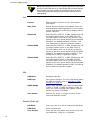
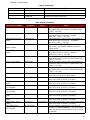
USB Baud
Power up baud rate.
User Format
Power up with front panel User Format set to select 1080p24sf,
1080p30, or 1080p48.
Disp Time
Power up with the pattern name display duration set to 0.25, 0.5, 1.0,
1.5, or 2.0 seconds.
Window Size
Power up with 10.8% (legacy) or 10.0% Gray Scale and Color windows.
User Values
Select 8-bit, 10-bit, or integer % entry of User luma and RGB color values.
Save Items
Save all of the above power up default items to non-volatile memory.
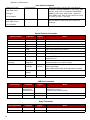
(AVI) InfoFrame (HDMI only)
Output
Auto or manual selection of the Output Signal Type parameter (Auto,
Off, RGB, YCbCr 4:2:2, YCbCr 4:4:4).
Color Enc
Auto or manual selection of the YCbCr color encoding parameter (Auto,
Off, Rec. 601, Rec. 709).
Levels
Auto or manual selection of the Output Signal Levels parameter (Auto,
Off, Video, PC).
Format
Auto or manual selection of the Output Signal Format parameter (Auto,
Off).
Pixel Rep
Auto or manual selection of the Output Signal Pixel Replication parameter (Auto, 1x, 2x).
NOTE: The AVI InfoFrame menu allows product designers and
expert users to troubleshoot display or video processor problems by temporarily disabling or sending an “incorrect” InfoFrame parameter to determine if a device is ignoring a particular
parameter or executing it incorrectly. For example, if a display is
decoding standard-definition YCbCr signals with the wrong color
matrix the user can change the InfoFrame Color Enc parameter
to determine whether the display responds to the parameter at
all, and if so how it responds to different parameter values.
46