1
INSTALLATIONS
MicroPCI Daughter Card Installation
The IB745 CPU card is integrated with a MicroPCI socket that use
SO-DIMM 144-pin connectors. These sockets can accommodate the
optional MicroPCI daughter cards.
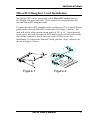
To insert the MicroPCI daughter cards, position it at 30° to the PCB and
gently push it into the MicroPCI connector (See Figure 1 below). The
card will not fit when inserted at an angle of 45° or 15°. Once inserted,
slowly press the card towards the PCB until it locks on both sides to the
clips of the connector. Screw the card to the PCB to secure the
installation. To remove the MicroPCI card, pull the ‘clips’ sideways as
shown in Figure 2 below.
Figure 1.
Figure 2.
IB745 User’s Manual
7