1
BERKELEY LOGO 6.0
Berkeley Logo User Manual
Brian Harvey
i
Short Contents
1 Introduction . . . . . . . . . . . . . . . . . . . . . . . . . . . . . . . . . . . . . . . . . 1
2 Data Structure Primitives . . . . . . . . . . . . . . . . . . . . . . . . . . . . . . 9
3 Communication . . . . . . . . . . . . . . . . . . . . . . . . . . . . . . . . . . . . . . 19
4 Arithmetic . . . . . . . . . . . . . . . . . . . . . . . . . . . . . . . . . . . . . . . . . . 29
5 Logical Operations . . . . . . . . . . . . . . . . . . . . . . . . . . . . . . . . . . . 35
6 Graphics . . . . . . . . . . . . . . . . . . . . . . . . . . . . . . . . . . . . . . . . . . . 37
7 Workspace Management . . . . . . . . . . . . . . . . . . . . . . . . . . . . . . . 49
8 Control Structures . . . . . . . . . . . . . . . . . . . . . . . . . . . . . . . . . . . 67
9 Macros . . . . . . . . . . . . . . . . . . . . . . . . . . . . . . . . . . . . . . . . . . . . . 83
10 Error Processing . . . . . . . . . . . . . . . . . . . . . . . . . . . . . . . . . . . . . 87
11 Special Variables . . . . . . . . . . . . . . . . . . . . . . . . . . . . . . . . . . . . . 89
12 Internationalization . . . . . . . . . . . . . . . . . . . . . . . . . . . . . . . . . . 93
INDEX . . . . . . . . . . . . . . . . . . . . . . . . . . . . . . . . . . . . . . . . . . . . . . . . 97
iii
Table of Contents
1
Introduction . . . . . . . . . . . . . . . . . . . . . . . . . . . . . . . . . . . . . 1
1.1
1.2
1.3
1.4
2
Overview . . . . . . . . . . . . . . . . . . . . . . . . . . . . . . . . . . . . . . . . . . . . . . . . . . . . . .
Getter/Setter Variable Syntax . . . . . . . . . . . . . . . . . . . . . . . . . . . . . . . . . .
Entering and Leaving Logo . . . . . . . . . . . . . . . . . . . . . . . . . . . . . . . . . . . . .
Tokenization . . . . . . . . . . . . . . . . . . . . . . . . . . . . . . . . . . . . . . . . . . . . . . . . . . .
1
2
5
6
Data Structure Primitives . . . . . . . . . . . . . . . . . . . . . 9
2.1
Constructors . . . . . . . . . . . . . . . . . . . . . . . . . . . . . . . . . . . . . . . . . . . . . . . . . . . 9
word . . . . . . . . . . . . . . . . . . . . . . . . . . . . . . . . . . . . . . . . . . . . . . . . . . . . . . . . . . . . . 9
list . . . . . . . . . . . . . . . . . . . . . . . . . . . . . . . . . . . . . . . . . . . . . . . . . . . . . . . . . . . . . . . 9
sentence. . . . . . . . . . . . . . . . . . . . . . . . . . . . . . . . . . . . . . . . . . . . . . . . . . . . . . . . . . 9
fput . . . . . . . . . . . . . . . . . . . . . . . . . . . . . . . . . . . . . . . . . . . . . . . . . . . . . . . . . . . . . . 9
lput . . . . . . . . . . . . . . . . . . . . . . . . . . . . . . . . . . . . . . . . . . . . . . . . . . . . . . . . . . . . . . 9
array. . . . . . . . . . . . . . . . . . . . . . . . . . . . . . . . . . . . . . . . . . . . . . . . . . . . . . . . . . . . . 9
mdarray . . . . . . . . . . . . . . . . . . . . . . . . . . . . . . . . . . . . . . . . . . . . . . . . . . . . . . . . 10
listtoarray . . . . . . . . . . . . . . . . . . . . . . . . . . . . . . . . . . . . . . . . . . . . . . . . . . . . . . 10
arraytolist . . . . . . . . . . . . . . . . . . . . . . . . . . . . . . . . . . . . . . . . . . . . . . . . . . . . . . 10
combine. . . . . . . . . . . . . . . . . . . . . . . . . . . . . . . . . . . . . . . . . . . . . . . . . . . . . . . . . 10
reverse . . . . . . . . . . . . . . . . . . . . . . . . . . . . . . . . . . . . . . . . . . . . . . . . . . . . . . . . . . 10
gensym . . . . . . . . . . . . . . . . . . . . . . . . . . . . . . . . . . . . . . . . . . . . . . . . . . . . . . . . . 10
2.2 Data Selectors . . . . . . . . . . . . . . . . . . . . . . . . . . . . . . . . . . . . . . . . . . . . . . . . 10
first . . . . . . . . . . . . . . . . . . . . . . . . . . . . . . . . . . . . . . . . . . . . . . . . . . . . . . . . . . . . . 10
firsts . . . . . . . . . . . . . . . . . . . . . . . . . . . . . . . . . . . . . . . . . . . . . . . . . . . . . . . . . . . . 11
last . . . . . . . . . . . . . . . . . . . . . . . . . . . . . . . . . . . . . . . . . . . . . . . . . . . . . . . . . . . . . 11
butfirst . . . . . . . . . . . . . . . . . . . . . . . . . . . . . . . . . . . . . . . . . . . . . . . . . . . . . . . . . 11
butfirsts . . . . . . . . . . . . . . . . . . . . . . . . . . . . . . . . . . . . . . . . . . . . . . . . . . . . . . . . 11
butlast . . . . . . . . . . . . . . . . . . . . . . . . . . . . . . . . . . . . . . . . . . . . . . . . . . . . . . . . . . 12
item . . . . . . . . . . . . . . . . . . . . . . . . . . . . . . . . . . . . . . . . . . . . . . . . . . . . . . . . . . . . 12
mditem . . . . . . . . . . . . . . . . . . . . . . . . . . . . . . . . . . . . . . . . . . . . . . . . . . . . . . . . . 12
pick . . . . . . . . . . . . . . . . . . . . . . . . . . . . . . . . . . . . . . . . . . . . . . . . . . . . . . . . . . . . . 12
remove . . . . . . . . . . . . . . . . . . . . . . . . . . . . . . . . . . . . . . . . . . . . . . . . . . . . . . . . . . 12
remdup . . . . . . . . . . . . . . . . . . . . . . . . . . . . . . . . . . . . . . . . . . . . . . . . . . . . . . . . . 12
quoted . . . . . . . . . . . . . . . . . . . . . . . . . . . . . . . . . . . . . . . . . . . . . . . . . . . . . . . . . . 12
2.3 Data Mutators . . . . . . . . . . . . . . . . . . . . . . . . . . . . . . . . . . . . . . . . . . . . . . . . 12
setitem . . . . . . . . . . . . . . . . . . . . . . . . . . . . . . . . . . . . . . . . . . . . . . . . . . . . . . . . . 12
mdsetitem . . . . . . . . . . . . . . . . . . . . . . . . . . . . . . . . . . . . . . . . . . . . . . . . . . . . . . 13
.setfirst . . . . . . . . . . . . . . . . . . . . . . . . . . . . . . . . . . . . . . . . . . . . . . . . . . . . . . . . . 13
.setbf . . . . . . . . . . . . . . . . . . . . . . . . . . . . . . . . . . . . . . . . . . . . . . . . . . . . . . . . . . . 13
.setitem . . . . . . . . . . . . . . . . . . . . . . . . . . . . . . . . . . . . . . . . . . . . . . . . . . . . . . . . . 13
push . . . . . . . . . . . . . . . . . . . . . . . . . . . . . . . . . . . . . . . . . . . . . . . . . . . . . . . . . . . . 13
pop . . . . . . . . . . . . . . . . . . . . . . . . . . . . . . . . . . . . . . . . . . . . . . . . . . . . . . . . . . . . . 13
queue . . . . . . . . . . . . . . . . . . . . . . . . . . . . . . . . . . . . . . . . . . . . . . . . . . . . . . . . . . . 14
dequeue . . . . . . . . . . . . . . . . . . . . . . . . . . . . . . . . . . . . . . . . . . . . . . . . . . . . . . . . . 14
iv
BERKELEY LOGO 6.0
2.4
Predicates . . . . . . . . . . . . . . . . . . . . . . . . . . . . . . . . . . . . . . . . . . . . . . . . . . . .
wordp. . . . . . . . . . . . . . . . . . . . . . . . . . . . . . . . . . . . . . . . . . . . . . . . . . . . . . . . . . .
listp . . . . . . . . . . . . . . . . . . . . . . . . . . . . . . . . . . . . . . . . . . . . . . . . . . . . . . . . . . . .
arrayp . . . . . . . . . . . . . . . . . . . . . . . . . . . . . . . . . . . . . . . . . . . . . . . . . . . . . . . . . .
emptyp . . . . . . . . . . . . . . . . . . . . . . . . . . . . . . . . . . . . . . . . . . . . . . . . . . . . . . . . .
equalp . . . . . . . . . . . . . . . . . . . . . . . . . . . . . . . . . . . . . . . . . . . . . . . . . . . . . . . . . .
notequalp . . . . . . . . . . . . . . . . . . . . . . . . . . . . . . . . . . . . . . . . . . . . . . . . . . . . . . .
beforep . . . . . . . . . . . . . . . . . . . . . . . . . . . . . . . . . . . . . . . . . . . . . . . . . . . . . . . . .
.eq . . . . . . . . . . . . . . . . . . . . . . . . . . . . . . . . . . . . . . . . . . . . . . . . . . . . . . . . . . . . . .
memberp . . . . . . . . . . . . . . . . . . . . . . . . . . . . . . . . . . . . . . . . . . . . . . . . . . . . . . .
substringp . . . . . . . . . . . . . . . . . . . . . . . . . . . . . . . . . . . . . . . . . . . . . . . . . . . . . .
numberp . . . . . . . . . . . . . . . . . . . . . . . . . . . . . . . . . . . . . . . . . . . . . . . . . . . . . . . .
vbarredp . . . . . . . . . . . . . . . . . . . . . . . . . . . . . . . . . . . . . . . . . . . . . . . . . . . . . . . .
2.5 Queries . . . . . . . . . . . . . . . . . . . . . . . . . . . . . . . . . . . . . . . . . . . . . . . . . . . . . . .
count . . . . . . . . . . . . . . . . . . . . . . . . . . . . . . . . . . . . . . . . . . . . . . . . . . . . . . . . . . .
ascii . . . . . . . . . . . . . . . . . . . . . . . . . . . . . . . . . . . . . . . . . . . . . . . . . . . . . . . . . . . .
rawascii . . . . . . . . . . . . . . . . . . . . . . . . . . . . . . . . . . . . . . . . . . . . . . . . . . . . . . . . .
char . . . . . . . . . . . . . . . . . . . . . . . . . . . . . . . . . . . . . . . . . . . . . . . . . . . . . . . . . . . .
member . . . . . . . . . . . . . . . . . . . . . . . . . . . . . . . . . . . . . . . . . . . . . . . . . . . . . . . . .
lowercase . . . . . . . . . . . . . . . . . . . . . . . . . . . . . . . . . . . . . . . . . . . . . . . . . . . . . . .
uppercase . . . . . . . . . . . . . . . . . . . . . . . . . . . . . . . . . . . . . . . . . . . . . . . . . . . . . . .
standout . . . . . . . . . . . . . . . . . . . . . . . . . . . . . . . . . . . . . . . . . . . . . . . . . . . . . . . .
parse . . . . . . . . . . . . . . . . . . . . . . . . . . . . . . . . . . . . . . . . . . . . . . . . . . . . . . . . . . .
runparse . . . . . . . . . . . . . . . . . . . . . . . . . . . . . . . . . . . . . . . . . . . . . . . . . . . . . . . .
3
14
14
14
14
14
14
15
15
15
15
16
16
16
16
16
16
16
17
17
17
17
17
18
18
Communication . . . . . . . . . . . . . . . . . . . . . . . . . . . . . . . . 19
3.1
Transmitters . . . . . . . . . . . . . . . . . . . . . . . . . . . . . . . . . . . . . . . . . . . . . . . . . .
print . . . . . . . . . . . . . . . . . . . . . . . . . . . . . . . . . . . . . . . . . . . . . . . . . . . . . . . . . . . .
type . . . . . . . . . . . . . . . . . . . . . . . . . . . . . . . . . . . . . . . . . . . . . . . . . . . . . . . . . . . .
show . . . . . . . . . . . . . . . . . . . . . . . . . . . . . . . . . . . . . . . . . . . . . . . . . . . . . . . . . . . .
3.2 Receivers . . . . . . . . . . . . . . . . . . . . . . . . . . . . . . . . . . . . . . . . . . . . . . . . . . . . .
readlist . . . . . . . . . . . . . . . . . . . . . . . . . . . . . . . . . . . . . . . . . . . . . . . . . . . . . . . . .
readword. . . . . . . . . . . . . . . . . . . . . . . . . . . . . . . . . . . . . . . . . . . . . . . . . . . . . . . .
readrawline . . . . . . . . . . . . . . . . . . . . . . . . . . . . . . . . . . . . . . . . . . . . . . . . . . . . .
readchar . . . . . . . . . . . . . . . . . . . . . . . . . . . . . . . . . . . . . . . . . . . . . . . . . . . . . . . .
readchars . . . . . . . . . . . . . . . . . . . . . . . . . . . . . . . . . . . . . . . . . . . . . . . . . . . . . . .
shell . . . . . . . . . . . . . . . . . . . . . . . . . . . . . . . . . . . . . . . . . . . . . . . . . . . . . . . . . . . .
3.3 File Access . . . . . . . . . . . . . . . . . . . . . . . . . . . . . . . . . . . . . . . . . . . . . . . . . . . .
setprefix . . . . . . . . . . . . . . . . . . . . . . . . . . . . . . . . . . . . . . . . . . . . . . . . . . . . . . . .
prefix . . . . . . . . . . . . . . . . . . . . . . . . . . . . . . . . . . . . . . . . . . . . . . . . . . . . . . . . . . .
openread . . . . . . . . . . . . . . . . . . . . . . . . . . . . . . . . . . . . . . . . . . . . . . . . . . . . . . . .
openwrite . . . . . . . . . . . . . . . . . . . . . . . . . . . . . . . . . . . . . . . . . . . . . . . . . . . . . . .
openappend . . . . . . . . . . . . . . . . . . . . . . . . . . . . . . . . . . . . . . . . . . . . . . . . . . . . .
openupdate . . . . . . . . . . . . . . . . . . . . . . . . . . . . . . . . . . . . . . . . . . . . . . . . . . . . .
close . . . . . . . . . . . . . . . . . . . . . . . . . . . . . . . . . . . . . . . . . . . . . . . . . . . . . . . . . . . .
allopen. . . . . . . . . . . . . . . . . . . . . . . . . . . . . . . . . . . . . . . . . . . . . . . . . . . . . . . . . .
closeall. . . . . . . . . . . . . . . . . . . . . . . . . . . . . . . . . . . . . . . . . . . . . . . . . . . . . . . . . .
erasefile . . . . . . . . . . . . . . . . . . . . . . . . . . . . . . . . . . . . . . . . . . . . . . . . . . . . . . . . .
19
19
19
20
20
20
20
20
21
21
21
22
22
22
22
22
23
23
23
23
23
23
v
dribble . . . . . . . . . . . . . . . . . . . . . . . . . . . . . . . . . . . . . . . . . . . . . . . . . . . . . . . . . .
nodribble . . . . . . . . . . . . . . . . . . . . . . . . . . . . . . . . . . . . . . . . . . . . . . . . . . . . . . .
setread . . . . . . . . . . . . . . . . . . . . . . . . . . . . . . . . . . . . . . . . . . . . . . . . . . . . . . . . . .
setwrite . . . . . . . . . . . . . . . . . . . . . . . . . . . . . . . . . . . . . . . . . . . . . . . . . . . . . . . . .
reader . . . . . . . . . . . . . . . . . . . . . . . . . . . . . . . . . . . . . . . . . . . . . . . . . . . . . . . . . .
writer . . . . . . . . . . . . . . . . . . . . . . . . . . . . . . . . . . . . . . . . . . . . . . . . . . . . . . . . . . .
setreadpos . . . . . . . . . . . . . . . . . . . . . . . . . . . . . . . . . . . . . . . . . . . . . . . . . . . . . .
setwritepos . . . . . . . . . . . . . . . . . . . . . . . . . . . . . . . . . . . . . . . . . . . . . . . . . . . . . .
readpos . . . . . . . . . . . . . . . . . . . . . . . . . . . . . . . . . . . . . . . . . . . . . . . . . . . . . . . . .
writepos . . . . . . . . . . . . . . . . . . . . . . . . . . . . . . . . . . . . . . . . . . . . . . . . . . . . . . . .
eofp. . . . . . . . . . . . . . . . . . . . . . . . . . . . . . . . . . . . . . . . . . . . . . . . . . . . . . . . . . . . .
filep . . . . . . . . . . . . . . . . . . . . . . . . . . . . . . . . . . . . . . . . . . . . . . . . . . . . . . . . . . . .
3.4 Terminal Access. . . . . . . . . . . . . . . . . . . . . . . . . . . . . . . . . . . . . . . . . . . . . . .
keyp . . . . . . . . . . . . . . . . . . . . . . . . . . . . . . . . . . . . . . . . . . . . . . . . . . . . . . . . . . . .
cleartext . . . . . . . . . . . . . . . . . . . . . . . . . . . . . . . . . . . . . . . . . . . . . . . . . . . . . . . .
setcursor . . . . . . . . . . . . . . . . . . . . . . . . . . . . . . . . . . . . . . . . . . . . . . . . . . . . . . . .
cursor . . . . . . . . . . . . . . . . . . . . . . . . . . . . . . . . . . . . . . . . . . . . . . . . . . . . . . . . . . .
setmargins . . . . . . . . . . . . . . . . . . . . . . . . . . . . . . . . . . . . . . . . . . . . . . . . . . . . . .
settextcolor . . . . . . . . . . . . . . . . . . . . . . . . . . . . . . . . . . . . . . . . . . . . . . . . . . . . .
increasefont . . . . . . . . . . . . . . . . . . . . . . . . . . . . . . . . . . . . . . . . . . . . . . . . . . . . .
settextsize . . . . . . . . . . . . . . . . . . . . . . . . . . . . . . . . . . . . . . . . . . . . . . . . . . . . . .
textsize . . . . . . . . . . . . . . . . . . . . . . . . . . . . . . . . . . . . . . . . . . . . . . . . . . . . . . . . .
setfont . . . . . . . . . . . . . . . . . . . . . . . . . . . . . . . . . . . . . . . . . . . . . . . . . . . . . . . . . .
font . . . . . . . . . . . . . . . . . . . . . . . . . . . . . . . . . . . . . . . . . . . . . . . . . . . . . . . . . . . . .
4
24
24
24
24
25
25
25
25
25
25
25
26
26
26
26
26
26
26
27
27
27
27
28
28
Arithmetic . . . . . . . . . . . . . . . . . . . . . . . . . . . . . . . . . . . . . 29
4.1
Numeric Operations . . . . . . . . . . . . . . . . . . . . . . . . . . . . . . . . . . . . . . . . . . .
sum . . . . . . . . . . . . . . . . . . . . . . . . . . . . . . . . . . . . . . . . . . . . . . . . . . . . . . . . . . . . .
difference . . . . . . . . . . . . . . . . . . . . . . . . . . . . . . . . . . . . . . . . . . . . . . . . . . . . . . .
minus . . . . . . . . . . . . . . . . . . . . . . . . . . . . . . . . . . . . . . . . . . . . . . . . . . . . . . . . . . .
product . . . . . . . . . . . . . . . . . . . . . . . . . . . . . . . . . . . . . . . . . . . . . . . . . . . . . . . . .
quotient . . . . . . . . . . . . . . . . . . . . . . . . . . . . . . . . . . . . . . . . . . . . . . . . . . . . . . . .
remainder . . . . . . . . . . . . . . . . . . . . . . . . . . . . . . . . . . . . . . . . . . . . . . . . . . . . . . .
modulo . . . . . . . . . . . . . . . . . . . . . . . . . . . . . . . . . . . . . . . . . . . . . . . . . . . . . . . . .
int . . . . . . . . . . . . . . . . . . . . . . . . . . . . . . . . . . . . . . . . . . . . . . . . . . . . . . . . . . . . . .
round . . . . . . . . . . . . . . . . . . . . . . . . . . . . . . . . . . . . . . . . . . . . . . . . . . . . . . . . . . .
sqrt . . . . . . . . . . . . . . . . . . . . . . . . . . . . . . . . . . . . . . . . . . . . . . . . . . . . . . . . . . . . .
power . . . . . . . . . . . . . . . . . . . . . . . . . . . . . . . . . . . . . . . . . . . . . . . . . . . . . . . . . . .
exp . . . . . . . . . . . . . . . . . . . . . . . . . . . . . . . . . . . . . . . . . . . . . . . . . . . . . . . . . . . . .
log10 . . . . . . . . . . . . . . . . . . . . . . . . . . . . . . . . . . . . . . . . . . . . . . . . . . . . . . . . . . .
ln . . . . . . . . . . . . . . . . . . . . . . . . . . . . . . . . . . . . . . . . . . . . . . . . . . . . . . . . . . . . . . .
sin . . . . . . . . . . . . . . . . . . . . . . . . . . . . . . . . . . . . . . . . . . . . . . . . . . . . . . . . . . . . . .
radsin . . . . . . . . . . . . . . . . . . . . . . . . . . . . . . . . . . . . . . . . . . . . . . . . . . . . . . . . . . .
cos . . . . . . . . . . . . . . . . . . . . . . . . . . . . . . . . . . . . . . . . . . . . . . . . . . . . . . . . . . . . . .
radcos . . . . . . . . . . . . . . . . . . . . . . . . . . . . . . . . . . . . . . . . . . . . . . . . . . . . . . . . . .
arctan . . . . . . . . . . . . . . . . . . . . . . . . . . . . . . . . . . . . . . . . . . . . . . . . . . . . . . . . . .
radarctan . . . . . . . . . . . . . . . . . . . . . . . . . . . . . . . . . . . . . . . . . . . . . . . . . . . . . . .
iseq . . . . . . . . . . . . . . . . . . . . . . . . . . . . . . . . . . . . . . . . . . . . . . . . . . . . . . . . . . . . .
29
29
29
29
29
29
30
30
30
30
30
30
30
30
30
31
31
31
31
31
31
31
vi
BERKELEY LOGO 6.0
rseq . . . . . . . . . . . . . . . . . . . . . . . . . . . . . . . . . . . . . . . . . . . . . . . . . . . . . . . . . . . . .
4.2 Numeric Predicates . . . . . . . . . . . . . . . . . . . . . . . . . . . . . . . . . . . . . . . . . . .
lessp . . . . . . . . . . . . . . . . . . . . . . . . . . . . . . . . . . . . . . . . . . . . . . . . . . . . . . . . . . . .
greaterp . . . . . . . . . . . . . . . . . . . . . . . . . . . . . . . . . . . . . . . . . . . . . . . . . . . . . . . .
lessequalp . . . . . . . . . . . . . . . . . . . . . . . . . . . . . . . . . . . . . . . . . . . . . . . . . . . . . . .
greaterequalp . . . . . . . . . . . . . . . . . . . . . . . . . . . . . . . . . . . . . . . . . . . . . . . . . . .
4.3 Random Numbers . . . . . . . . . . . . . . . . . . . . . . . . . . . . . . . . . . . . . . . . . . . . .
random . . . . . . . . . . . . . . . . . . . . . . . . . . . . . . . . . . . . . . . . . . . . . . . . . . . . . . . . .
rerandom . . . . . . . . . . . . . . . . . . . . . . . . . . . . . . . . . . . . . . . . . . . . . . . . . . . . . . .
4.4 Print Formatting . . . . . . . . . . . . . . . . . . . . . . . . . . . . . . . . . . . . . . . . . . . . . .
form . . . . . . . . . . . . . . . . . . . . . . . . . . . . . . . . . . . . . . . . . . . . . . . . . . . . . . . . . . . .
4.5 Bitwise Operations . . . . . . . . . . . . . . . . . . . . . . . . . . . . . . . . . . . . . . . . . . . .
bitand . . . . . . . . . . . . . . . . . . . . . . . . . . . . . . . . . . . . . . . . . . . . . . . . . . . . . . . . . .
bitor . . . . . . . . . . . . . . . . . . . . . . . . . . . . . . . . . . . . . . . . . . . . . . . . . . . . . . . . . . . .
bitxor . . . . . . . . . . . . . . . . . . . . . . . . . . . . . . . . . . . . . . . . . . . . . . . . . . . . . . . . . . .
bitnot . . . . . . . . . . . . . . . . . . . . . . . . . . . . . . . . . . . . . . . . . . . . . . . . . . . . . . . . . . .
ashift . . . . . . . . . . . . . . . . . . . . . . . . . . . . . . . . . . . . . . . . . . . . . . . . . . . . . . . . . . .
lshift . . . . . . . . . . . . . . . . . . . . . . . . . . . . . . . . . . . . . . . . . . . . . . . . . . . . . . . . . . . .
5
31
32
32
32
32
32
32
32
33
33
33
33
33
33
33
34
34
34
Logical Operations . . . . . . . . . . . . . . . . . . . . . . . . . . . . 35
and . . . . . . . . . . . . . . . . . . . . . . . . . . . . . . . . . . . . . . . . . . . . . . . . . . . . . . . . . . . . . 35
or . . . . . . . . . . . . . . . . . . . . . . . . . . . . . . . . . . . . . . . . . . . . . . . . . . . . . . . . . . . . . . . 35
not . . . . . . . . . . . . . . . . . . . . . . . . . . . . . . . . . . . . . . . . . . . . . . . . . . . . . . . . . . . . . 35
6
Graphics . . . . . . . . . . . . . . . . . . . . . . . . . . . . . . . . . . . . . . . 37
6.1
Turtle Motion . . . . . . . . . . . . . . . . . . . . . . . . . . . . . . . . . . . . . . . . . . . . . . . . .
forward . . . . . . . . . . . . . . . . . . . . . . . . . . . . . . . . . . . . . . . . . . . . . . . . . . . . . . . . .
back . . . . . . . . . . . . . . . . . . . . . . . . . . . . . . . . . . . . . . . . . . . . . . . . . . . . . . . . . . . .
left . . . . . . . . . . . . . . . . . . . . . . . . . . . . . . . . . . . . . . . . . . . . . . . . . . . . . . . . . . . . .
right . . . . . . . . . . . . . . . . . . . . . . . . . . . . . . . . . . . . . . . . . . . . . . . . . . . . . . . . . . . .
setpos . . . . . . . . . . . . . . . . . . . . . . . . . . . . . . . . . . . . . . . . . . . . . . . . . . . . . . . . . .
setxy . . . . . . . . . . . . . . . . . . . . . . . . . . . . . . . . . . . . . . . . . . . . . . . . . . . . . . . . . . .
setx . . . . . . . . . . . . . . . . . . . . . . . . . . . . . . . . . . . . . . . . . . . . . . . . . . . . . . . . . . . . .
sety . . . . . . . . . . . . . . . . . . . . . . . . . . . . . . . . . . . . . . . . . . . . . . . . . . . . . . . . . . . . .
setheading . . . . . . . . . . . . . . . . . . . . . . . . . . . . . . . . . . . . . . . . . . . . . . . . . . . . . .
home . . . . . . . . . . . . . . . . . . . . . . . . . . . . . . . . . . . . . . . . . . . . . . . . . . . . . . . . . . .
arc . . . . . . . . . . . . . . . . . . . . . . . . . . . . . . . . . . . . . . . . . . . . . . . . . . . . . . . . . . . . . .
6.2 Turtle Motion Queries. . . . . . . . . . . . . . . . . . . . . . . . . . . . . . . . . . . . . . . . .
pos . . . . . . . . . . . . . . . . . . . . . . . . . . . . . . . . . . . . . . . . . . . . . . . . . . . . . . . . . . . . .
xcor . . . . . . . . . . . . . . . . . . . . . . . . . . . . . . . . . . . . . . . . . . . . . . . . . . . . . . . . . . . .
ycor . . . . . . . . . . . . . . . . . . . . . . . . . . . . . . . . . . . . . . . . . . . . . . . . . . . . . . . . . . . .
heading . . . . . . . . . . . . . . . . . . . . . . . . . . . . . . . . . . . . . . . . . . . . . . . . . . . . . . . . .
towards . . . . . . . . . . . . . . . . . . . . . . . . . . . . . . . . . . . . . . . . . . . . . . . . . . . . . . . . .
scrunch . . . . . . . . . . . . . . . . . . . . . . . . . . . . . . . . . . . . . . . . . . . . . . . . . . . . . . . . .
6.3 Turtle and Window Control . . . . . . . . . . . . . . . . . . . . . . . . . . . . . . . . . . .
showturtle . . . . . . . . . . . . . . . . . . . . . . . . . . . . . . . . . . . . . . . . . . . . . . . . . . . . . .
hideturtle . . . . . . . . . . . . . . . . . . . . . . . . . . . . . . . . . . . . . . . . . . . . . . . . . . . . . . .
clean . . . . . . . . . . . . . . . . . . . . . . . . . . . . . . . . . . . . . . . . . . . . . . . . . . . . . . . . . . . .
37
37
37
38
38
38
38
38
38
38
38
39
39
39
39
39
39
39
39
39
39
40
40
vii
clearscreen . . . . . . . . . . . . . . . . . . . . . . . . . . . . . . . . . . . . . . . . . . . . . . . . . . . . . .
wrap . . . . . . . . . . . . . . . . . . . . . . . . . . . . . . . . . . . . . . . . . . . . . . . . . . . . . . . . . . . .
window . . . . . . . . . . . . . . . . . . . . . . . . . . . . . . . . . . . . . . . . . . . . . . . . . . . . . . . . .
fence . . . . . . . . . . . . . . . . . . . . . . . . . . . . . . . . . . . . . . . . . . . . . . . . . . . . . . . . . . . .
fill . . . . . . . . . . . . . . . . . . . . . . . . . . . . . . . . . . . . . . . . . . . . . . . . . . . . . . . . . . . . . .
filled . . . . . . . . . . . . . . . . . . . . . . . . . . . . . . . . . . . . . . . . . . . . . . . . . . . . . . . . . . . .
label . . . . . . . . . . . . . . . . . . . . . . . . . . . . . . . . . . . . . . . . . . . . . . . . . . . . . . . . . . . .
setlabelheight . . . . . . . . . . . . . . . . . . . . . . . . . . . . . . . . . . . . . . . . . . . . . . . . . . .
textscreen . . . . . . . . . . . . . . . . . . . . . . . . . . . . . . . . . . . . . . . . . . . . . . . . . . . . . . .
fullscreen . . . . . . . . . . . . . . . . . . . . . . . . . . . . . . . . . . . . . . . . . . . . . . . . . . . . . . .
splitscreen . . . . . . . . . . . . . . . . . . . . . . . . . . . . . . . . . . . . . . . . . . . . . . . . . . . . . .
setscrunch . . . . . . . . . . . . . . . . . . . . . . . . . . . . . . . . . . . . . . . . . . . . . . . . . . . . . .
refresh . . . . . . . . . . . . . . . . . . . . . . . . . . . . . . . . . . . . . . . . . . . . . . . . . . . . . . . . . .
norefresh . . . . . . . . . . . . . . . . . . . . . . . . . . . . . . . . . . . . . . . . . . . . . . . . . . . . . . . .
6.4 Turtle and Window Queries . . . . . . . . . . . . . . . . . . . . . . . . . . . . . . . . . . .
shownp . . . . . . . . . . . . . . . . . . . . . . . . . . . . . . . . . . . . . . . . . . . . . . . . . . . . . . . . .
screenmode . . . . . . . . . . . . . . . . . . . . . . . . . . . . . . . . . . . . . . . . . . . . . . . . . . . . .
turtlemode . . . . . . . . . . . . . . . . . . . . . . . . . . . . . . . . . . . . . . . . . . . . . . . . . . . . . .
labelsize . . . . . . . . . . . . . . . . . . . . . . . . . . . . . . . . . . . . . . . . . . . . . . . . . . . . . . . .
6.5 Pen and Background Control . . . . . . . . . . . . . . . . . . . . . . . . . . . . . . . . . .
pendown . . . . . . . . . . . . . . . . . . . . . . . . . . . . . . . . . . . . . . . . . . . . . . . . . . . . . . . .
penup . . . . . . . . . . . . . . . . . . . . . . . . . . . . . . . . . . . . . . . . . . . . . . . . . . . . . . . . . . .
penpaint . . . . . . . . . . . . . . . . . . . . . . . . . . . . . . . . . . . . . . . . . . . . . . . . . . . . . . . .
penerase . . . . . . . . . . . . . . . . . . . . . . . . . . . . . . . . . . . . . . . . . . . . . . . . . . . . . . . .
penreverse . . . . . . . . . . . . . . . . . . . . . . . . . . . . . . . . . . . . . . . . . . . . . . . . . . . . . .
setpencolor. . . . . . . . . . . . . . . . . . . . . . . . . . . . . . . . . . . . . . . . . . . . . . . . . . . . . .
setpalette . . . . . . . . . . . . . . . . . . . . . . . . . . . . . . . . . . . . . . . . . . . . . . . . . . . . . . .
setpensize . . . . . . . . . . . . . . . . . . . . . . . . . . . . . . . . . . . . . . . . . . . . . . . . . . . . . . .
setpenpattern . . . . . . . . . . . . . . . . . . . . . . . . . . . . . . . . . . . . . . . . . . . . . . . . . . .
setpen . . . . . . . . . . . . . . . . . . . . . . . . . . . . . . . . . . . . . . . . . . . . . . . . . . . . . . . . . .
setbackground . . . . . . . . . . . . . . . . . . . . . . . . . . . . . . . . . . . . . . . . . . . . . . . . . .
6.6 Pen Queries . . . . . . . . . . . . . . . . . . . . . . . . . . . . . . . . . . . . . . . . . . . . . . . . . . .
pendownp . . . . . . . . . . . . . . . . . . . . . . . . . . . . . . . . . . . . . . . . . . . . . . . . . . . . . . .
penmode . . . . . . . . . . . . . . . . . . . . . . . . . . . . . . . . . . . . . . . . . . . . . . . . . . . . . . . .
pencolor . . . . . . . . . . . . . . . . . . . . . . . . . . . . . . . . . . . . . . . . . . . . . . . . . . . . . . . .
palette . . . . . . . . . . . . . . . . . . . . . . . . . . . . . . . . . . . . . . . . . . . . . . . . . . . . . . . . . .
pensize. . . . . . . . . . . . . . . . . . . . . . . . . . . . . . . . . . . . . . . . . . . . . . . . . . . . . . . . . .
pen . . . . . . . . . . . . . . . . . . . . . . . . . . . . . . . . . . . . . . . . . . . . . . . . . . . . . . . . . . . . .
background . . . . . . . . . . . . . . . . . . . . . . . . . . . . . . . . . . . . . . . . . . . . . . . . . . . . .
6.7 Saving and Loading Pictures . . . . . . . . . . . . . . . . . . . . . . . . . . . . . . . . . .
savepict . . . . . . . . . . . . . . . . . . . . . . . . . . . . . . . . . . . . . . . . . . . . . . . . . . . . . . . . .
loadpict . . . . . . . . . . . . . . . . . . . . . . . . . . . . . . . . . . . . . . . . . . . . . . . . . . . . . . . . .
epspict . . . . . . . . . . . . . . . . . . . . . . . . . . . . . . . . . . . . . . . . . . . . . . . . . . . . . . . . . .
6.8 Mouse Queries . . . . . . . . . . . . . . . . . . . . . . . . . . . . . . . . . . . . . . . . . . . . . . . .
mousepos . . . . . . . . . . . . . . . . . . . . . . . . . . . . . . . . . . . . . . . . . . . . . . . . . . . . . . .
clickpos . . . . . . . . . . . . . . . . . . . . . . . . . . . . . . . . . . . . . . . . . . . . . . . . . . . . . . . . .
buttonp . . . . . . . . . . . . . . . . . . . . . . . . . . . . . . . . . . . . . . . . . . . . . . . . . . . . . . . . .
button . . . . . . . . . . . . . . . . . . . . . . . . . . . . . . . . . . . . . . . . . . . . . . . . . . . . . . . . . .
40
40
40
40
41
41
41
41
41
41
42
42
42
42
42
43
43
43
43
43
43
43
44
44
44
44
44
44
45
45
45
45
45
45
45
46
46
46
46
46
46
46
47
47
47
47
47
47
viii
7
BERKELEY LOGO 6.0
Workspace Management . . . . . . . . . . . . . . . . . . . . . . 49
7.1
Procedure Definition . . . . . . . . . . . . . . . . . . . . . . . . . . . . . . . . . . . . . . . . . .
to . . . . . . . . . . . . . . . . . . . . . . . . . . . . . . . . . . . . . . . . . . . . . . . . . . . . . . . . . . . . . . .
define . . . . . . . . . . . . . . . . . . . . . . . . . . . . . . . . . . . . . . . . . . . . . . . . . . . . . . . . . . .
text . . . . . . . . . . . . . . . . . . . . . . . . . . . . . . . . . . . . . . . . . . . . . . . . . . . . . . . . . . . . .
fulltext . . . . . . . . . . . . . . . . . . . . . . . . . . . . . . . . . . . . . . . . . . . . . . . . . . . . . . . . .
copydef . . . . . . . . . . . . . . . . . . . . . . . . . . . . . . . . . . . . . . . . . . . . . . . . . . . . . . . . .
7.2 Variable Definition . . . . . . . . . . . . . . . . . . . . . . . . . . . . . . . . . . . . . . . . . . . .
make . . . . . . . . . . . . . . . . . . . . . . . . . . . . . . . . . . . . . . . . . . . . . . . . . . . . . . . . . . .
name . . . . . . . . . . . . . . . . . . . . . . . . . . . . . . . . . . . . . . . . . . . . . . . . . . . . . . . . . . .
local . . . . . . . . . . . . . . . . . . . . . . . . . . . . . . . . . . . . . . . . . . . . . . . . . . . . . . . . . . . .
localmake . . . . . . . . . . . . . . . . . . . . . . . . . . . . . . . . . . . . . . . . . . . . . . . . . . . . . . .
thing . . . . . . . . . . . . . . . . . . . . . . . . . . . . . . . . . . . . . . . . . . . . . . . . . . . . . . . . . . .
global . . . . . . . . . . . . . . . . . . . . . . . . . . . . . . . . . . . . . . . . . . . . . . . . . . . . . . . . . . .
7.3 Property Lists . . . . . . . . . . . . . . . . . . . . . . . . . . . . . . . . . . . . . . . . . . . . . . . .
pprop . . . . . . . . . . . . . . . . . . . . . . . . . . . . . . . . . . . . . . . . . . . . . . . . . . . . . . . . . . .
gprop . . . . . . . . . . . . . . . . . . . . . . . . . . . . . . . . . . . . . . . . . . . . . . . . . . . . . . . . . . .
remprop . . . . . . . . . . . . . . . . . . . . . . . . . . . . . . . . . . . . . . . . . . . . . . . . . . . . . . . .
plist . . . . . . . . . . . . . . . . . . . . . . . . . . . . . . . . . . . . . . . . . . . . . . . . . . . . . . . . . . . .
7.4 Workspace Predicates . . . . . . . . . . . . . . . . . . . . . . . . . . . . . . . . . . . . . . . . .
procedurep . . . . . . . . . . . . . . . . . . . . . . . . . . . . . . . . . . . . . . . . . . . . . . . . . . . . . .
primitivep . . . . . . . . . . . . . . . . . . . . . . . . . . . . . . . . . . . . . . . . . . . . . . . . . . . . . .
definedp . . . . . . . . . . . . . . . . . . . . . . . . . . . . . . . . . . . . . . . . . . . . . . . . . . . . . . . .
namep . . . . . . . . . . . . . . . . . . . . . . . . . . . . . . . . . . . . . . . . . . . . . . . . . . . . . . . . . .
plistp . . . . . . . . . . . . . . . . . . . . . . . . . . . . . . . . . . . . . . . . . . . . . . . . . . . . . . . . . . .
7.5 Workspace Queries . . . . . . . . . . . . . . . . . . . . . . . . . . . . . . . . . . . . . . . . . . . .
contents . . . . . . . . . . . . . . . . . . . . . . . . . . . . . . . . . . . . . . . . . . . . . . . . . . . . . . . .
buried . . . . . . . . . . . . . . . . . . . . . . . . . . . . . . . . . . . . . . . . . . . . . . . . . . . . . . . . . .
traced . . . . . . . . . . . . . . . . . . . . . . . . . . . . . . . . . . . . . . . . . . . . . . . . . . . . . . . . . .
stepped . . . . . . . . . . . . . . . . . . . . . . . . . . . . . . . . . . . . . . . . . . . . . . . . . . . . . . . . .
procedures . . . . . . . . . . . . . . . . . . . . . . . . . . . . . . . . . . . . . . . . . . . . . . . . . . . . . .
primitives . . . . . . . . . . . . . . . . . . . . . . . . . . . . . . . . . . . . . . . . . . . . . . . . . . . . . . .
names . . . . . . . . . . . . . . . . . . . . . . . . . . . . . . . . . . . . . . . . . . . . . . . . . . . . . . . . . .
plists . . . . . . . . . . . . . . . . . . . . . . . . . . . . . . . . . . . . . . . . . . . . . . . . . . . . . . . . . . .
namelist . . . . . . . . . . . . . . . . . . . . . . . . . . . . . . . . . . . . . . . . . . . . . . . . . . . . . . . .
pllist . . . . . . . . . . . . . . . . . . . . . . . . . . . . . . . . . . . . . . . . . . . . . . . . . . . . . . . . . . . .
arity . . . . . . . . . . . . . . . . . . . . . . . . . . . . . . . . . . . . . . . . . . . . . . . . . . . . . . . . . . . .
nodes . . . . . . . . . . . . . . . . . . . . . . . . . . . . . . . . . . . . . . . . . . . . . . . . . . . . . . . . . . .
7.6 Workspace Inspection . . . . . . . . . . . . . . . . . . . . . . . . . . . . . . . . . . . . . . . . .
po . . . . . . . . . . . . . . . . . . . . . . . . . . . . . . . . . . . . . . . . . . . . . . . . . . . . . . . . . . . . . .
poall . . . . . . . . . . . . . . . . . . . . . . . . . . . . . . . . . . . . . . . . . . . . . . . . . . . . . . . . . . . .
pops . . . . . . . . . . . . . . . . . . . . . . . . . . . . . . . . . . . . . . . . . . . . . . . . . . . . . . . . . . . .
pons . . . . . . . . . . . . . . . . . . . . . . . . . . . . . . . . . . . . . . . . . . . . . . . . . . . . . . . . . . . .
popls . . . . . . . . . . . . . . . . . . . . . . . . . . . . . . . . . . . . . . . . . . . . . . . . . . . . . . . . . . .
pon . . . . . . . . . . . . . . . . . . . . . . . . . . . . . . . . . . . . . . . . . . . . . . . . . . . . . . . . . . . . .
popl . . . . . . . . . . . . . . . . . . . . . . . . . . . . . . . . . . . . . . . . . . . . . . . . . . . . . . . . . . . .
pot . . . . . . . . . . . . . . . . . . . . . . . . . . . . . . . . . . . . . . . . . . . . . . . . . . . . . . . . . . . . .
pots . . . . . . . . . . . . . . . . . . . . . . . . . . . . . . . . . . . . . . . . . . . . . . . . . . . . . . . . . . . .
49
49
50
51
51
51
51
51
51
52
52
52
52
53
53
53
53
53
53
53
53
54
54
54
54
54
54
54
54
55
55
55
55
55
55
55
56
56
56
56
56
56
57
57
57
57
57
ix
7.7
Workspace Control . . . . . . . . . . . . . . . . . . . . . . . . . . . . . . . . . . . . . . . . . . . .
erase . . . . . . . . . . . . . . . . . . . . . . . . . . . . . . . . . . . . . . . . . . . . . . . . . . . . . . . . . . . .
erall . . . . . . . . . . . . . . . . . . . . . . . . . . . . . . . . . . . . . . . . . . . . . . . . . . . . . . . . . . . .
erps . . . . . . . . . . . . . . . . . . . . . . . . . . . . . . . . . . . . . . . . . . . . . . . . . . . . . . . . . . . . .
erns . . . . . . . . . . . . . . . . . . . . . . . . . . . . . . . . . . . . . . . . . . . . . . . . . . . . . . . . . . . . .
erpls . . . . . . . . . . . . . . . . . . . . . . . . . . . . . . . . . . . . . . . . . . . . . . . . . . . . . . . . . . . .
ern . . . . . . . . . . . . . . . . . . . . . . . . . . . . . . . . . . . . . . . . . . . . . . . . . . . . . . . . . . . . .
erpl . . . . . . . . . . . . . . . . . . . . . . . . . . . . . . . . . . . . . . . . . . . . . . . . . . . . . . . . . . . . .
bury . . . . . . . . . . . . . . . . . . . . . . . . . . . . . . . . . . . . . . . . . . . . . . . . . . . . . . . . . . . .
buryall . . . . . . . . . . . . . . . . . . . . . . . . . . . . . . . . . . . . . . . . . . . . . . . . . . . . . . . . . .
buryname . . . . . . . . . . . . . . . . . . . . . . . . . . . . . . . . . . . . . . . . . . . . . . . . . . . . . . .
unbury . . . . . . . . . . . . . . . . . . . . . . . . . . . . . . . . . . . . . . . . . . . . . . . . . . . . . . . . . .
unburyall . . . . . . . . . . . . . . . . . . . . . . . . . . . . . . . . . . . . . . . . . . . . . . . . . . . . . . .
unburyname . . . . . . . . . . . . . . . . . . . . . . . . . . . . . . . . . . . . . . . . . . . . . . . . . . . .
buriedp . . . . . . . . . . . . . . . . . . . . . . . . . . . . . . . . . . . . . . . . . . . . . . . . . . . . . . . . .
trace . . . . . . . . . . . . . . . . . . . . . . . . . . . . . . . . . . . . . . . . . . . . . . . . . . . . . . . . . . . .
untrace . . . . . . . . . . . . . . . . . . . . . . . . . . . . . . . . . . . . . . . . . . . . . . . . . . . . . . . . .
tracedp . . . . . . . . . . . . . . . . . . . . . . . . . . . . . . . . . . . . . . . . . . . . . . . . . . . . . . . . .
step . . . . . . . . . . . . . . . . . . . . . . . . . . . . . . . . . . . . . . . . . . . . . . . . . . . . . . . . . . . . .
unstep . . . . . . . . . . . . . . . . . . . . . . . . . . . . . . . . . . . . . . . . . . . . . . . . . . . . . . . . . .
steppedp . . . . . . . . . . . . . . . . . . . . . . . . . . . . . . . . . . . . . . . . . . . . . . . . . . . . . . . .
edit . . . . . . . . . . . . . . . . . . . . . . . . . . . . . . . . . . . . . . . . . . . . . . . . . . . . . . . . . . . . .
editfile . . . . . . . . . . . . . . . . . . . . . . . . . . . . . . . . . . . . . . . . . . . . . . . . . . . . . . . . . .
edall . . . . . . . . . . . . . . . . . . . . . . . . . . . . . . . . . . . . . . . . . . . . . . . . . . . . . . . . . . . .
edps . . . . . . . . . . . . . . . . . . . . . . . . . . . . . . . . . . . . . . . . . . . . . . . . . . . . . . . . . . . .
edns . . . . . . . . . . . . . . . . . . . . . . . . . . . . . . . . . . . . . . . . . . . . . . . . . . . . . . . . . . . .
edpls . . . . . . . . . . . . . . . . . . . . . . . . . . . . . . . . . . . . . . . . . . . . . . . . . . . . . . . . . . . .
edn . . . . . . . . . . . . . . . . . . . . . . . . . . . . . . . . . . . . . . . . . . . . . . . . . . . . . . . . . . . . .
edpl . . . . . . . . . . . . . . . . . . . . . . . . . . . . . . . . . . . . . . . . . . . . . . . . . . . . . . . . . . . .
save. . . . . . . . . . . . . . . . . . . . . . . . . . . . . . . . . . . . . . . . . . . . . . . . . . . . . . . . . . . . .
savel . . . . . . . . . . . . . . . . . . . . . . . . . . . . . . . . . . . . . . . . . . . . . . . . . . . . . . . . . . . .
load . . . . . . . . . . . . . . . . . . . . . . . . . . . . . . . . . . . . . . . . . . . . . . . . . . . . . . . . . . . .
cslsload . . . . . . . . . . . . . . . . . . . . . . . . . . . . . . . . . . . . . . . . . . . . . . . . . . . . . . . . .
help . . . . . . . . . . . . . . . . . . . . . . . . . . . . . . . . . . . . . . . . . . . . . . . . . . . . . . . . . . . .
seteditor . . . . . . . . . . . . . . . . . . . . . . . . . . . . . . . . . . . . . . . . . . . . . . . . . . . . . . . .
setlibloc. . . . . . . . . . . . . . . . . . . . . . . . . . . . . . . . . . . . . . . . . . . . . . . . . . . . . . . . .
setcslsloc . . . . . . . . . . . . . . . . . . . . . . . . . . . . . . . . . . . . . . . . . . . . . . . . . . . . . . . .
sethelploc . . . . . . . . . . . . . . . . . . . . . . . . . . . . . . . . . . . . . . . . . . . . . . . . . . . . . . .
settemploc . . . . . . . . . . . . . . . . . . . . . . . . . . . . . . . . . . . . . . . . . . . . . . . . . . . . . .
gc . . . . . . . . . . . . . . . . . . . . . . . . . . . . . . . . . . . . . . . . . . . . . . . . . . . . . . . . . . . . . .
.setsegmentsize . . . . . . . . . . . . . . . . . . . . . . . . . . . . . . . . . . . . . . . . . . . . . . . . . .
57
57
58
58
58
58
58
58
59
59
59
59
59
59
60
60
60
60
60
60
61
61
61
62
62
62
62
62
62
62
63
63
63
63
64
64
64
64
64
64
65
x
8
BERKELEY LOGO 6.0
Control Structures . . . . . . . . . . . . . . . . . . . . . . . . . . . . 67
8.1
Control . . . . . . . . . . . . . . . . . . . . . . . . . . . . . . . . . . . . . . . . . . . . . . . . . . . . . . .
run . . . . . . . . . . . . . . . . . . . . . . . . . . . . . . . . . . . . . . . . . . . . . . . . . . . . . . . . . . . . .
runresult . . . . . . . . . . . . . . . . . . . . . . . . . . . . . . . . . . . . . . . . . . . . . . . . . . . . . . . .
repeat . . . . . . . . . . . . . . . . . . . . . . . . . . . . . . . . . . . . . . . . . . . . . . . . . . . . . . . . . .
forever . . . . . . . . . . . . . . . . . . . . . . . . . . . . . . . . . . . . . . . . . . . . . . . . . . . . . . . . . .
repcount . . . . . . . . . . . . . . . . . . . . . . . . . . . . . . . . . . . . . . . . . . . . . . . . . . . . . . . .
if . . . . . . . . . . . . . . . . . . . . . . . . . . . . . . . . . . . . . . . . . . . . . . . . . . . . . . . . . . . . . . .
ifelse . . . . . . . . . . . . . . . . . . . . . . . . . . . . . . . . . . . . . . . . . . . . . . . . . . . . . . . . . . . .
test . . . . . . . . . . . . . . . . . . . . . . . . . . . . . . . . . . . . . . . . . . . . . . . . . . . . . . . . . . . . .
iftrue . . . . . . . . . . . . . . . . . . . . . . . . . . . . . . . . . . . . . . . . . . . . . . . . . . . . . . . . . . .
iffalse . . . . . . . . . . . . . . . . . . . . . . . . . . . . . . . . . . . . . . . . . . . . . . . . . . . . . . . . . . .
stop . . . . . . . . . . . . . . . . . . . . . . . . . . . . . . . . . . . . . . . . . . . . . . . . . . . . . . . . . . . .
output . . . . . . . . . . . . . . . . . . . . . . . . . . . . . . . . . . . . . . . . . . . . . . . . . . . . . . . . . .
catch . . . . . . . . . . . . . . . . . . . . . . . . . . . . . . . . . . . . . . . . . . . . . . . . . . . . . . . . . . .
throw . . . . . . . . . . . . . . . . . . . . . . . . . . . . . . . . . . . . . . . . . . . . . . . . . . . . . . . . . . .
error . . . . . . . . . . . . . . . . . . . . . . . . . . . . . . . . . . . . . . . . . . . . . . . . . . . . . . . . . . . .
pause . . . . . . . . . . . . . . . . . . . . . . . . . . . . . . . . . . . . . . . . . . . . . . . . . . . . . . . . . . .
continue . . . . . . . . . . . . . . . . . . . . . . . . . . . . . . . . . . . . . . . . . . . . . . . . . . . . . . . .
wait . . . . . . . . . . . . . . . . . . . . . . . . . . . . . . . . . . . . . . . . . . . . . . . . . . . . . . . . . . . .
bye . . . . . . . . . . . . . . . . . . . . . . . . . . . . . . . . . . . . . . . . . . . . . . . . . . . . . . . . . . . . .
.maybeoutput . . . . . . . . . . . . . . . . . . . . . . . . . . . . . . . . . . . . . . . . . . . . . . . . . . .
goto . . . . . . . . . . . . . . . . . . . . . . . . . . . . . . . . . . . . . . . . . . . . . . . . . . . . . . . . . . . .
tag . . . . . . . . . . . . . . . . . . . . . . . . . . . . . . . . . . . . . . . . . . . . . . . . . . . . . . . . . . . . .
ignore . . . . . . . . . . . . . . . . . . . . . . . . . . . . . . . . . . . . . . . . . . . . . . . . . . . . . . . . . . .
‘................................................................
for . . . . . . . . . . . . . . . . . . . . . . . . . . . . . . . . . . . . . . . . . . . . . . . . . . . . . . . . . . . . . .
do.while . . . . . . . . . . . . . . . . . . . . . . . . . . . . . . . . . . . . . . . . . . . . . . . . . . . . . . . .
while . . . . . . . . . . . . . . . . . . . . . . . . . . . . . . . . . . . . . . . . . . . . . . . . . . . . . . . . . . .
do.until . . . . . . . . . . . . . . . . . . . . . . . . . . . . . . . . . . . . . . . . . . . . . . . . . . . . . . . . .
until . . . . . . . . . . . . . . . . . . . . . . . . . . . . . . . . . . . . . . . . . . . . . . . . . . . . . . . . . . . .
case. . . . . . . . . . . . . . . . . . . . . . . . . . . . . . . . . . . . . . . . . . . . . . . . . . . . . . . . . . . . .
cond . . . . . . . . . . . . . . . . . . . . . . . . . . . . . . . . . . . . . . . . . . . . . . . . . . . . . . . . . . . .
8.2 Template-based Iteration . . . . . . . . . . . . . . . . . . . . . . . . . . . . . . . . . . . . . .
apply . . . . . . . . . . . . . . . . . . . . . . . . . . . . . . . . . . . . . . . . . . . . . . . . . . . . . . . . . . .
invoke . . . . . . . . . . . . . . . . . . . . . . . . . . . . . . . . . . . . . . . . . . . . . . . . . . . . . . . . . .
foreach . . . . . . . . . . . . . . . . . . . . . . . . . . . . . . . . . . . . . . . . . . . . . . . . . . . . . . . . . .
map . . . . . . . . . . . . . . . . . . . . . . . . . . . . . . . . . . . . . . . . . . . . . . . . . . . . . . . . . . . .
map.se . . . . . . . . . . . . . . . . . . . . . . . . . . . . . . . . . . . . . . . . . . . . . . . . . . . . . . . . . .
filter . . . . . . . . . . . . . . . . . . . . . . . . . . . . . . . . . . . . . . . . . . . . . . . . . . . . . . . . . . . .
find . . . . . . . . . . . . . . . . . . . . . . . . . . . . . . . . . . . . . . . . . . . . . . . . . . . . . . . . . . . . .
reduce . . . . . . . . . . . . . . . . . . . . . . . . . . . . . . . . . . . . . . . . . . . . . . . . . . . . . . . . . .
crossmap . . . . . . . . . . . . . . . . . . . . . . . . . . . . . . . . . . . . . . . . . . . . . . . . . . . . . . . .
cascade . . . . . . . . . . . . . . . . . . . . . . . . . . . . . . . . . . . . . . . . . . . . . . . . . . . . . . . . .
cascade.2 . . . . . . . . . . . . . . . . . . . . . . . . . . . . . . . . . . . . . . . . . . . . . . . . . . . . . . .
transfer . . . . . . . . . . . . . . . . . . . . . . . . . . . . . . . . . . . . . . . . . . . . . . . . . . . . . . . . .
67
67
67
67
67
68
68
68
68
68
68
69
69
69
69
70
70
70
71
71
71
71
72
72
72
72
73
73
73
73
74
74
74
76
76
76
77
77
78
78
78
79
79
81
81
xi
9
Macros . . . . . . . . . . . . . . . . . . . . . . . . . . . . . . . . . . . . . . . . . 83
.macro . . . . . . . . . . . . . . . . . . . . . . . . . . . . . . . . . . . . . . . . . . . . . . . . . . . . . . . . . .
.defmacro . . . . . . . . . . . . . . . . . . . . . . . . . . . . . . . . . . . . . . . . . . . . . . . . . . . . . . .
macrop . . . . . . . . . . . . . . . . . . . . . . . . . . . . . . . . . . . . . . . . . . . . . . . . . . . . . . . . .
macroexpand . . . . . . . . . . . . . . . . . . . . . . . . . . . . . . . . . . . . . . . . . . . . . . . . . . .
10
Error Processing . . . . . . . . . . . . . . . . . . . . . . . . . . . . . 87
10.1
11
Error Codes . . . . . . . . . . . . . . . . . . . . . . . . . . . . . . . . . . . . . . . . . . . . . . . . . 87
Special Variables . . . . . . . . . . . . . . . . . . . . . . . . . . . . . 89
allowgetset . . . . . . . . . . . . . . . . . . . . . . . . . . . . . . . . . . . . . . . . . . . . . . . . . . . . . .
buttonact . . . . . . . . . . . . . . . . . . . . . . . . . . . . . . . . . . . . . . . . . . . . . . . . . . . . . . .
caseignoredp . . . . . . . . . . . . . . . . . . . . . . . . . . . . . . . . . . . . . . . . . . . . . . . . . . . .
commandline . . . . . . . . . . . . . . . . . . . . . . . . . . . . . . . . . . . . . . . . . . . . . . . . . . . .
erract . . . . . . . . . . . . . . . . . . . . . . . . . . . . . . . . . . . . . . . . . . . . . . . . . . . . . . . . . . .
fullprintp . . . . . . . . . . . . . . . . . . . . . . . . . . . . . . . . . . . . . . . . . . . . . . . . . . . . . . .
keyact . . . . . . . . . . . . . . . . . . . . . . . . . . . . . . . . . . . . . . . . . . . . . . . . . . . . . . . . . .
loadnoisily . . . . . . . . . . . . . . . . . . . . . . . . . . . . . . . . . . . . . . . . . . . . . . . . . . . . . .
printdepthlimit. . . . . . . . . . . . . . . . . . . . . . . . . . . . . . . . . . . . . . . . . . . . . . . . . .
printwidthlimit . . . . . . . . . . . . . . . . . . . . . . . . . . . . . . . . . . . . . . . . . . . . . . . . . .
redefp. . . . . . . . . . . . . . . . . . . . . . . . . . . . . . . . . . . . . . . . . . . . . . . . . . . . . . . . . . .
startup . . . . . . . . . . . . . . . . . . . . . . . . . . . . . . . . . . . . . . . . . . . . . . . . . . . . . . . . .
unburyonedit. . . . . . . . . . . . . . . . . . . . . . . . . . . . . . . . . . . . . . . . . . . . . . . . . . . .
usealternatenames . . . . . . . . . . . . . . . . . . . . . . . . . . . . . . . . . . . . . . . . . . . . . . .
logoversion . . . . . . . . . . . . . . . . . . . . . . . . . . . . . . . . . . . . . . . . . . . . . . . . . . . . . .
logoplatform . . . . . . . . . . . . . . . . . . . . . . . . . . . . . . . . . . . . . . . . . . . . . . . . . . . .
12
83
85
85
85
89
89
89
89
89
90
90
90
90
90
91
91
91
91
91
91
Internationalization . . . . . . . . . . . . . . . . . . . . . . . . . . 93
INDEX . . . . . . . . . . . . . . . . . . . . . . . . . . . . . . . . . . . . . . . . . . . . . 97
Chapter 1: Introduction
1
1 Introduction
1.1 Overview
c 1993 by the Regents of the University of California
Copyright This program is free software; you can redistribute it and/or modify it under the terms
of the GNU General Public License as published by the Free Software Foundation; either
version 2 of the License, or (at your option) any later version.
This program is distributed in the hope that it will be useful, but WITHOUT ANY WARRANTY ; without even the implied warranty of MERCHANTABILITY or FITNESS FOR
A PARTICULAR PURPOSE. See the GNU General Public License for more details.
You should have received a copy of the GNU General Public License along with this program;
if not, write to the Free Software Foundation, Inc., 675 Mass Ave, Cambridge, MA 02139,
USA.
This is a program that is still being written. Many things are missing, including adequate
documentation. This manual assumes that you already know how to program in Logo, and
merely presents the details of this new implementation.
Read Computer Science Logo Style, Volume 1: Symbolic Computing by Brian Harvey (MIT
Press, 1997) for a tutorial on Logo programming with emphasis on symbolic computation.
Here are the special features of this dialect of Logo:
Source file compatible among Unix, DOS, Windows, and Mac platforms.
Random-access arrays.
Variable number of inputs to user-defined procedures.
Mutators for list structure (dangerous).
Pause on error, and other improvements to error handling.
Comments and continuation lines; formatting is preserved when
procedure definitions are saved or edited.
Terrapin-style tokenization (e.g., [2+3] is a list with one member)
but LCSI-style syntax (no special forms except TO). The best of
both worlds.
First-class instruction and expression templates (see APPLY).
Macros.
2
BERKELEY LOGO 6.0
Features not found in Berkeley Logo include robotics, music, animation, parallelism, and
multimedia. For those, buy a commercial version.
1.2 Getter/Setter Variable Syntax
Logo distinguishes procedures from variables. A procedure is a set of instructions to carry
out some computation; a variable is a named container that holds a data value such as a
number, word, list, or array.
In traditional Logo syntax, a non-numeric word typed without punctuation represents a
request to invoke the procedure named by that word. A word typed with a preceding
quotation mark represents the word itself. For example, in the instruction
PRINT FIRST "WORD
the procedures named FIRST and PRINT are invoked, but the procedure named WORD is
not invoked; the word W-O-R-D is the input to FIRST.
What about variables? There are two things one can do with a variable: give it a value, and
find out its value. To give a variable a value, Logo provides the primitive procedure MAKE,
which requires two inputs: the name of the variable and the new value to be assigned. The
first input, the name of the variable, is just a word, and if (as is almost always the case) the
programmer wants to assign a value to a specific variable whose name is known in advance,
that input is quoted, just as any known specific word would be:
MAKE "MY.VAR FIRST "WORD
gives the variable named MY.VAR the value W (the first letter of WORD).
To find the value of a variable, Logo provides the primitive procedure THING, which takes a
variable name as its input, and outputs the value of the accessible variable with that name.
Thus
PRINT THING "MY.VAR
will print W (supposing the MAKE above has been done). Since finding the value of a specific, known variable name is such a common operation, Logo also provides an abbreviated
notation that combines THING with quote:
PRINT :MY.VAR
The colon (which Logo old-timers pronounce "dots") replaces THING and " in the earlier
version of the instruction.
Newcomers to Logo often complain about the need for all this punctuation. In particular,
Logo programmers who learned about dots and quotes without also learning about THING
wonder why an instruction such as
MAKE "NEW.VAR :OLD.VAR
uses two different punctuation marks to identify the two variables. (Having read the paragraphs above, you will understand that actually both variable names are quoted, but the
procedure THING is invoked to find the value of OLD.VAR, since it’s that value, not OLD.VAR’s
Chapter 1: Introduction
3
name, that MAKE needs to know. It wouldn’t make sense to ask for THING of NEW.VAR, since
we haven’t given NEW.VAR a value yet.)
Although Logo’s punctuation rules make sense once understood, they do form a barrier to
entry for the Logo beginner. Why, then, couldn’t Logo be designed so that an unpunctuated
word would represent a procedure if there is a procedure by that name, or a variable if there
is a variable by that name? Then we could say
PRINT MY.VAR
and Logo would realize that MY.VAR is the name of a variable, not of a procedure. The
traditional reason not to use this convention is that Logo allows the same word to name a
procedure and a variable at the same time. This is most often important for words that
name data types, as in the following procedure:
TO PLURAL :WORD
OUTPUT WORD :WORD "S
END
Here the name WORD is a natural choice for the input to PLURAL, since it describes the
kind of input that PLURAL expects. Within the procedure, we use WORD to represent Logo’s
primitive procedure that combines two input words to form a new, longer word; we use
:WORD to represent the variable containing the input, whatever actual word is given when
PLURAL is invoked.
? PRINT PLURAL "COMPUTER
COMPUTERS
However, if a Logo instruction includes an unquoted word that is not the name of a procedure, Logo could look for a variable of that name instead. This would allow a "punctuationless" Logo, provided that users who want to work without colons for variables choose
variable names that are not also procedure names.
What about assigning a value to a variable? Could we do without the quotation mark on
MAKE’s first input? Alas, no. Although the first input to MAKE is usually a constant, known
variable name, sometimes it isn’t, as in this example:
TO INCREMENT :VAR
MAKE :VAR (THING :VAR)+1 ; Note: it’s not "VAR here!
END
? MAKE "X 5
? INCREMENT "X
? PRINT :X
6
The procedure INCREMENT takes a variable name as its input and changes the value of that
variable. In this example there are two variables; the variable whose name is VAR, and whose
value is the word X; and the variable whose name is X and whose value changes from 5 to 6.
Suppose we changed the behavior of MAKE so that it took the word after MAKE as the name
of the variable to change; we would be unable to write INCREMENT:
4
BERKELEY LOGO 6.0
TO INCREMENT :VAR ; nonworking!
MAKE VAR (THING VAR)+1
END
This would assign a new value to VAR, not to X.
What we can do is to allow an alternative to MAKE, a "setter" procedure for a particular
variable. The notation will be
? SETFOO 7
? PRINT FOO
7
SETFOO is a "setter procedure" that takes one input (in this case the input 7) and assigns
its value to the variable named FOO.
Berkeley Logo allows users to choose either the traditional notation, in which case the same
name can be used both for a procedure and for a variable, or the getter/setter notation, in
which variable FOO is set with SETFOO and examined with FOO, but the same name can’t be
used for procedure and variable.
Here is how this choice is allowed: Berkeley Logo uses traditional notation, with procedures
distinct from variables. However, if there is a variable named AllowGetSet whose value is
TRUE (which there is, by default, when Logo starts up), then if a Logo instruction refers to
a nonexistent procedure (so that the error message "I don’t know how to ..." would result),
Logo tries the following two steps:
1. If the name is at least four characters long, and the first three
characters are the letters SET (upper or lower case), and if the name
is followed in the instruction by another value, and if the name
without the SET is the name of a variable that already exists, then
Logo will invoke MAKE with its first input being the name without the
SET, and its second input being the following value.
2. If step 1’s conditions are not met, but the name is
the name of an accessible variable, then Logo will invoke
THING with that name as input, to find the variable’s value.
Step 1 requires that the variable already exist so that misspellings of names of SETxxx
primitives (e.g., SETHEADING) will still be caught, instead of silently creating a new variable.
The command GLOBAL can be used to create a variable without giving it a value.
One final point: The TO command in Logo has always been a special case; the rest of the
line starting with TO is not evaluated as ordinary Logo expressions are. In particular, the
colons used to mark the names of inputs to the procedure do not cause THING to be invoked.
They are merely mnemonic aids, reminding the Logo user that these words are names of
variables. (Arguably, this nonstantard behavior of TO adds to Logo beginners’ confusion
about colons.) To a programmer using colonless variable references, the colons in the TO
line are unnecessary and meaningless. Berkeley Logo therefore makes the colons optional:
TO FOO :IN1 :IN2
Chapter 1: Introduction
5
and
TO FOO IN1 IN2
are both allowed.
1.3 Entering and Leaving Logo
The process to start Logo depends on your operating system:
Unix:
Type the word logo to the shell. (The directory in which you’ve installed Logo
must be in your path.)
DOS:
Change directories to the one containing Logo (probably C:\UCBLOGO). Then
type UCBLOGO for the large memory version, or BL for the 640K version.
Mac:
Double-click on the LOGO icon within the "UCB Logo" folder.
Windows: Double-click on the UCBWLOGO icon in the UCBLOGO folder.
To leave Logo, enter the command bye.
On startup, Logo looks for a file named ‘startup.lg’ in the system Logo library and, if
found, loads it. Then it looks for ‘startup.lg’ in the user’s home directory, or the current
directory, depending on the operating system, and loads that. These startup files can be
used to predefine procedures, e.g., to provide non-English names for primitive procedures.
Under Unix, DOS, or Windows, if you include one or more filenames on the command
line when starting Logo, those files will be loaded before the interpreter starts reading
commands from your terminal. If you load a file that executes some program that includes
a bye command, Logo will run that program and exit. You can therefore write standalone
programs in Logo and run them with shell/batch scripts. To support this technique, Logo
does not print its usual welcoming and parting messages if you give file arguments to the
logo command.
If a command line argument is just a hyphen, then all command line arguments after
the hyphen are not taken as filenames, but are instead collected in a list, one word per
argument; the buried variable COMMAND.LINE contains that list of arguments, or the empty
list if there are none. On my Linux system, if the first line of an executable shell script is
#!/usr/local/bin/logo - (note the hyphen) then the script can be given command line
arguments and they all end up in :COMMAND.LINE along with the script’s path. Experiment.
If you type your interrupt character (see table below) Logo will stop what it’s doing and
return to top-level, as if you did THROW "TOPLEVEL. If you type your quit character Logo
will pause as if you did PAUSE.
wxWidgets
Unix
DOS/Windows
Mac Classic
toplevel
alt-S
usually ctrl-C
ctrl-Q
command-. (period)
pause
alt-P
usually ctrl-\
ctrl-W
command-, (comma)
If you have an environment variable called LOGOLIB whose value is the name of a directory,
then Logo will use that directory instead of the default library. If you invoke a procedure
6
BERKELEY LOGO 6.0
that has not been defined, Logo first looks for a file in the current directory named ‘proc.lg’
where proc is the procedure name in lower case letters. If such a file exists, Logo loads that
file. If the missing procedure is still undefined, or if there is no such file, Logo then looks in
the library directory for a file named ‘proc ’ (no ‘.lg’) and, if it exists, loads it. If neither
file contains a definition for the procedure, then Logo signals an error. Several procedures
that are primitive in most versions of Logo are included in the default library, so if you use
a different library you may want to include some or all of the default library in it.
1.4 Tokenization
Names of procedures, variables, and property lists are case-insensitive. So are the special
words END, TRUE, and FALSE. Case of letters is preserved in everything you type, however.
Within square brackets, words are delimited only by spaces and square brackets. [2+3] is
a list containing one word. Note, however, that the Logo primitives that interpret such a
list as a Logo instruction or expression (RUN, IF, etc.) reparse the list as if it had not been
typed inside brackets.
After a quotation mark outside square brackets, a word is delimited by a space, a square
bracket, or a parenthesis.
A word not after a quotation mark or inside square brackets is delimited by a space, a
bracket, a parenthesis, or an infix operator +-*/=<>. Note that words following colons
are in this category. Note that quote and colon are not delimiters. Each infix operator
character is a word in itself, except that the two-character sequences <=, >=, and <> (the
latter meaning not-equal) with no intervening space are recognized as a single word.
A word consisting of a question mark followed by a number (e.g., ?37), when runparsed
(i.e., where a procedure name is expected), is treated as if it were the sequence
( ? 37 )
making the number an input to the ? procedure. (See the discussion of templates, below.)
This special treatment does not apply to words read as data, to words with a non-number
following the question mark, or if the question mark is backslashed.
A line (an instruction line or one read by READLIST or READWORD) can be continued onto
the following line if its last character is a tilde (~). READWORD preserves the tilde and the
newline; READLIST does not.
Lines read with READRAWLINE are never continued.
An instruction line or a line read by READLIST (but not by READWORD) is automatically continued to the next line, as if ended with a tilde, if there are unmatched brackets, parentheses,
braces, or vertical bars pending. However, it’s an error if the continuation line contains only
the word END; this is to prevent runaway procedure definitions. Lines explicitly continued
with a tilde avoid this restriction.
If a line being typed interactively on the keyboard is continued, either with a tilde or
automatically, Logo will display a tilde as a prompt character for the continuation line.
Chapter 1: Introduction
7
A semicolon begins a comment in an instruction line. Logo ignores characters from the
semicolon to the end of the line. A tilde as the last character still indicates a continuation
line, but not a continuation of the comment. For example, typing the instruction
print "abc;comment ~
def
will print the word abcdef. Semicolon has no special meaning in data lines read by READWORD
or READLIST, but such a line can later be reparsed using RUNPARSE and then comments will
be recognized.
The two-character sequence #! at the beginning of a line also starts a comment. Unix users
can therefore write a file containing Logo commands, starting with the line
#! /usr/local/bin/logo
(or wherever your Logo executable lives) and the file will be executable directly from the
shell.
To include an otherwise delimiting character (including semicolon or tilde) in a word, precede it with backslash (\). If the last character of a line is a backslash, then the newline
character following the backslash will be part of the last word on the line, and the line
continues onto the following line. To include a backslash in a word, use \\. If the combination backslash-newline is entered at the terminal, Logo will issue a backslash as a prompt
character for the continuation line. All of this applies to data lines read with READWORD or
READLIST as well as to instruction lines.
A line read with READRAWLINE has no special quoting mechanism; both backslash and vertical bar (described below) are just ordinary characters.
An alternative notation to include otherwise delimiting characters in words is to enclose a
group of characters in vertical bars. All characters between vertical bars are treated as if
they were letters. In data read with READWORD the vertical bars are preserved in the resulting
word. In data read with READLIST (or resulting from a PARSE or RUNPARSE of a word) the
vertical bars do not appear explicitly; all potentially delimiting characters (including spaces,
brackets, parentheses, and infix operators) appear unmarked, but tokenized as though they
were letters. Within vertical bars, backslash may still be used; the only characters that
must be backslashed in this context are backslash and vertical bar themselves.
Characters entered between vertical bars are forever special, even if the word or list containing them is later reparsed with PARSE or RUNPARSE. Characters typed after a backslash are
treated somewhat differently: When a quoted word containing a backslashed character is
runparsed, the backslashed character loses its special quality and acts thereafter as if typed
normally. This distinction is important only if you are building a Logo expression out of
parts, to be RUN later, and want to use parentheses. For example,
PRINT RUN (SE "\( 2 "+ 3 "\))
will print 5, but
RUN (SE "MAKE ""|(| 2)
8
BERKELEY LOGO 6.0
will create a variable whose name is open-parenthesis. (Each example would fail if vertical
bars and backslashes were interchanged.)
A normally delimiting character entered within vertical bars is EQUALP to the same character
without the vertical bars, but can be distinguished by the VBARREDP predicate. (However,
VBARREDP returns TRUE only for characters for which special treatment is necessary: whitespace, parentheses, brackets, infix operators, backslash, vertical bar, tilde, quote, question
mark, colon, and semicolon.)
Chapter 2: Data Structure Primitives
9
2 Data Structure Primitives
2.1 Constructors
word
WORD word1 word2
(WORD word1 word2 word3 ...)
outputs a word formed by concatenating its inputs.
list
LIST thing1 thing2
(LIST thing1 thing2 thing3 ...)
outputs a list whose members are its inputs, which can be any Logo datum (word, list, or
array).
sentence
SENTENCE thing1 thing2
SE thing1 thing2
(SENTENCE thing1 thing2 thing3 ...)
(SE thing1 thing2 thing3 ...)
outputs a list whose members are its inputs, if those inputs are not lists, or the members
of its inputs, if those inputs are lists.
fput
FPUT thing list
outputs a list equal to its second input with one extra member, the first input, at the
beginning. If the second input is a word, then the first input must be a one-letter word,
and FPUT is equivalent to WORD.
lput
LPUT thing list
outputs a list equal to its second input with one extra member, the first input, at the end.
If the second input is a word, then the first input must be a one-letter word, and LPUT is
equivalent to WORD with its inputs in the other order.
array
ARRAY size
(ARRAY size origin)
outputs an array of size members (must be a positive integer), each of which initially is an
empty list. Array members can be selected with ITEM and changed with SETITEM. The first
member of the array is member number 1 unless an origin input (must be an integer) is
given, in which case the first member of the array has that number as its index. (Typically
10
BERKELEY LOGO 6.0
0 is used as the origin if anything.) Arrays are printed by PRINT and friends, and can be
typed in, inside curly braces; indicate an origin with {a b c}@0.
See [ITEM], page 12 , [SETITEM], page 12 , [PRINT], page 19 .
mdarray
MDARRAY sizelist (library procedure)
(MDARRAY sizelist origin)
outputs a multi-dimensional array. The first input must be a list of one or more positive integers. The second input, if present, must be a single integer that applies to every dimension
of the array.
Ex: (MDARRAY [3 5] 0) outputs a two-dimensional array whose members range from [0 0]
to [2 4].
listtoarray
LISTTOARRAY list
(LISTTOARRAY list origin)
outputs an array of the same size as the input list, whose members are the members of the
input list.
arraytolist
ARRAYTOLIST array
outputs a list whose members are the members of the input array. The first member of the
output is the first member of the array, regardless of the array’s origin.
combine
COMBINE thing1 thing2 (library procedure)
if thing2 is a word, outputs WORD thing1 thing2.
FPUT thing1 thing2.
If thing2 is a list, outputs
See [WORD], page 9 , [FPUT], page 9
reverse
REVERSE list (library procedure)
outputs a list whose members are the members of the input list, in reverse order.
gensym
GENSYM (library procedure)
outputs a unique word each time it’s invoked. The words are of the form G1, G2, etc.
2.2 Data Selectors
first
FIRST thing
Chapter 2: Data Structure Primitives
11
if the input is a word, outputs the first character of the word. If the input is a list, outputs
the first member of the list. If the input is an array, outputs the origin of the array (that
is, the index of the first member of the array).
firsts
FIRSTS list
outputs a list containing the FIRST of each member of the input list. It is an error if any
member of the input list is empty. (The input itself may be empty, in which case the output
is also empty.) This could be written as
to firsts :list
output map "first :list
end
but is provided as a primitive in order to speed up the iteration tools MAP, MAP.SE, and
FOREACH.
to transpose :matrix
if emptyp first :matrix [op []]
op fput firsts :matrix transpose bfs :matrix
end
See [MAP], page 77 , [MAPdSE], page 77 , [FOREACH], page 76
last
LAST wordorlist
if the input is a word, outputs the last character of the word. If the input is a list, outputs
the last member of the list.
butfirst
BUTFIRST wordorlist
BF wordorlist
if the input is a word, outputs a word containing all but the first character of the input. If
the input is a list, outputs a list containing all but the first member of the input.
butfirsts
BUTFIRSTS list
BFS list
outputs a list containing the BUTFIRST of each member of the input list. It is an error if any
member of the input list is empty or an array. (The input itself may be empty, in which
case the output is also empty.) This could be written as
to butfirsts :list
output map "butfirst :list
end
12
BERKELEY LOGO 6.0
but is provided as a primitive in order to speed up the iteration tools MAP, MAP.SE, and
FOREACH.
See [MAP], page 77 , [MAPdSE], page 77 , [FOREACH], page 76
butlast
BUTLAST wordorlist
BL wordorlist
if the input is a word, outputs a word containing all but the last character of the input. If
the input is a list, outputs a list containing all but the last member of the input.
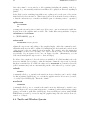
item
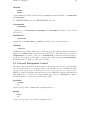
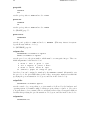
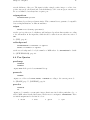
ITEM index thing
if the thing is a word, outputs the indexth character of the word. If the thing is a list,
outputs the indexth member of the list. If the thing is an array, outputs the indexth
member of the array. Index starts at 1 for words and lists; the starting index of an array is
specified when the array is created.
mditem
MDITEM indexlist array (library procedure)
outputs the member of the multidimensional array selected by the list of numbers indexlist.
pick
PICK list (library procedure)
outputs a randomly chosen member of the input list.
remove
REMOVE thing list (library procedure)
outputs a copy of list with every member equal to thing removed.
remdup
REMDUP list (library procedure)
outputs a copy of list with duplicate members removed. If two or more members of the
input are equal, the rightmost of those members is the one that remains in the output.
quoted
QUOTED thing (library procedure)
outputs its input, if a list; outputs its input with a quotation mark prepended, if a word.
2.3 Data Mutators
setitem
SETITEM index array value
Chapter 2: Data Structure Primitives
13
command. Replaces the indexth member of array with the new value. Ensures that the
resulting array is not circular, i.e., value may not be a list or array that contains array.
mdsetitem
MDSETITEM indexlist array value (library procedure)
command. Replaces the member of array chosen by indexlist with the new value.
.setfirst
.SETFIRST list value
command. Changes the first member of list to be value.
WARNING: Primitives whose names start with a period are dangerous. Their use by nonexperts is not recommended. The use of .SETFIRST can lead to circular list structures,
which will get some Logo primitives into infinite loops, and to unexpected changes to other
data structures that share storage with the list being modified.
.setbf
.SETBF list value
command. Changes the butfirst of list to be value.
WARNING: Primitives whose names start with a period are dangerous. Their use by
non-experts is not recommended. The use of .SETBF can lead to circular list structures,
which will get some Logo primitives into infinite loops; unexpected changes to other data
structures that share storage with the list being modified; or to Logo crashes and coredumps
if the butfirst of a list is not itself a list.
.setitem
.SETITEM index array value
command. Changes the indexth member of array to be value, like SETITEM, but without
checking for circularity.
WARNING: Primitives whose names start with a period are dangerous. Their use by nonexperts is not recommended. The use of .SETITEM can lead to circular arrays, which will
get some Logo primitives into infinite loops.
See [SETITEM], page 12.
push
PUSH stackname thing (library procedure)
command. Adds the thing to the stack that is the value of the variable whose name is
stackname. This variable must have a list as its value; the initial value should be the empty
list. New members are added at the front of the list.
pop
POP stackname (library procedure)
14
BERKELEY LOGO 6.0
outputs the most recently PUSHed member of the stack that is the value of the variable
whose name is stackname and removes that member from the stack.
queue
QUEUE queuename thing (library procedure)
command. Adds the thing to the queue that is the value of the variable whose name is
queuename. This variable must have a list as its value; the initial value should be the empty
list. New members are added at the back of the list.
dequeue
DEQUEUE queuename (library procedure)
outputs the least recently QUEUEd member of the queue that is the value of the variable
whose name is queuename and removes that member from the queue.
2.4 Predicates
wordp
WORDP thing
WORD? thing
outputs TRUE if the input is a word, FALSE otherwise.
listp
LISTP thing
LIST? thing
outputs TRUE if the input is a list, FALSE otherwise.
arrayp
ARRAYP thing
ARRAY? thing
outputs TRUE if the input is an array, FALSE otherwise.
emptyp
EMPTYP thing
EMPTY? thing
outputs TRUE if the input is the empty word or the empty list, FALSE otherwise.
equalp
EQUALP thing1 thing2
EQUAL? thing1 thing2
thing1 = thing2
outputs TRUE if the inputs are equal, FALSE otherwise. Two numbers are equal if they
have the same numeric value. Two non-numeric words are equal if they contain the same
Chapter 2: Data Structure Primitives
15
characters in the same order. If there is a variable named CASEIGNOREDP whose value is
TRUE, then an upper case letter is considered the same as the corresponding lower case letter.
(This is the case by default.) Two lists are equal if their members are equal. An array is
only equal to itself; two separately created arrays are never equal even if their members
are equal. (It is important to be able to know if two expressions have the same array as
their value because arrays are mutable; if, for example, two variables have the same array
as their values then performing SETITEM on one of them will also change the other.)
See [CASEIGNOREDP], page 89 , [SETITEM], page 12
notequalp
NOTEQUALP thing1 thing2
NOTEQUAL? thing1 thing2
thing1 <> thing2
outputs FALSE if the inputs are equal, TRUE otherwise. See EQUALP for the meaning of
equality for different data types.
beforep
BEFOREP word1 word2
BEFORE? word1 word2
outputs TRUE if word1 comes before word2 in ASCII collating sequence (for words of letters,
in alphabetical order). Case-sensitivity is determined by the value of CASEIGNOREDP. Note
that if the inputs are numbers, the result may not be the same as with LESSP; for example,
BEFOREP 3 12 is false because 3 collates after 1.
See [CASEIGNOREDP], page 89 , [LESSP], page 32
.eq
.EQ thing1 thing2
outputs TRUE if its two inputs are the same datum, so that applying a mutator to one will
change the other as well. Outputs FALSE otherwise, even if the inputs are equal in value.
WARNING: Primitives whose names start with a period are dangerous. Their use by nonexperts is not recommended. The use of mutators can lead to circular data structures,
infinite loops, or Logo crashes.
memberp
MEMBERP thing1 thing2
MEMBER? thing1 thing2
if thing2 is a list or an array, outputs TRUE if thing1 is EQUALP to a member of thing2, FALSE
otherwise. If thing2 is a word, outputs TRUE if thing1 is a one-character word EQUALP to a
character of thing2, FALSE otherwise.
See [EQUALP], page 14 .
16
BERKELEY LOGO 6.0
substringp
SUBSTRINGP thing1 thing2
SUBSTRING? thing1 thing2
if thing1 or thing2 is a list or an array, outputs FALSE. If thing2 is a word, outputs TRUE
if thing1 is EQUALP to a substring of thing2, FALSE otherwise.
See [EQUALP], page 14 .
numberp
NUMBERP thing
NUMBER? thing
outputs TRUE if the input is a number, FALSE otherwise.
vbarredp
VBARREDP char
VBARRED? char
BACKSLASHEDP char
BACKSLASHED? char
(library procedure)
(library procedure)
outputs TRUE if the input character was originally entered into Logo within vertical bars (|)
to prevent its usual special syntactic meaning, FALSE otherwise. (Outputs TRUE only if the
character is a backslashed space, tab, newline, or one of ()[]+-*/=<>":;\~?| )
The names BACKSLASHEDP and BACKSLASHED? are included in the Logo library for backward
compatibility with the former names of this primitive, although it does not output TRUE for
characters originally entered with backslashes.
2.5 Queries
count
COUNT thing
outputs the number of characters in the input, if the input is a word; outputs the number
of members in the input, if it is a list or an array. (For an array, this may or may not be
the index of the last member, depending on the array’s origin.)
ascii
ASCII char
outputs the integer (between 0 and 255) that represents the input character in the ASCII
code. Interprets control characters as representing vbarred punctuation, and returns the
character code for the corresponding punctuation character without vertical bars. (Compare
RAWASCII.)
rawascii
RAWASCII char
Chapter 2: Data Structure Primitives
17
outputs the integer (between 0 and 255) that represents the input character in the ASCII
code. Interprets control characters as representing themselves. To find out the ASCII code
of an arbitrary keystroke, use RAWASCII RC.
char
CHAR int
outputs the character represented in the ASCII code by the input, which must be an integer
between 0 and 255.
See [ASCII], page 16 .
member
MEMBER thing1 thing2
if thing2 is a word or list and if MEMBERP with these inputs would output TRUE, outputs the
portion of thing2 from the first instance of thing1 to the end. If MEMBERP would output
FALSE, outputs the empty word or list according to the type of thing2. It is an error for
thing2 to be an array.
See [MEMBERP], page 15 .
lowercase
LOWERCASE word
outputs a copy of the input word, but with all uppercase letters changed to the corresponding
lowercase letter.
uppercase
UPPERCASE word
outputs a copy of the input word, but with all lowercase letters changed to the corresponding
uppercase letter.
standout
STANDOUT thing
outputs a word that, when printed, will appear like the input but displayed in standout
mode (boldface, reverse video, or whatever your version does for standout). The word
contains machine-specific magic characters at the beginning and end; in between is the
printed form (as if displayed using TYPE) of the input. The output is always a word, even if
the input is of some other type, but it may include spaces and other formatting characters.
Note: a word output by STANDOUT while Logo is running on one machine will probably not
have the desired effect if printed on another type of machine.
In the Macintosh classic version, the way that standout works is incompatible with the use
of characters whose ASCII code is greater than 127. Therefore, you have a choice to make:
The instruction
CANINVERSE 0
18
BERKELEY LOGO 6.0
disables standout, but enables the display of ASCII codes above 127, and the instruction
CANINVERSE 1
restores the default situation in which standout is enabled and the extra graphic characters
cannot be printed.
parse
PARSE word
outputs the list that would result if the input word were entered in response to a READLIST
operation. That is, PARSE READWORD has the same value as READLIST for the same characters
read.
See [READLIST], page 20 , [READWORD], page 20
runparse
RUNPARSE wordorlist
outputs the list that would result if the input word or list were entered as an instruction
line; characters such as infix operators and parentheses are separate members of the output.
Note that sublists of a runparsed list are not themselves runparsed.
Chapter 3: Communication
19
3 Communication
3.1 Transmitters
Note: If there is a variable named PRINTDEPTHLIMIT with a nonnegative integer value,
then complex list and array structures will be printed only to the allowed depth. That is,
members of members of... of members will be allowed only so far. The members omitted
because they are just past the depth limit are indicated by an ellipsis for each one, so a
too-deep list of two members will print as [... ...].
If there is a variable named PRINTWIDTHLIMIT with a nonnegative integer value, then only
the first so many members of any array or list will be printed. A single ellipsis replaces all
missing data within the structure. The width limit also applies to the number of characters
printed in a word, except that a PRINTWIDTHLIMIT between 0 and 9 will be treated as if it
were 10 when applied to words. This limit applies not only to the top-level printed datum
but to any substructures within it.
See [PRINTDEPTHLIMIT], page 90 , [PRINTWIDTHLIMIT], page 90
If there is a variable named FULLPRINTP whose value is TRUE, then words that were created
using backslash or vertical bar (to include characters that would otherwise not be treated as
part of a word) are printed with the backslashes or vertical bars shown, so that the printed
result could be re-read by Logo to produce the same value. If FULLPRINTP is TRUE then the
empty word (however it was created) prints as ||. (Otherwise it prints as nothing at all.)
See [FULLPRINTP], page 90 .
print
PRINT thing
PR thing
(PRINT thing1 thing2 ...)
(PR thing1 thing2 ...)
command. Prints the input or inputs to the current write stream (initially the screen). All
the inputs are printed on a single line, separated by spaces, ending with a newline. If an
input is a list, square brackets are not printed around it, but brackets are printed around
sublists. Braces are always printed around arrays.
type
TYPE thing
(TYPE thing1 thing2 ...)
command. Prints the input or inputs like PRINT, except that no newline character is printed
at the end and multiple inputs are not separated by spaces. Note: printing to the screen is
ordinarily line buffered; that is, the characters you print using TYPE will not actually appear
on the screen until either a newline character is printed (for example, by PRINT or SHOW)
or Logo tries to read from the keyboard (either at the request of your program or after an
instruction prompt). This buffering makes the program much faster than it would be if
each character appeared immediately, and in most cases the effect is not disconcerting. To
20
BERKELEY LOGO 6.0
accommodate programs that do a lot of positioned text display using TYPE, Logo will force
printing whenever SETCURSOR is invoked. This solves most buffering problems. Still, on
occasion you may find it necessary to force the buffered characters to be printed explicitly;
this can be done using the WAIT command. WAIT 0 will force printing without actually
waiting.
See [SETCURSOR], page 26 , [WAIT], page 71
show
SHOW thing
(SHOW thing1 thing2 ...)
command. Prints the input or inputs like PRINT, except that if an input is a list it is printed
inside square brackets.
See [PRINT], page 19 .
3.2 Receivers
readlist
READLIST
RL
reads a line from the read stream (initially the keyboard) and outputs that line as a list. The
line is separated into members as though it were typed in square brackets in an instruction.
If the read stream is a file, and the end of file is reached, READLIST outputs the empty word
(not the empty list). READLIST processes backslash, vertical bar, and tilde characters in the
read stream; the output list will not contain these characters but they will have had their
usual effect. READLIST does not, however, treat semicolon as a comment character.
readword
READWORD
RW
reads a line from the read stream and outputs that line as a word. The output is a single
word even if the line contains spaces, brackets, etc. If the read stream is a file, and the
end of file is reached, READWORD outputs the empty list (not the empty word). READWORD
processes backslash, vertical bar, and tilde characters in the read stream. In the case of
a tilde used for line continuation, the output word does include the tilde and the newline
characters, so that the user program can tell exactly what the user entered. Vertical bars
in the line are also preserved in the output. Backslash characters are not preserved in the
output.
readrawline
READRAWLINE
reads a line from the read stream and outputs that line as a word. The output is a single
word even if the line contains spaces, brackets, etc. If the read stream is a file, and the end
of file is reached, READRAWLINE outputs the empty list (not the empty word). READRAWLINE
Chapter 3: Communication
21
outputs the exact string of characters as they appear in the line, with no special meaning
for backslash, vertical bar, tilde, or any other formatting characters.
See [READWORD], page 20 .
readchar
READCHAR
RC
reads a single character from the read stream and outputs that character as a word. If the
read stream is a file, and the end of file is reached, READCHAR outputs the empty list (not the
empty word). If the read stream is the keyboard, echoing is turned off when READCHAR is
invoked, and remains off until READLIST or READWORD is invoked or a Logo prompt is printed.
Backslash, vertical bar, and tilde characters have no special meaning in this context.
See [READLIST], page 20 .
readchars
READCHARS num
RCS num
reads num characters from the read stream and outputs those characters as a word. If
the read stream is a file, and the end of file is reached, READCHARS outputs the empty list
(not the empty word). If the read stream is the keyboard, echoing is turned off when
READCHARS is invoked, and remains off until READLIST or READWORD is invoked or a Logo
prompt is printed. Backslash, vertical bar, and tilde characters have no special meaning in
this context.
See [READLIST], page 20 , [READWORD], page 20
shell
SHELL command
(SHELL command wordflag)
Under Unix, outputs the result of running command as a shell command. (The command
is sent to ‘/bin/sh’, not ‘csh’ or other alternatives.) If the command is a literal list in the
instruction line, and if you want a backslash character sent to the shell, you must use \\ to
get the backslash through Logo’s reader intact. The output is a list containing one member
for each line generated by the shell command. Ordinarily each such line is represented by a
list in the output, as though the line were read using READLIST. If a second input is given,
regardless of the value of the input, each line is represented by a word in the output as
though it were read with READWORD. Example:
to dayofweek
output first first shell [date]
end
This is first first to extract the first word of the first (and only) line of the shell output.
Under MacOS X, SHELL works as under Unix. SHELL is not available under Mac Classic.
22
BERKELEY LOGO 6.0
Under DOS, SHELL is a command, not an operation; it sends its input to a DOS command
processor but does not collect the result of the command.
Under Windows, the wxWidgets version of Logo behaves as under Unix (except that DOSstyle commands are understood; use dir rather than ls). The non-wxWidgets version
behaves like the DOS version.
3.3 File Access
setprefix
SETPREFIX string
command. Sets a prefix that will be used as the implicit beginning of filenames in OPENREAD,
OPENWRITE, OPENAPPEND, OPENUPDATE, LOAD, and SAVE commands. Logo will put the appropriate separator character (slash for Unix, backslash for DOS/Windows, colon for MacOS
Classic) between the prefix and the filename entered by the user. The input to SETPREFIX
must be a word, unless it is the empty list, to indicate that there should be no prefix.
See [OPENREAD], page 22 , See [OPENWRITE], page 22 , See [OPENAPPEND], page 23
, See [OPENUPDATE], page 23 , See [LOAD], page 63 , See [SAVE], page 62 .
prefix
PREFIX
outputs the current file prefix, or [] if there is no prefix.
See [SETPREFIX], page 22 .
openread
OPENREAD filename
command. Opens the named file for reading. The read position is initially at the beginning
of the file.
openwrite
OPENWRITE filename
command. Opens the named file for writing. If the file already existed, the old version is
deleted and a new, empty file created.
OPENWRITE, but not the other OPEN variants, will accept as input a two-element list, in
which the first element must be a variable name, and the second must be a positive integer.
A character buffer of the specified size will be created. When a SETWRITE is done with this
same list (in the sense of .EQ, not a copy, so you must do something like
? make "buf [foo 100]
? openwrite :buf
? setwrite :buf
[...]
? close :buf
Chapter 3: Communication
23
and not just
? openwrite [foo 100]
? setwrite [foo 100]
and so on), the printed characters are stored in the buffer; when a CLOSE is done with the
same list as input, the characters from the buffer (treated as one long word, even if spaces
and newlines are included) become the value of the specified variable.
openappend
OPENAPPEND filename
command. Opens the named file for writing. If the file already exists, the write position is
initially set to the end of the old file, so that newly written data will be appended to it.
openupdate
OPENUPDATE filename
command. Opens the named file for reading and writing. The read and write position is
initially set to the end of the old file, if any. Note: each open file has only one position,
for both reading and writing. If a file opened for update is both READER and WRITER at the
same time, then SETREADPOS will also affect WRITEPOS and vice versa. Also, if you alternate
reading and writing the same file, you must SETREADPOS between a write and a read, and
SETWRITEPOS between a read and a write.
See [READER], page 25 , [WRITER], page 25 , [SETREADPOS], page 25 , [SETWRITEPOS], page 25
close
CLOSE filename
command. Closes the named file. If the file was currently the reader or writer, then the
reader or writer is changed to the keyboard or screen, as if SETREAD [] or SETWRITE []
had been done.
allopen
ALLOPEN
outputs a list whose members are the names of all files currently open. This list does not
include the dribble file, if any.
closeall
CLOSEALL (library procedure)
command. Closes all open files. Abbreviates FOREACH ALLOPEN [CLOSE ?]
See [FOREACH], page 76 , [CLOSE], page 23
erasefile
ERASEFILE filename
24
BERKELEY LOGO 6.0
ERF filename
command. Erases (deletes, removes) the named file, which should not currently be open.
dribble
DRIBBLE filename
command. Creates a new file whose name is the input, like OPENWRITE, and begins recording
in that file everything that is read from the keyboard or written to the terminal. That is,
this writing is in addition to the writing to WRITER. The intent is to create a transcript of
a Logo session, including things like prompt characters and interactions.
See [OPENWRITE], page 22 , [WRITER], page 25
nodribble
NODRIBBLE
command. Stops copying information into the dribble file, and closes the file.
setread
SETREAD filename
command. Makes the named file the read stream, used for READLIST, etc. The file must
already be open with OPENREAD or OPENUPDATE. If the input is the empty list, then the read
stream becomes the keyboard, as usual. Changing the read stream does not close the file
that was previously the read stream, so it is possible to alternate between files.
See [READLIST], page 20 , [OPENREAD], page 22 , [OPENUPDATE], page 23
setwrite
SETWRITE filename
command. Makes the named file the write stream, used for PRINT, etc. The file must
already be open with OPENWRITE, OPENAPPEND, or OPENUPDATE. If the input is the empty
list, then the write stream becomes the screen, as usual. Changing the write stream does
not close the file that was previously the write stream, so it is possible to alternate between
files.
If the input is a list, then its first element must be a variable name, and its second and last
element must be a positive integer; a buffer of that many characters will be allocated, and
will become the writestream. If the same list (same in the .EQ sense, not a copy) has been
used as input to OPENWRITE, then the already-allocated buffer will be used, and the writer
can be changed to and from this buffer, with all the characters accumulated as in a file.
When the same list is used as input to CLOSE, the contents of the buffer (as an unparsed
word, which may contain newline characters) will become the value of the named variable.
For compatibility with earlier versions, if the list has not been opened when the SETWRITE
is done, it will be opened implicitly, but the first SETWRITE after this one will implicitly
close it, setting the variable and freeing the allocated buffer.
See [PRINT], page 19 , [OPENWRITE], page 22 ; [OPENAPPEND], page 23 ; [OPENUPDATE], page 23
Chapter 3: Communication
25
reader
READER
outputs the name of the current read stream file, or the empty list if the read stream is the
terminal.
writer
WRITER
outputs the name of the current write stream file, or the empty list if the write stream is
the screen.
setreadpos
SETREADPOS charpos
command. Sets the file pointer of the read stream file so that the next READLIST, etc.,
will begin reading at the charposth character in the file, counting from 0. (That is,
SETREADPOS 0 will start reading from the beginning of the file.) Meaningless if the read
stream is the keyboard.
See [READLIST], page 20 .
setwritepos
SETWRITEPOS charpos
command. Sets the file pointer of the write stream file so that the next PRINT, etc., will begin
writing at the charposth character in the file, counting from 0. (That is, SETWRITEPOS 0
will start writing from the beginning of the file.) Meaningless if the write stream is the
screen.
See [PRINT], page 19 .
readpos
READPOS
outputs the file position of the current read stream file.
writepos
WRITEPOS
outputs the file position of the current write stream file.
eofp
EOFP
EOF?
predicate, outputs TRUE if there are no more characters to be read in the read stream file,
FALSE otherwise.
26
BERKELEY LOGO 6.0
filep
FILEP filename
FILE? filename (library procedure)
predicate, outputs TRUE if a file of the specified name exists and can be read, FALSE otherwise.
3.4 Terminal Access
keyp
KEYP
KEY?
predicate, outputs TRUE if there are characters waiting to be read from the read stream. If
the read stream is a file, this is equivalent to NOT EOFP. If the read stream is the terminal,
then echoing is turned off and the terminal is set to cbreak (character at a time instead
of line at a time) mode. It remains in this mode until some line-mode reading is requested
(e.g., READLIST). The Unix operating system forgets about any pending characters when it
switches modes, so the first KEYP invocation will always output FALSE.
See [EOFP], page 25 , [READLIST], page 20
cleartext
CLEARTEXT
CT
command. Clears the text window.
setcursor
SETCURSOR vector
command. The input is a list of two numbers, the x and y coordinates of a text window
position (origin in the upper left corner, positive direction is southeast). The text cursor is
moved to the requested position. This command also forces the immediate printing of any
buffered characters.
cursor
CURSOR
outputs a list containing the current x and y coordinates of the text cursor. Logo may get
confused about the current cursor position if, e.g., you type in a long line that wraps around
or your program prints escape codes that affect the screen strangely.
setmargins
SETMARGINS vector
command. The input must be a list of two numbers, as for SETCURSOR. The effect is to
clear the screen and then arrange for all further printing to be shifted down and to the
right according to the indicated margins. Specifically, every time a newline character is
Chapter 3: Communication
27
printed (explicitly or implicitly) Logo will type x margin spaces, and on every invocation
of SETCURSOR the margins will be added to the input x and y coordinates. (CURSOR will
report the cursor position relative to the margins, so that this shift will be invisible to Logo
programs.) The purpose of this command is to accommodate the display of terminal screens
in lecture halls with inadequate TV monitors that miss the top and left edges of the screen.
See [SETCURSOR], page 26 .
settextcolor
SETTEXTCOLOR foreground background
SETTC foreground background
command (wxWidgets only). The inputs are color numbers, or RGB color lists, as for turtle
graphics. The foreground and background colors for the textscreen/splitscreen text window
are changed to the given values. The change affects text already printed as well as future
text printing; there is only one text color for the entire window.
Command (non-wxWidgets Windows and DOS extended only). The inputs are color numbers, as for turtle graphics. Future printing to the text window will use the specified colors
for foreground (the characters printed) and background (the space under those characters). Using STANDOUT will revert to the default text window colors. In the DOS extended
(‘ucblogo.exe’) version, colors in textscreen mode are limited to numbers 0-7, and the coloring applies only to text printed by the program, not to the echoing of text typed by the
user. Neither limitation applies to the text portion of splitscreen mode, which is actually
drawn as graphics internally.
See [STANDOUT], page 17 .
increasefont
INCREASEFONT
DECREASEFONT
command (wxWidgets only). Increase or decrease the size of the font used in the text and
edit windows to the next larger or smaller available size.
settextsize
SETTEXTSIZE height
command (wxWidgets only). Set the "point size" of the font used in the text and edit
windows to the given integer input. The desired size may not be available, in which case
the nearest available size will be used. Note: There is only a slight correlation between
these integers and pixel sizes. Our rough estimate is that the number of pixels of height is
about 1.5 times the point size, but it varies for different fonts. See SETLABELHEIGHT for a
different approach used for the graphics window.
textsize
TEXTSIZE
28
BERKELEY LOGO 6.0
(wxWidgets only) outputs the "point size" of the font used in the text and edit windows.
See SETTEXTSIZE for a discussion of font sizing. See LABELSIZE for a different approach
used for the graphics window.
setfont
SETFONT fontname
command (wxWidgets only). Set the font family used in all windows to the one named
by the input. Try ‘Courier’ or ‘Monospace’ as likely possibilities. Not all computers have
the same fonts installed. It’s a good idea to stick with monospace fonts (ones in which all
characters have the same width).
font
FONT
(wxWidgets only) outputs the name of the font family used in all windows.
Chapter 4: Arithmetic
29
4 Arithmetic
4.1 Numeric Operations
sum
SUM num1 num2
(SUM num1 num2 num3 ...)
num1 + num2
outputs the sum of its inputs.
difference
DIFFERENCE num1 num2
num1 - num2
outputs the difference of its inputs. Minus sign means infix difference in ambiguous contexts
(when preceded by a complete expression), unless it is preceded by a space and followed by
a nonspace. (See also MINUS.)
minus
MINUS num
- num
outputs the negative of its input. Minus sign means unary minus if the previous token is an
infix operator or open parenthesis, or it is preceded by a space and followed by a nonspace.
There is a difference in binding strength between the two forms:
MINUS 3 + 4
- 3 + 4
means
means
-(3+4)
(-3)+4
product
PRODUCT num1 num2
(PRODUCT num1 num2 num3 ...)
num1 * num2
outputs the product of its inputs.
quotient
QUOTIENT num1 num2
(QUOTIENT num)
num1 / num2
outputs the quotient of its inputs. The quotient of two integers is an integer if and only
if the dividend is a multiple of the divisor. (In other words, QUOTIENT 5 2 is 2.5, not 2,
but QUOTIENT 4 2 is 2, not 2.0 — it does the right thing.) With a single input, QUOTIENT
outputs the reciprocal of the input.
30
BERKELEY LOGO 6.0
remainder
REMAINDER num1 num2
outputs the remainder on dividing num1 by num2; both must be integers and the result is
an integer with the same sign as num1.
modulo
MODULO num1 num2
outputs the remainder on dividing num1 by num2; both must be integers and the result is
an integer with the same sign as num2.
int
INT num
outputs its input with fractional part removed, i.e., an integer with the same sign as the
input, whose absolute value is the largest integer less than or equal to the absolute value of
the input.
round
ROUND num
outputs the nearest integer to the input.
sqrt
SQRT num
outputs the square root of the input, which must be nonnegative.
power
POWER num1 num2
outputs num1 to the num2 power. If num1 is negative, then num2 must be an integer.
exp
EXP num
outputs e (2.718281828+) to the input power.
log10
LOG10 num
outputs the common logarithm of the input.
ln
LN num
outputs the natural logarithm of the input.
Chapter 4: Arithmetic
31
sin
SIN degrees
outputs the sine of its input, which is taken in degrees.
radsin
RADSIN radians
outputs the sine of its input, which is taken in radians.
cos
COS degrees
outputs the cosine of its input, which is taken in degrees.
radcos
RADCOS radians
outputs the cosine of its input, which is taken in radians.
arctan
ARCTAN num
(ARCTAN x y)
outputs the arctangent, in degrees, of its input. With two inputs, outputs the arctangent
of y/x, if x is nonzero, or 90 or –90 depending on the sign of y, if x is zero.
radarctan
RADARCTAN num
(RADARCTAN x y)
outputs the arctangent, in radians, of its input. With two inputs, outputs the arctangent
of y/x, if x is nonzero, or pi/2 or –pi/2 depending on the sign of y, if x is zero.
The expression 2*(RADARCTAN 0 1) can be used to get the value of pi.
iseq
ISEQ from to (library procedure)
outputs a list of the integers from from to to, inclusive.
? show
[3 4 5
? show
[7 6 5
iseq 3 7
6 7]
iseq 7 3
4 3]
rseq
RSEQ from to count (library procedure)
outputs a list of count equally spaced rational numbers between from and to, inclusive.
32
BERKELEY LOGO 6.0
? show rseq 3 5 9
[3 3.25 3.5 3.75 4 4.25 4.5 4.75 5]
? show rseq 3 5 5
[3 3.5 4 4.5 5]
4.2 Numeric Predicates
lessp
LESSP num1 num2
LESS? num1 num2
num1 < num2
outputs TRUE if its first input is strictly less than its second.
greaterp
GREATERP num1 num2
GREATER? num1 num2
num1 > num2
outputs TRUE if its first input is strictly greater than its second.
lessequalp
LESSEQUALP num1 num2
LESSEQUAL? num1 num2
num1 <= num2
outputs TRUE if its first input is less than or equal to its second.
greaterequalp
GREATEREQUALP num1 num2
GREATEREQUAL? num1 num2
num1 >= num2
outputs TRUE if its first input is greater than or equal to its second.
4.3 Random Numbers
random
RANDOM num
(RANDOM start end)
with one input, outputs a random nonnegative integer less than its input, which must be a
positive integer.
With two inputs, RANDOM outputs a random integer greater than or equal to the first input,
and less than or equal to the second input. Both inputs must be integers, and the first
must be less than the second. (RANDOM 0 9) is equivalent to RANDOM 10; (RANDOM 3 8) is
equivalent to (RANDOM 6)+3.
Chapter 4: Arithmetic
33
rerandom
RERANDOM
(RERANDOM seed)
command. Makes the results of RANDOM reproducible. Ordinarily the sequence of random
numbers is different each time Logo is used. If you need the same sequence of pseudo-random
numbers repeatedly, e.g. to debug a program, say RERANDOM before the first invocation of
RANDOM. If you need more than one repeatable sequence, you can give RERANDOM an integer
input; each possible input selects a unique sequence of numbers.
4.4 Print Formatting
form
FORM num width precision
outputs a word containing a printable representation of num, possibly preceded by spaces
(and therefore not a number for purposes of performing arithmetic operations), with at least
width characters, including exactly precision digits after the decimal point. (If precision is
0 then there will be no decimal point in the output.)
As a debugging feature, (FORM num -1 format) will print the floating point num according
to the C printf format, to allow
to hex :num
op form :num -1 "|%08X %08X|
end
to allow finding out the exact result of floating point operations. The precise format needed
may be machine-dependent.
4.5 Bitwise Operations
bitand
BITAND num1 num2
(BITAND num1 num2 num3 ...)
outputs the bitwise and of its inputs, which must be integers.
See [AND], page 35 .
bitor
BITOR num1 num2
(BITOR num1 num2 num3 ...)
outputs the bitwise or of its inputs, which must be integers.
See [OR], page 35 .
bitxor
BITXOR num1 num2
34
BERKELEY LOGO 6.0
(BITXOR num1 num2 num3 ...)
outputs the bitwise exclusive or of its inputs, which must be integers.
See [OR], page 35 .
bitnot
BITNOT num
outputs the bitwise not of its input, which must be an integer.
See [NOT], page 35 .
ashift
ASHIFT num1 num2
outputs num1 arithmetic-shifted to the left by num2 bits. If num2 is negative, the shift is
to the right with sign extension. The inputs must be integers.
lshift
LSHIFT num1 num2
outputs num1 logical-shifted to the left by num2 bits. If num2 is negative, the shift is to
the right with zero fill. The inputs must be integers.
Chapter 5: Logical Operations
35
5 Logical Operations
and
AND tf1 tf2
(AND tf1 tf2 tf3 ...)
outputs TRUE if all inputs are TRUE, otherwise FALSE. All inputs must be TRUE or FALSE.
(Comparison is case-insensitive regardless of the value of CASEIGNOREDP. That is, true or
True or TRUE are all the same.) An input can be a list, in which case it is taken as an
expression to run; that expression must produce a TRUE or FALSE value. List expressions
are evaluated from left to right; as soon as a FALSE value is found, the remaining inputs are
not examined. Example:
MAKE "RESULT AND [NOT (:X = 0)] [(1 / :X) > .5]
to avoid the division by zero if the first part is false.
See [CASEIGNOREDP], page 89 .
or
OR tf1 tf2
(OR tf1 tf2 tf3 ...)
outputs TRUE if any input is TRUE, otherwise FALSE. All inputs must be TRUE or FALSE.
(Comparison is case-insensitive regardless of the value of CASEIGNOREDP. That is, true or
True or TRUE are all the same.) An input can be a list, in which case it is taken as an
expression to run; that expression must produce a TRUE or FALSE value. List expressions
are evaluated from left to right; as soon as a TRUE value is found, the remaining inputs are
not examined. Example:
IF OR :X=0 [some.long.computation] [...]
to avoid the long computation if the first condition is met.
See [CASEIGNOREDP], page 89 .
not
NOT tf
outputs TRUE if the input is FALSE, and vice versa. The input can be a list, in which case
it is taken as an expression to run; that expression must produce a TRUE or FALSE value.
Chapter 6: Graphics
37
6 Graphics
Berkeley Logo provides traditional Logo turtle graphics with one turtle. Multiple turtles,
dynamic turtles, and collision detection are not supported. This is the most hardwaredependent part of Logo; some features may exist on some machines but not others. Nevertheless, the goal has been to make Logo programs as portable as possible, rather than
to take fullest advantage of the capabilities of each machine. In particular, Logo attempts
to scale the screen so that turtle coordinates [–100 –100] and [100 100] fit on the graphics
window, and so that the aspect ratio is 1:1.
The center of the graphics window (which may or may not be the entire screen, depending
on the machine used) is turtle location [0 0]. Positive X is to the right; positive Y is up.
Headings (angles) are measured in degrees clockwise from the positive Y axis. (This differs
from the common mathematical convention of measuring angles counterclockwise from the
positive X axis.) The turtle is represented as an isoceles triangle; the actual turtle position
is at the midpoint of the base (the short side). However, the turtle is drawn one step behind
its actual position, so that the display of the base of the turtle’s triangle does not obscure
a line drawn perpendicular to it (as would happen after drawing a square).
Colors are, of course, hardware-dependent. However, Logo provides partial hardware independence by interpreting color numbers 0 through 7 uniformly on all computers:
0
4
black
red
1
5
blue
magenta
2
6
green
yellow
3 cyan
7 white
Where possible, Logo provides additional user-settable colors; how many are available depends on the hardware and operating system environment. If at least 16 colors are available,
Logo tries to provide uniform initial settings for the colors 8-15:
8
12
brown
salmon
9
13
tan
purple
10
14
forest
orange
11
15
aqua
grey
Logo begins with a black background and white pen.
6.1 Turtle Motion
forward
FORWARD dist
FD dist
moves the turtle forward, in the direction that it’s facing, by the specified distance (measured
in turtle steps).
back
BACK dist
BK dist
moves the turtle backward, i.e., exactly opposite to the direction that it’s facing, by the
specified distance. (The heading of the turtle does not change.)
38
BERKELEY LOGO 6.0
left
LEFT degrees
LT degrees
turns the turtle counterclockwise by the specified angle, measured in degrees (1/360 of a
circle).
right
RIGHT degrees
RT degrees
turns the turtle clockwise by the specified angle, measured in degrees (1/360 of a circle).
setpos
SETPOS pos
moves the turtle to an absolute position in the graphics window. The input is a list of two
numbers, the X and Y coordinates.
setxy
SETXY xcor ycor
moves the turtle to an absolute position in the graphics window. The two inputs are
numbers, the X and Y coordinates.
setx
SETX xcor
moves the turtle horizontally from its old position to a new absolute horizontal coordinate.
The input is the new X coordinate.
sety
SETY ycor
moves the turtle vertically from its old position to a new absolute vertical coordinate. The
input is the new Y coordinate.
setheading
SETHEADING degrees
SETH degrees
turns the turtle to a new absolute heading. The input is a number, the heading in degrees
clockwise from the positive Y axis.
home
HOME
moves the turtle to the center of the screen. Equivalent to SETPOS [0 0] SETHEADING 0.
See [SETPOS], page 38 , See [SETHEADING], page 38 .
Chapter 6: Graphics
39
arc
ARC angle radius
draws an arc of a circle, with the turtle at the center, with the specified radius, starting at
the turtle’s heading and extending clockwise through the specified angle. The turtle does
not move.
6.2 Turtle Motion Queries
pos
POS
outputs the turtle’s current position, as a list of two numbers, the X and Y coordinates.
xcor
XCOR (library procedure)
outputs a number, the turtle’s X coordinate.
ycor
YCOR (library procedure)
outputs a number, the turtle’s Y coordinate.
heading
HEADING
outputs a number, the turtle’s heading in degrees.
towards
TOWARDS pos
outputs a number, the heading at which the turtle should be facing so that it would point
from its current position to the position given as the input.
scrunch
SCRUNCH
outputs a list containing two numbers, the X and Y scrunch factors, as used by SETSCRUNCH.
(But note that SETSCRUNCH takes two numbers as inputs, not one list of numbers.)
See [SETSCRUNCH], page 42 .
6.3 Turtle and Window Control
showturtle
SHOWTURTLE
ST
makes the turtle visible.
40
BERKELEY LOGO 6.0
hideturtle
HIDETURTLE
HT
makes the turtle invisible. It’s a good idea to do this while you’re in the middle of a
complicated drawing, because hiding the turtle speeds up the drawing substantially.
clean
CLEAN
erases all lines that the turtle has drawn on the graphics window. The turtle’s state (position, heading, pen mode, etc.) is not changed.
clearscreen
CLEARSCREEN
CS
erases the graphics window and sends the turtle to its initial position and heading. Like
HOME and CLEAN together.
See [HOME], page 38 .
wrap
WRAP
tells the turtle to enter wrap mode: From now on, if the turtle is asked to move past the
boundary of the graphics window, it will "wrap around" and reappear at the opposite edge
of the window. The top edge wraps to the bottom edge, while the left edge wraps to the
right edge. (So the window is topologically equivalent to a torus.) This is the turtle’s initial
mode. Compare WINDOW and FENCE.
See [FENCE], page 40 .
window
WINDOW
tells the turtle to enter window mode: From now on, if the turtle is asked to move past
the boundary of the graphics window, it will move offscreen. The visible graphics window
is considered as just part of an infinite graphics plane; the turtle can be anywhere on the
plane. (If you lose the turtle, HOME will bring it back to the center of the window.) Compare
WRAP and FENCE.
See [HOME], page 38 .
fence
FENCE
tells the turtle to enter fence mode: From now on, if the turtle is asked to move past the
boundary of the graphics window, it will move as far as it can and then stop at the edge
with an "out of bounds" error message. Compare WRAP and WINDOW.
Chapter 6: Graphics
41
See [WRAP], page 40 .
fill
FILL
fills in a region of the graphics window containing the turtle and bounded by lines that
have been drawn earlier. This is not portable; it doesn’t work for all machines, and may
not work exactly the same way on different machines.
filled
FILLED color instructions
runs the instructions, remembering all points visited by turtle motion commands, starting
and ending with the turtle’s initial position. Then draws (ignoring penmode) the resulting polygon, in the current pen color, filling the polygon with the given color, which can
be a color number or an RGB list. The instruction list cannot include another FILLED
invocation. (wxWidgets only)
label
LABEL text
takes a word or list as input, and prints the input on the graphics window, starting at the
turtle’s position.
setlabelheight
SETLABELHEIGHT height
command (wxWidgets only). Takes a positive integer argument and tries to set the font
size so that the character height (including descenders) is that many turtle steps. This
will be different from the number of screen pixels if SETSCRUNCH has been used. Also, note
that SETSCRUNCH changes the font size to try to preserve this height in turtle steps. Note
that the query operation corresponding to this command is LABELSIZE, not LABELHEIGHT,
because it tells you the width as well as the height of characters in the current font.
textscreen
TEXTSCREEN
TS
rearranges the size and position of windows to maximize the space available in the text
window (the window used for interaction with Logo). The details differ among machines.
Compare SPLITSCREEN and FULLSCREEN.
See [SPLITSCREEN], page 42 .
fullscreen
FULLSCREEN
FS
rearranges the size and position of windows to maximize the space available in the graphics
window. The details differ among machines. Compare SPLITSCREEN and TEXTSCREEN.
42
BERKELEY LOGO 6.0
Since there must be a text window to allow printing (including the printing of the Logo
prompt), Logo automatically switches from fullscreen to splitscreen whenever anything is
printed.
In the DOS version, switching from fullscreen to splitscreen loses the part of the picture
that’s hidden by the text window. [This design decision follows from the scarcity of memory,
so that the extra memory to remember an invisible part of a drawing seems too expensive.]
splitscreen
SPLITSCREEN
SS
rearranges the size and position of windows to allow some room for text interaction while also
keeping most of the graphics window visible. The details differ among machines. Compare
TEXTSCREEN and FULLSCREEN.
See [TEXTSCREEN], page 41 .
setscrunch
SETSCRUNCH xscale yscale
adjusts the aspect ratio and scaling of the graphics display. After this command is used,
all further turtle motion will be adjusted by multiplying the horizontal and vertical extent
of the motion by the two numbers given as inputs. For example, after the instruction
SETSCRUNCH 2 1 motion at a heading of 45 degrees will move twice as far horizontally
as vertically. If your squares don’t come out square, try this. (Alternatively, you can
deliberately misadjust the aspect ratio to draw an ellipse.)
For all modern computers, both scale factors are initially 1. For DOS machines, the scale
factors are initially set according to what the hardware claims the aspect ratio is, but the
hardware sometimes lies. For DOS, the values set by SETSCRUNCH are remembered in a file
(called ‘scrunch.dat’) and are automatically put into effect when a Logo session begins.
refresh
REFRESH
(command) tells Logo to remember the turtle’s motions so that they can be used for highresolution printing (wxWidgets) or to refresh the graphics window if it is moved, resized,
or overlayed (non-wxWidgets). This is the default.
norefresh
NOREFRESH
(command) tells Logo not to remember the turtle’s motions, which may be useful to save
time and memory if your program is interactive or animated, rather than drawing a static
picture you’ll want to print later (wxWidgets). In non-wxWidgets versions, using NOREFRESH may prevent Logo from restoring the graphics image after the window is moved,
resized, or overlayed.
6.4 Turtle and Window Queries
Chapter 6: Graphics
43
shownp
SHOWNP
SHOWN?
outputs TRUE if the turtle is shown (visible), FALSE if the turtle is hidden. See SHOWTURTLE
and HIDETURTLE.
See [SHOWTURTLE], page 39 , [HIDETURTLE], page 40 .
screenmode
SCREENMODE
outputs the word TEXTSCREEN, SPLITSCREEN, or FULLSCREEN depending on the current
screen mode.
turtlemode
TURTLEMODE
outputs the word WRAP, FENCE, or WINDOW depending on the current turtle mode.
labelsize
LABELSIZE
(wxWidgets only) outputs a list of two positive integers, the width and height of characters
displayed by LABEL measured in turtle steps (which will be different from screen pixels if
SETSCRUNCH has been used). There is no SETLABELSIZE because the width and height of
a font are not separately controllable, so the inverse of this operation is SETLABELHEIGHT,
which takes just one number for the desired height.
6.5 Pen and Background Control
The turtle carries a pen that can draw pictures. At any time the pen can be UP (in which
case moving the turtle does not change what’s on the graphics screen) or DOWN (in which
case the turtle leaves a trace). If the pen is down, it can operate in one of three modes:
PAINT (so that it draws lines when the turtle moves), ERASE (so that it erases any lines
that might have been drawn on or through that path earlier), or REVERSE (so that it
inverts the status of each point along the turtle’s path).
pendown
PENDOWN
PD
sets the pen’s position to DOWN, without changing its mode.
penup
PENUP
PU
sets the pen’s position to UP, without changing its mode.
44
BERKELEY LOGO 6.0
penpaint
PENPAINT
PPT
sets the pen’s position to DOWN and mode to PAINT.
penerase
PENERASE
PE
sets the pen’s position to DOWN and mode to ERASE.
See [ERASE], page 57 .
penreverse
PENREVERSE
PX
sets the pen’s position to DOWN and mode to REVERSE. (This may interact in systemdependent ways with use of color.)
See [REVERSE], page 10 .
setpencolor
SETPENCOLOR colornumber.or.rgblist
SETPC colornumber.or.rgblist
sets the pen color to the given number, which must be a nonnegative integer. There are
initial assignments for the first 16 colors:
0
4
8
12
black 1 blue 2 green 3 cyan
red 5 magenta 6 yellow 7 white
brown 9 tan 10 forest 11 aqua
salmon 13 purple 14 orange 15 grey
but other colors can be assigned to numbers by the PALETTE command. Alternatively, sets
the pen color to the given RGB values (a list of three nonnegative numbers less than 100
specifying the percent saturation of red, green, and blue in the desired color).
setpalette
SETPALETTE colornumber rgblist
sets the actual color corresponding to a given number, if allowed by the hardware and
operating system. Colornumber must be an integer greater than or equal to 8. (Logo tries
to keep the first 8 colors constant.) The second input is a list of three nonnegative numbers
less than 100 specifying the percent saturation of red, green, and blue in the desired color.
setpensize
SETPENSIZE size
Chapter 6: Graphics
45
sets the thickness of the pen. The input is either a single positive integer or a list of two
positive integers (for horizontal and vertical thickness). Some versions pay no attention to
the second number, but always have a square pen.
setpenpattern
SETPENPATTERN pattern
sets hardware-dependent pen characteristics. This command is not guaranteed compatible
between implementations on different machines.
setpen
SETPEN list (library procedure)
sets the pen’s position, mode, thickness, and hardware-dependent characteristics according
to the information in the input list, which should be taken from an earlier invocation of
PEN.
See [PEN], page 46 .
setbackground
SETBACKGROUND colornumber.or.rgblist
SETBG colornumber.or.rgblist
set the screen background color by slot number or RGB values. See SETPENCOLOR for details.
See [SETPENCOLOR], page 44 .
6.6 Pen Queries
pendownp
PENDOWNP
PENDOWN?
outputs TRUE if the pen is down, FALSE if it’s up.
penmode
PENMODE
outputs one of the words PAINT, ERASE, or REVERSE according to the current pen mode.
See [ERASE], page 57 , [REVERSE], page 10 .
pencolor
PENCOLOR
PC
outputs a color number, a nonnegative integer that is associated with a particular color, or
a list of RGB values if such a list was used as the most recent input to SETPENCOLOR. There
are initial assignments for the first 16 colors:
0
black
1
blue
2
green
3
cyan
46
BERKELEY LOGO 6.0
4
8
12
red
brown
salmon
5
9
13
magenta
tan
purple
6
10
14
yellow
forest
orange
7 white
11 aqua
15 grey
but other colors can be assigned to numbers by the PALETTE command.
palette
PALETTE colornumber
outputs a list of three nonnegative numbers less than 100 specifying the percent saturation
of red, green, and blue in the color associated with the given number.
pensize
PENSIZE
outputs a list of two positive integers, specifying the horizontal and vertical thickness of the
turtle pen. (In some implementations, including wxWidgets, the two numbers are always
equal.)
PENPATTERN
outputs system-specific pen information.
pen
PEN (library procedure)
outputs a list containing the pen’s position, mode, thickness, and hardware-specific characteristics, for use by SETPEN.
See [SETPEN], page 45 .
background
BACKGROUND
BG
outputs the graphics background color, either as a slot number or as an RGB list, whichever
way it was set. (See PENCOLOR.)
6.7 Saving and Loading Pictures
savepict
SAVEPICT filename
command. Writes a file with the specified name containing the state of the graphics window,
including any nonstandard color palette settings, in Logo’s internal format. This picture can
be restored to the screen using LOADPICT. The format is not portable between platforms,
nor is it readable by other programs. [EPSPICT], page 47 to export Logo graphics for other
programs.
loadpict
LOADPICT filename
Chapter 6: Graphics
47
command. Reads the specified file, which must have been written by a SAVEPICT command,
and restores the graphics window and color palette settings to the values stored in the file.
Any drawing previously on the screen is cleared.
See [SAVEPICT], page 46 .
epspict
EPSPICT filename
command. Writes a file with the specified name, containing an Encapsulated Postscript
(EPS) representation of the state of the graphics window. This file can be imported into
other programs that understand EPS format. Restrictions: the drawing cannot use FILL,
PENERASE, or PENREVERSE; any such instructions will be ignored in the translation to Postscript form.
See [FILL], page 41 , See [PENERASE], page 44 , See [PENREVERSE], page 44 .
6.8 Mouse Queries
mousepos
MOUSEPOS
outputs the coordinates of the mouse, provided that it’s within the graphics window, in
turtle coordinates. If the mouse is outside the graphics window, then the last position
within the window is returned. Exception: If a mouse button is pressed within the graphics
window and held while the mouse is dragged outside the window, the mouse’s position is
returned as if the window were big enough to include it.
clickpos
CLICKPOS
outputs the coordinates that the mouse was at when a mouse button was most recently
pushed, provided that that position was within the graphics window, in turtle coordinates.
(wxWidgets only)
buttonp
BUTTONP
BUTTON?
outputs TRUE if a mouse button is down and the mouse is over the graphics window. Once
the button is down, BUTTONP remains true until the button is released, even if the mouse is
dragged out of the graphics window.
button
BUTTON
outputs 0 if no mouse button has been pushed inside the Logo window since the last call
to BUTTON. Otherwise, it outputs an integer between 1 and 3 indicating which button was
most recently pressed. Ordinarily 1 means left, 2 means right, and 3 means center, but
operating systems may reconfigure these.
Chapter 7: Workspace Management
49
7 Workspace Management
7.1 Procedure Definition
to
TO procname :input1 :input2 ...
(special form)
command. Prepares Logo to accept a procedure definition. The procedure will be named
procname and there must not already be a procedure by that name. The inputs will be
called input1 etc. Any number of inputs are allowed, including none. Names of procedures
and inputs are case-insensitive.
Unlike every other Logo procedure, TO takes as its inputs the actual words typed in the
instruction line, as if they were all quoted, rather than the results of evaluating expressions
to provide the inputs. (That’s what special form means.)
This version of Logo allows variable numbers of inputs to a procedure. After the procedure
name come four kinds of things, in this order :
1.
2.
3.
4.
0
0
0
0
or
or
or
or
more REQUIRED inputs
more OPTIONAL inputs
1 REST input
1 DEFAULT number
:FOO :FROBOZZ
[:BAZ 87] [:THINGO 5+9]
[:GARPLY]
5
Every procedure has a minimum, default, and maximum number of inputs. (The latter can
be infinite.)
The minimum number of inputs is the number of required inputs, which must come first.
A required input is indicated by the
:inputname
notation.
After all the required inputs can be zero or more optional inputs, each of which is represented
by the following notation:
[:inputname default.value.expression]
When the procedure is invoked, if actual inputs are not supplied for these optional inputs,
the default value expressions are evaluated to set values for the corresponding input names.
The inputs are processed from left to right, so a default value expression can be based on
earlier inputs. Example:
to proc :inlist [:startvalue first :inlist]
If the procedure is invoked by saying
proc [a b c]
then the variable inlist will have the value [A B C] and the variable startvalue will
have the value A. If the procedure is invoked by saying
(proc [a b c] "x)
50
BERKELEY LOGO 6.0
then inlist will have the value [A B C] and startvalue will have the value X.
After all the required and optional input can come a single rest input, represented by the
following notation:
[:inputname]
This is a rest input rather than an optional input because there is no default value expression. There can be at most one rest input. When the procedure is invoked, the value of this
inputname will be a list containing all of the actual inputs provided that were not used for
required or optional inputs. Example:
to proc :in1 [:in2 "foo] [:in3 "baz] [:in4]
If this procedure is invoked by saying
proc "x
then in1 has the value X, in2 has the value FOO, in3 has the value BAZ, and in4 has the
value [] (the empty list). If it’s invoked by saying
(proc "a "b "c "d "e)
then in1 has the value A, in2 has the value B, in3 has the value C, and in4 has the value
[D E].
The maximum number of inputs for a procedure is infinite if a rest input is given; otherwise,
it is the number of required inputs plus the number of optional inputs.
The default number of inputs for a procedure, which is the number of inputs that it will
accept if its invocation is not enclosed in parentheses, is ordinarily equal to the minimum
number. If you want a different default number you can indicate that by putting the desired
default number as the last thing on the TO line. example:
to proc :in1 [:in2 "foo] [:in3] 3
This procedure has a minimum of one input, a default of three inputs, and an infinite
maximum.
Logo responds to the TO command by entering procedure definition mode. The prompt
character changes from ? to > and whatever instructions you type become part of the
definition until you type a line containing only the word END.
define
DEFINE procname text
command. Defines a procedure with name procname and text text. If there is already a
procedure with the same name, the new definition replaces the old one. The text input must
be a list whose members are lists. The first member is a list of inputs; it looks like a TO
line but without the word TO, without the procedure name, and without the colons before
input names. In other words, the members of this first sublist are words for the names of
required inputs and lists for the names of optional or rest inputs. The remaining sublists of
the text input make up the body of the procedure, with one sublist for each instruction line
Chapter 7: Workspace Management
51
of the body. (There is no END line in the text input.) It is an error to redefine a primitive
procedure unless the variable REDEFP has the value TRUE.
See [REDEFP], page 91 .
text
TEXT procname
outputs the text of the procedure named procname in the form expected by DEFINE: a list
of lists, the first of which describes the inputs to the procedure and the rest of which are the
lines of its body. The text does not reflect formatting information used when the procedure
was defined, such as continuation lines and extra spaces.
fulltext
FULLTEXT procname
outputs a representation of the procedure procname in which formatting information is
preserved. If the procedure was defined with TO, EDIT, or LOAD, then the output is a list
of words. Each word represents one entire line of the definition in the form output by
READWORD, including extra spaces and continuation lines. The last member of the output
represents the END line. If the procedure was defined with DEFINE, then the output is a list
of lists. If these lists are printed, one per line, the result will look like a definition using TO.
Note: the output from FULLTEXT is not suitable for use as input to DEFINE!
See [TO], page 49 , [EDIT], page 61 , [LOAD], page 63 , [DEFINE], page 50 .
copydef
COPYDEF newname oldname
command. Makes newname a procedure identical to oldname. The latter may be a primitive. If newname was already defined, its previous definition is lost. If newname was already
a primitive, the redefinition is not permitted unless the variable REDEFP has the value TRUE.
Note: dialects of Logo differ as to the order of inputs to COPYDEF. This dialect uses "MAKE
order," not "NAME order."
See [REDEFP], page 91 , [SAVE], page 62 , [PO], page 56 , [POT], page 57 .
7.2 Variable Definition
make
MAKE varname value
command. Assigns the value value to the variable named varname, which must be a word.
Variable names are case-insensitive. If a variable with the same name already exists, the
value of that variable is changed. If not, a new global variable is created.
name
NAME value varname (library procedure)
command. Same as MAKE but with the inputs in reverse order.
52
BERKELEY LOGO 6.0
local
LOCAL varname
LOCAL varnamelist
(LOCAL varname1 varname2 ...)
command. Accepts as inputs one or more words, or a list of words. A variable is created
for each of these words, with that word as its name. The variables are local to the currently
running procedure. Logo variables follow dynamic scope rules; a variable that is local to
a procedure is available to any subprocedure invoked by that procedure. The variables
created by LOCAL have no initial value; they must be assigned a value (e.g., with MAKE)
before the procedure attempts to read their value.
See [MAKE], page 51 .
localmake
LOCALMAKE varname value (library procedure)
command. Makes the named variable local, like LOCAL, and assigns it the given value, like
MAKE.
See [LOCAL], page 52 , See [MAKE], page 51 .
thing
THING varname
:quoted.varname
outputs the value of the variable whose name is the input. If there is more than one such
variable, the innermost local variable of that name is chosen. The colon notation is an
abbreviation not for THING but for the combination
thing "
so that :FOO means THING "FOO.
global
GLOBAL varname
GLOBAL varnamelist
(GLOBAL varname1 varname2 ...)
command. Accepts as inputs one or more words, or a list of words. A global variable is
created for each of these words, with that word as its name. The only reason this is necessary
is that you might want to use the "setter" notation SETXYZ for a variable XYZ that does
not already have a value; GLOBAL "XYZ makes that legal. Note: If there is currently a local
variable of the same name, this command does *not* make Logo use the global value instead
of the local one.
Chapter 7: Workspace Management
53
7.3 Property Lists
Note: Names of property lists are always case-insensitive. Names of individual properties
are case-sensitive or case-insensitive depending on the value of CASEIGNOREDP, which is TRUE
by default.
See [CASEIGNOREDP], page 89 .
In principle, every possible name is the name of a property list, which is initially empty.
So Logo never gives a "no such property list" error, as it would for undefined procedure or
variable names. But the primitive procedures that deal with "all" property lists (CONTENTS,
PLISTS, etc.) list only nonempty ones. To "erase" a property list [ERASE], page 57 means
to make it empty, removing all properties from it.
pprop
PPROP plistname propname value
command. Adds a property to the plistname property list with name propname and value
value.
gprop
GPROP plistname propname
outputs the value of the propname property in the plistname property list, or the empty
list if there is no such property.
remprop
REMPROP plistname propname
command. Removes the property named propname from the property list named plistname.
plist
PLIST plistname
outputs a list whose odd-numbered members are the names, and whose even-numbered
members are the values, of the properties in the property list named plistname. The output
is a copy of the actual property list; changing properties later will not magically change a
list output earlier by PLIST.
7.4 Workspace Predicates
procedurep
PROCEDUREP name
PROCEDURE? name
outputs TRUE if the input is the name of a procedure.
primitivep
PRIMITIVEP name
PRIMITIVE? name
54
BERKELEY LOGO 6.0
outputs TRUE if the input is the name of a primitive procedure (one built into Logo).
Note that some of the procedures described in this document are library procedures, not
primitives.
definedp
DEFINEDP name
DEFINED? name
outputs TRUE if the input is the name of a user-defined procedure, including a library
procedure.
namep
NAMEP name
NAME? name
outputs TRUE if the input is the name of a variable.
plistp
PLISTP name
PLIST? name
outputs TRUE if the input is the name of a nonempty property list. (In principle every word
is the name of a property list; if you haven’t put any properties in it, PLIST of that name
outputs an empty list, rather than giving an error message.)
7.5 Workspace Queries
Note: All procedures whose input is indicated as contentslist will accept a single word
(taken as a procedure name), a list of words (taken as names of procedures), or a list of
three lists as described under the CONTENTS command above.
contents
CONTENTS
outputs a "contents list," i.e., a list of three lists containing names of defined procedures,
variables, and property lists respectively. This list includes all unburied named items in the
workspace.
buried
BURIED
outputs a contents list including all buried named items in the workspace.
traced
TRACED
outputs a contents list including all traced named items in the workspace.
stepped
STEPPED
Chapter 7: Workspace Management
55
outputs a contents list including all stepped named items in the workspace.
procedures
PROCEDURES
outputs a list of the names of all unburied user-defined procedures in the workspace. Note
that this is a list of names, not a contents list. (However, procedures that require a contents
list as input will accept this list.)
primitives
PRIMITIVES
outputs a list of the names of all primitive procedures in the workspace. Note that this is a
list of names, not a contents list. (However, procedures that require a contents list as input
will accept this list.)
names
NAMES
outputs a contents list consisting of an empty list (indicating no procedure names) followed
by a list of all unburied variable names in the workspace.
plists
PLISTS
outputs a contents list consisting of two empty lists (indicating no procedures or variables)
followed by a list of all unburied nonempty property lists in the workspace.
namelist
NAMELIST varname (library procedure)
NAMELIST varnamelist
outputs a contents list consisting of an empty list followed by a list of the name or names
given as input. This is useful in conjunction with workspace control procedures that require
a contents list as input.
pllist
PLLIST plname (library procedure)
PLLIST plnamelist
outputs a contents list consisting of two empty lists followed by a list of the name or names
given as input. This is useful in conjunction with workspace control procedures that require
a contents list as input.
See [CONTENTS], page 54 .
arity
ARITY procedurename
56
BERKELEY LOGO 6.0
outputs a list of three numbers: the minimum, default, and maximum number of inputs
for the procedure whose name is the input. It is an error if there is no such procedure. A
maximum of -1 means that the number of inputs is unlimited.
nodes
NODES
outputs a list of two numbers. The first represents the number of nodes of memory currently
in use. The second shows the maximum number of nodes that have been in use at any time
since the last invocation of NODES. (A node is a small block of computer memory as used
by Logo. Each number uses one node. Each non-numeric word uses one node, plus some
non-node memory for the characters in the word. Each array takes one node, plus some
non-node memory, as well as the memory required by its elements. Each list requires one
node per element, as well as the memory within the elements.) If you want to track the
memory use of an algorithm, it is best if you invoke GC at the beginning of each iteration,
since otherwise the maximum will include storage that is unused but not yet collected.
7.6 Workspace Inspection
po
PRINTOUT contentslist
PO contentslist
command. Prints to the write stream the definitions of all procedures, variables, and property lists named in the input contents list.
poall
POALL (library procedure)
command. Prints all unburied definitions in the workspace. Abbreviates PO CONTENTS.
See [CONTENTS], page 54 .
pops
POPS (library procedure)
command. Prints the definitions of all unburied procedures in the workspace. Abbreviates
PO PROCEDURES.
See [PO], page 56 , [PROCEDURES], page 55 .
pons
PONS (library procedure)
command. Prints the definitions of all unburied variables in the workspace. Abbreviates
PO NAMES.
See [PO], page 56 , [NAMES], page 55 .
Chapter 7: Workspace Management
57
popls
POPLS (library procedure)
command. Prints the contents of all unburied nonempty property lists in the workspace.
Abbreviates PO PLISTS.
See [PO], page 56 , [PLISTS], page 55 .
pon
PON varname (library procedure)
PON varnamelist
command. Prints the definitions of the named variable(s).
Abbreviates PO NAMELIST varname(list).
See [PO], page 56 , [NAMELIST], page 55 .
popl
POPL plname (library procedure)
POPL plnamelist
command. Prints the definitions of the named property list(s).
Abbreviates PO PLLIST plname(list).
See [PO], page 56 , [PLLIST], page 55 .
pot
POT contentslist
command. Prints the title lines of the named procedures and the definitions of the named
variables and property lists. For property lists, the entire list is shown on one line instead
of as a series of PPROP instructions as in PO.
See [PPROP], page 53 , [PO], page 56 .
pots
POTS (library procedure)
command. Prints the title lines of all unburied procedures in the workspace. Abbreviates
POT PROCEDURES.
See [PROCEDURES], page 55 .
7.7 Workspace Control
erase
ERASE contentslist
ER contentslist
58
BERKELEY LOGO 6.0
command. Erases from the workspace the procedures, variables, and property lists named
in the input. Primitive procedures may not be erased unless the variable REDEFP has the
value TRUE.
See [REDEFP], page 91 .
erall
ERALL
command. Erases all unburied procedures, variables, and property lists from the workspace.
Abbreviates ERASE CONTENTS.
See [CONTENTS], page 54 .
erps
ERPS
command. Erases all unburied procedures from the workspace.
Abbreviates ERASE PROCEDURES.
See [ERASE], page 57 , [PROCEDURES], page 55 .
erns
ERNS
command. Erases all unburied variables from the workspace. Abbreviates ERASE NAMES.
See [ERASE], page 57 , [NAMES], page 55 .
erpls
ERPLS
command. Erases all unburied property lists from the workspace.
Abbreviates ERASE PLISTS.
See [ERASE], page 57 , [PLISTS], page 55 .
ern
ERN varname (library procedure)
ERN varnamelist
command. Erases from the workspace the variable(s) named in the input. Abbreviates
ERASE NAMELIST varname(list).
See [ERASE], page 57 , [NAMELIST], page 55 .
erpl
ERPL plname (library procedure)
ERPL plnamelist
command. Erases from the workspace the property list(s) named in the input. Abbreviates
ERASE PLLIST plname(list).
Chapter 7: Workspace Management
59
See [ERASE], page 57 , [PLLIST], page 55 .
bury
BURY contentslist
command. Buries the procedures, variables, and property lists named in the input. A
buried item is not included in the lists output by CONTENTS, PROCEDURES, VARIABLES, and
PLISTS, but is included in the list output by BURIED. By implication, buried things are not
printed by POALL or saved by SAVE.
See [CONTENTS], page 54 , [PROCEDURES], page 55 , [PONS], page 56 , [PLISTS],
page 55 , [POALL], page 56 , [SAVE], page 62 .
buryall
BURYALL
(library procedure)
command. Abbreviates BURY CONTENTS.
See [CONTENTS], page 54 .
buryname
BURYNAME varname (library procedure)
BURYNAME varnamelist
command. Abbreviates BURY NAMELIST varname(list).
See [BURY], page 59 , [NAMELIST], page 55 .
unbury
UNBURY contentslist
command. Unburies the procedures, variables, and property lists named in the input. That
is, the named items will be returned to view in CONTENTS, etc.
See [CONTENTS], page 54 .
unburyall
UNBURYALL (library procedure)
command. Abbreviates UNBURY BURIED.
See [BURIED], page 54 .
unburyname
UNBURYNAME varname (library procedure)
UNBURYNAME varnamelist
command. Abbreviates UNBURY NAMELIST varname(list) .
See [UNBURY], page 59 , [NAMELIST], page 55 .
60
BERKELEY LOGO 6.0
buriedp
BURIEDP contentslist
BURIED? contentslist
outputs TRUE if the first procedure, variable, or property list named in the contents list is
buried, FALSE if not. Only the first thing in the list is tested; the most common use will be
with a word as input, naming a procedure, but a contents list is allowed so that you can
BURIEDP [[] [variable ]] or BURIEDP [[] [] [proplist ]].
trace
TRACE contentslist
command. Marks the named items for tracing. A message is printed whenever a traced
procedure is invoked, giving the actual input values, and whenever a traced procedure STOPs
or OUTPUTs. A message is printed whenever a new value is assigned to a traced variable
using MAKE. A message is printed whenever a new property is given to a traced property
list using PPROP.
See [STOP], page 69 , [OUTPUT], page 69 , [MAKE], page 51 , [PPROP], page 53 .
untrace
UNTRACE contentslist
command. Turns off tracing for the named items.
tracedp
TRACEDP contentslist
TRACED? contentslist
outputs TRUE if the first procedure, variable, or property list named in the contents list is
traced, FALSE if not. Only the first thing in the list is tested; the most common use will be
with a word as input, naming a procedure, but a contents list is allowed so that you can
TRACEDP [[] [variable ]] or TRACEDP [[] [] [proplist ]].
step
STEP contentslist
command. Marks the named items for stepping. Whenever a stepped procedure is invoked,
each instruction line in the procedure body is printed before being executed, and Logo waits
for the user to type a newline at the terminal. A message is printed whenever a stepped
variable name is shadowed because a local variable of the same name is created either as a
procedure input or by the LOCAL command.
See [LOCAL], page 52 .
unstep
UNSTEP contentslist
command. Turns off stepping for the named items.
Chapter 7: Workspace Management
61
steppedp
STEPPEDP contentslist
STEPPED? contentslist
outputs TRUE if the first procedure, variable, or property list named in the contents list is
stepped, FALSE if not. Only the first thing in the list is tested; the most common use will
be with a word as input, naming a procedure, but a contents list is allowed so that you can
STEPPEDP [[] [variable ]] or STEPPEDP [[] [] [proplist ]].
edit
EDIT contentslist
ED contentslist
(EDIT)
(ED)
command. If invoked with an input, EDIT writes the definitions of the named items into
a temporary file and edits that file, using an editor that depends on the platform you’re
using. In wxWidgets, and in the MacOS Classic version, there is an editor built into Logo.
In the non-wxWidgets versions for Unix, MacOS X, Windows, and DOS, Logo uses your
favorite editor as determined by the EDITOR environment variable. If you don’t have an
EDITOR variable, edits the definitions using jove. If invoked without an input, EDIT edits
the same file left over from a previous EDIT or EDITFILE instruction. When you leave the
editor, Logo reads the revised definitions and modifies the workspace accordingly. It is not
an error if the input includes names for which there is no previous definition.
If there is a variable LOADNOISILY whose value is TRUE, then, after leaving the editor, TO
commands in the temporary file print ‘procname defined’ (where procname is the name of
the procedure being defined); if LOADNOISILY is FALSE or undefined, TO commands in the
file are carried out silently.
If there is an environment variable called TEMP, then Logo uses its value as the directory in
which to write the temporary file used for editing.
Exceptionally, the EDIT command can be used without its default input and without parentheses provided that nothing follows it on the instruction line.
See [LOADNOISILY], page 90 , See [EDITFILE], page 61 .
editfile
EDITFILE filename
command. Starts the Logo editor, like EDIT, but instead of editing a temporary file it edits
the file specified by the input. When you leave the editor, Logo reads the revised file, as for
EDIT. EDITFILE also remembers the filename, so that a subsequent EDIT command with no
input will re-edit the same file.
EDITFILE is intended as an alternative to LOAD and SAVE. You can maintain a workspace
file yourself, controlling the order in which definitions appear, maintaining comments in the
file, and so on.
62
BERKELEY LOGO 6.0
In the wxWidgets version, EDITFILE asks whether or not you want to load the file into Logo
when you finish editing. This allows you to use EDITFILE to edit data files without leaving
Logo.
edall
EDALL (library procedure)
command. Abbreviates EDIT CONTENTS.
See [CONTENTS], page 54 .
edps
EDPS (library procedure)
command. Abbreviates EDIT PROCEDURES.
See [EDIT], page 61 , [PROCEDURES], page 55 .
edns
EDNS (library procedure)
command. Abbreviates EDIT NAMES.
See [EDIT], page 61 , [NAMES], page 55 .
edpls
EDPLS (library procedure)
command. Abbreviates EDIT PLISTS.
See [EDIT], page 61 , [PLISTS], page 55 .
edn
EDN varname (library procedure)
EDN varnamelist
command. Abbreviates EDIT NAMELIST varname(list) .
See [EDIT], page 61 , [NAMELIST], page 55 .
edpl
EDPL plname (library procedure)
EDPL plnamelist
command. Abbreviates EDIT PLLIST plname(list) .
See [EDIT], page 61 , [PLLIST], page 55 .
save
SAVE filename
command. Saves the definitions of all unburied procedures, variables, and nonempty property lists in the named file. Equivalent to
Chapter 7: Workspace Management
63
to save :filename
local "oldwriter
make "oldwriter writer
openwrite :filename
setwrite :filename
poall
setwrite :oldwriter
close :filename
end
Exceptionally, SAVE can be used with no input and without parentheses if it is the last
thing on the command line. In this case, the filename from the most recent LOAD or SAVE
command will be used. (It is an error if there has been no previous LOAD or SAVE.)
savel
SAVEL contentslist filename (library procedure)
command. Saves the definitions of the procedures, variables, and property lists specified by
contentslist to the file named filename.
load
LOAD filename
command. Reads instructions from the named file and executes them. The file can include
procedure definitions with TO, and these are accepted even if a procedure by the same name
already exists. If the file assigns a list value to a variable named STARTUP, then that list is
run as an instructionlist after the file is loaded. If there is a variable LOADNOISILY whose
value is TRUE, then TO commands in the file print ‘procname defined’ (where procname
is the name of the procedure being defined); if LOADNOISILY is FALSE or undefined, TO
commands in the file are carried out silently.
See [STARTUP], page 91 , See [LOADNOISILY], page 90 .
cslsload
CSLSLOAD name
command. Loads the named file, like LOAD, but from the directory containing the Computer
Science Logo Style programs instead of the current user’s directory.
See [LOAD], page 63 .
help
HELP name
(HELP)
command. Prints information from the reference manual about the primitive procedure
named by the input. With no input, lists all the primitives about which help is available. If
there is an environment variable LOGOHELP, then its value is taken as the directory in which
to look for help files, instead of the default help directory.
64
BERKELEY LOGO 6.0
If HELP is called with the name of a defined procedure for which there is no help file, it will
print the title line of the procedure followed by lines from the procedure body that start
with semicolon, stopping when a non-semicolon line is seen.
Exceptionally, the HELP command can be used without its default input and without parentheses provided that nothing follows it on the instruction line.
seteditor
SETEDITOR path
command. Tells Logo to use the specified program as its editor instead of the default editor.
The format of a path depends on your operating system.
setlibloc
SETLIBLOC path
command. Tells Logo to use the specified directory as its library instead of the default.
(Note that many Logo "primitive" procedures are actually found in the library, so they
may become unavailable if your new library does not include them!) The format of a path
depends on your operating system.
setcslsloc
SETCSLSLOC path
command. Tells Logo to use the specified directory for the CSLSLOAD command, instead of
the default directory. The format of a path depends on your operating system.
See [CSLSLOAD], page 63 .
sethelploc
SETHELPLOC path
command. Tells Logo to look in the specified directory for the information provided by the
HELP command, instead of the default directory. The format of a path depends on your
operating system.
settemploc
SETTEMPLOC path
command. Tells Logo to write editor temporary files in the specified directory rather than
in the default directory. You must have write permission for this directory. The format of
a path depends on your operating system.
gc
GC
(GC anything)
command. Runs the garbage collector, reclaiming unused nodes. Logo does this when
necessary anyway, but you may want to use this command to control exactly when Logo does
it. In particular, the numbers output by the NODES operation will not be very meaningful
Chapter 7: Workspace Management
65
unless garbage has been collected. Another reason to use GC is that a garbage collection
takes a noticeable fraction of a second, and you may want to schedule collections for times
before or after some time-critical animation. If invoked with an argument (of any value), GC
runs a full garbage collection, including GCTWA (Garbage Collect Truly Worthless Atoms,
which means that it removes from Logo’s memory words that used to be procedure or
variable names but aren’t any more); without an argument, GC does a generational garbage
collection, which means that only recently created nodes are examined. (The latter is
usually good enough.)
.setsegmentsize
.SETSEGMENTSIZE num
command. Sets the number of nodes that Logo allocates from the operating system at once
to num, which must be a positive integer. The name is dotted because bad things will
happen if you use a number that’s too small or too large for your computer. The initial
value is 16,000 for most systems, but is smaller for 68000-based Macs. Making it larger
will speed up computations (by reducing the number of garbage collections) at the cost of
allocating more memory than necessary.
Chapter 8: Control Structures
67
8 Control Structures
8.1 Control
Note: in the following descriptions, an instructionlist can be a list or a word. In the latter
case, the word is parsed into list form before it is run. Thus, RUN READWORD or RUN READLIST
will work. The former is slightly preferable because it allows for a continued line (with ~)
that includes a comment (with ;) on the first line.
A tf input must be the word TRUE, the word FALSE, or a list. If it’s a list, then it must be
a Logo expression, which will be evaluated to produce a value that must be TRUE or FALSE.
The comparisons with TRUE and FALSE are always case-insensitive.
A runlist can consist of either a single expression (that produces a value) or zero or more
instructions (that do something, rather than output a value), depending on the context:
PRINT IFELSE :X<0 ["NEGATIVE] ["POSITIVE] ; one value in each case
REPEAT 4 [PRINT "A PRINT "B] ; two instructions
run
RUN instructionlist
command or operation. Runs the Logo instructions in the input list; outputs if the list
contains an expression that outputs.
See [READWORD], page 20 , [READLIST], page 20 .
runresult
RUNRESULT instructionlist
runs the instructions in the input; outputs an empty list if those instructions produce no
output, or a list whose only member is the output from running the input instructionlist.
Useful for inventing command-or-operation control structures:
local "result
make "result runresult [something]
if emptyp :result [stop]
output first :result
repeat
REPEAT num instructionlist
command. Runs the instructionlist repeatedly, num times.
forever
FOREVER instructionlist
command. Runs the "instructionlist" repeatedly, until something inside the instructionlist
(such as STOP or THROW) makes it stop.
See [STOP], page 69 , See [THROW], page 69 .
68
BERKELEY LOGO 6.0
repcount
REPCOUNT
outputs the repetition count of the innermost current REPEAT or FOREVER, starting from 1.
If no REPEAT or FOREVER is active, outputs –1.
The abbreviation # can be used for REPCOUNT unless the REPEAT is inside the template input
to a higher order procedure such as FOREACH, in which case # has a different meaning.
if
IF tf instructionlist
(IF tf instructionlist1 instructionlist2)
command. If the first input has the value TRUE, then IF runs the second input. If the
first input has the value FALSE, then IF does nothing. (If given a third input, IF acts like
IFELSE, as described below.) It is an error if the first input is not either TRUE or FALSE.
For compatibility with earlier versions of Logo, if an IF instruction is not enclosed in
parentheses, but the first thing on the instruction line after the second input expression is
a literal list (i.e., a list in square brackets), the IF is treated as if it were IFELSE, but a
warning message is given. If this aberrant IF appears in a procedure body, the warning is
given only the first time the procedure is invoked in each Logo session.
ifelse
IFELSE tf instructionlist1 instructionlist2
command or operation. If the first input has the value TRUE, then IFELSE runs the second
input. If the first input has the value FALSE, then IFELSE runs the third input. IFELSE
outputs a value if the instructionlist contains an expression that outputs a value.
test
TEST tf
command. Remembers its input, which must be TRUE or FALSE, for use by later IFTRUE or
IFFALSE instructions. The effect of TEST is local to the procedure in which it is used; any
corresponding IFTRUE or IFFALSE must be in the same procedure or a subprocedure.
See [IFFALSE], page 68 .
iftrue
IFTRUE instructionlist
IFT instructionlist
command. Runs its input if the most recent TEST instruction had a TRUE input. The TEST
must have been in the same procedure or a superprocedure.
iffalse
IFFALSE instructionlist
IFF instructionlist
Chapter 8: Control Structures
69
command. Runs its input if the most recent TEST instruction had a FALSE input. The TEST
must have been in the same procedure or a superprocedure.
See [TEST], page 68 .
stop
STOP
command. Ends the running of the procedure in which it appears. Control is returned to
the context in which that procedure was invoked. The stopped procedure does not output
a value.
output
OUTPUT value
OP value
command. Ends the running of the procedure in which it appears. That procedure outputs
the value value to the context in which it was invoked. Don’t be confused: OUTPUT itself is
a command, but the procedure that invokes OUTPUT is an operation.
catch
CATCH tag instructionlist
command or operation. Runs its second input. Outputs if that instructionlist outputs. If,
while running the instructionlist, a THROW instruction is executed with a tag equal to the first
input (case-insensitive comparison), then the running of the instructionlist is terminated
immediately. In this case the CATCH outputs if a value input is given to THROW. The tag
must be a word.
If the tag is the word ERROR, then any error condition that arises during the running of
the instructionlist has the effect of THROW "ERROR instead of printing an error message and
returning to toplevel. The CATCH does not output if an error is caught. Also, during the
running of the instructionlist, the variable ERRACT is temporarily unbound. (If there is an
error while ERRACT has a value, that value is taken as an instructionlist to be run after
printing the error message. Typically the value of ERRACT, if any, is the list [PAUSE].)
See [ERROR], page 70 , [ERRACT], page 89 , [PAUSE], page 70 .
throw
THROW tag
(THROW tag value)
command. Must be used within the scope of a CATCH with an equal tag. Ends the running
of the instructionlist of the CATCH. If THROW is used with only one input, the corresponding
CATCH does not output a value. If THROW is used with two inputs, the second provides an
output for the CATCH.
THROW "TOPLEVEL can be used to terminate all running procedures and interactive pauses,
and return to the toplevel instruction prompt. Typing the system interrupt character
70
BERKELEY LOGO 6.0
(ALT-S for wxWidgets; otherwise normally CONTROL-C for Unix, CONTROL-Q for DOS,
or COMMAND-PERIOD for Mac) has the same effect.
THROW "ERROR can be used to generate an error condition. If the error is not caught, it
prints a message (THROW "ERROR) with the usual indication of where the error (in this case
the THROW) occurred. If a second input is used along with a tag of ERROR, that second input
is used as the text of the error message instead of the standard message. Also, in this case,
the location indicated for the error will be, not the location of the THROW, but the location
where the procedure containing the THROW was invoked. This allows user-defined procedures
to generate error messages as if they were primitives. Note: in this case the corresponding
CATCH "ERROR, if any, does not output, since the second input to THROW is not considered a
return value.
THROW "SYSTEM immediately leaves Logo, returning to the operating system, without printing the usual parting message and without deleting any editor temporary file written by
EDIT.
See [EDIT], page 61 .
error
ERROR
outputs a list describing the error just caught, if any. If there was not an error caught since
the last use of ERROR, the empty list will be output. The error list contains four members:
an integer code corresponding to the type of error, the text of the error message (as a single
word including spaces), the name of the procedure in which the error occurred, and the
instruction line on which the error occurred.
pause
PAUSE
command or operation. Enters an interactive pause. The user is prompted for instructions,
as at toplevel, but with a prompt that includes the name of the procedure in which PAUSE
was invoked. Local variables of that procedure are available during the pause. PAUSE
outputs if the pause is ended by a CONTINUE with an input.
If the variable ERRACT exists, and an error condition occurs, the contents of that variable are
run as an instructionlist. Typically ERRACT is given the value [PAUSE] so that an interactive
pause will be entered in the event of an error. This allows the user to check values of local
variables at the time of the error.
Typing the system quit character (ALT-S for wxWidgets; otherwise normally CONTROL-\
for Unix, CONTROL-W for DOS, or COMMAND-COMMA for Mac) will also enter a
pause.
See [ERRACT], page 89 .
continue
CONTINUE value
CO value
Chapter 8: Control Structures
71
(CONTINUE)
(CO)
command. Ends the current interactive pause, returning to the context of the PAUSE invocation that began it. If CONTINUE is given an input, that value is used as the output from
the PAUSE. If not, the PAUSE does not output.
Exceptionally, the CONTINUE command can be used without its default input and without
parentheses provided that nothing follows it on the instruction line.
wait
WAIT time
command. Delays further execution for time 60ths of a second. Also causes any buffered
characters destined for the terminal to be printed immediately. WAIT 0 can be used to
achieve this buffer flushing without actually waiting.
bye
BYE
command. Exits from Logo; returns to the operating system.
.maybeoutput
.MAYBEOUTPUT value (special form)
works like OUTPUT except that the expression that provides the input value might not, in
fact, output a value, in which case the effect is like STOP. This is intended for use in control
structure definitions, for cases in which you don’t know whether or not some expression
produces a value. Example:
to invoke :function [:inputs] 2
.maybeoutput apply :function :inputs
end
? (invoke "print "a "b "c)
a b c
? print (invoke "word "a "b "c)
abc
This is an alternative to RUNRESULT. It’s fast and easy to use, at the cost of being an
exception to Logo’s evaluation rules. (Ordinarily, it should be an error if the expression
that’s supposed to provide an input to something doesn’t have a value.)
See [OUTPUT], page 69 , [STOP], page 69 , [RUNRESULT], page 67 .
goto
GOTO word
command. Looks for a TAG command with the same input in the same procedure, and
continues running the procedure from the location of that TAG. It is meaningless to use
GOTO outside of a procedure.
72
BERKELEY LOGO 6.0
tag
TAG quoted.word
command. Does nothing. The input must be a literal word following a quotation mark ("),
not the result of a computation. Tags are used by the GOTO command.
ignore
IGNORE value (library procedure)
command. Does nothing. Used when an expression is evaluated for a side effect and its
actual value is unimportant.
‘
‘ list (library procedure)
outputs a list equal to its input but with certain substitutions. If a member of the input list is
the word ‘,’ (comma) then the following member should be an instructionlist that produces
an output when run. That output value replaces the comma and the instructionlist. If a
member of the input list is the word ‘,@’ (comma atsign) then the following member should
be an instructionlist that outputs a list when run. The members of that list replace the ‘,@’
and the instructionlist. Example:
show ‘[foo baz ,[bf [a b c]] garply ,@[bf [a b c]]]
will print
[foo baz [b c] garply b c]
A word starting with ‘,’ or ‘,@’ is treated as if the rest of the word were a one-word list,
e.g., ‘,:foo’ is equivalent to ‘,[:Foo]’.
A word starting with ‘",’ (quote comma) or ‘:,’ (colon comma) becomes a word starting
with ‘"’ or ‘:’ but with the result of running the substitution (or its first word, if the result
is a list) replacing what comes after the comma.
Backquotes can be nested. Substitution is done only for commas at the same depth as the
backquote in which they are found:
? show ‘[a ‘[b ,[1+2] ,[foo ,[1+3] d] e] f]
[a ‘ [b , [1+2] , [foo 4 d] e] f]
?make "name1 "x
?make "name2 "y
? show ‘[a ‘[b ,:,:name1 ,",:name2 d] e]
[a ‘ [b , [:x] , ["y] d] e]
for
FOR forcontrol instructionlist (library procedure)
command. The first input must be a list containing three or four members: (1) a word,
which will be used as the name of a local variable; (2) a word or list that will be evaluated as
Chapter 8: Control Structures
73
by RUN to determine a number, the starting value of the variable; (3) a word or list that will
be evaluated to determine a number, the limit value of the variable; (4) an optional word
or list that will be evaluated to determine the step size. If the fourth member is missing,
the step size will be 1 or –1 depending on whether the limit value is greater than or less
than the starting value, respectively.
The second input is an instructionlist. The effect of FOR is to run that instructionlist
repeatedly, assigning a new value to the control variable (the one named by the first member
of the forcontrol list) each time. First the starting value is assigned to the control variable.
Then the value is compared to the limit value. FOR is complete when the sign of (current
- limit) is the same as the sign of the step size. (If no explicit step size is provided, the
instructionlist is always run at least once. An explicit step size can lead to a zero-trip FOR,
e.g., FOR [I 1 0 1] ...). Otherwise, the instructionlist is run, then the step is added to
the current value of the control variable and FOR returns to the comparison step.
? for [i 2 7 1.5] [print :i]
2
3.5
5
6.5
?
See [RUN], page 67 .
do.while
DO.WHILE instructionlist tfexpression (library procedure)
command. Repeatedly evaluates the instructionlist as long as the evaluated tfexpres-sion
remains TRUE. Evaluates the first input first, so the instructionlist is always run at least
once. The tfexpression must be an expressionlist whose value when evaluated is TRUE or
FALSE.
while
WHILE tfexpression instructionlist (library procedure)
command. Repeatedly evaluates the instructionlist as long as the evaluated tfexpres-sion
remains TRUE. Evaluates the first input first, so the instructionlist may never be run at all.
The tfexpression must be an expressionlist whose value when evaluated is TRUE or FALSE.
do.until
DO.UNTIL instructionlist tfexpression (library procedure)
command. Repeatedly evaluates the instructionlist as long as the evaluated tfexpres-sion
remains FALSE. Evaluates the first input first, so the instructionlist is always run at least
once. The tfexpression must be an expressionlist whose value when evaluated is TRUE or
FALSE.
until
UNTIL tfexpression instructionlist (library procedure)
74
BERKELEY LOGO 6.0
command. Repeatedly evaluates the instructionlist as long as the evaluated tfexpres-sion
remains FALSE. Evaluates the first input first, so the instructionlist may never be run at all.
The tfexpression must be an expressionlist whose value when evaluated is TRUE or FALSE.
case
CASE value clauses (library procedure)
command or operation. The second input is a list of lists (clauses); each clause is a list
whose first element is either a list of values or the word ELSE and whose butfirst is a Logo
expression or instruction. CASE examines the clauses in order. If a clause begins with the
word ELSE (upper or lower case), then the butfirst of that clause is evaluated and CASE
outputs its value, if any. If the first input to CASE is a member of the first element of a
clause, then the butfirst of that clause is evaluated and CASE outputs its value, if any. If
neither of these conditions is met, then CASE goes on to the next clause. If no clause is
satisfied, CASE does nothing. Example:
to vowelp :letter
output case :letter [ [[a e i o u] "true] [else "false] ]
end
cond
COND clauses (library procedure)
command or operation. The input is a list of lists (clauses); each clause is a list whose
first element is either an expression whose value is TRUE or FALSE, or the word ELSE, and
whose butfirst is a Logo expression or instruction. COND examines the clauses in order. If
a clause begins with the word ELSE (upper or lower case), then the butfirst of that clause
is evaluated and CASE outputs its value, if any. Otherwise, the first element of the clause is
evaluated; the resulting value must be TRUE or FALSE. If it’s TRUE, then the butfirst of that
clause is evaluated and COND outputs its value, if any. If the value is FALSE, then COND goes
on to the next clause. If no clause is satisfied, COND does nothing. Example:
to evens :numbers ; select even numbers from a list
op cond [ [[emptyp :numbers] []]
[[evenp first :numbers] ; assuming EVENP is defined
fput first :numbers evens butfirst :numbers]
[else evens butfirst :numbers] ]
end
8.2 Template-based Iteration
The procedures in this section are iteration tools based on the idea of a template. This is a
generalization of an instruction list or an expression list in which slots are provided for the
tool to insert varying data. Four different forms of template can be used.
The most commonly used form for a template is ‘explicit-slot’ form, or ‘question mark’
form. Example:
? show map [? * ?] [2 3 4 5]
[4 9 16 25]
Chapter 8: Control Structures
75
?
In this example, the MAP tool evaluated the template [? * ?] repeatedly, with each of the
members of the data list [2 3 4 5] substituted in turn for the question marks. The same
value was used for every question mark in a given evaluation. Some tools allow for more
than one datum to be substituted in parallel; in these cases the slots are indicated by ?1
for the first datum, ?2 for the second, and so on:
? show (map [(word ?1 ?2 ?1)] [a b c] [d e f])
[ada beb cfc]
?
If the template wishes to compute the datum number, the form (? 1) is equivalent to ?1,
so (? ?1) means the datum whose number is given in datum number 1. Some tools allow
additional slot designations, as shown in the individual descriptions.
The second form of template is the ‘named-procedure’ form. If the template is a word
rather than a list, it is taken as the name of a procedure. That procedure must accept
a number of inputs equal to the number of parallel data slots provided by the tool; the
procedure is applied to all of the available data in order. That is, if data ?1 through ?3 are
available, the template "PROC is equivalent to [PROC ?1 ?2 ?3].
? show (map "word [a b c] [d e f])
[ad be cf]
?
to dotprod :a :b ; vector dot product
op apply "sum (map "product :a :b)
end
The third form of template is ‘named-slot’ or ‘lambda’ form. This form is indicated by a
template list containing more than one member, whose first member is itself a list. The first
member is taken as a list of names; local variables are created with those names and given
the available data in order as their values. The number of names must equal the number of
available data. This form is needed primarily when one iteration tool must be used within
the template list of another, and the ? notation would be ambiguous in the inner template.
Example:
to matmul :m1 :m2 [:tm2 transpose :m2] ; multiply two matrices
output map [[row] map [[col] dotprod :row :col] :tm2] :m1
end
The fourth form is ‘procedure text’ form, a variant of lambda form. In this form, the
template list contains at least two members, all of which are lists. This is the form used by
the DEFINE and TEXT primitives, and APPLY accepts it so that the text of a defined procedure
can be used as a template.
Note: The fourth form of template is interpreted differently from the others, in that Logo
considers it to be an independent defined procedure for the purposes of OUTPUT and STOP.
For example, the following two instructions are identical:
76
BERKELEY LOGO 6.0
? print apply [[x] :x+3] [5]
8
? print apply [[x] [output :x+3]] [5]
8
although the first instruction is in named-slot form and the second is in procedure-text
form. The named-slot form can be understood as telling Logo to evaluate the expression
:x+3 in place of the entire invocation of apply, with the variable x temporarily given the
value 5. The procedure-text form can be understood as invoking the procedure
to foo :x
output :x+3
end
with input 5, but without actually giving the procedure a name. If the use of OUTPUT were
interchanged in these two examples, we’d get errors:
? print apply [[x] output :x+3] [5]
Can only use output inside a procedure
? print apply [[x] [:x+3]] [5]
You don’t say what to do with 8
The named-slot form can be used with STOP or OUTPUT inside a procedure, to stop the
enclosing procedure.
The following iteration tools are extended versions of the ones in Appendix B of the book
Computer Science Logo Style, Volume 3: Advanced Topics by Brian Harvey [MIT Press,
1987]. The extensions are primarily to allow for variable numbers of inputs.
apply
APPLY template inputlist
command or operation. Runs the template, filling its slots with the members of inputlist.
The number of members in inputlist must be an acceptable number of slots for template. It
is illegal to apply the primitive TO as a template, but anything else is okay. APPLY outputs
what template outputs, if anything.
See [TO], page 49 .
invoke
INVOKE template input (library procedure)
(INVOKE template input1 input2 ...)
command or operation. Exactly like APPLY except that the inputs are provided as separate
expressions rather than in a list.
foreach
FOREACH data template (library procedure)
(FOREACH data1 data2 ... template)
Chapter 8: Control Structures
77
command. Evaluates the template list repeatedly, once for each member of the data list. If
more than one data list are given, each of them must be the same length. (The data inputs
can be words, in which case the template is evaluated once for each character.)
In a template, the symbol ?REST represents the portion of the data input to the right of the
member currently being used as the ? slot-filler. That is, if the data input is [A B C D E]
and the template is being evaluated with ? replaced by B, then ?REST would be replaced by
[C D E]. If multiple parallel slots are used, then (?REST 1) goes with ?1, etc.
In a template, the symbol # represents the position in the data input of the member currently
being used as the ? slot-filler. That is, if the data input is [A B C D E] and the template is
being evaluated with ? replaced by B, then # would be replaced by 2.
map
MAP template data (library procedure)
(MAP template data1 data2 ...)
outputs a word or list, depending on the type of the data input, of the same length as
that data input. (If more than one data input are given, the output is of the same type as
data1.) Each member of the output is the result of evaluating the template list, filling the
slots with the corresponding member(s) of the data input(s). (All data inputs must be the
same length.) In the case of a word output, the results of the template evaluation must be
words, and they are concatenated with WORD.
In a template, the symbol ?REST represents the portion of the data input to the right of the
member currently being used as the ? slot-filler. That is, if the data input is [A B C D E]
and the template is being evaluated with ? replaced by B, then ?REST would be replaced
by [C D E]. If multiple parallel slots are used, then (?REST 1) goes with ?1, etc.
In a template, the symbol # represents the position in the data input of the member currently
being used as the ? slot-filler. That is, if the data input is [A B C D E] and the template is
being evaluated with ? replaced by B, then # would be replaced by 2.
See [WORD], page 9 .
map.se
MAP.SE template data (library procedure)
(MAP.SE template data1 data2 ...)
outputs a list formed by evaluating the template list repeatedly and concatenating the
results using SENTENCE. That is, the members of the output are the members of the results
of the evaluations. The output list might, therefore, be of a different length from that of
the data input(s). (If the result of an evaluation is the empty list, it contributes nothing to
the final output.) The data inputs may be words or lists.
In a template, the symbol ?REST represents the portion of the data input to the right of the
member currently being used as the ? slot-filler. That is, if the data input is [A B C D E]
and the template is being evaluated with ? replaced by B, then ?REST would be replaced by
[C D E]. If multiple parallel slots are used, then (?REST 1) goes with ?1, etc.
78
BERKELEY LOGO 6.0
In a template, the symbol # represents the position in the data input of the member currently
being used as the ? slot-filler. That is, if the data input is [A B C D E] and the template is
being evaluated with ? replaced by B, then # would be replaced by 2.
See [SENTENCE], page 9 .
filter
FILTER tftemplate data (library procedure)
outputs a word or list, depending on the type of the data input, containing a subset of the
members (for a list) or characters (for a word) of the input. The template is evaluated once
for each member or character of the data, and it must produce a TRUE or FALSE value. If
the value is TRUE, then the corresponding input constituent is included in the output.
? print filter "vowelp "elephant
eea
?
In a template, the symbol ?REST represents the portion of the data input to the right of the
member currently being used as the ? slot-filler. That is, if the data input is [A B C D E]
and the template is being evaluated with ? replaced by B, then ?REST would be replaced by
[C D E].
In a template, the symbol # represents the position in the data input of the member currently
being used as the ? slot-filler. That is, if the data input is [A B C D E] and the template is
being evaluated with ? replaced by B, then # would be replaced by 2.
find
FIND tftemplate data (library procedure)
outputs the first constituent of the data input (the first member of a list, or the first
character of a word) for which the value produced by evaluating the template with that
consituent in its slot is TRUE. If there is no such constituent, the empty list is output.
In a template, the symbol ?REST represents the portion of the data input to the right of the
member currently being used as the ? slot-filler. That is, if the data input is [A B C D E]
and the template is being evaluated with ? replaced by B, then ?REST would be replaced by
[C D E].
In a template, the symbol # represents the position in the data input of the member currently
being used as the ? slot-filler. That is, if the data input is [A B C D E] and the template is
being evaluated with ? replaced by B, then # would be replaced by 2.
reduce
REDUCE template data (library procedure)
outputs the result of applying the template to accumulate the members of the data input.
The template must be a two-slot function. Typically it is an associative function name
like SUM. If the data input has only one constituent (member in a list or character in a
word), the output is that consituent. Otherwise, the template is first applied with ?1 filled
with the next-to-last consitient and ?2 with the last constituent. Then, if there are more
Chapter 8: Control Structures
79
constituents, the template is applied with ?1 filled with the next constituent to the left and
?2 with the result from the previous evaluation. This process continues until all constituents
have been used. The data input may not be empty.
Note: If the template is, like SUM, the name of a procedure that is capable of accepting
arbitrarily many inputs, it is more efficient to use APPLY instead of REDUCE. The latter is
good for associative procedures that have been written to accept exactly two inputs:
to max :a :b
output ifelse :a > :b [:a] [:b]
end
print reduce "max [...]
Alternatively, REDUCE can be used to write MAX as a procedure that accepts any number of
inputs, as SUM does:
to max [:inputs] 2
if emptyp :inputs ~
[(throw "error [not enough inputs to max])]
output reduce [ifelse ?1 > ?2 [?1] [?2]] :inputs
end
See [SUM], page 29 , [APPLY], page 76 .
crossmap
CROSSMAP template listlist (library procedure)
(CROSSMAP template data1 data2 ...)
outputs a list containing the results of template evaluations. Each data list contributes to
a slot in the template; the number of slots is equal to the number of data list inputs. As a
special case, if only one data list input is given, that list is taken as a list of data lists, and
each of its members contributes values to a slot. CROSSMAP differs from MAP in that instead
of taking members from the data inputs in parallel, it takes all possible combinations of
members of data inputs, which need not be the same length.
? show (crossmap [word ?1 ?2] [a b c] [1 2 3 4])
[a1 a2 a3 a4 b1 b2 b3 b4 c1 c2 c3 c4]
?
For compatibility with the version in the first edition of CSLS1, CROSSMAP templates may
use the notation :1 instead of ?1 to indicate slots.
See [MAP], page 77 .
cascade
CASCADE endtest template startvalue (library procedure)
(CASCADE endtest tmp1 sv1 tmp2 sv2 ...)
(CASCADE endtest tmp1 sv1 tmp2 sv2 ... finaltemplate)
1
Computer Science Logo Style
80
BERKELEY LOGO 6.0
outputs the result of applying a template (or several templates, as explained below) repeatedly, with a given value filling the slot the first time, and the result of each application
filling the slot for the following application.
In the simplest case, CASCADE has three inputs. The second input is a one-slot expression
template. That template is evaluated some number of times (perhaps zero). On the first
evaluation, the slot is filled with the third input; on subsequent evaluations, the slot is filled
with the result of the previous evaluation. The number of evaluations is determined by the
first input. This can be either a nonnegative integer, in which case the template is evaluated
that many times, or a predicate expression template, in which case it is evaluated (with the
same slot filler that will be used for the evaluation of the second input) repeatedly, and the
CASCADE evaluation continues as long as the predicate value is FALSE. (In other words, the
predicate template indicates the condition for stopping.)
If the template is evaluated zero times, the output from CASCADE is the third (startvalue)
input. Otherwise, the output is the value produced by the last template evaluation.
CASCADE templates may include the symbol # to represent the number of times the template
has been evaluated. This slot is filled with 1 for the first evaluation, 2 for the second, and
so on.
? show
[1 2 3
? show
ing
? show
120
?
cascade 5 [lput # ?] []
4 5]
cascade [vowelp first ?] [bf ?] "spring
cascade 5 [# * ?] 1
Several cascaded results can be computed in parallel by providing additional templatestartvalue pairs as inputs to CASCADE. In this case, all templates (including the endtest
template, if used) are multi-slot, with the number of slots equal to the number of pairs of
inputs. In each round of evaluations, ?2, for example, represents the result of evaluating
the second template in the previous round. If the total number of inputs (including the
first endtest input) is odd, then the output from CASCADE is the final value of the first
template. If the total number of inputs is even, then the last input is a template that is
evaluated once, after the end test is satisfied, to determine the output from CASCADE.
to fibonacci :n
output (cascade :n [?1 + ?2] 1 [?1] 0)
end
to piglatin :word
output (cascade [vowelp first ?] ~
[word bf ? first ?] ~
:word ~
[word ? "ay])
end
Chapter 8: Control Structures
81
cascade.2
CASCADE.2 endtest temp1 startval1 temp2 startval2
(library procedure)
outputs the result of invoking CASCADE with the same inputs. The only difference is that
the default number of inputs is five instead of three.
transfer
TRANSFER endtest template inbasket (library procedure)
outputs the result of repeated evaluation of the template. The template is evaluated once
for each member of the list inbasket. TRANSFER maintains an outbasket that is initially
the empty list. After each evaluation of the template, the resulting value becomes the new
outbasket.
In the template, the symbol ?IN represents the current member from the inbasket; the
symbol ?OUT represents the entire current outbasket. Other slot symbols should not be
used.
If the first (endtest) input is an empty list, evaluation continues until all inbasket members have been used. If not, the first input must be a predicate expression template, and
evaluation continues until either that template’s value is TRUE or the inbasket is used up.
Chapter 9: Macros
83
9 Macros
.macro
.MACRO procname :input1 :input2 ...
.DEFMACRO procname text
(special form)
A macro is a special kind of procedure whose output is evaluated as Logo instructions in
the context of the macro’s caller. .MACRO is exactly like TO except that the new procedure
becomes a macro; .DEFMACRO is exactly like DEFINE with the same exception.
Macros are useful for inventing new control structures comparable to REPEAT, IF, and so
on. Such control structures can almost, but not quite, be duplicated by ordinary Logo
procedures. For example, here is an ordinary procedure version of REPEAT:
to my.repeat :num :instructions
if :num=0 [stop]
run :instructions
my.repeat :num-1 :instructions
end
This version works fine for most purposes, e.g.,
my.repeat 5 [print "hello]
But it doesn’t work if the instructions to be carried out include OUTPUT, STOP, or LOCAL.
For example, consider this procedure:
to example
print [Guess my secret word. You get three guesses.]
repeat 3 [type "|?? | ~
if readword = "secret [pr "Right! stop]]
print [Sorry, the word was "secret"!]
end
This procedure works as written, but if MY.REPEAT is used instead of REPEAT, it won’t work
because the STOP will stop MY.REPEAT instead of stopping EXAMPLE as desired.
The solution is to make MY.REPEAT a macro. Instead of actually carrying out the computation, a macro must return a list containing Logo instructions. The contents of that list are
evaluated as if they appeared in place of the call to the macro. Here’s a macro version of
REPEAT:
.macro my.repeat :num :instructions
if :num=0 [output []]
output sentence :instructions ~
(list "my.repeat :num-1 :instructions)
end
Every macro is an operation — it must always output something. Even in the base case,
MY.REPEAT outputs an empty instruction list. To show how MY.REPEAT works, let’s take the
example
84
BERKELEY LOGO 6.0
my.repeat 5 [print "hello]
For this example, MY.REPEAT will output the instruction list
[print "hello my.repeat 4 [print "hello]]
Logo then executes these instructions in place of the original invocation of MY.REPEAT; this
prints hello once and invokes another repetition.
The technique just shown, although fairly easy to understand, has the defect of slowness
because each repetition has to construct an instruction list for evaluation. Another approach is to make MY.REPEAT a macro that works just like the non-macro version unless the
instructions to be repeated include OUTPUT or STOP:
.macro my.repeat :num :instructions
catch "repeat.catchtag ~
[op repeat.done runresult [repeat1 :num :instructions]]
op []
end
to repeat1 :num :instructions
if :num=0 [throw "repeat.catchtag]
run :instructions
.maybeoutput repeat1 :num-1 :instructions
end
to repeat.done :repeat.result
if emptyp :repeat.result [op [stop]]
op list "output quoted first :repeat.result
end
If the instructions do not include STOP or OUTPUT, then REPEAT1 will reach its base case
and invoke THROW. As a result, MY.REPEAT’s last instruction line will output an empty list,
so the evaluation of the macro result by the caller will do nothing. But if a STOP or OUTPUT
happens, then REPEAT.DONE will output a STOP or OUTPUT instruction that will be executed
in the caller’s context.
The macro-defining commands have names starting with a dot because macros are an
advanced feature of Logo; it’s easy to get in trouble by defining a macro that doesn’t
terminate, or by failing to construct the instruction list properly.
Lisp users should note that Logo macros are not special forms. That is, the inputs to the
macro are evaluated normally, as they would be for any other Logo procedure. It’s only the
output from the macro that’s handled unusually.
Here’s another example:
.macro localmake :name :value
output (list "local
~
word "" :name
~
"apply
~
Chapter 9: Macros
85
""make
~
(list :name :value))
end
It’s used this way:
to try
localmake "garply "hello
print :garply
end
LOCALMAKE outputs the list
[local "garply apply "make [garply hello]]
The reason for the use of APPLY is to avoid having to decide whether or not the second
input to MAKE requires a quotation mark before it. (In this case it would — MAKE "GARPLY
"HELLO — but the quotation mark would be wrong if the value were a list.)
It’s often convenient to use the ‘ function to construct the instruction list:
.macro localmake :name :value
op ‘[local ,[word "" :name] apply "make [,[:name] ,[:value]]]
end
On the other hand, ‘ is pretty slow, since it’s tree recursive and written in Logo.
See [TO], page 49 , [DEFINE], page 50 , [APPLY], page 76 , [STOP], page 69 , [OUTPUT],
page 69 .
.defmacro
See [dMACRO], page 83 .
macrop
MACROP name
MACRO? name
outputs TRUE if its input is the name of a macro.
macroexpand
MACROEXPAND expr (library procedure)
takes as its input a Logo expression that invokes a macro (that is, one that begins with
the name of a macro) and outputs the the Logo expression into which the macro would
translate the input expression.
.macro localmake :name :value
op ‘[local ,[word "" :name] apply "make [,[:name] ,[:value]]]
end
? show macroexpand [localmake "pi 3.14159]
[local "pi apply "make [pi 3.14159]]
Chapter 10: Error Processing
87
10 Error Processing
If an error occurs, Logo takes the following steps. First, if there is an available variable
named ERRACT, Logo takes its value as an instructionlist and runs the instructions. The
operation ERROR may be used within the instructions (once) to examine the error condition.
If the instructionlist invokes PAUSE, the error message is printed before the pause happens.
Certain errors are recoverable; for one of those errors, if the instructionlist outputs a value,
that value is used in place of the expression that caused the error. (If ERRACT invokes PAUSE
and the user then invokes CONTINUE with an input, that input becomes the output from
PAUSE and therefore the output from the ERRACT instructionlist.)
It is possible for an ERRACT instructionlist to produce an inappropriate value or no value
where one is needed. As a result, the same error condition could recur forever because
of this mechanism. To avoid that danger, if the same error condition occurs twice in a
row from an ERRACT instructionlist without user interaction, the message ‘Erract loop’ is
printed and control returns to toplevel. "Without user interaction" means that if ERRACT
invokes PAUSE and the user provides an incorrect value, this loop prevention mechanism
does not take effect and the user gets to try again.
During the running of the ERRACT instructionlist, ERRACT is locally unbound, so an error
in the ERRACT instructions themselves will not cause a loop. In particular, an error during
a pause will not cause a pause-within-a-pause unless the user reassigns the value [PAUSE]
to ERRACT during the pause. But such an error will not return to toplevel; it will remain
within the original pause loop.
If there is no available ERRACT value, Logo handles the error by generating an internal
THROW "ERROR. (A user program can also generate an error condition deliberately by invoking THROW.) If this throw is not caught by a CATCH "ERROR in the user program, it is
eventually caught either by the toplevel instruction loop or by a pause loop, which prints the
error message. An invocation of CATCH "ERROR in a user program locally unbinds ERRACT, so
the effect is that whichever of ERRACT and CATCH "ERROR is more local will take precedence.
If a floating point overflow occurs during an arithmetic operation, or a two-input mathematical function (like POWER) is invoked with an illegal combination of inputs, the ‘doesn’t
like’ message refers to the second operand, but should be taken as meaning the combination.
See [ERRACT], page 89 , [THROW], page 69 , [ERROR], page 70 , [CATCH], page 69 ,
[PAUSE], page 70 , [CONTINUE], page 70 .
10.1 Error Codes
Here are the numeric codes that appear as the first member of the list output by ERROR when
an error is caught, with the corresponding messages. Some messages may have two different
codes depending on whether or not the error is recoverable (that is, a substitute value can
be provided through the ERRACT mechanism) in the specific context. Some messages are
warnings rather than errors; these will not be caught. Errors 0 and 32 are so bad that Logo
exits immediately.
0 Fatal internal error
(can’t be caught)
88
BERKELEY LOGO 6.0
1
2
3
4
5
6
7
8
9
10
11
12
13
14
15
16
17
18
19
20
21
22
23
24
25
26
27
28
29
30
31
32
33
34
35
36
37
38
39
40
41
42
43
Out of memory
Stack overflow
Turtle out of bounds
proc doesn’t like datum as input (not recoverable)
proc didn’t output to proc
Not enough inputs to proc
proc doesn’t like datum as input (recoverable)
Too much inside ()’s
You don’t say what to do with datum
’)’ not found
var has no value
Unexpected ’)’
I don’t know how to proc (recoverable)
Can’t find catch tag for throwtag
proc is already defined
Stopped
Already dribbling
File system error
Assuming you mean IFELSE, not IF (warning only)
var shadowed by local in procedure call (warning only)
Throw "Error
proc is a primitive
Can’t use TO inside a procedure
I don’t know how to proc (not recoverable)
IFTRUE/IFFALSE without TEST
Unexpected ’]’
Unexpected ’}’
Couldn’t initialize graphics
Macro returned value instead of a list
You don’t say what to do with value
Can only use STOP or OUTPUT inside a procedure
APPLY doesn’t like badthing as input
END inside multi-line instruction
Really out of memory (can’t be caught)
user-generated error message (THROW "ERROR message )
END inside multi-line instruction
Bad default expression for optional input: expr
Can’t use OUTPUT or STOP inside RUNRESULT
Assuming you meant ’FD 100’, not FD100 (or similar)
I can’t open file filename
File filename already open
File filename not open
Runlist [expr expr ] has more than one expression.
Chapter 11: Special Variables
89
11 Special Variables
Logo takes special action if any of the following variable names exists. They follow the
normal scoping rules, so a procedure can locally set one of them to limit the scope of its effect.
Initially, no variables exist except for ALLOWGETSET, CASEIGNOREDP, and UNBURYONEDIT,
which are TRUE and buried.
allowgetset
ALLOWGETSET
(variable)
if TRUE, indicates that an attempt to use a procedure that doesn’t exist should be taken as
an implicit getter or setter procedure (setter if the first three letters of the name are SET)
for a variable of the same name (without the SET if appropriate).
buttonact
BUTTONACT
(variable)
if nonempty, should be an instruction list that will be evaluated whenever a mouse button
is pressed. Note that the user may have released the button before the instructions are
evaluated. BUTTON will still output which button was most recently pressed. CLICKPOS will
output the position of the mouse cursor at the moment the button was pressed; this may
be different from MOUSEPOS if the user moves the mouse after clicking.
Note that it’s possible for the user to press a button during the evaluation of the instruction
list. If this would confuse your program, prevent it by temporarily setting BUTTONACT to
the empty list. One easy way to do that is the following:
make "buttonact [button.action]
to button.action [:buttonact []]
... ; whatever you want the button to do
end
caseignoredp
CASEIGNOREDP
(variable)
if TRUE, indicates that lower case and upper case letters should be considered equal by
EQUALP, BEFOREP, MEMBERP, etc. Logo initially makes this variable TRUE, and buries it.
See [EQUALP], page 14 , [BEFOREP], page 15 , [MEMBERP], page 15 .
commandline
COMMANDLINE
(variable)
contains any text appearing after a hyphen on the command line used to start Logo.
erract
ERRACT
(variable)
90
BERKELEY LOGO 6.0
an instructionlist that will be run in the event of an error. Typically has the value [PAUSE]
to allow interactive debugging.
See [PAUSE], page 70 .
fullprintp
FULLPRINTP
(variable)
if TRUE, then words that were created using backslash or vertical bar (to include characters
that would otherwise not be treated as part of a word) are printed with the backslashes
or vertical bars shown, so that the printed result could be re-read by Logo to produce the
same value. If FULLPRINTP is TRUE then the empty word (however it was created) prints
as ||. (Otherwise it prints as nothing at all.)
keyact
KEYACT
(variable)
if nonempty, should be an instruction list that will be evaluated whenever a key is pressed
on the keyboard. The instruction list can use READCHAR to find out what key was pressed.
Note that only keys that produce characters qualify; pressing SHIFT or CONTROL alone will
not cause KEYACT to be evaluated.
Note that it’s possible for the user to press a key during the evaluation of the instruction
list. If this would confuse your program, prevent it by temporarily setting KEYACT to the
empty list. One easy way to do that is the following:
make "keyact [key.action]
to key.action [:keyact []]
... ; whatever you want the key to do
end
loadnoisily
LOADNOISILY
(variable)
if TRUE, prints the names of procedures defined when loading from a file (including the
temporary file made by EDIT).
See [EDIT], page 61 .
printdepthlimit
PRINTDEPTHLIMIT
(variable)
if a nonnegative integer, indicates the maximum depth of sublist structure that will be
printed by PRINT, etc.
See [PRINT], page 19 .
printwidthlimit
PRINTWIDTHLIMIT
(variable)
Chapter 11: Special Variables
91
if a nonnegative integer, indicates the maximum number of members in any one list that
will be printed by PRINT, etc.
See [PRINT], page 19 .
redefp
REDEFP
(variable)
if TRUE, allows primitives to be erased (ERASE) or redefined (COPYDEF).
See [ERASE], page 57 , [COPYDEF], page 51 .
startup
STARTUP
(variable)
if assigned a list value in a file loaded by LOAD, that value is run as an instructionlist after
the loading.
See [LOAD], page 63 .
unburyonedit
UNBURYONEDIT
(variable)
if TRUE, causes any procedure defined during EDIT or LOAD to be unburied, so that it will
be saved by a later SAVE. Files that want to define and bury procedures must do it in that
order.
See [EDIT], page 61 , See [LOAD], page 63 , See [SAVE], page 62 .
usealternatenames
USEALTERNATENAMES (variable)
if TRUE, causes Logo to generate non-English words (from the ‘Messages’ file) instead of
TRUE, FALSE, END, etc.
Logo provides the following buried variables that can be used by programs:
logoversion
LOGOVERSION
(variable)
a real number indicating the Logo version number, e.g., 5.5
logoplatform
LOGOPLATFORM
(variable)
one of the following words: wxWidgets, X11, Windows, or Unix-nographics.
Chapter 12: Internationalization
93
12 Internationalization
Berkeley Logo has limited support for non-English-speaking users. Alas, there is no Unicode
support, and high-bit-on ASCII codes work in some contexts but not others.
If you want to translate Berkeley Logo for use with another language, there are three main
things you have to do:
1. Primitive names
2. Error (and other) messages
3. Documentation
For primitive names, the easiest thing is to provide a startup file that defines aliases for the
English primitive names, using COPYDEF:
COPYDEF "AVANT "FORWARD
This should take care of it, unless your language’s name for one primitive is spelled like the
English name of a different primitive. In that case you have to turn REDEFP on and be sure
to copy the non-conflicting name before overwriting the conflicting one!
"Primitives" that are actually in the Logo library, of course, can just be replaced or augmented with native-language-named Logo procedures and filenames.
Of course Logo programs will still not look like your native language if the word order is
dramatically different, especially if you don’t put verbs before their objects.
For error messages, there is a file named ‘Messages’ in the ‘logolib’ directory with texts of
messages, one per line. You can replace this with a file for your own language. Do not add,
delete, or reorder lines; Logo finds messages by line number. The sequences %p, %s, and
%t in these messages represent variable parts of the message and should not be translated.
(%p PRINTs the variable part, while %s SHOWs it – that is, the difference is about whether
or not brackets are shown surrounding a list. %t means that the variable part is a C text
string rather than a Logo object.) If you want to change the order of two variable parts (no
reorderable message has more than two), you would for example replace the line
%p doesn’t like %s as input
with
%+s is a lousy input to %p
The plus sign tells the message printer to reverse the order; you must reverse the order of
%p and %s, if both are used, to match. The plus sign goes just after the first percent sign in
the message, which might not be at the beginning of the line. The sequence \n in a message
represents a newline; don’t be fooled into thinking that the n is part of the following word.
Some messages appear twice in the file; this isn’t a mistake. The two spaces before to
in I don’t know how\ \ to aren’t a mistake either. The message containing just %p is for
user-provided error messages in THROW "ERROR. The message "\ \ in %s\n%s" is the part
of all error messages that indicates where the error occurred if it was inside a procedure;
you might want to change the word in to your language. %s defined\n is what LOAD prints
94
BERKELEY LOGO 6.0
for each procedure defined if the variable LOADNOISILY is TRUE. "to %p\nend\n\n" is what
EDIT puts in the temporary file if you ask to edit a procedure that isn’t already defined.
Also in the ‘Messages’ file are lines containing only one word each; the first of these is the
word true. Some of these words are recognized by Logo in user input; some are generated
by Logo; some are both. For example, the words TRUE and FALSE are recognized as Boolean
values by IF and IFELSE, and are also generated by Logo as outputs from the primitive
predicates such as EQUALP. The word END is recognized as the end of a procedure definition,
and may be generated when Logo reconstructs a procedure body for PO or EDIT. I’ve used
capital letters in this paragraph for easier reading, but the words in the ‘Messages’ file
should be in lower case.
If you replace these with non-English words, Logo will recognize both the English names
and your alternate names. For example, if you replace the word true with vrai then Logo
will understand both of these:
IF "TRUE [PRINT "YES]
IF "VRAI [PRINT "YES]
The variable UseAlternateNames determines whether Logo will generate other-language
names – for example, whether predicate functions return the other-language alternates for
TRUE and FALSE. This variable is FALSE by default, meaning that the English words will be
generated.
You might wish to have English-named predicate functions generate English TRUE and
FALSE, while other-language-named predicates generate the alternate words. This can be
done by leaving UseAlternateNames false, and instead of defining the other-language predicates with COPYDEF, do it this way:
to french.boolean :bool
if equalp :bool "true [output "vrai]
if equalp :bool "false [output "faux]
output :bool ; shouldn’t happen
end
to make.french.predicate :french :english :arity
define :french ‘[[[inputs] ,[:arity]]
[output french.boolean
apply ,[word "" :english] :inputs]]
end
? make.french.predicate "egal? "equal? 2
? pr egal? 3 4
faux
? pr egal? 4 4
vrai
? pr equal? 3 4
false
? pr equal? 4 4
Chapter 12: Internationalization
95
true
The third input to make.french.predicate is the number of inputs that the predicate expects. This solution isn’t quite perfect because the infix predicates (=, <, >) will still output
in English. If you want them to generate alternate-language words, set UseAlternateNames
to TRUE instead.
Some of the words in this section of the ‘Messages’ file are names of Logo primitives (OUTPUT,
STOP, GOTO, TAG, IF, IFELSE, TO, .MACRO). To translate these names, you must use COPYDEF
as described earlier, in addition to changing the names in ‘Messages’. You should be
consistent in these two steps. Don’t forget the period in .macro!
For documentation, there are two kinds: this manual and the help files. The latter are
generated automatically from this manual if you have a Unix system, so in that case you
need only translate this manual, maintaining the format. (The automatic helpfile generator
notices things like capital letters, tabs, hyphens, and equal signs at the beginnings of lines.)
The program makefile.c may require modification because a few of the primitive names
are special cases (e.g., LOG10 is the only name with digits included).
If you don’t have Unix tools, you can just translate each helpfile individually. A period in
a primitive name is represented as a D in the filename; there are no files for question marks
because the HELP command looks for the file named after the corresponding primitive that
ends in P.
INDEX
97
INDEX
*
* . . . . . . . . . . . . . . . . . . . . . . . . . . . . . . . . . . . . . . . . . . . . . . 29
+
+ . . . . . . . . . . . . . . . . . . . . . . . . . . . . . . . . . . . . . . . . . . . . . . 29
- . . . . . . . . . . . . . . . . . . . . . . . . . . . . . . . . . . . . . . . . . . . . . . 29
.
.defmacro . . . . . . . . . . . . . . . . . . . . . . . . . . . . . . . . . . . . .
.eq . . . . . . . . . . . . . . . . . . . . . . . . . . . . . . . . . . . . . . . . . . . .
.macro . . . . . . . . . . . . . . . . . . . . . . . . . . . . . . . . . . . . . . . .
.maybeoutput . . . . . . . . . . . . . . . . . . . . . . . . . . . . . . . . .
.setbf . . . . . . . . . . . . . . . . . . . . . . . . . . . . . . . . . . . . . . . . . .
.setfirst . . . . . . . . . . . . . . . . . . . . . . . . . . . . . . . . . . . . . . . .
.setitem . . . . . . . . . . . . . . . . . . . . . . . . . . . . . . . . . . . . . . .
.setsegmentsize . . . . . . . . . . . . . . . . . . . . . . . . . . . . . . . .
83
15
83
71
13
13
13
65
/
/ . . . . . . . . . . . . . . . . . . . . . . . . . . . . . . . . . . . . . . . . . . . . . . 29
<
< . . . . . . . . . . . . . . . . . . . . . . . . . . . . . . . . . . . . . . . . . . . . . . 32
<= . . . . . . . . . . . . . . . . . . . . . . . . . . . . . . . . . . . . . . . . . . . . 32
<> . . . . . . . . . . . . . . . . . . . . . . . . . . . . . . . . . . . . . . . . . . . . . 15
=
= . . . . . . . . . . . . . . . . . . . . . . . . . . . . . . . . . . . . . . . . . . . . . 14
>
> . . . . . . . . . . . . . . . . . . . . . . . . . . . . . . . . . . . . . . . . . . . . . . 32
>= . . . . . . . . . . . . . . . . . . . . . . . . . . . . . . . . . . . . . . . . . . . . 32
‘
‘ . . . . . . . . . . . . . . . . . . . . . . . . . . . . . . . . . . . . . . . . . . . . . . 72
A
allopen . . . . . . . . . . . . . . . . . . . . . . . . . . . . . . . . . . . . . . . . 23
allowgetset . . . . . . . . . . . . . . . . . . . . . . . . . . . . . . . . . . . . 89
AllowGetSet . . . . . . . . . . . . . . . . . . . . . . . . . . . . . . . . . . . . 4
and . . . . . . . . . . . . . . . . . . . . . . . . . . . . . . . . . . . . . . . . . . . 35
apply . . . . . . . . . . . . . . . . . . . . . . . . . . . . . . . . . . . . . . . . . . 76
arc . . . . . . . . . . . . . . . . . . . . . . . . . . . . . . . . . . . . . . . . . . . . 39
arctan . . . . . . . . . . . . . . . . . . . . . . . . . . . . . . . . . . . . . . . . . 31
arity . . . . . . . . . . . . . . . . . . . . . . . . . . . . . . . . . . . . . . . . . . 55
array . . . . . . . . . . . . . . . . . . . . . . . . . . . . . . . . . . . . . . . . . . . 9
array? . . . . . . . . . . . . . . . . . . . . . . . . . . . . . . . . . . . . . . . . . 14
arrayp . . . . . . . . . . . . . . . . . . . . . . . . . . . . . . . . . . . . . . . . . 14
arraytolist . . . . . . . . . . . . . . . . . . . . . . . . . . . . . . . . . . . . . 10
ascii . . . . . . . . . . . . . . . . . . . . . . . . . . . . . . . . . . . . . . . . . . . 16
ashift . . . . . . . . . . . . . . . . . . . . . . . . . . . . . . . . . . . . . . . . . . 34
B
back . . . . . . . . . . . . . . . . . . . . . . . . . . . . . . . . . . . . . . . . . . .
background . . . . . . . . . . . . . . . . . . . . . . . . . . . . . . . . . . . .
before? . . . . . . . . . . . . . . . . . . . . . . . . . . . . . . . . . . . . . . . .
beforep . . . . . . . . . . . . . . . . . . . . . . . . . . . . . . . . . . . . . . . .
bf . . . . . . . . . . . . . . . . . . . . . . . . . . . . . . . . . . . . . . . . . . . . .
bfs . . . . . . . . . . . . . . . . . . . . . . . . . . . . . . . . . . . . . . . . . . . .
bg . . . . . . . . . . . . . . . . . . . . . . . . . . . . . . . . . . . . . . . . . . . . .
bitand . . . . . . . . . . . . . . . . . . . . . . . . . . . . . . . . . . . . . . . . .
bitnot . . . . . . . . . . . . . . . . . . . . . . . . . . . . . . . . . . . . . . . . .
bitor . . . . . . . . . . . . . . . . . . . . . . . . . . . . . . . . . . . . . . . . . .
bitxor . . . . . . . . . . . . . . . . . . . . . . . . . . . . . . . . . . . . . . . . .
bk . . . . . . . . . . . . . . . . . . . . . . . . . . . . . . . . . . . . . . . . . . . . .
bl . . . . . . . . . . . . . . . . . . . . . . . . . . . . . . . . . . . . . . . . . . . . .
buried . . . . . . . . . . . . . . . . . . . . . . . . . . . . . . . . . . . . . . . . .
buried? . . . . . . . . . . . . . . . . . . . . . . . . . . . . . . . . . . . . . . . .
buriedp. . . . . . . . . . . . . . . . . . . . . . . . . . . . . . . . . . . . . . . .
bury . . . . . . . . . . . . . . . . . . . . . . . . . . . . . . . . . . . . . . . . . .
buryall . . . . . . . . . . . . . . . . . . . . . . . . . . . . . . . . . . . . . . . .
buryname . . . . . . . . . . . . . . . . . . . . . . . . . . . . . . . . . . . . .
butfirst . . . . . . . . . . . . . . . . . . . . . . . . . . . . . . . . . . . . . . . .
butfirsts . . . . . . . . . . . . . . . . . . . . . . . . . . . . . . . . . . . . . . .
butlast . . . . . . . . . . . . . . . . . . . . . . . . . . . . . . . . . . . . . . . .
button . . . . . . . . . . . . . . . . . . . . . . . . . . . . . . . . . . . . . . . .
button? . . . . . . . . . . . . . . . . . . . . . . . . . . . . . . . . . . . . . . .
buttonact . . . . . . . . . . . . . . . . . . . . . . . . . . . . . . . . . . . . .
buttonp . . . . . . . . . . . . . . . . . . . . . . . . . . . . . . . . . . . . . . .
bye . . . . . . . . . . . . . . . . . . . . . . . . . . . . . . . . . . . . . . . . . . . .
37
46
15
15
11
11
46
33
34
33
33
37
12
54
60
60
59
59
59
11
11
12
47
47
89
47
71
C
cascade . . . . . . . . . . . . . . . . . . . . . . . . . . . . . . . . . . . . . . . . 79
cascade.2 . . . . . . . . . . . . . . . . . . . . . . . . . . . . . . . . . . . . . . 81
case . . . . . . . . . . . . . . . . . . . . . . . . . . . . . . . . . . . . . . . . . . . 74
case-insensitive . . . . . . . . . . . . . . . . . . . . . . . . . . . . . . . . . 6
caseignoredp. . . . . . . . . . . . . . . . . . . . . . . . . . . . . . . . . . . 89
catch . . . . . . . . . . . . . . . . . . . . . . . . . . . . . . . . . . . . . . . . . . 69
char . . . . . . . . . . . . . . . . . . . . . . . . . . . . . . . . . . . . . . . . . . . 17
clean . . . . . . . . . . . . . . . . . . . . . . . . . . . . . . . . . . . . . . . . . . 40
clearscreen . . . . . . . . . . . . . . . . . . . . . . . . . . . . . . . . . . . . 40
cleartext . . . . . . . . . . . . . . . . . . . . . . . . . . . . . . . . . . . . . . 26
clickpos . . . . . . . . . . . . . . . . . . . . . . . . . . . . . . . . . . . . . . . 47
close . . . . . . . . . . . . . . . . . . . . . . . . . . . . . . . . . . . . . . . . . . 23
closeall . . . . . . . . . . . . . . . . . . . . . . . . . . . . . . . . . . . . . . . . 23
co . . . . . . . . . . . . . . . . . . . . . . . . . . . . . . . . . . . . . . . . . . . . . 70
combine . . . . . . . . . . . . . . . . . . . . . . . . . . . . . . . . . . . . . . . 10
98
BERKELEY LOGO 6.0
commandline . . . . . . . . . . . . . . . . . . . . . . . . . . . . . . . . . . 89
comments . . . . . . . . . . . . . . . . . . . . . . . . . . . . . . . . . . . . . . 6
Computer Science Logo Style. . . . . . . . . . . . . . . . . . . 1
cond . . . . . . . . . . . . . . . . . . . . . . . . . . . . . . . . . . . . . . . . . . 74
contents . . . . . . . . . . . . . . . . . . . . . . . . . . . . . . . . . . . . . . . 54
continue . . . . . . . . . . . . . . . . . . . . . . . . . . . . . . . . . . . . . . . 70
copydef . . . . . . . . . . . . . . . . . . . . . . . . . . . . . . . . . . . . . . . . 51
Copyright . . . . . . . . . . . . . . . . . . . . . . . . . . . . . . . . . . . . . . 1
cos . . . . . . . . . . . . . . . . . . . . . . . . . . . . . . . . . . . . . . . . . . . . 31
count . . . . . . . . . . . . . . . . . . . . . . . . . . . . . . . . . . . . . . . . . . 16
crossmap . . . . . . . . . . . . . . . . . . . . . . . . . . . . . . . . . . . . . . 79
cs . . . . . . . . . . . . . . . . . . . . . . . . . . . . . . . . . . . . . . . . . . . . . 40
cslsload. . . . . . . . . . . . . . . . . . . . . . . . . . . . . . . . . . . . . . . . 63
ct . . . . . . . . . . . . . . . . . . . . . . . . . . . . . . . . . . . . . . . . . . . . . 26
cursor . . . . . . . . . . . . . . . . . . . . . . . . . . . . . . . . . . . . . . . . . 26
erract . . . . . . . . . . . . . . . . . . . . . . . . . . . . . . . . . . . . . . . . .
error . . . . . . . . . . . . . . . . . . . . . . . . . . . . . . . . . . . . . . . . . .
errors . . . . . . . . . . . . . . . . . . . . . . . . . . . . . . . . . . . . . . . . .
exp . . . . . . . . . . . . . . . . . . . . . . . . . . . . . . . . . . . . . . . . . . . .
89
70
87
30
F
decreasefont . . . . . . . . . . . . . . . . . . . . . . . . . . . . . . . . . . . 27
define . . . . . . . . . . . . . . . . . . . . . . . . . . . . . . . . . . . . . . . . . 50
defined? . . . . . . . . . . . . . . . . . . . . . . . . . . . . . . . . . . . . . . . 54
definedp . . . . . . . . . . . . . . . . . . . . . . . . . . . . . . . . . . . . . . . 54
delimiters. . . . . . . . . . . . . . . . . . . . . . . . . . . . . . . . . . . . . . . 6
dequeue . . . . . . . . . . . . . . . . . . . . . . . . . . . . . . . . . . . . . . . 14
difference . . . . . . . . . . . . . . . . . . . . . . . . . . . . . . . . . . . . . . 29
do.until . . . . . . . . . . . . . . . . . . . . . . . . . . . . . . . . . . . . . . . 73
do.while . . . . . . . . . . . . . . . . . . . . . . . . . . . . . . . . . . . . . . . 73
dribble . . . . . . . . . . . . . . . . . . . . . . . . . . . . . . . . . . . . . . . . 24
fd . . . . . . . . . . . . . . . . . . . . . . . . . . . . . . . . . . . . . . . . . . . . . 37
fence . . . . . . . . . . . . . . . . . . . . . . . . . . . . . . . . . . . . . . . . . . 40
file? . . . . . . . . . . . . . . . . . . . . . . . . . . . . . . . . . . . . . . . . . . . 26
filep . . . . . . . . . . . . . . . . . . . . . . . . . . . . . . . . . . . . . . . . . . . 26
fill. . . . . . . . . . . . . . . . . . . . . . . . . . . . . . . . . . . . . . . . . . . . . 41
filled . . . . . . . . . . . . . . . . . . . . . . . . . . . . . . . . . . . . . . . . . . 41
filter . . . . . . . . . . . . . . . . . . . . . . . . . . . . . . . . . . . . . . . . . . 78
find . . . . . . . . . . . . . . . . . . . . . . . . . . . . . . . . . . . . . . . . . . . 78
first . . . . . . . . . . . . . . . . . . . . . . . . . . . . . . . . . . . . . . . . . . . 10
firsts . . . . . . . . . . . . . . . . . . . . . . . . . . . . . . . . . . . . . . . . . . 11
font . . . . . . . . . . . . . . . . . . . . . . . . . . . . . . . . . . . . . . . . . . . 28
for . . . . . . . . . . . . . . . . . . . . . . . . . . . . . . . . . . . . . . . . . . . . 72
foreach . . . . . . . . . . . . . . . . . . . . . . . . . . . . . . . . . . . . . . . . 76
forever . . . . . . . . . . . . . . . . . . . . . . . . . . . . . . . . . . . . . . . . 67
form . . . . . . . . . . . . . . . . . . . . . . . . . . . . . . . . . . . . . . . . . . 33
forward. . . . . . . . . . . . . . . . . . . . . . . . . . . . . . . . . . . . . . . . 37
fput . . . . . . . . . . . . . . . . . . . . . . . . . . . . . . . . . . . . . . . . . . . . 9
fs . . . . . . . . . . . . . . . . . . . . . . . . . . . . . . . . . . . . . . . . . . . . . 41
fullprintp . . . . . . . . . . . . . . . . . . . . . . . . . . . . . . . . . . . . . . 90
fullscreen . . . . . . . . . . . . . . . . . . . . . . . . . . . . . . . . . . . . . . 41
fulltext . . . . . . . . . . . . . . . . . . . . . . . . . . . . . . . . . . . . . . . . 51
E
G
D
ed . . . . . . . . . . . . . . . . . . . . . . . . . . . . . . . . . . . . . . . . . . . . .
edall . . . . . . . . . . . . . . . . . . . . . . . . . . . . . . . . . . . . . . . . . .
edit . . . . . . . . . . . . . . . . . . . . . . . . . . . . . . . . . . . . . . . . . . .
editfile . . . . . . . . . . . . . . . . . . . . . . . . . . . . . . . . . . . . . . . .
editor . . . . . . . . . . . . . . . . . . . . . . . . . . . . . . . . . . . . . . . . .
edn. . . . . . . . . . . . . . . . . . . . . . . . . . . . . . . . . . . . . . . . . . . .
edns . . . . . . . . . . . . . . . . . . . . . . . . . . . . . . . . . . . . . . . . . . .
edpl . . . . . . . . . . . . . . . . . . . . . . . . . . . . . . . . . . . . . . . . . . .
edpls . . . . . . . . . . . . . . . . . . . . . . . . . . . . . . . . . . . . . . . . . .
edps . . . . . . . . . . . . . . . . . . . . . . . . . . . . . . . . . . . . . . . . . . .
empty? . . . . . . . . . . . . . . . . . . . . . . . . . . . . . . . . . . . . . . . .
emptyp . . . . . . . . . . . . . . . . . . . . . . . . . . . . . . . . . . . . . . . .
eof? . . . . . . . . . . . . . . . . . . . . . . . . . . . . . . . . . . . . . . . . . . .
eofp . . . . . . . . . . . . . . . . . . . . . . . . . . . . . . . . . . . . . . . . . . .
epspict . . . . . . . . . . . . . . . . . . . . . . . . . . . . . . . . . . . . . . . .
equal? . . . . . . . . . . . . . . . . . . . . . . . . . . . . . . . . . . . . . . . . .
equalp . . . . . . . . . . . . . . . . . . . . . . . . . . . . . . . . . . . . . . . . .
er . . . . . . . . . . . . . . . . . . . . . . . . . . . . . . . . . . . . . . . . . . . . .
erall . . . . . . . . . . . . . . . . . . . . . . . . . . . . . . . . . . . . . . . . . . .
erase . . . . . . . . . . . . . . . . . . . . . . . . . . . . . . . . . . . . . . . . . .
erasefile . . . . . . . . . . . . . . . . . . . . . . . . . . . . . . . . . . . . . . .
erf . . . . . . . . . . . . . . . . . . . . . . . . . . . . . . . . . . . . . . . . . . . .
ern . . . . . . . . . . . . . . . . . . . . . . . . . . . . . . . . . . . . . . . . . . . .
erns . . . . . . . . . . . . . . . . . . . . . . . . . . . . . . . . . . . . . . . . . . .
erpl . . . . . . . . . . . . . . . . . . . . . . . . . . . . . . . . . . . . . . . . . . .
erpls . . . . . . . . . . . . . . . . . . . . . . . . . . . . . . . . . . . . . . . . . .
erps . . . . . . . . . . . . . . . . . . . . . . . . . . . . . . . . . . . . . . . . . . .
61
62
61
61
61
62
62
62
62
62
14
14
25
25
47
14
14
57
58
57
23
23
58
58
58
58
58
gc . . . . . . . . . . . . . . . . . . . . . . . . . . . . . . . . . . . . . . . . . . . . . 64
gensym . . . . . . . . . . . . . . . . . . . . . . . . . . . . . . . . . . . . . . . . 10
getter . . . . . . . . . . . . . . . . . . . . . . . . . . . . . . . . . . . . . . . . . . 2
global . . . . . . . . . . . . . . . . . . . . . . . . . . . . . . . . . . . . . . . . . 52
goto . . . . . . . . . . . . . . . . . . . . . . . . . . . . . . . . . . . . . . . . . . . 71
gprop . . . . . . . . . . . . . . . . . . . . . . . . . . . . . . . . . . . . . . . . . 53
greater? . . . . . . . . . . . . . . . . . . . . . . . . . . . . . . . . . . . . . . . 32
greaterequal? . . . . . . . . . . . . . . . . . . . . . . . . . . . . . . . . . . 32
greaterequalp . . . . . . . . . . . . . . . . . . . . . . . . . . . . . . . . . . 32
greaterp . . . . . . . . . . . . . . . . . . . . . . . . . . . . . . . . . . . . . . . 32
H
heading . . . . . . . . . . . . . . . . . . . . . . . . . . . . . . . . . . . . . . .
help . . . . . . . . . . . . . . . . . . . . . . . . . . . . . . . . . . . . . . . . . . .
hideturtle . . . . . . . . . . . . . . . . . . . . . . . . . . . . . . . . . . . . .
home . . . . . . . . . . . . . . . . . . . . . . . . . . . . . . . . . . . . . . . . . .
ht . . . . . . . . . . . . . . . . . . . . . . . . . . . . . . . . . . . . . . . . . . . . .
39
63
40
38
40
I
if . . . . . . . . . . . . . . . . . . . . . . . . . . . . . . . . . . . . . . . . . . . . . .
ifelse . . . . . . . . . . . . . . . . . . . . . . . . . . . . . . . . . . . . . . . . . .
iff . . . . . . . . . . . . . . . . . . . . . . . . . . . . . . . . . . . . . . . . . . . . .
iffalse . . . . . . . . . . . . . . . . . . . . . . . . . . . . . . . . . . . . . . . . .
ift . . . . . . . . . . . . . . . . . . . . . . . . . . . . . . . . . . . . . . . . . . . . .
iftrue . . . . . . . . . . . . . . . . . . . . . . . . . . . . . . . . . . . . . . . . . .
68
68
68
68
68
68
INDEX
ignore . . . . . . . . . . . . . . . . . . . . . . . . . . . . . . . . . . . . . . . . .
increasefont . . . . . . . . . . . . . . . . . . . . . . . . . . . . . . . . . . .
int . . . . . . . . . . . . . . . . . . . . . . . . . . . . . . . . . . . . . . . . . . . .
invoke . . . . . . . . . . . . . . . . . . . . . . . . . . . . . . . . . . . . . . . . .
iseq . . . . . . . . . . . . . . . . . . . . . . . . . . . . . . . . . . . . . . . . . . .
item . . . . . . . . . . . . . . . . . . . . . . . . . . . . . . . . . . . . . . . . . . .
99
72
27
30
76
31
12
K
key? . . . . . . . . . . . . . . . . . . . . . . . . . . . . . . . . . . . . . . . . . . . 26
keyact . . . . . . . . . . . . . . . . . . . . . . . . . . . . . . . . . . . . . . . . . 90
keyp . . . . . . . . . . . . . . . . . . . . . . . . . . . . . . . . . . . . . . . . . . 26
L
label . . . . . . . . . . . . . . . . . . . . . . . . . . . . . . . . . . . . . . . . . . 41
labelsize . . . . . . . . . . . . . . . . . . . . . . . . . . . . . . . . . . . . . . . 43
last. . . . . . . . . . . . . . . . . . . . . . . . . . . . . . . . . . . . . . . . . . . . 11
leaving ucblogo. . . . . . . . . . . . . . . . . . . . . . . . . . . . . . . . . 5
left . . . . . . . . . . . . . . . . . . . . . . . . . . . . . . . . . . . . . . . . . . . . 38
less?. . . . . . . . . . . . . . . . . . . . . . . . . . . . . . . . . . . . . . . . . . . 32
lessequal? . . . . . . . . . . . . . . . . . . . . . . . . . . . . . . . . . . . . . 32
lessequalp . . . . . . . . . . . . . . . . . . . . . . . . . . . . . . . . . . . . . 32
lessp . . . . . . . . . . . . . . . . . . . . . . . . . . . . . . . . . . . . . . . . . . 32
line-continuation . . . . . . . . . . . . . . . . . . . . . . . . . . . . . . . . 6
list . . . . . . . . . . . . . . . . . . . . . . . . . . . . . . . . . . . . . . . . . . . . . 9
list? . . . . . . . . . . . . . . . . . . . . . . . . . . . . . . . . . . . . . . . . . . . 14
listp . . . . . . . . . . . . . . . . . . . . . . . . . . . . . . . . . . . . . . . . . . . 14
listtoarray . . . . . . . . . . . . . . . . . . . . . . . . . . . . . . . . . . . . . 10
ln . . . . . . . . . . . . . . . . . . . . . . . . . . . . . . . . . . . . . . . . . . . . . 30
load . . . . . . . . . . . . . . . . . . . . . . . . . . . . . . . . . . . . . . . . . . . 63
loadnoisily . . . . . . . . . . . . . . . . . . . . . . . . . . . . . . . . . . . . . 90
loadpict . . . . . . . . . . . . . . . . . . . . . . . . . . . . . . . . . . . . . . . 46
local . . . . . . . . . . . . . . . . . . . . . . . . . . . . . . . . . . . . . . . . . . 52
localmake . . . . . . . . . . . . . . . . . . . . . . . . . . . . . . . . . . . . . 52
log10 . . . . . . . . . . . . . . . . . . . . . . . . . . . . . . . . . . . . . . . . . . 30
logohelp . . . . . . . . . . . . . . . . . . . . . . . . . . . . . . . . . . . . . . . 63
logoplatform . . . . . . . . . . . . . . . . . . . . . . . . . . . . . . . . . . . 91
logoversion . . . . . . . . . . . . . . . . . . . . . . . . . . . . . . . . . . . . 91
lowercase . . . . . . . . . . . . . . . . . . . . . . . . . . . . . . . . . . . . . . 17
lput . . . . . . . . . . . . . . . . . . . . . . . . . . . . . . . . . . . . . . . . . . . . 9
lshift . . . . . . . . . . . . . . . . . . . . . . . . . . . . . . . . . . . . . . . . . . 34
lt. . . . . . . . . . . . . . . . . . . . . . . . . . . . . . . . . . . . . . . . . . . . . . 38
M
macro? . . . . . . . . . . . . . . . . . . . . . . . . . . . . . . . . . . . . . . . .
macroexpand . . . . . . . . . . . . . . . . . . . . . . . . . . . . . . . . . .
macrop . . . . . . . . . . . . . . . . . . . . . . . . . . . . . . . . . . . . . . . .
make . . . . . . . . . . . . . . . . . . . . . . . . . . . . . . . . . . . . . . . . . .
map . . . . . . . . . . . . . . . . . . . . . . . . . . . . . . . . . . . . . . . . . . .
map.se . . . . . . . . . . . . . . . . . . . . . . . . . . . . . . . . . . . . . . . .
mdarray . . . . . . . . . . . . . . . . . . . . . . . . . . . . . . . . . . . . . . .
mditem. . . . . . . . . . . . . . . . . . . . . . . . . . . . . . . . . . . . . . . .
mdsetitem . . . . . . . . . . . . . . . . . . . . . . . . . . . . . . . . . . . . .
member . . . . . . . . . . . . . . . . . . . . . . . . . . . . . . . . . . . . . . .
member? . . . . . . . . . . . . . . . . . . . . . . . . . . . . . . . . . . . . . .
memberp . . . . . . . . . . . . . . . . . . . . . . . . . . . . . . . . . . . . . .
85
85
85
51
77
77
10
12
13
17
15
15
minus . . . . . . . . . . . . . . . . . . . . . . . . . . . . . . . . . . . . . . . . . 29
modulo . . . . . . . . . . . . . . . . . . . . . . . . . . . . . . . . . . . . . . . . 30
mousepos. . . . . . . . . . . . . . . . . . . . . . . . . . . . . . . . . . . . . . 47
N
name . . . . . . . . . . . . . . . . . . . . . . . . . . . . . . . . . . . . . . . . . .
name? . . . . . . . . . . . . . . . . . . . . . . . . . . . . . . . . . . . . . . . . .
namelist . . . . . . . . . . . . . . . . . . . . . . . . . . . . . . . . . . . . . . .
namep. . . . . . . . . . . . . . . . . . . . . . . . . . . . . . . . . . . . . . . . .
names . . . . . . . . . . . . . . . . . . . . . . . . . . . . . . . . . . . . . . . . .
nodes . . . . . . . . . . . . . . . . . . . . . . . . . . . . . . . . . . . . . . . . .
nodribble . . . . . . . . . . . . . . . . . . . . . . . . . . . . . . . . . . . . . .
norefresh . . . . . . . . . . . . . . . . . . . . . . . . . . . . . . . . . . . . . .
not . . . . . . . . . . . . . . . . . . . . . . . . . . . . . . . . . . . . . . . . . . . .
notequal?. . . . . . . . . . . . . . . . . . . . . . . . . . . . . . . . . . . . . .
notequalp . . . . . . . . . . . . . . . . . . . . . . . . . . . . . . . . . . . . .
number?. . . . . . . . . . . . . . . . . . . . . . . . . . . . . . . . . . . . . . .
numberp . . . . . . . . . . . . . . . . . . . . . . . . . . . . . . . . . . . . . .
51
54
55
54
55
56
24
42
35
15
15
16
16
O
op . . . . . . . . . . . . . . . . . . . . . . . . . . . . . . . . . . . . . . . . . . . . .
openappend . . . . . . . . . . . . . . . . . . . . . . . . . . . . . . . . . . .
openread . . . . . . . . . . . . . . . . . . . . . . . . . . . . . . . . . . . . . .
openupdate . . . . . . . . . . . . . . . . . . . . . . . . . . . . . . . . . . . .
openwrite . . . . . . . . . . . . . . . . . . . . . . . . . . . . . . . . . . . . .
or . . . . . . . . . . . . . . . . . . . . . . . . . . . . . . . . . . . . . . . . . . . . .
output . . . . . . . . . . . . . . . . . . . . . . . . . . . . . . . . . . . . . . . .
69
23
22
23
22
35
69
P
palette . . . . . . . . . . . . . . . . . . . . . . . . . . . . . . . . . . . . . . . .
parse . . . . . . . . . . . . . . . . . . . . . . . . . . . . . . . . . . . . . . . . . .
pause. . . . . . . . . . . . . . . . . . . . . . . . . . . . . . . . . . . . . . . . . .
pc . . . . . . . . . . . . . . . . . . . . . . . . . . . . . . . . . . . . . . . . . . . . .
pd . . . . . . . . . . . . . . . . . . . . . . . . . . . . . . . . . . . . . . . . . . . .
pe . . . . . . . . . . . . . . . . . . . . . . . . . . . . . . . . . . . . . . . . . . . . .
pen . . . . . . . . . . . . . . . . . . . . . . . . . . . . . . . . . . . . . . . . . . .
pencolor . . . . . . . . . . . . . . . . . . . . . . . . . . . . . . . . . . . . . . .
pendown . . . . . . . . . . . . . . . . . . . . . . . . . . . . . . . . . . . . . .
pendown? . . . . . . . . . . . . . . . . . . . . . . . . . . . . . . . . . . . . .
pendownp . . . . . . . . . . . . . . . . . . . . . . . . . . . . . . . . . . . . .
penerase . . . . . . . . . . . . . . . . . . . . . . . . . . . . . . . . . . . . . . .
penmode . . . . . . . . . . . . . . . . . . . . . . . . . . . . . . . . . . . . . .
penpaint . . . . . . . . . . . . . . . . . . . . . . . . . . . . . . . . . . . . . .
penpattern . . . . . . . . . . . . . . . . . . . . . . . . . . . . . . . . . . . .
penreverse . . . . . . . . . . . . . . . . . . . . . . . . . . . . . . . . . . . . .
pensize . . . . . . . . . . . . . . . . . . . . . . . . . . . . . . . . . . . . . . . .
penup . . . . . . . . . . . . . . . . . . . . . . . . . . . . . . . . . . . . . . . . .
pick . . . . . . . . . . . . . . . . . . . . . . . . . . . . . . . . . . . . . . . . . . .
plist . . . . . . . . . . . . . . . . . . . . . . . . . . . . . . . . . . . . . . . . . . .
plist? . . . . . . . . . . . . . . . . . . . . . . . . . . . . . . . . . . . . . . . . . .
plistp. . . . . . . . . . . . . . . . . . . . . . . . . . . . . . . . . . . . . . . . . .
plists . . . . . . . . . . . . . . . . . . . . . . . . . . . . . . . . . . . . . . . . . .
pllist . . . . . . . . . . . . . . . . . . . . . . . . . . . . . . . . . . . . . . . . . .
po . . . . . . . . . . . . . . . . . . . . . . . . . . . . . . . . . . . . . . . . . . . . .
poall . . . . . . . . . . . . . . . . . . . . . . . . . . . . . . . . . . . . . . . . . .
46
18
70
45
43
44
46
45
43
45
45
44
45
44
46
44
46
43
12
53
54
54
55
55
56
56
100
pon . . . . . . . . . . . . . . . . . . . . . . . . . . . . . . . . . . . . . . . . . . .
pons . . . . . . . . . . . . . . . . . . . . . . . . . . . . . . . . . . . . . . . . . .
pop . . . . . . . . . . . . . . . . . . . . . . . . . . . . . . . . . . . . . . . . . . .
popl . . . . . . . . . . . . . . . . . . . . . . . . . . . . . . . . . . . . . . . . . . .
popls . . . . . . . . . . . . . . . . . . . . . . . . . . . . . . . . . . . . . . . . . .
pops . . . . . . . . . . . . . . . . . . . . . . . . . . . . . . . . . . . . . . . . . .
pos . . . . . . . . . . . . . . . . . . . . . . . . . . . . . . . . . . . . . . . . . . . .
pot . . . . . . . . . . . . . . . . . . . . . . . . . . . . . . . . . . . . . . . . . . . .
pots . . . . . . . . . . . . . . . . . . . . . . . . . . . . . . . . . . . . . . . . . . .
power . . . . . . . . . . . . . . . . . . . . . . . . . . . . . . . . . . . . . . . . .
pprop . . . . . . . . . . . . . . . . . . . . . . . . . . . . . . . . . . . . . . . . .
ppt . . . . . . . . . . . . . . . . . . . . . . . . . . . . . . . . . . . . . . . . . . . .
pr . . . . . . . . . . . . . . . . . . . . . . . . . . . . . . . . . . . . . . . . . . . . .
prefix . . . . . . . . . . . . . . . . . . . . . . . . . . . . . . . . . . . . . . . . .
primitive? . . . . . . . . . . . . . . . . . . . . . . . . . . . . . . . . . . . . .
primitivep . . . . . . . . . . . . . . . . . . . . . . . . . . . . . . . . . . . . .
primitives . . . . . . . . . . . . . . . . . . . . . . . . . . . . . . . . . . . . .
print . . . . . . . . . . . . . . . . . . . . . . . . . . . . . . . . . . . . . . . . . .
printdepthlimit . . . . . . . . . . . . . . . . . . . . . . . . . . . . . . . .
printout . . . . . . . . . . . . . . . . . . . . . . . . . . . . . . . . . . . . . . .
printwidthlimit . . . . . . . . . . . . . . . . . . . . . . . . . . . . . . . .
procedure? . . . . . . . . . . . . . . . . . . . . . . . . . . . . . . . . . . . .
procedurep . . . . . . . . . . . . . . . . . . . . . . . . . . . . . . . . . . . .
procedures . . . . . . . . . . . . . . . . . . . . . . . . . . . . . . . . . . . .
product . . . . . . . . . . . . . . . . . . . . . . . . . . . . . . . . . . . . . . .
pu. . . . . . . . . . . . . . . . . . . . . . . . . . . . . . . . . . . . . . . . . . . . .
push . . . . . . . . . . . . . . . . . . . . . . . . . . . . . . . . . . . . . . . . . .
px . . . . . . . . . . . . . . . . . . . . . . . . . . . . . . . . . . . . . . . . . . . . .
BERKELEY LOGO 6.0
57
56
13
57
57
56
39
57
57
30
53
44
19
22
53
53
55
19
90
56
90
53
53
55
29
43
13
44
Q
queue . . . . . . . . . . . . . . . . . . . . . . . . . . . . . . . . . . . . . . . . . 14
quoted . . . . . . . . . . . . . . . . . . . . . . . . . . . . . . . . . . . . . . . . 12
quotient . . . . . . . . . . . . . . . . . . . . . . . . . . . . . . . . . . . . . . . 29
R
radarctan. . . . . . . . . . . . . . . . . . . . . . . . . . . . . . . . . . . . . .
radcos . . . . . . . . . . . . . . . . . . . . . . . . . . . . . . . . . . . . . . . . .
radsin . . . . . . . . . . . . . . . . . . . . . . . . . . . . . . . . . . . . . . . . .
random. . . . . . . . . . . . . . . . . . . . . . . . . . . . . . . . . . . . . . . .
rawascii . . . . . . . . . . . . . . . . . . . . . . . . . . . . . . . . . . . . . . .
rc . . . . . . . . . . . . . . . . . . . . . . . . . . . . . . . . . . . . . . . . . . . . .
rcs . . . . . . . . . . . . . . . . . . . . . . . . . . . . . . . . . . . . . . . . . . . .
readchar . . . . . . . . . . . . . . . . . . . . . . . . . . . . . . . . . . . . . . .
readchars . . . . . . . . . . . . . . . . . . . . . . . . . . . . . . . . . . . . . .
reader . . . . . . . . . . . . . . . . . . . . . . . . . . . . . . . . . . . . . . . . .
readlist . . . . . . . . . . . . . . . . . . . . . . . . . . . . . . . . . . . . . . . .
readpos . . . . . . . . . . . . . . . . . . . . . . . . . . . . . . . . . . . . . . .
readrawline . . . . . . . . . . . . . . . . . . . . . . . . . . . . . . . . . . . .
readword . . . . . . . . . . . . . . . . . . . . . . . . . . . . . . . . . . . . . .
redefp . . . . . . . . . . . . . . . . . . . . . . . . . . . . . . . . . . . . . . . . .
reduce . . . . . . . . . . . . . . . . . . . . . . . . . . . . . . . . . . . . . . . . .
refresh . . . . . . . . . . . . . . . . . . . . . . . . . . . . . . . . . . . . . . . .
remainder . . . . . . . . . . . . . . . . . . . . . . . . . . . . . . . . . . . . .
remdup. . . . . . . . . . . . . . . . . . . . . . . . . . . . . . . . . . . . . . . .
remove . . . . . . . . . . . . . . . . . . . . . . . . . . . . . . . . . . . . . . . .
remprop . . . . . . . . . . . . . . . . . . . . . . . . . . . . . . . . . . . . . . .
31
31
31
32
16
21
21
21
21
25
20
25
20
20
91
78
42
30
12
12
53
repcount . . . . . . . . . . . . . . . . . . . . . . . . . . . . . . . . . . . . . . 68
repeat . . . . . . . . . . . . . . . . . . . . . . . . . . . . . . . . . . . . . . . . . 67
rerandom . . . . . . . . . . . . . . . . . . . . . . . . . . . . . . . . . . . . . . 33
reverse . . . . . . . . . . . . . . . . . . . . . . . . . . . . . . . . . . . . . . . . 10
right . . . . . . . . . . . . . . . . . . . . . . . . . . . . . . . . . . . . . . . . . . 38
rl. . . . . . . . . . . . . . . . . . . . . . . . . . . . . . . . . . . . . . . . . . . . . . 20
round . . . . . . . . . . . . . . . . . . . . . . . . . . . . . . . . . . . . . . . . . 30
rseq . . . . . . . . . . . . . . . . . . . . . . . . . . . . . . . . . . . . . . . . . . . 31
rt . . . . . . . . . . . . . . . . . . . . . . . . . . . . . . . . . . . . . . . . . . . . . 38
run . . . . . . . . . . . . . . . . . . . . . . . . . . . . . . . . . . . . . . . . . . . . 67
runparse. . . . . . . . . . . . . . . . . . . . . . . . . . . . . . . . . . . . . . . 18
runparsing . . . . . . . . . . . . . . . . . . . . . . . . . . . . . . . . . . . . . . 6
runresult . . . . . . . . . . . . . . . . . . . . . . . . . . . . . . . . . . . . . . 67
rw. . . . . . . . . . . . . . . . . . . . . . . . . . . . . . . . . . . . . . . . . . . . . 20
S
save . . . . . . . . . . . . . . . . . . . . . . . . . . . . . . . . . . . . . . . . . . . 62
savel . . . . . . . . . . . . . . . . . . . . . . . . . . . . . . . . . . . . . . . . . . 63
savepict . . . . . . . . . . . . . . . . . . . . . . . . . . . . . . . . . . . . . . . 46
screenmode . . . . . . . . . . . . . . . . . . . . . . . . . . . . . . . . . . . . 43
scrunch . . . . . . . . . . . . . . . . . . . . . . . . . . . . . . . . . . . . . . . . 39
scrunch.dat . . . . . . . . . . . . . . . . . . . . . . . . . . . . . . . . . . . . 42
se . . . . . . . . . . . . . . . . . . . . . . . . . . . . . . . . . . . . . . . . . . . . . . 9
sentence . . . . . . . . . . . . . . . . . . . . . . . . . . . . . . . . . . . . . . . . 9
setbackground . . . . . . . . . . . . . . . . . . . . . . . . . . . . . . . . . 45
setbg . . . . . . . . . . . . . . . . . . . . . . . . . . . . . . . . . . . . . . . . . . 45
setcslsloc . . . . . . . . . . . . . . . . . . . . . . . . . . . . . . . . . . . . . . 64
setcursor . . . . . . . . . . . . . . . . . . . . . . . . . . . . . . . . . . . . . . 26
seteditor. . . . . . . . . . . . . . . . . . . . . . . . . . . . . . . . . . . . . . . 64
setfont . . . . . . . . . . . . . . . . . . . . . . . . . . . . . . . . . . . . . . . . 28
seth . . . . . . . . . . . . . . . . . . . . . . . . . . . . . . . . . . . . . . . . . . . 38
setheading . . . . . . . . . . . . . . . . . . . . . . . . . . . . . . . . . . . . . 38
sethelploc . . . . . . . . . . . . . . . . . . . . . . . . . . . . . . . . . . . . . 64
setitem . . . . . . . . . . . . . . . . . . . . . . . . . . . . . . . . . . . . . . . . 12
setlabelheight. . . . . . . . . . . . . . . . . . . . . . . . . . . . . . . . . . 41
setlibloc . . . . . . . . . . . . . . . . . . . . . . . . . . . . . . . . . . . . . . . 64
setmargins. . . . . . . . . . . . . . . . . . . . . . . . . . . . . . . . . . . . . 26
setpalette. . . . . . . . . . . . . . . . . . . . . . . . . . . . . . . . . . . . . . 44
setpc . . . . . . . . . . . . . . . . . . . . . . . . . . . . . . . . . . . . . . . . . . 44
setpen . . . . . . . . . . . . . . . . . . . . . . . . . . . . . . . . . . . . . . . . . 45
setpencolor . . . . . . . . . . . . . . . . . . . . . . . . . . . . . . . . . . . . 44
setpenpattern . . . . . . . . . . . . . . . . . . . . . . . . . . . . . . . . . 45
setpensize . . . . . . . . . . . . . . . . . . . . . . . . . . . . . . . . . . . . . 44
setpos . . . . . . . . . . . . . . . . . . . . . . . . . . . . . . . . . . . . . . . . . 38
setprefix . . . . . . . . . . . . . . . . . . . . . . . . . . . . . . . . . . . . . . . 22
setread . . . . . . . . . . . . . . . . . . . . . . . . . . . . . . . . . . . . . . . . 24
setreadpos . . . . . . . . . . . . . . . . . . . . . . . . . . . . . . . . . . . . . 25
setscrunch . . . . . . . . . . . . . . . . . . . . . . . . . . . . . . . . . . . . . 42
settc . . . . . . . . . . . . . . . . . . . . . . . . . . . . . . . . . . . . . . . . . . 27
settemploc . . . . . . . . . . . . . . . . . . . . . . . . . . . . . . . . . . . . 64
setter . . . . . . . . . . . . . . . . . . . . . . . . . . . . . . . . . . . . . . . . . . . 2
settextcolor . . . . . . . . . . . . . . . . . . . . . . . . . . . . . . . . . . . . 27
settextsize . . . . . . . . . . . . . . . . . . . . . . . . . . . . . . . . . . . . . 27
setwrite . . . . . . . . . . . . . . . . . . . . . . . . . . . . . . . . . . . . . . . 24
setwritepos . . . . . . . . . . . . . . . . . . . . . . . . . . . . . . . . . . . . 25
setx . . . . . . . . . . . . . . . . . . . . . . . . . . . . . . . . . . . . . . . . . . . 38
setxy . . . . . . . . . . . . . . . . . . . . . . . . . . . . . . . . . . . . . . . . . . 38
INDEX
101
sety . . . . . . . . . . . . . . . . . . . . . . . . . . . . . . . . . . . . . . . . . . . 38
shell . . . . . . . . . . . . . . . . . . . . . . . . . . . . . . . . . . . . . . . . . . . 21
show . . . . . . . . . . . . . . . . . . . . . . . . . . . . . . . . . . . . . . . . . . 20
shown? . . . . . . . . . . . . . . . . . . . . . . . . . . . . . . . . . . . . . . . . 43
shownp . . . . . . . . . . . . . . . . . . . . . . . . . . . . . . . . . . . . . . . . 43
showturtle . . . . . . . . . . . . . . . . . . . . . . . . . . . . . . . . . . . . . 39
sin . . . . . . . . . . . . . . . . . . . . . . . . . . . . . . . . . . . . . . . . . . . . 31
splitscreen . . . . . . . . . . . . . . . . . . . . . . . . . . . . . . . . . . . . . 42
sqrt . . . . . . . . . . . . . . . . . . . . . . . . . . . . . . . . . . . . . . . . . . . 30
ss . . . . . . . . . . . . . . . . . . . . . . . . . . . . . . . . . . . . . . . . . . . . . 42
st . . . . . . . . . . . . . . . . . . . . . . . . . . . . . . . . . . . . . . . . . . . . . 39
standout . . . . . . . . . . . . . . . . . . . . . . . . . . . . . . . . . . . . . . 17
starting ucblogo . . . . . . . . . . . . . . . . . . . . . . . . . . . . . . . . 5
startup . . . . . . . . . . . . . . . . . . . . . . . . . . . . . . . . . . . . . . . . 91
step . . . . . . . . . . . . . . . . . . . . . . . . . . . . . . . . . . . . . . . . . . . 60
stepped . . . . . . . . . . . . . . . . . . . . . . . . . . . . . . . . . . . . . . . 54
stepped? . . . . . . . . . . . . . . . . . . . . . . . . . . . . . . . . . . . . . . 61
steppedp . . . . . . . . . . . . . . . . . . . . . . . . . . . . . . . . . . . . . . 61
stop . . . . . . . . . . . . . . . . . . . . . . . . . . . . . . . . . . . . . . . . . . . 69
substring? . . . . . . . . . . . . . . . . . . . . . . . . . . . . . . . . . . . . . 16
substringp . . . . . . . . . . . . . . . . . . . . . . . . . . . . . . . . . . . . . 16
sum . . . . . . . . . . . . . . . . . . . . . . . . . . . . . . . . . . . . . . . . . . . 29
U
unbury . . . . . . . . . . . . . . . . . . . . . . . . . . . . . . . . . . . . . . . .
unburyall . . . . . . . . . . . . . . . . . . . . . . . . . . . . . . . . . . . . . .
unburyname . . . . . . . . . . . . . . . . . . . . . . . . . . . . . . . . . . .
unburyonedit . . . . . . . . . . . . . . . . . . . . . . . . . . . . . . . . . .
unstep. . . . . . . . . . . . . . . . . . . . . . . . . . . . . . . . . . . . . . . . .
until . . . . . . . . . . . . . . . . . . . . . . . . . . . . . . . . . . . . . . . . . .
untrace . . . . . . . . . . . . . . . . . . . . . . . . . . . . . . . . . . . . . . . .
uppercase . . . . . . . . . . . . . . . . . . . . . . . . . . . . . . . . . . . . .
usealternatenames . . . . . . . . . . . . . . . . . . . . . . . . . . . . .
59
59
59
91
60
73
60
17
91
V
vbarred? . . . . . . . . . . . . . . . . . . . . . . . . . . . . . . . . . . . . . . 16
vbarredp . . . . . . . . . . . . . . . . . . . . . . . . . . . . . . . . . . . . . . 16
W
T
tag . . . . . . . . . . . . . . . . . . . . . . . . . . . . . . . . . . . . . . . . . . . .
temp . . . . . . . . . . . . . . . . . . . . . . . . . . . . . . . . . . . . . . . . . .
template . . . . . . . . . . . . . . . . . . . . . . . . . . . . . . . . . . . . . .
test . . . . . . . . . . . . . . . . . . . . . . . . . . . . . . . . . . . . . . . . . . .
text . . . . . . . . . . . . . . . . . . . . . . . . . . . . . . . . . . . . . . . . . . .
textscreen . . . . . . . . . . . . . . . . . . . . . . . . . . . . . . . . . . . . .
textsize . . . . . . . . . . . . . . . . . . . . . . . . . . . . . . . . . . . . . . . .
thing . . . . . . . . . . . . . . . . . . . . . . . . . . . . . . . . . . . . . . . . . .
throw . . . . . . . . . . . . . . . . . . . . . . . . . . . . . . . . . . . . . . . . .
to . . . . . . . . . . . . . . . . . . . . . . . . . . . . . . . . . . . . . . . . . . . . .
towards . . . . . . . . . . . . . . . . . . . . . . . . . . . . . . . . . . . . . . .
trace . . . . . . . . . . . . . . . . . . . . . . . . . . . . . . . . . . . . . . . . . .
traced . . . . . . . . . . . . . . . . . . . . . . . . . . . . . . . . . . . . . . . . .
traced? . . . . . . . . . . . . . . . . . . . . . . . . . . . . . . . . . . . . . . . .
tracedp . . . . . . . . . . . . . . . . . . . . . . . . . . . . . . . . . . . . . . . .
transfer . . . . . . . . . . . . . . . . . . . . . . . . . . . . . . . . . . . . . . . 81
turtlemode . . . . . . . . . . . . . . . . . . . . . . . . . . . . . . . . . . . . 43
type . . . . . . . . . . . . . . . . . . . . . . . . . . . . . . . . . . . . . . . . . . . 19
72
61
74
68
51
41
27
52
69
49
39
60
54
60
60
wait . . . . . . . . . . . . . . . . . . . . . . . . . . . . . . . . . . . . . . . . . . . 71
while . . . . . . . . . . . . . . . . . . . . . . . . . . . . . . . . . . . . . . . . . . 73
window . . . . . . . . . . . . . . . . . . . . . . . . . . . . . . . . . . . . . . . . 40
word . . . . . . . . . . . . . . . . . . . . . . . . . . . . . . . . . . . . . . . . . . . 9
wordp . . . . . . . . . . . . . . . . . . . . . . . . . . . . . . . . . . . . . . . . . 14
wrap . . . . . . . . . . . . . . . . . . . . . . . . . . . . . . . . . . . . . . . . . . 40
writepos . . . . . . . . . . . . . . . . . . . . . . . . . . . . . . . . . . . . . . . 25
writer . . . . . . . . . . . . . . . . . . . . . . . . . . . . . . . . . . . . . . . . . 25
X
xcor . . . . . . . . . . . . . . . . . . . . . . . . . . . . . . . . . . . . . . . . . . . 39
Y
ycor . . . . . . . . . . . . . . . . . . . . . . . . . . . . . . . . . . . . . . . . . . . 39