1
http://www.advancedactuators.com
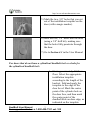
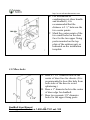
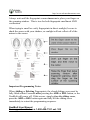
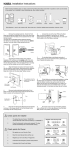
B. For installation of
combination set (door handle
and deadbolt), it is
recommended that the
distance is 5 ½‖ between the
two center points.
C. Mark the center points of the
two small holes on the door
face for the two upper fixing
posts mounted on the top
plate of the outdoor unit, as
indicated on the installation
template.
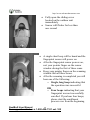
3.12 Bore holes
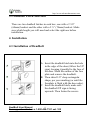
A. Bore a 2 1/8‖ diameter hole in the
center of door face for chassis. (It is
recommended to bore this hole from
both sides of the door to avoid
splintering.)
B. Bore a 1‖ diameter hole in the center
of door edge for deadbolt.
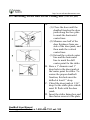
C. Bore two separate 3/8‖ diameter
holes for the upper fixing posts.
8
NextBolt User Manual
For support contact us a 1-800-408-7101 ext. 102