1
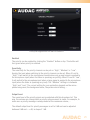
Input gain
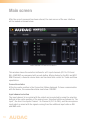
On the left side all input channels are shown, together with a dropdown list. With
this list the input gain for every channel can be adjusted. The default input gain for
every channel is set to 0 dB. It can be set between -4 dB and +10 dB, in steps of 2
dB. This can simply be done by clicking the dropdown list and selecting the desired
gain adjustment factor. When the desired value is selected the changes will take
immediate effect.
Phantom power
A button to enable Phantom Power for the microphone channel can be found on the
right side. This can simply be done by clicking this button. When the phantom power
is enabled, this button will turn green and 15 Volts phantom power will be delivered to
the microphone input. (Only direct mic input and not WMI)
Output mono
A button to enable Mono output can be found on the right bottom side. When not
enabled the output will be in stereo.
Back
Click the “Back” button to return back to the settings screen.
Configuration >> Priority Settings
In this window you can make priority settings such as sensitivity and level adjustment
for the microphone inputs. When applying a signal to the microphone input (when
someone is talking in the microphone), all other signal sources will be suppressed.
24