1
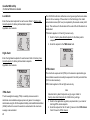
1, 2, 3, and 4-Gas Detector
Technical Reference Guide
Table of Contents
Heading
Page
Introduction ......................................................................................................................................................................... 1
Zeroing the Sensors ........................................................................................................................................................... 1
Contacting BW Technologies by Honeywell .................................................................................................................... 2
Safety Information - Read First.......................................................................................................................................... 2
Sensor Poisons and Contaminants .................................................................................................................................. 5
Getting Started .................................................................................................................................................................... 6
Parts of the GasAlertMicroClip .......................................................................................................................................... 7
Display Elements ................................................................................................................................................................ 8
Pushbutton .......................................................................................................................................................................... 9
Activating the Detector..................................................................................................................................................... 10
Self-Test ........................................................................................................................................................................ 10
Battery Test .............................................................................................................................................................. 10
Audible/Visual Test ................................................................................................................................................... 10
Detector Version ....................................................................................................................................................... 10
Startup Message ...................................................................................................................................................... 10
Alarm Setpoints ........................................................................................................................................................ 11
Sensor and Power Test ............................................................................................................................................ 11
Automatic Zero and O2 Calibration (optional)........................................................................................................... 12
Calibration Due Date (optional) ................................................................................................................................ 12
Last Calibration Failed (optional) .............................................................................................................................. 13
Overdue Calibration.................................................................................................................................................. 13
Cal IR Lock ............................................................................................................................................................... 13
Bump Test ................................................................................................................................................................ 13
Last Bump Test Failed.............................................................................................................................................. 14
Force Bump (optional) .............................................................................................................................................. 14
Self-Test Pass ............................................................................................................................................................... 15
i
GasAlertMicroClip
Technical Reference Guide
Title
Page
Self-Test Fail .................................................................................................................................................................. 15
Battery Test.................................................................................................................................................................... 15
Backlight ........................................................................................................................................................................ 15
Deactivating the Detector ................................................................................................................................................. 16
Installing Fleet Manager II ................................................................................................................................................ 16
Using Fleet Manager II to Configure the Detector ......................................................................................................... 18
Detector Identification ...................................................................................................................................................... 19
Serial Number ................................................................................................................................................................ 19
Hardware/Firmware Revision......................................................................................................................................... 19
Startup Message ............................................................................................................................................................ 19
Sensor Configuration ....................................................................................................................................................... 20
Sensor Disabled............................................................................................................................................................. 20
Calibration Gas Concentration.................................................................................................................................. 21
Calibration Interval ......................................................................................................................................................... 21
Bump Interval ................................................................................................................................................................. 21
Low Alarm ...................................................................................................................................................................... 22
High Alarm ..................................................................................................................................................................... 22
TWA Alarm..................................................................................................................................................................... 22
STEL Alarm.................................................................................................................................................................... 22
STEL Interval ................................................................................................................................................................. 23
Auto Zero on Startup...................................................................................................................................................... 23
O2 Auto-Calibration on Startup (Automatic O2 Calibration) ........................................................................................... 23
LEL By Vol CH4 ............................................................................................................................................................. 23
User Options...................................................................................................................................................................... 24
Cal Lock (Calibration IR Lock) ....................................................................................................................................... 24
Confidence Beep ........................................................................................................................................................... 25
Confidence Beep and IntelliFlash Interval ..................................................................................................................... 25
ii
GasAlertMicroClip
Technical Reference Guide
Title
Page
Datalog Interval .............................................................................................................................................................. 25
Force Bump When Overdue .......................................................................................................................................... 25
Force Calibration When Overdue .................................................................................................................................. 26
IntelliFlash ...................................................................................................................................................................... 26
Latching Alarms ............................................................................................................................................................. 26
Low Alarm Acknowledge................................................................................................................................................ 27
Safe Mode...................................................................................................................................................................... 27
Stealth Mode .................................................................................................................................................................. 27
Language Menu................................................................................................................................................................. 28
Alarms ................................................................................................................................................................................ 29
Computed Gas Exposures ............................................................................................................................................. 31
Viewing Gas Exposures ................................................................................................................................................. 31
Clearing Gas Exposures ........................................................................................................................................... 32
Gas Alarm Setpoints ...................................................................................................................................................... 32
Factory Gas Alarm Setpoints ......................................................................................................................................... 33
Changing Alarm Setpoints ............................................................................................................................................. 33
Stopping a Gas Alarm .................................................................................................................................................... 33
Sensor Alarm ................................................................................................................................................................. 34
Low Battery Alarm.......................................................................................................................................................... 34
Automatic Deactivation Alarm ........................................................................................................................................ 34
Bump Test.......................................................................................................................................................................... 35
Calibration ......................................................................................................................................................................... 36
Guidelines ...................................................................................................................................................................... 36
Diagnostics Test ............................................................................................................................................................ 36
Connecting the Gas Cylinder to the Detector ................................................................................................................ 37
Calibration Setup ........................................................................................................................................................... 38
Setting Span Gas Concentration Values .................................................................................................................. 38
iii
GasAlertMicroClip
Technical Reference Guide
Title
Page
Calibrating with the IR Link ....................................................................................................................................... 39
Calibration Procedure ............................................................................................................................................... 39
Auto Zero and Oxygen Sensor Calibration ............................................................................................................... 40
Auto Span ................................................................................................................................................................. 40
Successful Span .................................................................................................................................................. 41
Unsuccessful Span ............................................................................................................................................. 41
Calibration Due Date ................................................................................................................................................ 41
Verification ................................................................................................................................................................ 42
Datalogs ............................................................................................................................................................................. 43
Event Logs ......................................................................................................................................................................... 43
Downloading Datalogs and Event Logs ......................................................................................................................... 43
Software Requirements ................................................................................................................................................. 43
Maintenance ...................................................................................................................................................................... 44
Battery Cautions ............................................................................................................................................................ 44
Charging the Battery ...................................................................................................................................................... 45
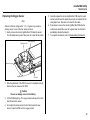
Replacing a Sensor or Sensor Filter .............................................................................................................................. 46
Replacing the Sensor Filter............................................................................................................................................ 48
Replacing the H2S, CO, and LEL sensor ....................................................................................................................... 48
Replacing the Oxygen Sensor ....................................................................................................................................... 49
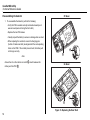
Reassembling the detector ............................................................................................................................................ 50
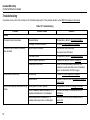
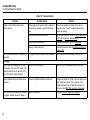
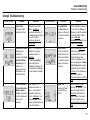
Troubleshooting ................................................................................................................................................................ 52
Startup Troubleshooting .................................................................................................................................................. 55
Calibration Troubleshooting ............................................................................................................................................ 56
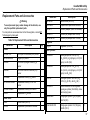
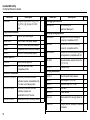
Replacement Parts and Accessories .............................................................................................................................. 57
Specifications .................................................................................................................................................................... 60
General Datalogger Specifications ................................................................................................................................ 61
iv
List of Tables
Table
Title
Page
1.
2.
3.
4.
5.
6.
7.
8.
9.
10.
11.
12.
13.
14.
15.
16.
Gases Monitored ................................................................................................................................................... 1
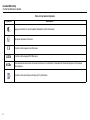
International Symbols ............................................................................................................................................ 4
Parts of the GasAlertMicroClip .............................................................................................................................. 7
Display Elements................................................................................................................................................... 8
Pushbutton ............................................................................................................................................................ 9
Connecting the IR Link ........................................................................................................................................ 18
Alarms ................................................................................................................................................................. 29
Computed Gas Exposures .................................................................................................................................. 31
Gas Alarm Setpoints ........................................................................................................................................... 32
Sample Factory Alarm Setpoints ......................................................................................................................... 33
Connecting the Gas Cylinder to the Detector ...................................................................................................... 37
Connecting the Detector and IR Link .................................................................................................................. 38
Connecting the Charging Adapter ....................................................................................................................... 45
Replacing a Sensor or Sensor Filter ................................................................................................................... 47
Troubleshooting................................................................................................................................................... 52
Replacement Parts and Accessories .................................................................................................................. 57
v
GasAlertMicroClip
Technical Reference Guide
Table
Title
Page
vi
List of Figures
Figure
Title
Page
1.
2.
3.
4.
5.
6.
7.
8.
9.
10.
11.
12.
13.
Parts of the GasAlertMicroClip .............................................................................................................................. 7
Display Elements................................................................................................................................................... 8
Connecting the IR Link ........................................................................................................................................ 18
Detector Identification.......................................................................................................................................... 19
CO Sensor Configuration .................................................................................................................................... 20
Disabled Sensor .................................................................................................................................................. 20
Fleet Manager II IR Link User Options ................................................................................................................ 24
Connecting the Gas Cylinder to the Detector ...................................................................................................... 37
Connecting the Detector and IR Link .................................................................................................................. 38
Connecting the Charging Adapter ....................................................................................................................... 45
Replacing a Sensor or Sensor Filter ................................................................................................................... 47
Sensor Positioning .............................................................................................................................................. 48
Replacing the Rear Shell..................................................................................................................................... 50
vii
GasAlertMicroClip
Technical Reference Guide
Figure
Title
Page
viii
GasAlertMicroClip
Introduction
Zeroing the Sensors
a Warning
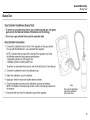
To ensure personal safety, read Safety Information - Read
First and the Cautions before using the detector.
The GasAlertMicroClip XT and XL (“the detector”) warns of hazardous
gas at levels above user-defined alarm setpoints.
To zero the sensors, refer to steps #1-3 in Calibration Procedure.
Table 1. Gases Monitored
Gas Detected
Hydrogen sulfide (H2S)
Unit of Measure
parts per million (ppm)
The detector is a personal safety device. It is your responsibility to
respond properly to the alarm.
Carbon monoxide (CO)
parts per million (ppm)
Oxygen (O2)
percent by volume (%)
Table 1. lists the gases monitored.
Combustible gases (LEL)
Field selectable for:
1. percent of lower explosive
limit (% LEL)
2. percent by volume methane
0-5.0% v/v
1
GasAlertMicroClip
Technical Reference Guide
Contacting BW Technologies by Honeywell
Safety Information - Read First
To contact BW Technologies by Honeywell, call
Use the detector only as specified in this guide and the operator’s
manual, otherwise the protection provided by the detector may be
impaired.
USA: 1-888-749-8878
Canada: 1-800-663-4164
Europe: +44 (0) 1295 700300
Other countries: +1-403-248-9226
Address correspondence to
BW Technologies by Honeywell
2840 – 2 Avenue S.E.
Calgary, AB T2A 7X9
CANADA
Email: [email protected]
BW Technologies by Honeywell's website: www.gasmonitors.com
International symbols on the detector and in this manual are explained in
Table 2.
Read the Cautions on the following pages before using the detector.
ec Warning
This instrument contains a lithium polymer battery. Dispose of
lithium cells immediately. Do not disassemble and do not
dispose of in fire. Do not mix with the solid waste stream.
Spent batteries must be disposed of by a qualified recycler or
hazardous materials handler.
a Cautions
• Warning: Substitution of components may impair Intrinsic Safety.
ISO 9001
• Before using the detector, refer to Sensor Poisons and
Contaminants.
• Warning: For safety reasons, this equipment must be operated
and serviced by qualified personnel only. Read and understand
the user manual completely before operating or servicing.
• Do not use the detector if it is damaged. Inspect the detector
before using. Look for cracks and/or missing parts.
• If the detector is damaged or parts are missing, contact BW
Technologies by Honeywell immediately.
• Only use sensor(s) that are specifically designed for the
GasAlertMicroClip. Refer to Replacement Parts and Accessories.
2
GasAlertMicroClip
Safety Information - Read First
• Calibrate the detector before first-time use and then on a regular
schedule, depending on use and sensor exposure to poisons
and contaminants. BW recommends calibrating at least once
every 180 days (6 months).
• Only calibrate the detector in a fresh air environment and in a
safe area.
• BW recommends to “bump test” the sensors before each day’s
use to confirm their ability to respond to gas by exposing the
detector to a gas concentration that exceeds the alarm setpoints.
Manually verify that the audible and visual alarms are activated.
Calibrate if the readings are not within the specified limits.
• Charge the detector before first-time use. BW recommends the
detector be charged after every workday.
• BW recommends the combustible sensor be checked with a
known concentration of calibration gas after any known
exposure to catalyst contaminants/poisons (sulfur compounds,
silicon vapors, halogenated compounds, etc).
• The combustible sensor is factory calibrated to 50% LEL
methane. If monitoring a different combustible gas in the % LEL
range, calibrate the sensor using the appropriate gas.
• Caution: High off-scale readings may indicate an explosive
concentration.
• Only the combustible gas detection portion of this instrument
has been assessed for performance by CSA International.
• Protect the combustible sensor from exposure to lead
compounds, silicones, and chlorinated hydrocarbons.
• Sensor exposure to certain organic vapors (such as leaded
gasoline and halogenated hydrocarbons) may temporarily inhibit
sensor performance. After exposure, a bump test or calibration is
recommended.
• For use only in potentially explosive atmospheres where oxygen
concentrations do not exceed 20.9% (v/v).
• Use only BW approved batteries for the GasAlertMicroClip
detector. Refer to Specifications.
• Charge the detector using the recommended charging adapter
only. Do not use any other charging adapter. Failure to adhere to
this caution can lead to fire and/or explosion.
• Extended exposure of the detector to certain concentrations of
combustible gases and air may stress a detector element that
can seriously affect its performance. If an alarm occurs due to
high concentration of combustible gases, calibrate the detector.
If necessary, replace the sensor.
• Do not test the combustible sensor’s response with a butane
cigarette lighter; doing so will damage the sensor.
• Do not expose the detector to electrical shock and/or severe
continuous mechanical shock.
• Do not attempt to disassemble, adjust, or service the detector
unless instructions for that procedure are provided in the
technical reference guide, and/or that part is listed as a
replacement part. Use only BW Technologies by Honeywell
replacement parts. Refer to Replacement Parts and Accessories.
• The detector warranty will be voided if customers, personnel, or
third parties damage the detector during repair attempts.
Non-BW Technologies by Honeywell repair/service attempts void
this warranty.
• Any rapid up-scaling reading followed by a declining or erratic
reading may indicate a gas concentration beyond upper scale
limit, which may be hazardous.
3
GasAlertMicroClip
Technical Reference Guide
Table 2. International Symbols
Symbols
Description
n
Approved to both U.S. and Canadian Standards by CSA International
g
European Explosive Protection
X
Conforms to European Union Directives
ATEX
Conforms to European ATEX Directives
IECEx
International Electrotechnical Commission Scheme for Certification to Standards for Electrical Equipment for Explosive
Atmospheres
Conforms to Korea Testing Laboratory (KTL) Certification
4
GasAlertMicroClip
Sensor Poisons and Contaminants
Sensor Poisons and Contaminants
Several cleaners, solvents, and lubricants can contaminate and cause
permanent damage to sensors. Before using cleaners, solvents, and
lubricants in close proximity to the detector sensors, read the following
cautions and refer to the lists below.
a Caution
Use only the following BW Technologies by Honeywell
recommended products and procedures:
• Use water based cleaners.
• Use non-alcohol based cleaners.
• Clean the exterior of the detector with a soft, damp cloth.
Silicones
•
•
•
•
•
•
Silicone cleaners and protectants
Silicone based adhesives, sealants, and gels
Hand/body and medicinal creams containing silicone
Tissues containing silicone
Mold releasing agents
Polishes
Aerosols
•
•
•
•
Bug repellents and sprays
Lubricants
Rust inhibitors
Window cleaners
• Do not use soaps, polishes, or solvents.
Below are common products to avoid using around sensors.
Cleaners and Lubricants
•
•
•
•
•
•
•
•
•
•
Brake cleaners
Lubricants
Rust inhibitors
Window and glass cleaners
Dishsoaps
Citrus based cleaners
Alcohol based cleaners
Hand sanitizers
Anionic detergents
Methanol (fuels and antifreezes)
5
GasAlertMicroClip
Technical Reference Guide
Getting Started
The list below provides the standard items included with the detector. If
the detector is damaged or parts are missing, contact the place of
purchase immediately.
• Sensors: H2S, CO, O2, and combustible (LEL)
•
•
•
•
•
Calibration cap and hose
Charging adapter
Printed Operator‘s Manual
Supplementary Booklet, including a Quick Reference Card
CD-ROM, including translated operator‘s manuals
Configuration Software: The detector is configured with Fleet Manager
II software. It can be downloaded for free from BW Technologies by
Honeywell website: www.gasmonitors.com.
Fleet Manager II CD-ROM is shipped with the MicroDock II base station
and IR Link kit.
The detector is shipped with the sensors and rechargeable battery
installed.
Battery Replacement: To replace the battery, contact BW Technologies
by Honeywell. The battery can only be replaced by the manufacturer.
Charge Battery and Replace Sensors: To charge the battery and
replace the sensors and/or sensor filter, refer to the following:
• Battery Cautions
• Replacing a Sensor or Sensor Filter
To order replacement parts, refer to Replacement Parts and
Accessories.
6
To become oriented with the features and functions of the detector, refer
to the following figures and tables:
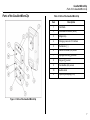
• Figure 1. and Table 3. describes the detector’s components.
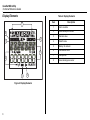
• Figure 2. and Table 4. describes the detector’s display elements.
• Table 5. describes the detector’s pushbutton.
GasAlertMicroClip
Parts of the GasAlertMicroClip
Parts of the GasAlertMicroClip
Table 3. Parts of the GasAlertMicroClip
Item
Description
1
IntelliFlash
2
Visual alarm indicators (LEDs)
3
Alligator clip
4
Charging connector / IR interface
5
Pushbutton (C)
6
Carbon monoxide (CO) sensor
7
Hydrogen sulfide (H2S) sensor
8
Oxygen (O2) sensor
9
Combustible (LEL) sensor
10
Audible alarm
11
Liquid crystal display (LCD)
Figure 1. Parts of the GasAlertMicroClip
7
GasAlertMicroClip
Technical Reference Guide
Display Elements
Table 4. Display Elements
Item
1
8
2
7
3
6
5
4
Figure 2. Display Elements
8
Description
1
Alarm condition
2
Automatically zero sensor
3
Numeric value
4
Stealth mode
5
Battery life indicator
6
Gas identifier bars
7
Gas cylinder
8
Automatically span sensor
GasAlertMicroClip
Pushbutton
Pushbutton
Table 5. Pushbutton
Pushbutton
Description
• To activate the detector press C.
• To deactivate the detector, press and hold C until the OFF countdown is complete and the LCD
deactivates.
• To view the TWA, STEL, and peak (maximum) readings, press C twice. To clear the TWA, STEL,
and peak readings, press C when the LCD displays RESET.
C
• To initiate calibration, deactivate the detector. Press and hold C while the detector performs the
OFF countdown. Continue holding C while the LCD briefly deactivates. The LCD reactivates and
then begins the CAL countdown. Release C when the CAL countdown is complete.
• To activate the backlight in normal operation, press C.
• To acknowledge latched alarms, press C.
• To acknowledge a low alarm and disable the audible alarm, press C (if the Low Alarm
Acknowledge option is enabled).
9
GasAlertMicroClip
Technical Reference Guide
Activating the Detector
a Caution
Only activate the detector in a fresh air environment and in a
safe area.
Audible/Visual Test
1. All of the LCD elements display simultaneously as the detector
beeps, flashes, vibrates, and activates the backlight.
To activate the detector, press C.
Self-Test
The following startup tests are written as startup performance is
intended. If an error occurs, refer to Startup Troubleshooting.
When the detector is activated, it performs several startup tests. Confirm
the following tests occur.
Battery Test
Detector Version
2. The current firmware version of the detector then displays on the
LCD.
The detector performs a battery test during startup. If the battery has
insufficient power to operate, the following screen displays.
Startup Message
Charge the battery for 2-3 hours before restarting the detector. Refer to
Charging the Battery.
10
3. If data is entered in the Startup Message option (25 characters
maximum) of Fleet Manager II, that data will display during the
startup self-test. To enter a startup message, refer to Detector
Identification or the Fleet Manager II Operator’s Manual.
GasAlertMicroClip
Activating the Detector
Alarm Setpoints
Sensor and Power Test
4. Next, the TWA, STEL, low, and high alarm setpoints display.
5. The detector then tests the sensors.
Note
Alarm setpoints may vary by region. Refer to Factory Gas Alarm
Setpoints.
After testing the sensors, the following screen displays to verify
all sensors have passed.
If an error message displays, refer to Startup Troubleshooting.
Note
The sensors are tested continuously while the detector is activated.
11
GasAlertMicroClip
Technical Reference Guide
Note
Automatic Zero and O2 Calibration (optional)
6. Auto-Zero on Startup: If enabled, the H2S, CO, and LEL
sensors are automatically zeroed during startup. Each sensor is
enabled individually. The auto-zero option is enabled for each
sensor upon shipment.
O2 Auto-Calibration on Startup: If enabled, the O2 sensor is
automatically calibrated during startup. The auto-calibration
option is enabled for the O2 sensor upon shipment.
If oxygen is configured to measure 20.8% vol., the oxygen
calibration screen displays 20.8% O2.
Calibration Due Date (optional)
7. The following screen displays the number of days remaining
before calibration is due. The number of days that displays is
when the next sensor calibration should be performed.
The detector beeps twice to signal a successful zero and span,
and the following screen displays.
Note
If the O2 Auto-Calibration on Startup option is enabled, and the
Auto-Zero on Startup option is disabled for all sensors, the
following screen displays.
12
If the Calibration Interval option is defined as 0, the calibration
due date is bypassed during startup.
GasAlertMicroClip
Activating the Detector
Last Calibration Failed (optional)
If any sensor failed the last calibration, CAL FAILURE displays
on the screen.
Note
If calibration is not performed, or C is not pressed within
2 minutes, the detector automatically deactivates.
If the Force Calibration When Overdue is disabled, press C to
acknowledge the warning. The detector continues with the
startup self-tests and then enters normal operation.
Cal IR Lock
If the Cal Lock option is enabled, the following screen displays.
Note
When the CAL FAILURE displays, the previous calibration has
failed but the calibration is still valid until the next calibration due
date.
Overdue Calibration
If any sensor is past due for calibration, the detector beeps,
flashes, vibrates, and the following screen displays.
Refer to Startup Troubleshooting.
Bump Test
Note
A bump test cannot be conducted if the detector has just been
calibrated. If the Bump Interval option is defined as 0 in Fleet
Manager II, the bump test is bypassed.
BW recommends to “bump test” the sensors, before each day’s
use, to confirm their ability to respond to gas by exposing the
detector to a gas concentration that exceeds the alarm setpoints.
If calibration is overdue and the Force Calibration When
Overdue option is enabled, a calibration must be performed to
enter normal operation. Refer to Calibration.
13
GasAlertMicroClip
Technical Reference Guide
Last Bump Test Failed
If any sensor failed the last calibration, CAL FAILURE displays
on the screen.
A bump test must be performed to enter normal operation. Apply
gas to the sensors. Ensure the visual, audible, and vibrator
alarms activate. When the gas is removed, the detector briefly
remains in alarm until the gas has cleared from the sensors.
When the sensors successfully pass the bump check, the
following screen displays showing the number of days remaining
until the next bump check is due (I d = 1 day).
Note
When the BUMPCHK FAILURE displays, the previous
calibration has failed but the calibration is still valid until the next
bump test due date.
Force Bump (optional)
8. If the Force Bump option is enabled and the sensors are due
have a bump test, the following screen displays.
14
If Force Bump is disabled, press C to continue with the startup
self-tests.
Note
If BUMPCHK todAY displays again after performing a bump
check, refer to Startup Troubleshooting.
GasAlertMicroClip
Activating the Detector
Self-Test Pass
Battery Test
When the detector has passed all startup self-tests, it enters normal
operation. The LCD displays the ambient gas readings.
The battery is tested when the detector is activated and continuously
thereafter. A newly charged battery will typically operate for 10-12 hours.
The detector automatically begins
• recording the peak (maximum) gas exposure,
• calculating the short-term exposure level (STEL), and
• calculating the time-weighted average (TWA) exposures.
Self-Test Fail
If the following error message displays after entering normal operation,
refer to Startup Troubleshooting.
• Battery power is continually displayed during normal operation. If
flashes. The detector performs a
battery power is low, L and
sequence of 10 rapid sirens and alternating flashes with 7 seconds
of silence in between (continues for 15 minutes).
• If battery power becomes critically low, L and LOW BAT display.
The detector performs a sequence of 10 rapid sirens with 1 second
of silence in between (sequence reactivates seven times). The
detector then displays OFF and the detector deactivates.
Note
If enabled, Confidence Beep and IntelliFlash automatically
deactivate during a low battery alarm. Refer to Confidence Beep
and IntelliFlash.
Backlight
The backlight automatically activates
• during startup,
• when the pushbutton is pressed (then deactivates after 5 seconds),
and
• when there is an alarm condition (unless Stealth is enabled).
15
GasAlertMicroClip
Technical Reference Guide
Deactivating the Detector
Installing Fleet Manager II
To deactivate the detector, press and hold C. The detector
Fleet Manager II is required to configure the detector and sensors. And
IR Link is also required. To purchase contact BW Technologies by
Honeywell.
•
•
•
•
performs a sequence of two sirens with alternating flashes,
vibrates,
initiates the deactivation countdown, and
displays OFF.
Note
If C is released before the countdown is complete, the detector
will not deactivate.
16
To install Fleet Manager II complete the following:
1. Install Fleet Manager II using the Fleet Manager CD-ROM
(available with MicroDock II and the IR Link), or download (at no
cost) from BW Technologies by Honeywell website:
www.gasmonitors.com.
2. Follow the installation wizard.
3. When installation is complete, open Fleet Manager II.
4. Click Administration located on the left toolbar.
5. Click the Login/Logout button.
GasAlertMicroClip
Installing Fleet Manager II
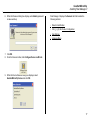
6. When the Password dialog box displays, enter Admin (password
is case sensitive).
Fleet Manager II displays the Sensors tab that includes the
following sections:
• Detector Identification
• CO, O2, H2S, LEL Sensor Configuration
• User Options
• Language Menu
7. Click OK.
8. From the Devices toolbar, click Configure Device via IR Link.
9. When the Device Selection dialog box displays, select
GasAlertMicroClip Series and click OK.
17
GasAlertMicroClip
Technical Reference Guide
Using Fleet Manager II to Configure the Detector
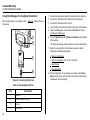
When Fleet Manager II is installed, refer to , Figure 3., and the following
procedures:
1
2
1.
2.
3.
4.
5.
Activate the detector and wait for the startup tests to complete.
Connect the USB cable to the USB port on the computer.
Connect the USB cable to the IR Link.
Insert the IR link onto the IR interface on the back of the detector.
Open Fleet Manager II and access the Sensors tab. Refer to
Installing Fleet Manager II.
6. From the Sensors tab, click Retrieve from Device at the bottom
of the window.
The fields will populate with the detector’s current configurations.
7. Refer to the descriptions in the following sections to define
settings and enable/disable options:
3
• Detector Identification
• Sensor Configuration (CO, O2, H2S, and LEL)
• User Options
4
Figure 3. Connecting the IR Link
Table 6. Connecting the IR Link
Item
1
18
Description
Detector
2
IR and charger interface
3
IR Link
4
USB cable
• Language Menu
8. When configuration of new settings is complete, click Save to
Device at the bottom of the window. The detector automatically
updates with the new settings.
GasAlertMicroClip
Detector Identification
Detector Identification
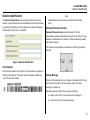
The Detector Identification section provides information about the
detector, current firmware revision, and hardware revision. Data can also
be entered (25 characters per line) to display as a startup message on
the detector LCD each time it is activated.
Note
GasAlertMicroClip serial numbers use the KA serial number
prefix.
Hardware/Firmware Revision
Hardware/Firmware Revision cannot be altered. The field
automatically populates when data is retrieved from the detector. If new
firmware is downloaded to the detector, the field automatically updates
when data is retrieved.
The firmware version displays on the detector LCD during the startup
self-tests.
Figure 4. Detector Identification
Serial Number
Enter the serial number of the detector. The serial number is located on
the back of the detector. The serial number is listed above the S: bar
code. This cannot be altered.
Startup Message
Enter text (25 characters per line) to display on the detector LCD during
startup. Enter information such as employee name, plant, area,
emergency numbers, etc.
Depending upon the length of the message, it will either
a) display on the LCD for 3 seconds (shorter message), or
b) scroll twice on the LCD (longer message).
19
GasAlertMicroClip
Technical Reference Guide
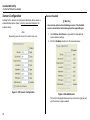
Sensor Configuration
Sensor Disabled
Settings for the sensors are configured individually. Enter values or
enable/disable options. Refer to Factory Gas Alarm Setpoints for
setpoint values.
Note
Depending upon the sensor, the options may vary.
Figure 5. CO Sensor Configuration
a Warning
Use extreme caution when disabling a sensor. The disabled
sensor cannot detect and alarm against the applicable gas.
1. Click Retrieve from Device to populate the fields with the
current detector settings.
2. Click the Disabled checkbox for the required sensor.
Figure 6. Disabled Sensor
The fields for the applicable sensor become inactive (greyed out)
until the sensor is again enabled.
20
GasAlertMicroClip
Sensor Configuration
3. Click the Save to Device button located at the bottom of the
window.
4. The detector LCD automatically updates. The gas type and
sensor readings no longer display on the LCD for the applicable
sensor.
Calibration Interval
a Caution
BW recommends that the sensors be calibrated once every
180 days (6 months).
Define how often a sensor should be calibrated in the Cal Interval field.
A different calibration interval can be defined for each sensor.
1. Enter the value (0-365 days) for each sensor.
2. Enter 0 to disable the calibration interval option. Entering zero
automatically deactivates the Force Calibration When Overdue
user option.
5. Enable the sensor as soon as possible. If the sensor is
damaged, replace it immediately. Refer to Replacing a Sensor or
Sensor Filter.
Calibration Gas Concentration
a Caution
The gas concentration value entered in Fleet Manager II must
match the gas concentration value on the gas cylinder.
1. Refer to the following list of recommended gas mixtures:
• CO: 100 ppm balance N2
• H2S: 25 ppm balance N2
• LEL: 50% LEL or 2.5 to 25% by vol. methane balance air
• O2: 20.9%
2. Select/enter the gas concentration value in the Cal Gas field of
the applicable sensor.
The detector is shipped with the factory default set to 180 days.
Bump Interval
Define how often a bump check should be performed for each sensor in
the Bump Interval field. A different bump interval can be defined for
each sensor.
1. Enter the value (1-365 days) for each sensor.
2. Enter 0 to disable the Bump Interval option. Entering 0
automatically disables the Force Bump When Overdue option.
The detector is shipped with the factory default set to 0 days.
Note
BW recommends to bump test the sensors before each day’s
use to confirm their ability to respond to gas by exposing the
detector to a gas concentration that exceeds the alarm setpoints.
Verify that the audible and visual alarms activate. Calibrate if the
readings are not within the specified limits.
21
GasAlertMicroClip
Technical Reference Guide
Low Alarm
Enter the low alarm setpoints for each sensor. Refer to Factory Gas
Alarm Setpoints for factory defined alarm setpoints.
Applicable to all sensors.
The US OSHA method is defined as a moving average that accumulates
over an 8-hour average. If the worker is in the field longer, the oldest
accumulated values (first hour) are replaced by the newest values (ninth
hour). This continues for the duration of the work shift until the detector is
deactivated.
TWA Alarm applies to CO and H2S sensors only.
1. Refer to Factory Gas Alarm Setpoints for the factory alarm
setpoints.
2. Enter the setpoint in the TWA Alarm field.
High Alarm
Enter the high alarm setpoints for each sensor. Refer to Factory Gas
Alarm Setpoints for factory defined alarm setpoints.
Applicable to all sensors.
STEL Alarm
The short-term exposure limit (STEL) is the maximum permissible gas
concentration a worker can safely be exposed to for short periods of time
(5-15 minutes maximum).
STEL Alarm applies to CO and H2S sensors only.
TWA Alarm
The time-weighted average (TWA) is a safety measure used to
determine accumulated average exposure to gases. An average is
determined using the US Occupational Safety and Health Administration
(OSHA) method to ensure the worker is warned when the maximum
average is accumulated.
22
Note
Standard factory Alarm Setpoints vary by region. Refer to
Factory Gas Alarm Setpoints for OSHA factory settings.
1. Refer to the applicable regulatory requirements in your area for
defining STEL alarm setpoints.
2. Enter the setpoint for the CO and H2S sensor in the STEL Alarm
field. Proceed to STEL Interval.
GasAlertMicroClip
Sensor Configuration
STEL Interval
O2 Auto-Calibration on Startup (Automatic O2 Calibration)
STEL Interval provides protection for workers from over exposure to
high concentrations of gas, and is based on used-defined 5-15 minute
intervals. When the maximum STEL is reached, the detector alarms to
notify the worker.
When enabled, the O2 sensor is automatically calibrated during the
startup self-tests.
a Caution
Follow all safety procedures as defined by your employer.
Enter the interval (5-15 minutes) in the STEL Interval field. The detector
is shipped with the factory default setting of 15 minutes.
The detector is shipped with the O2 Auto-Calibration on Startup option
enabled.
LEL By Vol CH4
When enabled, the detector displays the LEL value as CH4%, assuming
a methane environment.
Auto Zero on Startup
When enabled, the sensors automatically zero during the startup
self-tests. The Auto-Zero on Start-up option is available for the CO,
H2S, and LEL sensors. Not applicable to O2.
1. Click the checkbox of each sensor that will be auto zeroed during
startup.
The LEL By Vol CH4 option is applicable to the LEL sensor only. The
detector is shipped with the LEL by Vol CH4 disabled.
The detector is shipped with the Auto-Zero on Start-up option
enabled for the CO, H2S, and LEL sensor.
23
GasAlertMicroClip
Technical Reference Guide
User Options
Cal Lock (Calibration IR Lock)
The user options section provides detector features that can be enabled
or disabled. The green checkmark indicates the option is enabled. Click
the checkmark to disable the option.
When enabled, the sensors can only be calibrated using an infrared (IR)
device to ensure calibrations are recorded. The following are IR devices:
• IR Link with Fleet Manager (refer to Calibration Procedure),
• MicroDock II base station (refer to the MicroDock II User Manual).
If Cal Lock is enabled and calibration is attempted, the following screen
displays.
Note
If Cal Lock is enabled, the detector will still auto zero the
sensors.
The detector is shipped with Cal Lock disabled.
Figure 7. Fleet Manager II IR Link User Options
24
GasAlertMicroClip
User Options
Confidence Beep
Force Bump When Overdue
When enabled, the confidence beep provides continuous audible
confirmation that the detector is operating correctly by beeping once
every second.
When enabled, if a sensor(s) is past due for a bump test, the sensor(s)
must be bump tested immediately, otherwise the detector deactivates.
Note
Confidence beep automatically disables during a low battery
alarm, a self-test fail, a calibration fail, a bump test fail, or during
an alarm event.
A bump test should be performed regularly to ensure the sensors are
responding correctly to gas. The following screen displays when the
option is enabled and the sensor(s) is overdue.
To define how often Confidence Beep occurs (1-60 seconds), refer to
Confidence Beep and IntelliFlash Interval. Default setting is 1 second.
The detector is shipped with the Confidence Beep disabled.
Confidence Beep and IntelliFlash Interval
Enter a value (1-60 seconds) to define how often IntelliFlash occurs and
the detector beeps. Intelliflash and/or Confidence Beep must be enabled
in order to define Confidence Beep and IntelliFlash Interval.
Refer to Confidence Beep and IntelliFlash Interval. Default interval is
1 second.
Note
IntelliFlash and IntelliFlash Interval are only applicable to
GasAlertMicroClip XT and XL.
To enable Force Bump When Overdue, complete the following:
1. Click the Force Bump When Overdue checkbox to enable.
2. Enter a value (1-365 days) in the Bump Interval field.
a Caution
If 0 is entered in the Bump Interval field, the Force Bump
When Overdue option is automatically disabled.
The detector is shipped with Force Bump When Overdue disabled.
For information and procedures, refer to Bump Test.
Datalog Interval
Enter a value (1-120 seconds). The default datalog interval is one
reading every 15 seconds.
25
GasAlertMicroClip
Technical Reference Guide
Force Calibration When Overdue
IntelliFlash
When enabled, if a sensor(s) is past due, the sensor(s) must be
calibrated immediately, otherwise the detector deactivates.
When enabled, the green LED flashes to provide continuous visual
confirmation that the detector is operating correctly.
Enable Force Calibration When Overdue to ensure calibrations are
performed regularly and sensors are operating correctly. The following
screen displays during the startup sequence when the option is enabled
and the sensor(s) is overdue.
Note
IntelliFlash is only applicable to GasAlertMicroClip XT and XL.
IntelliFlash automatically deactivates during a low battery alarm,
a self-test fail, a calibration fail, a bump test fail, or during an
alarm event.
To define how often IntelliFlash occurs (1-60 seconds), refer to
Confidence Beep and IntelliFlash Interval. Default interval is 1 second.
The detector is shipped with IntelliFlash enabled.
To enable Force Calibration When Overdue, complete the following:
1. Click the Force Calibration When Overdue checkbox to
enable.
2. Enter a value (1-365 days) in the Calibration Interval
(Cal Interval) field.
a Caution
If 0 (zero) is entered in the Cal Interval field, the Force
Calibration When Overdue option is automatically disabled.
The detector is shipped with Force Calibration When Overdue
disabled.
For more information, refer to Calibration.
26
Latching Alarms
When enabled, a low alarm persists until the alarm is acknowledged and
gas concentrations are below the low alarm setpoint. The audible alarm
can be temporarily deactivated by pressing C, but the LCD continues to
display the peak concentration values until the alarm condition no longer
exists.
The detector is shipped with Latching Alarms disabled.
GasAlertMicroClip
User Options
Low Alarm Acknowledge
Stealth Mode
When enabled, the audible alarm can be deactivated during a low alarm
for the CO, H2S, and LEL sensors. The LED and visual alarm indicators
remain active until the alarm condition changes or the detector
deactivates.
When enabled, the backlight, visual alarms, and audible alarms are
disabled.
displays continuously on the LCD.
Press C to acknowledge the low alarm and deactivate the audible alarm.
Note
Low Alarm Acknowledge is not applicable to O2.
The detector is shipped with Low Alarm Acknowledge disabled.
During an alarm, the vibrator activates and readings display on the LCD.
The detector is shipped with Stealth Mode disabled.
Safe Mode
When enabled, SAFE displays continuously on the LCD unless an alarm
condition occurs. Safe Mode provides visual confirmation that no
(monitored) hazardous gas is present.
The detector is shipped with Safe Mode disabled.
27
GasAlertMicroClip
Technical Reference Guide
Language Menu
The detector can display warnings and notifications in five different
languages. Refer to the following illustration.
Click a language. When the settings are saved to the detector, the LCD
displays warnings and notifications in the selected language.
The detector is shipped with English as the default language.
28
GasAlertMicroClip
Alarms
Alarms
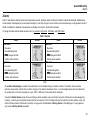
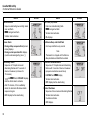
Table 7. describes the detector alarms and corresponding screens. During an alarm condition, the detector activates the backlight, audible/visual/
vibrator alarms, and displays the current ambient readings. If more than one type or level of alarm occurs simultaneously, a multi-gas alarm results. If
Stealth is enabled, the audible and visual alarms are disabled, and only the vibrator alarm activates.
To change the factory-defined alarm setpoints, refer to Low Alarm, High Alarm, TWA Alarm, and STEL Alarm.
Table 7. Alarms
Alarm
Low Alarm
• Slow siren
• Slow alternating flash
• L and gas bar flash
• Vibrator alarm activates
High Alarm
• Fast siren
• Fast alternating flash
• L and gas bar flash
• Vibrator alarm activates
Screen
Alarm
Screen
TWA Alarm
• Slow siren
• Slow alternating flash
• L and gas bar flash
• Vibrator alarm activates
STEL Alarm
• Fast siren
• Fast alternating flash
• L and gas bar flash
• Vibrator alarm activates
Note
If Low Alarm Acknowledge is enabled, the audible alarm can be disabled during a low alarm condition. The vibrator and visual alarm
indicators remain active until the alarm condition changes or the detector deactivates. Press C to acknowledge the low alarm and deactivate
the audible alarm. If the alarm escalates to a high, TWA, or STEL alarm, the audible alarm reactivates.
If enabled, Latched Alarms causes the low and high gas alarms (audible, visual, and vibrator) to persist until the alarm is acknowledged (by
pressing C) and the gas concentration is below the low alarm setpoint. The LCD displays the peak concentration and the audible, visual, and
vibrator indicators persist until the alarm condition no longer exists. Enable/disable Latching Alarms in Fleet Manager II. Local regulations
may require Latching Alarms be enabled.
29
GasAlertMicroClip
Technical Reference Guide
Alarm
Screen
Alarm
Multi-Gas Alarm
• Sequence alternating low and high alarm
siren and flash
• L and gas bars flash
• Vibrator alarm activates
Over Limit (OL) Alarm
• Fast siren and alternating flash
• L and gas bar flash
• Vibrator alarm activates
• OL displays
Sensor Alarm
• During startup sequence Error [sensor
name] displays
• During normal operation Err displays
(must be acknowledged by press C)
Confidence Beep and IntelliFlash
• One beep and flash every second
Low Battery Alarm
• Sequence of 10 rapid sirens and
alternating flashes with 7 seconds of
silence in between (continues for
15 minutes)
•
and L flash, LOW BAT displays,
and the vibrator alarm activates
• After 15 minutes, of the Low Battery
alarm, the Automatic Shutdown Alarm
sequence begins
• OFF displays before deactivating
30
Note
The detector is shipped with Confidence
Beep disabled and IntelliFlash enabled
Automatic Shutdown Alarm
• Sequence of 10 rapid sirens and alternating
flashes with 1 second of silence in between
(sequence reactivates seven times)
• LOW BAT and L display
• Vibrator alarm activates
• OFF displays before deactivating
Normal Shutdown
• Sequence of two sirens and alternating flashes
• Vibrator alarm activates
• Countdown initiates
• OFF displays
Screen
GasAlertMicroClip
Alarms
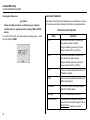
Computed Gas Exposures
Viewing Gas Exposures
a Warning
To avoid possible personal injury, do not deactivate the
detector during a work shift. TWA, STEL, and MAX readings
reset once the detector is deactivated.
To view the TWA, STEL, and peak (maximum) readings, press C twice.
The LCD first displays the TWA gas exposures.
Table 8. Computed Gas Exposures
Gas Exposures
Description
TWA
(H2S and CO
only)
Time-weighted average (TWA) based on
accumulated exposure to toxic gases
averaged over a workday according to US
OSHA method.
OSHA: 8 hour moving average
STEL
(H2S and CO
only)
Short-term exposure limit (STEL) to gas
based on a 5-15 minute user-defined
period.
Peak*
(maximum)
Peak concentration encountered during
work shift.
Then the LCD displays the STEL gas exposures.
Finally the LCD displays the peak (maximum) readings.
* For oxygen, it is the highest or the lowest concentration
encountered.
31
GasAlertMicroClip
Technical Reference Guide
Gas Alarm Setpoints
Clearing Gas Exposures
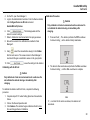
a Caution
Follow all safety procedures as defined by your employer.
Confirm with your supervisor before clearing TWA and STEL
alarms.
To clear the TWA, STEL, and peak exposure readings, press C when
the LCD displays RESET.
32
Gas alarms are activated when detected gas concentrations are above
or below the user-defined setpoints. Gas alarms are described below.
Table 9. Gas Alarm Setpoints
Alarm
Condition
Low
Toxics and combustibles: Ambient gas
level above low alarm setpoint.
Oxygen: Ambient gas level may be set
above or below 20.9% (or 20.8%).
High
Toxics and combustibles: Ambient gas
level above high alarm setpoint.
Oxygen: Ambient gas level may be set
above or below 20.9% (or 20.8%).
TWA
Toxics only: Accumulated value above the
TWA alarm setpoint.
STEL
Toxics only: Accumulated value above the
STEL alarm setpoint.
Downscale
Toxics only: If sensor reading is negative
(half of the TWA setpoint)
Multi-gas
Two or more gas alarm conditions.
Over Limit (OL)
OL displays when readings are above or
below the sensor detection range. Refer to
Specifications for detection ranges.
GasAlertMicroClip
Alarms
Factory Gas Alarm Setpoints
Changing Alarm Setpoints
Note
Standard factory alarm setpoints may vary by region.
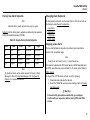
Table 10. lists the factory alarm setpoints as defined by Occupational
Safety and Health Association (OSHA).
Table 10. Sample Factory Alarm Setpoints
Gas
TWA
STEL
Low
High
O2
N/A
N/A
19.5% vol.
23.5% vol.
LEL
N/A
N/A
10% LEL
20% LEL
CO
35 ppm
50 ppm
35 ppm
200 ppm
H2 S
10 ppm
15 ppm
10 ppm
15 ppm
Note
To disable an alarm, set the alarm setpoint to 0 (zero) in Fleet
Manager II. Refer to Using Fleet Manager II to Configure the
Detector for complete instructions.
To change alarm setpoints, use the base station or IR Link and refer to
the following under Sensor Configuration:
•
•
•
•
Low Alarm
High Alarm
TWA Alarm
STEL Alarm
Stopping a Gas Alarm
The low and high alarms stop when the ambient gas concentration
returns to the acceptable range.
Note
If alarms are set to latch, press C to reset the alarms.
The detector calculates the TWA value based on OSHA standards and
the STEL value based on a user-defined 5 to 15 minute period. Refer to
STEL Interval.
To stop a TWA or STEL alarm, perform one of the following:
1. Deactivate and reactivate the detector.
2. Reset the TWA/STEL/peak exposure readings. Refer to Viewing
Gas Exposures).
a Warning
Follow all safety procedures as defined by your employer.
Confirm with your supervisor before clearing TWA and STEL
alarms.
33
GasAlertMicroClip
Technical Reference Guide
Sensor Alarm
The detector tests for missing or defective sensors during the startup
self-test and continuously thereafter.
• During start-up if a sensor fails, Error and the sensor name displays.
• If a sensor fails the self-test, Err displays above the gas type of the
failed sensor. The detector will enter alarm. Press C to acknowledge
the sensor alarm and stoop the alarm. Refer to Troubleshooting.
• If battery power becomes critically low, L and LOW BAT display.
The detector performs a sequence of 10 rapid sirens with 1 second
of silence in between (sequence reactivates seven times). The
detector then displays OFF and the detector deactivates.
Charge the battery immediately. Refer to Charging the Battery.
Note
Confidence Beep automatically disables during a low battery
alarm.
Automatic Deactivation Alarm
An automatic deactivation alarm will occur if
Low Battery Alarm
• Battery power is continually displayed during normal operation. If
flashes. The detector performs a
battery power is low, L and
sequence of 10 rapid sirens and alternating flashes with 7 seconds
of silence in between (continues for 15 minutes).
34
• the battery voltage is too low to operate the detector,
• calibration is due but not performed (when the Force Calibration
option is enabled),
• bump test is due but not performed (when the Force Bump options
is enabled) and
• all sensors fail during the startup self-test.
The detector performs a sequence of 10 rapid sirens with alternating
flashes with 1 second of silence in between (sequence reactivates seven
times). OFF then displays and the detector deactivates.
GasAlertMicroClip
Bump Test
Bump Test
35
GasAlertMicroClip
Technical Reference Guide
Calibration
Guidelines
When calibrating the detector, adhere to the following guidelines:
• Recommended gas mixture:
CO: 100 ppm balance N2
H2S: 25 ppm balance N2
LEL: 50% LEL or 2.5% by vol. methane balance air
O2: clean air, 18%
• To ensure accurate calibration, use a premium-grade calibration gas.
Gases approved by the National Institute of Standards and
Technology (NIST) improve the accuracy of the calibration.
• Do not use a gas cylinder past its expiration date.
• Calibrate a new sensor before use. Install the sensor, activate the
detector, and allow the sensor to stabilize before starting calibration
(used sensor: 60 seconds / new sensor: 5 minutes).
• Calibrate the sensors at least once every 180 days, depending on
use and sensor exposure to poisons and contaminants.
• Calibrate the detector if the gas readings varies during startup.
• Calibrate the sensor before defining the alarm setpoints.
• Calibrate only in a safe area that is free of hazardous gas in an
atmosphere of 20.9% oxygen.
• Do not calibrate the detector during or immediately after charging is
complete.
• The oxygen sensor can be automatically calibrated each time upon
activation (if this feature is enabled). Activate the detector in a
normal (20.9%/20.8% oxygen) atmosphere.
• Allow the detector to stabilize for 1 minute after activation before
performing a calibration or bump test.
36
• If a certified calibration is required, contact BW Technologies by
Honeywell.
Diagnostics Test
The detector tests the air (auto zero) and the span gas that is applied
(auto span) to ensure it meets expected values. Auto zero sets the
zero-gas level of the sensor.
Auto Zero: If target gas is present, the zero level will be incorrect and
the sensor will fail. If a sensor fails, an error message displays.
Auto Span: If the target gas does not meet expected values, an error
message displays.
A sensors that fails to span retains the previous span value, and does
not continue with the calibration process.
GasAlertMicroClip
Calibration
Connecting the Gas Cylinder to the Detector
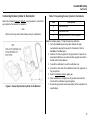
Refer to the following Figure 8., Table 11., and procedures to connect the
gas cylinder to the detector for calibration.
Note
Wind currents may cause false readings and poor calibrations.
Table 11. Connecting the Gas Cylinder to the Detector
Item
Description
1
Calibration cap
2
Calibration hose
3
Gas cylinder with 0.5 ml/min regulator
Read the following steps (1-7) before beginning calibration.
Figure 8. Connecting the Gas Cylinder to the Detector
1. Verify the calibration gas being used matches the span
concentration value(s) that are set for the detector. Refer to
Cal Gas in Fleet Manager II.
2. Attach a 0.5 ml/min regulator to the gas cylinder. To perform an
automated calibration, use a demand flow regulator and refer to
the MicroDock II User Manual.
3. Connect the calibration hose to the calibration cap.
4. Connect the other end of the calibration hose to the regulator on
the gas cylinder.
5. Refer to Calibration Setup to apply gas.
6. When calibration is complete turn off gas and disconnect the
hose from the calibration cap and regulator.
7. Ensure the gas cylinder is stored according to the manufacturer’s
specifications.
37
GasAlertMicroClip
Technical Reference Guide
Calibration Setup
The following calibration procedures are written as calibration
performance is intended. If an error or failure occurs, refer to Calibration
Troubleshooting.
3. Insert the IR Link into the IR interface on the back of the detector.
Refer to Figure 9.
a Caution
1
Only calibrate in a fresh air environment and in a safe area. Do
not calibrate the detector during or immediately after
charging.
2
Note
Calibration can be aborted at any time. To abort calibration,
press C. The following screen displays.
3
4
Setting Span Gas Concentration Values
1. Activate the detector and allow startup to complete.
2. Connect the IR Link to the computer.
38
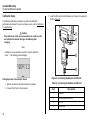
Figure 9. Connecting the Detector and IR Link
Table 12. Connecting the Detector and IR Link
Item
Description
1
Detector
2
IR and charger interface
3
IR Link
4
USB cable
GasAlertMicroClip
Calibration
4. On the PC, open Fleet Manager II.
5. Login to the Administration functions. From the Devices toolbar,
click Configure Device via IR Link and select
GasAlertMicroClip Series.
6. Click
. The fields populate with the
detector’s current settings.
7. Refer to Calibration Gas Concentration for span gas values.
8. Ensure the sensors to be calibrated are enabled in Fleet
Manager II.
Calibration Procedure
a Caution
Only calibrate in a fresh air environment and in a safe area. Do
not calibrate the detector during or immediately after
charging.
1. Press and hold C. The detector performs the OFF countdown.
Continue holding C as the detector briefly deactivates.
9. Using
, select the concentration value(s) in the Cal Gas
field for each sensor. The values entered in Fleet Manager II
must match the gas concentration values on the gas cylinder.
10. Click
to save the settings to the detector.
2. The detector then reactivates and performs the CAL countdown.
Continue holding C until the CAL countdown is complete.
Calibrating with the IR Link
a Caution
Only calibrate in a fresh air environment and in a safe area. Do
not calibrate the detector during or immediately after
charging.
To calibrate the detector with the IR Link, complete the following
procedure:
1. Complete steps #1-10 under Setting Span Gas Concentration
Values.
2. Click on the Device Operations tab.
3. Click Calibrate. The detector begins calibration. Refer to Auto
Zero and Oxygen Sensor Calibration.
Note
If C is not held for the entire countdown, the detector will
deactivate.
39
GasAlertMicroClip
Technical Reference Guide
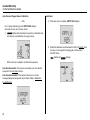
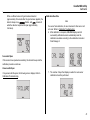
Auto Zero and Oxygen Sensor Calibration
Note
Auto Span
4. When auto zero is complete, APPLY GAS displays.
Do not apply calibration gas until APPLY GAS displays,
otherwise the auto zero function will fail.
3.
flashes while the detector zeroes the combustible and
toxic sensors, and calibrates the oxygen sensor.
5. Attach the calibration cap to the detector. Refer to Figure 8. Open
the valve on the regulator and apply gas at a flow rate of
250-500 ml/min.
flashes and
When auto zero is complete, the detector beeps twice.
Auto Zero Successful: If the sensors successfully zero, the detector
proceeds to the Auto Span function.
Auto Zero Unsuccessful: If the sensors fail auto zero, an error
message displays showing which sensor failed. Refer to Calibration
Troubleshooting.
40
displays
GasAlertMicroClip
Calibration
When a sufficient amount of gas has been detected
(approximately 30 seconds after the gas has been applied), the
detector beeps once,
flashes, and
remains lit
while the detector completes the span (approximately
2 minutes).
Calibration Due Date
Note
If a sensor fails calibration, the next due date for that sensor will
not reset. Refer to Calibration Troubleshooting.
6. After calibration is complete, CAL DUE displays and all
successfully calibrated sensors automatically reset the
calibration due dates according to the calibration intervals in
Fleet Manager II.
Successful Span
If the sensors have spanned successfully, the detector beeps and the
calibration procedure continues.
Unsuccessful Span
If any sensors fail the span, the following screen displays. Refer to
Calibration Troubleshooting.
7. The number of days that displays is when the next sensor
calibration should be performed.
41
GasAlertMicroClip
Technical Reference Guide
Failed Sensor Past Calibration Due Date: If a sensor fails the span
and it is past the calibration due date, the following three screens
display.
Verification
1. After calibration is complete and the detector returns to normal
operation, verify the calibration using a gas cylinder other than
the one used for calibration.
2. The gas concentration should not exceed the sensor's detection
range. Confirm the LCD shows the expected concentration.
3. To ensure the readings are accurate, apply the verification gas
for the same amount of time as was applied to the sensor when it
was calibrated.
Example: H2S span time 2 minutes therefore, apply verification
gas for 2 minutes.
1. Press C to acknowledge the warning. The detector returns to
normal operation.
Note
A negative number indicates that sensor is overdue for a
calibration.
42
GasAlertMicroClip
Datalogs
Datalogs
Event Logs
The detector records various information that can be compiled to create
a report. The detector is capable of storing 16 hours of information (when
recording a datalog every 15 seconds). When the memory is full, the
detector replaces the oldest datalogs with the most recent datalogs.
The detector records the 10 most recent gas alarm events. The following
information is recorded:
To change the datalog interval, refer to Datalog Interval.
•
•
•
•
•
Serial number of the detector
Start time of alarm
Type, level and duration of alarm
Peak exposure level (ppm or %)
Status of the sensor
Downloading Datalogs and Event Logs
The datalog and event log files can only be downloaded to a PC using an
IR Link or the MicroDock II base station. Refer to the Fleet Manager II
Operator’s Manual or MicroDock II User Manual.
Software Requirements
To create spreadsheet reports of event logs, datalogs, and bump and
calibration results, the following software applications are required:
• Fleet Manager II, and
• Microsoft Excel.
43
GasAlertMicroClip
Technical Reference Guide
Maintenance
To maintain the detector in good operating condition, perform the
following basic maintenance as required.
• Calibrate, bump check, and inspect the detector at regular intervals.
• Maintain an operations log of all maintenance, bump checks,
calibrations, and alarm events.
• Clean the exterior with a soft damp cloth. Do not use solvents,
soaps, or polishes.
• Do not immerse the detector in liquids.
Battery Cautions
a Warning
To avoid personal injury and/or property damage, adhere to
the following:
• The detector must be deactivated to charge the battery.
• Charge the battery immediately when the detector emits a low
battery alarm. Refer to Charging the Battery.
• Charge the battery in a safe area that is free of hazardous gas in
temperatures of 32°F to 113°F (0°C to 45°C).
• Charge the battery using the BW Multi-Unit Cradle Charger or
charger adapter only. Do not use any other charging adapters.
Failure to adhere to this caution can lead to fire and/or
explosion.
• The charging adapter is voltage specific to your region. Use of
the charging adapter outside your region will damage the
charger and the detector.
• Do not calibrate the detector during or immediately after
charging the battery.
44
• The battery can only be replaced by the manufacturer. Failure to
adhere to this caution can lead to fire and/or explosion.
• Warning: The GasAlertMicroClip uses a lithium battery that may
present a risk of fire or chemical burn hazard if misused. Do not
disassemble, heat above 212° (100°C), or incinerate.
• Warning: Lithium polymer cells exposed to heat at 266°F
(130°C) for 10 minutes can cause fire and/or explosion.
GasAlertMicroClip
Maintenance
Charging the Battery
To charge the battery, refer to Figure 10., Table 13., and the following
procedures (1-8).
Table 13. Connecting the Charging Adapter
Item
Description
1
Detector
2
IR and charger interface
3
Charging adapter
4
Charging cable
a Warning
The detector must be charged in a safe area that is free of
hazardous gas in temperatures of 32°F to 113°F (0°C to 45°C).
1. Deactivate the detector.
2. Plug the charging adapter into an AC outlet.
a Caution
The charging adapter is voltage specific to your region. Use of
the charging adapter outside your region will damage the
charger and the detector.
3. Attach the charging adapter to the charger interface. Refer to
Figure 10.
4. Allow the battery to charge for 2-3 hours. The charging indicator
flashes on the LCD while the detector is being charged.
Figure 10. Connecting the Charging Adapter
45
GasAlertMicroClip
Technical Reference Guide
5. When charging is complete, the charging indicator stops flashing
and displays
to indicate a full charge. Remove the charging
adapter and activate the detector.
If the battery indicator does not display, refer to Troubleshooting.
6. Charge the battery after each workday.
Note
To reach full battery capacity, allow the battery to fully charge and
fully discharge three times.
Charging the detector in temperatures above 45°C (113°F) will
greatly reduce the number of charges the detector can accept.
The detector may be warm immediately following charging. This
is normal.
Replacing a Sensor or Sensor Filter
a Warning
To avoid personal injury, only use sensors that are
specifically designed for the detector. Refer to Replacement
Parts and Accessories.
Use proper ESD handling practices.
• Each sensor has a high degree of resistance to common vapors and
gases. To clear a sensor, move the detector to a non-hazardous
environment and wait 10 to 30 minutes.
• Do not expose a sensor to vapors of inorganic solvents such as
fumes from paint thinners, or organic solvents such as benzoic acids
and acrylic acids.
• Ensure hands are clean or wear gloves before handling components.
To replace a sensor or sensor filter, refer to
•
•
•
•
46
Table 14.,
Figure 11.,
Figure 13., and
the following procedures.
GasAlertMicroClip
Maintenance
Table 14. Replacing a Sensor or Sensor Filter
6
Item
5
3
1
4
2
8
10
7
9
11
Figure 11. Replacing a Sensor or Sensor Filter
Description
1
Front shell
2
Combustible (LEL) sensor
3
PCB
4
PCB screws (2)
5
Rear shell
6
Machine screws (6)
7
Sealing rib
8
Carbon monoxide (CO) sensor
9
Hydrogen sulfide (H2S) sensor
10
Oxygen (O2) sensor
11
Sensor filter
1. Deactivate the detector. On a clean surface, place the detector
face down.
2. Remove the six machine screws on the rear shell.
3. Remove the back cover by lifting the top and the bottom upwards
simultaneously to prevent damaging the charger pins.
47
GasAlertMicroClip
Technical Reference Guide
Replacing the Sensor Filter
1. Note the placement of the PCB to ensure it is replaced correctly.
Remove the two screws on the PCB. Remove the PCB carefully.
Replacing the H2S, CO, and LEL sensor
1. Note the placement of the PCB to ensure it is replaced correctly.
Remove the two screws on the PCB. Remove the PCB carefully.
a Caution
a Caution
Ensure no damage occurs to the battery.
Ensure no damage occurs to the battery.
2. Remove the old sensor filter. It may be stuck to the sensors.
3. Insert the new sensor filter.
Note
When inserting a new sensor filter, ensure the black gasket is
facing the front shell.
4. To complete the detector, refer to Reassembling the detector.
If the sensor filter is stuck to the sensors, remove and replace the
sensor filter into the front shell.
2. Slide the sensors out.
Note
Detectors that are configured for 1, 2, or 3 gases may contain a
dummy sensor in one of the four sensor locations.
3. Insert the new sensor(s). For sensor positioning, refer to
Figure 12.
Figure 12. Sensor Positioning
4. To complete the detector, refer to Reassembling the detector.
48
GasAlertMicroClip
Maintenance
Replacing the Oxygen Sensor
Note
Detectors that are configured for 1, 2, or 3 gases may contain a
dummy sensor in one of the four sensor locations.
1. Gently remove the circular rigidified flex PCB atop the sensor
from the metal sensor posts. Take care not to tear the flex cable.
Rigidified flex PCB
5. Carefully replace the circular rigidified flex PCB atop the metal
sensor posts. Ensure the plastic sensor post is inserted into the
clear plastic hole. Take care not to tear the flex cable.
6. Press down to secure the circular rigidified flex PCB atop the
metal sensor posts.Take care not to press down too hard and
accidentally activate the detector.
7. To complete the detector, refer to Reassembling the detector.
Plastic sensor post
Metal sensor posts
Oxygen sensor
Flex cable
2. Note the placement of the PCB to ensure it is replaced correctly.
Remove the two screws on the PCB.
a Caution
Ensure no damage occurs to the battery.
3. Lift the PCB straight up. The oxygen sensor will stay in the front
shell. Remove the sensor.
4. On roughly the same spot on the front shell, place the new
sensor. Lower the PCB over the oxygen sensor.
49
GasAlertMicroClip
Technical Reference Guide
Reassembling the detector
XT Model
1. To re-assemble the detector, perform the following:
• Verify the PCB is seated correctly and inserted exactly as it
was removed (sensors facing the front shell).
• Replace the two PCB screws.
• Visually inspect the battery to ensure no damage has occurred.
• When replacing the rear shell, ensure the charging pins
(bottom of inside rear shell) are aligned with the corresponding
holes on the PCB. If the contact pins are bent, the battery will
not charge correctly.
Note
2
1
Ensure the rib on the interior rear shell 1 inserts between the
battery and the PCB 2 .
XL Model
2
1
Figure 13. Replacing the Rear Shell
50
GasAlertMicroClip
Maintenance
• Press the front and rear shells together firmly to ensure a
proper seal. Ensure the front and rear shell have a uniform,
tight 1/16 in (1 mm) seal on all sides of the detector.
• When replacing the screws, they must be seated properly to
prevent cross threading. Turn the screw counter-clockwise until
a click is heard and then begin tightening the screw clockwise.
2. New sensors must be calibrated. Activate the detector and
calibrate the sensor(s). Refer to Calibration.
51
GasAlertMicroClip
Technical Reference Guide
Troubleshooting
If a problem occurs, refer to the solutions in the Troubleshooting section. If the problem persists, contact BW Technologies by Honeywell
Table 15. Troubleshooting
Problem
Possible Cause
Solution
Startup
The detector does not activate.
The detector enters alarm immediately
when activated.
The activation self-test fails.
Detector automatically deactivates during
startup.
52
Depleted battery
Charge battery. Refer to Charging the Battery.
Damaged or defective detector
Contact BW Technologies by Honeywell.
Sensor needs to stabilize
Used sensor: wait 60 seconds
New sensor: wait 5 minutes
Low battery alarm
Charge battery. Refer to Charging the Battery.
Detector requires calibration
Calibrate the detector. Refer to Calibration.
Hazardous environment
Leave the area immediately. Deactivate and
reactivate in a safe area that is free of hazardous
gas, in an atmosphere of 20.9% oxygen.
General fault
Contact BW Technologies by Honeywell.
Sensor failure
Replace the sensor. Refer to Replacing a Sensor or
Sensor Filter.
Battery power too low to operate
Charge battery. Refer to Charging the Battery.
Force Calibration When Overdue option is
enabled and calibration is not attempted
Calibrate the sensor(s) immediately. Refer to
Calibration.
Force Bump When Overdue option is
enabled and a bump test is not attempted
Bump test the sensor(s) immediately. Refer to
Bump Test.
GasAlertMicroClip
Troubleshooting
Table 15. Troubleshooting
Problem
Possible Cause
Solution
Detector Operation
Detector does not display expected gas
readings after activation self-test.
Detector does not respond to pushbutton.
Detector does not accurately measure
gas.
Detector does not enter into alarm.
Sensor not stabilized
Used sensor: wait 60 seconds
New sensor: wait 5 minutes
Sensor(s) requires calibration
Calibrate the sensor(s). Refer to Calibration.
Target gas is present
Detector is operating properly. Use caution in
suspect areas.
Battery is depleted
Charge battery. Refer to Charging the Battery.
Detector is performing operations that do not
require user input
Pushbutton operation restores automatically when
the operation ends.
Sensor(s) requires calibration
Calibrate the sensors. Refer to Calibration.
Detector is colder/hotter than ambient gas
Allow the detector to attain ambient temperature
before use.
Sensor filter is blocked
Replace the sensor filter. Refer to Replacing a
Sensor or Sensor Filter.
Alarm setpoint(s) defined incorrectly
Reset alarm setpoints. Refer to Factory Gas Alarm
Setpoints and Sensor Configuration.
Alarm setpoint(s) set to zero
Reset alarm setpoints. Refer to Factory Gas Alarm
Setpoints and Sensor Configuration.
Detector is in calibration mode
Complete the calibration procedure.
53
GasAlertMicroClip
Technical Reference Guide
Table 15. Troubleshooting
Problem
Detector intermittently enters alarm
without reason.
Possible Cause
Solution
Ambient gas levels are near alarm setpoint or
the sensor is exposed to a puff of the target
gas
Detector is operating normally. Use caution in
suspect areas. Check the peak (maximum) gas
exposure reading.
Alarm setpoints defined incorrectly
Reset alarm setpoints. Refer to Factory Gas Alarm
Setpoints and Sensor Configuration.
Detector requires calibration
Calibrate the sensors. Refer to Calibration.
Missing or faulty sensor(s)
Replace the sensor. Refer to Replacing a Sensor or
Sensor Filter.
Changes have been made in Fleet Manager II
Verify settings in Fleet Manager II are correct.
Battery has been charging for 3+ hours
(XT model) or 6+ hours (XL model). The
charging indicator on the detector LCD
shows the battery is still charging.
Battery is trickle charging
Battery is fully charged and ready for operation.
Battery indicator does not display when
charging.
Detector is depleted below normal levels
Charge the battery for 8 hours. Detector LEDs may
light during first 5 hours. This is normal. If the
battery indicator does not light after charging for
8 hours, contact BW Technologies by Honeywell.
When detector is activated after charging,
the battery indicator does not display.
Battery is defective
Contact BW Technologies by Honeywell.
Features and options are not operating as
expected.
Charging
54
GasAlertMicroClip
Startup Troubleshooting
Startup Troubleshooting
Error Screen
Problem
Solution
Error Screen
Problem
Solution
Sensor Error
The sensor failed
during the self-test.
Calibrate the sensor(s).
Refer to Calibration.
Reactivate the detector. If
error displays again, replace
the sensor. Refer to
Replacing a Sensor or
Sensor Filter.
IR Lock Enabled
If the IR Lock screen
displays, an IR device
is required to calibrate
the sensors.
Perform calibration using the
IR Link with Fleet Manager II
software, or insert the detector
into the MicroDock II station.
Refer to Cal Lock
(Calibration IR Lock) in User
Options and Calibration.
Calibration Overdue
Displays when
calibration is
overdue. If the Force
Calibration When
Overdue option is
enabled, the
sensor(s) must be
calibrated to enter
normal operation.
Press C to continue and
calibrate the sensor(s)
immediately. Refer to
Calibration.
If the IR Lock enabled
screen displays, the
MicroDock II station or the
IR Link with Fleet Manager
II must be used to calibrate.
Bump Test Fail
A bump test has just
been performed. The
detector is prompting
for another bump test
because a sensor(s)
has failed.
Perform another Bump Test.
Ensure the cylinder is not
empty and that the cylinder is
not past the expiry date.
Ensure the regulator is fully
opened to apply gas. If Bump
Check Today displays again,
calibrate the sensors. Refer to
Calibration. If the calibration is
unsuccessful, refer to
Replacing a Sensor or Sensor
Filter.
Forced Calibration
If Force Calibration
When Overdue is
enabled, the sensors
must be calibrated to
enter normal
operation.
Press and hold C to
calibrate the sensors, or
press C and release to
deactivate the detector.
Refer to Calibration. If the
IR Lock enabled screen
displays, an IR device must
be used to calibrate.
Sensor Fail
A sensor has failed
during the startup
self-test.
Perform a Bump Test and
reactivate the detector. If the
sensor fails again, perform
Calibration. Reactivate the
detector again. If the sensor
still does not pass, refer to
Replacing a Sensor or Sensor
Filter.
55
GasAlertMicroClip
Technical Reference Guide
Calibration Troubleshooting
Error Screen
56
Problem
Solution
Error Screen
Problem
Solution
Auto-zero
Unsuccessful
H2S, CO, or LEL
sensor fails to autozero, or O2 sensor
fails to calibrate.
Attempt calibration again.
Refer to Calibration. If
ERROR displays again,
replace the sensor. Refer to
Replacing a Sensor or
Sensor Filter.
No Gas Detected
If the gas is not
detected about 30
seconds after the
APPLY GAS message
is displayed, the
detector fails the
calibration.
Ensure the sensor is enabled.
Verify gas cylinder is not
empty or past the expiration
date. Check/replace the
regulator.
Attempt calibration again. If
the calibration fails again,
refer to Replacing a Sensor or
Sensor Filter.
Auto Span
Unsuccessful
H2S, CO, or LEL, or
O2 sensor fails to
auto-span.
Ensure sensor is enabled.
Verify gas cylinder is not
empty or past the expiration
date. Check/replace the
regulator. Attempt
calibration again. If the
sensor fails the span again,
refer to Replacing a Sensor
or Sensor Filter.
Calibration Due Date
Overdue
A sensor displays a
negative number for a
next due date after
calibration is
performed.
Calibration for the sensor was
unsuccessful. The due date
will not reset. Attempt
calibration of the sensor
again. If still unsuccessful,
refer to Replacing a Sensor or
Sensor Filter. Calibrate the
new sensor immediately.
IR Lock Enabled
IR-Lock displays
when calibration is
attempted.
Perform calibration using
the IR Link with Fleet
Manager II software, or
insert the detector into the
MicroDock II station. Refer
to Cal Lock (Calibration IR
Lock) in User Options and
Calibration.
GasAlertMicroClip
Replacement Parts and Accessories
Replacement Parts and Accessories
Model No.
a Warning
To avoid personal injury and/or damage to the detector, use
only the specified replacement parts.
To order parts or accessories listed in the following table, contact BW
Technologies by Honeywell.
Table 16. Replacement Parts and Accessories
Model No.
Description
Description
Qty
MC-SS-K1
Sensor filters (kit of 10)
1
MC2-SS-K1
Replacement quad sensor screens
1
MC-AF-1
Auxiliary adapter (filters not included)
1
MC-AF-K1
Auxiliary kit (adapter with 5 filters)
1
MC-SS-AF-K1
Auxiliary kit (adapter with 10 filters)
1
Regulator (0.5 l/min)
1
CG-Q58-4
Quad gas cylinder: CH4 (2.5%),
O2 (18.0%), H2S (25 ppm), CO (100
ppm), bal. N2 (58 l)
1
CG-Q34-4
Quad gas cylinder: CH4 (2.5%),
O2 (18.0%), H2S (25 ppm), CO (100
ppm), bal. N2 (34 l)
1
CG-T34
Dual gas cylinder: 50% LEL (CH4
2.5%) O2 (20.9%), bal. N2 (34 l)
1
CK-Q58-4
Quad calibration kit with regulator,
quad gas cylinder (CG-Q58-4), hose,
and carrying case
1
G0042-H25
Single gas cylinder: H2S (25 ppm),
bal. N2 (58 l)
1
CG2-M-200-103
Single gas cylinder: CO (100 ppm),
bal N2 (103 l)
1
Regulator
Qty
Sensors
Reg-0.5
Gas Cylinders
SR-W-MP75C
MICROpeL combustible (LEL) sensor
1
AAY80-390R-BW
Oxygen (O2) sensor
1
SR-H-MC
MICROceL hydrogen sulfide (H2S)
sensor
1
SR-M-MC
MICROceL carbon monoxide (CO)
sensor
1
SR-DUMM1
Replacement dummy O2 sensor
1
SR-TOX-MC-DUMM
Replacement dummy CO or H2S
sensor
1
SR-W-MC-DUMM
Replacement dummy LEL sensor
1
SR-X2V
Replacement O2 sensor
1
MC-SS
Sensor filters (kit of 2)
1
MC2-SS
Replacement quad sensor screens
1
Sensor filters
57
GasAlertMicroClip
Technical Reference Guide
Model No.
CG-BUMP1
Description
Bump alarm gas aerosol: CH4 (2.5%),
O2 (10%), H2S (40 ppm), CO (200
ppm)
Qty
1
Multi-unit (5) cradle charger
1
GA-PA-1-MC5*
Multi-unit wall outlet power adapter
1
GA-PA-3
12-24 VDC direct-wire power adapter
1
GA-PA-1*
Replacement wall outlet power adapter 1
GA-VPA-1
12-24 VDC Vehicle power adaptor
1
MC-CK-DL
Deluxe confined space kit
1
MC-CK-CC
Carry case and foam insert
(compatible with XL)
1
Confined space kit
58
IR Connectivity Kit
(with Fleet Manager II)
1
GA-SPAK02
SamplerPak (motorized sampling
pump kit) (compatible with XT)
1
GA-SPAK
SamplerPak (motorized sampling
pump kit) (compatible with XL)
1
GA-SPAK-NA
SamplerPak motorized sampling pump 1
rechargeable kit (compatible with XL)
MC-AS01
Manual aspirator pump kit with probe
(1 ft. / 0.3 m)
1
MC-TC-1
Calibration cap
1
GA-NS-1
Neck strap with safety release
1
GA-LY-1
Short strap 6 in. (15.2 cm)
1
GA-ES-1
Extension strap 4 ft. (1.2 m)
1
GA-ARM-1
Arm band
1
GA-CH-2
Chest harness
1
MC2-LC-1
Black leather PVC carrying holster for
XT
1
SPAK-CC1
Carrying case for Sampling Pump and/ 1
or detector
Carrying Accessories
MicroDock II and Module
DOCK2-0-1P-00-G
Qty
Sampling/Testing Equipment
MC2-CO1-MC5*
DOCK2-2-1P-00-G*
Description
Datalogging Accessories
GA-USB1-IR
Charger and Accessories
DOCK2-2-1C1P-00-G*
Model No.
MicroDock II Automatic Test and
1
Calibration System, GasAlertMicroClip
XT module, and charging cable
MicroDock II Automatic Test and
Calibration System and
GasAlertMicroClip XT module
1
GasAlertMicroClip XT docking module
1
GasAlertMicroClip
Replacement Parts and Accessories
Model No.
Description
Qty
Miscellaneous
MCXL-FC1
Replacement front enclosure – Yellow
(compatible with XL only)
1
MCXL-FC1B
Replacement front enclosure – Black
(compatible with XL only)
1
MCXL-BC1
Replacement back enclosure – Yellow
(compatible with XL only)
1
MCXL-BC1B
Replacement back enclosure – Black
(compatible with XL only)
1
MC2-FPCB1
Replacement flex PCB
1
MCXL-MPCB1
Replacement main PCB and battery
(compatible with XL only)
1
MC-LCD-K1
Replacement LCD
1
MC-SCREW-K1
Replacement screw kit
1
*Add one of the following applicable suffixes to the end of the order
number to ensure power adapter is correct for region.
-UK for United Kingdom
-EU for Europe,
-AU for Australia/China
59
GasAlertMicroClip
Technical Reference Guide
Specifications
Instrument dimensions:
XT: 11.25 x 6.00 x 2.89 cm (4.4 x 2.4 x 1.1 in.)
XL: 11.25 x 6.00 x 3.09 cm (4.4 x 2.4 x 1.2 in.)
Weight:
XT: 170 g (6.0 oz.)
XL: 190 g (6.7 oz.)
Operating temperature: -20°C to +50°C (-4°F to +122°F)
+50°C to +58°C is certified by CSA International on the combustible
sensor with ±5% accuracy
Storage temperature: -40°C to +50°C (-40°F to +122°F)
Operating humidity: 0% to 95% relative humidity (non-condensing)
Alarm setpoints: May vary by region and are user defined. All setpoints
automatically display during the startup self-test
Detection range:
H2S: 0 – 100 ppm (1 / 0.1 ppm increments)
CO: 0 – 500 ppm (1 ppm increments)
O2: 0 – 30.0% vol. (0.1% vol. increments)
Combustible (LEL): 0 – 100% LEL (1% LEL increments) or 0 – 5.0% v/v
methane
Sensor type:
H2S, CO, O2: Single plug-in electrochemical cell
Combustibles: Plug-in catalytic bead
O2 measuring principle: Capillary controlled concentration sensor
Alarm conditions: TWA alarm, STEL alarm, low alarm, high alarm,
multi-gas alarm, over limit (OL) alarm, low battery alarm, confidence
beep, automatic deactivation alarm
Audible alarm: 95 dB at 30 cm (1 ft.) (100 dB typical) variable pulsed
beeper
60
Visual alarm: Red light-emitting diodes (LED)
Display: Alphanumeric liquid crystal display (LCD)
Backlight: Activates when the pushbutton is pressed and deactivates
after 5 seconds; also activates during an alarm condition
Self-test: Initiated upon activation
Calibration: Automatic zero and automatic span
Oxygen sensor: Automatic span upon activation (enable/disable)
User field options: Startup message, Confidence Beep, latching
alarms, enable/disable safe display mode, oxygen measurement,
combustible sensor measurement, sensor disable, define calibration
interval, force calibration, calibration lock, force bump, define bump
interval, bump due lock, stealth mode, low alarm acknowledge, language
selection, enable/disable automatic oxygen calibration, enable/disable
auto zero at startup, define alarm setpoints, span concentration values,
define STEL calculation period, IntelliFlash, and Confidence Beep and
IntelliFlash Interval
Battery operating time: 1 rechargeable lithium polymer battery
10 hours (typical)
Year of manufacture: The detector’s year of manufacture is determined
from the serial number. The second and third number after the letters
determines the year of manufacture
E.g.: KA410-000001 = 2010 year of manufacture
Approved battery:
Approved batteries for GasAlertMicroClip XT:
Narada NL 503759
Approved batteries for GasAlertMicroClip XL:
Narada NLP883759LT20
Rechargeable battery
Temperature code
Lithium polymer
-20°C ≤ Ta ≤ +50°C
T4
GasAlertMicroClip
Specifications
Battery charger: GasAlertMicroClip charging adapter
a
Warning
Charge only in a safe area that is free of hazardous gas and
within temperatures of 0°C to 45°C (32°F to 113°F).
First-time charge:
XT: 2-3 hours
XL: 5-6 hours
Normal charge:
XT: 2-3 hours
XL: 5-6 hours
Warranty: 2 years including sensors
Approvals:
Approved by CSA to both U.S. and Canadian Standards
CAN/CSA C22.2 No. 157 and C22.2 152
ANSI/UL – 913 and ANSI/ISA – 12.13.01 Part 1
CSA
Class I, Division 1, Group A, B, C, and D
ATEX
CE 0539 g II 1 G Ex ia IIC T4 Ga
Sira 13ATEX2330
EN 60079-0, EN 60079-11, EN 60079-26
IECEx
Ex ia IIC T4 Ga IECEx CSA 05.0015
IEC 60079-0, IEC 60079-11, IEC 60079-26
KTL
12-KB4BO-0053
This equipment has been tested and found to comply with the limits for a
Class B digital device, pursuant to Part 15 of the FCC Rules and
ICES-003 Canadian EMI requirements. These limits are designed to
provide reasonable protection against harmful interference in a
residential installation. This equipment generates, uses and can radiate
radio frequency energy and, if not installed and used in accordance with
the instructions, may cause harmful interference to radio
communications. However, there is no guarantee that interference will
not occur in a particular installation. If this equipment does cause harmful
interference to radio or television reception, which can be determined by
turning the equipment off and on, the user is encouraged to try to correct
the interference by one of more of the following measures:
• Reorient or relocate the receiving antenna.
• Increase the separation between the equipment and receiver.
• Connect the equipment into an outlet on a circuit different from that
to which the receiver is connected.
• Consult the dealer or an experienced radio/TV technician for help.
General Datalogger Specifications
Storage: 16 hours at 15-second intervals
Memory type: Wraparound memory ensures most recent data is always
saved
Datalog Interval: The default interval is one reading every 15 seconds.
The user has the option to change the intervals to rates from 1 to
120 seconds.
Data recorded: All sensor readings, all alarm conditions, calibrations,
event flags, battery status, sensor status, confidence beep activation,
and detector status with the time and date for each reading and unit
serial number
Operation: Requires no user intervention (automatic)
Compatible with: Desktop PC computer or laptop
Operating system: Windows 2000 or higher
Download via: IR device (IR Link adapter or MicroDock II base station)
Software required:
• Fleet Manager II application, or
• Microsoft Excel (optional) to create custom reports.
61
GasAlertMicroClip
Technical Reference Guide
62
50120681-002 EN-B2
English
© BW Technologies 2014. All rights reserved.