1
LockBox
You are likely to have confidential documents on your computer, which you may want to
encrypt. WinLock uses a very strong Blowfish crypto-algorithm, to protect data.
To open LockBox, In Tools menu click LockBox.
To encrypt a file, you will have to do the following:
•
Select Encrypt a file.
•
Enter the name of the file that you want to encrypt.
Tip: you can select multiple files by clicking on a file names while holding Ctrl key in Open
dialog.
•
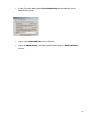
Enter the password in Password, and re-enter it in Confirm password.
Tip: to use current WinLock password for encryption, select Use WinLock password.
•
Select, whether you want to delete the source file after encryption.
•
Click the Next button to encrypt the file.
•
Your file is now encrypted and can be decrypted only by those who possess the
password for that particular file.
To decrypt previously encrypted file, you will have to do the following:
•
Select Decrypt a file.
•
Enter the name of the file that you want to decrypt.
•
Enter the password in Password.
•
Select, whether you want to delete the source file after decryption.
•
Click the Next button to decrypt the file.
29