1
Getting Started
1
Power
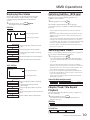
S witc h monitor power O N/O F F
OSD Menu
E nter or exit on-s c reen dis play menu s ys tem.
2
3
OSD
4
F/R
IR Sensor
(2) P res s Twic e : S witc h IR O N/O F F.
5
USB/DVD
USB / DVD
S witc h DVD / US B / Memory C ard mode.
6
SOURCE
Display Source
Function
S witc h Number / Func tion mode.
FM Modulator (Option)
(1) P res s O nc e : S witc h F M O N/O F F. ( 87.7MHz to 88.9MHz)
Stop Playback
7
8
SETUP
DVD Setup Menu
9
MENU
Disc Menu
10
11
Cursor Buttons
Skip Backward / Forward
12
Play/Pause/Enter
ENTER
13
SUB.
14
AUDIO
Subtitle
Audio
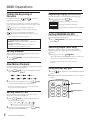
S witc h dis play s ourc e. (DVD→AV IN1 →AV IN2)
(1) P res s O nc e: P R E -S TO P dis c playbac k.
(2) P res s Twic e : S TO P playbac k c ompletely.
E nter or exit the dis c DVD s etup menu.
R eturn to dis c c ontents menu.
(For VC D with P B C feature, P B C mus t be turned off.)
Move between the func tion items in the menu.
S kip to the previous or next c hapter / title / trac k.
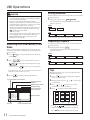
(1) P res s O nc e : S tart playbac k.
(2) P res s Twic e : Paus e playbac k.
S elec t des ired s ubtitle to dis play.
S elec t des ired audio language to dis play.
S elec t des ired s earc h bac kward / forward s peed.
15
Search Backward / Forward
2X →
4X →
8X →
16X →
32X →
2X →
4X →
8X →
16X →
32X →
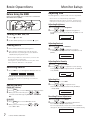
S elec t des ired repeat mode.
16
RPT.
17
MUTE
Repeat
(1) DVD Dis c : C hapter → Title → All→R epeat O ff
Mute
Dis able or enable audio output.
(2) C D/ VC D Dis c : R epeat 1 → R epeat All → R epeat O ff
18
19
Volume Increase / Decrease
Inc reas e / Dec reas e volume.
Number Key Pad
P res s
RETURN (1)
Return (1)
R eturns to the previous dis play.
DIMMER (2)
Dimmer (2)
VOL
0
VOL
~
9
SLOW (3)
Slow (3)
to s witc h number key pad to input data for dis c .
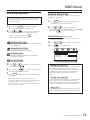
S elec t different LC D panel bac k-light brightnes s .
S elec t different s low playbac k modes for a VC D/DVD.
2
ZOOM (4)
A-B (5)
RANDOM (6)
TITLE (7)
DISPLAY (8)
ANGLE (9)
Zoom (4)
A-B (5)
Random (6)
Title (7)
Display (8)
Angle (9)
4
8
2
16
4
8
16
E nlarge a pic ture or ac tive image on the s c reen.
2X
3X
4X
2
3
4
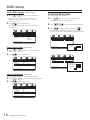
R epeat playbac k of a s pec ific s e c tion within a c hapter of DVD or
a trac k.
S elec t to playbac k the c hapter / trac k randomly.
G o to dis c title.
Dis play c urrent information during playbac k.
※J P E G : C hange the brows ing effec ts during playbac k.
S elec t des ired viewing angle. (If a DVD dis c c ontains multi-angle
feature, viewing angles may be s elec ted.)
R ea r-S ea t E nterta inment
6