1
AutoNumber CRM 2011 Online Installation Manual
October 4, 2011
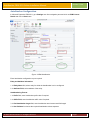
5. In Use System Date field selection to use the current date in the AutoNumber value.
6. In Date Separator list choose the date format separator.
7. In Date Position list choose the AutoNumber date value position.
8. In Reset AutoNumber Counter / Day field, if using System Date in AutoNumber then can choose this
option to Reset AutoNumber iincrement automatically at the end of the day.
9. In Next AutoNumber field, specify the increment initial value of AutoNumber sequence
Use Entity Fields Value in AutoNumbering:
10. In Entity Field 1 field, choose entity attribute field value to be used in the AutoNumber
11. In Field Position, choose the entity field 1 attribute value position in the AutoNumber
12. In Entity Field 2 field, choose entity attribute field value to be used in the AutoNumber
13. In Field Position, choose the entity field 2 attribute value position in the AutoNumber
14. In Entity Field 3 field, choose entity attribute field value to be used in the AutoNumber
15. In Field Position, choose the entity field 3 attribute value position in the AutoNumber
© 2011 CRM Innovation LLC All Rights Reserved
Page 8