1
!
WARNING! Do NOT interconnect the EV board and the
KEY while jumper J4 is in place, as this will permanently damage
the KEY when power is applied to the EV board.
MAX1455 Evaluation Kit
•
Printout of compensation test data (MAX1455EVKIT-CS
only)
Required Equipment
•
Five samples of the MAX1455
•
Straight-connected serial cable for connecting the
KEY and PC
•
Precision-regulated +5V power supply
•
Multimeter with at least five significant digits
•
Sensor pressure source
Overview
Procedure
4) Connect a DVM between OUT and GND.
The objective of the EV kit is to allow the user to learn
how to program the ASIC using a hands-on approach.
To do this, users are encouraged to compensate their
own sensors using the EV kit along with the provided
software. This kit is intended to be used by engineers
familiar with resistive element sensors and their compensation techniques.
The purpose of the MAX1455EVKIT-CS is to demonstrate
the capabilities of the MAX1455 in compensating a typical resistive element sensor. To assist the user in quickly
evaluating the ASIC, the board has been precompensated using a generic, low-pressure sensor such as the
NovaSensor NPH8-100G.
5) Determine whether the EV board will run in analog
or digital mode:
Factory setting of the -CS type is analog mode.
Factory setting of the -NS type is digital mode.
In the case of the MAX1455EVKIT-CS, the test data printout included in the EV kit is specific to the particular EV
board enclosed in the kit. Both the test data and the EV
board contain a serial number for identification.
Use the following quick-start procedure to operate and
evaluate the factory calibration accuracy of a MAX1455
EV board with sensor option.
1) Download and install the MAX1455 EV kit software
on your PC.
2) Run Port98nt.exe (from the START menu or
MAX1455 folder) to load the device driver for PC IO
communication.
3) Connect a 5V power supply to the +5V and GND
terminals on the EV kit.
6) For analog mode, make sure jumper J2 is removed
and jumper J4 is present. Note: It is not possible to
communicate with the MAX1455 while in analog
mode.
7) For digital mode, make sure that jumper J2 is present
and jumper J4 is removed before applying power to
the EV board. In addition, make sure that the 10-pin
ribbon cable connects the EV board to the serial communication module and that the 9-pin connector on
the serial module is connected to the PC either directly
or through a straight-connected serial cable.
MAX1455 EV Kit Contents
The MAX1455EVKIT-CS is shipped fully temperature compensated from -40°C to +125°C. The
MAX1455EVKIT-NS version of the EV kit is shipped
without a sensor. Additional material may be included
in your EV kit, which are not listed below.
• MAX1455 EV board
•
MAX1452KEY interface adapter
•
10-pin ribbon cable for connecting the KEY and EV
board
•
Computer interface adapter ribbon interconnect cable
Initial Setup
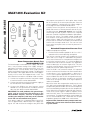
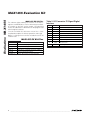
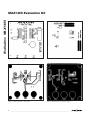
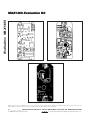
See the MAX1455 EV board (Figure 1). Four configuration jumpers, J1–J4, are provided to make the EV board
adaptable to a wide range of applications. J1 bypasses
the VOUT isolation resistor and is not normally fitted. J2
unlocks the MAX1455 digital interface and places the
part in digital mode. J3 connects DIO to VOUT for singlepin programming. J4, when fitted, supplies power directly to the MAX1455. J4 must be removed when operating
in digital mode as control of the power line is then provided by the serial-adapter board. Two rows of test points
are provided to allow the user to probe the pins of the
MAX1455, including the four sensor nodes. If the user
wishes to connect an alternative sensor, this can be
done using the 8-pin DIL socket, S3. When connecting
an alternative sensor, the user must also cut the four split
pad tracks (SP1–SP4) that connect the resident sensor,
S1/S2. These pads are located on the reverse side of the
board. The 10-way header P1 carries serial data and
power to the serial-adapter board. This must be used
when the MAX1455 is in digital mode and allows the user
to reprogram the ASIC through the computer. Three
4mm banana sockets (P2, P3, and P4) carry the +5V,
OUT, and GND signals to the board. Note that all the
connectors and test pins are labeled on the board.
_______________________________________________________________________________________
3
Evaluates: MAX1455
Quick Start