1
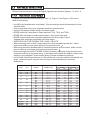
Chapter 3 - Programming Features
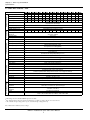
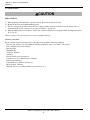
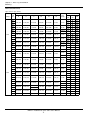
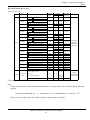
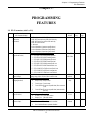
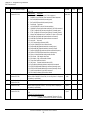
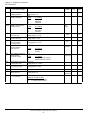
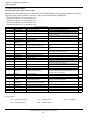
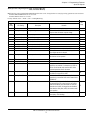
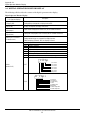
P5+ Parameters
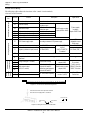
No.
Function Name
(LCD Operator Display)
n025 Frequency reference 2
(Reference 2)
n026 Frequency reference 3
(Reference 3)
n027 Frequency reference 4
(Reference 4)
n028 Not used
n029 Not used
n030 Jog frequency
(Jog Reference)
n031 Frequency upper limit
(Ref Upper Limit)
n032 Frequency lower limit
(Ref Lower Limit)
n033 Motor rated current
(Motor Rated FLA)
n034 Motor thermal protection
(Motor OL Sel)
n035 Stop method selection -OH1for inverter
overheat pre-alarm
(OH1 Stop Method)
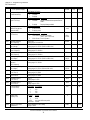
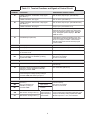
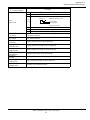
Description
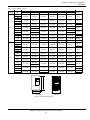
Setting depends on n023 setting.
Range: 0~9999
Setting depends on n023 setting.
Range: 0~9999
Setting depends on n023 setting.
Range: 0~9999
Setting depends on n023 setting.
Range: 0~9999
Unit: 1%
Setting range: 0~109%
Unit: 1%
Setting range: 0~100%
Unit: 0.1A Range: 10~200% inverter rated current
Unit is 1A, when setting is more than 1,000A
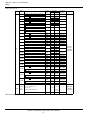
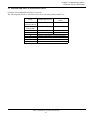
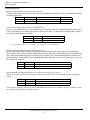
LED SettingLCD SettingDescription
0
Disabled
Protection disabled
1
STD Motor/8 minGeneral-purpose motor (time constant 8
min.)
2
STD Motor/5 minGeneral-purpose motor (time constant 5
min.)
3
INV Motor/8 minBlower-cooled motor (time constant 8 min.)
4
INV Motor/ 5 minBlower-cooled motor (time constant 5 min.)
LED SettingLCD Setting Description
0
Ramp STOP/Decel 1Ramp to stop - Decel 1 (fault)
1
Coast to STOPCoast to stop (fault)
2
Ramp STOP/Decel 2Ramp to stop - Decel 2 (fault)
3
Continue OperContinue operation (alarm) at 80% of
frequency reference
IDM P5+ Installation & Quick-start User’s Manual
35
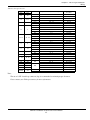
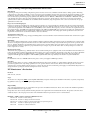
Factory
Default
User Setting
Ref.
Page
0.0Hz
55
0.0Hz
55
0.0Hz
55
6.0Hz
-
51
100%
59
0%
59
kVA dependent
STD Motor/
8 min
53,81
Continue
Oper
-
53