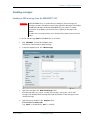
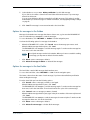
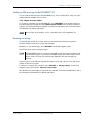
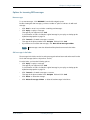
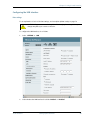
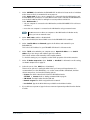
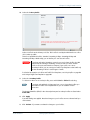
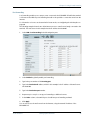
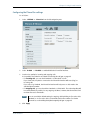
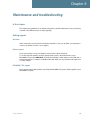
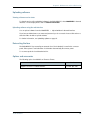
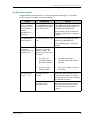
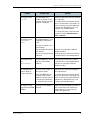
1
33126-EXP527-USERMAN-FRONT-A4 26/02/07 13:36 EXPLORER™ 527 USER MANUAL Thrane & Thrane A/S • [email protected] • www.thrane.com Side 1 TT-3712A EXPLORER 527 Document number: TT 98-123789-D Release date: 27 February 2007 Information in this document is subject to change without notice and does not represent a commitment on the part of Thrane & Thrane A/S. Copyright © 2007 Thrane & Thrane A/S. All rights reserved. Trademark acknowledgements • EXPLORER is a trademark of Thrane & Thrane A/S. • Windows and Outlook are registered trademarks of Microsoft Corporation in the United States and other countries. • Inmarsat is a registered trademark of the International Maritime Satellite Organisation (IMSO) and is licensed by IMSO to Inmarsat Limited and Inmarsat Ventures plc. • Inmarsat’s product names are either trademarks or registered trademarks of Inmarsat. • Other product and company names mentioned in this manual may be trademarks or trade names of their respective owners. Company Addresses www.thrane.com Denmark Denmark Norway Thrane & Thrane A/S Lundtoftegårdsvej 93 D DK-2800 Kgs. Lyngby Denmark Thrane & Thrane Aalborg A/S Porsvej 2 DK-9200 Aalborg SV Denmark T: +45 39 55 88 00 F: +45 39 55 88 88 T: +45 39 55 88 00 F: +45 96 34 61 01 Thrane & Thrane Norge A/S Bergerveien 12 PO Box 91 1375 Billingstad, Norway T: +47 67 24 47 00 F: +47 67 24 43 10 USA China Thrane & Thrane, Inc. 509 Viking Drive, Suites K, L and M Virginia Beach, VA 23452 USA Thrane & Thrane Shanghai Representative Office 28J Pufa Tower 588 Pudong Rd(S), Pu Dong 200120 Shanghai P. R. China T: +1 (757) 463-9557 F: +1 (757) 463-9581 T: +86 21 68 87 87 80 F: +86 21 68 87 71 12 TT 98-123789-D ii Safety summary 1 The following general safety precautions must be observed during all phases of operation, service and repair of this equipment. Failure to comply with these precautions or with specific warnings elsewhere in this manual violates safety standards of design, manufacture and intended use of the equipment. Thrane & Thrane A/S assume no liability for the customer's failure to comply with these requirements. Do not operate in an explosive atmosphere Do not operate the equipment in the presence of flammable gases or fumes. Operation of any electrical equipment in such an environment constitutes a definite safety hazard. Keep away from live circuits Operating personnel must not remove equipment covers, except for the SIM cover. Component replacement and internal adjustment must be made by qualified maintenance personnel. Do not replace components with the power cable connected. Under certain conditions, dangerous voltages may exist even with the power cable removed. To avoid injuries, always disconnect power and discharge circuits before touching them. Do not service alone Do not attempt internal service or adjustments unless another person, capable of rendering first aid resuscitation, is present. Do not substitute parts or modify equipment Because of the danger of introducing additional hazards, do not substitute parts or perform any unauthorized modification to the equipment. Keep away from active antenna The TT-3053A antenna for the EXPLORER 527 emits radio frequency energy when connected to the EXPLORER 527 and switched on. To avoid injury, keep a minimum safety distance of 1 m to the side and above the antenna when the EXPLORER 527 is on. The safety distance of 1 m does not apply directly below the antenna, as the radiation forms a hemisphere above the antenna. TT 98-123789-D iii About this manual About this manual 2 Intended readers This manual is a user manual for the EXPLORER 527. The readers of the manual include anyone who is using or intends to use the EXPLORER 527. No specific skills are required to operate the EXPLORER 527. However, it is important that you observe all safety requirements listed in the Safety summary in the beginning of this manual, and operate the EXPLORER 527 according to the guidelines in this manual. Manual overview This manual may not always reflect the latest software functionality of your EXPLORER 527. To obtain the latest version of the manual, please enter the Thrane & Thrane Extranet and download the latest version, or acquire it from your distributor. This manual has the following chapters: • Introduction contains an overview of the BGAN services and a brief description of the system. • Getting started explains how to insert SIM card, install the EXPLORER 527 and antenna, connect cables, start up the unit and enter the PIN. It also contains a short guide to making the first call. • Using the display and keypad contains an overview of the display menu system and explains how to use the menus. • Using the interfaces goes through the basic setup and use of each interface. • Using the web interface explains how to use the built-in web interface of the EXPLORER 527, and describes the available menus and settings. It also explains advanced setup of interfaces. • Maintenance and troubleshooting contains a short troubleshooting guide and explains how to update software. It also describes and lists the alarm messages that may appear in the handset, and gives information on where to get further help if necessary. Typography In this manual, typography is used as indicated below: Bold is used for the following purposes: • To emphasize words. Example: “Enabling stealth mode will not put the EXPLORER 527 into stealth mode, it only enables the use of stealth mode”. • To indicate what the user should select in the user interface. Example: “Select SETTINGS > LAN and click Enabled”. Italic is used to emphasize the paragraph title in cross-references. Example: “For further information, see Connecting Cables on page...”. COURIER is used for the following purposes: • To indicate text appearing in the display. Example: “the Main screen shows READY”. • To indicate low level commands such as AT commands. Example: “In your terminal program, type ATD”. TT 98-123789-D iv Contents Safety summary ....................................................................................................iii About this manual ................................................................................................ iv Chapter 1 Introduction Welcome ................................................................................................................1 In this chapter ........................................................................................................1 The BGAN system .................................................................................................. 2 The BGAN services ................................................................................................ 4 Features and interfaces of the EXPLORER™ 527 .....................................................5 Your EXPLORER™ 527 terminal .............................................................................. 7 Matrix of services and communication interfaces ..................................................10 What’s next? .........................................................................................................10 Chapter 2 Getting started In this chapter ...................................................................................................... 11 Unpacking and assembling .................................................................................. 11 installing the terminal ..........................................................................................14 Installing the antenna ..........................................................................................15 Connecting cables ................................................................................................18 Powering the EXPLORER™ 527 .............................................................................21 Entering the SIM PIN ........................................................................................... 22 Making the first call ............................................................................................. 23 Making the first data connection (LAN) ................................................................ 25 What’s next? ........................................................................................................ 26 Chapter 3 Using the display and keypad In this chapter ..................................................................................................... 27 Menu overview .................................................................................................... 27 Display during start-up ........................................................................................ 29 Display symbols ................................................................................................... 30 Navigating the display and keypad .......................................................................31 The menus ........................................................................................................... 32 Messages menu .................................................................................................. 32 Connect menu ..................................................................................................... 33 Calls menu .......................................................................................................... 34 TT 98-123789-D v Contents Settings menu ..................................................................................................... 34 Properties menu .................................................................................................. 37 Help desk ............................................................................................................ 39 Dynamic information in the display ..................................................................... 40 What’s next? .........................................................................................................41 Chapter 4 Using the interfaces In this chapter ................................................................................................... 42 General .............................................................................................................. 42 Connecting to the antenna and to power ............................................................. 42 Tools for setup and use ....................................................................................... 42 Services and interfaces ........................................................................................ 43 Enabling or disabling an interface ....................................................................... 44 Using a phone or fax machine .......................................................................... 45 Selecting the call type .......................................................................................... 45 Connecting an analog phone or a fax machine .................................................... 47 Entering the SIM PIN using a phone .................................................................... 48 Making or receiving a phone call with the EXPLORER™ 527 ................................ 49 Making a call to the EXPLORER™ 527 .................................................................. 50 Dialing functions ..................................................................................................51 Sending or receiving a fax message ..................................................................... 53 Using a computer .............................................................................................. 54 Standard or Streaming data ................................................................................. 54 Using the LAN interface ....................................................................................... 55 Using the USB service interface ........................................................................... 57 What’s next? ...................................................................................................... 58 Chapter 5 Using the web interface In this chapter ................................................................................................... 59 Introduction ....................................................................................................... 59 The web interface ................................................................................................ 59 Accessing and navigating the web interface .........................................................61 Entering the SIM PIN in the web interface ........................................................... 63 The Home window ............................................................................................ 64 Overview .............................................................................................................. 64 Terminal properties ............................................................................................. 64 Managing calls and data sessions ....................................................................... 65 TT 98-123789-D vi Contents Using the phone book ....................................................................................... 66 General usage ..................................................................................................... 66 Editing phone book entries .................................................................................. 67 Call log ............................................................................................................... 68 Information on total usage .................................................................................. 68 Exporting the call log ........................................................................................... 68 Viewing the lists of calls ...................................................................................... 69 Handling messages ........................................................................................... 70 Sending an SMS message from the EXPLORER™ 527 ........................................... 70 Options for messages in the Outbox ......................................................................71 Options for messages in the Sent folder ................................................................71 Sending an SMS message to the EXPLORER™ 527 ............................................... 72 Receiving a message ........................................................................................... 72 Options for incoming SMS messages ................................................................... 73 Configuring message settings .............................................................................. 74 EXPLORER™ 527 settings ................................................................................. 76 Accessing the EXPLORER™ 527 settings ............................................................... 76 Setting the display backlight and contrast ........................................................... 76 Turning audio indicators on or off ....................................................................... 77 Enabling activation of stealth mode ..................................................................... 77 Setting up the interfaces .................................................................................. 78 Enabling/disabling interfaces .............................................................................. 78 Description of data settings ................................................................................. 78 Configuring the LAN interface ..............................................................................80 Configuring the Phone/Fax settings ..................................................................... 84 Setting up supplementary services ...................................................................... 85 Setting a common APN ........................................................................................ 92 Selecting the preferred BGAN satellite ................................................................. 93 Properties, software upload and alarm list .................................................... 94 Viewing the properties of the EXPLORER™ 527 .................................................... 94 Uploading software ............................................................................................. 95 Viewing the Alarm List ......................................................................................... 96 Administration .................................................................................................. 97 Accessing the administration settings .................................................................. 97 Using Profiles ..................................................................................................... 101 Using a Traffic Flow Template .............................................................................104 Help desk and diagnostic report .....................................................................106 TT 98-123789-D vii Contents Accessing the Help desk .....................................................................................106 Generating a diagnostic report ...........................................................................106 What’s next? ..................................................................................................... 107 Chapter 6 Maintenance and troubleshooting In this chapter ....................................................................................................108 Getting support ..................................................................................................108 Uploading software ............................................................................................109 Reinserting the fuse ...........................................................................................109 Options and accessories .....................................................................................109 Troubleshooting guide ....................................................................................... 110 Status signaling ...................................................................................................115 Alarm messages ..................................................................................................115 Log files ..............................................................................................................120 Appendix A Technical specifications In this appendix ...................................................................................................121 General specifications .........................................................................................121 Power input ........................................................................................................ 124 SIM interface ...................................................................................................... 124 Phone/Fax interface ........................................................................................... 125 LAN interface ...................................................................................................... 126 USB service interface .......................................................................................... 127 Antenna interface on EXPLORER™ 527 ...............................................................128 Serial number labels .......................................................................................... 129 Conformity .......................................................................................................... 129 Appendix B AT commands In this appendix ...................................................................................................131 Starting up an AT command session ....................................................................131 List of supported AT commands .......................................................................... 132 Glossary ............................................................................................................................138 Index .............................................................................................................................141 TT 98-123789-D viii Chapter 1 Introduction 1 Welcome Congratulations on the purchase of your EXPLORER™ 527! EXPLORER 527 is a land-vehicular rack-mountable terminal with a tracking antenna, providing high-speed data and voice communication via satellite through the Broadband Global Area Network (BGAN). Just plug in a phone, fax or computer, switch on - and you are online. With the transceiver connected to the rooftop tracking antenna your car, truck or other vehicle turns into a true mobile communications center wherever you are. Applications include: • Internet browsing • E-mail • Phone/fax services • Large file transfers • Video conferencing and Streaming • VPN (Virtual Private Network) access to corporate servers In this chapter This chapter gives an overview of the BGAN system and services, and introduces the EXPLORER 527. It also gives an overview of the physical unit and its features and functions. TT 98-123789-D 1 Chapter 1: Introduction The BGAN system What is BGAN? The Broadband Global Area Network (BGAN) is a mobile satellite service that offers high-speed data up to 492 kbps and voice telephony. BGAN enables users to access e-mail, corporate networks and the Internet, transfer files and make telephone calls. Coverage The Inmarsat® BGAN services are based on geostationary satellites situated above the equator. Each satellite covers a certain area (footprint). The coverage map below shows the footprints of the BGAN system. Note The map depicts Inmarsat's expectations of coverage, but does not represent a guarantee of service. The availability of service at the edge of coverage areas fluctuates depending on various conditions. The launch of the F3 satellite (POR) will be determined in due course. TT 98-123789-D 2 Chapter 1: Introduction Overview of the BGAN system A complete BGAN system may include the EXPLORER 527 with antenna and connected peripherals, the BGAN satellite, and the Satellite Access Station (SAS). The satellites are the connection between your EXPLORER 527 and the SAS, which is the gateway to the worldwide networks (Internet, telephone network, cellular network, etc.). Packet Switched Network Satellite IP Router PC TT-3053A antenna Satellite Access Station (SAS) EXPLORER 527 Switch Voice and ISDN Circuit Switched Network Standard phone Fax machine Laptop TT 98-123789-D 3 Chapter 1: Introduction The BGAN services Supported services The services currently supported by BGAN comprise: • A Packet Switched connection to the Internet • A Circuit Switched (Dialed) connection for voice, fax or data • Short Messaging Service (SMS) Packet data service The BGAN network supports different classes of data connection to the Internet. • Using a Standard data connection, several users can share the data connection simultaneously. This type of connection is ideal for e-mail, file transfer, and Internet and intranet access. The user pays for the amount of data sent and received. • Using a Streaming data connection, you get an exclusive, high-priority connection, ensuring seamless transfer of data. This type of connection is ideal for time critical applications like live video over IP. The user pays for the duration of the connection (per minute charge). Circuit switched (dialed) service Two types of circuit switched connection are available: • Standard Voice. A low-tariff connection for voice only. The voice signal is compressed to 4.0 kbps, which reduces the bandwidth use and consequently the tariff. • 3.1 kHz Audio. A high quality connection which can be used for Premium Voice, G3 fax, analog modem or ISDN (speech, G4 fax or 64 kbps UDI/RDI data). The signal is uncompressed 3.1 kHz audio, which allows for optimum voice quality. SMS service The BGAN system provides a Short Messaging Service (SMS) for sending and receiving SMS messages. Supplementary services The BGAN system also supports the following supplementary services: • Call hold • Call waiting • Call forwarding • Voice mail • Call barring • Line identification TT 98-123789-D 4 Chapter 1: Introduction • Closed user group Note that the supplementary services are provided by the Airtime Provider. The Airtime Provider may only provide a subset of the above services. Features and interfaces of the EXPLORER™ 527 Features The EXPLORER 527 provides the following features: High speed data, single or multi-user, up to 464 kbps - shared bandwidth Support for Streaming classes 32, 64 and 128 kbps Simultaneous voice and data Seamless global coverage Standard LAN and phone/fax ports USB service interface Easy system setup and operation Built-in web interface allowing you to manage your phone book, messages and calls, and customize the terminal to your specific needs 12 or 24 V power system Robust, reliable and durable design Top mount or rack mount installation TT 98-123789-D 5 Chapter 1: Introduction Overview of interfaces The EXPLORER 527 provides different interfaces for connection of a phone, fax and/or computer. LAN Standard phone/fax connection Using the interfaces on page 42 describes how to use each of the available interfaces. TT 98-123789-D 6 Chapter 1: Introduction Your EXPLORER™ 527 terminal Overview The EXPLORER 527 is a rack-mountable unit with a tracking antenna, designed to be installed on a vehicle. Display and keypad The EXPLORER 527 has a display and a keypad for displaying status and for setting up the EXPLORER 527. For information on how to use the keypad and display, and for an overview of the display menu system, see Using the display and keypad on page 27. TT 98-123789-D 7 Chapter 1: Introduction Light indicators The EXPLORER 527 has three light indicators in the front panel. Power indicator The function of the green Power indicator is as follows: Behavior of green indicator Meaning Steady light The EXPLORER 527 is on. Off No power or Stealth mode. Antenna indicator The function of the Antenna indicator is as follows: Behavior of green/red indicator Meaning Flashing green The antenna is searching for the network operator. Steady green light The antenna has registered on the BGAN network and is ready for use. Steady red light Antenna error. Off No power or Stealth mode. Message indicator The function of the yellow Message indicator is as follows: Behavior of yellow indicator Steady light Meaning An alarm is active or an SMS message has arrived. Press OK on the keypad to view the alarm(s) or SMS message(s).a The yellow light will stay on after OK is pressed if Off • there are more SMS messages, or • an alarm is still active. For information on alarm messages, see Alarm messages on page 115. No messages, or the EXPLORER 527 is in Stealth mode or off. a. If a computer is connected, you can also view alarms and SMS messages in the built-in web interface in the EXPLORER 527. For further information, see Icons in the icon bar on page 62. TT 98-123789-D 8 Chapter 1: Introduction User interfaces The keypad and display are used for displaying status and for changing simple parameters. To obtain full access to all features and for ease-of-use, you should use a computer (a PC, Laptop or similar) and the built-in web interface. The web interface is used for easy configuration and daily use. The web interface is accessed directly from a computer connected to the EXPLORER 527, using an Internet browser. No installation of software is needed. For further information on the web interface, see Chapter 5, Using the web interface. Additionally, it is possible to control the EXPLORER 527 using AT Commands. Refer to Appendix B, AT commands for a list of supported commands. Antenna The EXPLORER 527 uses an active tracking antenna, TT-3053A, which can be mounted on the roof of a vehicle, either with 3 bolts or with magnetic mounts. The antenna is connected to the EXPLORER 527 with one of the antenna cables included in the delivery. The antenna automatically points to the BGAN satellite and registers on the BGAN network after start-up. SIM card The SIM (Subscriber Identity Module) card used for the EXPLORER 527 is a standard SIM card, which is acquired from the Airtime Provider. The EXPLORER 527 requires a SIM card to go online and to access the settings of the EXPLORER 527. Without a SIM card you can only see the Main screen of the display system showing signal strength etc. Using the web interface, you can view the properties of the EXPLORER 527 and upload software without inserting a SIM card. Upload of software, however, requires an Administrator user name and password. SIM lock The supplier may SIM lock the EXPLORER 527 to a specific provider. For further information, contact your supplier. TT 98-123789-D 9 Chapter 1: Introduction Matrix of services and communication interfaces The following table shows which services can be accessed from which interfaces, and which types of equipment can be used. Interface on the EXPLORER 527 Service Packet Switched Connection Circuit Switched Connection Phone/Fax SMS LAN Display/ Keypad Analog telephone 3.1 kHz Audio G3 Fax machine Standard Voice Data Data multi-user Analog telephone Computer with analog modem Computer with Switch/Hub Computer Data single-user Computer View only What’s next? This chapter has provided an overview of the BGAN system and of the EXPLORER 527. The next chapters will go into more detail about how to set up and use the EXPLORER 527. The following chapter, Getting started, explains how to unpack and start up the EXPLORER 527. TT 98-123789-D 10 Chapter 2 Getting started 2 In this chapter This chapter describes: • what is included in the delivery, • how to insert and remove the SIM card, • how to install the EXPLORER 527 and antenna • how to start up the EXPLORER 527 and make the first call or data session. Unpacking and assembling Unpacking Unpack the EXPLORER 527 and accessories and check that the below items are present. Note that the antenna is packed separately. Getting Started Kit containing: Antenna (TT-3053A) - Getting Started leaflet - Quick Guide - EXPLORER 527 CD-ROM EXPLORER 527 (TT-3734A) LAN cable 4 mounting brackets Antenna cable, 2.7 m Antenna cable, 5 m 4 rubber pads Power cable, 2 m TT 98-123789-D 11 Chapter 2: Getting started Inserting the SIM card The SIM card is provided by your Airtime Provider. To access the SIM slot you need to remove the small SIM cover on the side of the EXPLORER 527. Do as follows: 1. Use a screwdriver to loosen the two screws that hold the SIM cover. 2. Remove the SIM cover from the EXPLORER 527. 3. Insert the SIM card into the SIM slot. Make sure the SIM card is positioned as shown on the label in the SIM slot! 4. Press gently until it clicks. 5. Slide the lock to close the SIM slot. 6. Reinsert the SIM cover and secure it with the two screws. TT 98-123789-D 12 Chapter 2: Getting started Removing the SIM card Note When the SIM card is removed, you cannot use the display menu system nor make calls or start data sessions. Only emergency calls are allowed, and only if permitted by the network. If you have an administrator user name and password, you can upload software using the web interface without inserting the SIM card. For further information, see Uploading software on page 95. Remove the SIM card as follows: To access the SIM slot you need to remove the SIM cover on the side of the EXPLORER 527. Do as follows: 1. Use a screwdriver to loosen the two screws that hold the SIM cover. 2. Remove the SIM cover from the EXPLORER 527. 1. Slide the lock aside to open the SIM slot as shown. 2. Gently press the SIM card and let it pop out of the slot. 3. Remove the SIM card. TT 98-123789-D 13 Chapter 2: Getting started installing the terminal Before you start There are two options for mounting the EXPLORER 527: Rack mounted or top mounted. Four rubber pads are included with the EXPLORER 527: • If the EXPLORER 527 is to be top mounted, mount the rubber pads in the four holes in the bottom of the EXPLORER 527. • If the EXPLORER 527 is rack-mounted, do not mount the rubber pads. Four mounting brackets are also included with the EXPLORER 527. Used when the unit is rack mounted Each bracket has three circular holes for mounting the bracket on the EXPLORER 527 and two oval holes for fastening the EXPLORER 527 to a rack or a surface. Used when the unit is top mounted Rack mount Do as follows: 1. Remove the two screws closest to the front panel in each side of the EXPLORER 527 (one at the top and one at the bottom). Keep the four screws. 2. Use the screws that were removed in the previous step to attach one bracket to each side of the front panel as shown. Use only two of the three circular holes for each bracket, as illustrated in the previous section. 3. Insert the EXPLORER 527 in a 19” rack. 4. Secure the EXPLORER 527 to the rack using the oval holes in the mounting brackets. TT 98-123789-D 14 Chapter 2: Getting started Top mount Do as follows: 1. Mount the four rubber pads (included in the delivery) in the four holes in the bottom of the EXPLORER 527. 2. Remove the two screws on each side of the EXPLORER 527 where the brackets are to be attached as shown. Keep the four screws. 3. Use the screws that were removed in the previous step to attach two brackets to each side of the EXPLORER 527 as shown. Use only the center circular hole in each bracket. 4. Mount the unit on a surface, using the oval holes in the mounting brackets. Installing the antenna Important note! The EXPLORER 527 is designed for use with the TT-3053A antenna only. Do not use any other antenna with the EXPLORER 527! Placing the Antenna WARNING! Avoid exposure to microwave radiation. Keep a safe distance of minimum 1 meter (39 inches) to the side and above the antenna. Do not place the antenna close to interfering signal sources or receivers. It is recommended that no other antennas be located within three meters of the TT-3053A antenna. If other equipment is installed near the EXPLORER 527 it is recommended to operate all equipment simultaneously and verify there is no co-interference. A clear line-of-sight to the satellite is mandatory. Preferably, avoid all obstructions within three meters of the antenna. Obstructions less than 15 cm (6 inches) in diameter can be ignored beyond this distance. If the antenna is being mounted on a vehicle it is important to ensure there is a clear line-of-site to the satellite(s) in all directions. After the EXPLORER 527 is commissioned and operational it is recommended that the signal strength be checked while the vehicle is slowly driven in a 360° circle. The signal strength should not vary significantly or be degraded in any particular direction. TT 98-123789-D 15 Chapter 2: Getting started Direct mounting, e.g. on the roof of a car The antenna may be mounted directly on the roof of your car, using three M5 bolts and rubber washers. This solution requires that you drill three holes in the roof of the car. Mounting accessories are included with each antenna - 6 M5 Rubber Washers, 3 M5 Stainless Steel Washer and 6 Spacers (10 mm). Note that the bolt and nut are not included, because the required dimensions may vary depending on the place of installation. When mounting the antenna on a flat surface, use 3 Stainless Steel M5 bolts of suitable length (not supplied in the kit). Note the individual position of washers and spacers. Important The drainage holes at the buttom of the antenna must have a clearance of 10 mm above the base plane. Use 3 Spacers to "lift" the antenna. If the base plane is curved, it may be necessary to place extra spacers to ensure the clearance of 10 mm. Alternatively you may use the magnetic mount kit described in the next section. TT 98-123789-D 16 Chapter 2: Getting started Magnetic mount For temporary use – or to avoid drilling of holes – you may use a magnetic mount installation kit. For ordering information, see Options and accessories on page 109. Three magnetic mounts each with an adhesive force of at least 420 N are used to secure the antenna. Installation and use of the magnetic mount kit The Magnet Mount kit consists of 3 individual high intensity magnets with rubber coating. Each magnet has a stainless steel M5 center bolt. To use the magnetic mounts, do as follows: 1. First attach the magnets to the antenna. Important The drainage holes at the buttom of the antenna must have a clearance of 10 mm above the base plane. If the base plane is curved, it may be necessary to place extra spacers to ensure the clearance of 10 mm. There are 3 “legs” on the antenna where the magnets are placed. Note the position of the rubber washers just below and above each “leg”, the stainless steel washer above the upper rubber washer and the M5 protective nut on top. Hex domed nut M5 washer Rubber washer Rubber washer High “intensity” magnet 2. Place the antenna with magnets on the roof of the car. Remember that the magnets only work on a metal roof! TT 98-123789-D 17 Chapter 2: Getting started Detaching the antenna Grab the antenna near one of the magnets and lift it. When one magnet is loose, the other two are easy to “break off”. In some situations the magnetic force may be so great that it is necessary to unscrew the antenna first and remove the magnets separately. Connecting cables After inserting the SIM card and mounting the EXPLORER 527 and antenna, connect all relevant cables. Connector panel The connector panel is placed on the rear side of the EXPLORER 527 and has the following connectors: • Threaded GND stud, marked • USB connector for service use, marked USB • Phone/Fax connector for phone, fax or analog modem, marked Phone/Fax • Antenna connector, marked Antenna • LAN connector for data equipment, marked LAN • DC power connector for connection to 12/24 V DC in a car, marked DC For information on how to connect to a specific interface, see the corresponding section in Chapter 4, Using the interfaces. The end of this section describes how to connect to the antenna and to power. Front connector The EXPLORER 527 has an additional Phone/Fax connector, marked Phone/Fax, in the front panel of the EXPLORER 527. TT 98-123789-D 18 Chapter 2: Getting started Before connecting the antenna CAUTION! Do not connect the antenna cable when the EXPLORER 527 is powered! The inrush current may cause damage to the antenna connector. Do not use any other antenna than the TT-3053A antenna with the EXPLORER 527. The antenna connector is located in the rear connector panel. Use one of the antenna cables delivered with your EXPLORER 527. The antenna cables are 50 Ω cables with male TNC connectors, an angled connector at one end and a straight connector at the other end. This line carries RF, signaling and DC power for the antenna. Important When installing the antenna cable, protect it against moisture by using selfadhesive tape or similar wrapped around the coaxial connector. Also be careful to secure the cable run from the antenna at short intervals. An unsupported length of cable will vibrate when the vehicle is in motion and could negatively affect the connection over time. Connecting the antenna Connect the antenna as follows: 1. Make sure the EXPLORER 527 is switched off. 2. Connect the antenna cable between the antenna and the antenna connector in the rear connector panel of the EXPLORER 527. Note that the TNC connectors on the cable are different, one end is straight, the other is angled. TT 98-123789-D 19 Chapter 2: Getting started Before connecting to power The EXPLORER 527 DC input can connect to a DC voltage between 10 and 32 V DC, e.g. 12 or 24 V DC in a car. The power connector is located in the rear connector panel. The DC input of the EXPLORER 527 is protected by a circuit breaker, marked Fuse 10A, located next to the power connector in the connector panel. The circuit breaker will disconnect power when the system is overloaded. To reconnect push the circuit breaker back in. When connecting to power use the Power cable delivered with your EXPLORER 527. Use a suitable cable to connect the threaded stud of the EXPLORER 527 to the chassis of the car. Connecting to power Do as follows: 1. Connect a cable between the threaded stud in the rear connector panel, marked , and the chassis of the car. 2. Connect the unmounted end of the power cable to 12 or 24 V DC in your car (black wire to GND, red wire to +). 3. Connect the mounted end of the cable to the power input on the EXPLORER 527, marked DC. Make sure it is oriented correctly in relation to the coding of the connector. TT 98-123789-D 20 Chapter 2: Getting started Powering the EXPLORER™ 527 Switching the EXPLORER™ 527 on/off To switch on the EXPLORER 527, push the Power button in the left side of the front panel. The button stays in when the EXPLORER 527 is on. The display and the green Power indicator light up. To switch off the EXPLORER 527, push the power button again and let it pop out. Note that the EXPLORER 527 may take a couple of seconds to close down properly. Power Button Power Indicator After switching on the EXPLORER 527 you are prompted for a PIN (Personal Identification Number), unless the PIN is disabled. 1 If it is the first time the EXPLORER 527 system is used, the antenna will start scanning immediately after power on. If the system has been in use before, the antenna will start up in the last used position. The Antenna indicator is flashing green during the scanning process and until the EXPLORER 527 is registered on the BGAN network. Note that the EXPLORER 527 system will not attempt to register on the BGAN network until the PIN has been accepted (unless the PIN is disabled). See the next section for information on how to enter the PIN. 1. The PIN can only be disabled/enabled by use of AT commands (AT+CLCK). TT 98-123789-D 21 Chapter 2: Getting started Entering the SIM PIN Overview You have to enter a PIN to use the EXPLORER 527, unless the use of PINs is disabled. When you are asked for a PIN, you can choose to cancel (press C). If you cancel, you can always go back and enter the PIN at a later stage by pressing OK from the Main screen, or using a phone or the web interface. You cannot use the display menu system nor make calls or start data sessions without entering the PIN. Only emergency calls are allowed, and only if permitted by the network. However, if you have an administrator user name and password, you can upload software using the web interface. For further information, see Uploading software on page 95. Entering the PIN To enter the PIN using the display and keypad, do as follows: 1. When you are asked for a PIN, press OK. 2. Press S or T a number of times until the first digit is correct. 3. Press OK to go to the next digit. When OK is pressed, the previous digit is indicated by *. To correct an entered digit, press C to go back and use the S and T buttons again. 4. After entering the last digit with OK, press OK again to apply the PIN. When the PIN is accepted the terminal can attempt to register on the BGAN network. When the terminal is registered on the network, the Antenna indicator turns steady green and the display reads READY. The terminal is now ready for communication. For further information on how to use the keypad and display, see Using the display and keypad on page 27. You can enter the PIN using a phone or computer connected to the EXPLORER 527. For further information, see Entering the SIM PIN using a phone on page 48 or Entering the SIM PIN in the web interface on page 63. TT 98-123789-D 22 Chapter 2: Getting started Wrong PIN You have 3 attempts to enter the PIN, before you are asked to enter the PUK (Pin Unblocking Key). The PUK is supplied with your SIM card. Enter the PUK followed by a new PIN of your own choice. The PIN must be from 4 to 8 digits long. Important If you enter a wrong PUK 10 times, the SIM card will no longer be functional, and you have to contact your Airtime Provider for a new SIM card. Making the first call Introduction After connecting cables and entering the PIN, you are ready to make or receive the first call. The following sections provide a short guide to making calls. For more detailed information, see Making or receiving a phone call with the EXPLORER™ 527 on page 49. Making a call from the EXPLORER™ 527 Your phone must be connected to one of the Phone/Fax connectors. For further information, see Before connecting to the Phone/Fax interface on page 47. Note Only one of the Phone/Fax connectors can be used at a time. To make a call from a phone connected to the EXPLORER 527, dial 00 <country code> <phone number> #. Example: To call Thrane & Thrane in Denmark (+45 39558800), dial 00 45 39558800 # Making a call to the EXPLORER™ 527 To make a call to a phone connected to the EXPLORER 527, dial +870 <Mobile subscriber number> • + is the prefix used in front of the country code for international calls. This is 00 when calling from most countries in Europe and from many other countries. • Mobile subscriber number: The mobile subscriber number of the EXPLORER 527 you are calling. If the mobile subscriber number of the EXPLORER 527 is available on the SIM card, it is listed in the display menu system of the EXPLORER 527 under PROPERTIES > MOBILE NUMBERS. If it is not available, refer to your airtime subscription. Note There are two voice numbers, one for 3.1 kHz Audio and one for Standard Voice. Example: If you are calling from Denmark to the EXPLORER 527 and the mobile subscriber number for 3.1 kHz Audio is 772112345 on your EXPLORER 527, and you want to make a call to the EXPLORER 527 using 3.1 kHz Audio, dial 00 870 772112345. TT 98-123789-D 23 Chapter 2: Getting started Making a call from one EXPLORER™ 527 to another EXPLORER™ 527 To make a call from one EXPLORER 527 to another EXPLORER 527, dial 00 870 <Mobile subscriber number>. Receiving a call To be able to receive a call, the phone must be connected to one of the Phone/Fax connectors on the EXPLORER 527. You can see unanswered calls in the CALLS menu of the display and the web interface. TT 98-123789-D 24 Chapter 2: Getting started Making the first data connection (LAN) Before connecting to the LAN interface For the LAN (Local Area Network) interface to work without any further setup, the computer must be set up to obtain an IP address and a DNS server address automatically. To check these settings on your computer, do as follows (For Windows® XP): 1. From the Start menu, select Connect To > Show All Connections. 2. Double-click Local Area Connection and click Properties. 3. Select Internet Protocol (TCP/IP) from the list and click Properties. Make sure both fields are set to obtain an address automatically. TT 98-123789-D 25 Chapter 2: Getting started Connecting to the LAN interface Do as follows: 1. Connect a LAN cable to the network interface of your computer. A suitable cable is included in the delivery. 2. Connect the other end of the cable to the LAN connector, marked LAN, in the connector panel of the EXPLORER 527. 3. Start up the EXPLORER 527 as described earlier in this chapter. 4. Power on the computer. 5. When power on is completed, check the connection e.g. by starting your Internet Browser. You may have to disable the Proxy server settings in your browser. For further information, see Browser settings on page 60. What’s next? After reading this chapter you should be able to start up the EXPLORER 527 and make a simple data or voice connection. The next chapters provide more information on the user interfaces and the setup of the EXPLORER 527. The following chapter, Using the display and keypad, explains the display menu system, which is the basic tool for setting up the EXPLORER 527. TT 98-123789-D 26 Chapter 3 Using the display and keypad 3 In this chapter This chapter describes how to use the built-in display menu system of the EXPLORER 527. It contains an overview of the entire menu system followed by a description of each menu. It also explains the symbols and messages that may appear in the display, and describes how to navigate using the keypad. Menu overview Main menu The items of the main menu are: • MESSAGES shows all incoming SMS messages and allows you to open or delete each message or delete all messages. • CONNECT shows a list of the Streaming Profiles that are defined and selected for the LAN interface using the web interface. The CONNECT menu allows you to start and stop data sessions with the listed Streaming Profiles. • CALLS shows missed, received and outgoing calls and data sessions. • SETTINGS allows you to • set display backlight and contrast, • set audio indications on or off, • enable or disable each interface, • enable or disable stealth mode (a terminal mode where lights and sound are off), and • restore settings. • PROPERTIES shows: • GPS status, • Terminal information (IP address, hardware and software numbers, IMEI number), • Mobile numbers, • Voice mail number, and • a list of active alarms. • HELP DESK shows the phone number to the Airtime Provider, if available. For information on how to navigate in the menu system, see Navigating the display and keypad on page 31. TT 98-123789-D 27 Chapter 3: Using the display and keypad Menu drawing The below drawing shows an overview of the menus in the display menu system of the EXPLORER 527. Start up PIN Code <message 1> <message 2> <message 3> <message 4> DELETE ALL OPEN DELETE MESSAGE START STOP <streaming profile 1> <streaming profile 2> <streaming profile 3> MESSAGES CONNECT CALLS SETTINGS PROPERTIES HELP DESK MISSED RECEIVED OUTGOING SATELLITE DISPLAY AUDIO INDICATOR INTERFACES STEALTH MODE RESTORE SETTINGS IOR AOR POR AUTO BACKLIGHT CONTRAST ON OFF TIMED SET LEVEL AUTOMATIC SET LEVEL MESSAGES ALARM GPS STATUS TERMINAL MOBILE NUMBERS VOICE MAIL NUMBER ALARM LIST IP ADDRESS HARDWARE SOFTWARE IMEI 2 SECONDS 5 SECONDS 10 SECONDS 30 SECONDS 60 SECONDS LEVEL LEVEL LEVEL LEVEL LEVEL LEVEL LEVEL 1 2 3 4 5 6 7 LEVEL LEVEL LEVEL LEVEL LEVEL LEVEL LEVEL 1 2 3 4 5 6 7 PHONE/FAX LAN ON OFF ENABLED DISABLED ON OFF UNIT SER. NO. MAIN PCB NO. PSM PCB NO. MAC The next section shows an overview of the start-up sequence before entering the menu system. The menus are further described in the following sections of this chapter. TT 98-123789-D 28 Chapter 3: Using the display and keypad Display during start-up Start-up sequence After power on you are asked for a PIN. When you have entered the correct PIN, the display shows the Main screen. While the antenna is attempting to connect to the BGAN network, the Main screen shows the progress as follows: • SEARCHING: The EXPLORER 527 is searching for the network operator. • REGISTERING: The EXPLORER 527 is registering itself on the BGAN network. If the GPS position has not yet been acquired at this point, the display will show NO GPS. For further information, see the Troubleshooting Guide on page 111. • READY: The EXPLORER 527 is registered on the network and is ready to go online. If a computer is already connected, the display will show DATA instead of READY. Main screen The Main screen is shown after passing the PIN screen, and anytime you leave the menu system. The Main screen shows the most important status of the EXPLORER 527 such as signal strength and general status. The Main screen also shows icons for any interfaces that are turned on. In this case, the Phone/Fax interface, the USB service interface and the LAN interface are all on. TT 98-123789-D 29 Chapter 3: Using the display and keypad Display symbols Apart from the menu text, the display can show various symbols. Below is a list of the possible symbols with an explanation to each symbol. Symbol Explanation The signal strength. Minimum two bars are normally required to be able to make a Standard Voice call. Phone/Fax interface is on. USB service interface is on. LAN interface is on. Unread message (shown next to the message in the message list) Read messages (shown next to the message in the message list) The current connection on the BGAN network is not ciphered. Do not transmit data that requires ciphering. TT 98-123789-D 30 Chapter 3: Using the display and keypad Navigating the display and keypad Navigating with the keypad The PIN must be accepted by the EXPLORER 527 before you can access the menu system. Note In low temperatures the display may respond slowly when a key is pressed. At temperatures close to -25°C/-13°F the display may even turn black for a moment, e.g. when you are scrolling through a menu. After 1-2 seconds with no keypad activity the display will be readable again. • To access the menu system from the Main screen, press S or T. • To move up and down in the current menu, press S or T. • To select the current menu item or setting, press OK. • To escape the current menu/setting and return to the previous level, press C. • To see the hidden part of long text strings, press X. • To move backwards in the menu system, or in long text strings, press W. • To adjust settings, press S and T. Short-cuts The following short-cuts are available in the menu system: • To exit the menu system, press and hold C for one second. The display returns to the Main screen. • To activate/deactivate Stealth mode, Press C+OK. When stealth mode is activated, the display shows STEALTH ACTIVATED for a moment; then all lights and sounds are turned off. Note TT 98-123789-D For Stealth mode to be available, it must be enabled in the EXPLORER 527. Refer to Enabling or disabling stealth mode on page 36. 31 Chapter 3: Using the display and keypad Display text When you have not entered the menu system, the Main screen shows the currently most important information. Refer to Dynamic information in the display on page 40. CANCEL in the left side of the display means: Press C to cancel the current operation. OK in the right side of the display means: Press OK to accept the current operation. The menus The following sections describe each of the menus in the menu system. All available settings and status items are explained. To access the menu system from the main screen, press S or T. Messages menu Viewing the list of messages To see the list of SMS messages, enter the menu system and select MESSAGES. Each message is listed with the name (if known) or the number of the sender. An unopened folder indicates an unread message and an opened folder indicates a read message. Use S and T to scroll through the list. For information on how new messages are presented, see Received messages on page 40. Opening or deleting received SMS messages To delete all messages, go to the bottom of the list of messages and select DELETE ALL. To open or delete one message, do as follows: 1. In the MESSAGES list, select the message you want to open or delete and press OK. 2. Then select one of the following: • OPEN to open the selected message. The display shows the time and the message contents. Use S and T to scroll through the message and details. • DELETE to delete the selected message. TT 98-123789-D 32 Chapter 3: Using the display and keypad Connect menu Streaming Profiles Using the web interface you can define a number of Profiles for data transmission. The Streaming Profiles defined and selected for the LAN interface appear in the CONNECT menu, and can be started and stopped using the keypad. Streaming Profiles are Profiles where the Traffic Class is set to Streaming in the Profiles window of the web interface. For information on Profiles, see Using Profiles on page 101. For information on Streaming, see Standard or Streaming data on page 54. Starting or stopping a Streaming session To start or stop a Streaming session on the LAN interface, do as follows: 1. Select CONNECT. 2. Select the Streaming Profile you want to start or stop. The list only shows Profiles that have been selected for the LAN interface. For information on how to set up the LAN interface, see Configuring the LAN interface on page 80. 3. Select START or STOP and confirm. Important When running a Streaming session you are charged for the time you are connected. An active Streaming session will stay active until you stop it. You can also start/stop Streaming sessions using the web interface. For further information, see Setting up and activating a Streaming connection on page 54. TT 98-123789-D 33 Chapter 3: Using the display and keypad Calls menu To see a list of calls or data sessions, do as follows: 1. Select CALLS. 2. Select one of the following: • MISSED to see a list of incoming calls that were not answered. • RECEIVED to see a list of incoming calls that were answered. • OUTGOING to see a list of outgoing calls or data sessions. 3. Select a call from the list to see details such as time, date and phone number. If there was an error, the call log shows the cause of the error when possible. When there are more than 100 calls in the list, the oldest calls are automatically deleted to make room for new calls. If you need to preserve the call log, you can export it to a file using the built-in web interface. For further information, see Exporting the call log on page 68. Settings menu Selecting the preferred satellite By default the EXPLORER 527 is set up to automatically find the most appropriate satellite to connect to. However, if you are located in an area with coverage from more than one BGAN satellite, you can select the satellite you prefer to use. Do as follows: 1. Select SETTINGS > SATELLITE 2. Select one of the following: • IOR to use the Indian Ocean Region satellite. • AOR to use the Atlantic Ocean Region satellite. • POR to use the Pacific Ocean Region satellite. Note that at this writing the POR satellite is not yet available. • AUTO to automatically use the most appropriate satellite (the default setting). Note TT 98-123789-D If you have selected one of the satellites, the EXPLORER 527 will only try to establish a connection to the selected satellite. This means that if the antenna is outside the coverage area for that satellite, the EXPLORER 527 will not be able to register with the BGAN network. 34 Chapter 3: Using the display and keypad Setting the display backlight To adjust the backlight of the display, do as follows: 1. Select SETTINGS > DISPLAY > BACKLIGHT. 2. Select one of the following: • ON have constant backlight. • OFF to turn the backlight off. • TIMED to set how long the backlight should be on after the last key was pressed (2, 5, 10, 30 or 60 seconds). • SET LEVEL to set the level of backlight (1 to 7). Setting the display contrast To adjust the contrast of the display, do as follows: 1. Select SETTINGS > DISPLAY > CONTRAST. 2. Select one of the following: • AUTOMATIC to let the EXPLORER 527 automatically adjust the contrast according to the temperature. The contrast of the display is affected by the temperature. The EXPLORER 527 can automatically adjust the contrast so that the display looks the same, regardless of changes in the temperature. • SET LEVEL to set the level of the contrast manually (1 to 7). Turning audio indicators on or off The EXPLORER 527 has audio indicators to indicate an event. You can turn each of these audio indicators on or off. 1. Select SETTINGS > AUDIO INDICATOR. 2. Select one of the following: • MESSAGES: a sound to indicate that a message has arrived. • ALARM: a sound to indicate that an alarm is present. 3. Select ON or OFF to enable or disable the selected audio indicator. Note that the sound from the audio indicator is weak. The noise from your vehicle may drown the sound from the audio indicator. TT 98-123789-D 35 Chapter 3: Using the display and keypad Enabling or disabling interfaces To turn an interface on or off, do as follows: 1. Select SETTINGS > INTERFACES. 2. Select one of the following interfaces: • PHONE/FAX • LAN 3. Select ON or OFF to enable or disable the selected interface. Enabling or disabling stealth mode When the EXPLORER 527 is in stealth mode, all lights and sounds are turned off. You can still use the EXPLORER 527, and the display text is readable. To enable or disable the use of stealth mode, do as follows: 1. Select SETTINGS > STEALTH MODE. 2. Select one of the following: • ENABLED • DISABLED Note Enabling stealth mode will not put the EXPLORER 527 into stealth mode, it only enables the use of stealth mode. • To activate Stealth mode (after enabling Stealth mode), press C+OK on the keypad. • To deactivate Stealth mode, press C+OK again. Selecting the language You can change the language used in the display and in the web interface of the EXPLORER 527. Do as follows: Select SETTINGS > LANGUAGE and select the language you want to use. The following languages are available: • English • French • Spanish • German • Russian TT 98-123789-D 36 Chapter 3: Using the display and keypad Restoring settings You can restore default values for the settings in the SETTINGS menu, except the contrast setting. The following settings are restored: • Backlight • Audio indicators • Stealth mode • Interfaces enabled Note that all other settings are left unchanged. To restore settings, do as follows: 1. Select SETTINGS > RESTORE SETTINGS. 2. Press OK. Properties menu Viewing the GPS status The display can show the current GPS status. To view the GPS status, select PROPERTIES > GPS STATUS. The GPS status screen can vary, depending on the situation. • If the GPS position has not yet been obtained, the display shows the status of each of the 16 GPS satellites as follows: • If the GPS position is known, the display shows the GPS position, and whether it is a 2-dimensional or 3-dimensional position (2D fix or 3D fix). TT 98-123789-D 37 Chapter 3: Using the display and keypad • In some cases, the BGAN network does not allow the position to be displayed to the user. If this is the case, the display may just show GPS ACQUIRED. This means that the GPS position is received, but the user is not allowed to see it. This also applies if the EXPLORER 527 is not yet registered on the BGAN network, but the GPS position is received. Viewing terminal properties You can view properties of the EXPLORER 527 such as IP address, hardware numbers, software version and IMEI number. When contacting Support, please include these numbers. To view the properties, select PROPERTIES > TERMINAL and select one of the following options: • IP ADDRESS to see the IP address of the EXPLORER 527. This IP address is used to access the web interface of the EXPLORER 527. The web interface is a built-in web server used to configure and set up the EXPLORER 527. For further information on the web interface, see Using the web interface on page 59. • HARDWARE to see the serial number, PCB numbers and MAC address of your EXPLORER 527. • SOFTWARE to see the software version of the EXPLORER 527. • IMEI to see the IMEI number (International Mobile Equipment Identity) of the EXPLORER 527. This is the unique mobile equipment number that identifies your EXPLORER 527. The IMEI number is also printed on the serial number label at the back of the terminal. Viewing mobile subscriber numbers If available on the SIM card, the MOBILE NUMBERS menu lists the mobile subscriber number to use when calling the EXPLORER 527. To view the mobile subscriber number, select PROPERTIES > MOBILE NUMBERS. If the mobile number is not available, the display reads NO INFORMATION AVAILABLE. Viewing the voice mail number The EXPLORER 527 informs you of any incoming voice mail through the display and through the web interface. The voice mail number is the number you call to hear your incoming voice mail. If it is available on the SIM card, the PROPERTIES menu shows the voice mail number. TT 98-123789-D 38 Chapter 3: Using the display and keypad To view the voice mail number, select PROPERTIES > VOICE MAIL NUMBER. If the voice mail number is not available, the display reads NO INFORMATION AVAILABLE. Alarm list If an error is present in the system, an alarm will be issued. For information on how new alarms are presented, see Display of alarm messages on page 115. You can always view the list of currently active alarms by entering the menu system and selecting PROPERTIES > ALARM LIST. In the alarm list, the alarms are listed with their ID numbers. To see the name and time stamp of the alarm, press OK. Use S and T to scroll through the name, ID and time stamp. If the text is too long, press OK (X) to scroll through the rest of the text. Help desk If you need support regarding airtime, you may call the Airtime Provider help desk. To see the help desk number, select HELP DESK in the menu system. The display will show the name and phone number of your Airtime Provider, if it is available on the SIM card. If the information is not available on the SIM card, you can use the built-in web interface of the EXPLORER 527 to store the help desk name and number. For further information, see Accessing the Help desk on page 106. TT 98-123789-D 39 Chapter 3: Using the display and keypad Dynamic information in the display Types of display information Text in the display can be: • Information of received messages. • Alarms. • Status information. • Request for action. Received messages When messages arrive in your EXPLORER 527, the display indicates the number of new messages that have arrived, and the yellow Message indicator in the left side of the front panel lights up. The messages can be SMS messages or notification of voice mail. If the message is an SMS message, you can go directly to the message list by pressing OK. If the message is information of voice mail, you can press OK or C to go back to the Main screen. The yellow message indicator will stay on until you have collected your voice mail. To hear your voice mail, call the voice mail service number provided by your Airtime Provider. To see the voice mail service number, select PROPERTIES > VOICE MAIL NUMBER Alarms When alarms are issued in your EXPLORER 527, the display indicates the number of new alarms, and the yellow message indicator lights up. See also: • Display of alarm messages on page 115. • List of alarms on page 116. • Alarm log on page 120. TT 98-123789-D 40 Chapter 3: Using the display and keypad Status information Status information in the display is normally shown in the lower line of the Main screen. Examples of status information are: READY, REGISTERING and DATA. Displaying ongoing transmission The display shows information on type and duration/MB for calls and data sessions in progress. • A 64 K Streaming session is displayed as 64K followed by the duration, • a CS call is displayed as CALL followed by the duration and • Backgound data is displayed as DATA followed by MB. Two lines are available in the display. If more than two calls or sessions are active, display of Streaming data has the highest priority, then CS calls and then Background data. Within these categories, the oldest calls/data sessions have the highest priority. WARNING! When the EXPLORER 527 is powered on, stay clear of the antenna top and sides! The antenna emits radio frequency energy, not only when a call or data session is in progress. Always keep a minimum distance of 1 m from the antenna top and sides when the system is powered. Request for action A request for action, if it is not an alarm, is shown in the lower line of the display. This could be e.g. INSERT SIM or ENTER PIN. When the text is a question, press OK to accept. What’s next? This chapter has explained how to navigate in the display menu system and how to use it for basic setup of the EXPLORER 527. The following chapter, Using the interfaces, explains in detail how to set up and use each interface of the EXPLORER 527. TT 98-123789-D 41 Chapter 4 Using the interfaces 4 In this chapter This chapter describes how to use the interfaces of the EXPLORER 527. For each connection type it describes how to connect cables and the necessary setup to establish a connection. It does not describe advanced configuration of interfaces. For this type of information, refer to the “Configuring...” sections for the data interfaces in Chapter 5, Using the web interface. General Connecting to the antenna and to power For information on how to connect to the antenna and to power, refer to Connecting the antenna and Connecting to power on page 20. Tools for setup and use Display and keypad The display and keypad can be used for simple setup, but for enhanced use and for configuration of interfaces, you need to connect a computer (PC, laptop or similar). For information on the display menu system, see Using the display and keypad on page 27. web interface With a computer and a browser, you can use the built-in web interface to set up and control the EXPLORER 527. For information on how to use the web interface, see Using the web interface on page 59. TT 98-123789-D In this chapter 42 Chapter 4: Using the interfaces Services and interfaces A variety of services can be accessed from different interfaces on the EXPLORER 527. The following table shows the possible combinations of services and interfaces, and which types of equipment can be used. Interface on the EXPLORER 527 Service Packet Switched Connection Circuit Switched Connection Phone/Fax Display/ Keypad Analog telephone 3.1 kHz Audio G3 Fax machine Standard Voice Data Analog telephone Computer with analog modem Data multi-user Computer with Switch/Hub Computer Data single-user SMS TT 98-123789-D LAN Computer General View only 43 Chapter 4: Using the interfaces Enabling or disabling an interface Overview By default, all interfaces are enabled. However, you can disable the LAN interface and/or the Phone/Fax interface. Note The USB service interface cannot be disabled; it is always enabled. Using display and keypad To enable or disable an interface using the display and keypad, do as follows: 1. Enter the menu system. From the Main screen, press S or T. 2. Select SETTINGS > INTERFACES. 3. Select the interface you want to enable or disable. 4. Select ON to enable or OFF to disable. Using web interface To enable or disable an interface using the web interface, do as follows: 1. Connect a computer. Refer to Connecting to the LAN interface on page 56. 2. Access the web interface. For further information, see The web interface on page 59. 3. From the left navigation pane in the web interface, select SETTINGS and then select the interface you want to enable or disable. 4. Select Enabled or Disabled at the top of the window. TT 98-123789-D General 44 Chapter 4: Using the interfaces Using a phone or fax machine Selecting the call type Definition The phone connection can be either a Standard Voice connection or a 3.1 kHz Audio connection. In the web interface you can set up which type of connection to use by default when you make or receive a call from the Phone/Fax interface. When connecting a fax or a modem you must use 3.1 kHz Audio. Example: If you always have a fax connected to the Phone/Fax interface you can set this interface to 3.1 kHz Audio only. This will mean that if an incoming Standard Voice call is received, the Phone/Fax interface will not ring. Selecting the default outgoing call type To select the default call type for outgoing calls, first connect a computer. Refer to the relevant section in this chapter, e.g. Connecting to the LAN interface on page 56. Then do as follows: 1. Access the web interface. For further information, see The web interface on page 59. 2. Select SETTINGS > Phone/Fax. 3. At Outgoing calls, select Standard or 3.1 kHz Audio. Overriding the default outgoing call type To override the default setting for a specific outgoing call, do as follows: • To use Standard Voice for the call, dial 1* before the number. • To use 3.1 kHz Audio for the call, dial 2* before the number. Example: To make a call to Thrane & Thrane in Denmark (+45 39558800), forcing the connection to use Standard Voice, dial 1* 0045 39558800 #. Note TT 98-123789-D This will not change the default call type, only the type used for the ongoing call. Using a phone or fax machine 45 Chapter 4: Using the interfaces Phone numbers for incoming 3.1 kHz Audio and Standard Voice 3.1 kHz Audio and Standard Voice have separate phone numbers. This way a person calling a phone connected to the EXPLORER 527 can select whether to use 3.1 kHz Audio or Standard Voice, simply by using one of the two phone numbers. Note The call type you are using must be selected in the web interface (refer to the next section). If the Mobile subscriber numbers are available on the SIM card you can look them up, using either the display menu system or the web interface. To view the phone numbers for Standard Voice and 3.1 kHz Audio, do one of the following: • Select PROPERTIES > MOBILE NUMBERS in the display menu system, or • access the web interface and select PROPERTIES. The numbers are listed in the field Mobile subscriber numbers. For further information, see The web interface on page 59. If the numbers are not available in the display menus nor the web interface, refer to your airtime subscription. For information on how to make a call to the EXPLORER 527, see Making a call to the EXPLORER™ 527 on page 50. Selecting the incoming call type To select which call types are accepted for an incoming call, first connect a computer. Refer to the relevant section in this chapter, e.g. Connecting to the LAN interface on page 56. Then do as follows: 1. Access the web interface. For further information, see The web interface on page 59. 2. Select SETTINGS > Phone/Fax. 3. At Incoming Calls, select Standard or 3.1 kHz Audio or both. If the call type used for a call to the EXPLORER 527 is not selected in the web interface, the connected phone will not ring. TT 98-123789-D Using a phone or fax machine 46 Chapter 4: Using the interfaces Connecting an analog phone or a fax machine Before connecting to the Phone/Fax interface The EXPLORER 527 has two Phone/Fax connectors, one at the front panel and one at the rear connector panel. To connect a phone or a fax machine to one of the Phone/Fax connectors, you need an analog telephone cable with an RJ-11 connector. For specifications and pin-out, refer to Phone/Fax interface on page 125. Connecting to the Phone/Fax interface Do as follows: 1. Connect the cable to your phone or fax machine. 2. Connect the other end of the cable to one of the Phone/Fax connectors on the EXPLORER 527. One Phone/Fax connector is placed at the front panel, the other is placed at the rear connector panel. Both are marked Phone/Fax. Note You can only connect to one of the Phone/Fax connectors at a time. 3. Power on the EXPLORER 527. 4. Check the connection by making a phone call or sending a fax. See Making or receiving a phone call with the EXPLORER™ 527 on page 49 or Sending or receiving a fax message on page 53. If connection fails, check that the interface is enabled in the EXPLORER 527. If the analog phone icon is not present in the display Main screen and in the Home window of the web interface, the interface is disabled. See Enabling or disabling an interface on page 44. If the interface is enabled, but connection fails, refer to the the Troubleshooting Guide on page 113. TT 98-123789-D Using a phone or fax machine 47 Chapter 4: Using the interfaces Entering the SIM PIN using a phone Entering the PIN If you have a phone connected to the EXPLORER 527, you can use it to enter the PIN at start up, as an alternative to the keypad. Do as follows: 1. Pick up the phone. When the EXPLORER 527 is waiting for a PIN, you will hear 2 beeps - pause - 2 beeps - etc. 2. Dial the PIN the same way you would dial a phone number: Dial <PIN> #. When you hear a “busy” tone or a dialing tone, the PIN has been accepted and you can put the phone back on hook. Wrong PIN If, instead of the busy tone or dialing tone, you continue to hear 2 beeps - pause - 2 beeps - etc., it means the PIN was wrong. Check that you have the correct PIN and try again. If a wrong PIN has been entered three times, you will hear 3 beeps - pause - 3 beeps - etc. This means you have to enter the PUK (PIN Unblocking Key) provided with your SIM card. After entering the PUK, you must enter a new PIN of your own choice (4 to 8 digits long). Dial the following: <PUK> * <New PIN> * <New PIN> followed by #. Example: If the PUK is 87654321 and the new PIN is 1234, dial 87654321 * 1234 * 1234 followed by #. If you enter 10 wrong PUKs, the SIM card will no longer be functional. Contact your Airtime Provider for a new SIM card. TT 98-123789-D Using a phone or fax machine 48 Chapter 4: Using the interfaces Making or receiving a phone call with the EXPLORER™ 527 Making a call You have two methods for making a call: • Short Dial. If the number is in the phone book of the EXPLORER 527, you can use the Short Dial number, which is found in the first column of the phone book in the web interface. See Short dial on page 67. Simply dial 0 <Short Dial> #. Example: • To call entry number 4 in the phone book, dial 04 #. Manual Dial. To make a call, dial 00 <country code> <phone number> #. Example: To call Thrane & Thrane in Denmark (+45 39558800), dial 00 45 39558800 # If there was an error establishing the connection, the web interface and the display of the EXPLORER 527 show an error message. Refer to the Troubleshooting Guide on page 113. Receiving a call To be able to receive a call, the phone must be connected to the relevant interface on the EXPLORER 527. By default, all devices connected to the Phone/Fax interface will ring when one of the mobile subscriber numbers is called. Note, however, that this depends on the call type settings. Refer to Selecting the incoming call type on page 46. Information of missed calls is stored in the call log of the EXPLORER 527. You can view the call log with the display menu system or the web interface. See Calls menu on page 34 or Viewing the lists of calls on page 69. TT 98-123789-D Using a phone or fax machine 49 Chapter 4: Using the interfaces Making a call to the EXPLORER™ 527 To make a call to a phone connected to the EXPLORER 527, dial +870 <Mobile subscriber number> • + is the prefix used in front of the country code for international calls. This is 00 when calling from countries in Europe and from many other countries. • Mobile subscriber number. If the mobile subscriber numbers are available on the SIM card, you can look them up using the display menu system or the web interface. • Display menu system: Enter the menu system and select PROPERTIES > MOBILE NUMBERS. • web interface: If a computer is connected, access the web interface, select PROPERTIES and locate the Mobile subscriber numbers section. For further information on the web interface, see The web interface on page 59. If the mobile subscriber numbers are not available in the display menu system nor the web interface, refer to your airtime subscription. Note TT 98-123789-D There are two Voice numbers, one for 3.1 kHz Audio and one for Standard Voice. Using a phone or fax machine 50 Chapter 4: Using the interfaces Dialing functions Overview There are a number of dialing functions available in the EXPLORER 527. The following list shows the allocated special-purpose numbers for the EXPLORER 527. Number Function 0 * followed by # Redial last called number on this interface. 00 * followed by # Redial last answered call on this interface. Note: If the last answered number is an unlisted number, you will not be allowed to dial back. 0 followed by one of the numbers 1-199 and # Short dial phone numbers in phone book. Apart from the numbers above, the EXPLORER 527 uses the following dialing prefixes: • 1 * before the phone number will force the connection to use Standard Voice. • 2 * before the phone number will force the connection to use 3.1 kHz Audio. • # 31 # before the phone number will hide the callers phone number to the recipient. • * 31 # before the phone number will show the callers phone number to the recipient where it would otherwise be hidden, e.g. because the number is an ex-directory number. • R is used during a call to indicate that the following key-presses should activate a supplementary services function. The supplementary services functions supported by the EXPLORER 527 are described in the subsequent sections. Note TT 98-123789-D The supplementary services are only available if they are provided by the Airtime Provider. Using a phone or fax machine 51 Chapter 4: Using the interfaces Handling waiting calls Note The phone must have an R key to be able to use these functions. During a call, if a second party attempts to make contact with you, you will hear a Call Waiting indication. The Call Waiting indication is two beeps and a pause of 3 seconds, then two beeps again etc. If no action is taken, the waiting call is released after a time out period. In the web interface you can enable or disable the call waiting indication. For further information, see When you receive a Call Waiting indication, you have the following options: If you want to: Do as follows: Clear the current call, and accept the waiting call. Press R 1 #, within the time out period. Hold the current call, and accept the waiting call. Press R 2 #, within the time out period. Ignore the waiting call. Take no action. Reject the waiting call. Press R 0 #, within the time out period. Holding a call Note The phone must have an R key to be able to use these functions. During a call, you may place the initial call on hold while another call is made. If you want to: Do as follows: Place a call on hold. Press R 2 #. Place the existing call on hold and establish a new call. Press R and dial the second phone number followed by #. Shuttle between the two calls. Press R 2 # (irrespective of whether the second call was acquired using Call Hold or acceptance of Call Waiting.) Clear the held call, if no waiting call exists. Press R 0 #. Clear an active call and return to the held call. Press R 1 #. Note that this is only possible if no waiting call exists. TT 98-123789-D Using a phone or fax machine 52 Chapter 4: Using the interfaces Sending or receiving a fax message Handling delays When sending or receiving fax messages over satellite, both fax units must be capable of handling longer delays without timing out. Some fax machines have an Overseas mode, which enables the unit to handle the long delays. Sending a fax message The fax machine must be connected to the Phone/Fax interface of the EXPLORER 527. Refer to Before connecting to the Phone/Fax interface on page 47. 3.1 kHz Audio must be used for an analog fax machine. Refer to Selecting the default outgoing call type on page 45. To send a fax from a fax machine connected to the EXPLORER 527, dial 00 <country code> <phone number> # Example: To send a fax to Thrane & Thrane in Denmark (+45 39558888), dial 00 45 39558888 # Note If the default setting in the web interface is not 3.1 kHz Audio, you can dial 2 * before the number, to force the connection to use 3.1 kHz Audio. For further information, see Selecting the default outgoing call type on page 45. Receiving a fax message An analogue fax machine connected to the EXPLORER 527 can only receive a fax with 3.1 kHz Audio. Refer to Selecting the incoming call type on page 46. Make sure the fax is sent to the 3.1 kHz Audio phone number and that 3.1 kHz Audio is enabled for the Phone/Fax interface. TT 98-123789-D Using a phone or fax machine 53 Chapter 4: Using the interfaces Using a computer Standard or Streaming data Definition The BGAN network supports different classes of data connection to the Internet. The main classes are Standard data and Streaming data. • Using a Standard data connection, several users can share the data connection simultaneously. This type of connection is ideal for TCP/IP traffic such as e-mail, file transfer, and Internet and intranet access. The user pays for the amount of data sent and received. • Using a Streaming data connection, you get an exclusive, high-priority connection, ensuring seamless transfer of data. This type of connection is ideal for time critical applications like live video over IP. The user pays for the duration of the connection (per minute charge). Note For optimum performance it is important that you select the right traffic class when defining Profiles for your connection. You can set up various types of connection using the Profiles and a Traffic Flow Template. For further information, see Using Profiles on page 101 and Using a Traffic Flow Template on page 104. Setting up and activating a Streaming connection By default, any data connection on the EXPLORER 527 is a Standard data connection. If you want to set up a Streaming connection, select a Streaming Profile when setting up your data interface. See the “Configuring...” section for your interface in Chapter 5, Using the web interface. Before starting a Streaming session on the LAN interface, make sure you have set up the Streaming Profile for the LAN interface. To start or stop a Streaming session on the LAN interface, do as follows: 1. Access the web interface. 2. Go to the Home window and locate the field STREAMING PROFILES ON LAN. 3. Click the Start or Stop link of the relevant Streaming Profile. Note TT 98-123789-D When running a Streaming session you are charged for the time you are connected. A started Streaming session will stay active until you stop it. Using a computer 54 Chapter 4: Using the interfaces Using the LAN interface Before connecting to the LAN interface To connect to the LAN (Local Area Network) interface, use a shielded cable mounted with an RJ-45 connector. The LAN interface is configured as MDI-X. This means that if you are connecting your computer directly to the EXPLORER 527, you should use a straight cable. If you are connecting a switch to the EXPLORER 527, use a crossed cable. For specifications, refer to LAN interface on page 126. For the LAN interface to work without any further setup, the computer must be set up to obtain an IP address and a DNS server address automatically. To check these settings on your computer, do as follows (For Windows XP): 1. Select Connect To > Show All Connections from the Start menu. 2. Double-click Local Area Connection. 3. Click Properties 4. Select Internet Protocol (TCP/IP) from the list and click Properties. Make sure both fields are set to obtain an address automatically. TT 98-123789-D Using a computer 55 Chapter 4: Using the interfaces Connecting to the LAN interface This section does not describe configuration of the LAN interface. For information on configuration, see Configuring the LAN interface on page 80. To connect to the LAN interface, do as follows: 1. Connect a LAN cable to the network interface of your computer. 2. Connect the other end of the cable to the LAN connector, marked LAN, in the rear connector panel of the EXPLORER 527. 3. Power on the EXPLORER 527. When the EXPLORER 527 is registered on the network, the connection is automatically established. By default, the connection is a Standard data connection. 4. Check the connection, e.g. by starting your Internet Browser. If connection fails, check that the interface is enabled in the EXPLORER 527. If the LAN icon is not present in the display Main screen and in the Home window of the web interface, the interface is disabled. See Enabling or disabling an interface on page 44. If connection still fails, refer to the Troubleshooting Guide on page 113. TT 98-123789-D Using a computer 56 Chapter 4: Using the interfaces Using the USB service interface Before connecting to the USB service interface The USB (Universal Serial Bus) service interface of the EXPLORER 527 is intended for accessing the settings of the transceiver in a service situation, using AT commands. To connect to the USB service interface, use a USB cable mounted with a type B connector. For specifications, refer to USB service interface on page 127. First time setup of USB If it is the first time you connect your computer to the EXPLORER 527 using the USB service interface, or you have exchanged the EXPLORER 527 with another EXPLORER 527, you must install a driver as follows: 1. Power on your computer. 2. Connect the USB cable to the USB port of your computer. 3. Connect the other end of the cable to the USB connector, marked USB, on the rear connector panel of the EXPLORER 527. 4. Power on the EXPLORER 527 as described in Getting started on page 11. 5. Your computer should now automatically discover that new hardware is connected. Note The following description is for Windows XP. If you are using a different operating system, the procedure may be different. 6. On Windows XP, the New Hardware Wizard starts automatically. Go through the wizard as follows: 7. In the New Hardware Wizard, select No, not this time when you are asked if Windows can search for software. 8. Click Next. 9. Insert the Thrane & Thrane CD-ROM provided with your EXPLORER 527 into the CD-ROM drive of your computer. 10. Select Install the software automatically and click Next. 11. If you get a warning that the software has not passed Windows logo testing, you can safely click Continue Anyway. 12. Click Finish when the installation is complete. When you finish the wizard, the Thrane & Thrane EXPLORER USB driver is installed. TT 98-123789-D Using a computer 57 Chapter 4: Using the interfaces To verify that the installation was successful, display the list of modems on your computer (for details, refer to the documentation for your operating system). Two new ports, Thrane & Thrane EXPLORER port 1 and Thrane & Thrane EXPLORER port 2 should now be displayed in the list. The two new COM ports are now ready for use. Connecting to the USB service interface If you are connecting your computer to the USB service interface for the first time, see First time setup of USB on page 57. To connect to the USB service interface, do as follows: 1. Power on your computer. 2. Connect the USB cable to the USB port of your computer. 3. Connect the other end of the cable to the USB connector, marked USB, on the rear panel of the EXPLORER 527. 4. Power on the EXPLORER 527 as described in Getting started on page 11. 5. Start up your terminal program. You can now start an AT-shell and communicate with the EXPLORER 527 using AT commands. For information on supported AT commands, see AT commands on page 131. If connection fails, refer to the Troubleshooting Guide on page 114. What’s next? This chapter has described the basics of how to set up and use each interface. The following chapter, Using the web interface, describes how to use the built-in web interface for setting up and using the EXPLORER 527. TT 98-123789-D What’s next? 58 Chapter 5 Using the web interface 5 In this chapter This chapter describes how to use the web interface to operate, set up and configure the EXPLORER 527. Initial configuration of interfaces is described in the chapter Using the interfaces on page 42. Introduction The web interface What is the web interface? The web interface is a built-in web server in the EXPLORER 527, used for operating, setting up and configuring the EXPLORER 527. No installation of software is needed. You can access the web interface from a standard Internet browser. Internet Explorer 6.0, Mozilla Firefox 1.0 and Apple Safari 2.0 have been tested successfully with the web interface. You may be able to use other browser versions as well. Connecting Connect your computer to the EXPLORER 527 using the LAN interface. Make sure your computer is set up for the LAN interface. See Using the LAN interface on page 55 for details. To access the web interface, an Internet browser must be installed on the computer. TT 98-123789-D In this chapter 59 Chapter 5: Using the web interface Browser settings The Proxy server settings in your browser must be disabled before accessing the web interface. Most browsers support disabling of the Proxy server settings for one specific IP address, so you can disable Proxy server settings for the web interface only, if you wish. Consult your browser help for information. To disable the use of a Proxy server completely, do as follows: Note 1. The following description is for Microsoft Internet Explorer. If you are using a different browser, the procedure may be different. In Microsoft Internet Explorer, select Tools > Internet Options > Connections > LAN Settings. 2. Uncheck the box labeled Use a proxy server for your LAN. 3. Click OK. When the proxy server settings are disabled, close your browser. You may need to change this setting back on return to your Internet connection. TT 98-123789-D Introduction 60 Chapter 5: Using the web interface Accessing and navigating the web interface Accessing the web interface To access the web interface do as follows: 1. Connect your computer to the EXPLORER 527 using the LAN interface. For further information, see Using the LAN interface on page 55. 2. Start up the EXPLORER 527. For further information, see Getting started on page 11. 3. Open your browser and enter the IP address of the EXPLORER 527. The default IP address is 192.168.0.1. If your EXPLORER 527 uses a different IP address, you can look it up by entering the display menu system of the EXPLORER 527 and selecting PROPERTIES > IP ADDRESS. Overview of the web interface The web interface consists of the following sections. Icon Bar Contents Section Status Field Navigation Pane TT 98-123789-D Introduction 61 Chapter 5: Using the web interface • The navigation pane holds the main menu. Clicking an item in the menu opens a submenu in the navigation pane or a new page in the contents section. • The status field shows the signal strength. • The icon bar shows an icon for each interface that is enabled. It also shows icons for new SMS messages and for active alarms, when relevant. For explanations of the icons, see the next section, Icons in the icon bar. • The menu path shows the path through the menu system to the current page shown in the contents section. • The contents section shows the page selected in the navigation pane. This section is used for viewing or changing settings, or for performing actions. Icons in the icon bar The following icons may appear in the icon bar in the web interface: Icon Explanation Phone/Fax interface is on. LAN interface is on. USB service interface is on. A new SMS message, or information of Voice mail, has arrived. Click the icon to see new messages or information of Voice mail. For further information, see Receiving a message on page 72. An alarm is pending. Click the icon to see a list of active alarms. For explanations of the alarm messages, see List of alarms on page 116. Note that the alarm icon will remain in the icon bar as long as the cause of the alarm is still present. Navigating the web interface • To expand a menu, click the menu in the navigation pane. • To access status and settings, click the relevant subject in the navigation pane, or an icon in the icon bar. The status or settings are displayed in the contents section. • To see the site map, click SITE MAP in the navigation pane. Click on items in the site map to go directly to the relevant location. • To return to the Home window from anywhere in the system, click Home, either from the navigation pane or from the menu path below the icon bar. TT 98-123789-D Introduction 62 Chapter 5: Using the web interface Entering the SIM PIN in the web interface If a computer is connected when you start up the EXPLORER 527, and the web interface is accessed, you can enter the SIM PIN from the web interface. Until you enter the PIN in, you can only access the PROPERTIES window and upload software. Access to all other parts of the web interface requires a PIN. Type in the PIN and press OK. If you enter a wrong PIN 3 times you are asked for a PUK (PIN Unblocking Key). For further information, see Wrong PIN on page 23. If the PIN has already been accepted in the EXPLORER 527, or the PIN is disabled1, the web interface goes directly to the Home window at start-up. When the PIN is accepted, the web interface opens the Home window and is ready for use. 1. The PIN can only be disabled/enabled by use of AT commands (AT+CLCK). TT 98-123789-D Introduction 63 Chapter 5: Using the web interface The Home window Overview The Home window of the web interface contains a “dashboard” for control and inspection of ongoing communication and for viewing properties of the EXPLORER 527. The NETWORK section shows the name of the Airtime Provider, if available on the SIM card. Terminal properties The TERMINAL section of the Home window shows the following: • Status. The status of the EXPLORER 527. This field corresponds largely, but not completely, to the status information in the display. Examples of status information are: Ready, Registering and Data. • Satellite selection. The satellite selected for logon. For further information, see Selecting the preferred BGAN satellite on page 93. • Unit serial number. The serial number of the total unit. • Software version. The version of the software embedded in the EXPLORER 527. • Local IP address. The local IP address of the EXPLORER 527. • IMEI number. The IMEI number (International Mobile Equipment Identity) of the EXPLORER 527. This is a unique number that identifies your EXPLORER 527. • MAC address of the EXPLORER 527. TT 98-123789-D The Home window 64 Chapter 5: Using the web interface Managing calls and data sessions Start/stop a Streaming session on the LAN interface Note Before starting a Streaming session, make sure you have set up a Streaming Profile and activated it in the SETTINGS > LAN window. To start or stop a Streaming session, click the relevant link under STREAMING PROFILES ON LAN. For information on setup of the LAN interface, see Configuring the LAN interface on page 80. For information on how to set up a Profile, see Using Profiles on page 101. Viewing information on calls and data sessions The following sections in the Home window show information on calls and data sessions. • ONGOING CALLS is a list of calls that are currently active. The list shows the Voice quality and the time connected for each call. • ONGOING DATA SESSIONS is a list of data Profiles that are currently active, including the IP address that is assigned to each PDP context. • SESSIONS TOTAL lists the totals for each connection. The list shows the time connected for voice and Streaming data, and MB transferred for Standard data. TT 98-123789-D The Home window 65 Chapter 5: Using the web interface Using the phone book General usage Overview In the phone book you can: • Look up phone numbers. • Look up short dial numbers for easy dialing from a phone. • Modify or delete existing names and phone numbers, or enter new names and phone numbers. Accessing the phone book To access the phone book, select PHONE BOOK from the left navigation pane. TT 98-123789-D Using the phone book 66 Chapter 5: Using the web interface The phone book shows all entries with entry number, name and phone number. Empty place holders are also included. To sort the phone book, click the title of the column you wish to sort by. For example, to sort by the names in the phone book alphabetically, click on Name in the top row of the phone book. The phone book is divided into subpages. To select the subpages you want, click the relevant link at the bottom of the page. Short dial The entry number in the phone book is the Short dial number. When making a call from the EXPLORER 527 you can use this number instead of dialing the entire phone number. Simply dial 0 <short dial> followed by #. Example: To call the third entry in the phone book from an analog phone, take the phone off hook and dial 03 #. Editing phone book entries Adding a new entry To add a new entry, do as follows: 1. In the phone book, locate the empty entry number where you want to add the new phone number and click New. 2. Type in the name and phone number of the new entry and click Save entry. The new name and number are now listed at the specified entry number in the phone book. Modifying an entry in the phone book To modify an entry, do as follows: 1. In the phone book, click Edit next to the entry you want to modify. 2. Modify the name or number as wanted and click Save entry. The name and/or number in the selected entry is now replaced with the new information. Deleting an entry in the phone book To delete an entry, click Delete next to the entry you want to delete. Deleting all entries in the phone book To delete all the entries in the phone book, click Delete all entries in phone book at the bottom of the PHONE BOOK window. TT 98-123789-D Using the phone book 67 Chapter 5: Using the web interface Call log Information on total usage To enter the CALLS window select CALLS from the left navigation pane. The CALLS window contains information on usage for circuit switched connections. The listed information includes: • Time connected using Standard Voice and • time connected using 3.1 kHz Audio. Exporting the call log The EXPLORER 527 logs all calls and data sessions. For information on how to view the lists of calls and data sessions, see the next section. To export the entire call log to a file, do as follows: 1. In the CALLS window, click the link Export total Call Log to file. 2. Browse to the location where you want to save the log. 3. Click OK. TT 98-123789-D Call log 68 Chapter 5: Using the web interface Viewing the lists of calls To see information on outgoing, received or missed calls or data sessions, select one of the following lists from the left navigation pane in the CALLS window: • Outgoing calls shows the start time, receiving end phone number, duration, type (Standard or 3.1 kHz Audio) and estimated charge of each outgoing call. • Received calls shows the start time, calling phone number, duration and type (Standard or 3.1 kHz Audio) of each incoming call. • Missed calls shows the start time, calling phone number and type (Standard or 3.1 kHz Audio) of each incoming call that was not received. • Standard data sessions shows the start time, bytes in, bytes out and estimated charge of each Standard data session. • Streaming data sessions shows the start time, duration, type (Streaming 32, 64 128 kbps) and estimated charge of each Streaming data session. Date and time is UTC time, received from the satellite. Note The estimated charge is based on your entries under ADMINISTRATION > Call charges. Thrane & Thrane does not take responsibility for the correctness of this estimated charge. You can sort each of the lists by clicking the title of the column you wish to sort by. If a list covers more than one page, you can click the relevant link at the bottom of the page, to go to another page. When there are more than 100 calls in the total list, the oldest calls are automatically removed to make room for new calls. TT 98-123789-D Call log 69 Chapter 5: Using the web interface Handling messages Sending an SMS message from the EXPLORER™ 527 Important If the EXPLORER 527 is not online when you attempt to send a message, the message is moved to the Outbox in stead of the Sent folder. Messages in the Outbox are not automatically sent when the EXPLORER 527 goes online. For further information on the Outbox, see the next section, Options for messages in the Outbox. To make sure a message has been sent, check that it has been moved to the Sent folder. To send an SMS message from the EXPLORER 527, do as follows: 1. Click MESSAGES from the left navigation pane. This window contains new incoming messages. 2. In the left navigation pane, click Write message. 3. Type in the message in the Write new message field. If the message text is too long for one SMS, the message is sent as two or more SMS messages. The field below the message field shows the number of SMS messages used to send the message. 4. Type in the phone number in the Recipient field. Remember 00 and country code (e.g. 00 45 to call Denmark or 00 1 to call USA). TT 98-123789-D Handling messages 70 Chapter 5: Using the web interface 5. Select whether or not you want Delivery notification for this SMS message. If you click Yes, the Status column in the Sent folder will show the status of your message when it has been sent. You can set up delivery notification generally for all SMS messages. This setting is used by default when you send a message. For further information, see Configuring message settings on page 74. 6. Click Send. The message is now sent and moved to the Sent folder. Options for messages in the Outbox Messages in the Outbox are messages that have not been sent, e.g. because the EXPLORER 527 was not online when you attempted to send the messages. To access the Outbox, click MESSAGES > Outbox from the navigation pane. You have the following options for messages in the Outbox: • When the EXPLORER 527 is online, click Resend next to the message you want to send. When the Write message window opens, click Send. The EXPLORER 527 now attempts to send the message again. To make sure the message has been sent, look in the Sent folder. Note The original message remains in the Outbox. When you have succeeded in sending the message you may want to delete it from the Outbox. • Click Delete next to a message to delete it. • Click Delete all messages in Outbox to delete all the messages. Options for messages in the Sent folder The Sent folder contains SMS messages that have been sent. To access the Sent folder, select MESSAGES > Sent from the navigation pane. The Status column shows the status of each message, if you have selected Delivery notification when sending the message. From the Sent folder you have the following options: • Click Resend next to a message you want to send again. When the Write message window opens, click Send. The EXPLORER 527 now attempts to send the message again. To make sure the message has been sent, look in the Sent folder. There should now be two copies of the sent message. • Click Forward next to a message you want to forward. When the Write message window opens, type in the phone number of the new recipient and click Send. The EXPLORER 527 now attempts to send the message to the new recipient. To make sure the message has been sent, look in the Sent folder. • Click Delete next to a message to delete it. • Click Delete all sent messages to delete all the messages. TT 98-123789-D Handling messages 71 Chapter 5: Using the web interface Sending an SMS message to the EXPLORER™ 527 You can send an SMS message to the EXPLORER 527 e.g. from a mobile phone, using one of the mobile subscriber numbers for voice. Dial +870 <Mobile subscriber number> To see the voice numbers of your EXPLORER 527, select PROPERTIES from the web interface or from the display menu system and view Mobile subscriber numbers. Note, however, that these numbers are only listed if they are available on the SIM card. Otherwise, refer to the information included with your airtime subscription. Note There are two Voice numbers, one for 3.1 kHz Audio and one for Standard Voice. Receiving a message If a message has arrived, the icon bar at the top of the web interface shows an unopened envelope. Click the envelope to see the new message(s). Otherwise, to see new messages, click MESSAGES from the left navigation pane. The window shows new incoming messages. Note The EXPLORER 527 does not accept more than 100 incoming messages (including read and unread messages). If you have received 100 messages, you have to delete some of them in order to free space for new messages. Otherwise, the new messages are rejected. If the message is not an SMS message but information of voice mail, call your voice mail service number to hear the voice mail. To find your voice mail service number, select MESSAGES > Message settings from the left navigation pane and locate the Voice mail service number. Note that the voice mail number is only shown if it is available on the SIM card. Otherwise, refer to the information included with your Airtime subscription. TT 98-123789-D Handling messages 72 Chapter 5: Using the web interface Options for incoming SMS messages New messages To see new messages, click MESSAGES from the left navigation pane. Besides viewing the new messages, you have a number of options for what to do with each message: • Click Read to move it to your Inbox containing read messages. • Click Reply to reply to a message. Then type in your reply and click Send. For information on how to include the original message in your reply, see Setting up the default message options on page 74. • Click Forward to forward a message to someone. Then type in the phone number in the Recipient field and click Send. • If you want to move all the new messages, click Move all new messages to Inbox. Note New messages cannot be deleted until they have been moved to the Inbox. SMS messages in the Inbox The messages in the Inbox are the incoming messages that have been read and moved from the list of new messages (refer to the previous section). From the Inbox, you have the following options: • Click Reply to reply to a message. Then type in your reply and click Send. For information on how to include the original message in your reply, see Setting up the default message options on page 74. • Click Forward to forward a message to someone. Then type in the phone number in the Recipient field and click Send. • Click Delete to delete the message. • Click Delete all messages in Inbox to delete all read messages in the Inbox. TT 98-123789-D Handling messages 73 Chapter 5: Using the web interface Configuring message settings Setting up the default message options You can set up general options for your outgoing messages. These settings apply by default to all your outgoing messages. Note, however, that you can change the Delivery notification setting for an individual message. For further information, see Sending an SMS message from the EXPLORER™ 527 on page 70. Do as follows: 1. Select MESSAGES > Message settings from the left navigation pane. 2. If you want to include the original message when you reply, select Yes next to Include message in reply. 3. Select whether or not you want Delivery notification for SMS messages. If you click Yes, the Status column in the Sent folder will show the status of your message when it has been sent. 4. Click Apply. TT 98-123789-D Handling messages 74 Chapter 5: Using the web interface Viewing or changing SMS service center number The SMS service center number identifies the SMS service center used when sending and receiving SMS messages. The SMS service center number is stored on the SIM card. • To see the SMS service center number, select MESSAGES > Message settings from the left navigation pane. • To change the number, click Edit next to SMS service center, change the number and click Save. Then click Apply to apply all changes in the window. The SMS service center number is provided from your Airtime Provider. Viewing the Voice mail number The Voice mail number is the number you call to hear your incoming voice mails. Note The Voice mail number is only listed if it is available on the SIM card. Otherwise, refer to the information included with your Airtime subscription. To see the Voice mail number, select MESSAGES > Message settings from the left navigation pane. TT 98-123789-D Handling messages 75 Chapter 5: Using the web interface EXPLORER™ 527 settings Accessing the EXPLORER™ 527 settings Select SETTINGS from the left navigation pane. The SETTINGS window contains the local settings of the EXPLORER 527. The next sections describe these settings. Setting the display backlight and contrast To set the display backlight and contrast, do as follows: 1. In the Backlight section of the SETTINGS window, set the timing. The Timed period is the period of time the light will stay on after the last key is pressed. 2. Set the level of the backlight with the Set level scroll bar. 3. In the Contrast section, click Yes next to Automatic if you want the contrast to be adjusted automatically according to the temperature. TT 98-123789-D EXPLORER™ 527 settings 76 Chapter 5: Using the web interface The contrast of the display changes with the temperature. The EXPLORER 527 can automatically adjust the contrast to compensate for these variations. 4. If you want to set the contrast manually, set the contrast level with the Set level scroll bar. 5. Click Apply. Turning audio indicators on or off The EXPLORER 527 has audio indicators for different events or situations. To enable or disable these audio indicators, do as follows: 1. In the Audio indicators section of the SETTINGS window, turn the audio indicators on or off using the radio buttons. • Messages. The Message indicator is a sound indicating that a message has arrived. • Alarm. The Alarm indicator is a sound indicating that an alarm is issued. An alarm is issued if the EXPLORER 527 detects an error that requires your action. 2. Click Apply. Enabling activation of stealth mode In Stealth mode, the EXPLORER 527 operates with no sounds nor lights. However, it is still possible to operate the EXPLORER 527 and the display text is, in most cases, readable. Important Only enable activation of Stealth mode if you are going to use it. If Stealth mode is activated by mistake, it may be difficult to operate the EXPLORER 527. To enable the use of Stealth mode for the EXPLORER 527, do as follows: 1. Select SETTINGS from the left navigation pane. 2. In the Stealth mode section, click Enable. If you click Disable, the Stealth mode function cannot be activated. 3. Click Apply. Note This setting does not activate Stealth mode, it only enables the use of Stealth mode. To activate Stealth mode, press C+OK on the keypad. To deactivate Stealth mode and return to normal function, press C+OK again. TT 98-123789-D EXPLORER™ 527 settings 77 Chapter 5: Using the web interface Setting up the interfaces Enabling/disabling interfaces By default, all interfaces are enabled. However, you can disable the LAN interface and/or the Phone/Fax interface. The icons in the Icon bar at the top of the web interface shows interfaces that are enabled. Clicking an icon brings you to the window where you can set up the interface or enable/disable it. Note The USB service interface cannot be disabled; it is always enabled. To enable or disable an interface from the menu, do as follows: 1. Select SETTINGS from the left navigation pane. The SETTINGS menu expands. 2. Under SETTINGS in the left navigation pane, select the interface you want to enable or disable. 3. At the top of the window, select Enabled or Disabled. 4. Click Apply. Description of data settings Introduction There are several data parameters that can be set up in the web interface. This section gives an overview of these parameters. APN (Access Point Name) The APN is used by the EXPLORER 527 user to establish the connection to the required destination network. This means that the EXPLORER 527 must know the APN in order to be able to connect to the destination network. APNs are provided from the Airtime Provider. They may also be defined on the SIM card. Header compression The Header of a data packet contains control information belonging to that packet. The information in the Header can take up a considerable amount of bandwidth. In order to save bandwidth, you can use Header Compression, meaning you compress the header information, leaving some of the information out. You can select whether or not to use Header Compression for your data transmission. • Header Compression enabled: Recommended for low-noise applications. If you select Header Compression enabled, you will be using less bandwidth on header TT 98-123789-D Setting up the interfaces 78 Chapter 5: Using the web interface information, leaving more bandwidth for the actual payload. However, if the environment is noisy, the system will have to retransmit information, and you may end up using more bandwidth than without Header Compression. • Header Compression disabled: Recommended in noisy environments. If Header Compression is disabled, the system will be less sensitive to noise. Primary and secondary Profiles A Profile is a collection of Quality of Service (QoS) settings and other settings defining the mode in which data is transmitted on an interface. For example, a Profile is used to define whether a connection should be a Standard or Streaming connection. You can select between a number of predefined Profiles or define your own Profiles for your data transmission. Note If you have selected more than one Profile (one primary and one or more secondary Profiles) for an interface, you must define a Traffic Flow Template before you can establish a valid connection. In the EXPLORER™ 527, you need an Administrator password to define Profiles and Traffic Flow Templates. NAT (Network Address Translation) NAT enables a local-area network to use one set of private IP addresses for internal traffic and an assigned or static IP address for external traffic. The built-in NAT module in the EXPLORER 527 makes all necessary address translations between the local-area traffic and the external traffic. If more than one user is connected to the LAN interface of the EXPLORER 527, it is necessary to use a switch, as the EXPLORER 527 only has one LAN connector. If more than one user is connected using a switch, you must select Router mode to use the NAT of the EXPLORER 527. TT 98-123789-D Setting up the interfaces 79 Chapter 5: Using the web interface Configuring the LAN interface Data settings For an explanation of each of the data settings, see Description of data settings on page 78. CAUTION! If you are connected using LAN while changing the settings below, your changes may affect your current connection. To configure the LAN interface, do as follows: 1. Select SETTINGS > LAN. 2. Select whether the LAN interface should be Enabled or Disabled. TT 98-123789-D Setting up the interfaces 80 Chapter 5: Using the web interface 3. Under NAT/DHCP, select whether the EXPLORER 527 should run in Router mode or in Modem mode. Router mode is recommended for most purposes. Select Router mode if one or more computers are connected using the LAN interface, and the EXPLORER 527 should act as a router. When Router mode is selected, the EXPLORER 527 uses the built-in NAT module for making the necessary address translations. Select Modem mode if • only one computer is connected to the LAN interface, and the EXPLORER 527 should act as a modem, or • more than one computer is connected to the LAN interface using an external router. Note Do not connect more than one computer to the LAN interface in Modem mode, unless you have an external router. 4. Under DHCP status, enable or disable DHCP. If you select Enabled, the internal DHCP server in the EXPLORER 527 is enabled. 5. Under Local IP address and Netmask, type in the IP address and netmask for your EXPLORER 527. This is the local IP address for your EXPLORER 527 when it is in Router mode. 6. Under TCP/IP, select whether your computer uses a Dynamic IP address or a Static IP address. If you are using a static address, type in the address. This is the IP address used externally on the satellite network. To check this setting on your computer, see the TCP/IP properties of the LAN connection. 7. Under IP Header compression, select Enabled or Disabled. For information on this setting, see Header compression on page 78. 8. Select the source of the APN (Access Point Name). There are four options for setting the APN. Unless you have special requirements, it is recommended to use the SIM default, or to set the common APN to SIM default, and then select Common here. You have the following options: • Common. The APN is taken from the Common APN defined under SETTINGS > Common. Refer to Setting a common APN on page 92. • SIM default. The APN is taken from the SIM card. • Network assigned. The APN is assigned from the network. • User defined. Type in the APN. APNs are provided from the Airtime Provider. 9. If your APN uses a password, type in the user name and password provided from the Airtime Provider. TT 98-123789-D Setting up the interfaces 81 Chapter 5: Using the web interface 10. Select the Primary Profile. Select a Profile from the Primary scroll list. This Profile is used by the LAN interface as a first choice, when possible. There are 4 predefined Profiles: Standard, Streaming 32 kbps, Streaming 64 kbps and Streaming 128 kbps. Additionally, you can define your own custom Profiles. Important If you have selected a Streaming connection as your Primary Profile, the LAN interface will be running a Streaming connection until you select another Profile or disconnect the interface. However, if you select one or more Secondary Profiles, you can set up your Traffic Flow Template so that it will only use the Streaming Profile for certain types of traffic. For further information on Profiles and Traffic Flow Templates, see Using Profiles on page 101 and Using a Traffic Flow Template on page 104. 11. Select the Secondary Profile. To select more than one secondary Profile, press and hold Ctrl or Shift while selecting. Note If you have selected both a Primary and one or more Secondary Profiles you must define a Traffic Flow Template before you can establish a valid connection. The Context Identifiers (CIDs) for the selected primary and secondary Profiles are listed under Profile CIDs. 12. Click Apply. Your LAN settings are applied. Note that changes to your Profiles are not activated until you click Activate. 13. Click Activate if you want to activate the changes to your Profiles. TT 98-123789-D Setting up the interfaces 82 Chapter 5: Using the web interface Port forwarding Port forwarding enables you to setup a server connected to the EXPLORER 527 while the terminal is in Router mode. Without port forwarding it would not be possible to contact the server from the internet. For information on how to set the terminal in Router mode, see Configuring the LAN interface on page 80. The following example shows how to allow internet access to a mail server (smtp) connected to the terminal . The mail server in this example has the IP address 192.168.0.100. 1. Select LAN > Port forwarding in the left navigation pane. 2. Select Enabled to globally enable port forwarding. 3. Type in the port number of the Incoming port. 4. Type in the Destination IP address, which in this example is the IP address of the mail server: 192.168.0.100. 5. Type in the Destination port number. 6. Repeat step 3. to step 5. to set up port forwarding to additional servers. 7. In the Active column, select which ports should have port forwarding activated. 8. Click Apply. You can now access the mail server from the Internet, using the external IP address of the EXPLORER 527. TT 98-123789-D Setting up the interfaces 83 Chapter 5: Using the web interface Configuring the Phone/Fax settings Do as follows: 1. Select SETTINGS > Phone/Fax from the left navigation pane. 2. Select Enabled or Disabled to enable/disable the Phone/Fax interface. 3. Set the voice quality for incoming and outgoing calls. Voice quality is described in more detail in Selecting the call type on page 45. • For Incoming calls, you can check Standard or 3.1 kHz Audio or both. If you check both, any device connected to the Phone/Fax interface will react (ring) on incoming calls. If you select e.g. Standard, the Phone/Fax interface will only react on calls made to the Standard phone number. • For Outgoing calls, you can select either Standard or 3.1 kHz Audio. The selected quality will be used by default, if possible, for any outgoing call. Note, however, that fax machines and modems must use 3.1 kHz Audio. Note 4. You can override the default setting for outgoing calls by dialing 1* (force the call to Standard) or 2* (force the call to 3.1 kHz Audio) before the number. For further information, see Overriding the default outgoing call type on page 45. Click Apply. TT 98-123789-D Setting up the interfaces 84 Chapter 5: Using the web interface Setting up supplementary services Overview The EXPLORER 527 supports a number of supplementary services. Note The EXPLORER 527 must be registered on the BGAN network before you can set up supplementary services in the web interface. In the web interface you can set up the following supplementary services: • Call forwarding • Call barring • Call waiting • Line identification • Closed user group Note that some active supplementary service settings may prevent other supplementary service settings from being activated. TT 98-123789-D Setting up the interfaces 85 Chapter 5: Using the web interface Call forwarding You can forward incoming calls to another phone number. Do as follows: 1. Select Settings > Phone/Fax > Call forward from the left navigation pane. 2. For each call type, select Enabled next to the situation(s) in which you want to forward incoming calls. 3. Next to the enabled items, type in the phone number you want to forward the call to. 4. If you have selected Forward if no reply, select from the drop-down list the period of time the system should wait before forwarding the call. 5. Click Apply. TT 98-123789-D Setting up the interfaces 86 Chapter 5: Using the web interface Call barring You can bar incoming and/or outgoing calls to and from the EXPLORER 527. Do as follows: 1. Select Settings > Phone/Fax > Call barring from the left navigation pane. 2. Click OK next to Read current settings, to make sure the window is updated. 3. For each call type, select which calls should be barred. 4. In the Barring PIN field at the bottom, type in a PIN for your call barring setup. Anyone who subsequently wants to change any settings in the Call barring window must enter this PIN for the settings to take effect. 5. Click Apply. TT 98-123789-D Setting up the interfaces 87 Chapter 5: Using the web interface Call waiting You can set up whether or not you want to receive notification of waiting calls while you are making a call or transmitting data on the Phone/Fax interface. Do as follows: 1. Select Settings > Phone/Fax > Call waiting from the left navigation pane. 2. Click OK next to Read current settings to make sure the window is updated. 3. For each call type, select Call waiting enabled if you want to get notification of waiting calls while you are making a call or transmitting data on the Phone/Fax interface. 4. Click Apply. TT 98-123789-D Setting up the interfaces 88 Chapter 5: Using the web interface Line identification You can set up the terminal to show your number when you are making a call or transmitting data on the Phone/Fax interface. Do as follows: 1. Select Settings > Phone/Fax > Line identification from the left navigation pane. 2. Select Show my number and click Apply. TT 98-123789-D Setting up the interfaces 89 Chapter 5: Using the web interface Closed user group Your subscription may include one or more closed user groups. A closed user group is a group of users permitted to make calls to each other but not to users outside the group. To define the settings for these user groups, do as follows: 1. Select Settings > Phone/Fax > Closed user group from the left navigation pane. 2. Type in your user group number(s) under Group no. 3. Select which group(s) should be active. If you select Subscribed, the group(s) included in your subscription will be active. 4. To allow outgoing access for the activated user group(s), select Outgoing Access under SETTINGS FOR ACTIVE CLOSED USER GROUP. Note that if you selected Subscribed above, this setting will not be used. TT 98-123789-D Setting up the interfaces 90 Chapter 5: Using the web interface 5. Select Preferential if you want the activated user group to be selected when a member of a user group does not specify the group number during call set up. Note that if you selected Subscribed above, this setting will not be used. 6. Click Apply. TT 98-123789-D Setting up the interfaces 91 Chapter 5: Using the web interface Setting a common APN Setting the common APN The common APN setting is defined here and can be selected for each interface. If you are using the same APN for many interfaces, it is easier to define it once, and then simply select it for the relevant interfaces. Also, if you change the common APN at a later stage, it is automatically updated for all interfaces where the Common setting is selected. To set a common APN, do as follows: 1. Select SETTINGS > Common. 2. Select the source of the APN. You have the following options: • SIM default. The APN is taken from the SIM card. This is the recommended option, unless you have special requirements. • Network assigned. The APN is assigned from the network. • User defined. Type in the APN. APNs are provided from the Airtime Provider. 3. If your APN uses a password, type in the user name and password provided from the Airtime Provider. 4. Click Apply. How to use the common APN When you configure your individual interface, select Common to use the setting from this window. Where Common is selected in the individual interface settings, the setting will automatically be updated when the Common APN is changed. TT 98-123789-D Setting up the interfaces 92 Chapter 5: Using the web interface Selecting the preferred BGAN satellite By default the EXPLORER 527 is set up to automatically find the most appropriate satellite to connect to (“Auto” mode). However, if you are located in an area with more than one BGAN satellite available, you can select the satellite you prefer to use when connecting to the BGAN network. Do as follows: 1. Select SETTINGS > Satellite selection from the left navigation pane. 2. Select the satellite you prefer to use. If you select Auto (the default setting) the EXPLORER 527 automatically uses the most appropriate satellite. Note that at this writing the POR satellite is not yet available. 3. Click Apply. Note TT 98-123789-D If you have selected one of the satellites, the EXPLORER 527 will only try to establish a connection to the selected satellite. This means that if the antenna is outside the coverage area for that satellite, the EXPLORER 527 will not be able to register with the BGAN network. Setting up the interfaces 93 Chapter 5: Using the web interface Properties, software upload and alarm list Viewing the properties of the EXPLORER™ 527 To view the properties of the EXPLORER 527, select PROPERTIES from the left menu. The PROPERTIES window shows: • Local IP address. The local IP address of the EXPLORER 527. • IMEI number. The IMEI number (International Mobile Equipment Identity) of the EXPLORER 527. This is a unique number that identifies your EXPLORER 527. • SMS service center. A number used to identify the SMS service center used by your EXPLORER 527 to send and receive SMS messages. • Mobile subscriber numbers (if available on SIM card). The numbers to use for Standard Voice, 3.1 kHz Audio and data connection when calling the EXPLORER 527. • Software version. The version of the software embedded in the EXPLORER 527. • Unit serial number. The serial number of the total unit. • Main PCB number. The number of the Main PCB in the EXPLORER 527. • MAC address of the EXPLORER 527. TT 98-123789-D Properties, software upload and alarm list 94 Chapter 5: Using the web interface Uploading software You can upload software to the EXPLORER 527 without entering the PIN. However, if the PIN is not entered, you must enter the Administration user name and password. To upload software to the EXPLORER 527, do as follows: 1. Acquire the new software version from Thrane & Thrane and save it on your computer. 2. In the web interface, select PROPERTIES from the left navigation pane. The Software version field shows the current software version. 3. Click Upload from the left navigation pane. If you have not entered the PIN at start-up, you are prompted for an Administration user name and password. 4. If required, type in the Administration user name and password and click Logon. The default user name is admin and the default password is 1234. 5. Click Browse... 6. Browse to the new software version and accept it. 7. Click the Upload button. Note that the upload procedure takes a couple of minutes. Note TT 98-123789-D When upload is done, your EXPLORER 527 automatically restarts with the new software. Properties, software upload and alarm list 95 Chapter 5: Using the web interface Viewing the Alarm List When an alarm is issued, the web interface shows an alarm icon in the icon bar. To view the Alarm list, click the alarm icon from the icon bar at the top of the web interface or select Properties > Alarm list from the left navigation pane. The Alarm list window shows a detailed list of active alarms including the time of the first occurrence, ID and severity of the alarm message, number of occurrences and a short text describing the error. For more information on the alarm messages, refer to Alarm messages on page 115. If you need to report the alarms for service purposes, make sure you include the complete ID number. This number is used by service personnel to uniquely identify an alarm. TT 98-123789-D Properties, software upload and alarm list 96 Chapter 5: Using the web interface Administration Accessing the administration settings Logging on The Administration settings require an Administration user name and password. 1. Select ADMINISTRATION from the left navigation pane. 2. Enter the Administration user name and password. The default user name is admin and the default password is 1234. In software version 1.07 and greater, if you have forgotten the administrator password, you can reset the password by clicking the link at the bottom of the window. For further information, see the next section Resetting the Administrator password. 3. Click Logon. The Administration window is now updated to let you change the user name and password, Save/load a configuration or log off Administration. TT 98-123789-D Administration 97 Chapter 5: Using the web interface Resetting the Administrator password Note This feature is only available in software version 1.07 and greater. If you have forgotten the administrator password, do as follows: 1. Contact your supplier for a reset code. Please report the serial number and IMEI number of the terminal. 2. Click the link Forgot administrator password? at the bottom of the ADMINISTRATOR LOGON window (see the previous section). 3. Type in the reset code obtained from your supplier and click Reset. 4. Type in the user name Admin and the default password 1234. 5. Click Logon. For information on how to change the password, see the next section Changing the administrator password. TT 98-123789-D Administration 98 Chapter 5: Using the web interface Changing the administrator password Do as follows: 1. After entering the Administrator user name and password in the ADMINISTRATION window, locate the section Change administrator logon. 2. Type in the existing user name. 3. Type in the new password twice. 4. Click Change. At the next logon the new password is required. Saving a configuration to a file If you need to reuse a configuration in another EXPLORER 527, you can save your current configuration to a file, which can then be loaded into the other EXPLORER 527. Do as follows: 1. In the ADMINISTRATION window, under Configuration, click Save. 2. Accept the default destination file name or type in the destination file name and location. 3. Click OK. The configuration is now saved to a file. This file is used to load the configuration into another EXPLORER 527. See the next section. TT 98-123789-D Administration 99 Chapter 5: Using the web interface Loading a configuration from a file 1. In the ADMINISTRATION window, under Configuration, click Load. 2. Click Browse... to browse to the file you want to import. Then click Open. 3. Click Load. The new configuration is now loaded into your EXPLORER 527. Logging off administration If you have not entered anything for 30 minutes under ADMINISTRATION, you are logged off automatically. To log off manually, click Logoff under Administrator logoff in the ADMINISTRATION window. Call charges If you know the tariff for your subscribed services, you can enter these tariffs in the web interface and automatically calculate the charges for your calls and data sessions. Note Thrane & Thrane does not take responsibility for the correctness of the estimated charges. This calculation is only a rough estimate of the charge, based on the tariff entered by the user. Also, the Airtime Provider may have different methods of calculating the charge. Do as follows: 1. From the left navigation pane in the ADMINISTRATION window, select Call Charges. 2. Select the currency from the Currency drop-down list. 3. Enter the tariff for each of the services. 4. Click Apply. The entered tariffs are used for estimating the charges for calls and data sessions. The estimated charge is listed for each call or data session in the call log. For further information, see Viewing the lists of calls on page 69. Log handling 1. From the left navigation pane in the ADMINISTRATION window, select Log Handling. 2. To clear the Call log, click OK next to Clear call log?. 3. To clear the total counters, click OK next to Clear total counter?. This will reset the Time connected counters on the Calls page. TT 98-123789-D Administration 100 Chapter 5: Using the web interface Using Profiles What is a Profile? A Profile is a collection of Quality of Service (QoS) settings and other settings defining the mode in which data is transmitted on an interface. For example, a Profile is used to define whether the connection is a Streaming connection or a Standard connection. You can select between a number of predefined Profiles or define your own Profiles for your data transmission. If no Traffic Flow Template (TFT) is defined, the Primary Profile for an interface is used for all traffic on that interface. See What is a Traffic Flow Template? in the next section. For further information on Profiles, refer to the 3GPP standard TS 23.107. Selecting the Profiles for an interface When you set up your interface, you select the Profiles to use for that interface. You select a Primary Profile and optionally one or more Secondary Profiles. For further information on how to select the Profiles, see the “Configuring...” sections for the individual interfaces in this chapter. TT 98-123789-D Administration 101 Chapter 5: Using the web interface Defining new Profiles When you define your Profiles you can select Subscribed for many of the settings. If you select Subscribed, the value given in your Airtime subscription will automatically be used. To define a new Profile, do as follows: 1. From the left navigation pane, select ADMINISTRATION > Profiles. 2. In one of the User defined columns, fill in the top field with the name of your Profile. 3. In the Traffic class row of your new Profile, select a class from the drop-down list. Important For best performance, choose the right traffic class for your application. In general, Standard data (Background) is best suited for TCP/IP applications, and Streaming data is best suited for UDP traffic, e.g. live video or audio. You may select one of the following: • Conversational is real-time two-way conversation. It is primarily used for voice over IP and video conferencing. • Streaming is real-time one-way communication. It is primarily used for video and audio. • Interactive is two-way communication (not real-time). It is used for communication that is not very delay-sensitive, such as web browsing, data base retrieval and server access. Examples of machines interaction with remote equipment are: polling for measurement records and automatic data base enquiries (tele-machines). TT 98-123789-D Administration 102 Chapter 5: Using the web interface • Background is used for data which is not delay-sensitive, such as E-mails, SMS, download of databases and reception of measurement records. 4. Type in the bit rates in kbps in the following rows: • Maximum bit rate ul (kbps) is the maximum upload bit rate allowed for this Profile. • Maximum bit rate dl (kbps) is the maximum download bit rate allowed for this Profile. • Guaranteed bit rate ul (kbps) is the guaranteed upload bit rate needed for this Profile. • Guaranteed bit rate dl (kbps) is the guaranteed download bit rate needed for this Profile. Note 5. When you click Apply, the bit rate values you typed in may be rounded off because only certain values are allowed. In the Delivery order row, select from the scroll list whether or not data should be delivered in the same order it was sent. Yes means the data packets are delivered in the same order they were sent. 6. In the Maximum SDU size (byte) row, type in the maximum allowed packet size in Bytes (rounded off to nearest 10). The maximum packet size possible is 1520. 7. In the Delivery of erroneous SDUs row, select one of the following from the list: • Yes means packets are allowed to contain errors. This setting is suitable for delay-sensitive transmission, because the need for retransmission is limited. The SDU Error settings in step 8. and step 9. will apply. • No means packets are not allowed to contain errors, and the SDU Error setting in step 8. will not be applied. This setting is suitable where error-free transmission is important and delays are accepted. • No detect means that errors will not be detected, and the SDU Error setting in step 8. will not be applied. 8. If you selected Yes in step 7., select from the SDU error ratio drop-down list the fraction of a packet allowed to be lost or erroneous. 9. Select from the Residual bit error ratio drop-down list the undetected bit error ratio of a packet. If no error detection is requested, Residual bit error ratio indicates the bit error ratio in the delivered packets. 10. In the Transfer delay (ms) row, type in the delay in ms. This is the delay from data is received in the EXPLORER 527 until it arrives at the receiving end. 11. In the Traffic handling priority row, select from the drop-down list which priority this connection should have. 12. Click Apply. The new Profile is now added, and can be selected from the lists of primary and secondary Profiles when you set up your interfaces. TT 98-123789-D Administration 103 Chapter 5: Using the web interface Using a Traffic Flow Template What is a Traffic Flow Template? A Traffic Flow Template (TFT) is a packet filter list allowing the Core network and the EXPLORER 527 to classify packets received from the external network into the proper PDP (Packet Data Protocol) context. A TFT consists of from one and up to eight packet filters, each identified by a unique packet filter identifier. A packet filter also has an evaluation precedence index that is unique within all TFTs associated with the PDP contexts that share the same PDP address. Information of source, destination, type of service etc. is combined in each packet filter in the TFT. Purpose of the Traffic Flow Template The purpose of the TFT is to assign different priorities to different types of traffic, in order to optimize performance. Example: When you are browsing the Internet, a Standard data connection will normally be sufficient. However, if you need to have a video conference, you may need to use a Streaming connection, in order to obtain a direct connection without interruptions. Your Traffic Flow Template can define these priorities, so that your connection automatically switches to Streaming e.g. when you have a video conference. Defining the Traffic Flow Template To define a new template, do as follows: 1. From the left navigation pane, select ADMINISTRATION > Traffic Flow Templates. 2. Select which filters should apply to which Profiles. The filters are defined in the Traffic flow filters list. Refer to the next section 3. Click Apply. TT 98-123789-D Administration 104 Chapter 5: Using the web interface Defining filters for the Traffic Flow Template To define the filters used in the Traffic flow template, do as follows: 1. From the left navigation pane, select ADMINISTRATION > Traffic Flow Templates > Traffic flow filters. Then fill in the details for each traffic flow filter as described below. 2. Type in an Evaluation Precedence Index in the Eval.Prec. Index column. Note This field is mandatory. Each filter must have a different Evaluation Precedence Index. 3. Fill in one or more of the following fields to define the filter. The allowed ranges appear in hover text when you pass the mouse over the fields. • Source address + Subnet mask. • Protocol number. • Destination port range (From and To). Note that Source and Destination are relative the core network. This means that Destination is your EXPLORER 527 terminal. • Source port range (From and To). • Type of Service + Type of Service mask. For further information on the principles and parameters of the Traffic Flow Template, refer to the 3GPP standards TS27.007 V4.2.0 and TS 23.060 V4.7.0. 4. Click Apply at the bottom of the window. The new settings are included if you select the filter in the Traffic flow template window. TT 98-123789-D Administration 105 Chapter 5: Using the web interface Help desk and diagnostic report Accessing the Help desk If you need help with airtime-related issues you may call the Help desk. By default, the Help desk is the phone number for your Airtime Provider, if it is available on the SIM card. Select HELP DESK from the left navigation pane. If the Help desk number is available on the SIM card, the number is displayed as a link. To change the number, click the link, change the number and click Apply. If you need help with EXPLORER 527 issues you should call your supplier. Generating a diagnostic report If you want to generate a diagnostic report, do as follows: 1. Click Generate report from the HELP DESK window. In some browsers the file may open directly in your browser. If it does, choose File > Save As to save the file. 2. Choose a location for the file and save it. The diagnostic report contains relevant information for troubleshooting. Please enclose this file when you are reporting an error. TT 98-123789-D Help desk and diagnostic report 106 Chapter 5: Using the web interface What’s next? This chapter has explained how to use the web interface for setup and use of the EXPLORER 527. You should now be able to set up the EXPLORER 527, check status, read and send SMS messages, use the phone book and much more. The following chapter, Maintenance and troubleshooting, provides guidelines for troubleshooting and for general maintenance. TT 98-123789-D What’s next? 107 Chapter 6 Maintenance and troubleshooting 6 In this chapter This chapter gives guidelines for troubleshooting and for general maintenance. It also provides an overview of the different means of status signaling, Getting support Overview If this manual does not provide the information required to solve your problem, you may want to contact your Airtime Provider or your supplier. Airtime support If you need assistance from your Airtime Provider, please call the help desk. To see the help desk number, enter the display menu system or the web interface of your EXPLORER 527 and select HELP DESK. This help desk number is either taken from the SIM card or entered manually. If no number is available under HELP DESK, check your Airtime subscription for a contact number. EXPLORER™ 527 support If you need assistance with problems caused by the EXPLORER 527, please call the supplier of your EXPLORER 527 system. TT 98-123789-D 108 Chapter 6: Maintenance and troubleshooting Uploading software Viewing software version status To view the version of the embedded software in the EXPLORER 527, select PROPERTIES in the web interface or in the display menus and see Software information. Uploading software using the web interface You can upload software from the PROPERTIES > Upload window in the web interface. If you have an Administrator user name and password you do not need to insert a SIM card nor to enter the PIN to be able to upload software. For further information, see Uploading software on page 95. Reinserting the fuse The EXPLORER 527 is protected by an automatic fuse (circuit breaker) located in the connector panel. If the system is overloaded the circuit breaker automatically disconnects power. To reconnect push the circuit breaker back in. Options and accessories The following option is available from Thrane & Thrane: Item Magnetic mount for TT-3053A antenna. TT 98-123789-D Number TT-3712A, Opt. 920 109 Chapter 6: Maintenance and troubleshooting Troubleshooting guide The below table provides information on some of the problems that might occur, including possible causes and remedies to solve the problems. Problem Possible Cause Remedy There is no light in the power indicator nor in the display when the EXPLORER 527 is switched on. The EXPLORER 527 may be in Stealth Mode (all lights and sounds are off). Press C+OK on the display keypad. This will toggle Stealth Mode on/off, if it is enabled in the EXPLORER 527. The EXPLORER 527 cannot power up. The circuit breaker has cut out. If the terminal is not in Stealth mode and the problem persists, contact your supplier. Push the circuit breaker back in and power up the EXPLORER 527. If the problem persists, contact your supplier. The Antenna indicator in the front panel lights red. There is no connection with the antenna. The reason may be one of the following: 1. The display shows INSERT SIM. TT 98-123789-D The cable is not connected properly or the cable is defective. 1. Check the cable and the connectors. Replace the cable if necessary. 2. A processor in the antenna is faulty 2. Contact your supplier for repair of the antenna The SIM card is not present. Remove the SIM cover and insert the SIM card in the SIM slot according to the instructions in the section Inserting the SIM card on page 12. The SIM card is not inserted properly. Remove the SIM card and re-insert it according to the instructions in the section Inserting the SIM card on page 12. 110 Chapter 6: Maintenance and troubleshooting Problem The display shows NO GPS. Possible Cause Remedy The EXPLORER 527 is unable to register on the network, because the GPS position is unknown. Make sure the view to the GPS satellites is not blocked. To obtain GPS fix, the antenna should be in a location with a clear view to as much of the sky as possible. When the antenna has obtained GPS fix, it can register on the BGAN network. To see the GPS status, enter the menu system and select PROPERTIES > GPS STATUS. The display shows EMERGENCY ONLY. The BGAN network is only available for emergency calls. The reason may be one of the following: 1) Your Airtime subscription has expired. 1) Check your subscription with the Airtime Provider. 2) You are using the wrong SIM card. 2) Check that your SIM card is valid for communication on the BGAN network. The display shows NOT REGISTERED. The EXPLORER 527 cannot register on the BGAN network. Check that your SIM card is valid for communication on the BGAN network. The EXPLORER 527 cannot obtain its position using GPS. There is no GPS signal, or the signal is weak. Check the GPS status in the display or the web interface. If the EXPLORER 527 has not been used recently within the same location, it can take up to 10 minutes to obtain the GPS position. To obtain GPS fix, the antenna should be in a location with a clear view to as much of the sky as possible. When the antenna has obtained GPS fix, it can register on the BGAN network No signal or weak signal from the BGAN satellite. The view to the satellite is blocked. Make sure the EXPLORER 527 antenna has a clear view to the satellite. Be aware that trees or even rain may reduce the signal level. TT 98-123789-D Check your subscription with the Airtime Provider. 111 Chapter 6: Maintenance and troubleshooting Problem Connection to the Internet cannot be established. The web interface cannot be accessed. TT 98-123789-D Possible Cause Remedy Your connection is defined as a dial-up connection, but you have not opened the dial-up connection. You need to open the dial-up connection before you can connect to the Internet. Your connection is a dialup connection, but you have not entered the phone number *98# to indicate a connection to the Internet. Change the phone number in the dialup connection to *98# and open the dial-up connection before accessing the Internet. The browser is configured to use a proxy server. For Microsoft Internet Explorer, select Tools > Internet Options > Connections > LAN Settings and uncheck Use a proxy server for your LAN. You have entered a wrong IP address. Check the IP address and re-enter it. Your connection is defined as a dial-up connection, but you have not opened the dial-up connection. You need to open the dial-up connection before you can connect to the Web server. Your connection is a dialup connection, but you have not entered the phone number *98# or *99# to indicate connection to the Internet and/or the web interface. Change the phone number in the dialup connection to *98# or *99# and open the dial-up connection before accessing the web interface. 112 Chapter 6: Maintenance and troubleshooting Problem Possible Cause A phone/fax connection cannot be established. The interface is disabled in the EXPLORER 527. Remedy Enable the interface by entering the display menu system and selecting SETTINGS > INTERFACES > PHONE/FAX > ON, or by accessing the web interface and selecting SETTINGS > Phone/Fax > Enabled A LAN connection cannot be established. The cable is not properly connected. Connect the cable. The connector type is not correct. For information on the correct type of connector, refer to Phone/Fax interface on page 125. Incoming calls: The voice quality used for the call is not selected in the web interface. Make sure the voice quality used for calls to the EXPLORER 527 is selected in the web interface. Access the web interface and select SETTINGS > Phone/Fax. Then select the voice quality for incoming calls. The interface is off in the EXPLORER 527. Enable the interface by entering the display menu system and selecting SETTINGS > INTERFACES > LAN > ON, or by accessing the web interface and selecting SETTINGS > LAN > Enabled TT 98-123789-D The cable is not properly connected. Connect the cable. The cable type or connector type is not correct. For information on the correct type of connector and cable, refer to LAN interface on page 126. 113 Chapter 6: Maintenance and troubleshooting Problem A USB connection cannot be established. Possible Cause Remedy The cable is not properly connected. Connect the cable. The cable type or connector type is not correct. For information on the correct type of connector and cable, refer to USB service interface on page 127. The Thrane & Thrane EXPLORER USB driver is not installed. Install the driver as described in First time setup of USB on page 57. The USB connection uses a wrong COM port. Make sure the connection uses the COM port to which the Thrane & Thrane EXPLORER USB driver is assigned. In Windows XP, open your dial-up connection and select Properties. Under Connect using: check that Thrane & Thrane EXPLORER port 1 or Thrane & Thrane EXPLORER port 2 is selected. The Administrator password does not work. Someone has changed the Administrator password. If the correct password is not found, you have to reset the password. Contact your supplier for a reset code. You must provide the serial number and IMEI number of the terminal. Then enter the web interface and reset the password as described in: Resetting the Administrator password on page 98. TT 98-123789-D 114 Chapter 6: Maintenance and troubleshooting Status signaling There are many ways of troubleshooting if an error occurs. The EXPLORER 527 has different means of status signaling, to help you find the cause of a problem: • Indicators. The function of the light indicators on the front panel is described in Light indicators on page 8. • Alarm messages. • Log files. Alarm messages and log files are described in the following sections. Alarm messages Display of alarm messages When the EXPLORER 527 detects an error that requires your action, it issues an alarm.The EXPLORER 527 can detect errors during POST (Power On Self Test) or CM (Continuous Monitoring). When alarms are issued in your EXPLORER 527, the display indicates the number of new alarms, and the yellow message indicator lights up. You now have the following options: • Press C to ignore the alarm message and continue from where you were before the alarm was issued. • Press OK to enter the alarm list showing all active alarms. The alarms are listed with their ID numbers. Unacknowledged alarms are marked NEW. To acknowledge an alarm and see the name and time stamp, press OK again. Use S and T to scroll through the name, ID and time stamp. If the text is too long, press OK (X) to scroll through the rest of the text. Once the alarm is acknowledged (OK) or C is pressed, the display returns to normal operation. The yellow message indicator stays on as long as the cause of the alarm is still present. Explanations for the alarms and remedies to solve the problems are listed in the next section. All alarms are logged in the alarm log. For information on the alarm log, see Alarm log on page 120. TT 98-123789-D 115 Chapter 6: Maintenance and troubleshooting List of alarms The following list explains the alarms that may show in the display and in the web interface of the EXPLORER 527. Note In the display and in the web interface the ID includes a hyphen followed by a controldigit at the end. This digit is used to make sure the ID is not misinterpreted when passed on, e.g. to service personnel. Make sure you include the entire number when contacting your supplier. ID Alarm Text Explanation Remedy 00100 to 00199 System Data Damaged Important system data is damaged. Do not use the EXPLORER 527. Contact your supplier. 00210 to 00219 SIM Module Error The SIM interface on the EXPLORER 527 cannot be used. Contact your supplier. 00220 to 00229 USB Module Error The USB service interface on the EXPLORER 527 cannot be used. Contact your supplier. 00230 to 00239 Temperature Sensor FATAL The system is in danger of overheating. Do not use the EXPLORER 527. Contact your supplier. 00240 to 00249 Temperature Sensor Error Automatic adjustment of the display contrast does not work. Contact your supplier. 00260 to 00269 System Error The EXPLORER 527 cannot communicate on the satellite network. Contact your supplier. 00270 to 00279 Voice Module Error Voice services cannot be accessed by the EXPLORER 527. Contact your supplier. 00280 to 00289 Ethernet Module Error The Ethernet interface on the EXPLORER 527 cannot be used. Contact your supplier. 00290 to 00299 Power Supply Error Power on/off and/or LED control may be out of function. Contact your supplier. TT 98-123789-D 116 Chapter 6: Maintenance and troubleshooting ID Alarm Text Explanation Remedy 00300 to 00309 GPS Module Error The GPS module is out of function. The EXPLORER 527 cannot obtain a valid GPS position. Contact your supplier. 01000 to 01009 Temperature Too Low Low ambient temperature is causing the performance of the EXPLORER 527 to be degraded or halted. Move the EXPLORER 527 to a warmer location. 01100 to 01109 01300 to 01309 Data rate reduction due to high temperature High ambient temperature is causing the performance of the EXPLORER 527 to be degraded or halted. No GPS Fix The GPS receiver has not yet achieved position fix. For information on temperature limits, see General specifications on page 121. Move the EXPLORER 527 to a cooler location. For information on temperature limits, see General specifications on page 121. Make sure the view to the GPS satellites is not blocked. To help the EXPLORER 527 obtain GPS fix, the antenna should be in a location with a clear view to as much of the sky as possible. Note that in some cases it may take up to 10 minutes to obtain GPS fix. 01400 to 01409 Satellite Signal Lost The EXPLORER 527 no longer receives a signal from the satellite. Make sure the EXPLORER 527 antenna has a clear view to the satellite. 01500 to 01509 SIM Card Missing No SIM card is detected in the SIM slot. Insert SIM card. 01600 to 01609 SOS Calls Only The SIM card is not accepted by the network. Only emergency calls are allowed. Enter the PIN and wait for network approval. If the problem persists, contact your Airtime Provider. TT 98-123789-D If the SIM card is already inserted, try removing and reinserting it. 117 Chapter 6: Maintenance and troubleshooting ID Alarm Text Explanation Remedy 01700 to 01709 Registration For Voice Failed The EXPLORER 527 has not yet been allowed to register for voice services (Circuit Switched). If the problem persists, contact your Airtime Provider. 01800 to 01809 Registration For Data Failed The EXPLORER 527 has not yet been allowed register for data services (Packet Switched). If the problem persists, contact your Airtime Provider. 02000 to 02009 Satellite Signal Weak The signal from the satellite is weak. Check the line of sight to the satellite. Be aware that window glass, trees, or even rain may reduce the signal level. 02200 to 02209 Ethernet Connection Failed Ethernet data session could not be established. See the display call log for the cause of the error. Refer to Calls menu on page 34. If the problem persists, contact your supplier. 02900 to 02909 Network failed authentication The EXPLORER 527 does not accept the network as a valid BGAN network. Restart the EXPLORER 527. 03200 to 03209 AVR failure Communication with an external AVR processor is not working. If the problem is recurrent, the EXPLORER 527 should be returned for repair. Contact your supplier. 03300 to 03309 Antenna link down There is no connection with the antenna. The reason may be one of the following: 1. The cable is not connected properly or the cable is defective. 2. A processor in the antenna is faulty TT 98-123789-D If the problem persists, contact your supplier. 1. Check the cable and the connectors. Replace the cable if necessary. 2. Contact your supplier for repair of the antenna 118 Chapter 6: Maintenance and troubleshooting ID Alarm Text 03400 to 03409 HPA heat alarm Explanation The HPA in the antenna is overheated. Transmission from the antenna is not possible. TT 98-123789-D Remedy Switch off the system until the HPA has cooled down. Then restart the system. 119 Chapter 6: Maintenance and troubleshooting Log files Diagnostic report When contacting your supplier for support, please include a diagnostic report. The diagnostic report contains information relevant for the service personnel during troubleshooting. To generate the diagnostic report, access the web interface and select Help Desk. Then click Generate report. Alarm log The alarm log holds information of all alarms issued by the EXPLORER 527. The log includes the time of the error, a short description, location of the error etc. This information can help troubleshooting errors in the EXPLORER 527. The Alarm log is not accessible from the user interface, but is included when you generate a diagnostic report. For information, see Help desk and diagnostic report on page 106. Call log The call log holds information of up to 100 calls and data sessions to/from the EXPLORER 527. The call log contains detailed information such as date, time, phone numbers, duration, Mb transferred etc., for each call or data session. Date and time is UTC time, received from the satellite. For information on how to view the call log in the display, see Calls menu on page 34. For information on how to view the call log in the web interface, see Viewing the lists of calls on page 69. TT 98-123789-D 120 Appendix A Technical specifications A In this appendix This appendix contains technical specifications for the EXPLORER 527. General specifications Transceiver The EXPLORER 527 meets or exceeds current and proposed Inmarsat specifications for operation on the Inmarsat Broadband Global Area Network. Item Specification Type EXPLORER 527 Max. data ratea Downlink 464 kbps (shared) Uplink 448 kbps (shared) Streaming IP 32, 64, 128 kbps Physical dimensions 19'' 1U rack-mountable casing Weight 4.9 kg/10.8 lbs Environmental conditions Operating temperature -25°C to +55°C/-13°F to +131°F Storage temperature -40°C to +80°C/-40°F to +176°F Vibration Operational random 5-20 Hz, 0.02 g sq/Hz, 20-150 Hz, -3 dB/oct (1.05 g) Survival random 5-20 Hz, 0.05 g sq/Hz, 20-150 Hz, -3 dB/oct (1.7 g) Vehicle motion Turning rate 60°/s Turning acceleration 50°/s2 Induced acceleration 0.8 g Coverage limits 5-85° (no tilt) Robustness TT 98-123789-D 0.5 m/1.64 ft drop on concrete (survival) 121 Appendix A: Technical specifications Item Specification Supported web browsers (Other browsers may be supported as well, but only these have been tested.) Microsoft Internet Explorer 6.0 Mozilla Firefox 1.0 Apple Safari 2.0 a. Performance depends on a wide range of factors and actual usage. Antenna Item Specification Type Active tracking antenna with fixed gain HPA/LNA Combined Inmarsat BGAN and GPS Antenna/LNA Polarization RHCP Dimensions Ø 50 cm/20'', max. height 15 cm/5'' Weight 5.2 kg/11.5 lbs Housing Waterproof outdoor housing Connector type TNC female Frequencies Inmarsat Transmit Receive GPS 1626.5 MHz - 1660.5 MHz 1525 - 1559 MHz 1575 MHz EIRP Max. 17.5 dBW (nominal) Mounting Fixed or magnetic mounting TT 98-123789-D 122 Appendix A: Technical specifications Item Specification Environmental conditions Operating temperature -25°C to +55°C/-13°F to +131°F Storage temperature -40°C to +80°C/-40°F to +176°F Relative humidity 100% condensing at +40°C/+104°F Rain Up to 50 mm/h Operational wind load 200 km/h relative wind speed (operational) Ice 25 mm ice (non-operational) Vibration Operational random 5-20 Hz, 0.02 g sq/Hz, 20-150 Hz, -3 dB/oct (1.05 g) Survival random 5-20 Hz, 0.05 g sq/Hz, 20-150 Hz, -3 dB/oct (1.7 g) Unpackaged drop 0.5 m on concrete (survival) Shock survival 20 g / 11 ms half sine Solar radiation 1120 W/m2; MIL-SPEC 810E 505.3 Water & Dust IP-56 dust and water jet proof Air pressure transport 4500 m AMSL; Mil-SPEC 810E 500.3 TT 98-123789-D 123 Appendix A: Technical specifications Power input Connector pin-out This drawing shows the pin-out for the DC power connector. Pin Function A GND B NC C + D NC Specifications Item Specification DC input range +10 to +32 V DC, 60 W Power consumptiona Standby mode 20 W Transmit mode 60 W Connector type Proprietary, male connector with lock. a. Performance depends on a wide range of factors and actual usage. SIM interface Specifications Item Specification Slot type Standard SIM card holder located behind a small SIM cover. TT 98-123789-D 124 Appendix A: Technical specifications Phone/Fax interface Front panel connector pin-out The pin-out for the Phone/Fax connector in the front panel is as follows: RJ-11 Connector Pin Function 1 234 Female (Receptacle) 1 NC 2 Tip 3 Ring 4 NC Rear panel connector pin-out The pin-out for the Phone/Fax connector in the connector panel is as follows: RJ-11 Connector 1 23456 Female (Receptacle) Pin Function 1 NC 2 NC 3 Tip 4 Ring 5 NC 6 NC Specifications Item Specification Number of connectors 2, one in the front panel and one in the connector panel. Note that only one of them can be connected at a time. Connector type RJ-11, female Impedance 180 Ω + 750 Ω/150 nF Max. cable length 100 m/80 Ω Max. units connected One unit TT 98-123789-D 125 Appendix A: Technical specifications LAN interface Connector pin-out The pin-out for the LAN connector is as follows: RJ-45 Connector Female (Receptacle) Pin Function 1 Rx + 2 Rx - 3 Tx + 4 NC 5 NC 6 Tx - 7 NC 8 NC Specifications Item Specification Connector type RJ-45, female, MDI-X (IEEE 802.3 10/100BaseT), with lock Standard ISO/IEC 8877:1992 and IEEE 802.3 1998 Edition Max. data rate 10/100 Mbps Max. cable length 100 m/328 ft with Cat5 UTP TT 98-123789-D 126 Appendix A: Technical specifications USB service interface Connector pin-out The pin-out for the USB connector is as follows: Type B Female (Receptacle) Pin Function 1 NC 2 D- 3 D+ 4 GND Specifications Item Specification Version 1.1 (Slave) Connector type USB Type B, female Max. data rate 12 Mbps Max. cable length 5 m/16.4 ft Driver Proprietary, enclosed on CD with the product TT 98-123789-D 127 Appendix A: Technical specifications Antenna interface on EXPLORER™ 527 Connector pin-out This drawing shows the pin-out for the antenna connector on the EXPLORER 527. Signal GND Specifications Important Only use the TT-3053A antenna included with the EXPLORER 527. Item Specification Connector type TNC female TT 98-123789-D 128 Appendix A: Technical specifications Serial number labels The following label is placed on the transceiver part of the EXPLORER 527. The following label is placed on the antenna part of the EXPLORER 527. “Xes” are replaced by the relevant numbers for the specific transceiver/antenna. Conformity CE (R&TTE) The EXPLORER 527 is CE certified (R&TTE directive) as stated in “Declaration of Conformity with R&TTE Directive”, enclosed in electronic copy on the next page. TT 98-123789-D 129 Appendix B AT commands B In this appendix This appendix contains a list of AT Commands for the EXPLORER 527. Starting up an AT command session Set up your computer to use the USB service interface. For further information, see Using the USB service interface on page 57. Connect your computer to the USB service interface of the EXPLORER 527 and launch your terminal program. The following section contains a list of commands that can be used with the EXPLORER 527. For further information on the AT commands, refer to the following standards: • ITU V.250 Serial asynchronous automatic dialing and control • 3GPP TS 27.005 ver. 4.2.0, Use of Data Terminal Equipment - Data Circuit terminating Equipment (DTE-DCE) interface for Short Message Service (SMS) and Cell Broadcast Service (CBS) • 3GPP TS 27.007 ver. 4.6.0, AT command set for User Equipment (UE) 3GGP standards are found on www.3gpp.org ITU standards are found on www.itu.int TT 98-123789-D 131 Appendix B: AT commands List of supported AT commands Command Function ATA Answer ATD Dial ATE Command echo ATH Hang up ATI Request identification information ATL Monitor speaker loudness ATM Monitor speaker mode ATN Automode control ATP Select pulse dialing (command) ATQ Result code suppression ATS Set register ATT Select tone dialing (command) ATV DCE response format ATX Result code selection and call progress monitoring control ATZ Reset to default configuration AT&C Circuit 109 (Received line signal detector) behavior AT&D Circuit 108 (Data terminal ready) behavior AT&F Set to factory defined configuration AT&V Display active and stored profile AT&W Store profile AT+CACM Accumulated call meter AT+CAEMLPP eMLPP priority registration and interrogation AT+CALM Alert sound mode AT+CAMM Accumulated call meter AT+CAOC Advice of charge TT 98-123789-D 132 Appendix B: AT commands Command Function AT+CBST Select bearer service type AT+CCFC Call forwarding number and conditions AT+CCLK Clock AT+CCUG Closed user group AT+CCWA Call waiting AT+CCWE Call meter maximum event AT+CDIP Called line identification presentation AT+CEER Extended error report AT+CFCS Fast call setup conditions AT+CFUN Set phone functionality AT+CGACT PDP context activate or deactivate AT+CGATT PS attach or detach AT+CGCLASS GPRS mobile station class AT+CGCMOD PDP context modify AT+CGDATA Enter data state AT+CGDCONT Define PDP context AT+CGDSCONT Define secondary PDP context AT+CGEQMIN 3G quality of service profile (minimum acceptable) AT+CGEQNEG 3G quality of service profile (negotiated) AT+CGEQREQ 3G quality of service profile (requested) AT+CGEREP Packet domain event reporting AT+CGMI Request manufacturer identification AT+CGMM Request model identification AT+CGMR Request revision identification AT+CGPADDR Show PDP address AT+CGQMIN Quality of service profile (minimum acceptable) TT 98-123789-D 133 Appendix B: AT commands Command Function AT+CGQREQ Quality of service profile (requested) AT+CGREG GPRS network registration status AT+CGSMS Select service for MO SMS messages AT+CGSN Request product serial number identification AT+CGTFT Traffic flow template AT+CHLD Call related supplementary services AT+CHUP Hang-up call AT+CIMI Request International Mobile Subscriber Identity AT+CIND Indicator control AT+CLAC List all available AT commands AT+CLCC List current calls AT+CLCK Facility lock AT+CLIP Calling line identification presentation AT+CLIR Calling line identification restriction AT+CMAR Master reset AT+CMEC Mobile equipment control mode AT+CMEE Report mobile equipment error AT+CMER Mobile equipment event reporting AT+CMGC Send command AT+CMGD Delete message AT+CMGF Message format AT+CMGL List messages AT+CMGR Read messages AT+CMGS Send message AT+CMGW Write message to memory AT+CMOD Call mode TT 98-123789-D 134 Appendix B: AT commands Command Function AT+CMSS Send message from storage AT+CNMI New message indication to TE AT+CNUM Subscriber number AT+COLP Connected line identification presentation AT+COPN Read operator names AT+COPS PLMN selection AT+CPAS Phone activity status AT+CPBF Find phone book entries AT+CPBR Read phone book entries AT+CPBS Select phone book memory storage AT+CPBW Write phone book entry AT+CPIN Enter PIN AT+CPLS Selection of preferred PLMN list AT+CPMS Preferred message storage AT+CPOL Preferred PLMN list AT+CPPS eMLPP subscriptions AT+CPUC Price per unit and currency table AT+CPWD Change password AT+CR Service reporting control AT+CRC Cellular result codes AT+CREG Network registration AT+CRSM Restricted SIM Access AT+CSCA Service center address AT+CSCS Select TE character set AT+CSDF Settings date format AT+CSIL Silence command TT 98-123789-D 135 Appendix B: AT commands Command Function AT+CSMS Select message service AT+CSQ Signal quality AT+CSSN Supplementary service notifications AT+CSTA Select type of address AT+CSTF Settings time format AT+CSVM Set voice mail number AT+CUSD Unstructured supplementary service data AT+CAAP Automatic answer for eMLPP Service AT+FCLASS Select mode AT+GCAP Request complete capabilities list AT+GCI Country of Installation AT+GMI Request manufacturer identification AT+GMM Request model identification AT+GMR Request revision identification AT+GSN Request product serial number identification AT+ICF DTE DCE character framing AT+IFC DTE-DCE local flow control AT+ILRR DTE-DCE local rate reporting AT+IPR Fixed DTE rate AT+WS46 PCCA STD-101 [17] select wireless network AT_IBNOTIFY Control the sending of unsolicited result codes AT_IGPS GPS location information AT_ILOG Retrieve log file from the EXPLORER 527 AT_IMETER Call metering AT_INIS Network interface status AT_ISIG Signal quality indication TT 98-123789-D 136 Appendix B: AT commands Command Function AT_ITCSI Configure incoming voice quality AT_ITCSO Configure outgoing voice quality AT_ITEMP Temperature in the EXPLORER 527 AT_ITNAT Configure NAT for an interface TT 98-123789-D 137 Glossary Glossary A AOR Atlantic Ocean Region APN Access Point Name. The Access Point Name is used by the EXPLORER 527 user to establish the connection to the required destination network. B BGAN Broadband Global Area Network. A satellite network based on geostationary satellites, delivering data rates of up to 492 kbps to virtually any part of the earth, with full UMTS (3G) compatibility. C CIDContext Identifier D DHCP Dynamic Host Configuration Protocol. A protocol for assigning dynamic IP addresses to devices on a network. With dynamic addressing, a device can have a different IP address every time it connects to the network. G Geostationary Placed in a fixed position relative to a point on the surface of the earth. GPRS General Packet Radio Service. A standard for wireless communications which runs at speeds up to 115 kbps, compared with current GSM (Global System for Mobile Communications) systems’ 9.6 kbps. I IMEI International Mobile Equipment Identity. A unique number given to every single piece of mobile phone equipment. IMEI numbers are stored in a database containing all valid mobile phone equipment. IMSO International Maritime Satellite Organisation. An intergovernmental body established to TT 98-123789-D 138 Glossary ensure that Inmarsat continues to meet its public service obligations, including obligations relating to the GMDSS. IOR Indian Ocean Region K kbps kilobits per second L LAN Local Area Network. A system that links together electronic office equipment such as computers and word processors, and forms a network within an office or building. M MAC Media Access Control. A hardware address that uniquely identifies each node of a network. MDI-X Medium Dependent Interface. An MDI-X (for MDI crossover) is a version of MDI that enables connection between like devices. MDI ports connect to MDI-X ports via straight-through cabling. MDI-to-MDI and MDIX-to-MDIX connections use crossover cabling. N NAT Network Address Translation. An Internet standard that enables a local-area network to use one set of IP addresses for internal traffic and a second set of addresses for external traffic. A NAT module makes all necessary address translations. NC Not Connected , P PCB Printed Circuit Board PDA Personal Digital Assistant. A lightweight, hand-held, usually pen-based computer used as a personal organizer. PDP Packet Data Protocol. A network protocol used by external packet data networks that communicate with a GPRS network. PIN Personal Identification Number. A code number used to provide access to a system that has restricted access. TT 98-123789-D 139 Glossary POR Pacific Ocean Region PUK PIN Unblocking Key. An eight-digit code used to unblock a SIM card after three incorrect PINs have been entered. The PUK code is supplied with the SIM card. R RDI Restricted Digital Information S SAS Satellite Access Station. The gateway between the satellites and the worldwide networks such as Internet, telephone network, cellular network etc. SDU Service Data Unit. Also known as a data packet. SIM Subscriber Identity Module.The SIM provides secure storing of the key identifying a mobile phone service subscriber but also subscription information, preferences and storage of text messages. Streaming A technique for transferring data - such as audio or video clips - so that it is processed as a continuous stream. With a Streaming connection you are charged by the minute, like for a telephone connection. T TFT Traffic Flow Template. A packet filter list allowing the Core network and the EXPLORER 527 to classify packets received from the external network into the proper PDP context. V VPN TT 98-123789-D Virtual Private Network. A network that is constructed by using public wires to connect nodes. You can create networks using the Internet for transporting data, using security mechanisms so that only authorized users can access the network. 140 Index Index Numerics 2-wire interface connecting, 47 selecting voice quality, 84 specifications, 125 A administration settings, 97 advanced configuration LAN, 80 network settings, 92 alarm codes list with explanation⁄remedy, 116 alarms in display, 40, 115 list of active, 39, 96 antenna connecting, 19 installing, 15 magnetic mount kit, 109 short description, 9 specifications, 122 APN setting for all interfaces, 92 setting for LAN, 80 AT commands, 131 audio indicators, 35, 77 audio quality, 45 B backlight in display, 35, 76 barring calls, 87 BGAN coverage, 2 services, 4 system overview, 3 browser settings for web interface, 60 C call log, 34, 76 clearing, 100 TT 98-123789-D call type, 45 calls barring, 87 closed user group, 90 forwarding, 86 holding, 52 line identification, 89 making or receiving, 49 missed, received, outgoing, 34, 69 redial, 51 to the EXPLORER 527, 50 view ongoing, 65 view total usage, 65 waiting indication, 52, 88 circuit breaker reconnecting, 109 clearing call log, 100 clearing usage counter, 100 closed user group, 90 common network settings, 92 configuration exporting to file, 99 import from file, 100 LAN, 80 connectors antenna, 128 LAN, 126 overview, 18 Phone/Fax, 125 power, 124 USB, 127 contact information, 108 contrast in display, 35, 76 coverage Inmarsat BGAN system, 2 D dashboard, 64 data advanced configuration, 92 Profiles, 101 Traffic Flow Templates, 104 view ongoing sessions, 65 view total usage, 65 delivery items included, 11 141 Index DHCP enable or disable for LAN, 80 display backlight, 35, 76 contrast, 35, 76 menu drawing, 28 navigating, 31 overview of menus, 27 short-cuts, 31 symbols, 30 E error codes list with explanation⁄remedy, 116 Ethernet interface connecting, 55 setting up, 80 specifications, 126 EXPLORER 527 getting to know, 7 installing, 14 specifications, 121 type number, ii export configuration, 99 Header compression enable or disable for LAN, 80 help desk number, 39, 106 changing with web interface, 106 I IMEI number, 38, 64, 94 import configuration, 100 Inbox for SMS messages replying, forwarding or deleting, 73 indicators function, 8 installing the antenna, 15 the EXPLORER 527, 14 interfaces overview, 6 turning on or off, 36, 44 interfaces and services combinations, 10 IP address, 38, 64, 94 items included in delivery, 11 L F fax connecting, 47 sending or receiving, 53 features, 5 forwarding calls, 86 Fuse reconnecting, 109 G general specifications, 121 GPS position, 37 troubleshooting, 111 view status, 37 H LAN interface connecting, 55 setting up, 80 specifications, 126 LEDs function, 8 light and sound disabling, 36, 77 light indicators function, 8 line identification, 89 List of alarm codes, 116 logs clearing, 100 M MAC address, 38, 64, 94 magnetic mount kit for antenna, 109 matrix of services and interfaces, 10 hardware view version, 64, 94 TT 98-123789-D 142 Index messages configuring outgoing, 74 deleting in display, 32 forwarding, 73 opening in display, 32 opening in web interface, 73 receiving in display, 40 receiving in web interface, 72 replying, 73 sending, 72 view list in display, 32 mobile subscriber numbers viewing, 38, 64, 94 mounting the antenna, 15 the EXPLORER 527, 14 N NAT setting on or off for LAN, 80 navigation display and keypad, 31 web interface, 62 number of EXPLORER 527 system, ii O PIN administration PIN, 97 entering in display, 22 entering in web interface, 63 entering with a phone, 48 port forwarding, 83 POTS interface connecting, 47 selecting voice quality, 84 specifications, 125 power, 21 connecting, 20 specifications, 124 Profiles for data transmission, 101 selecting for LAN, 80 properties view, 38, 64, 94 Proxy server disabling, 60 PUK code, 23, 48, 63 Q quality of voice, 45 Quick dial, 49 R options and accessories, 109 Outbox for SMS messages resending or deleting messages, 71 redial, 51 restoring settings, 37 P S phone making calls, 49 phone book, 66 add number, 67 delete all entries, 67 delete entry, 67 modify entry, 67 Phone/Fax interface connecting, 47 selecting voice quality, 84 specifications, 125 safety summary, iii satellite position and coverage, 2 selecting, 34, 93 status of GPS, 37 view selected, 64 sent messages resending, forwarding or deleting, 71 viewing status, 71 serial number, 38, 64, 94 services supported by BGAN, 4 services and interfaces combinations, 10 services, supplementary, 85 TT 98-123789-D 143 Index settings restore, 37 Short dial, 49 show number, 89 SIM card inserting, 12 removing, 13 specifications, 124 SIM lock, 9 SMS in display opening or deleting, 32 receiving, 40 view list, 32 SMS in web interface forwarding, 73 opening, 73 receiving, 72 replying to, 73 sending, 72 SMS service number, 64, 75, 94 software uploading, 95 view version, 64, 94 sound alarm, 35, 77 message, 35, 77 sound and light disabling, 36, 77 specifications antenna, 122 Ethernet interface, 126 general for transceiver, 121 LAN interface, 126 Phone/Fax interface, 125 power, 124 SIM card, 124 USB service interface, 127 Standard data, 54 status methods for signaling, 115 viewing, 41, 64 stealth mode activating, 31 enabling, 36, 77 Streaming data, 54 activating, 33, 54 defining Profiles for, 101 supplementary services setting up, 85 support contact information, 108 TT 98-123789-D T telephone interface connecting, 47 selecting voice quality, 84 specifications, 125 total usage viewing, 65, 68 Traffic Flow Templates, 104 transceiver general specifications, 121 troubleshooting guide, 110 type number of EXPLORER 527 system, ii typography used in this manual, iv U uploading software, 95 usage counter, 65, 68 clearing, 100 USB service interface connecting, 57 specifications, 127 V version hardware, 38, 64, 94 software, 38, 64, 94 voice mail number viewing, 38, 75 voice quality, 45 selecting for Phone/Fax interface, 84 W waiting calls, 88 web interface accessing, 59 browser settings, 60 definition, 59 navigating, 62 144