1
6.1 Introduction ......................................................................................................................... 6-2
6.2 Notation Conventions.......................................................................................................... 6-2
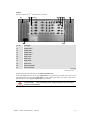
6.3 VISUPLUS Internals................................................................................................................. 6-3
6.4 VISUPLUS Operation Protocol ................................................................................................ 6-4
6.4.1 Error / Info messages .................................................................................................. 6-4
6.4.2 Return value................................................................................................................ 6-4
6.4.3 ACK / NACK ............................................................................................................. 6-4
6.5 Commands........................................................................................................................... 6-5
6.5.1 <CR> .......................................................................................................................... 6-6
6.5.2 SET_BAUDRATE ..................................................................................................... 6-6
6.5.3 AUTO_CONFIG ........................................................................................................ 6-6
6.5.4 VERBOSE .................................................................................................................. 6-7
6.5.5 HW_SET_PARAM / HW_GET_PARAM ................................................................ 6-7
6.5.6 OPU_SET_POS.......................................................................................................... 6-9
6.5.7 OPU_SET_PARAM / OPU_GET_PARAM............................................................ 6-10
6.5.8 IPU_LNK_TO_WIN ................................................................................................ 6-10
6.5.9 WIN_LNK_TO_SRC ............................................................................................... 6-11
6.5.10 WIN_SET_POS...................................................................................................... 6-11
6.5.11 WIN_SET_VIEWPORT ........................................................................................ 6-12
6.5.12 WIN_BRING_TO_TOP......................................................................................... 6-12
6.5.13 WIN_SHOW........................................................................................................... 6-12
6.5.14 WIN_SET_PARAM / WIN_GET_PARAM.......................................................... 6-13
6.5.15 SRC_SET_PARAM / SRC_GET_PARAM........................................................... 6-14
6.5.16 ENABLE_UPDATE............................................................................................... 6-16
6.5.17 TRY_ENABLE_UPDATE..................................................................................... 6-17
6.5.18 VERSION ............................................................................................................... 6-17
6.6 Way of operations ............................................................................................................. 6-18
7 Technical Appendix ..................................................................................................................... 7-1
7.1 Technical Data..................................................................................................................... 7-2
7.2 Interfaces ............................................................................................................................. 7-6
7.3 Order Codes....................................................................................................................... 7-11
8 Troubleshooting ........................................................................................................................... 8-1
8.1 Communication to VISUPLUS Fails ........................................................................................ 8-2
8.2 Hot Line............................................................................................................................... 8-3
9 Index............................................................................................................................................. 9-1
9.1 Table of Tables.................................................................................................................... 9-1
9.2 Table of Figures................................................................................................................... 9-2
R5976214
VisuPlus Video Insertion Unit
June 2003