1
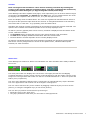
The base memory usage of running programs is shown in Kilobytes at the right side of the
screen. Note that the values shown do not represent the total memory consumption by the
programs.
The following symbols may be displayed next to the application names:
* - System application which is not to be closed under normal circumstances.
# - A task that has been excluded from the End all command.
¤ - An application over which the Status icon is set to be automatically hidden.
Clicking on a program's name results in bringing it to foreground (if it was already running), or
launching (if it was not yet running).
Commands available in Programs view (either on button bar or menu) are the following:
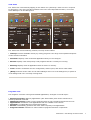
• Information: Bring up the Program information dialog, displaying detailed information and
settings for the selected task (see also below).
• End: Request the selected (or all marked) application to be shut down. Programs that are
essential for the phone's normal operation can not be exited.
• End all: Extend the End command to all running programs. Use this option when you do not
work with the currently running applications any more and want to release all memory used by
them.
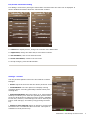
• Reclaim memory: Release as much memory as possible, by exiting programs. The strength of
the release can be adjusted in Settings/Cleanup. Note that memory reclaim does not obey the
exclusions that you set in the Program information dialog.
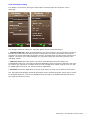
• Favorites/Invoke: Display the list of Favorites for launching one of them.
• Favorites/Backup: Save the current Favorites list to the memory card.
• Favorites/Restore: Replace the current Favorites list with a backup saved earlier.
• Favorites/Reset: Set the Favorites back to a default list.
CellPhoneSoft – Swiss Manager Pro Documentation
4