1
CBR User’s Guide
3.2.1 Penetration Curve Linearity Correction
Due to surface irregularities or other causes, the initial portion of the stress vs.
penetration curve may be concave upward. For these curves, CBR test specifications indicate
that a line should be drawn tangent to the steepest linear portion of the curve: the intersection of
this line with the penetration depth axis becomes the new "0" point for the curve (i.e., "corrected"
penetration depths are obtained by subtracting the actual depths from the new "0" point.)
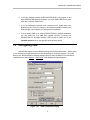
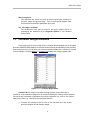
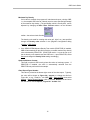
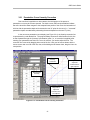
In the on-screen penetration curve display (see Figure 3.2.4), the linearity correction line
is represented by a red dashed line. The program always chooses an initial location for this line
so that it passes through the (0-stress, 0-penetration) point (i.e., no correction is applied); after
entering your penetration test data, if the curve is concave, you need to adjust this line. The
correction line is moved by dragging either end of the line: click your left mouse button with the
mouse cursor near one end of the line, then, while holding the left button down, drag the line to its
new position.
Linearity
Correction
Note upward
concavity
Drag here to
adjust the
correction line’s
left endpoint
Figure 3.2.4 -- Penetration Curve Linearity Correction
21
Drag here to
adjust the
correction line’s
right endpoint