1
Introduction, Installation and Setup
⇒ If you have already licensed the GEOSYSTEM Drilling Log program or any
other GEOSYSTEM Windows programs, you must install CBR into the same
hard disk or network subdirectory.
⇒ If you are installing the software onto a network server, please refer to the
Networks section in the LD4 manual or the Network Installation section in the
Data Manager manual before proceeding with the installation.
⇒ If you’re adding CBR to an existing GEOSYSTEM for Windows installation,
you can make sure that CBR was installed correctly by starting the
GEOSYSTEM for Windows package: CBR should be listed next to the
Installed modules: title on the right side of the opening screen.
1.2 Configuring CBR
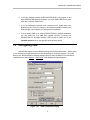
CBR includes support for a few different testing and recording procedures – before typing
in your first test set you should make sure that the package is correctly configured. To do this,
start up your GEOSYSTEM for Windows package (refer to either the GDM or LD4 manuals for
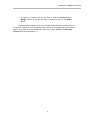
instructions) then select Options > CBR Setup, which displays the following dialog:
Figure 1.2.1 -- CBR Configuration Dialog
2