1
Introduction
This document guides new users through basic setup of a Measurement Specialties digital accelerometer. The preconfigured nature of this sensor allows users to begin collecting data within minutes of removing the accelerometer
from the box. In the interest of simplicity, only a portion of the capabilities of the sensor will be discussed in this
guide.
More in-depth information is available in the form of Tech Notes, the ICU User’s Manual, and the ICU Reference
Manual, all available on the Measurement Specialties website: precisionsensors.meas-spec.com. For any additional
questions, contact Measurement Specialties, Inc., Precision Inertial Products at 330-659-3312.
Step 1. Unpacking the box(es)
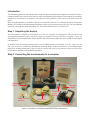
The accelerometer is shipped in a hard plastic case. The case is packed in a shipping box with accessories such
as programming adapters, cables, and power supplies (if ordered) inside the same box (see Image 1 below for
identification of parts included when the PC Interface Kit and mounting adapter are ordered; USB to serial adapter
sold separately).
In addition to the accelerometer and accessories, several additional parts are included. A set of 4 screws in a vial
and a hex wrench are included for attaching the mounting adapter to the accelerometer (see mounting adapter
manual for mounting instructions). There are also two screws and a pair of clips that are used to secure the 9-pin
accelerometer connector to the programming adapter.
Step 2. Connecting the accelerometer to a computer
'LJLWDO$FFHOHURPHWHU
FDEOHGYHUVLRQ
3URJUDPPLQJ
DGDSWHU
0RXQWLQJ
DGDSWHU
0RXQWLQJ
VFUHZV
DQGZUHQFK
$GDSWHUVFUHZV
DQGFOLSV
56FDEOH
3RZHUVXSSO\
IMAGE 1: CONTENTS
OF X5203AK0
(USB ADAPTER SOLD SEPARATELY)
,PDJH
&RQWHQWVRI;$.