1
Important! Measurement Specialties approves only the use of cables and accessories ordered from the factory. The
use of unapproved cables can irreparably damage the electronics inside the accelerometer.
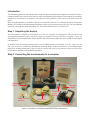
The following items are the accessories needed to connect a cabled accelerometer to a computer for configuration
or data acquisition purposes. For instructions on configuring a terminal block version, consult the accelerometer
manual included in the shipment.
Included with the PC Interface kit:
Programming Adapter - The programming adapter is a gray box with connectors on both ends. The adapter
converts the RS485 output signal from the sensor into an RS232 signal so the computer can process the
information.
RS232 cable - The RS232 cable connects a computer to the programming adapter. One end of the cable plugs into
the RS232 port on the PC. The other end connects to the programming adapter. Note: If you are connecting
to a laptop or PC with only a USB port, you will need an RS232 to USB adapter.
Power Supply - The power supply plugs into the side of the programming adapter on one end and an electrical
outlet on the other.
Not included with the PC Interface kit:
RS232 to USB Adapter - If the computer has no serial port, a USB adapter is available.
Once the programming adapter, RS232 cable, and power supply are connected as described, you are ready to
configure the digital accelerometer.
IMAGE 2A: SETUP WITH SERIAL PORT
IMAGE 2B: SETUP WITH USB ADAPTER