1
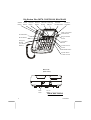
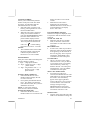
Alphanumeric Caller ID LCD panel A three-line LCD panel that displays:
• Real Time Clock
• Name /Phone Number of Caller
• Time /Date of Call
• New Call Indication
• Call Timer
• Repeat Call Indication
•
•
•
•
•
•
•
•
Off-Hook Indication
Blocked Call
Out of Area
Line Error
Call Back Function
Battery Low Indication
Message Waiting (if provided by
your local phone company)
Three Selectable Languages
(English, French, Spanish)
Call Back Button - Can automatically
call back the phone number of a person
which is selected from the caller ID
display.
Option - Allows you to change the
format of display of the phone number.
DELETE Button – Used to program or
deleting Caller ID records .
MESSAGE / New Call LED
Indicator - This LED flashes when you
have new message(s) from Message
Waiting (an optional service provided
by your local phone company) or when
there are new Caller ID call records
stored in memory. This LED turns off
when you have either retrieved your
message from Message Waiting, or if
you have reviewed your call records on
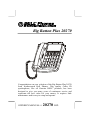
the Big Button Plus 20270.
Real time Clock Display -
010508A-1
The LCD panel will automatically set
and display the real time and day when
the first Caller ID call is received.
Review UP / Review DOWN Buttons Allows you to view the call history list
in either direction.
TELEPHONE UNIT:
FLASH Button - Momentarily hangs
up the phone to access custom calling
features such as Call Waiting or ThreeWay Calling provided by your local
phone company.
LCD BACKLIGHT AND LIGHTED
KEY PAD – The LCD and keypad
illuminates making for easy dialing even
in a darkened room.
Handset Retainer Tab - If you decide
to have the unit placed in the wall
mount position, the handset retainer tab
can be pulled out and turned around so
that it allows the handset to hang onto
the base unit.
RINGER ON/OFF Switch - Used to
turn the ringer volume ON or OFF.
HANDSET Receiver Volume Nor/Hi
Switch - Allows you to select the
handset receiver either Normal or High
volume.
Hook switch - A switch on the handset
cradle of the base unit, which is used to
hang up or get a dial tone.
Off -Hook Indication The LCD panel will display the OffHook icon “ ” on the first line of the
LCD panel to indicate that the handset is
Off-Hook .
One-Touch Memory Buttons - The
Big Button Plus 20270 can store up to 3
emergency telephone numbers into
memory (up to 16 digits each), and you
6