1
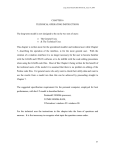
Base Unit
(Side View)
CALLER ID OPERATION
Studs
Modular
Wall
Plate
Wall Mount
slots
(Figure 1)
NOTE: If you do not have a standard
modular wall jack, have a qualified
technician mount one on the wall.
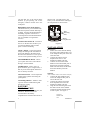
Handset Retainer Tab Installation
If the base unit is to be placed in the
wall mount position, the handset retainer
tab must be pulled out, turned around
and placed in the opposite direction, so
that the tab allows the handset to hang
onto the base unit, as shown in figure 2
Handset
Retainer
Tab
Setting the Language Mode
After the battery installation and power
connection, the LCD panel will display
“E F S”
where, E = English
F = French
S = Spanish
1. Press either the Review UP or
DOWN button to select the desired
language.
2. Press the DELETE button to
confirm , then display will change
to show “set area code.”
Setting the Area Code
1. Press review UP or DOWN button
to select the correct digit number.
2. Press DELETE button to confirm
and shift to the next digit.
3. Repeat steps 1-2 to set the next two
digits.
4. After the area code is completed,
press DELETE button again to
change the display to TIME/DATE
setting.
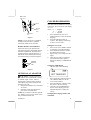
Setting the TIME/DATE
The first digit will be blinking
(Figure 2)
OPTIONAL AC ADAPTOR
CAUTION: Use only with Class 2
AC Adaptor (not included)with a rating
of 120VAC input, DC6V, 100 mA
output with a center tip that is negative.
The adaptor plug must correctly fit the
machine’s DC jack.
1. Plug the AC Adaptor into a standard
AC outlet.
2. Insert the small plug into the DC
jack on the rear of the base.
NOTE: If you wish to order the optional
AC Adaptor, an Accessory Order Form
has provided with this unit.
010508A-1
SET
TIME/DATE
SET TIME/DATE
1.
2.
3.
Press repeatedly either the Review
UP or DOWN button to set the
correct time and date.
Press the DELETE button to shift
the cursor to the next setting.
Once the correct TIME/DATE is
shown on the display, press the
DELETE button to confirm the
setting.
Changing the Language Mode, and
Time/Date
8