1
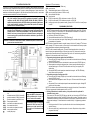
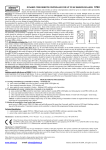
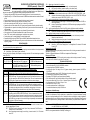
STP CONTROLLER INSTALLATION The Elmes STP controller is delivered without casing and is intended for direct installation inside gate gear motor shelter housing. Installation should well protect the controller against harsh environmental conditions such as water, high humidity, heat and dust. In order to extend operating range of remote control hand transmitters an external antenna suitable for 434 MHz radio band should be used with its coaxial cable connected to antenna terminals ANT on board of the controller. NOTE! The controller is only a part of automatic gate installation and it is entirely a responsibility of the installer to follow respective EU regulations and standards, in particular compliance with EN 12453, EN 12445, EN12635, EN12604, EN 60204-1, EN60335-1 standards and machinery directive 98/37/WE related to gate automation. Manufacturer of the controller declares compliance of the product with respective EU standards (Manufacturer’s CE Declaration included). CAUTION! Automated sliding gate can cause danger to humans and objects within range of its operation. To avoid accidental injury or damage it is necessary to fit protective photo (infrared) barriers on both sides (recommended) of the gate. Barriers must be installed in such a way as to secure that in no circumstances human or moving object access to moving gate is possible. Barriers installed on both sides of gate should be connected in series. CAUTION! The controller is 230VAC mains powered. Installation with power connected is dangerous and can cause electric shock. Description of STP mains 230VAC connection terminals: L - live phase wire terminal of 23VAC mains cable, N - neutral wire terminal of 230VAC mains cable, PE - ground wire terminal of 230VAC mains cable, PE - ground wire terminal of gate 230VAC motor, OPEN - start-up capacitor terminal , OPEN - open rotation motor phase wire terminal, middle - motor neutral wire terminal , CLOSE - close rotation motor phase wire terminal, CLOSE - start-up capacitor terminal, - courtesy lamp output. NOTICE! Live (phase) wire of mains supply cable MUST be connected to „L” terminal and Neutral wire of mains cable to „N” terminal of the controller. NOTICE! Inputs FK and STOP should be connected to COM, if not used. If EOL switches are not used, inputs KC and KO should be left disconnected with JP5 set ON. Description of STP control terminals: ZFK - infrared barrier supply, (+24V, 150mA max), COM - ground terminal, FK - infrared barrier signal (connect to COM if not used) STOP - gate stop security input (connect to COM if not used), WR - gate control wall switch input, COM - ground terminal, KO - End Of Line open switch, (if EOL switches are not used, set JP5 to ON), KC - End Of Line close switch, (if EOL switches are not used, set JP5 to ON), CH2 - auxiliary relay control output: opened at standby, if jumper „NC NO” is set NO, or closed if jumper is set NC. PROGRAMMING PROCEDURES 1. Learning remote control transmitters to controller’s memory (up to 112 transmitters max.): NOTICE! If the transmitter will be used to control gate operation and auxiliary output CH2, JP1 should be set ON, if gate only - JP1 should be set OFF. After transmitters are learned, the JP1 should be set according to selected operating mode of courtesy lamp. a) Press shortly PRG switch - LED lights on. b) Press selected transmitter button once - PRG LED switches off. c) Press the same transmitter button again. Slowly flashing LED in controller confirms the transmitter is learned and end of procedure. NOTICE! Number of transmitters learned to controller’s memory is limited to 112, learning 113th will remove the first, learning 114th will remove second, etc. Removing lost or stolen transmitter from memory requires deleting all transmitters and learning the remaining ones again. NOTICE! If, while in transmitter learning mode, JP1 was set ON and transmitter button 1 was used, the button will control gate operation while button 2 will control aux. output CH2. In later need to control gate operation with two transmitter buttons (JP6 should be set ON), buttons 1 & 2 would control gate operation while button 3 of the transmitter would control CH2 output. 2. Programming electric tube motor rotation time and PAUSE time: a) Press control unit PRG switch (LED lights on) for more than 2 and less than 8 seconds. Releasing the switch PRG LED sets off. b) Press on hand transmitter button or wired wall switch to start motor rotation (PRG LED lights on). c) When required motor rotation time has lapsed (max. 4 minutes) press the transmitter button (or wired wall switch) again – LED sets OFF and the electric motor stops (if not stopped by EOL switch earlier). d) After required PAUSE time has lapsed press transmitter button again – the PRG LED flashing slowly confirms end of the procedure. 3. Programming set on time of auxiliary output CH2: a) Press control unit PRG switch (LED lights on) for more than 2 and less than 8 seconds. Releasing the switch PRG LED sets off. b) Press transmitter button designated to control CH2 output – LED sets on and the CH2 relay output sets on. c) After required CH2 set on time has lapsed press the same transmitter button again – flashing LED confirms end of the procedure. NOTICE! If time between second and third transmitter button pressing is shorter than 0,5 second then the CH2 output is programmed for bistable operation (set ON – set OFF). 4. Deleting all transmitters in controller’s memory – this procedure should be performed if a transmitter is lost or stolen: Press control unit PRG switch (PRG LED lights on) and hold (over 8 seconds) until PRG LED starts flashing and then release the switch. Flashing LED confirms end of procedure. Transmitter memory in is deleted and controller does not respond to transmitter’s control signals. Programmed motor and CH2 timings remain unchanged. To learn transmitter/s to controller follow pt. 1 of programming procedures. NOTES: 1. Performing procedures 2 & 3 above is possible with wall switch or transmitter already learned to controller’s memory. 2. Gate motor rotation timing is manufacturer set to ca 4 seconds. Required motor timing should be programmed individually. [email protected] www.elmes.pl ©Elmes Electronic 10.2014. All rights reserved.