1
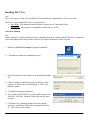
Over-the-air Method
1. On the Pocket PC, run Internet Explorer and navigate to the
website hosting the EECS Nav setup file
2. Tap the file name to begin the download. Be sure Open file
after download is checked. Tap Yes.
3. Tap Next
4. Read the Read Me file displayed onscreen and tap Next
5. Read the licensing agreement. Tap I agree if you agree to the
terms. Tap Next.
6. Tap Next to install to the default location.
7. Tab Finish to complete the installation.
3